A resignation lands in HR at 9:12 a.m. By 9:20, your IT team knows a company laptop is sitting in a spare bedroom hundreds of miles away, still signed into corporate apps, still holding files, and still outside your physical control. That's the core problem with remote offboarding. The hardware matters, but the bigger risk is everything attached to it.
When companies don't have a recovery playbook, the same pattern shows up fast. Someone sends a polite email. The former employee says they'll “ship it this week.” Packaging is improvised. Tracking is missing or incomplete. The laptop arrives late, damaged, or not at all. Meanwhile, HR, IT, security, and finance all own part of the mess but no one owns the full chain.
How to recover company laptops from remote employees efficiently comes down to one principle. Design the process before you need it, then automate what happens the moment offboarding starts. The strongest programs combine policy, technical control, logistics, and documentation. That mix reduces risk, shortens retrieval time, and keeps ex-employee laptop recovery from turning into a drawn-out exception case every time someone leaves.
The High Stakes of Remote Asset Recovery
A remote laptop recovery failure rarely looks dramatic on day one. It starts with small gaps. The employee didn't confirm receipt of instructions. HR assumed IT had started the process. IT assumed the manager had collected accessories. A shipping label was promised but never sent.
By the end of the week, those small gaps become bigger business problems. The organization now has an unmanaged endpoint outside the network perimeter, unclear possession of company property, and no reliable forecast for return, redeployment, or disposal. For regulated organizations, that's more than inconvenience. It can create audit friction and force teams into reactive legal and security work.
What the business actually loses
The missing laptop is only one line item. The hidden costs sit elsewhere:
- Security exposure: A device can remain a live endpoint longer than anyone intended.
- Operational drag: IT staff spend time chasing one asset instead of processing the next ten.
- Redeployment delays: A laptop that should go to a replacement hire stays in limbo.
- Documentation risk: If custody isn't tracked, it becomes harder to prove what happened and when.
Practical rule: Treat every remote recovery like a security event and a logistics project at the same time.
That mindset changes the response. Instead of asking the former employee to “send it back when possible,” mature teams lock the device, start the return workflow, assign ownership, and document every handoff. The organizations that do this well don't rely on memory or goodwill. They rely on process.
Build Your Bulletproof Remote Asset Policy
The best laptop recovery program starts before the laptop is issued. If your policy is vague at hire, recovery becomes a negotiation at exit. That's exactly what you want to avoid.
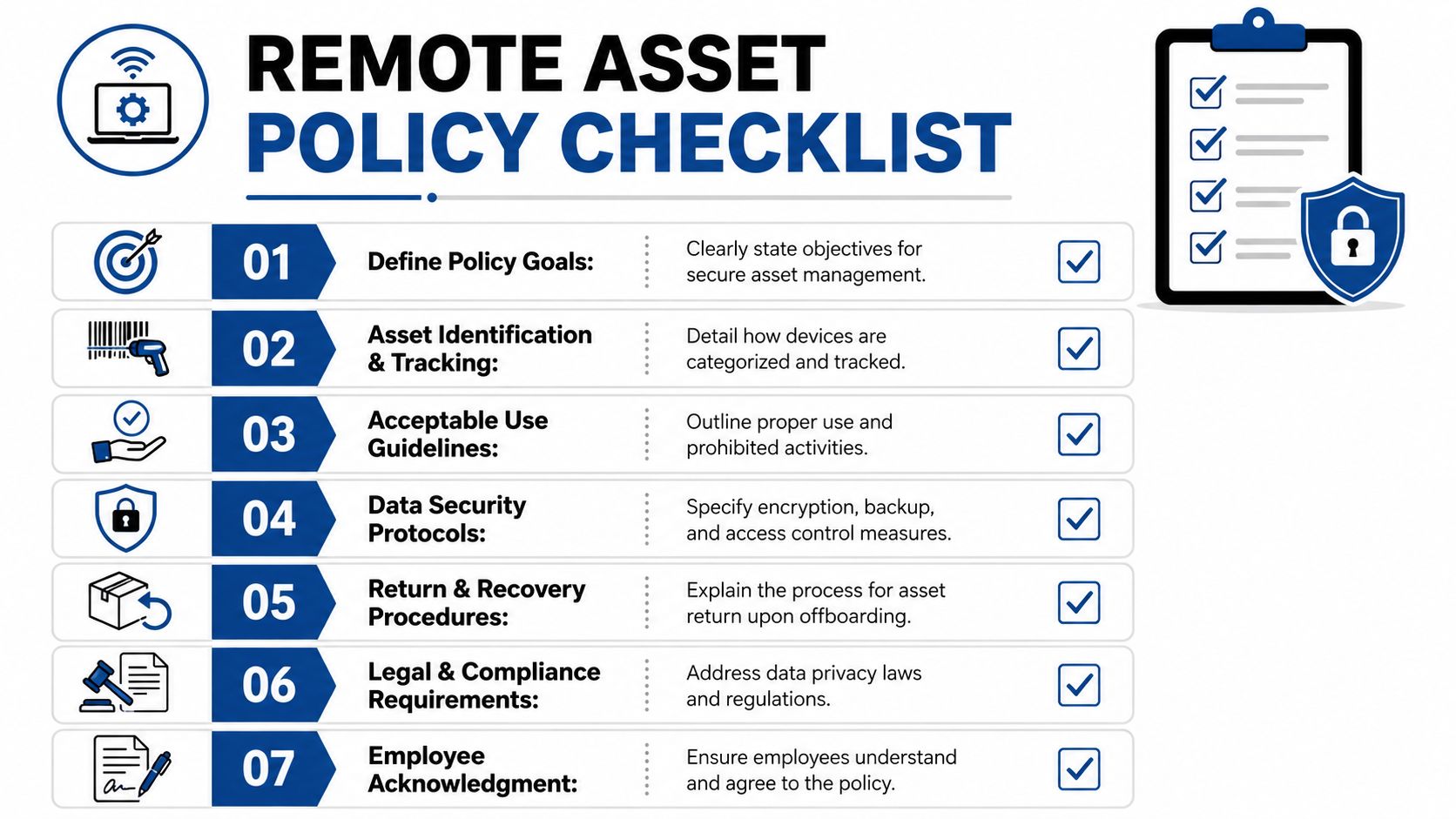
A remote asset policy should make three things unmistakable. The company owns the device. The employee is responsible for protecting and returning it. The company may manage, lock, or wipe the device under defined offboarding conditions. Those terms need to appear in the documents employees acknowledge, not in a buried help center article nobody reads.
The clauses that prevent later disputes
Your policy should cover these essential points:
- Ownership language: State that laptops, accessories, and issued peripherals remain company property throughout employment.
- Condition expectations: Require reasonable care and return of listed accessories such as chargers, docks, and security keys.
- Management consent: Spell out that endpoint controls such as Microsoft Intune or VMware Workspace ONE may be used for lock, wipe, or reset actions during separation.
- Return procedure: Define who sends instructions, what the employee receives, where the asset goes, and how the shipment is tracked.
- Acknowledgment requirement: Require signed or digital acknowledgment so you can show the employee accepted the terms.
The policy also needs an operational owner. If HR writes it but IT never sees it, enforcement breaks. If legal approves it but managers don't know when to trigger it, timing breaks. Good policy is cross-functional by design.
For a practical framework on governance, inventory discipline, and lifecycle controls, it helps to align the policy with broader IT asset management best practices.
Cross-border clauses can't be an afterthought
International recovery is where weak policies fall apart. A 2025 report noted that 42% of multinational companies faced delays exceeding 60 days in recovering assets from remote workers in non-US/EU jurisdictions due to legal ambiguities, while only 12% of existing ITAD guides provide actionable cross-border protocols (remote employee laptop return guidance).
That doesn't mean you need a country-by-country legal manual inside the employee handbook. It does mean your policy should reserve room for local legal review, data sovereignty checks, and alternate remedies when a simple return request won't work.
Cross-border recoveries fail when companies assume their domestic offboarding rules travel automatically with the laptop.
What a strong policy sounds like
A bulletproof policy is plain, not theatrical. It says what the company will do, what the employee must do, and what happens if the asset isn't returned. It avoids vague promises like “equipment should be returned promptly.” Replace that with named steps, channels, and responsibility.
If you want clean recoveries later, write the policy for the worst day, not the average one.
The Offboarding Trigger and Immediate Security Actions
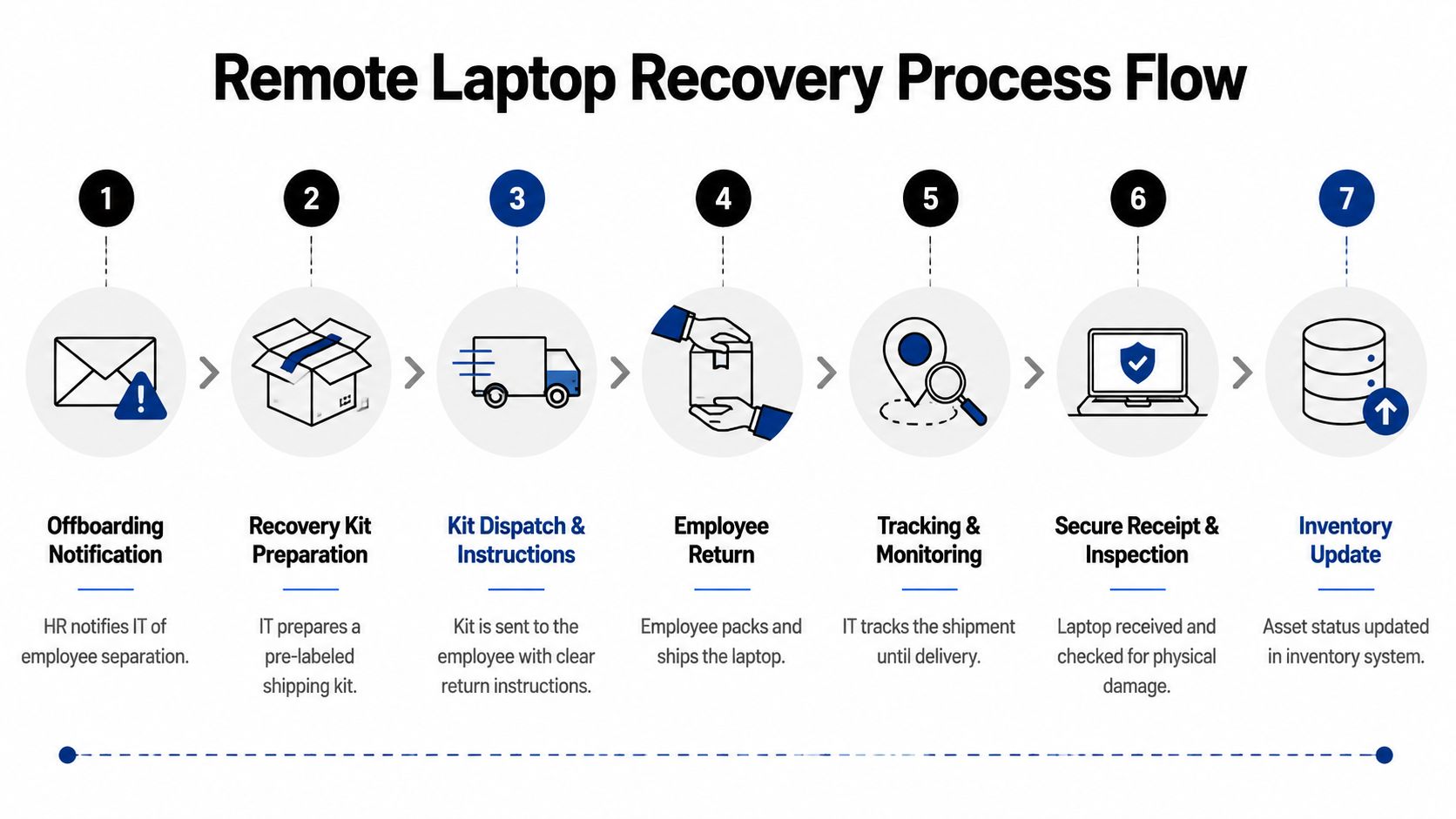
The moment HR changes an employee's status, your recovery workflow should already be moving. Delay creates room for confusion, unauthorized access, and inconsistent handling. The first move isn't shipping. It's containment.

Industry best practice is clear here. The retrieval process must initiate within 24 to 48 hours of the termination notification to maximize return rates and reduce security risk (offboarding remote employees best practices).
What happens in the first day
Teams often do better with a short sequence than a long checklist.
- Revoke access first. Disable email, VPN, SSO, cloud storage, and any privileged apps tied to the device user.
- Put the laptop into managed lockdown. Use your MDM to restrict access while preserving your ability to issue commands.
- Queue the wipe action based on policy. For many organizations, a factory reset with encryption key destruction is the right move before the physical return begins.
- Send one clear employee communication. Keep it brief. List the device, the next step, support contact, and what the employee should expect.
What doesn't work is mixing manual and automated actions. If IT removes access but forgets to trigger the shipping process, the laptop goes dark operationally but remains physically unrecovered. If HR sends instructions without MDM actions, the organization is trusting process without technical enforcement.
Automation beats manual follow-up
Manual offboarding emails create too many chances for drift. People miss messages. Managers forward old templates. Employees claim they never saw the instructions. Recovery improves when the workflow starts from a system event rather than a person remembering to send a note.
Lock the endpoint, then simplify the return. Don't ask a departing employee to secure your data for you.
The cleanest operating model connects HR status changes to IT actions. Once separation is recorded, the system should create the ticket, assign the owner, notify the employee, and prepare the return package. That's how remote employee equipment return becomes repeatable instead of reactive.
Streamlining Logistics with Recovery Kits and Tracking
Most failed recoveries break in the logistics layer, not in policy. Employees use the wrong box, forget the charger, tape a label over an old one, or drop the package with no tracking record your team can monitor. If you want predictable outcomes, remove as many employee decisions as possible.
Why DIY shipping underperforms
There are two common models. The first asks the departing employee to find a box, pack the laptop, pay for shipping, and get reimbursed later. The second sends a pre-built recovery kit with everything needed to complete the return correctly.
The second model wins because it removes friction and ambiguity. Success rates for recovery programs using pre-paid, padded shipping kits with multilingual, visual instructions exceed 90%, while programs without those kits drop to below 65%, cutting the average retrieval timeline from 14 days to under 5 days.
What belongs in a real recovery kit
A good kit is simple, but not generic. Include:
- Protective packaging: Padded inserts sized for laptops, chargers, and small accessories.
- Pre-printed shipping materials: A return label and clear exterior markings.
- Visual instructions: Short steps with images, especially useful for multilingual workforces.
- Return checklist: Device, charger, dock, security key, or any item tied to the asset record.
If your team wants a basic reference point for durable packing formats, general house moving kits can be a useful comparison for box strength and packing organization, even though IT equipment requires more device-specific protection.
Tracking is part of custody
A shipping label is not chain of custody by itself. You need a carrier process that gives your team visibility from dispatch to receipt. That means insured, trackable shipping and a system that logs the package against the employee and asset ID.
Outsourced logistics often pay for themselves. A structured reverse-logistics program can standardize dispatch, labels, tracking events, and exception handling. For organizations recovering equipment across multiple locations, nationwide reverse logistics services show what that operational model looks like in practice.
| Logistics model | What usually happens | Operational downside |
|---|---|---|
| Employee packs and ships | Fast to request, inconsistent in execution | More damage, more delay, weaker visibility |
| Pre-paid recovery kit | Standardized return path | Requires inventory and dispatch discipline |
| Managed reverse logistics | End-to-end tracking and intervention | Best fit when volume or geography is complex |
When companies ask how to recover company laptops from remote employees efficiently, logistics is where the answer gets real. Good intentions don't move equipment. Kits, labels, tracking, and ownership do.
Ensuring Secure Data Handling and Chain of Custody
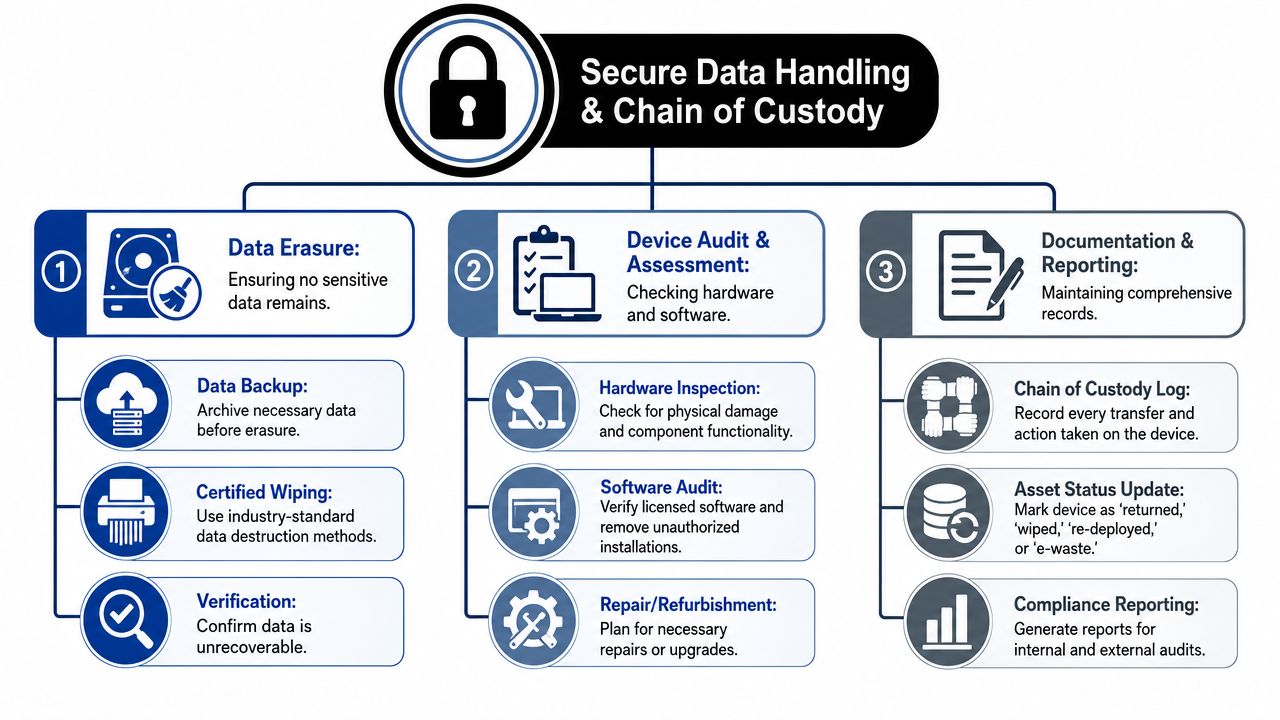
Getting the laptop back is not the finish line. It's the handoff into a second process: secure handling, inspection, documentation, and final disposition. Many teams lose audit clarity during this stage. They know the device came back, but they can't prove who touched it, what was verified, or how the data was destroyed.
Remote wipe, in-house wipe, or destruction
Each method serves a different risk profile.
Remote wiping is best for reducing exposure before transit. If the device is lost in shipment, the data is already inaccessible when the process uses a factory reset with encryption key destruction. But remote wipe doesn't replace receipt inspection or final records.
In-house wiping works when the laptop returns intact and the organization has the tooling and staff to validate sanitization, reimage the system, and document the result. This can support redeployment, but it depends on disciplined process.
Professional ITAD destruction is the stronger choice when devices are damaged, retired, high-risk, or tied to stricter compliance expectations. Physical media destruction and certified wiping create a cleaner end-state when the device won't return to service.
Inspection isn't optional
A recovered laptop still has to be verified. Organizations using integrated HRIS and IT asset management platforms achieve a 92% laptop return rate within 7 days, but failing to verify physical condition upon receipt leads to a 25% increase in redeployment costs due to undiscovered damage.
That inspection should include:
- Asset verification: Match serial number, assigned user, and expected accessories.
- Condition review: Check chassis damage, screen condition, battery status, and missing components.
- Status decision: Redeploy, repair, resell, or send to final disposition.
For teams building auditable intake and transfer controls, this is exactly why ITAD chain of custody matters. Without a custody log, you can't show a complete handling history.
A laptop return without a custody record is still a blind spot. You have the device back, but not the proof.
What chain of custody should record
You don't need a complex legal file for every laptop. You do need consistent records that survive staff turnover and audit review.
Use a chain-of-custody log that captures:
- Receipt event: Date, sender, package condition, receiving staff member
- Asset confirmation: Serial number, asset tag, accessories present or missing
- Processing actions: Lock status, wipe status, inspection notes, disposition path
- Final outcome: Redeployed, repaired, remarketed, recycled, or destroyed
A chain of custody does two jobs at once. It protects the company operationally by making asset status visible. It also protects the company legally by showing due diligence from return through final handling.
Troubleshooting Recoveries and Defining Escalation Paths
Not every employee follows the script. Some ignore instructions. Some say they never received the kit. Some are willing to return the laptop but are in the middle of a critical project handoff. The mistake is handling each of these situations from scratch.
A defined escalation matrix prevents overreaction on one case and passivity on the next. It tells HR, IT, legal, and the manager what happens on day one, day three, and the point where the matter stops being a reminder and becomes a formal recovery issue.
Build the escalation ladder before you need it
A practical matrix usually includes progressive steps such as:
- Initial outreach: Automated email and SMS with plain return instructions
- Manager follow-up: Human contact when the former employee doesn't respond
- Formal notice: Written demand routed through HR or legal when deadlines pass
- Disposition decision: Lock, wipe, replacement charge review, or legal recovery path based on policy and local law
This structure matters because ambiguity creates uneven enforcement. One manager becomes aggressive too early. Another waits too long because they want to “keep things friendly.” Both approaches weaken recovery.
Timing matters when the employee is still active
Retrieval timing can also create avoidable business disruption. Recent 2025 research from the Global IT Workforce Institute found that 38% of companies experienced significant project delays when retrieving laptops during active project sprints (remote worker laptop return and compliance).
That's a useful reminder that recovery should be secure, but not careless. If an employee is leaving during a live sprint, coordinate backup, handoff, and device cutoff around business-critical dependencies. Security and operational continuity both need a seat at the table.
For teams mapping these exception cases, common IT asset disposition challenges often start with the same issue: no predefined owner, no escalation threshold, and no agreed response when recovery stalls.
The best escalation path isn't the harshest one. It's the one every team can follow consistently.
Conclusion Partnering for Flawless IT Asset Recovery
Efficient laptop recovery is part policy discipline, part security response, and part logistics execution. Organizations that do it well don't treat those as separate problems. They connect them. The policy gives authority. The offboarding trigger starts the controls. The recovery kit and tracking move the hardware. The custody record closes the loop.
That integrated approach is what makes how to recover company laptops from remote employees efficiently a solvable operational process instead of a repeating fire drill. When teams automate the trigger, standardize return logistics, and document handling from shipment to disposition, they reduce delay, lower risk, and make redeployment or disposal far easier to manage.
Vendor selection also matters. If an outside provider touches data-bearing devices, picks up equipment, or issues destruction records, your team should review its controls with the same scrutiny applied to any other risk-bearing partner. A vendor due diligence checklist helps frame that review around custody, documentation, security practices, and reporting.
For many organizations, the hardest part isn't knowing what the right playbook looks like. It's executing it consistently across locations, employee types, and exit scenarios. That's where specialist ITAD and reverse-logistics support becomes useful. Internal teams keep governance and decision rights. The partner handles the heavy operational lift.
Contact Beyond Surplus for certified electronics recycling and secure IT asset disposal. If your organization needs help recovering remote laptops, documenting chain of custody, coordinating nationwide pickups, or managing compliant end-of-life processing, Beyond Surplus can help streamline the process and reduce risk.