If you’re managing vmware atlanta infrastructure right now, you may be dealing with a familiar problem. The workloads are moving, licensing has changed, older hosts are still sitting in racks, and nobody wants to be the person who shuts down the wrong cluster or disposes of storage without a defensible data trail.
That’s where VMware decommissioning projects usually get risky. The technical team focuses on migration. Finance watches contracts and refresh budgets. Facilities wants the room cleared. Compliance wants proof that every drive, datastore, and retired appliance was handled correctly. If those tracks don’t meet, the project finishes late, leaves value on the floor, or creates avoidable exposure.
The New Reality for VMware Infrastructure in Atlanta
Atlanta has real history in VMware’s footprint. VMware deepened its presence in Georgia when it acquired Atlanta-based AirWatch for $1.54 billion in 2014, its largest acquisition at that time, which made VMware’s direction especially relevant for local enterprises managing infrastructure change (Fortune coverage of the AirWatch acquisition).
What’s driving decommissioning now
In practice, Atlanta IT leaders usually start a decommissioning project for one of three reasons:
- Licensing pressure: Subscription and platform shifts force a review of what still belongs on-prem.
- Cloud or private cloud redesign: Teams migrate priority applications and inherit a leftover estate of ESXi hosts, SAN, backup gear, and network appliances.
- Hardware age: Supportability becomes the key trigger. Once replacement parts, firmware consistency, and host reliability become daily work, the environment is already overdue for cleanup.
The mistake is treating the end of the project as “remove old hardware.” It isn’t. It’s a controlled risk event.
What goes wrong with ad hoc disposal
The danger rarely starts with the final truck pickup. It starts earlier, when a team powers down hosts before validating dependencies, or when someone assumes a wiped VM means the underlying storage no longer matters.
Practical rule: A VMware shutdown is not a disposal plan. It’s only the point where disposal risk becomes visible.
For Atlanta organizations in healthcare, finance, education, and government contracting, that risk isn’t abstract. A retired vSAN node, a forgotten management appliance, or a mislabeled backup target can hold regulated data long after production has moved elsewhere. At the same time, viable servers, memory, and storage often still have resale or reuse value if the chain of custody is tight and data handling is documented.
A sound VMware decommissioning plan keeps four outcomes in view at once: service continuity, security, compliance, and value recovery. If one of those gets ignored, the project usually comes back for a second round of cleanup.
Strategic Planning for Your VMware Decommissioning
Most failed decommissions don’t fail in the data center. They fail in planning. Someone approves a migration but never defines what “done” means for legal hold, residual storage, backup retention, lease return, or downstream asset recovery.
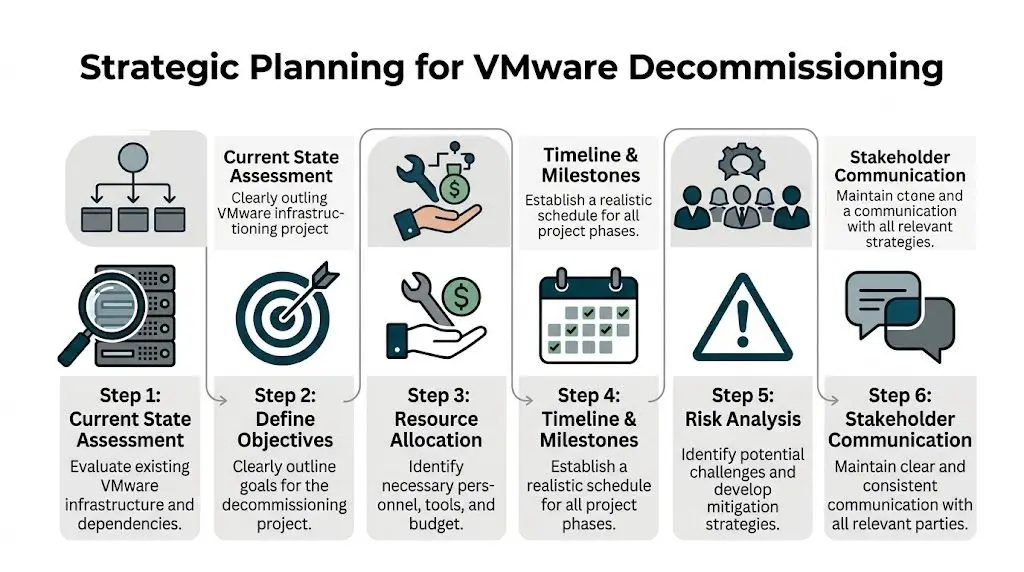
VMware’s own event messaging tends to emphasize cloud direction and platform strategy, but localized guidance on secure IT asset disposition during VMware de-installations remains a major gap for Atlanta enterprises, especially in regulated sectors (VMware Explore highlights).
Build the project team before you touch production
A workable decommissioning team is cross-functional. Keep it small, but give each function a clear decision right.
- Infrastructure lead: Owns vCenter, ESXi hosts, clusters, datastore retirement, and migration validation.
- Security or compliance lead: Decides sanitization standards, evidence requirements, and exception handling.
- Finance or procurement: Confirms lease status, asset ownership, and whether resale proceeds matter.
- Facilities or operations: Controls dock access, removal windows, badges, freight paths, and after-hours work.
- Application owners: Confirm business cutover and sign off that dependencies are gone.
If your organization struggles to get alignment, structured consensus methods help. Teams planning a contentious shutdown sequence can borrow from Delphi technique examples to gather expert input without turning every decision into a meeting.
Define scope in plain language
A strong charter answers practical questions, not abstract ones.
Use a short scope list like this:
- What infrastructure is in scope: clusters, hosts, storage, backup systems, management appliances, racks, and cabling.
- What data states are allowed: migrated, archived, retained, sanitized, or destroyed.
- What evidence is required: export logs, ticket closure, chain-of-custody records, and destruction or recycling certificates.
- Who signs final acceptance: IT, security, compliance, and facilities.
If an item can’t be assigned an owner and an end state, it isn’t in scope yet. It’s still a risk.
Set goals that matter to executives
Technical teams often write objectives around host retirement. Executives care about risk removal, timeline discipline, and budget control. Translate the work.
A useful goal set includes:
- Security outcome: no storage leaves the site without approved sanitization.
- Operational outcome: no production dependency breaks during shutdown.
- Financial outcome: reusable assets are identified for buyback or redeployment.
- Audit outcome: records support internal review and regulator questions.
Vendor review matters here too. Before signing any removal or destruction work, use a formal ITAD vendor due diligence checklist so security, legal, and procurement are evaluating the same controls.
Building Your Decommissioning Blueprint Inventory and Dependency Mapping
Most VMware Atlanta projects either stay controlled or drift into guesswork. You can’t retire what you haven’t accurately identified, and you can’t shut down what you haven’t mapped.

Transitioning physical servers into VMware vSphere can deliver up to 80% reduction in capital and operating costs, but assessment is the hinge point. The same source notes that 30% to 50% server underutilization is common, and missing that during migration or decommissioning can cause 20% cost overruns (ONLC VMware Atlanta training page).
Inventory what exists, not what the CMDB says exists
Start with authoritative system records from vCenter, then verify them manually. Pull the current list of:
- ESXi hosts
- vCenter instances
- clusters and resource pools
- datastores and storage policies
- virtual machines and templates
- distributed switches and uplink dependencies
- backup appliances and replication targets
- out-of-band management devices tied to the environment
Then compare that against what’s physically in the room. Labels drift. Rack elevations go stale. Decommission tags get applied early and forgotten.
Dependency mapping is the real control point
A VM can look inactive and still support an application nobody remembered to document. Common misses include authentication dependencies, batch jobs, legacy file shares, jump hosts, print services, monitoring collectors, and backup proxies.
Use a mix of methods:
- native VMware visibility
- monitoring and log review
- application owner interviews
- maintenance tickets from the last several months
- firewall and load balancer records
- restore test history for legacy systems
A missed dependency rarely appears in a dashboard first. It appears when a department says a business process stopped working.
The most expensive server in a decommission isn’t the oldest one. It’s the one everyone thought was safe to remove.
Create a retirement matrix
Don’t manage this from a loose spreadsheet alone. Use a matrix with five fields for every asset:
| Asset | Business owner | Dependency status | Data disposition | Physical outcome |
|---|---|---|---|---|
| ESXi host | Named owner | Verified clear or blocked | Wipe or destroy | Redeploy, resale, recycle |
| Datastore | Named owner | Verified clear or blocked | Wipe or destroy | Retire with storage record |
| VM or appliance | Named owner | Migrated or retained | Archive or delete | Remove from inventory |
For governance, tie that matrix back to your broader IT asset management best practices so retirement decisions are consistent with purchasing, tracking, and end-of-life controls.
Executing the Transition VM Migration and System Shutdown
Execution should feel boring. That’s a good sign. Clean migrations and clean shutdowns come from repetition, sequencing, and validation, not heroics.
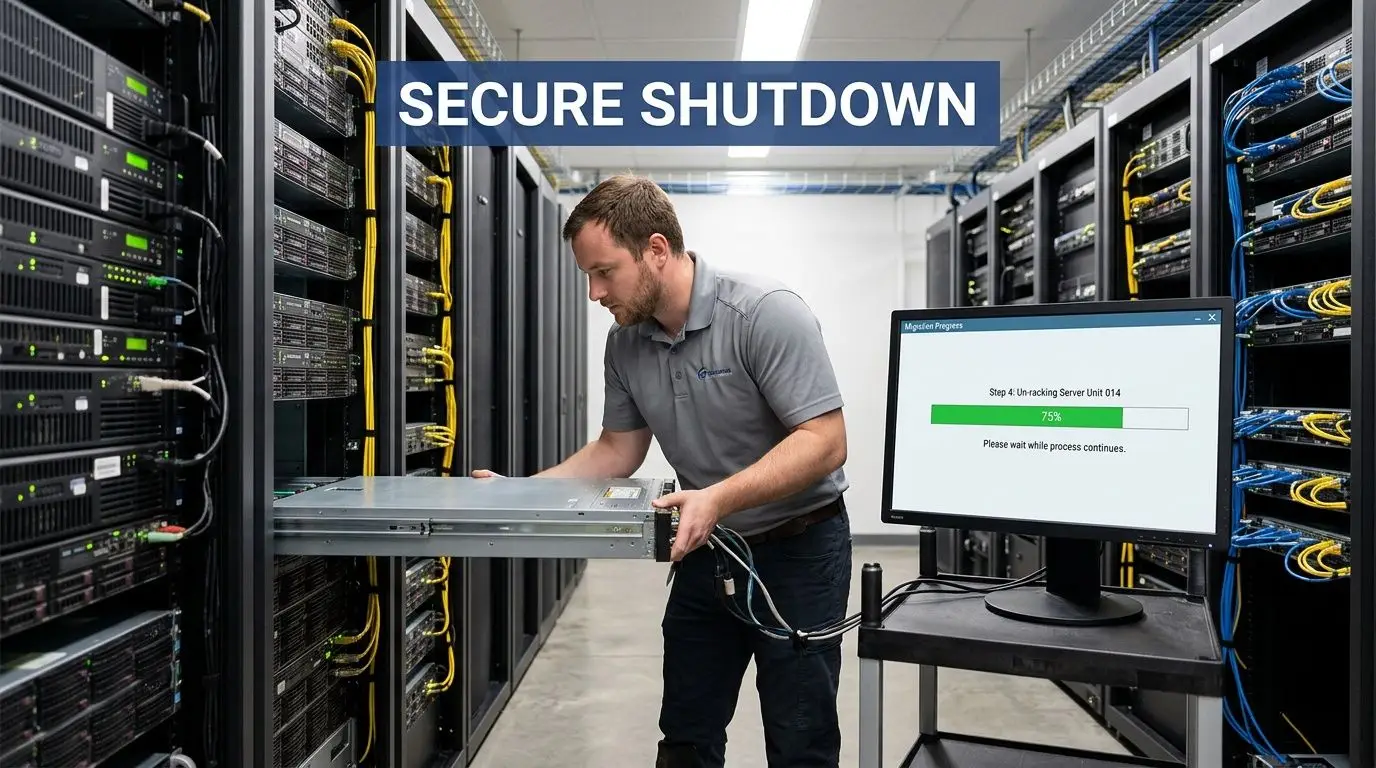
Migrate in waves, not all at once
Group workloads by dependency and business tolerance. Move low-risk systems first. Hold tightly coupled applications until you’ve seen one or two successful waves complete.
When teams still have active VMware mobility tools available, use them. Validate each move with application owners, not only infrastructure checks. A green task status doesn’t prove the business service is healthy.
Good execution usually follows this pattern:
- Wave planning: group VMs by app stack and change window.
- Pre-cutover validation: confirm backup status, destination readiness, and rollback path.
- Migration event: move workloads, then run application checks.
- Acceptance: get business confirmation before closing the wave.
Shut down legacy systems in a controlled sequence
Once migrations are validated, retire the old environment in order. Don’t jump straight to powering off hardware.
Use a sequence like this:
- Remove or archive unused templates and ISOs.
- Decommission retired VMs in the management plane.
- Confirm logging, monitoring, and backup references are removed.
- Place hosts in maintenance mode.
- Remove hosts from clusters and inventory as appropriate.
- Isolate storage and management components slated for sanitization.
- Power down hardware only after records are complete.
A host should be physically touched only after its logical life is over, documented, and approved.
Communication matters here. Facilities, security, and transport teams should know exactly when equipment becomes removable. If your runbook is thin, align the physical phase with established data center migration best practices so shutdown, removal, and transport happen under one chain of control.
What works and what doesn’t
What works is a phased cutover, short validation windows, and signed acceptance after each wave.
What doesn’t work is combining migration, sanitization approval, and physical removal into one rushed weekend. That model hides mistakes until the hardware is already gone.
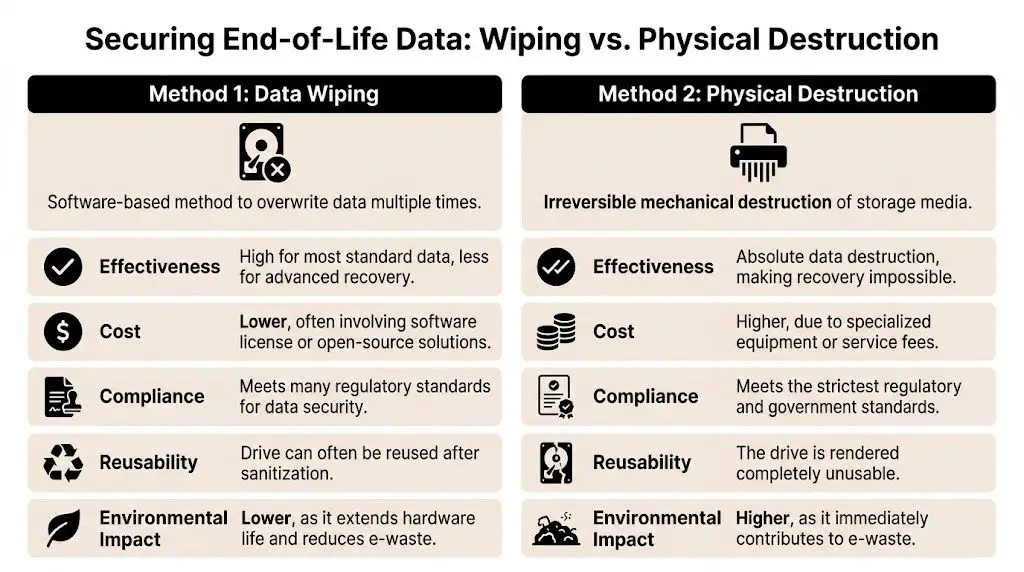
Securing End-of-Life Data Wiping vs Physical Destruction
Once the VMware estate is dark, the main question changes. It’s no longer “Did migration finish?” It becomes “What level of sanitization is required for this media, this data class, and this audit posture?”
For VCF-related data center decommissions, an expert handoff includes exporting required VM snapshots via OVF and then wiping vSAN disks on-site with certified shredders. That process is presented as critical to achieving 100% liability transfer and reducing risk in post-Broadcom-era environments (VCF Architect posting).
When wiping makes sense
Certified data wiping is the right choice when the organization wants to preserve asset value and the media can be sanitized to policy. It supports remarketing and reuse, which matters for newer enterprise hardware.
Choose wiping when:
- the media is healthy and readable
- the organization allows sanitized resale or redeployment
- evidence from the wiping process satisfies internal policy
- storage doesn’t require mandatory destruction by contract or regulation
For policy alignment, teams typically reference NIST SP 800-88 guidance when deciding how sanitization should be documented.
When destruction is the better answer
Physical destruction is usually the cleaner decision when storage health is uncertain, the data sensitivity is high, or legal and compliance teams want finality over resale value.
Use destruction when:
- drives are failed or inaccessible
- regulated data raises residual risk concerns
- chain-of-custody confidence is more important than remarketing value
- the organization wants irreversible outcome at the device level
Some media should be wiped. Some media should be shredded. Problems start when teams pretend those are interchangeable decisions.
The trade-off table
| Decision factor | Data wiping | Physical destruction |
|---|---|---|
| Security posture | Strong when properly executed | Highest finality |
| Asset value recovery | Preserved | Lost |
| Speed in mixed batches | Can require more handling | Faster for high-risk media |
| Audit preference | Good with detailed logs | Strong with destruction record |
| Sustainability | Better for reuse | Better only when risk requires it |
The right answer is often mixed. Wipe server-grade media that can be remarketed. Destroy failed drives, highly sensitive storage, and anything your compliance team won’t defend later.
Managing Logistics and Value Recovery in Metro Atlanta
Once data is addressed, the physical project begins, and decommissioning shifts from IT work to controlled operations work. A loose pickup schedule, incomplete pallet counts, or undocumented handoff can undo otherwise solid technical execution.
Chain of custody starts at the rack
Every device leaving the room should map to an asset list, a sanitization status, and a removal record. That means serial capture, pallet or container control, loading supervision, and documented transfer.
In metro Atlanta, timing matters as much as process. Building access, freight elevator windows, loading dock restrictions, and after-hours escort rules can decide whether a removal stays orderly or becomes a scramble.
Use a logistics checklist that includes:
- Removal staging: segregate sanitized, unsanitized, and reusable equipment.
- Packaging control: use containers and palletization that prevent mix-ups.
- Transit visibility: document custody changes from site to processor.
- Exception handling: isolate anything with label conflicts or missing records.
Value recovery is decided before pickup day
Organizations often ask about buyback too late. By then, equipment has been mixed, labels are inconsistent, and useful components are treated like scrap.
Value recovery improves when the project team identifies remarketable assets before final shutdown. Enterprise servers, memory, storage, and some network hardware may qualify for resale if condition, generation, and data handling are clear. That requires testing, grading, and a documented path from rack removal to resale channel.
A disciplined partner can turn part of the project from pure expense into partial recovery. That matters when a refresh, migration, or license change already hit the budget.
For Georgia-based projects, review options for asset recovery services in Georgia before final removal planning so finance and IT agree on which assets should be recovered, recycled, or destroyed.
Hardware value doesn’t disappear when production ends. Teams usually lose it through poor sorting, weak records, and rushed pickups.
What local teams usually underestimate
They underestimate how much project friction sits outside the hypervisor. Dock scheduling, crate availability, chain-of-custody paperwork, on-site destruction coordination, and remarketing segregation all need planning. When those items are treated as “vendor details,” projects drift, and audit questions become harder to answer later.
Finalizing Compliance and Documentation The Ultimate Checklist
A VMware decommission is only finished when the paper trail is stronger than the memory of the people who ran it. That’s the standard regulated organizations should use.
In Atlanta healthcare and finance environments, a persistent question is how to keep disposal compliant once hardware leaves the VMware stack. Security tooling alone doesn’t solve that. The FTC Disposal Rule requires data destruction certificates, and those records must be tied to the physical decommissioning process to be meaningful (discussion of this compliance gap).
What documents matter
Keep the final file simple and complete. It should include:
- Asset inventory closure: what was retired, moved, retained, or removed
- Change and approval records: who authorized cutover and shutdown
- Sanitization evidence: wiping logs or destruction records by asset
- Certificates: data destruction and recycling documentation
- Transport records: chain of custody from site departure onward
- Exception log: any item held back, missing, or processed separately
Final sign-off checklist
Before closing the project, confirm each item:
- Backups and retention were resolved for any system subject to legal, regulatory, or business hold.
- Application owners signed off that dependencies were removed or moved.
- vCenter and supporting records were updated so retired assets don’t linger in operational tools.
- Every storage device has a documented sanitization outcome.
- Removed equipment matches the shipping and custody record.
- Certificates are received, stored, and linked to the asset list.
- Finance has the final disposition path for resale, recycle, or destruction.
- Compliance can audit the file without chasing missing evidence.
That’s the difference between a shutdown and a completed decommission. One turns systems off. The other closes risk.
If you’re planning a VMware decommission in Atlanta, Beyond Surplus can help with certified electronics recycling, secure IT asset disposition, data destruction, logistics coordination, and value recovery for retired enterprise equipment. Contact Beyond Surplus to build a defensible end-of-life process before old infrastructure becomes a compliance problem.