

A remote offboarding issue usually starts the same way. HR closes out an employee record, IT disables access, and then someone realizes the laptop is still sitting in an apartment three states away, along with a dock, charger, monitor, and whatever data remained on the drive at the moment the account was cut off.
That's where manual processes break down. Emailing a label, hoping the former employee finds a box, and waiting for a tracking update isn't a process. It's a chain of avoidable failure points. If you want to understand how IT asset recovery services simplify remote employee laptop returns, the short answer is this: they replace improvisation with controlled logistics, documented custody, and repeatable data destruction.
The Growing Challenge of Remote Employee Offboarding
A busy IT director doesn't struggle with one return. The significant pain starts when returns pile up across locations, managers, and departure types. One employee resigns with notice. Another is terminated immediately. A third is overseas. Each one has a different device set, different shipping constraints, and a different risk profile.
At small scale, teams often absorb the friction. Someone in IT creates a spreadsheet. HR sends reminders. Finance asks whether the asset was returned. That works until volume turns a nuisance into an operational drag. According to Synetic's guide to managing remote employee IT assets, when an organization exceeds 100+ remote employees or generates 20+ device returns annually due to turnover, the operational math shifts significantly, requiring a professional retrieval process.
What usually goes wrong
- Packaging gets improvised. Employees use whatever box they can find, which increases the chance of damage in transit.
- Tracking gets fragmented. IT, HR, and the employee may all have a partial view, but nobody has a clean chain of custody.
- Accessory recovery gets ignored. The laptop may come back. The power adapter, dock, and monitor often don't.
- Data risk stays open. Until the device is wiped, received, or both, the organization is carrying avoidable exposure.
The laptop is only the visible asset. The process around it is the real control point.
Companies that haven't formalized remote retrieval usually discover the same thing late. Their offboarding workflow was designed for account disablement, not physical asset recovery. A managed process closes that gap. For a closer look at the operational headaches, Beyond Surplus outlines common remote employee laptop return challenges and how to solve them.
The Standardized Laptop Return Workflow Explained
A professional return program works because it reduces choices. Former employees don't need to figure out packaging, labels, or carrier rules. IT doesn't need to manually coordinate every shipment. The workflow is standardized from the first notification to final intake.
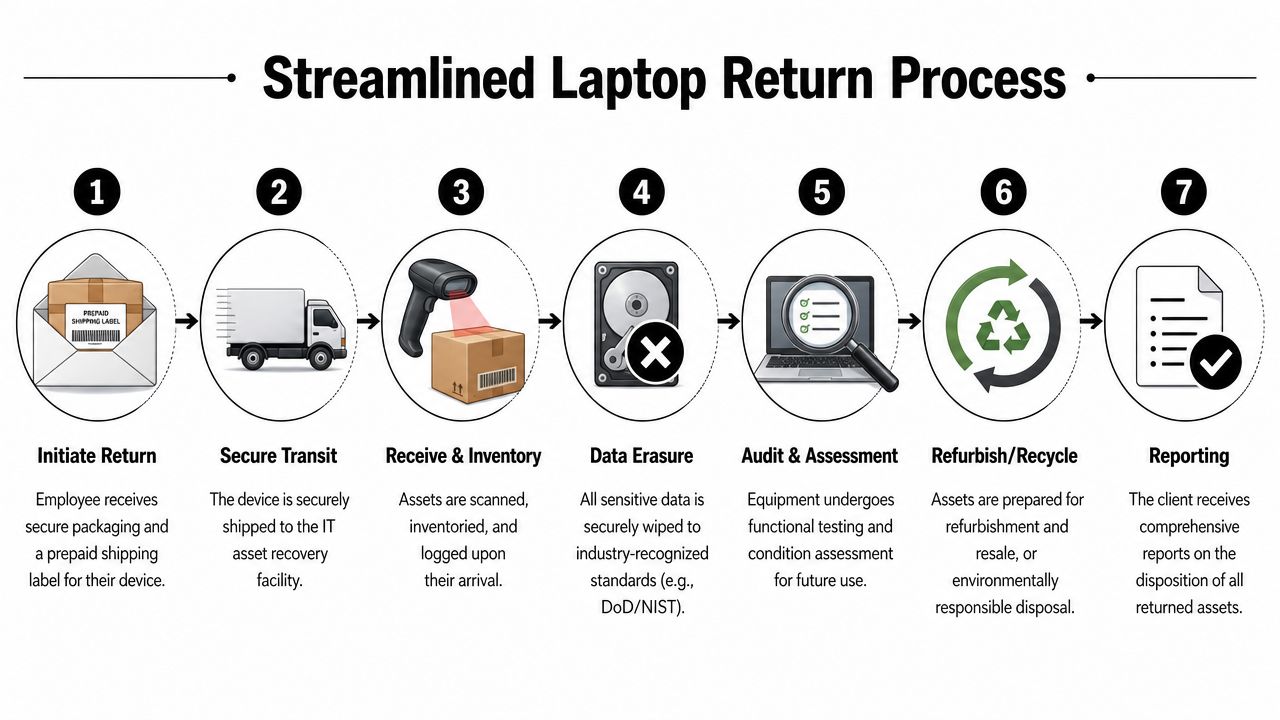
How the process typically runs
Return is triggered
HR or IT initiates the return when offboarding starts. That trigger matters because timing drives everything else, including device lock, employee communications, and shipping timelines.The employee receives a return kit
The kit usually includes protective packaging, clear instructions, and a prepaid label. That sounds simple, but it solves one of the biggest reasons returns stall. People delay tasks that require extra effort.Carrier movement is tracked automatically
With automatic tracking, the process shifts from being email-driven to manageable. Unduit's remote laptop return service guide notes that standardized logistics protocols that include pre-packaged return kits and automated carrier tracking can reduce manual effort by up to 60% while ensuring end-to-end visibility.
Why standardization matters
The operational benefit isn't just speed. It's consistency. Every return follows the same path, so exceptions stand out quickly.
A good workflow also links the shipment to the correct employee and device record before instructions go out. That prevents serial-number mismatches and avoids the common issue of recovering the wrong asset or incomplete asset set.
Practical rule: If your team has to reinvent the return process for each departure, you don't have a process yet.
What managed services do better than ad hoc shipping
| Approach | What happens in practice |
|---|---|
| DIY return | IT creates labels manually, employees use random packaging, and updates move through email threads |
| Managed return | Kits, shipping, tracking, intake, and reporting follow one documented workflow |
The best programs also build intake discipline at the receiving end. Assets are scanned, inventoried, condition-checked, and routed for wipe, refurbishment, redeployment, or recycling. That final step is where logistics turns into asset management instead of just package recovery.
Securing Data from Departure to Destruction
A recovered laptop isn't secure just because it's in transit. Security depends on what happened before shipment, what happens during movement, and what happens when the device is received.
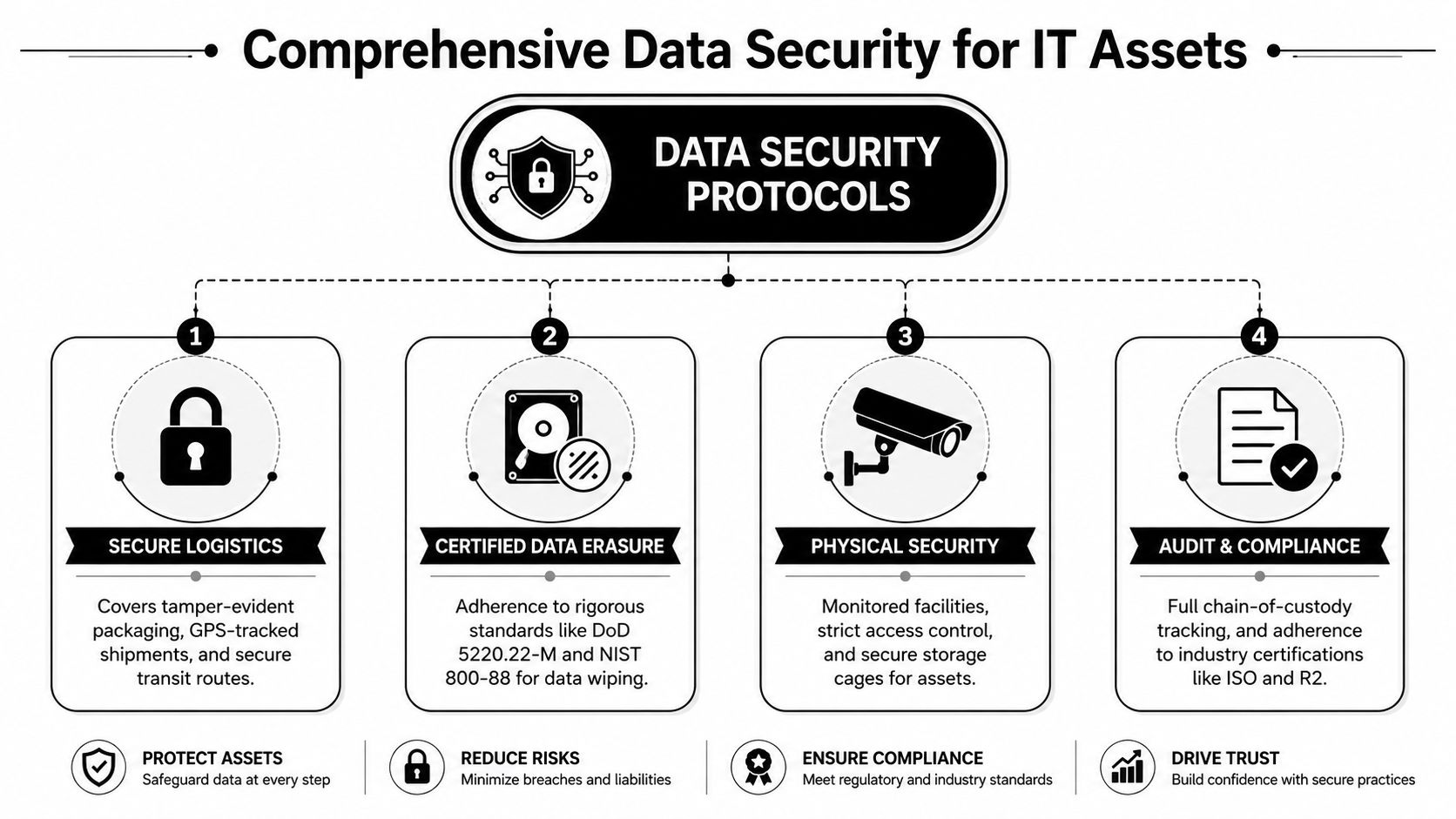
The strongest programs use layered controls. They don't treat remote wipe as the whole answer, and they don't wait passively for the box to arrive before taking action.
What a secure sequence looks like
Remoasset's guide for IT teams describes a structure that includes a 48–72 hour backup window prior to remote wipe execution, followed by a secondary factory reset upon physical receipt, using standards such as NIST 800-88. That sequence matters because it balances business security with practical offboarding realities.
The backup window gives the employee a final chance to remove permitted personal material. The remote wipe reduces exposure during transit. The secondary reset on receipt verifies that the device entering downstream handling no longer holds recoverable corporate data.
The legal issue many teams skip
Immediate remote wiping sounds clean on paper. It isn't always clean in policy or employment practice.
In some jurisdictions, wiping a device without clear notice or contractual language can create HR disputes or legal friction, especially where employee privacy and computer misuse rules are stricter. That's why a wipe policy shouldn't live only inside MDM settings. It needs to be embedded in onboarding documents, acceptable use policy, and offboarding communications.
- Good practice means employees know in advance that company devices may be remotely locked or wiped at separation.
- Bad practice is treating technical capability as legal permission.
- Safer practice ties wipe actions to documented notice, defined timelines, and a record of execution.
Remote wipe is a security control. It is not a substitute for policy.
For organizations tightening this part of offboarding, Beyond Surplus has a practical overview of why remote employee laptop recovery matters for data security.
Achieving Compliance and Verifiable Proof of Disposal
Compliance doesn't happen because a vendor says a drive was wiped. It happens when your organization can prove what was done, to which asset, when it happened, and how that action was documented.
That's why serious IT asset recovery programs issue Certificates of Data Destruction and, where applicable, certificates of recycling. These records matter in regulated environments because audits don't accept verbal confirmation. They look for serialized evidence tied to chain of custody.
Why documentation is non-negotiable
A certificate creates a formal handoff from internal assumption to external verification. If a regulator, customer, insurer, or internal auditor asks how a departed employee's laptop was handled, the answer shouldn't be “IT sent it out and the vendor took care of it.”
It should include:
- Asset identification tied to a serial number or internal asset record
- Destruction method documented according to the service performed
- Date and custody trail showing when the asset moved and when destruction occurred
- Supporting records stored where compliance, legal, and IT can retrieve them quickly
For sectors dealing with healthcare, finance, or public company controls, this documentation supports obligations tied to frameworks such as HIPAA, the FTC Disposal Rule, GDPR, and SOX. The operational value is just as important as the regulatory value. When records are centralized, IT doesn't have to reconstruct the event later.
What to ask a provider for
A provider should be able to produce documentation that is clear enough for an external reviewer and useful enough for internal teams. If the certificate is vague, delayed, or disconnected from asset records, it won't help much in an audit.
Keep your proof where your risk team can actually find it. A certificate buried in someone's inbox isn't a control.
Teams building their own documentation standard can start with a data destruction certificate template from Beyond Surplus.
The Financial Equation of Cost Versus Value
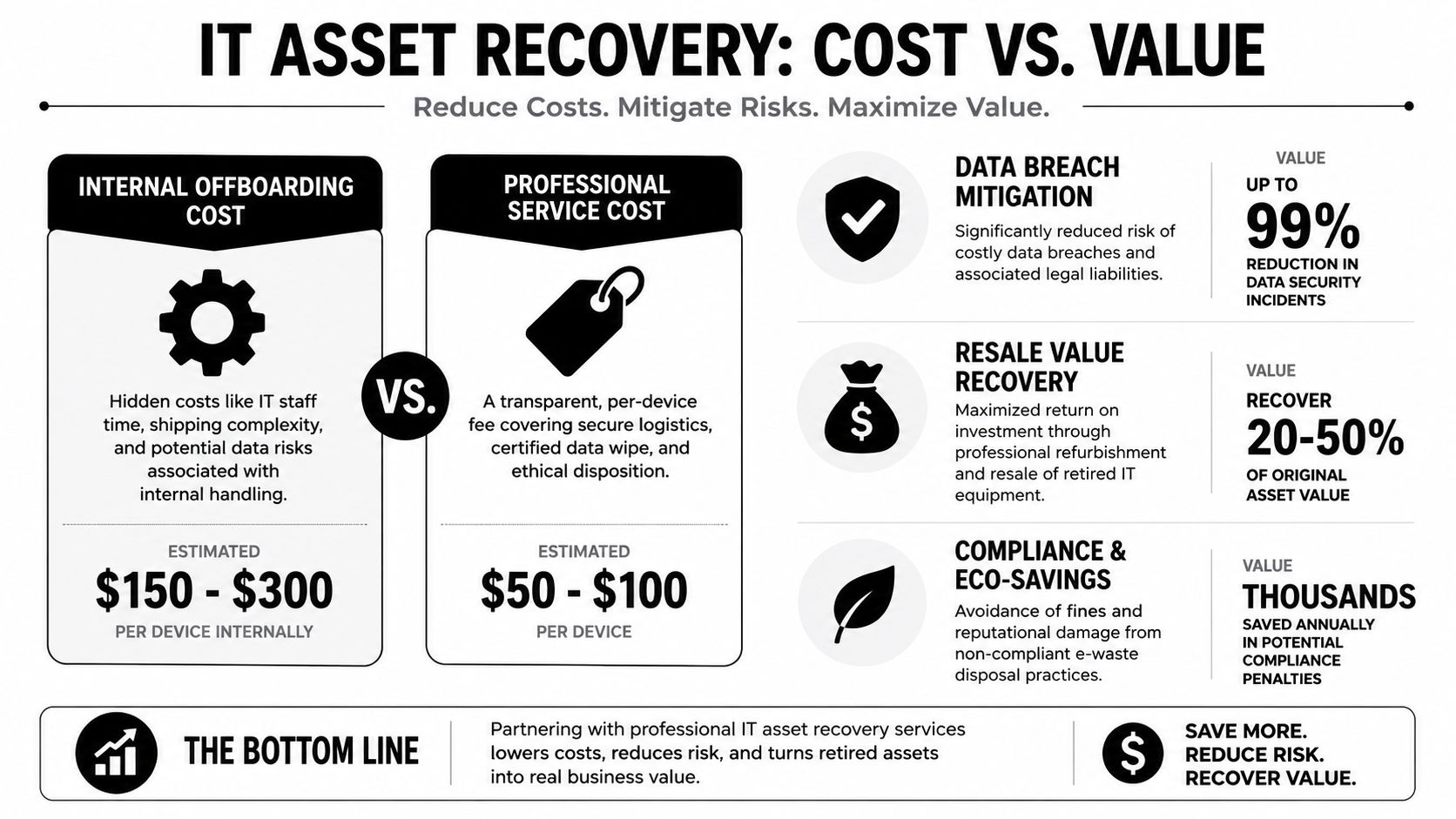
A remote employee leaves on Friday. By the next week, HR shows the offboarding as complete, but IT is still chasing a laptop, a dock, two monitors, a headset, and the employee's power adapter. The budget impact is not one missing device. It is replacement spend, staff time, delayed redeployment, and risk attached to any asset that disappears outside a controlled process.
What the direct costs look like
The visible cost is easy to spot. You pay for shipping, handling, processing, and, in some cases, onsite or mail-in recovery support. That line item can make an internal process look cheaper at first glance.
The problem is that internal handling rarely stays limited to shipping. Someone has to issue instructions, answer employee questions, send reminders, track serial numbers, verify what came back, reconcile missing accessories, update inventory records, and decide whether each item should be wiped, reused, sold, or recycled. That work usually lands across HR, IT support, asset management, and procurement, which means the cost is spread out enough that many teams never measure it cleanly.
The hidden loss is usually outside the laptop itself
A lot of return programs are built around the laptop alone. That misses the complete recovery picture.
Remote users are often assigned a full working kit: charger, dock, monitor, keyboard, mouse, headset, webcam, adapters, and sometimes mobile devices or specialty peripherals. If those items are not listed in the return workflow, they disappear into the gap between “employee equipment” and “IT asset.” The result is predictable. A replacement hire gets a returned laptop but not a usable setup, so the company buys accessories again while the asset register still shows equipment as deployed or recoverable.
That is not just a purchasing issue. It distorts inventory, slows onboarding, and weakens accountability for assets that may still store data or connect to corporate systems.
Value comes from control, not just recovery
Return on a managed process shows up in four places:
- Less internal labor because IT is not coordinating boxes, labels, reminder emails, and status checks by hand
- Higher asset recovery because the return covers the full assigned kit, not only the laptop
- Better reuse and resale decisions because returned equipment is tested, sorted, and processed consistently
- Lower legal and security exposure because devices and data-bearing accessories enter a documented chain of custody instead of sitting untracked in transit or at an employee's home
That last point matters more than many finance models account for. Some peripherals are not just low-value accessories. External drives, docking stations with embedded storage, mobile hotspots, and multifunction devices can all create data handling questions. If your recovery process ends at “the laptop came back,” you still have a gap.
One practical option is Beyond Surplus asset recovery services in Georgia, which include logistics coordination, secure processing, and documentation as part of a broader ITAD workflow.
For most IT directors, the question is not whether managed recovery has a cost. It does. The better question is whether an informal return process costs more in labor, replacement purchases, audit exposure, and lost assets than the service fee you were trying to avoid.
Implementing Your Remote Laptop Return Policy
An employee leaves on Friday. By Monday, HR has closed the file, IT has disabled access, and nobody can confirm whether the laptop, dock, monitor, headset, hotspot, and external drive are still sitting in a home office. That is where return policies fail. The issue is rarely intent. It is unclear ownership, inconsistent instructions, and too much reliance on manual follow-up.
A workable policy removes judgment calls from offboarding. It tells HR when to trigger the return, tells the employee exactly what must come back, and gives IT a documented path from account lock to intake, inspection, and final disposition. It should also cover accessories and data-bearing peripherals, not just the laptop. That broader scope closes one of the most common gaps in remote recovery programs.
DIY process versus managed process
| Decision area | DIY approach | Managed service approach |
|---|---|---|
| Employee instructions | Written manually and often inconsistently | Standardized communication and return steps |
| Shipping materials | Employee may need to source a box or print labels | Return kit and prepaid label are coordinated in advance |
| Asset scope | Laptop is tracked, accessories often aren't | Full assigned asset set can be listed and checked |
| Security actions | Timing varies by manager or technician | Wipe, receipt, and processing follow a defined workflow |
| Proof of completion | Often split across inboxes and spreadsheets | Reporting and certificates are easier to centralize |
The policy itself does not need to be long. It needs to be specific enough that HR, IT, legal, and the employee all follow the same process.
What the policy should include
- Trigger point and ownership so someone is responsible for starting the return as soon as notice is given or termination is approved
- Return deadlines with clear timing for voluntary departures and involuntary terminations
- Full asset list expectations so chargers, docks, monitors, mobile devices, and external storage are treated as assigned company property
- Shipping instructions that explain packaging, label use, and what to do if the employee is traveling or overseas
- Data handling language that addresses account lock, remote actions, intake validation, and destruction requirements where applicable
- Escalation steps for late, incomplete, or damaged returns, including when payroll, legal, or employee relations need to be involved
One practical mistake I see often is writing the policy around replacement cost alone. That misses the bigger risk. A missing laptop is expensive, but an unreturned external drive or multifunction device can create harder questions about regulated data, client files, and whether the company can prove destruction was completed under its own policy and any contractual obligations.
Costs still matter, of course. A managed process adds service fees. An informal process adds staff time, replacement purchases, inconsistent records, and more exceptions for HR and IT to resolve by hand. For many organizations, the better decision is the one that produces fewer open assets and cleaner documentation at the end of each offboarding cycle.
If your team is building the process now, this 10-step remote employee equipment return program checklist is a practical starting point for turning policy language into an operating procedure.
Streamline Your Offboarding with Professional Asset Recovery
Remote offboarding fails when companies treat physical asset return as a minor administrative task. It isn't. It sits at the intersection of logistics, security, compliance, and cost control.
That's why managed recovery services work. They standardize return kits, shipping, tracking, intake, data destruction, and documentation into one process that IT can trust. They also solve a problem many teams undercount. The laptop isn't the whole asset. The charger, dock, monitor, and other assigned gear are part of the same risk and value equation.
The strongest programs also avoid a common mistake in security planning. They don't assume that a technically possible wipe is automatically a legally sound wipe. They combine notice, policy, wipe timing, intake validation, and verifiable destruction. That's how organizations reduce risk without creating new HR problems.
If your team is still managing returns through spreadsheets, ad hoc labels, and email follow-ups, you're spending skilled IT time on tasks that can be operationalized. A professional ITAD workflow gives you consistency, cleaner records, and fewer unresolved assets at the end of every offboarding cycle.
Contact Beyond Surplus for certified electronics recycling and secure IT asset disposal, including remote employee laptop return support, data destruction, and documented chain-of-custody services for business organizations across the United States.


