Insider threats have surged by 58% since remote work became widespread, and 83% of organizations experienced at least one attack in 2024, according to Insider Risk research on remote work exposure. That should change how leaders think about laptop returns. An unrecovered device isn't just missing hardware. It's an unmanaged endpoint holding credentials, cached files, browser sessions, customer records, and internal documents outside your control.
That's why remote employee laptop recovery matters for data security. Software controls matter, but they stop short when the physical device never comes back. If your offboarding process disables accounts yet leaves the laptop in a spare bedroom, garage, storage unit, or secondary market channel, your security program has a blind spot at the exact point where accountability should be highest.
For IT, HR, procurement, and compliance teams, the issue is asset lifecycle management. The moment a remote employee exits, the laptop has to move from active endpoint to recovered asset, then into verified data destruction or redeployment. Anything less leaves risk sitting in the field.
The New Endpoint Security Blind Spot
Remote work dismantled the physical offboarding routine that used to protect company laptops. In an office, security or IT could recover the device the same day, confirm its condition, and route it into a documented next step. In a remote workforce, that handoff often breaks.
Many organizations responded by tightening software controls and treating that as closure. Accounts are disabled. MFA tokens are revoked. MDM issues a lock or wipe command. HR completes the separation workflow. The laptop itself can still remain in a home office, storage closet, repair shop, or resale channel with no verified recovery record.
That assumption is often incorrect.
The core gap is custody. If the device never returns, the company cannot confirm whether the wipe executed, whether local data remained accessible, or whether the hardware was later reused outside approved disposal channels. That is the blind spot many remote security programs miss. They govern the user session, but not the asset lifecycle.
Why software-only offboarding breaks down
Four controls are routinely overestimated during remote offboarding:
- Remote wipe: Useful only if the laptop is powered on, connected, enrolled, and still communicating with your management platform.
- Access revocation: It cuts off accounts, but it does not remove local files, browser data, cached mail, or offline exports already stored on the device.
- Encryption: Strong protection against casual access, but it does not replace physical recovery, inspection, and documented sanitization.
- Employee attestations: Helpful for HR documentation, weak as proof that the asset was returned intact and handled correctly.
Practical rule: If the device is not recovered, the organization cannot prove what happened to the data stored on it.
This is why physical asset lifecycle management deserves more attention than it usually gets. Security teams spend heavily on endpoint detection, identity controls, and device management. Those controls matter. But they stop at the point where custody is lost. For additional perspective on aligning cyber controls with operational discipline, Wisenet Security Ltd cyber expertise provides useful context.
What a missing laptop actually represents
A missing laptop is not just an inventory exception. It is a failed control point in the chain from active use to verified recovery, data destruction, and redeployment or disposal.
That distinction matters in audits, investigations, and legal review. If a former employee says the device was discarded, donated, or handed to a local recycler, your team still needs evidence that data handling met policy and regulatory expectations. A documented recovery process, followed by certified disposition through a provider that understands secure data destruction trends in Atlanta, gives IT and compliance teams something software alone cannot provide. Proof.
From a risk standpoint, the scenarios vary, but the control failure is the same. Your business no longer has verified possession of the hardware or verified disposition of the data it may still contain.
The Escalating Risks of Unrecovered Laptops
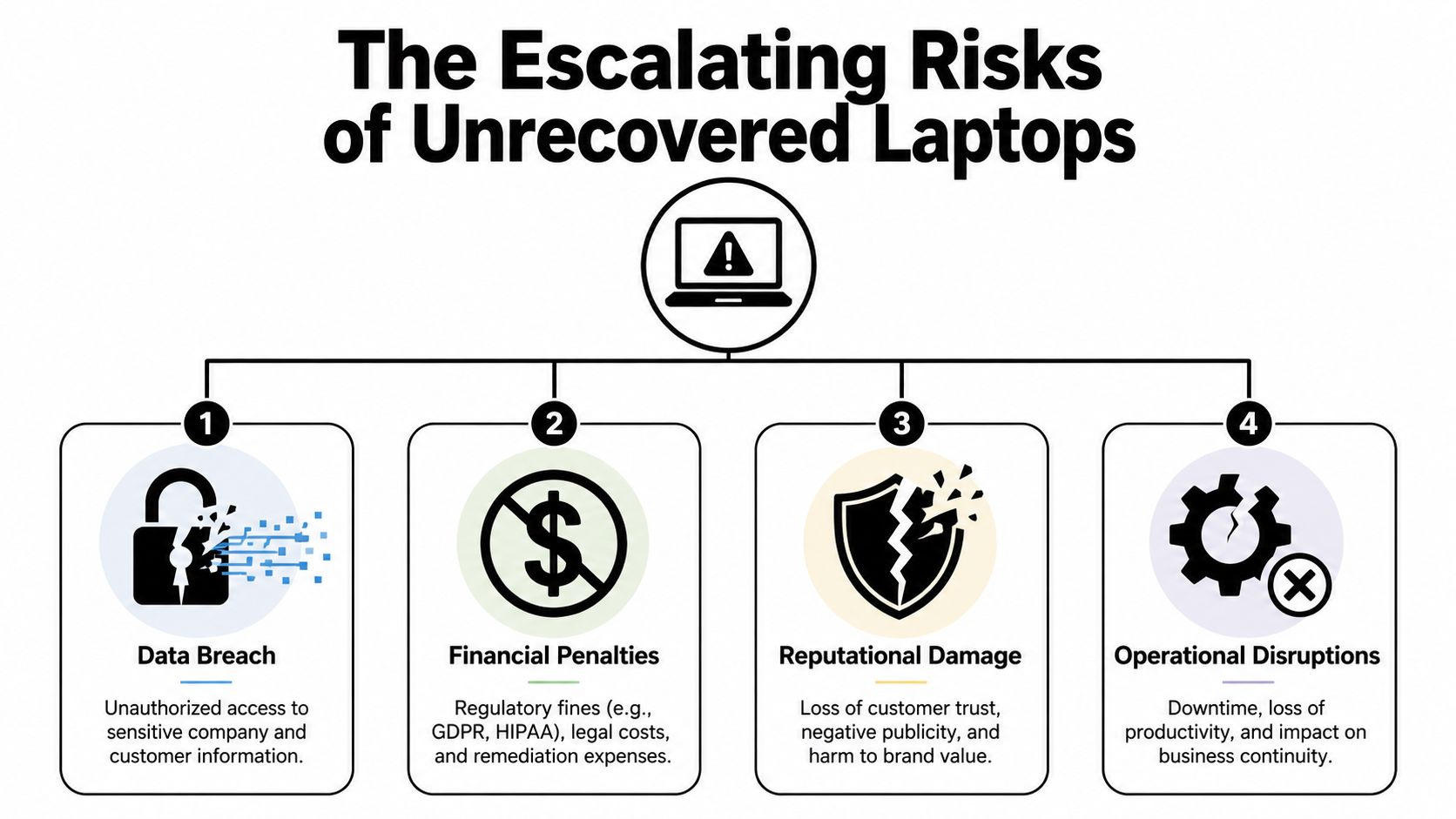
A missing laptop creates more than one problem. It creates a stack of related business exposures, and each one can hit a different team first. Security sees data risk. Legal sees reporting exposure. Finance sees write-offs and response costs. Operations sees delay and confusion.
Data at rest becomes uncontrolled data
Once a laptop leaves your custody without a documented return, you lose confidence in what remains on the drive. Local mail files, downloaded reports, offline exports, saved credentials, VPN profiles, and customer data can all persist beyond account deactivation.
That creates a practical gap. Security teams may know what should have happened. They can't always prove what did happen.
Compliance exposure follows the asset
Regulated organizations already understand this in theory. HIPAA, GDPR, and the FTC Disposal Rule all push companies toward defensible handling of sensitive data and retired devices. The problem is execution. If an employee device disappears during offboarding, the organization may struggle to show that disposal, destruction, or sanitization occurred under controlled conditions.
A useful way to think about it is simple:
| Risk area | What goes wrong when the laptop isn't recovered |
|---|---|
| Security | No verified data wipe or physical inspection |
| Compliance | No defensible record of handling and destruction |
| Operations | Delays, escalations, and manual exception work |
| Finance | Lost asset value, legal expense, and incident response cost |
Environmental handling can become a security issue
Improper disposal doesn't just create sustainability problems. It creates data problems too. The United States generates approximately 6.9 million tons of electronic waste annually, and only 15% of e-waste in North America was formally collected and recycled as of 2019, meaning 85% is diverted to unlicensed facilities or landfills where data security risks are uncontrolled, according to SAMR's e-waste statistics summary.
That matters because unrecovered laptops often don't stay “missing.” They drift into informal disposal channels, secondary resale, or unverified recycling. At that point, your company doesn't just lose the device. It loses the chain of accountability.
A retired laptop without documented disposition is still a live liability.
For businesses reviewing their broader destruction controls, secure data destruction trends in Atlanta offers a useful operational reference point.
The business impact is cumulative
One lost laptop rarely stays one problem. Security teams investigate. HR chases the employee. Procurement writes off the asset. Legal asks for records. Compliance asks for evidence. Leadership asks whether customer data was involved. The cost comes from the pileup.
That's why strong organizations stop treating recovery as a courtesy request and start treating it as a controlled business process.
Building a Bulletproof Laptop Recovery Program
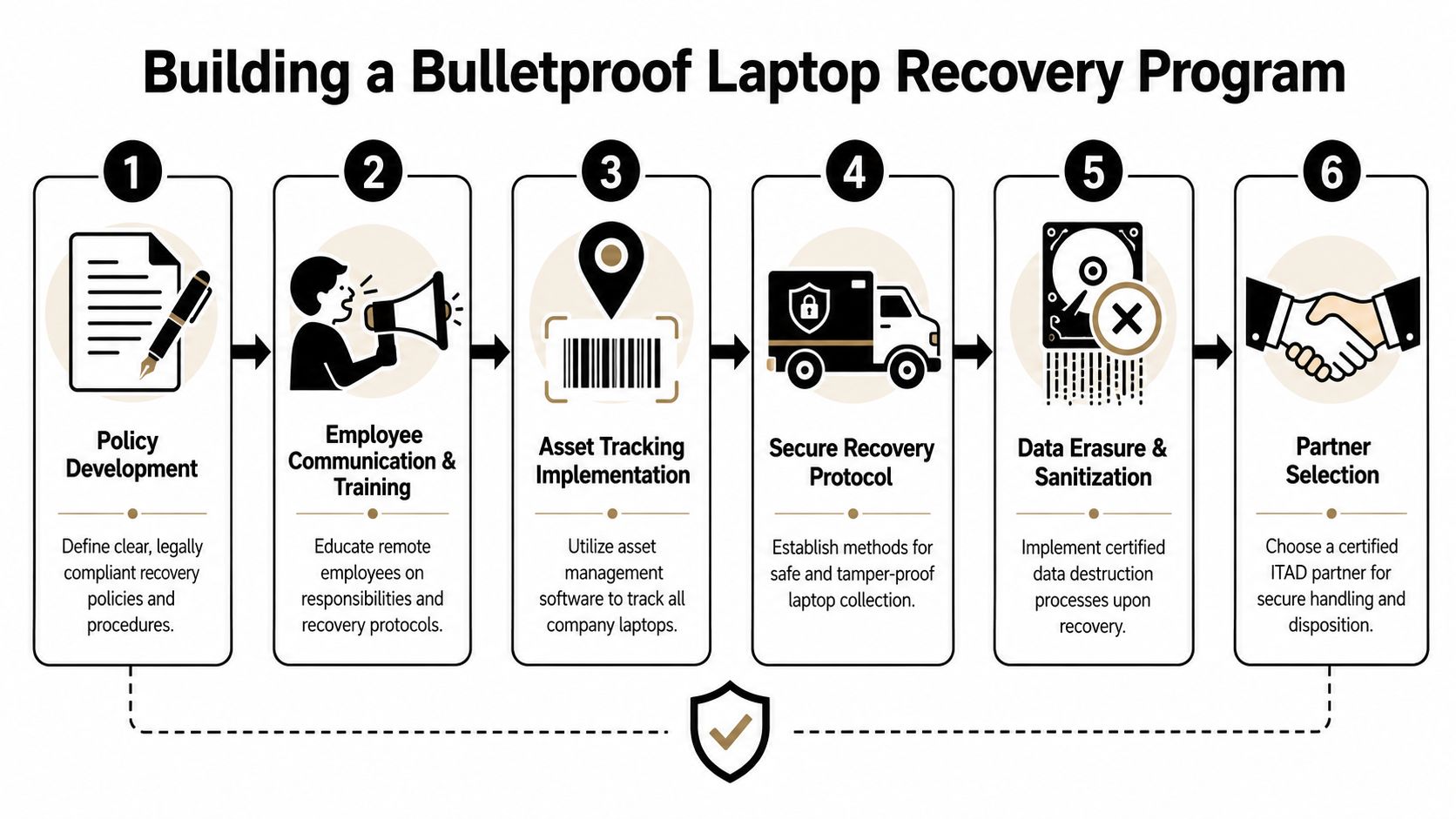
Good recovery programs are boring in the best way. They don't rely on improvisation, individual memory, or whether a manager remembered to email shipping instructions. They run on policy, ownership, and repeatable workflow.
Start on day one, not at exit
The best time to set expectations is when the laptop is issued. Every remote employee should acknowledge, in writing, that company hardware remains company property, must be returned at separation, and is subject to inspection, wiping, and certified disposition.
That policy should sit in three places:
- Employment documents: So expectations are established early.
- Asset assignment records: So serial numbers map to named users.
- Offboarding workflow: So return steps trigger automatically when employment ends.
Build a real handoff between HR and IT
Most failed returns happen in the gaps between teams. HR knows the exit date. IT knows the asset list. Procurement may own inventory. Facilities or security may own shipping supplies. If no one owns the whole chain, the laptop falls through it.
A workable flow usually includes:
- Departure notice logged: HR confirms final working date.
- Asset list verified: IT checks assigned laptop, accessories, and any peripherals.
- Return instructions issued: Employee receives packaging guidance and deadline.
- Transit monitored: Tracking, serial confirmation, and receipt logging are documented.
- Device inspected on arrival: Team verifies asset identity and physical condition.
- Data sanitization completed: Wipe or destruction is performed under policy.
- Final disposition recorded: Device is redeployed, remarketed, recycled, or destroyed.
Operational advice: Give one person authority to chase exceptions. Shared ownership sounds collaborative. In practice, it creates delays.
What works and what usually fails
Some methods hold up well in distributed workforces. Others don't.
What works
- Predefined shipping kits: Employees return devices faster when packaging is simple.
- Serial-based tracking: Matching user, device, and shipment record prevents disputes.
- Escalation deadlines: Managers and HR need a trigger when return windows lapse.
- Documented receipt checks: Intake should confirm model, serial, and condition immediately.
What fails
- Informal reminders: “Please send it back when you can” isn't a control.
- Spreadsheet-only tracking: It breaks quickly once volume rises.
- No exception path: Devices get stuck when employees move, travel, or disengage.
- Waiting to think about disposition: Recovery without sanitization is incomplete.
Teams building formal programs can compare their process against remote employee laptop return best practices for IT and HR teams. The useful principle is consistency. Every departure should follow the same controlled path, whether the employee left on good terms or bad ones.
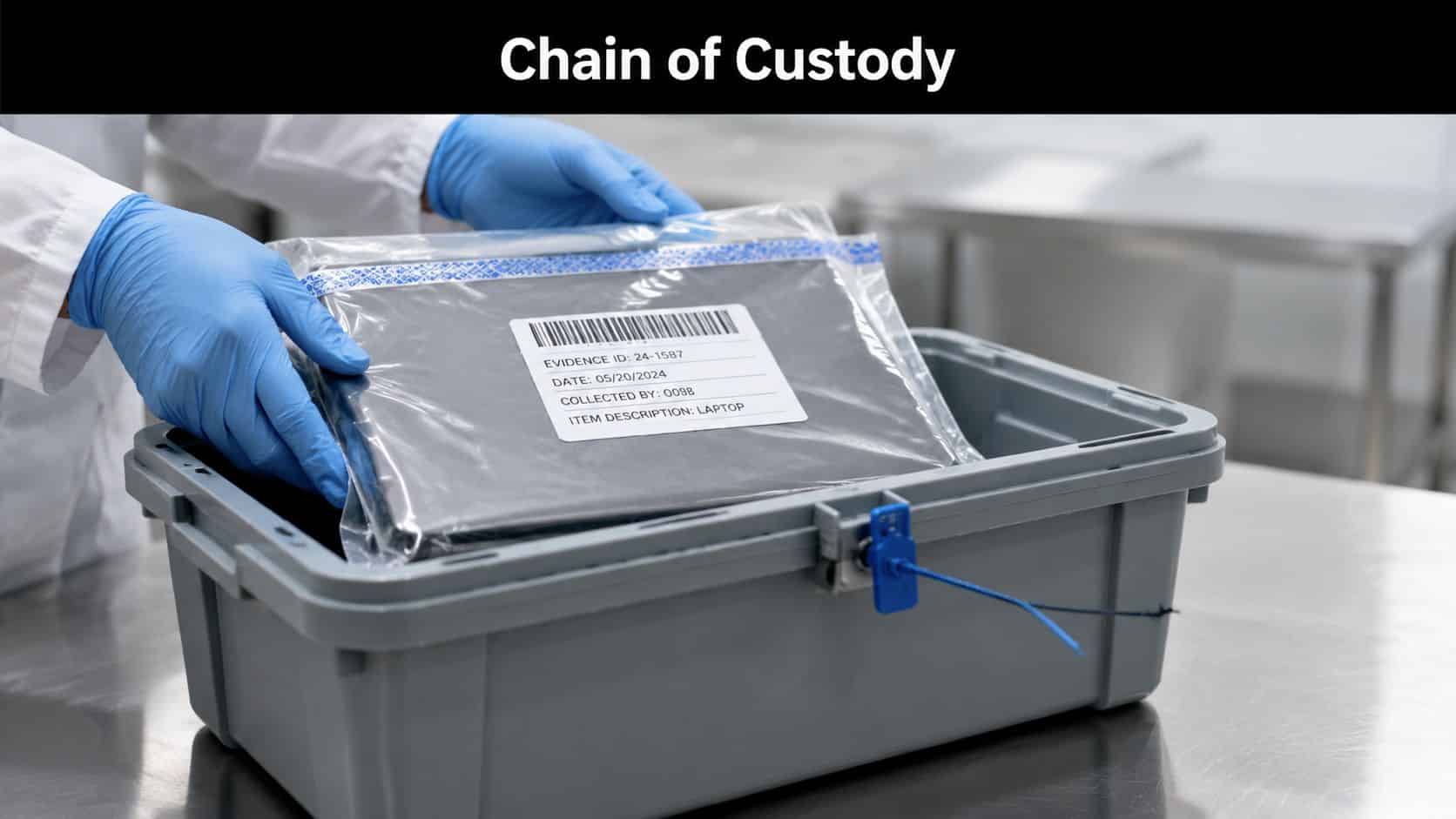
Chain of Custody The Unbroken Link in Security
Recovery is only half the job. The other half is proving who handled the laptop, when they handled it, and what happened after that. That's chain of custody.
What a defensible chain looks like
In IT asset disposition, chain of custody means there's an unbroken, auditable record from employee possession through transport, intake, sanitization, and final disposition. If any handoff is undocumented, the record weakens. If the record weakens, your legal position weakens with it.
A defensible chain usually includes these control points:
- Employee release: Confirmation that the specific device left the user's possession
- Shipment or pickup record: Tracking linked to the asset record
- Receipt at secure facility: Serial verification and timestamped intake
- Processing record: Wipe, destruction, testing, or storage status
- Disposition certificate: Final proof that policy was completed
The two documents that matter most
When a business retires remote laptops, two documents carry real weight.
The first is a Certificate of Data Destruction. That document confirms that the data-bearing media was wiped or physically destroyed under a defined process. The second is a Certificate of Recycling. That confirms the hardware entered a documented downstream recycling stream rather than an informal disposal path.
If a vendor can't produce clean disposition records, the organization keeps the liability.
For regulated companies, these documents aren't administrative extras. They are part of the evidence package that supports compliance reviews, internal audits, insurance inquiries, and legal response.
Why vague vendor reporting isn't enough
Many vendors can say they “handled” equipment securely. That statement has little value if they can't tie each laptop to a serial, intake record, sanitization action, and final outcome.
Look for reporting that answers basic questions fast:
| Question | Record you should expect |
|---|---|
| Was this the right device? | Serial-number match to the employee asset record |
| When did it arrive? | Timestamped intake confirmation |
| What happened to the data? | Wipe or destruction documentation |
| Where did the hardware go? | Redeployment, resale, recycling, or destruction record |
A practical reference for these controls is ITAD chain of custody in Georgia and why it matters. The core lesson applies nationally. If custody is broken on paper, it's broken where it matters.
Selecting a Certified IT Asset Disposition Partner
Most enterprises can't run nationwide recovery, secure transport, data sanitization, and downstream disposition with internal staff alone. They need an ITAD partner. That choice should be treated as a security and compliance decision, not a freight decision.
Commercial demand already shows where this market is headed. Industrial electronics recycling is projected to represent 40.0% of total global demand in 2025, according to Fact.MR's electronics recycling market projection. Enterprise asset disposition isn't a side category. It's a major operating need.
What to evaluate before signing
A qualified partner should meet a practical checklist.
- Certifications: Ask about R2, e-Stewards, and NAID AAA where relevant to the service scope.
- Data sanitization standards: The vendor should support documented processes aligned with NIST SP 800-88.
- Custody controls: They should track devices from pickup through final disposition.
- Insurance: Ask about data breach and pollution liability coverage.
- Reporting quality: You want asset-level documentation, not summary-level reassurance.
- Logistics capability: National pickup and secure transport matter for distributed teams.
Red flags that should stop the conversation
Some warning signs are easy to miss because the sales process sounds polished.
A vendor is risky if they can't explain how remote employee devices are recovered individually. They're risky if they offer vague “recycling certificates” without asset detail. They're risky if they outsource too much of the chain without transparency.
Vendor rule: If the provider talks mostly about convenience and very little about evidence, keep looking.
One factual example in this category is Beyond Surplus, which provides secure data destruction, chain-of-custody documentation, and certificates of recycling and data destruction for business IT assets. That kind of service model is what buyers should verify in any provider, not assume.
For procurement teams comparing options, how to choose an ITAD vendor in Georgia step by step is a practical checklist.
The right partner reduces work inside your business
A strong ITAD partner doesn't remove your responsibility. It reduces the number of weak points your team has to manage internally. That means fewer custom exceptions, clearer reporting for audits, and a cleaner path from employee exit to verified disposition.
The Strategic ROI of Rigorous Laptop Recovery
Leadership teams often file laptop return under operations. That's too narrow. A rigorous recovery program is a risk control with direct business value.
The strategic return shows up in four places. First, it reduces the chance that retired devices remain outside company control. Second, it strengthens compliance posture by creating auditable evidence. Third, it protects brand trust by lowering the odds of an avoidable data incident tied to sloppy offboarding. Fourth, it preserves asset value when hardware can be redeployed, remarketed, or recycled through a controlled channel.
A small process with enterprise impact
The strongest argument for investment is simple. The cost of disciplined recovery is predictable. The cost of one failed device can sprawl across security response, legal review, executive attention, and customer communication.
This is why remote employee laptop recovery matters for data security. It closes the gap between digital offboarding and physical control. It turns a weak point into a documented process. It gives security teams evidence instead of assumptions.
What executives should ask now
If you want a fast read on program maturity, ask these questions:
- Can we identify every remote employee laptop currently assigned?
- Do we have a standard recovery workflow tied to HR offboarding?
- Can we prove data destruction on returned devices?
- Do we have a documented chain of custody from user to final disposition?
- Can our current vendor support distributed recovery at business scale?
If any answer is unclear, the issue isn't theoretical. It's operational.
A structured recovery approach also supports broader asset recovery services in Georgia, especially for organizations managing remote teams, office closures, refresh cycles, and end-of-life equipment at the same time. The companies that do this well don't treat laptops as loose ends. They treat them as controlled assets from deployment to destruction.
If your organization needs a tighter process for recovering remote employee laptops, documenting chain of custody, and ensuring secure end-of-life handling, contact Beyond Surplus.