An employee leaves on Friday. HR closes the record. Access is disabled. Then IT starts the part that often goes sideways: getting the laptop back from a home office, a coworking space, or a spare bedroom three states away.
If that process still depends on a manual email, a prepaid label, and hope, the problem isn't shipping. It's risk control. Every remote laptop in limbo is both a possible data exposure and a depreciating business asset.
That's why the role of ITAD in remote employee laptop recovery has changed. It's no longer the cleanup step after offboarding. It's the operating model that makes offboarding secure, auditable, and financially rational. If your current workflow still feels reactive, remote employee laptop return challenges and how to solve them is a useful benchmark for what breaks first.
The New Challenge of Remote Asset Recovery
Remote work turned a centralized handoff into a distributed recovery problem. In an office, an employee handed a laptop to IT. In a remote environment, the same device may sit unreturned for days or weeks while HR, IT, managers, and the former employee trade messages about boxes, labels, chargers, and pickup windows.
That delay creates two forms of exposure. Sensitive data may still be on the machine, and the hardware keeps losing value while nobody has verified its condition. Teams usually feel the operational pain first, but the bigger issue is governance.
Where ad hoc recovery fails
The weak points are usually predictable:
- No ownership: HR starts the offboarding task, but nobody owns the recovery workflow end to end.
- No standard packaging: Employees use whatever box they can find, which increases transit damage.
- No verified intake: IT knows a device was “sent,” but not whether the right asset arrived with the right accessories.
- No defensible documentation: If an auditor asks when custody transferred, the answer lives in scattered emails.
A returned laptop isn't recovered when the employee says it shipped. It's recovered when the organization can verify possession, identity, and next disposition.
Why this has become a board-level issue
An unrecovered laptop used to look like a minor asset loss. In a remote estate, it can expose weaknesses in security, compliance, and lifecycle management all at once. That's why mature IT leaders don't treat laptop recovery as an afterthought to termination. They treat it as a controlled reverse-logistics process with security requirements built in from the start.
Defining the Strategic Role of ITAD in a Remote World
Many teams still hear ITAD and think “recycling vendor.” That definition is too narrow for a distributed workforce. In practice, ITAD becomes the framework that governs how a device moves from employee possession back into controlled enterprise handling.
A good remote recovery program starts the moment separation is initiated, not when the laptop reaches a warehouse.
What ITAD actually owns in remote recovery
For remote laptops, ITAD should cover five operational responsibilities:
Collection coordination
The provider or internal program organizes how the asset gets from the employee to a controlled facility without improvisation.Secure reverse logistics
Shipping isn't just transportation. It includes packaging standards, routing, labeling, and transit controls.Chain of custody
Every custody transfer should be documented, timestamped, and tied to a specific asset record.Data disposition
Once received, storage media must be sanitized or destroyed using methods aligned to enterprise policy and risk tolerance.Value recovery
Returned devices should be evaluated for redeployment, repair, resale, or recycling instead of being treated as generic scrap.
Why a neutral third party helps
Remote recovery often stalls because former employees don't want to coordinate with three internal departments. A centralized ITAD process simplifies that. The employee gets one instruction set, one label path, and one return workflow.
That also helps internal teams. HR can trigger the event, IT can monitor status, procurement can reconcile the asset, and compliance can pull documentation without reconstructing the history from inboxes and spreadsheets.
Practical rule: If your recovery process changes by manager, region, or employee location, it's not a process yet. It's a collection of exceptions.
What doesn't work
Three shortcuts consistently create problems:
- Retail trade-in thinking that prioritizes convenience over control
- Local one-off recyclers that can handle disposal but not enterprise reporting
- Internal DIY handling without standardized intake, grading, and destruction records
The role of ITAD in remote employee laptop recovery is to remove those weak links. Done well, it converts a loose offboarding task into a repeatable business control.
Ensuring Security and Compliance from a Distance
An employee leaves on Friday, the laptop ships on Monday, and your team still cannot answer three basic questions by Wednesday. Where is the device, what data is still on it, and who can prove what happened between the employee's home and final disposition? That gap is the remote recovery problem. It is not just an operational delay. It is a security exposure, a compliance issue, and a direct threat to asset value.
The controls that matter
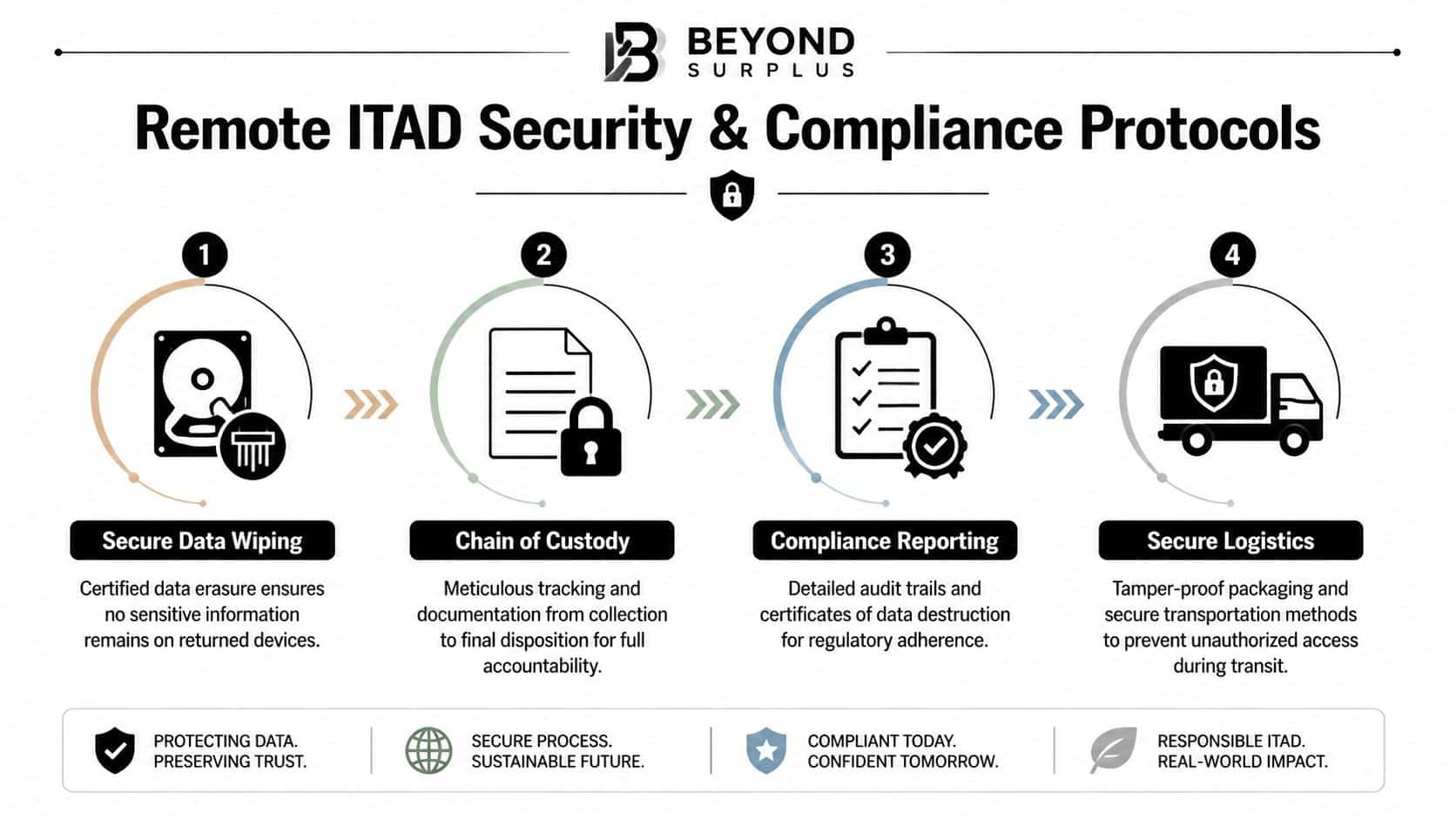
A defensible remote recovery program treats every returned laptop as if it still contains sensitive business data until intake, inspection, and sanitization are complete. That standard matters because the risk does not end when the employee agrees to return the device. It ends when the organization has evidence that custody remained intact and data was handled according to policy.
For IT directors, the baseline controls are straightforward. The provider needs documented chain of custody, verified intake procedures, media sanitization aligned to policy, exception handling for damaged or missing assets, and records your compliance team can produce without rebuilding the timeline from email threads.
If you need the technical baseline, NIST SP 800-88 guidance for media sanitization should be part of your vendor review and internal policy language.
Chain of custody is the difference between trust and proof
Remote programs break down when status updates replace documented handoffs. “Shipped,” “received,” and “wiped” are not enough on their own. Your team needs a record that shows who possessed the asset, when custody changed, how the shipment was tracked, what condition the device arrived in, and what happened after intake.
That record supports more than security review. It also helps with internal disputes, cyber insurance questions, customer due diligence requests, and regulated audits where disposal controls are examined alongside access controls.
A practical chain-of-custody record usually includes:
- Asset identity: serial number, model, user assignment
- Transfer point: employee release, carrier scan, facility receipt
- Condition notes: obvious damage, missing accessories, tamper concerns
- Final action: sanitized, destroyed, redeployed, resold, or recycled
Custody documentation exists for the day something goes wrong. On that day, assumptions have no value.
Sanitization versus deletion
A reset, reimage, or deleted user profile does not satisfy enterprise disposal requirements. Those actions prepare a machine for reuse in a casual setting. They do not prove that data cannot be recovered. An ITAD partner should use approved sanitization methods for functional drives and documented physical destruction for failed media that cannot be sanitized.
Remote recovery transitions from a logistical shipping exercise to a strategic control. Proper sanitization protects the business from data exposure, but it also preserves value. A device that arrives with intact custody records and verified data destruction can be redeployed or resold with confidence. A device with unclear handling history often gets quarantined, downgraded, or destroyed to reduce risk.
For IT directors, the policy decision is usually about trade-offs. If the device is functional and custody is clean, sanitization supports faster remarketing and stronger recovery value. If the drive is failed, encrypted with no recovery path, or shows signs of tampering, destruction is often the right call. Security and value recovery are not competing goals here. Good ITAD process protects both.
The End-to-End Logistics of Laptop Recovery
An employee leaves on Friday, keeps the laptop over the weekend, and ships it back on Monday in a thin retail box with no padding. By the time it reaches the processing site, the screen is cracked, the charger is missing, and nobody can confirm whether the serial number matches the asset record. That is not a shipping problem. It is a control failure that creates security exposure, compliance questions, and avoidable value loss.
A remote recovery program should run the same way every time. The goal is not convenience for its own sake. The goal is to maintain control from offboarding trigger to final intake so the business gets the device back quickly, in known condition, and with the highest recovery potential.
Start with a standardized return kit
Standardized return kits reduce variation at the point where remote programs usually break. The employee should receive packaging sized for the device, protective inserts, a pre-labeled shipping document, clear instructions, and a checklist that matches company policy on required accessories.
This is not about making the box look organized. It is about reducing preventable exceptions.
If employees are left to find their own packaging, damage rates rise, accessories go missing, and IT spends time sorting out avoidable discrepancies. If the kit is too rigid or expensive, recovery costs can eat into residual value on older devices. Good program design matches the return kit to the asset class and the likely disposition path.
What a practical workflow looks like
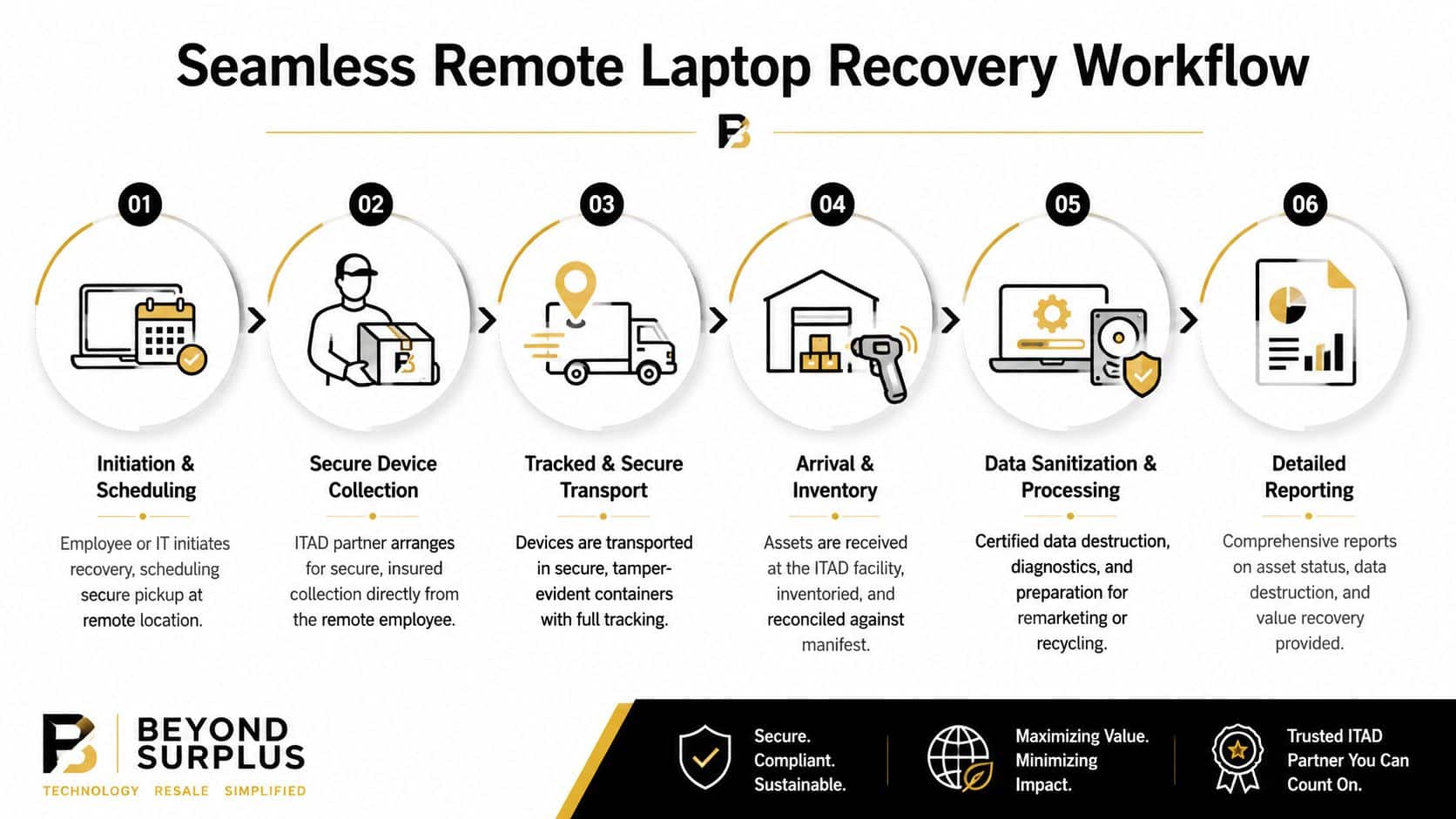
A controlled workflow usually includes six steps:
Trigger the recovery event
HR or IT submits the offboarding or refresh request with the employee's confirmed address, asset record, and required return items.Dispatch the kit
The recovery team sends the correct packaging and shipping label based on device type, location, and timing requirements.Confirm what should come back
The employee verifies the assigned device and checks whether items such as chargers, docks, or security keys must be included.Monitor the shipment
Tracking data updates the asset status so IT can intervene early if a package stalls, reroutes, or never enters the carrier network.Reconcile on receipt
Intake staff match the returned serial number and contents against the original record, then flag damage, missing components, or device mismatches.Route by business outcome
The asset moves into the correct stream for sanitization, repair review, redeployment preparation, resale processing, or recycling.
Teams building policy and workflow can use this remote employee equipment return program guide as a planning reference.
Where logistics programs break
Failures usually come from process gaps, not carrier performance alone.
Wrong packaging leads to broken screens and bent chassis. Unclear instructions lead to partial returns or the wrong asset being shipped. Weak reconciliation leads to intake records that show a package arrived, but do not prove which device arrived. Missing exception handling leaves damaged or incomplete returns sitting in limbo while asset records stay open and business units wait for direction.
The fix is disciplined operational design. Define who owns each handoff. Set time thresholds for non-response, non-shipment, and in-transit delays. Establish an escalation path for international returns, terminated employees, and assets that come back damaged or incomplete.
That is what turns remote recovery into a managed risk and value recovery function instead of a recurring cleanup exercise.
Maximizing Value Recovery from Returned Assets
A returned laptop can still hold budget value long after the employee is done with it. The difference comes down to how quickly and consistently you classify the asset, decide its next use, and move it into the right channel.
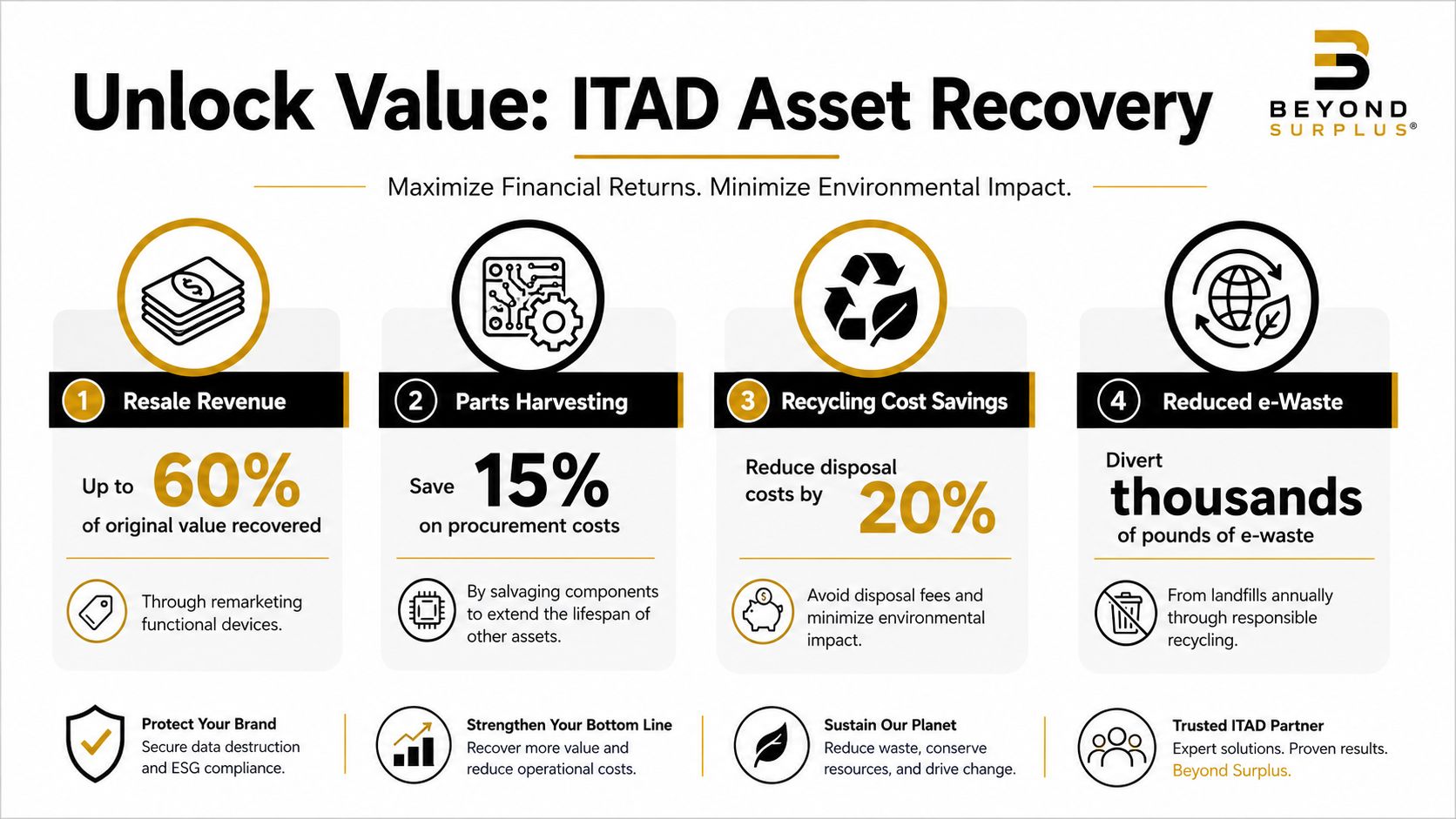
Triage turns returns into business outcomes
The highest-performing recovery programs do not treat all returned devices the same. They grade each laptop against resale demand, age, specs, cosmetic condition, battery health, repair cost, and internal redeployment need.
That decision point directly affects cost recovery.
A late-model laptop with minor wear may be worth more in resale than in a spare pool. A three-year-old unit with acceptable specs may create more value as a redeployed device because it avoids a new hardware purchase. A damaged system with a failed screen may still make sense to repair if parts and labor stay below the expected recovery value. If none of those paths hold up financially or under policy, recycling is the right closeout.
Programs lose money when they skip this discipline. Assets get scrapped too early, stored too long, or repaired with no clear return.
The four disposition paths
| Path | Best use |
|---|---|
| Redeploy | New hire onboarding, loaner pools, internal spares |
| Repair | Units with minor defects but acceptable economics |
| Resell | Late-model business hardware with secondary market demand |
| Recycle | Damaged, obsolete, or policy-restricted equipment |
Each path serves a different business objective. Redeployment reduces capital spend. Repair extends useful life when the numbers work. Resale converts idle equipment into recovered budget. Recycling closes out assets that no longer justify handling costs or carry policy restrictions.
A returned laptop should go to its next highest-value approved use, not to the fastest disposal option.
Why remarketing discipline matters
Value recovery depends on more than wiping the drive and listing the device for sale. The program needs consistent grading, tested functionality, accurate part identification, market-aware pricing, and a documented disposition trail that finance and compliance teams can both defend.
This is one reason many IT teams use an ITAD partner instead of consumer trade-in channels or ad hoc resale. Business devices often have better value in structured B2B remarketing streams where assets are processed in volume, graded consistently, and sold through channels that match the hardware type and condition.
A practical example is how Georgia businesses can maximize value with ITAD services, which shows how disciplined disposition decisions affect recovery results downstream.
The strategic point is simple. Remote laptop recovery is not finished when the box arrives. The full return comes from turning each asset into the best approved outcome for security, compliance, and financial recovery.
How to Select the Right ITAD Partner
Vendor selection gets sloppy when teams focus only on pickup coverage or unit price. Remote recovery requires a more disciplined review because the provider is handling data-bearing devices outside your facilities and across a dispersed workforce.
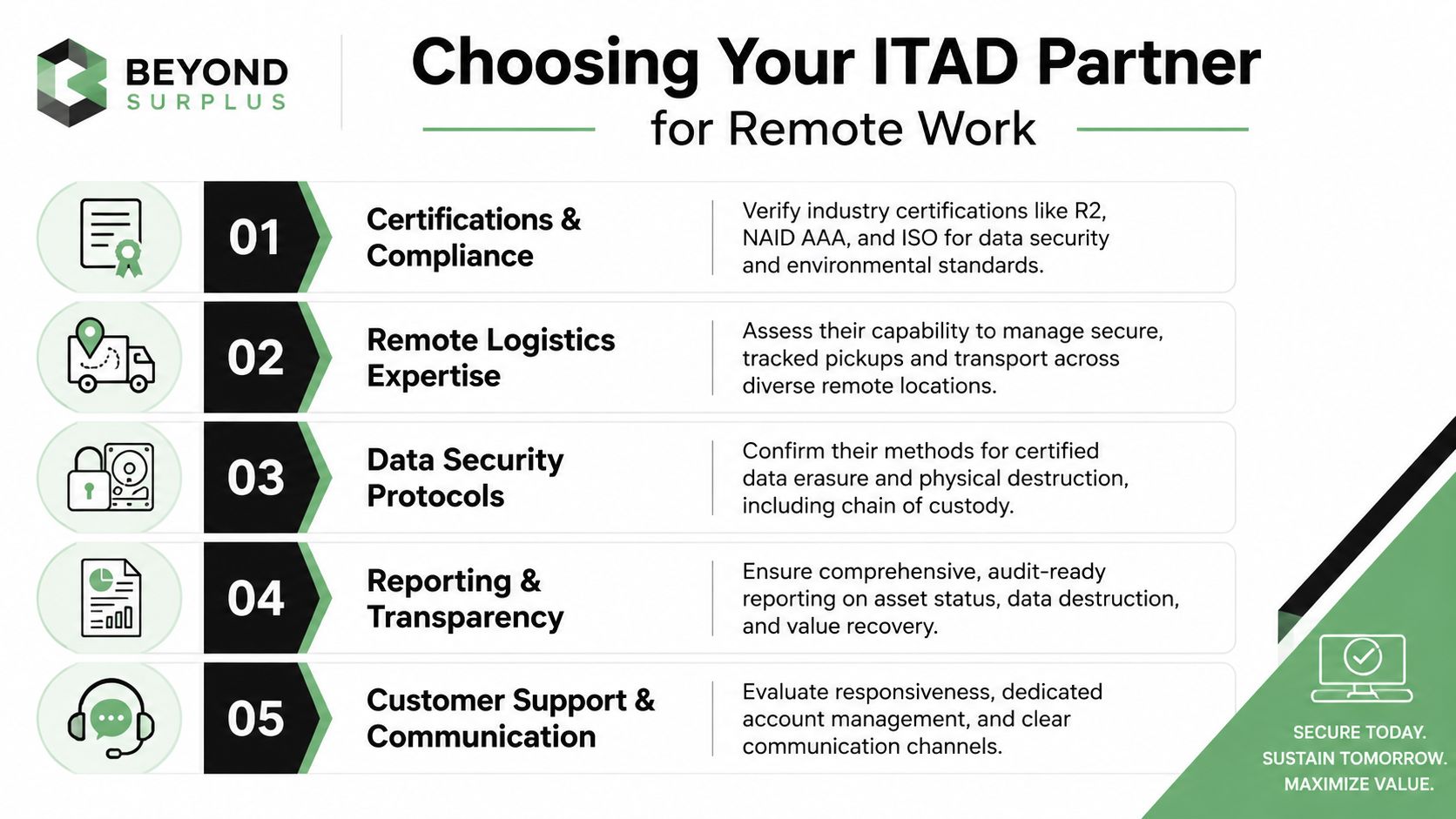
The non-negotiables
Use this as a working checklist:
- Security standards: Ask how the provider handles sanitization, destruction exceptions, and proof of completion.
- Remote logistics capability: Confirm they can support dispersed employees with repeatable collection methods.
- Reporting depth: Require audit-ready records, not summary invoices.
- Disposition transparency: You should know what was redeployed, resold, destroyed, or recycled.
- Support model: Named contacts and clear escalation paths matter when returns stall.
Questions worth asking in procurement
A short RFP section often tells you more than a polished sales deck:
- How is chain of custody documented from employee handoff through final disposition?
- What happens when the returned serial number doesn't match the manifest?
- How are damaged or non-functional drives handled?
- What documentation does the client receive after processing?
- How are devices routed for resale versus destruction?
If a provider can't explain exception handling clearly, they probably don't control it well.
What to avoid
Retail trade-in channels may look easy, but they aren't designed for enterprise recovery programs. They don't provide the same level of certified destruction, auditable handling, or remarketing control that corporate assets require.
For due diligence structure, this vendor due diligence checklist is a useful internal review aid. If you want one provider example in the market, Beyond Surplus offers nationwide logistics coordination, certified data wiping and destruction, and reporting support for business ITAD programs.
Implementing Your Remote Recovery Program
A workable program doesn't need to be complicated. It needs clear ownership, fixed decision points, and documented outputs.
A policy outline that holds up
Start with a simple operating model:
- HR triggers offboarding and confirms employee contact details.
- IT verifies assigned assets and flags any device with heightened data sensitivity.
- Recovery logistics begin through a standard return-kit process.
- Receipt and reconciliation occur before the asset is marked recovered.
- Sanitization or destruction is completed according to policy.
- Disposition reporting closes the loop for IT, compliance, finance, and procurement.
Then define service expectations. Who sends the kit. How quickly it goes out. When an unreturned device escalates. What report IT receives after processing. Those details prevent policy from becoming a document nobody can execute.
What good implementation looks like
The most effective programs share three traits:
- One owner for the workflow
- One standard process for every remote departure
- One reporting format that auditors and finance teams can both use
Remote recovery becomes manageable when the organization stops treating each laptop return as a special case. The role of ITAD in remote employee laptop recovery is to give that process structure, proof, and economic discipline.
Contact Beyond Surplus to design a secure remote laptop recovery program with certified electronics recycling, IT asset disposition, documented chain of custody, and value recovery options for enterprise equipment across the United States.