

A laptop refresh has just finished, but the work isn't over. Devices sit in a storage room, servers wait for removal, and nobody can confirm which drives still contain sensitive information. Procurement wants a recovery report, security wants evidence of destruction, facilities needs the space cleared, and finance wants to know whether the equipment still has value. IT lifecycle management gives every team a shared process for handling that situation, from the first purchasing decision through secure retirement.
Table of Contents
- Why IT Lifecycle Management Matters Right Now
- What IT Lifecycle Management Really Means
- The Five Stages of the IT Lifecycle and Who Owns Them
- Security Compliance and Environmental Impact Across the Lifecycle
- How ITAD Completes the Lifecycle and Recovers Value
- Best Practices Checklists and KPIs for Every Phase
- Putting Your IT Lifecycle Strategy Into Action
Why IT Lifecycle Management Matters Right Now
A laptop can be fully retired from a user's desk and still create work for security, finance, facilities, and IT operations. If its inventory record is incomplete, its storage location is unclear, or its data sanitization status is unknown, the organization cannot close the asset's business or security history. The same problem applies to servers, networking equipment, and equipment held for reuse or resale.
These gaps make audits harder and increase the chance of misplaced assets, unauthorized access, and unplanned handling costs. They also hide recoverable value. A device that reaches a resale channel while it is still in usable condition may return more value than one left in storage until demand or condition declines.
Refresh planning makes this issue more urgent. A 2025 lifecycle benchmark covering 56 organizations and more than 2.5 million processed assets found that laptop refresh cycles shortened from 4.3 to 4.0 years (Cascade Assets benchmark report). Faster refreshes send more equipment into storage, reuse, resale, recycling, and destruction workflows. Without matching IT asset disposition capacity, the end-of-life phase becomes a queue that slows projects and weakens accountability.
The environmental responsibility is also large. The Global E-waste Monitor 2024 reports that the world generated 62 billion kilograms of e-waste in 2022, or 7.8 kilograms per person. Only 22.3% was formally collected and recycled in an environmentally sound manner. The report also records growth from 34 billion kilograms in 2010 to 62 billion kilograms in 2022, making retirement practices part of sustainability and compliance planning.
The business case for lifecycle thinking
A practical program gives IT managers a checklist:
- Who owns the asset: Can procurement, IT operations, security, and facilities work from the same inventory?
- What happens next: Does every device have a documented route for reuse, resale, recycling, or destruction?
- What evidence exists: Are sanitization records, transfer documents, and recycling certificates available?
- What value remains: Has the team assessed equipment before its condition and market demand decline?
For local teams, IT asset management trends for Atlanta provides context for linking inventory discipline with retirement planning. The end-of-life phase therefore continues the lifecycle. A planned ITAD process carries security controls, sustainability goals, and value recovery through the final handoff, rather than treating disposal as an emergency task.
What IT Lifecycle Management Really Means
Think of an IT asset as a company vehicle. Procurement chooses the model, operations assigns it to a driver, maintenance keeps it reliable, management decides when replacement makes sense, and an approved partner handles the vehicle when the organization no longer needs it. Nobody would buy a fleet without ownership records, maintenance history, or a plan for retirement. Technology deserves the same discipline.
IT lifecycle management is the coordinated process of planning, purchasing, deploying, operating, refreshing, and retiring technology. It connects people, policies, systems, and vendors so an asset remains accountable throughout its useful business life. The laptop itself is only one part of the lifecycle. The other parts include its serial number, assigned user, configuration, location, support history, security status, and final disposition record.
Start with ownership
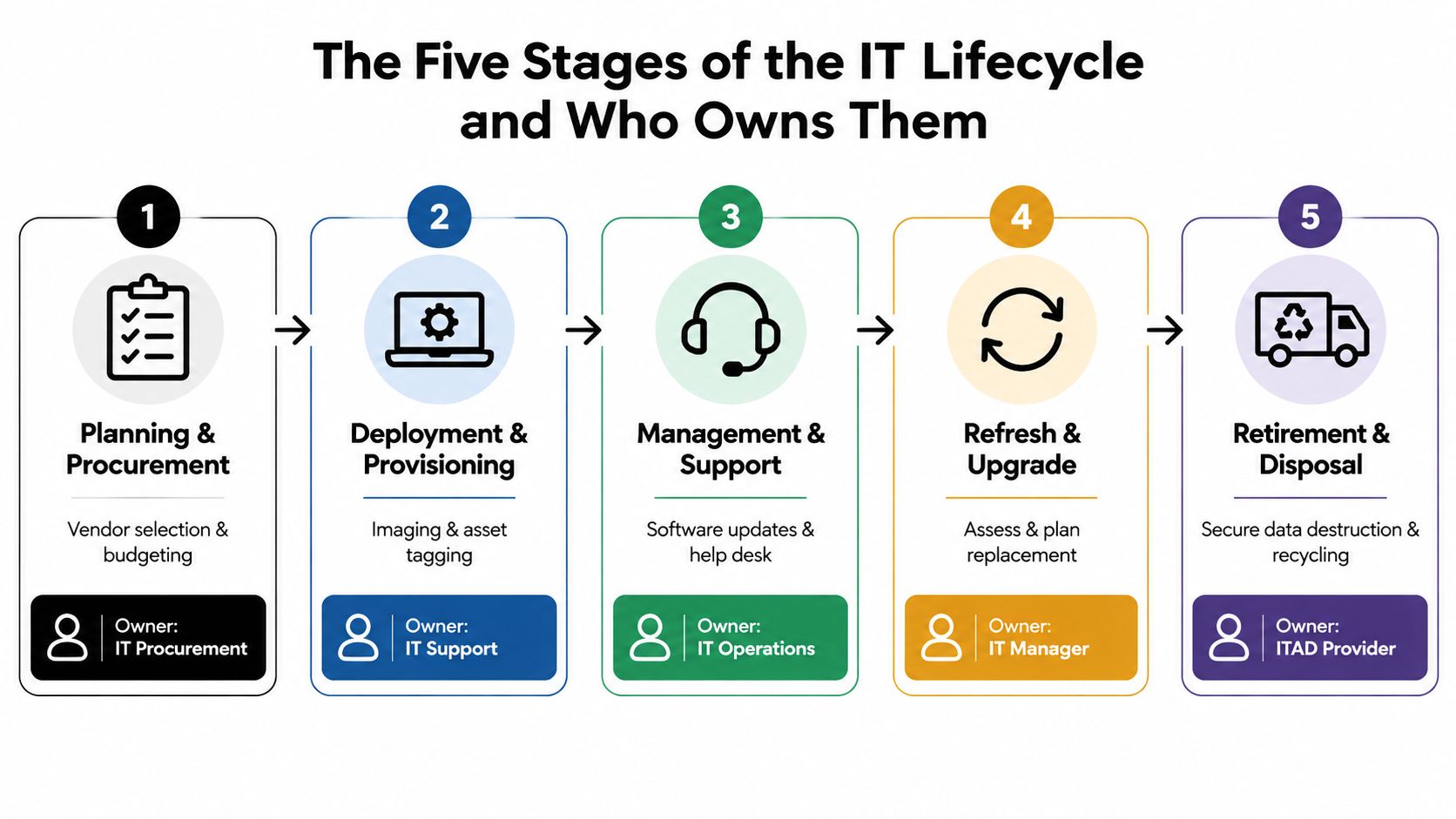
A lifecycle process works when each phase has a clear owner and a defined handoff. IT procurement may select a laptop model, but IT support must receive the specifications needed for imaging and enrollment. IT operations maintains the device, while security sets requirements for encryption, access, and retirement. An IT manager coordinates replacement timing, and an IT asset disposition provider manages secure destruction, recycling, or resale after authorization.
That ownership model prevents a common mistake: treating the asset register as a static list. The register should change when the device changes hands, location, condition, configuration, or status. A record that says “in service” after the laptop has been placed in a warehouse isn't useful evidence. It can also hide a security exposure.
Follow the asset, not just the department
The lifecycle begins before delivery. Procurement should document approved models, warranty terms, serviceability, operating requirements, and end-of-life expectations. Deployment should add an asset tag, record the serial number, assign the user or business function, and capture the system enrollment. Support should update the record as repairs and replacements occur.
The final phase deserves equal planning. IT asset management best practices can help teams formalize inventory controls, ownership, and disposition readiness. The practical test is whether a manager can trace an asset from purchase order to final certificate without relying on memory, scattered emails, or an unverified spreadsheet.
The Five Stages of the IT Lifecycle and Who Owns Them
A laptop can pass through procurement, deployment, support, refresh, and retirement while several teams handle different parts of its story. The lifecycle works only when each handoff carries accurate information forward. Assigning ownership means naming the team accountable for completing a phase and delivering usable records to the next owner, not isolating departments from one another.

Planning and procurement
IT procurement works with IT leadership, finance, security, and users to define requirements. The team evaluates compatibility, supportability, security features, warranty coverage, and expected business use. Procurement records the supplier, model, serial number when available, purchase details, and contract terms.
Retirement planning starts here. Select equipment that can be repaired, redeployed, remarketed, or recycled through a documented channel. A low purchase price can create later costs if the organization cannot identify the asset or demonstrate secure disposition. The Cascade Assets benchmark report also provides context for connecting refresh planning with downstream handling requirements.
Deployment and provisioning
IT support turns purchased hardware into controlled business equipment. This work usually includes imaging or enrollment, patching, encryption settings, endpoint protection, asset tagging, and assignment to a user or location. Before the device leaves staging, the team should confirm that its physical identity matches the asset record.
A clean deployment record supports recovery later. It helps support staff distinguish a missing device from one transferred to another department, location, or user.
Management and support
IT operations keeps the asset functional and governed. Maintenance includes software updates, endpoint monitoring, repair records, access changes, and updates to the user or location. Facilities and security may contribute when equipment sits in restricted areas, laboratories, healthcare environments, or data centers.
Support history guides the next decision. Repeated failures, obsolete software dependencies, or unavailable parts may show that replacement offers less risk than continued repair.
Refresh and upgrade
The IT manager coordinates replacement according to business requirements, security exposure, supportability, performance, and total cost. Planning should begin before equipment becomes stranded in a closet. The manager also schedules user migration, data retention, access removal, and collection of the outgoing asset.
A faster refresh cycle increases the number of devices entering retirement, so ITAD should be built into the replacement schedule rather than treated as a final cleanup task. Reserve time for collection, verification, data destruction, and value assessment alongside installation of the replacement equipment.
Retirement and disposition
The ITAD provider receives authorized equipment, verifies the shipment, maintains chain of custody, and completes the approved outcome. Possible outcomes include redeployment, resale, parts recovery, certified recycling, product destruction, or physical media destruction. The provider should return documentation that matches the original inventory.
Practical rule: If the disposition decision isn't documented before equipment leaves your facility, the organization has already lost control of part of the lifecycle.
The handoff should include an inventory list, collection details, asset condition, data-bearing components, approved sanitization method, and reporting requirements. Security, procurement, finance, and facilities should receive the records connected to their responsibilities. End of life therefore continues the same security, sustainability, and value controls established at purchase, rather than ending the asset's business history.
Security Compliance and Environmental Impact Across the Lifecycle
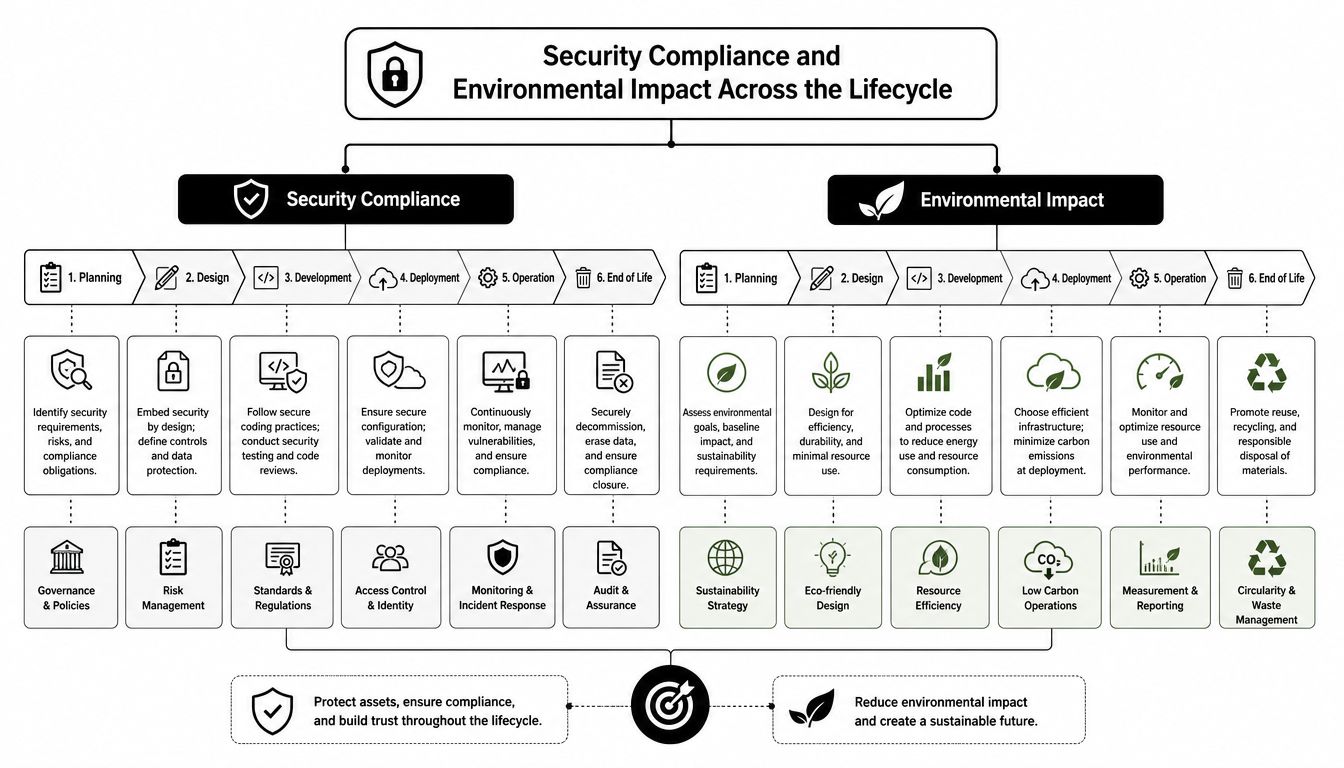
A retired laptop can create two separate problems at once: exposed data and unnecessary waste. The controls that address both begin before retirement. Accurate identification, data protection, controlled transport, and recorded decisions determine whether the final outcome is defensible. A missing serial number can weaken both a data-destruction report and a recycling record.
Security controls need an auditable endpoint
Sanitization must match the media, data sensitivity, and intended outcome. Equipment prepared for reuse may need validated wiping. A failed or highly sensitive drive may require physical destruction. The figures cited earlier indicate that organizations are placing greater emphasis on recognized sanitization practices. The practical requirement is clear: define a repeatable method, assign authorized personnel, verify completion, and retain evidence.
Chain of custody matters because a secure wipe after an undocumented transfer leaves an unresolved gap. Use controlled collection, locked staging areas, transfer records, and certificates that identify the relevant assets. Cyber controls and physical safeguards should be designed together, as explained in this guide to converging cyber and physical security.
Compliance extends beyond deletion
The FTC Disposal Rule requires businesses and individuals that maintain or possess consumer reports and related records for a business purpose to take appropriate measures when disposing of sensitive information derived from those records. IT managers should coordinate with legal, privacy, security, and records teams to determine which assets and data fall within applicable obligations.
Documentation must also fit the organization and industry. A healthcare provider, financial institution, government agency, and manufacturer may follow different requirements, yet each benefits from a consistent inventory, an approved process, and records that can be retrieved during review.
Environmental outcomes depend on the route
Disposition affects environmental impact. A life-cycle-assessment review found that recycling with end-of-life disposal generally creates lower toxicity and ecotoxicity burdens than landfill or incineration, while incineration produced the highest burden among the compared options (PubMed review). The appropriate route still depends on condition, transport, sorting, reuse potential, and material recovery.
Teams can connect these decisions to broader environmental objectives through sustainable IT asset management best practices. Reuse can extend functional life. Certified recycling supports responsible material recovery when reuse is unsuitable, so end of life remains a continuation of security, sustainability, and value management rather than a final disposal event.
How ITAD Completes the Lifecycle and Recovers Value
Informal disposal treats retired equipment as clutter. Integrated IT asset disposition treats it as a controlled business transition. The difference appears in the questions each process can answer.
| Informal disposal | Integrated ITAD |
|---|---|
| Who took the equipment? | Who collected, transported, and processed each asset? |
| Was data removed? | Which sanitization method was approved and verified? |
| Where did the material go? | Was the outcome reuse, resale, destruction, or certified recycling? |
| Did the equipment have value? | Was condition assessed before selecting the disposition route? |
| What evidence exists? | Are inventory records and certificates available for review? |

Bring disposition into the refresh plan
An ITAD partner should enter the process before collection day. The IT manager can provide an asset list, identify data-bearing equipment, define acceptable outcomes, and schedule pickup around user migration or facility work. For a data center decommissioning, the plan may also include rack removal, equipment separation, serialized inventory, media destruction, transportation, and site coordination.
Faster refresh cycles make timing more important. A device that remains boxed in a warehouse may lose condition, market appeal, or complete documentation. Early assessment helps separate equipment suitable for redeployment or remarketing from equipment that requires recycling or product destruction.
Require evidence, not assurances
Ask prospective providers how they verify wiping, handle failed drives, protect equipment during transport, and document downstream processing. Require certificates of data destruction or recycling where applicable, along with inventory reconciliation and a clear chain-of-custody record.
An integrated provider may offer secure data wiping, on-site or off-site hard-drive shredding, certified recycling, buyback, remarketing, logistics, and product destruction. Beyond Surplus is one example of a business ITAD provider offering those services, along with data center de-installation support and nationwide pickup coordination for organizations. Its IT asset disposition guide provides additional terminology for evaluating disposition programs.
The commercial outcome is not limited to avoiding risk. Proper sorting can identify equipment for reuse or resale, while documented recycling handles material that no longer has a practical second life. The retirement phase becomes a continuation of security, sustainability, and value recovery rather than a final act of disposal.
Best Practices Checklists and KPIs for Every Phase
A lifecycle program becomes manageable when teams convert policy into repeatable checkpoints. Start with the records that must exist, then define who updates them and how managers review exceptions.
Phase checklists
- Procurement: Approve standard models, record supplier and purchase data, confirm support terms, and define security and disposition requirements.
- Deployment: Apply asset tags, capture serial numbers, enroll devices, enable required protections, and verify the assigned user or location.
- Operations: Record repairs, transfers, access changes, software status, and equipment condition.
- Refresh: Identify replacement triggers, schedule collection, coordinate migration, remove access, and prepare an inventory for disposition.
- Retirement: Approve the outcome, document custody, sanitize or destroy data, reconcile assets, and retain certificates and recovery records.
Don't measure only how quickly a new device reaches an employee. A fast deployment with incomplete retirement records moves risk from one queue to another.
IT Lifecycle KPIs by Phase
| Lifecycle Phase | Example KPI | What Good Looks Like |
|---|---|---|
| Planning and procurement | Asset record completeness | Required purchasing and ownership fields are present before deployment |
| Deployment and provisioning | Tagging and enrollment completion | Each issued asset matches the management system |
| Management and support | Record update quality | Transfers, repairs, and location changes are recorded promptly |
| Refresh and upgrade | Refresh cycle length | Replacement decisions follow documented business and security criteria |
| Retirement and disposition | Sanitization compliance rate | Approved methods are verified and supported by documentation |
| Retirement and disposition | Remarketing value recovered | Eligible equipment is assessed before recycling or destruction |
| Retirement and disposition | Recycling rate | Non-reusable equipment moves through documented recycling channels |
The benchmark offers two useful reference points for managers. Laptop refresh cycles moved from 4.3 to 4.0 years, and reported NIST SP 800-88 compliance rose from 34% to 52% (Cascade Assets benchmark report). Use those figures as context, not as a universal target. Your target should reflect asset sensitivity, support requirements, contractual obligations, and environmental policy.
For collection preparation, use this business computer recycling checklist to standardize approvals, inventory, data handling, and pickup readiness. Review KPIs with security, finance, procurement, and facilities so the program measures business outcomes rather than activity alone.
Putting Your IT Lifecycle Strategy Into Action
Start with an inventory review. Identify assets in service, storage, repair, transit, and pending disposition. Reconcile serial numbers, owners, locations, data-bearing components, and status. Then select a manageable group of upcoming refreshes and test the complete workflow, including authorization, collection, sanitization, value assessment, recycling, and reporting.
Assign one accountable owner for each handoff. Set a recurring review for refresh forecasts, exception records, certificates, and recovery reports. If a data center closure, office move, or large laptop refresh is approaching, involve the ITAD provider during planning rather than after equipment has accumulated.
The strategy works when the end-of-life phase receives the same operational attention as procurement and deployment. Secure data destruction protects the organization, certified recycling supports responsible processing, and documented recovery decisions help finance understand residual value. A consistent process also gives auditors and stakeholders evidence instead of informal assurances.
Beyond Surplus supports business electronics recycling, IT equipment disposal, secure data destruction, asset recovery, product destruction, data center de-installations, and logistics coordination for organizations across the contiguous United States. Review your asset records now, identify the next retirement group, and define its disposition path before the equipment leaves active service.
Contact Beyond Surplus for secure data destruction, certified electronics recycling, IT asset recovery, and documented business equipment disposal. Visit Beyond Surplus to discuss a pickup, refresh, data center decommissioning, or compliant ITAD program for your organization.


