

Old laptops stacked in a storage room. Retired switches under a bench. A few failed drives in an admin drawer because no one wants to be the person who sends them out the wrong way. That's a familiar situation for IT managers in Decatur.
The problem usually isn't deciding that equipment has reached end of life. The problem is deciding what happens next. If assets leave your control without proper tracking, secure data handling, and final documentation, you're taking on unnecessary business risk. The average cost of a data breach reached $4.35 million according to ITAD USA's certified data destruction guidance. That's why strong ITAD programs treat end of life equipment as a governance issue, not a cleanup project.
Your Guide to Strategic IT Asset Disposition in Decatur
A practical ITAD program starts before pickup day. It starts when your team recognizes that retired equipment still carries data, compliance exposure, and residual value. That applies whether you're clearing out a server closet, replacing employee laptops, or closing a branch office in Decatur.
Most businesses already understand the front half of the asset lifecycle. Procurement tracks purchases. IT deploys devices. Finance depreciates them. The blind spot is retirement. That's where secure disposition connects directly to operations, audit readiness, and brand protection. If you need a refresher on lifecycle discipline, this overview of ITAM for business success is useful because it frames retirement as part of asset management, not a separate afterthought.
What a Decatur IT manager is really dealing with
The equipment pile is only the visible issue. The underlying issue is uncertainty:
- What's on each device
- Which assets can be reused or sold
- Which media requires destruction
- What records an auditor will ask for later
That's why Decatur ITAD services and data destruction programs work best when they're structured. Asset lists, chain of custody, sanitization decisions, resale evaluation, and recycling all need to connect.
Practical rule: If a device leaves your building without documented custody and a defined disposition path, the risk didn't leave with it.
A local business looking for Decatur computer and electronics recycling shouldn't stop at “Who can pick this up?” The better question is “Who can document every step and help us decide what should be wiped, shredded, remarketed, or recycled?”
What ITAD Encompasses Beyond Basic Recycling
Dropping old electronics into a recycling stream is disposal. IT asset disposition is something else. It's closer to retiring a company vehicle fleet. You don't just hand over the keys and hope for the best. You verify the VIN, transfer custody, document condition, remove company property, and decide whether to resell, scrap, or dismantle.
The same logic applies to IT hardware.
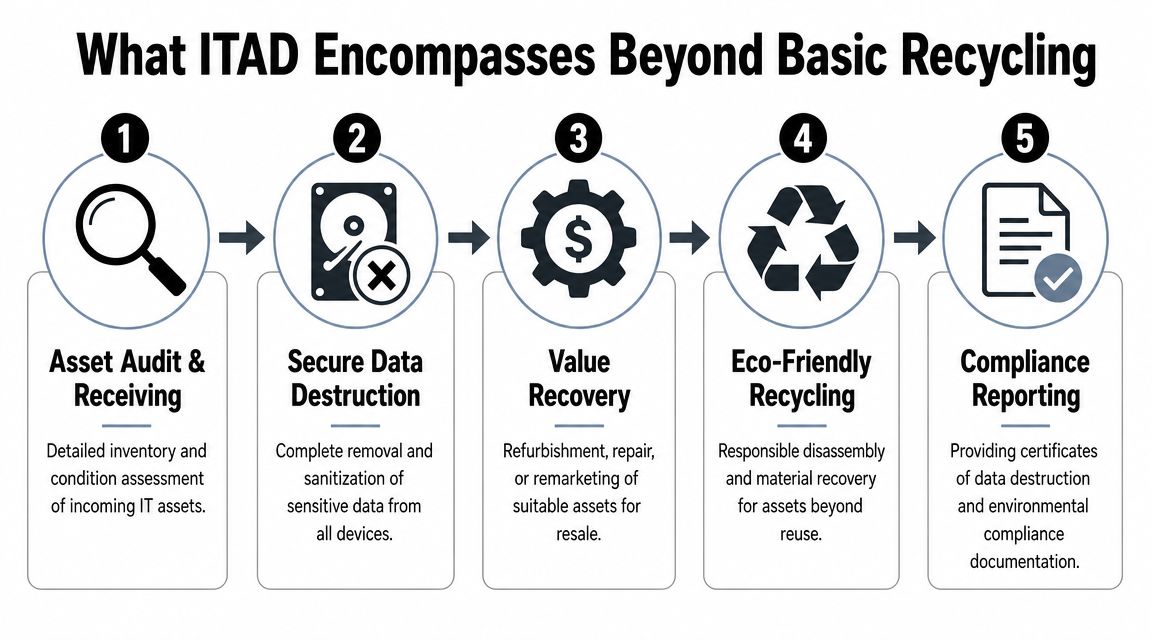
The managed lifecycle approach
A business-grade ITAD process usually includes several linked steps:
Asset intake and audit
Devices are counted, identified, and matched to a disposition plan.Secure logistics
Equipment is packed, transferred, and tracked so custody stays clear.Data sanitization or destruction
The method depends on device condition, reuse potential, and internal policy.Value recovery review
Usable assets may be tested, refurbished, or routed for resale.Recycling and reporting
Non-reusable equipment is processed responsibly, with documentation closing the loop.
Why basic recycling isn't enough
A recycler can remove obsolete hardware. A true ITAD workflow addresses liability. That means proving what came in, how it was handled, whether data-bearing media was wiped or destroyed, and how the final disposition was recorded.
Providers offering Georgia ITAD services differ from general e-waste collection. The work isn't only environmental. It's operational and evidentiary.
The best ITAD programs don't treat compliance, security, and value recovery as separate projects. They handle them in one controlled process.
For Decatur businesses, that distinction matters most when equipment volumes grow, multiple departments are involved, or regulated data may still sit on retired devices.
Secure Data Destruction Methods for Decatur Businesses
The right destruction method depends on two questions. Is the media functional, and does the device still have resale or redeployment value? If the answer to the second question is yes, wiping may make sense. If the media is damaged, high risk, or subject to stricter internal rules, physical destruction is usually the safer call.
Industry guidance notes that physical destruction is the most defensible control for high-risk media, and that shredding, grinding, and crushing are standard methods, while logical wiping is typically reserved for devices that can be reused or remarketed, according to this ITAD guide on secure data destruction.
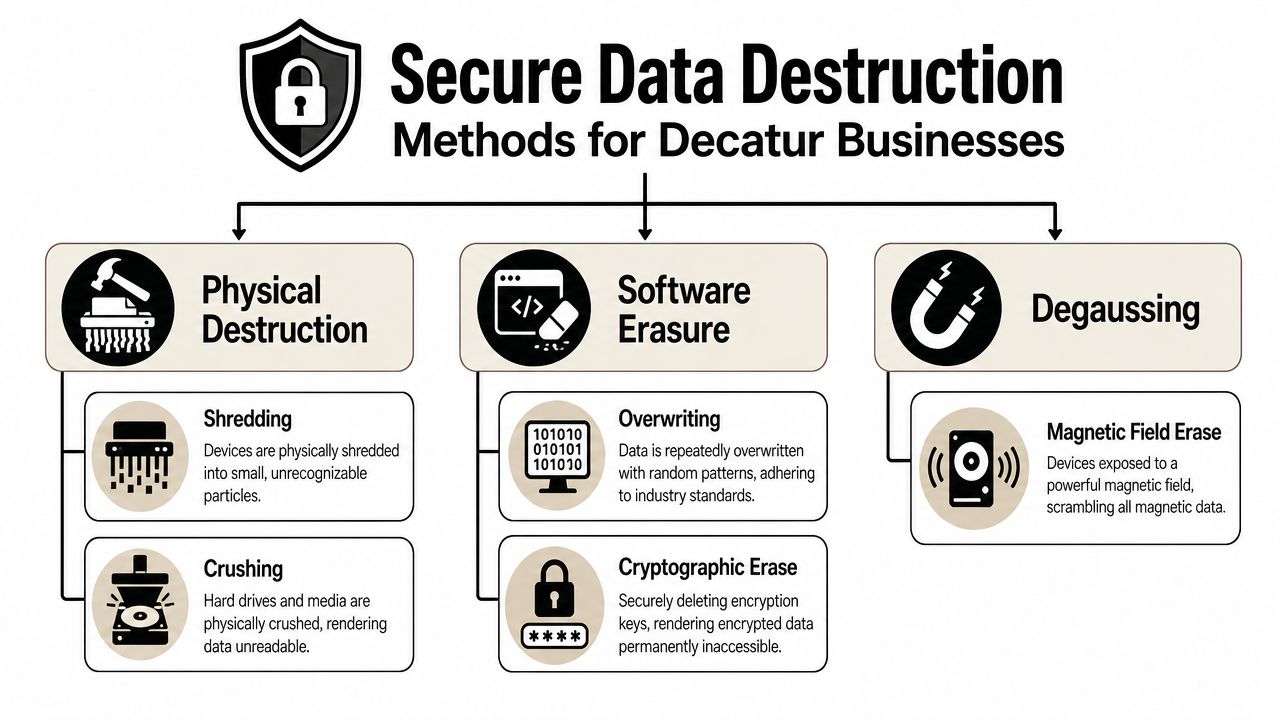
When wiping is the right tool
Software erasure works when a drive is functional and the business wants to preserve asset value. In professional ITAD, that usually means a standards-based sanitization workflow and a verifiable record that the erase completed successfully.
Use wiping when:
- The device still works
- You want resale or redeployment options
- Your policy allows sanitized reuse
- You need proof tied to the device record
When destruction is the better answer
Some media should never be routed into a reuse stream. Failed drives, old backup tapes, damaged storage, and especially sensitive media are better handled through physical destruction or degaussing.
Choose destruction when:
- The drive is non-functional
- The data risk is high
- Your regulator, customer, or internal policy expects irreversible destruction
- The device has little or no remarketing value
For many organizations, that's where onsite data destruction in Georgia becomes useful. The media can be destroyed at the facility before transport, which reduces handoff risk for especially sensitive assets.
What businesses often get wrong
The mistake isn't choosing shredding. It's choosing shredding for everything. That increases cost, eliminates recovery value, and often exceeds what's necessary for lower-risk reusable devices.
The opposite mistake is worse. Teams assume a quick format or internal delete process is enough. It isn't. If you want a useful non-technical explainer on employee and organizational exposure, this piece on understanding information theft risks is a good reminder that discarded hardware creates a very real attack surface.
Secure destruction should match the media, the data, and the business objective. Not fear, and not convenience.
Navigating Compliance and Chain of Custody Documentation
Most vendors can say they shred drives. That's not the hard part. The hard part is producing records that stand up when legal, compliance, procurement, or internal audit asks what happened to a specific laptop or failed SSD.
Auditors usually care less about marketing language and more about evidence. Corodata's guidance on improper IT asset disposal says businesses should require documented proof of disposal for every device, including timestamps, signatures, transportation logs, and vendors with verifiable certifications such as NAID AAA, R2, or e-Stewards.
What chain of custody should show
A real chain of custody isn't a vague promise that assets were handled securely. It should let you reconstruct the device journey from retirement through final disposition.
That record typically needs to show:
- Asset identity such as serial or internal tag
- Transfer details including pickup, receiving, and handoff points
- Responsible parties with signatures or equivalent approvals
- Disposition path such as wipe, shred, degauss, resale, or recycle
What a certificate needs to support
A certificate matters only if it ties back to the assets you released. If your certificate is broad, generic, or disconnected from inventory, it won't help much in an audit.
Look for records that connect the certificate to the item list and disposition event. Businesses that need formal proof often ask for a hard drive destruction certificate because it helps document that destruction occurred, when it occurred, and which media it covered.
| Document | What it should prove |
|---|---|
| Asset inventory | What devices were included |
| Pickup or transport log | When custody changed hands |
| Destruction or sanitization record | What method was used |
| Final certificate | That the disposition event was completed |
If you can't trace one retired device from the storeroom to final disposition, your documentation process still has a gap.
Healthcare, finance, government, and education teams in Decatur usually benefit from keeping these records organized by project, department, or location. That makes downstream audits easier and reduces scramble later.
Maximizing Value Recovery from Retired IT Assets
Not every retired asset belongs in a shred bin. A surprising amount of enterprise hardware still has value after it leaves production. Laptops, servers, networking gear, and some mobile fleets may still be useful in secondary markets if they're functional and properly sanitized.
That's why the smartest ITAD programs separate assets into tracks instead of treating everything as waste. One track is for high-risk or failed media that needs destruction. Another is for equipment that can be tested, cleaned, wiped, and remarketed.
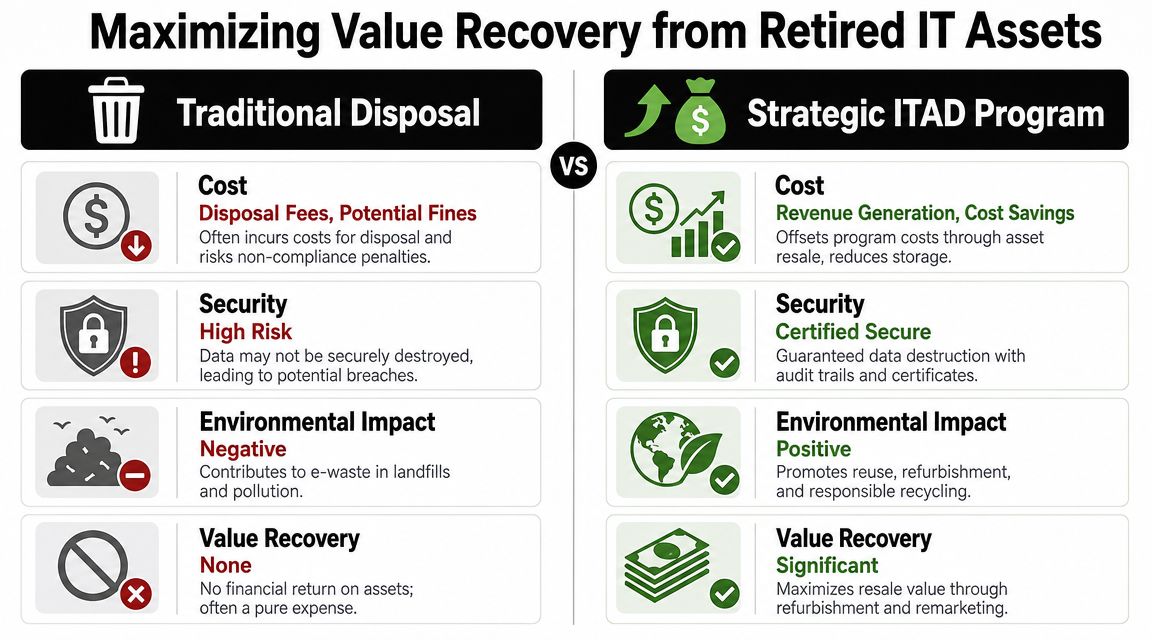
Where value recovery makes sense
The economics matter. Industry guidance notes that the choice between destruction and value recovery has real budget impact, and that marketable devices can often be wiped and resold, reducing e-waste while avoiding unnecessary destruction costs, as discussed in this ITAD facility and service expansion update.
A value recovery review should ask:
- Is the device functional enough to test?
- Is there current demand for this model class?
- Will compliant wiping preserve resale value?
- Does the likely return justify handling effort?
What doesn't work
What fails most often is the all-or-nothing approach. Some companies destroy everything because it feels safer. Others hold old equipment too long, hoping someone will eventually sort it. Both choices burn money in different ways.
A more disciplined approach is to grade assets quickly:
- Reusable assets go to wipe, test, and resale review.
- Low-value but non-sensitive hardware moves to responsible recycling.
- High-risk media goes straight to destruction.
- Mixed projects need item-level decisions, not one blanket rule.
That's the thinking behind asset recovery services in Georgia. A provider can evaluate which equipment belongs in a recovery channel and which should be retired with no resale attempt.
The cheapest decision on paper often isn't the lowest total cost. Storage drag, missed resale windows, and default destruction all add up.
For Decatur businesses, the best financial outcome usually comes from making the disposition decision early, while equipment still has a market and before records become incomplete.
Scheduling ITAD Logistics and Pickup in Decatur
Once you know what needs to leave, logistics should be straightforward. The smoother the pickup plan, the fewer custody gaps and internal delays you create.

What to prepare before pickup
You don't need a perfect spreadsheet to get started, but a little preparation saves time.
- Group assets by type such as laptops, servers, monitors, and loose drives.
- Flag sensitive media that may require destruction instead of wiping.
- Separate leased equipment from owned assets.
- Identify access limits such as loading dock hours, badge rules, or elevator restrictions.
What a practical pickup flow looks like
Most commercial ITAD projects in Decatur follow a simple sequence. First, define the scope. Second, confirm whether the project requires onsite destruction, standard pickup, or a larger decommissioning workflow. Third, document counts or serialized items at handoff so everyone agrees on what left the site.
For larger offices, clinics, schools, and warehouse locations, it also helps to assign one internal contact who can approve final release. That avoids confusion when assets are spread across multiple rooms or departments.
A good logistics plan should reduce work for your IT team, not create another side project.
FAQs for Decatur ITAD and Data Destruction
How do we start a commercial ITAD project in Decatur
Start with a list of asset types, approximate quantities, and whether you have data-bearing media that needs wiping or destruction. If the project includes servers, storage, or multiple departments, note that early so pickup and documentation can be scoped correctly.
What equipment is usually accepted
Business ITAD programs commonly handle laptops, desktops, servers, network gear, storage devices, monitors, mobile devices, and loose hard drives. Many projects also include printers, telecom equipment, and retired infrastructure from office moves or data center work.
Should every hard drive be shredded
No. If a drive is functional and eligible for compliant sanitization, wiping may support reuse or resale. If the media is damaged, high risk, or subject to stricter internal controls, destruction is usually the better fit.
How fast do we receive documentation
Turnaround varies by project size and service path. The right question to ask isn't only how fast documentation arrives. Ask what the documentation will include, whether it ties to itemized inventory, and whether it supports your internal audit needs.
What should we ask a provider before approving pickup
Ask about chain of custody, how assets are inventoried, what sanitization and destruction methods are available, which certifications they maintain, and what final reporting you'll receive. Those answers tell you much more than a simple pickup promise.
Can one project include destruction, recycling, and resale review
Yes. That's often the right model. Mixed loads are normal, and the strongest ITAD programs route each asset according to risk, condition, and value instead of forcing one disposal method across everything.
If your team is sitting on retired laptops, failed drives, surplus network gear, or a larger decommissioning project, contact Beyond Surplus to schedule certified electronics recycling and secure IT asset disposal for your Decatur business.


