Global e-waste reached a record 62 million tonnes in 2022, equal to about 7.8 kg per person, yet only 22.3% was formally collected and recycled in an environmentally sound way, according to the Global E-waste Monitor 2024. Businesses retiring desktops, laptops, servers, storage devices, and networking equipment are therefore working inside a system where most discarded electronics still bypass documented recycling channels.
That makes how to recycle business computers responsibly a security, compliance, logistics, and value-recovery decision. A sound program inventories every asset, matches sanitization to data sensitivity, verifies each result, controls transportation, and preserves records through final disposition. Recycling is only the last step in a broader IT asset disposition workflow.
Table of Contents
- Why Business Computer Recycling Demands a Different Approach
- Assessing and Inventorying Your IT Assets Before Disposal
- Choosing the Right Data Destruction Method for Each Device
- Selecting and Vetting a Certified ITAD Vendor
- Managing Logistics and Documenting Chain of Custody
- Evaluating Reuse and Value Recovery Before Recycling
- Building an Internal Computer Recycling Policy and Checklist
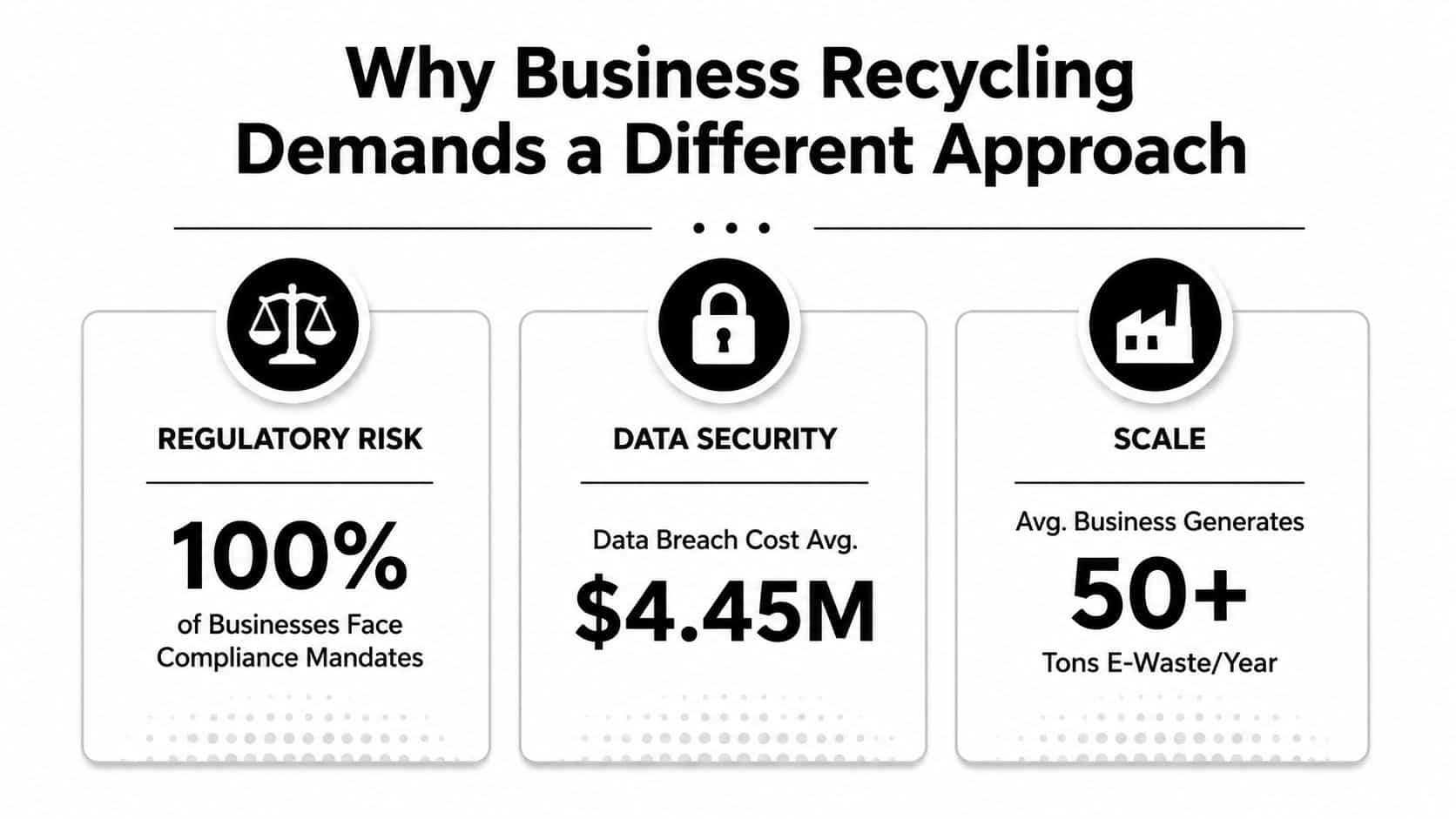
Why Business Computer Recycling Demands a Different Approach
A household drop-off model doesn't fit an enterprise fleet. A business computer may contain customer records, employee information, financial data, intellectual property, credentials, or regulated healthcare information. Sending that equipment to an unknown processor without item-level tracking can create exposure even when the equipment eventually reaches a legitimate recycler.
The environmental scale is already significant. The Global E-waste Monitor 2024 reports that the world is generating e-waste about 2.6 million tonnes faster every year, with a projected 82 million tonnes by 2030. The same source identifies roughly US$62 billion in recoverable resources that go unaccounted for annually. Businesses need a process that protects those resources without treating data security as an afterthought.
Compliance and security travel together
The FTC Disposal Rule, HIPAA obligations, state e-waste requirements, and internal retention policies can all affect the disposition workflow. The exact requirements vary by organization and jurisdiction, but the operational expectation is consistent: know what left your control, protect the information stored on it, and retain evidence of what happened.
Earlier international reporting recorded an official collection and recycling rate of 17.4% in 2019, compared with 22.3% in 2022, as documented by the International Telecommunication Union's Global E-waste Monitor publication page. That modest improvement doesn't eliminate the underlying recovery gap. It reinforces why a company should use a controlled ITAD process rather than an informal electronics pickup.
Practical rule: Treat every storage-bearing device as a controlled asset until its data disposition and final destination are documented.
A mature ITAD program connects asset inventory, data sanitization, reuse, resale, destruction, recycling, transportation, and reporting. The IT asset disposition overview from Beyond Surplus provides useful terminology, but the central principle is straightforward: physical recycling doesn't prove that business data was handled correctly.
Assessing and Inventorying Your IT Assets Before Disposal
The first mistake in computer recycling is often made before the vendor arrives. Teams identify a room full of equipment, estimate the quantity, and schedule a pickup without creating a reliable asset register. That approach makes it difficult to select the correct destruction method, calculate residual value, or prove that every device reached its intended disposition.
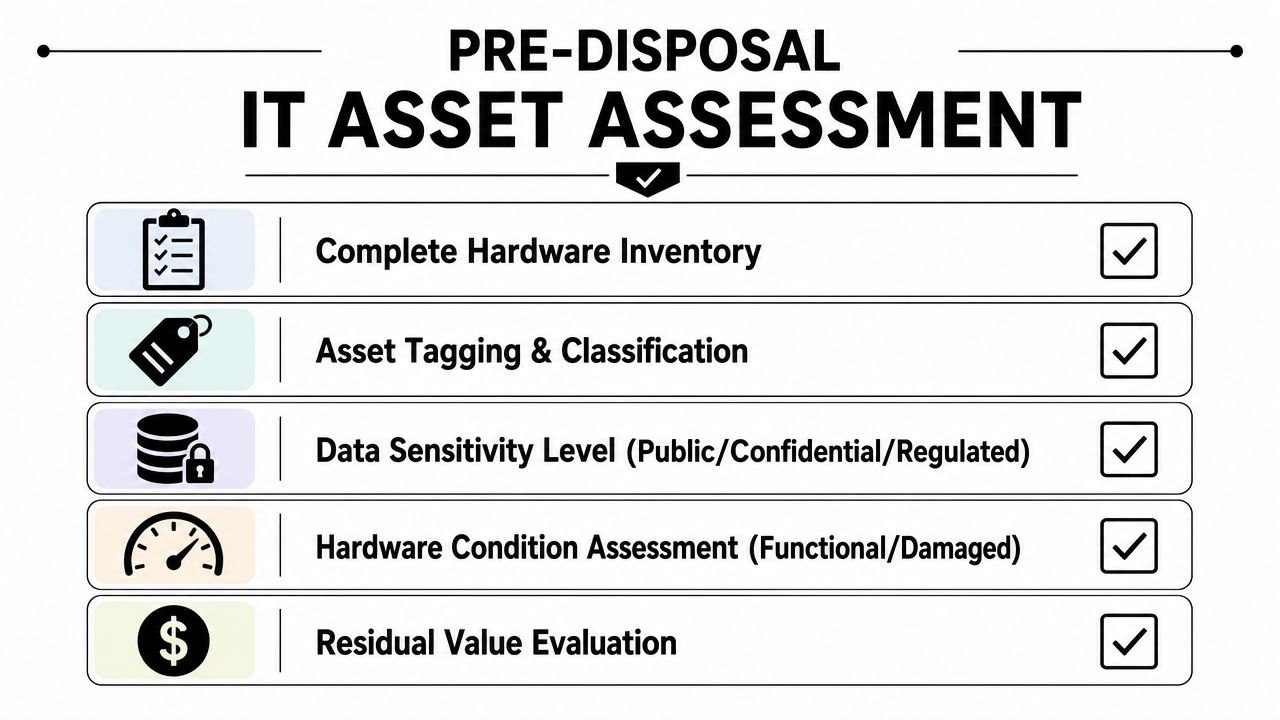
Begin with a disposal-specific inventory. Capture the asset tag, manufacturer, model, serial number, device type, location, assigned department, operating condition, and storage media. Include desktops, laptops, servers, hard drives, SSDs, networking equipment, monitors, and peripherals when they travel through the same project.
Classify assets before you price them
A useful register adds three decision fields:
- Data sensitivity: Mark the device as public, confidential, regulated, or unknown. Unknown devices should be handled conservatively until someone confirms their history.
- Media type: Identify magnetic hard drives, solid-state drives, removable media, embedded storage, and devices with failed or inaccessible media.
- Disposition intent: Separate internal redeployment, certified wiping for reuse or resale, physical destruction, and material recycling.
Condition and value deserve separate treatment. A working laptop with a readable serial number may be suitable for wiping and resale, while a damaged laptop with a failed SSD may require destruction. A retired server can contain multiple drives, so its chassis count isn't enough for a destruction quote or a final certificate.
Use a spreadsheet or asset-management export that your downstream provider can consume without manual interpretation. The vendor should receive serial numbers, quantities, media details, condition grades, pickup locations, and any special handling requirements before issuing a final scope.
Resolve exceptions before the loading dock
Inventory reconciliation should happen before equipment is staged. Match the physical count against procurement records, endpoint-management data, lease schedules, and prior transfer documents. Flag missing serial numbers, devices held for litigation, encrypted systems awaiting key confirmation, and assets that contain removable drives.
The equipment condition assessment service is relevant when the organization needs a structured evaluation of functionality and residual value. Don't let a high resale estimate override a security decision. A device's financial value matters only after the organization determines that its data can be sanitized with confidence and documented properly.
Choosing the Right Data Destruction Method for Each Device
The correct destruction method depends on the media, information sensitivity, intended disposition, and recovery risk. NIST classifies sanitization as Clear, Purge, or Destroy. Its SP 800-88 Revision 2 guidance also calls for a documented method, outcome verification, and per-device records. Those records support compliance reviews and help establish where responsibility sits if an asset is later questioned.
A certified wipe can preserve resale value, but only when the drive and workflow support reliable verification. Physical destruction removes reuse and recovery value, yet may be the sounder decision when equipment leaves organizational control, stores highly sensitive information, or cannot be sanitized with confidence. The hard-drive shredding versus data-wiping comparison helps stakeholders assess that security and value trade-off.
| Method | Best For | Compliance Level | Value Recovery | Verification Required |
|---|---|---|---|---|
| Certified wiping | Functional drives approved for reuse, resale, or redeployment | Clear or Purge, when the method suits the media | Preserves the highest recovery potential | Yes, with a recorded result tied to the asset |
| Degaussing | Compatible magnetic media where the process is validated | Purge or Destroy, depending on the media and program | Usually eliminates normal reuse potential | Yes, including equipment and process records |
| Physical shredding | Failed media, high-risk storage, or devices that can't be confidently sanitized | Destroy | No recovery from the destroyed media | Yes, with destruction records and final disposition |
Match the method to the media
Deleting files or formatting a volume does not adequately address sensitive data. NIST's earlier SP 800-88 Revision 1 publication discusses overwrite methods, including an optional three-pass approach using a pseudorandom pattern with an inverted second pass. Do not apply that legacy routine automatically. The selected process must match the drive technology and the organization's current policy.
Hard drives and SSDs require different validation. Storage management, overprovisioning, and inaccessible sectors can affect whether a wipe provides equivalent assurance across media types. Degaussing also depends on the media. Require the provider to explain field-strength validation and compatibility rather than accepting it as a universal solution.
For physical destruction, confirm whether the provider handles complete devices, loose drives, or both. Ask what particle or fragment size the process produces, how destruction is recorded, and how the material reaches final disposition. For a supplementary privacy checklist before equipment leaves an organization, consult the We Fix PC Laptop data privacy guide. Enterprise workflows still require controlled authorization, verification, and evidence rather than informal user preparation.
Selecting and Vetting a Certified ITAD Vendor
A certification logo is a starting point, not a complete due-diligence file. The vendor must show how it controls the equipment from pickup through processing, resale, downstream recycling, or destruction. The EPA implementation study on electronics recycling standards is relevant because documented standards and audits address environmental, health, and safety performance across the recycling chain.
Ask for evidence, not assurances. A credible provider should be able to explain its facility controls, employee access procedures, media handling, downstream relationships, insurance, incident response, and reporting process.
Questions that expose weak programs
- Who processes the equipment: Identify whether the vendor owns the facility, uses subcontractors, or transfers specific material streams downstream.
- How data results are verified: Confirm that certificates identify the asset, method, technician or responsible operator, date, and final disposition.
- How exceptions are handled: Ask what happens when a serial number is missing, a drive fails testing, or an asset arrives with a different configuration.
- How value is calculated: Require clear grading criteria, deductions, and disposition outcomes for buyback or resale.
- How liability moves: Review the transfer point in the contract, chain-of-custody language, insurance coverage, and responsibilities for loss or unauthorized access.
A healthcare system might require witnessed destruction for selected media and an audit of the receiving facility. A financial organization may approve certified wiping for standard endpoints but route failed drives to destruction. Those decisions should appear in the statement of work, not remain as informal instructions to warehouse staff.
A vendor that can't identify the next destination of your equipment hasn't provided a complete chain of custody.
Run a pilot before committing a large fleet. Send a controlled sample, compare the returned asset report against your register, inspect certificates, and test whether the vendor's exception process works. The vendor due-diligence checklist can support that review. Beyond Surplus is one commercial option that provides ITAD, secure data destruction, electronics recycling, logistics coordination, and certificates for business disposition projects.

Managing Logistics and Documenting Chain of Custody
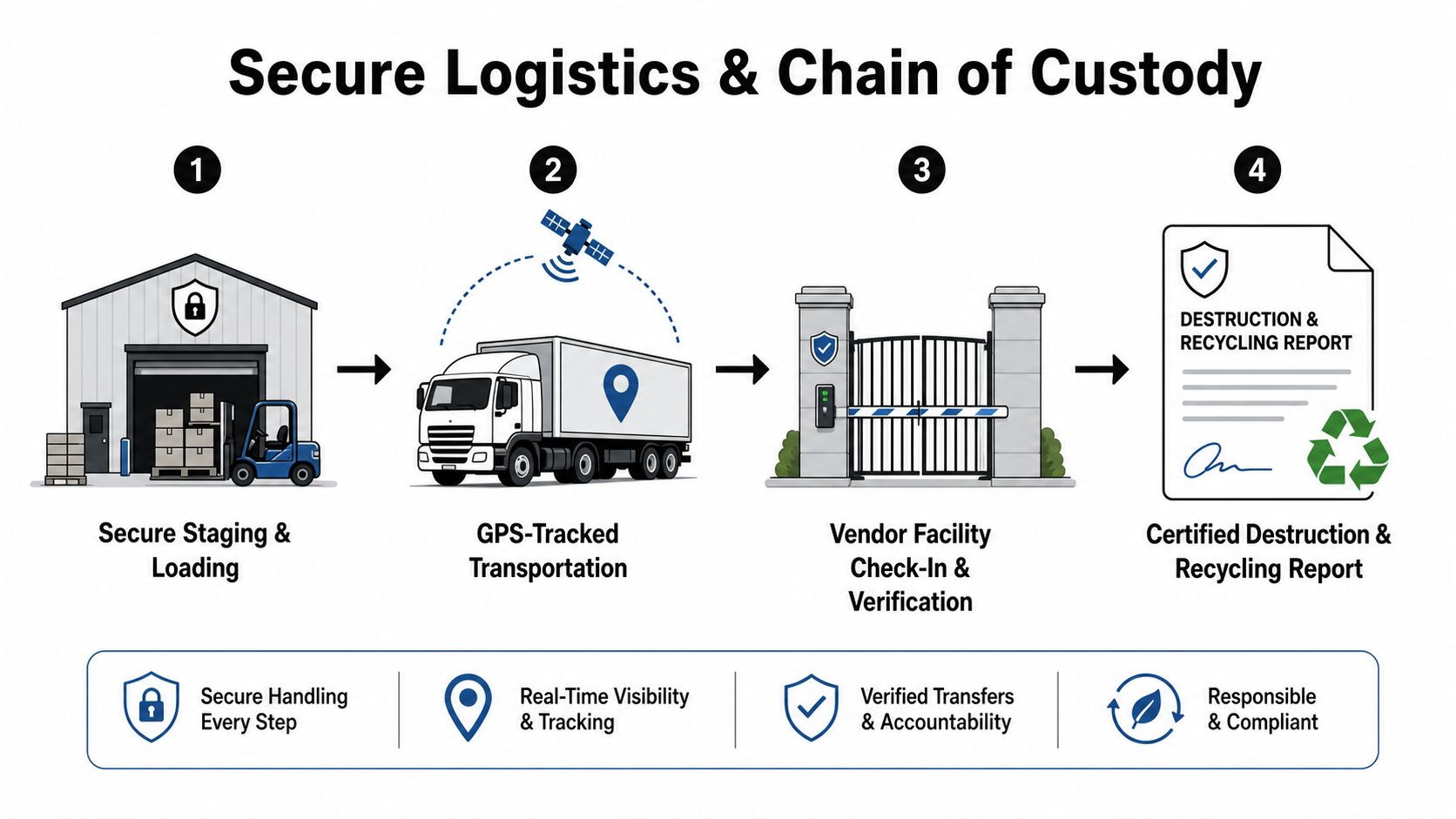
The loading dock is where a carefully designed disposal plan can fail. Equipment left in an unsecured staging area, counted only by pallet, or handed to an unidentified carrier creates an evidence gap. Secure logistics should connect the physical handoff to the asset register and continue until the processor confirms receipt.
Prepare a controlled staging area with restricted access. Seal or otherwise secure containers, record the asset identifiers loaded, photograph unusual conditions when appropriate, and require signatures at each transfer. On-site destruction may reduce transport risk and provide a witnessed event, while off-site processing can offer broader equipment and testing capabilities. The right choice depends on data sensitivity, volume, facility constraints, and the vendor's controls.
Build the record around the asset
A shipment record should connect:
- Release: The authorized employee, date, location, asset list, container count, and carrier or vendor representative.
- Transport: The vehicle or shipment reference, destination, and any tracking information supplied under the service agreement.
- Receipt: The receiving facility, check-in date, condition exceptions, reconciled serial numbers, and staff confirmation.
- Disposition: The sanitization or destruction method, verification result, technician identification, date, certificate number, and final outcome.
Certificates that say only “electronics recycled” are weak evidence for a high-risk fleet. The organization needs item-level documentation that distinguishes wiping, destruction, reuse, resale, and material recycling. Retain the certificates with the original inventory, purchase or lease records, approvals, and exception correspondence.
Don't overlook international movement
Cross-border consolidation adds a separate compliance layer. The Basel Convention e-waste amendments FAQ explains the prior informed consent mechanism for covered transboundary movements, including written notification and consent from importing and transit states before shipment begins.
The European Commission states that, from 1 January 2025, hazardous e-waste is classified as A1181 and non-hazardous e-waste as Y49. It also states that exports of all e-waste from the EU to non-OECD countries are prohibited, while exports to OECD countries and imports into the EU are subject to prior informed consent, as described on its waste shipments guidance page. Multinational IT teams should validate classification, paperwork, destination approval, and transit requirements before equipment moves across borders.
The chain-of-custody documentation service page outlines the kind of evidence a business should expect from a controlled disposition workflow.
Evaluating Reuse and Value Recovery Before Recycling
Before recycling becomes the default answer, run each device through a reuse hierarchy that can preserve value and reduce demand for replacement equipment. A computer that remains serviceable may support internal redeployment, repair, refurbishment, or resale, provided its data and condition are controlled.
Use this order:
- Redeploy: Assign suitable equipment to teams with less demanding workloads, after confirming compatibility and support requirements.
- Repair or refurbish: Replace eligible components, test the system, and record its resulting condition.
- Resell: Apply a verified media-sanitization method, grade the hardware accurately, and retain the disposition record.
- Recycle: Send equipment or components to environmentally sound processing when reuse is no longer practical.
The decision matrix must include data risk, not only resale value. Verified wiping can preserve recovery value for a working laptop. Physical destruction removes that option, but it may be required for high-sensitivity data or failed media that cannot be reliably sanitized. IT and procurement leaders should approve the method against lifecycle cost, device condition, media type, and information risk. A resale estimate should never determine the sanitization method by itself.
Right-to-repair laws and extended producer responsibility programs support longer asset life and more deliberate local processing. They also make vendor scrutiny more important. Ask whether the downstream processor can document testing, resale, component recovery, and final recycling, rather than accepting a general sustainability statement.
The practical test is whether the organization can extend a device's life safely, recover value with verified controls, and preserve evidence for the next transition when recycling becomes appropriate.
Building an Internal Computer Recycling Policy and Checklist
A workable policy gives staff a repeatable path from retirement approval to final records. Keep the document operational rather than aspirational.
Policy template
- Inventory: Record serial number, asset tag, media type, location, condition, and owner.
- Classify: Mark data sensitivity and select Clear, Purge, or Destroy.
- Approve: Obtain IT, security, legal, and business-owner approval for exceptions.
- Sanitize: Use an approved media-specific method and verify the result.
- Select disposition: Redeploy, refurbish, resell, destroy, or recycle.
- Control logistics: Secure staging, authorized pickup, reconciled receipt, and documented transfers.
- Retain evidence: File certificates, asset reports, approvals, and exception records together.
- Audit: Review vendor performance, downstream controls, missing records, and policy changes on a scheduled basis.
Train facilities, security, procurement, and IT staff on the handoff rules. A policy only protects the organization when employees know that an untracked laptop can't be placed in a general recycling bin.
Beyond Surplus provides commercial computer recycling, secure data wiping, hard-drive shredding, IT equipment disposal, ITAD, product destruction, data-center decommissioning, logistics coordination, and certificates of recycling and data destruction. Visit Beyond Surplus to plan a documented business pickup and match each asset to a defensible reuse, destruction, or recycling outcome.