A remote employee leaves on Friday. By Monday, HR has closed the ticket, the manager has moved on, and IT is still waiting for a laptop that contains company email, files, saved credentials, and browser sessions. The shipping label was never sent, nobody confirmed the serial number, and the former employee has stopped replying.
That situation is common because remote offboarding breaks down at the handoff points. HR assumes IT will handle retrieval. IT assumes the employee will cooperate. Procurement assumes the asset will eventually reappear. In practice, companies lose time, hardware, and control at the exact moment they need a clean chain of custody.
How to streamline laptop returns during remote employee offboarding comes down to three disciplines working together: policy, automation, and enforcement. If any one of them is weak, the process turns into a string of manual follow-ups and avoidable risk.
The High Cost of a Broken Offboarding Process
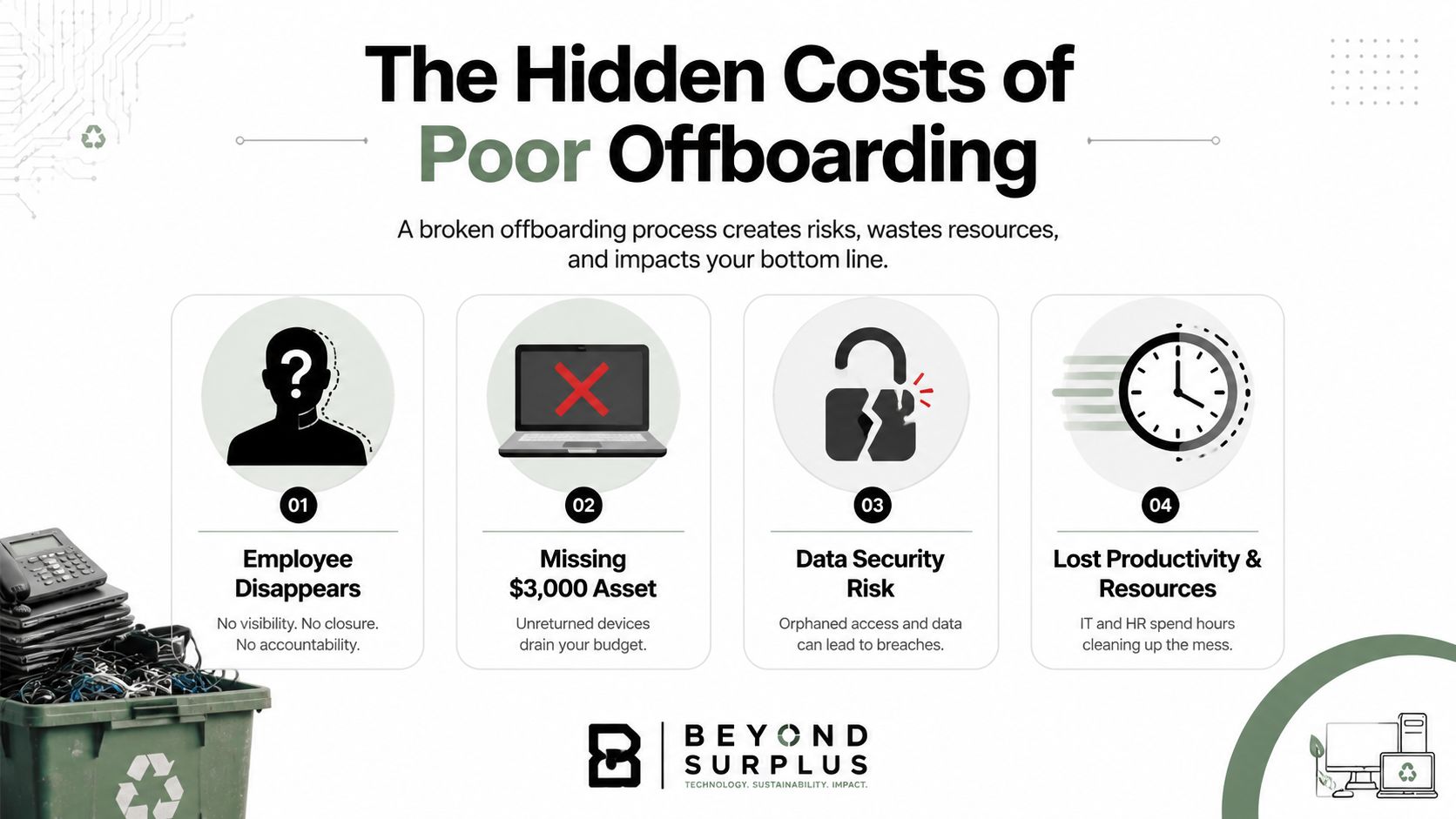
The failure usually starts small. A manager submits a departure notice late. IT sends a polite email. The employee says they'll ship the laptop next week. Then access is revoked, communication slows down, and the device disappears into a gray area between HR, IT, and legal.
That gray area is expensive. A staggering 71% of HR professionals reported that at least one departing employee failed to return company equipment, and 41% of data breaches originate from lost or stolen devices, according to Teqtivity's analysis of equipment return and device risk. An unreturned laptop isn't just missing hardware. It's a live security and compliance problem.
A strong summary of the business risk is covered in this resource on why remote employee laptop recovery matters for data security.
Where manual follow-up fails
Manual offboarding depends on memory and goodwill. Neither is a control.
When the process lives in inboxes and spreadsheets, teams miss obvious steps:
- Access gets revoked too early: The employee loses visibility into return instructions, labels, and pickup messages.
- Asset records stay incomplete: IT may know the user's name but not the serial number, charger status, or device condition.
- Nobody owns escalation: HR chases signatures, IT chases hardware, and legal hears about the issue too late.
Practical rule: If laptop recovery starts after the last working day, the company is already behind.
Why remote work makes it worse
Distributed teams create distance between the company and the asset. There's no desk pickup, no front-office handoff, and no easy visual confirmation that the laptop came back intact. The process needs to replace that physical control with documented steps, shipment tracking, and security actions that happen on time.
The companies that handle this well don't treat returns as an admin task. They treat them as an asset recovery and data protection workflow.
Designing Your Bulletproof Return Policy
If the policy is vague, the process will be vague. That's why the return policy has to be built before anyone leaves, not drafted during a disputed offboarding.
The operational case is clear. Organizations without structured return processes experience only a 70–85% laptop return rate, leaving 15–30% of devices missing permanently, while companies using automated follow-ups, prepaid shipping labels, and digital tracking improve outcomes, as outlined in this review of remote laptop return practices.
A practical baseline for drafting and maintaining that policy is this guide to IT asset management best practices.
Clauses that need to be in writing
A usable policy is specific. It should identify what the employee must return, when they must return it, and what happens if they don't.
Include these core elements:
- Ownership language: State that laptops, docks, phones, chargers, tokens, and peripherals remain company property.
- Return timing: Require return within 5–7 days of the last working day if shipment is involved.
- Condition expectations: Require reasonable care and prohibit disposal, transfer, resale, or gifting of company equipment.
- Shipping instructions: State that the company will provide packaging, a prepaid label, or pickup instructions.
- Inspection rights: Reserve the right to inspect the device for missing parts, damage, and asset tag verification.
- Security controls: State that the company may lock, track, or wipe devices under its device management policy.
- Enforcement language: Where legally permissible, reference paycheck deductions, repayment obligations, or referral for legal recovery.
What works better than a last-minute acknowledgment
The best time to get agreement is onboarding. A signed handbook acknowledgment, equipment receipt, and acceptable use policy create a usable paper trail later. Trying to collect consent during a tense exit rarely works.
“If the return obligation wasn't clear on day one, don't expect clean compliance on the last day.”
Policy language that reduces disputes
Keep the wording plain. Legal review matters, but plain language prevents arguments.
For example, your policy should say the employee must return “all assigned company equipment in their possession, including accessories issued with the device,” not just “hardware as applicable.” The second version creates room for debate about chargers, adapters, and monitors.
A strong policy also separates logistics from consequences. First, tell people exactly how to return the asset. Then state what happens if they fail to do it. Combining both in one sentence tends to produce confusion and HR friction.
Automating Logistics and Communication
Once the policy exists, the next job is removing friction. The process should start before the final day, not after. Organizations should trigger the retrieval workflow 5–7 days before an employee's last working day, because retrieval success drops once access is revoked, according to GoWorkwize's guidance on streamlining laptop returns.
That timing matters because the employee is still reachable, the shipping address can still be confirmed, and HR and IT are still able to resolve issues quickly.
Build the workflow around one trigger
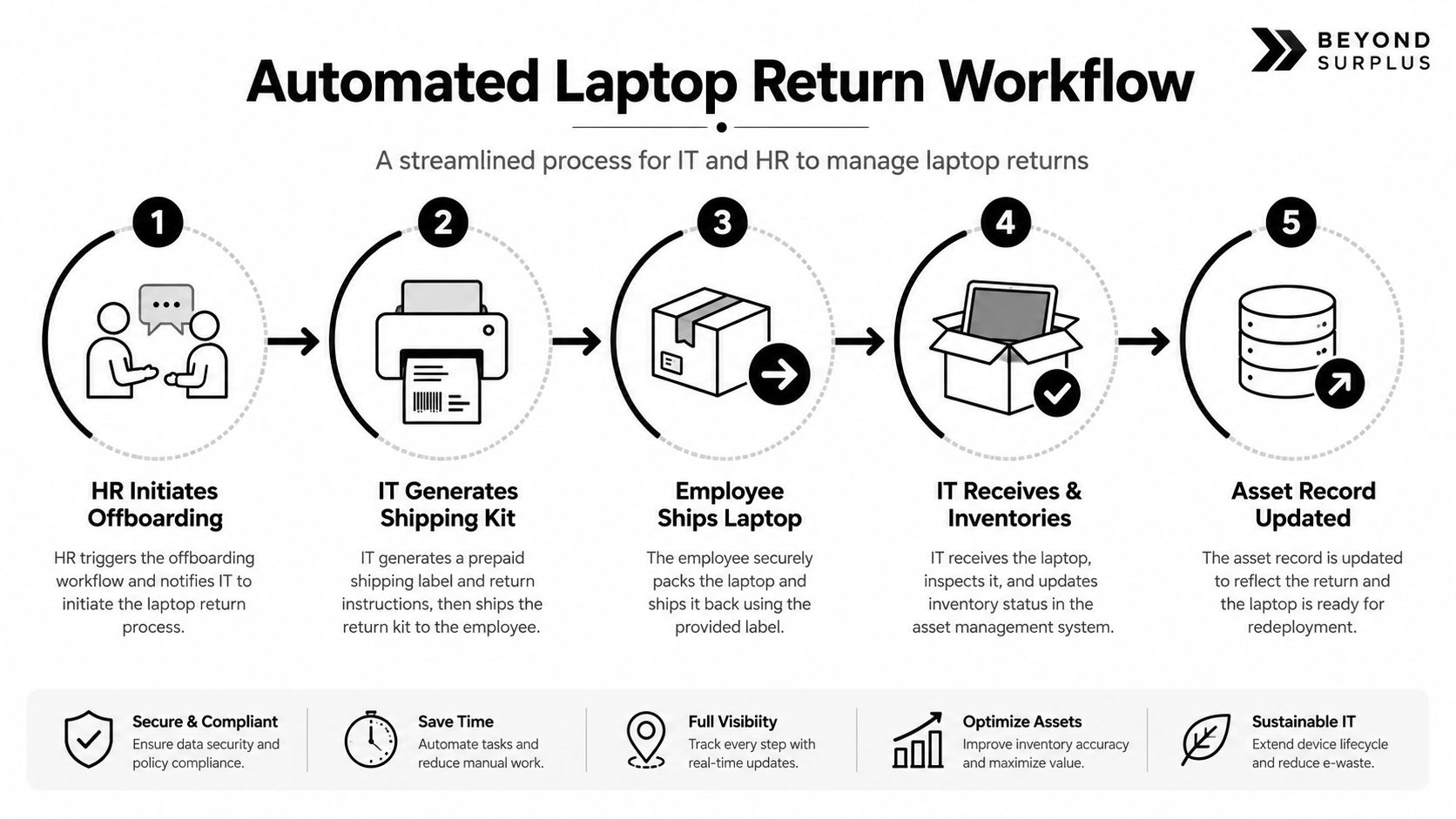
The cleanest trigger is the offboarding event inside the HRIS or ITSM platform. Once the termination or resignation date is entered, the workflow should automatically open linked tasks for HR, IT, and asset management.
A simple sequence looks like this:
Departure date entered
HR confirms the last working day and personal shipping address.Asset record matched
IT verifies assigned device, serial number, accessories, and management status.Return kit generated
Packaging, prepaid label, courier instructions, and packing guidance are sent automatically.Reminder cadence starts
The employee receives scheduled messages before the last day and after shipment.Receipt logged
The device is checked in, inspected, and routed for reimage, reuse, or disposition.
What the employee should receive
Don't ask people to improvise. When companies say “please send the laptop back,” they create delays because the employee now has to source a box, padding, tape, and a carrier visit.
For teams that want sturdier packing materials, it can help to review standardized order removal box sets so the return kit isn't an afterthought. The exact vendor matters less than the principle: use packaging that protects the asset and reduces excuses.
Every kit should include:
- A fitted box: Not a random oversized carton.
- Protective padding: Enough to prevent impact damage in transit.
- A prepaid tracked label: Tracking must tie back to the asset record.
- Simple instructions: Show what to include and how to pack it.
- A support contact: One email or portal for exceptions.
Automate the messages, not just the label
Many teams automate shipping but leave communication manual. That's where the process stalls.
Use a message sequence with clear purpose:
- Initial notice: Confirms the laptop return process has started.
- Kit shipped message: Includes tracking and expected delivery date.
- Last-day reminder: Repeats packing instructions and return deadline.
- Post-departure follow-up: Confirms whether the package has been dropped off or picked up.
- Exception notice: Triggers if no movement appears in tracking.
If you also need a fallback channel for small-volume returns or mixed equipment, a mail-in electronics recycling process can provide a useful model for standardized shipping, tracking, and receipt confirmation.
Ensuring Secure Data Destruction and Chain of Custody
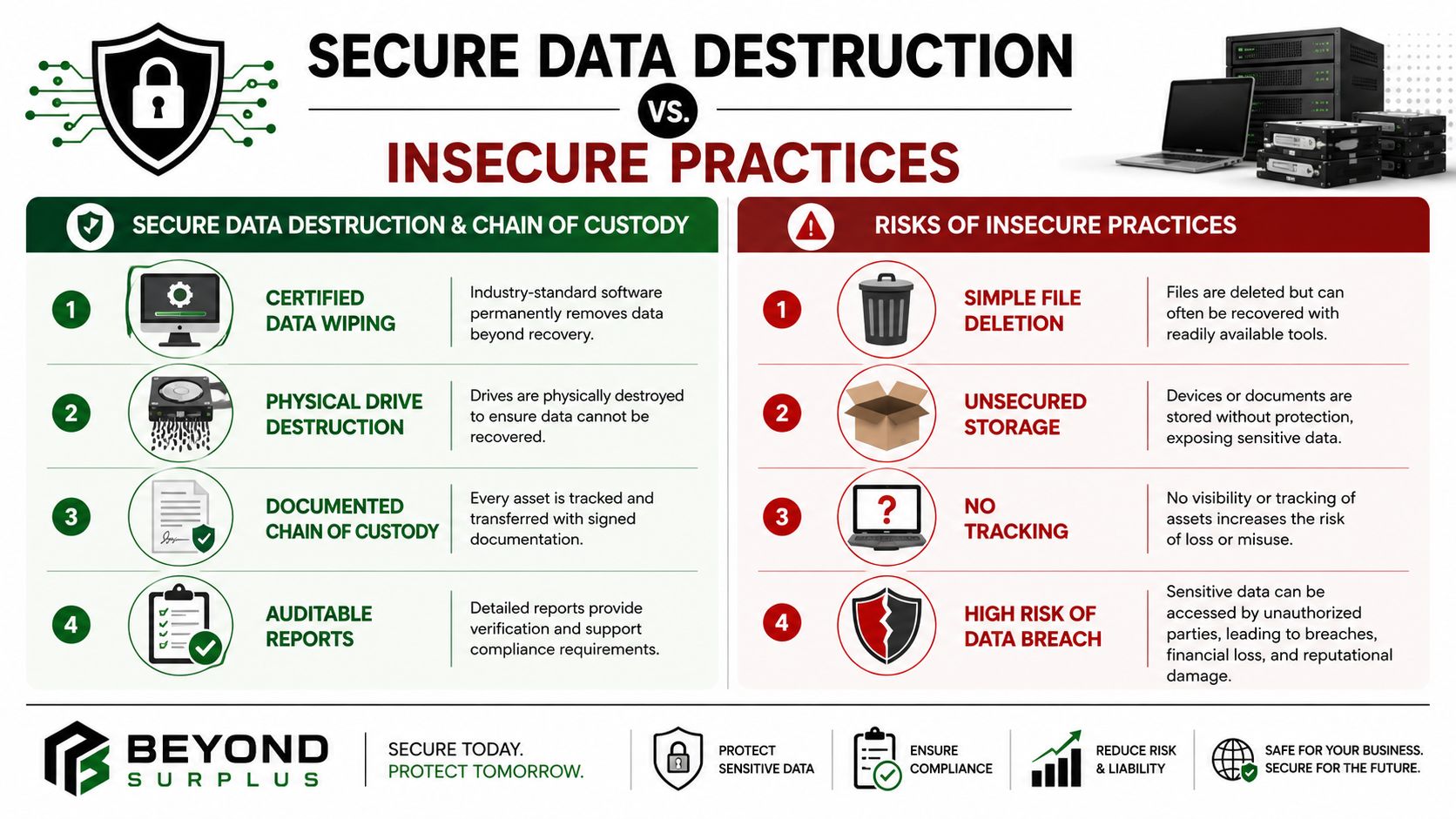
Getting the laptop back is only half the job. The security question is what happens to the data before, during, and after transit.
The standard debate is whether to wipe the device remotely before shipment or after it has been physically received. Both approaches can be valid, but they solve different risks.
Remote wipe versus post-receipt wipe
Here's the trade-off in plain terms.
| Method | Best use | Main advantage | Main drawback |
|---|---|---|---|
| Remote pre-wipe | High data sensitivity, lower asset-value concern | Reduces exposure if the laptop is lost in transit | Weakens evidentiary value if the device later arrives damaged or disputed |
| Post-receipt wipe | Higher-value assets, contested returns, stricter chain-of-custody needs | Preserves device condition for inspection and documentation | Requires strong receipt controls before sanitization |
The overlooked issue is liability. A pre-wiped laptop may protect data faster, but if the shipment is damaged or the employee disputes the condition of the hardware, you've already altered the evidence on the device. For high-value assets, many IT asset managers prefer post-receipt wiping with documented custody and inspection.
Secure wiping is a security decision. The timing of that wipe is also a legal decision.
Standards and documentation that matter
A compliant process should align with recognized sanitization and audit requirements. ITAD compliance mandates adherence to data sanitization standards such as NIST 800-88, compliance with HIPAA, GLBA, and FERPA, and use of vendors with certifications like R2v3, NAID AAA, and ISO 9001, as described in this ITAD compliance and certification guide.
If your team needs a detailed reference point, use NIST SP 800-88 guidance as the baseline for deciding whether a device should be cleared, purged, or physically destroyed.
Chain of custody after receipt
The handoff after delivery needs just as much discipline as the return shipment. A returned laptop should move through a documented path:
- Receipt confirmation: Record courier delivery, date, and receiving employee.
- Asset match: Verify serial number, asset tag, charger status, and visible damage.
- Security hold: Place the device in a controlled location until sanitization begins.
- Sanitization record: Log wipe method, operator, and completion status.
- Disposition path: Reimage for reuse, hold for buyback, or transfer to recycling.
For equipment that won't be reused, the documentation shouldn't stop at wiping. For non-data-bearing equipment, a Certificate of Recycling is the document that transfers disposal liability from the client to the vendor when environmental requirements have been followed.
Managing Vendors and Establishing a Chain of Trust
Many companies can coordinate a few returns internally. Fewer can do it well across multiple locations, mixed device fleets, and regulated data environments. That's where vendor discipline matters.
A qualified ITAD partner shouldn't just pick up equipment. The vendor should extend your controls beyond your walls. If that doesn't happen, outsourcing only hides the weak spots.
A useful evaluation framework is this vendor due diligence checklist.
The six controls to verify before asset release
According to Beyond Surplus's business compliance guide for e-waste and ITAD controls, a compliant ITAD program requires six specific controls before asset release: inventory before movement, secure staging in controlled locations, documented release signed by internal staff, tracked transportation, verified processing, and certificates with retention for legal retrieval.
Use that as a vendor scorecard:
- Inventory before movement: The vendor should require a manifest with serial numbers and asset status before anything leaves your site.
- Secure staging: Equipment shouldn't sit in an open hallway, lobby, or shared warehouse zone.
- Documented release: Someone on your side must sign off on what was transferred.
- Tracked transportation: Shipments need traceable movement tied to the manifest.
- Verified processing: Assets can't disappear into bulk pallets with no item-level accountability.
- Certificate retention: You need retrievable records later for audit, insurance, legal, or compliance reviews.
Questions worth asking vendors directly
A serious vendor should answer operational questions without vague language.
Ask things like:
- How do you maintain chain of custody from pickup through processing?
- What happens if a manifest item arrives damaged or incomplete?
- Can you provide item-level reporting, not just shipment-level confirmation?
- Which certifications support your data destruction and quality controls?
- How long are destruction and recycling certificates retained?
If a vendor can't explain custody, transport, and documentation in operational detail, they won't help you during an audit.
Why in-house often breaks at scale
Internal teams usually struggle with the same three issues: inconsistent packaging, inconsistent documentation, and inconsistent follow-through. A certified vendor can standardize those controls across offices, remote users, and decommissioning events.
That matters most when the return process doesn't end with one laptop. It often extends into dock stations, monitors, mobile devices, failed drives, and equipment that has to be wiped, resold, redeployed, or recycled under documented conditions.
Troubleshooting and Escalating for Non-Compliance
A friendly process is necessary. It isn't always enough.
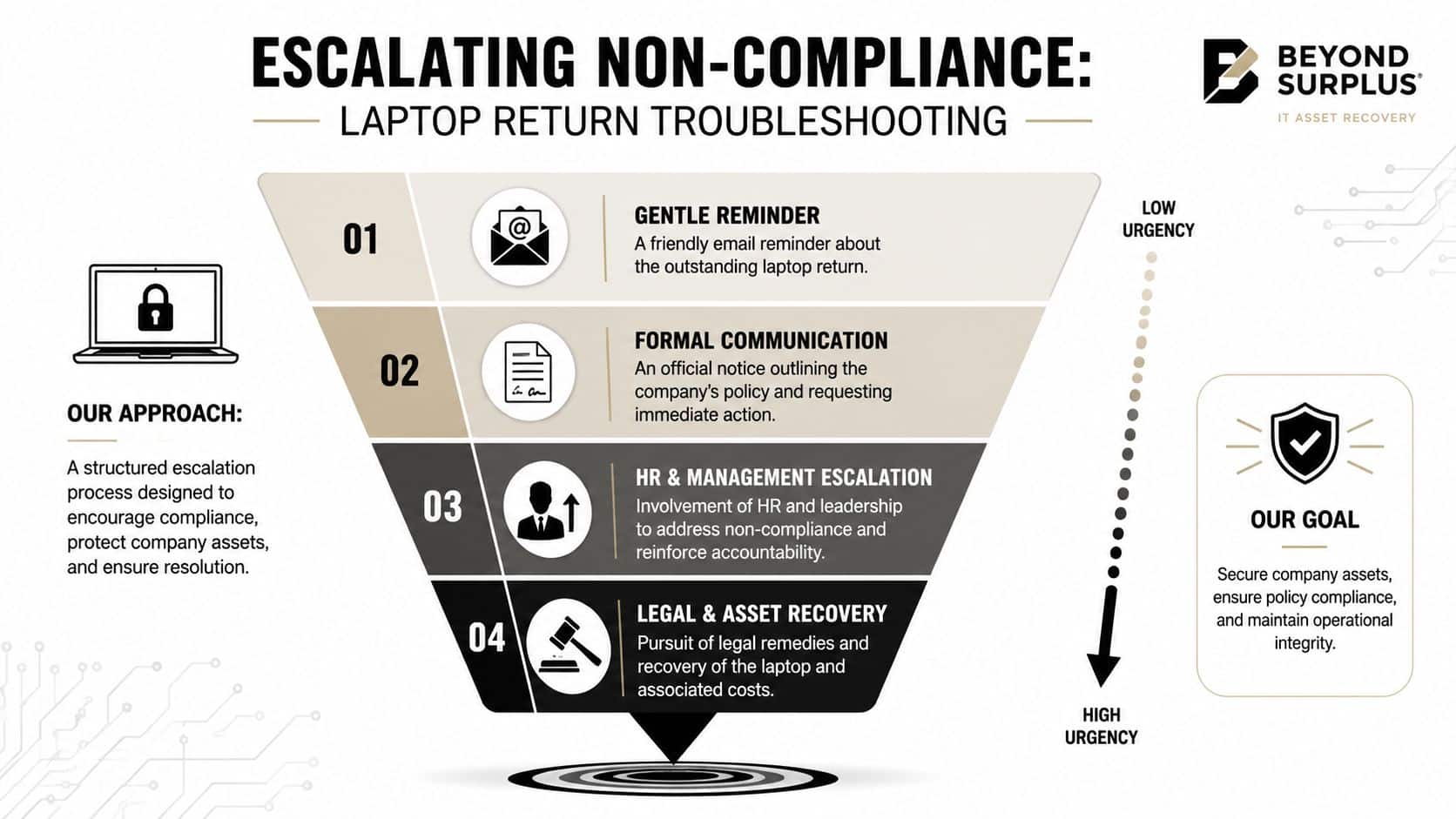
Some former employees cooperate immediately. Others delay, ignore messages, dispute ownership of accessories, or cease responding. That's why the recovery process needs escalation built in from the start. The companies that struggle most are the ones that treat non-compliance as an exception instead of a planned workflow.
Use a tiered enforcement model
The first step should be light. The last step should be formal. What matters is that each stage is documented and tied to the signed policy.
A workable sequence looks like this:
Stage one, automated reminders
Send the scheduled return notices, shipping instructions, and tracking prompts. Keep the tone neutral and practical.Stage two, direct outreach
If tracking shows no movement, HR or the manager should contact the former employee directly. This often resolves address errors, schedule conflicts, or missing packaging.Stage three, formal notice
Send written communication referencing the employee's signed obligations, the asset list, the deadline, and any lawful financial consequences. Keep legal reviewed language on file for this.Stage four, technical enforcement
If policy allows, lock the device through MDM and disable access to remaining services tied to the endpoint.Stage five, legal recovery
Counsel sends a demand notice or begins asset recovery action when the hardware value, data risk, or compliance exposure justifies it.
What not to do
Don't improvise consequences. Don't let managers negotiate side deals. Don't wait weeks before documenting failed contact attempts. Delay weakens your record and makes later enforcement look inconsistent.
A better approach is a case log that records every message, shipment event, lock action, and exception. That log protects HR, IT, and legal when the situation turns adversarial.
Non-compliance isn't a shipping problem. It's a policy enforcement problem with a shipping component.
The strongest remote offboarding programs assume some employees won't follow the happy path. They remove friction for cooperative users and create defensible escalation for everyone else. That's how you protect assets, shorten recovery time, and keep one failed laptop return from turning into a security incident.
When laptop returns involve security, compliance, and chain-of-custody risk, it pays to use a partner that handles the full lifecycle correctly. Beyond Surplus helps organizations manage certified electronics recycling, secure IT asset disposal, data destruction, and documented downstream processing. Contact Beyond Surplus for certified electronics recycling and secure IT asset disposal.