

Norcross managers see the same problem every quarter. A storage room fills with retired laptops, old firewalls, rack servers, monitors, docking stations, and loose drives that nobody wants to touch. Finance sees sunk cost. IT sees risk. Operations sees clutter.
That pile is usually two things at once. It's a data liability and a value recovery opportunity. The businesses that handle it well don't treat retirement as junk removal. They treat it as an asset disposition project with chain of custody, documented destruction, and a plan for resale, reuse, parts harvesting, or certified recycling.
That shift matters in Norcross, where many companies sit inside the broader Atlanta technology and logistics corridor. Equipment turns over fast, office footprints change, and data-bearing devices don't get safer by sitting on a shelf.
Your Norcross Business's Untapped Asset Goldmine
A common Norcross scenario looks like this. A company upgrades employee laptops, replaces edge networking gear, and retires a few storage arrays after a migration. The new equipment is live, but the old equipment stays in a back room because nobody has time to inventory it, wipe it, and figure out what still has value.
That delay creates two costs. First, unprocessed hardware still carries storage media, credentials, labels, and configuration history that can become a security problem. Second, resale windows close. A device that could have been remarketed six months ago often becomes a recycling candidate later because market demand moves on.
The broader market supports that reality. The global data-center IT asset disposition market was valued at US$13.7 billion in 2024 and is projected to reach US$19.1 billion by 2030, implying a 5.6% CAGR according to this data-center ITAD market report. That growth reflects a practical business need: organizations want secure data removal and better recovery from retired equipment.
What businesses usually miss
Most internal teams sort retired gear into only two buckets:
- Keep it for now: Hardware gets parked because someone thinks it might be useful later.
- Scrap it all: Everything gets treated the same, regardless of age, condition, or resale demand.
Both approaches leave money on the table. A better process starts by assuming some assets may still have downstream value, while others should move quickly to destruction and recycling without consuming more labor.
Valuable IT retirement work often starts outside the server room. If you're also clearing office space, furniture, and fixtures, coordinated Cubicle By Design decommissioning can help align facility shutdowns with IT removal so assets don't get separated from their records.
For a local example of how that value recovery mindset applies in Georgia, this guide on how Georgia businesses can maximize value with ITAD services lays out why secure disposition should be treated as a business process, not an afterthought.
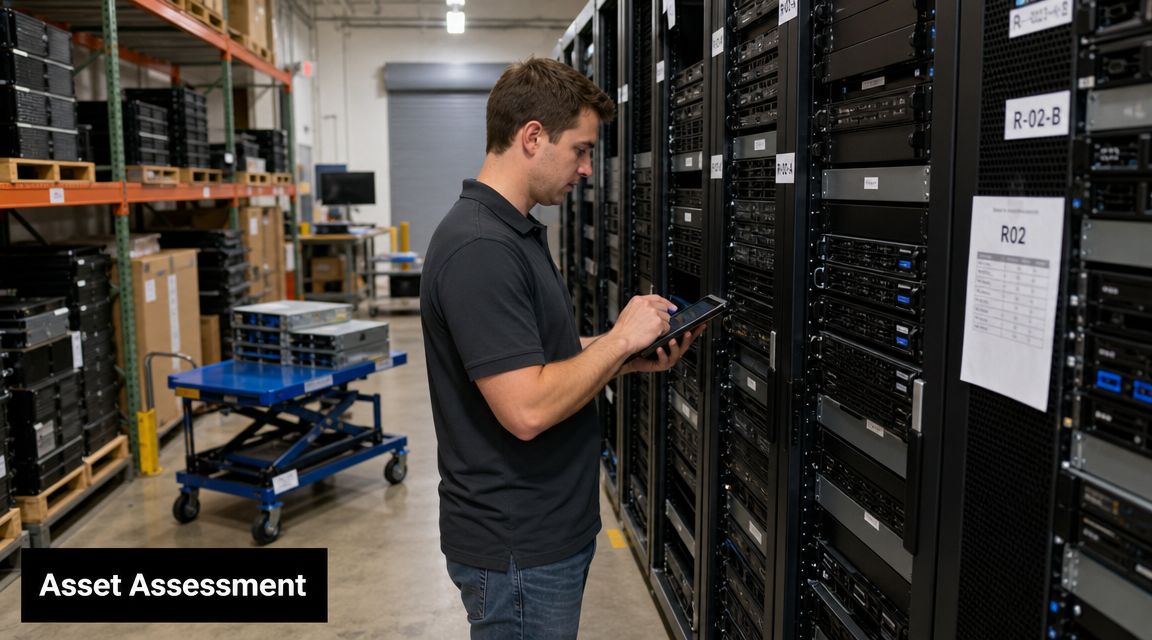
Starting with a Strategic Asset Assessment
The first mistake companies make is calling for pickup before they know what they have. That sounds efficient, but it weakens pricing, reporting, and compliance from the start.
A high-value workflow follows a strict order: inventory first, then secure transport, then certified sanitization or destruction, then value recovery decisions. Industry guidance also warns that the biggest pitfall is skipping the inventory step because untracked assets weaken both compliance evidence and residual value planning, as explained in this overview of ITAD process and best practices.
What your inventory needs to capture
A useful inventory is more than “12 laptops” or “3 servers.” Record enough detail to support valuation and chain of custody.
- Asset identity: Manufacturer, model, serial number, and asset tag.
- Core specs: Processor class, memory, storage type, drive count, and any upgrade components.
- Physical state: Working, damaged, incomplete, locked, or untested.
- Data status: Contains drive, drive removed, encrypted, failed media, or unknown.
- Location detail: Closet, office, lab, branch, rack position, or cage reference.
If you manage software and hardware together, this primer on managing software licenses and IT inventory is useful because it shows why device records and entitlement records should stay aligned during retirement.
How to run the assessment without slowing down operations
Assign one owner. It can be IT, procurement, facilities, or an outside partner, but one person needs authority to reconcile mismatches.
Then divide the work into passes:
- Count and tag everything
- Verify serial numbers on data-bearing assets
- Separate intact resale candidates from obvious scrap
- Flag anything with missing drives or uncertain custody
- Document exceptions before removal day
Practical rule: If a device leaves your site without a serial number tied to a disposition outcome, you've created a documentation problem that will surface later.
For teams building a repeatable program, these IT asset management best practices are a good operational baseline. The discipline you build during inventory usually determines whether the rest of the project runs cleanly.
Choosing Your Data Destruction Method
Once the inventory is done, the next decision is security. Most Norcross businesses don't need every asset handled the same way. The right method depends on the device type, compliance expectations, and whether value recovery is still realistic.
Wiping versus physical destruction
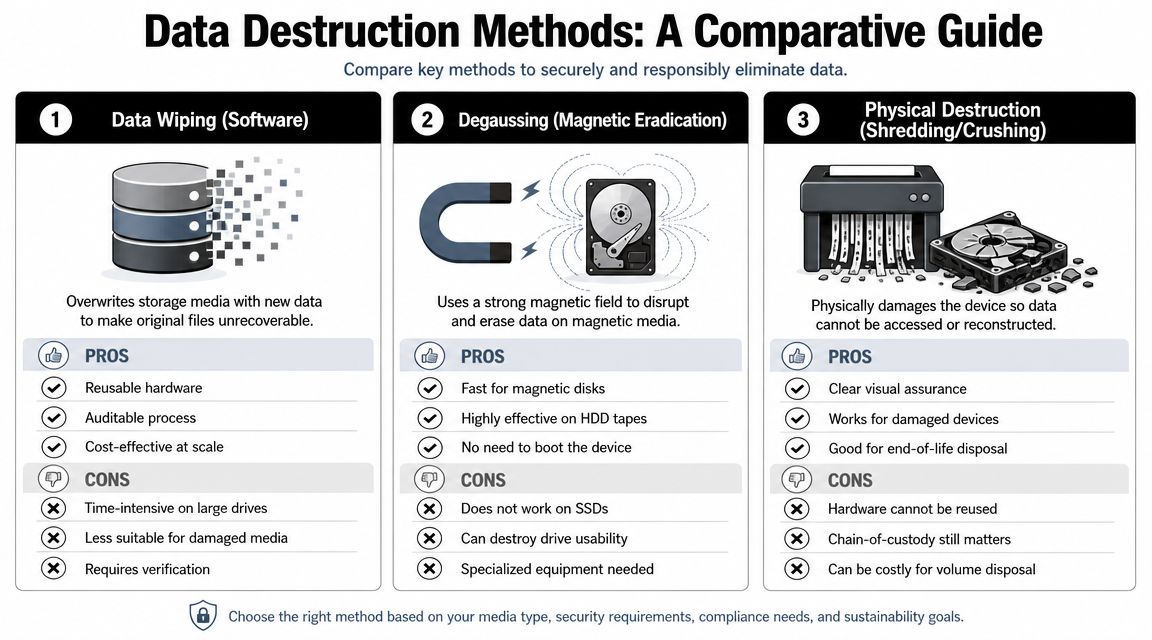
Certified data wiping makes sense when the equipment still has resale or redeployment potential. If the drive is functional and the chain of custody is intact, sanitization preserves the asset for remarketing.
Physical destruction is the better choice when media is failed, policy requires destruction, or the risk of reuse outweighs the recovery value. That often applies to failed SSDs, damaged laptops, loose drives from mixed storage rooms, and sensitive media from regulated environments.
Here's the practical trade-off:
| Method | Works best when | Limitation |
|---|---|---|
| Data wiping | Asset still has reuse or resale value | Requires working media and reliable processing |
| Degaussing | Magnetic media needs eradication | Not appropriate for every media type and usually eliminates reuse |
| Physical shredding | Highest assurance is required | Ends resale opportunity for the media |
For small mobile devices, consumer-oriented walkthroughs can still help staff understand the basics of sanitization before handoff. This guide for securely wiping an iPhone is one example of the difference between deleting data and preparing a device for safe retirement.
On-site versus off-site handling
This choice is less about theory and more about your internal risk tolerance.
- On-site destruction: Best when policy requires media to be destroyed before leaving the facility, or when stakeholders want direct observation.
- Off-site processing: Often more efficient when assets can travel under documented custody to a secure processing facility.
- Hybrid model: Common for mixed loads. High-risk media gets shredded on-site, while lower-risk equipment is transported for wiping, testing, and remarketing.
Data-center environments need extra care. For AI clusters, high-density servers, and other complex hardware, ITAD involves careful de-installation, source-level inventorying, and often high-volume drive shredding. The same industry guidance notes that the major risks include not only data exposure but also lost value when GPUs and NVMe devices are recycled before they're identified and harvested, as described by ITAD USA's data center decommissioning guidance.
If a provider proposes shredding everything before discussing component harvest, ask what value is being destroyed along with the data.
For Georgia organizations balancing risk and auditability, this secure data destruction in Georgia ITAD compliance guide is a useful checklist before you approve a destruction plan.
Making the Right Value Recovery Decision
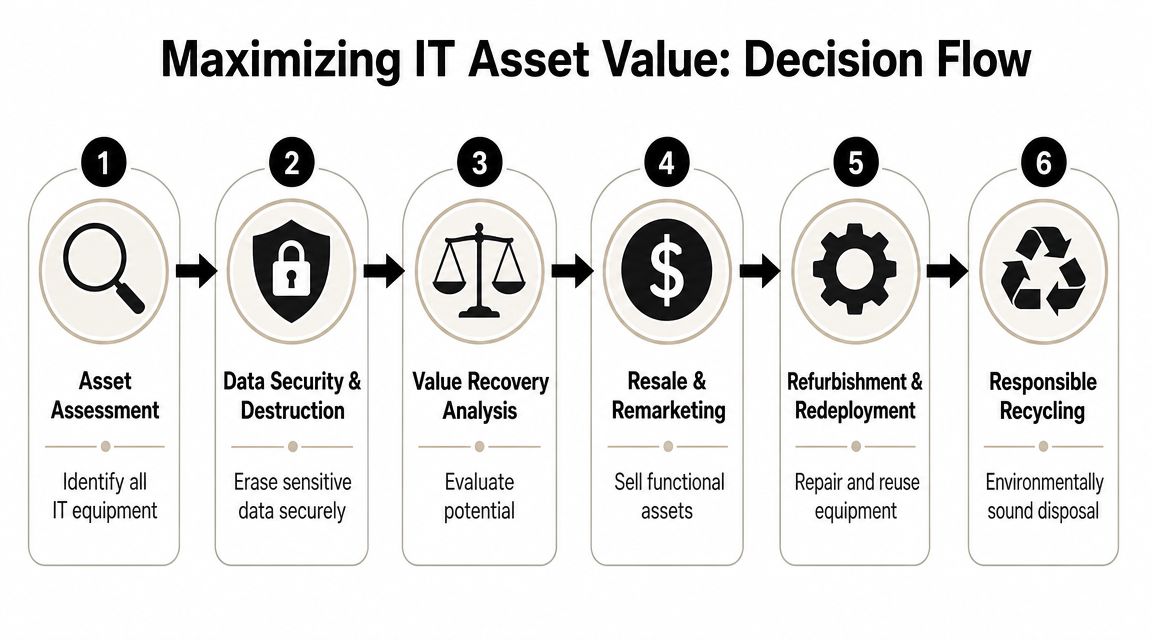
Value recovery is where disciplined ITAD separates itself from simple recycling. Not every retired asset should be sold, and not every old device should be shredded. The decision has to happen at the asset level.
The best return comes from routing equipment into reuse, resale, or recycling based on condition and lifecycle stage. Industry guidance also notes that enterprises are moving away from broad, uniform refreshes and toward more selective replacement, which makes device-by-device valuation more important, as outlined in this discussion of maximizing value and sustainability in ITAD.
A practical routing framework
Start with four questions:
- Is the asset complete?
- Can its data be securely sanitized without destroying the item?
- Is there still buyer demand for this model or component set?
- Will labor, transport, and processing exceed likely recovery?
That framework usually produces clearer decisions than broad categories like “old” and “new.”
What typically works
- Recent business laptops: Often strong candidates for wiping, testing, and resale if they're complete and in working condition.
- Network switches and branded enterprise gear: Frequently worth evaluating individually because some models move well even after office refreshes.
- Servers with useful components: Sometimes the chassis isn't the value. The processors, memory, rails, caddies, GPUs, or storage can justify harvesting.
- Peripherals and low-demand items: Mice, old cables, damaged monitors, and commodity accessories often belong in responsible recycling.
What doesn't work is forcing the whole lot into one outcome. Companies lose money when they recycle resale-worthy assets. They also lose money when they spend too much labor testing obsolete hardware that should have gone straight to recycling.
The smartest disposition decision is often mixed. A single pallet can contain resale units, harvest candidates, redeployment stock, and scrap.
For Norcross companies that want structured recovery rather than one-size-fits-all recycling, Georgia asset recovery services show how remarketing and documented disposition can work together. Beyond Surplus is one local option that handles certified ITAD, secure data destruction, logistics, and asset recovery for business equipment.
Decoding ITAD Pricing and Calculating ROI
Most procurement teams ask the wrong opening question. They ask, “What does pickup cost?” The better question is, “What is the net result after destruction, logistics, labor avoided, and asset recovery?”
ITAD pricing usually includes a mix of service elements. Transport, packing labor, on-site work, serialized processing, data destruction, and recycling all affect the final structure. On the other side of the ledger, resale and parts recovery can offset some or all of that cost.
What drives the economics
A Norcross office cleanout with mostly recent laptops and docking stations is different from a storage room full of broken monitors and obsolete printers. One project may produce meaningful return. The other may remain a disposal job with documentation as the main value.
The cleanest way to evaluate ROI is to separate the project into cost buckets and recovery buckets.
| Cost side | Recovery side |
|---|---|
| Pickup and logistics | Resale of complete devices |
| Packing and de-installation labor | Parts harvesting from selected assets |
| Data wiping or shredding | Internal redeployment value |
| Recycling for low-value material | Avoided storage and handling burden |
How to build the business case
Use practical math, not wishful thinking.
- Start with avoidable internal cost: Staff time spent sorting, storing, and moving dead equipment is real cost even if it doesn't show up as an invoice.
- Add risk reduction value: Certificates, custody records, and proper destruction lower exposure in ways that basic junk hauling doesn't.
- Estimate recovery conservatively: Assume only some portion of the batch will be marketable.
- Treat fast action as part of ROI: Delay usually reduces asset value and increases handling complexity.
A strong ITAD proposal should show why some items carry processing cost, why others may offset those costs, and why a mixed-disposition approach is financially better than blanket shredding or blanket storage. If a quote doesn't explain that logic, it's hard to compare vendors intelligently.
Ensuring Compliance with Certified Documentation
The physical removal of equipment is the visible part of ITAD. The paper trail is what protects the business later.
In a 2024 Cascade Asset Management survey, 23% of respondents called ITAD service a critical component and another 53% called it very important, meaning 76% placed it in the top two importance tiers, according to the Cascade Benchmarking Report 2024. That matters because mature programs don't stop at pickup. They require records that hold up during audits, contract reviews, and internal investigations.
The documents that matter most
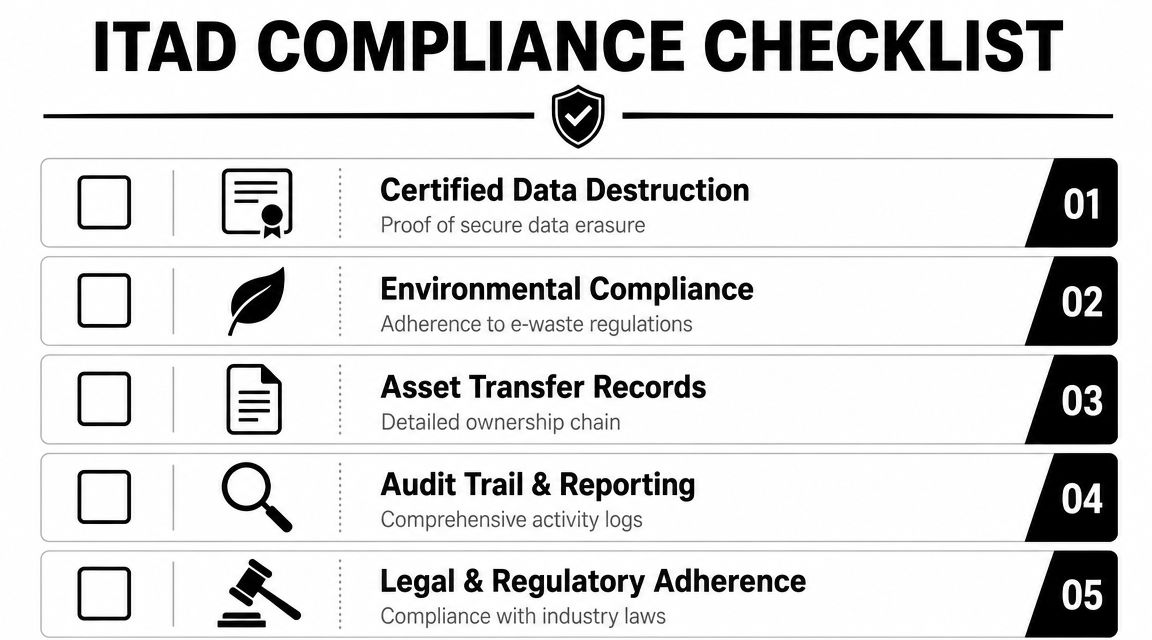
You want records that answer three questions: what left, how it was handled, and what happened to it.
- Serialized inventory report: Proves which assets were included in the project.
- Certificate of data destruction: Confirms sanitization or physical destruction of data-bearing media.
- Certificate of recycling: Documents environmentally responsible downstream processing for non-recoverable items.
- Chain-of-custody records: Show who controlled the assets from pickup through final disposition.
Why this changes liability
Without documentation, your company is relying on trust. With documentation, you have evidence.
That evidence matters when a regulator, customer, insurer, or internal auditor asks what happened to retired equipment that once stored business data. It also matters when your legal team wants proof that assets were transferred into a documented process rather than discarded informally.
Auditors rarely care that a room was cleaned out. They care whether the organization can prove what happened to each data-bearing device.
Good documentation also improves finance outcomes. It ties recovered value back to specific assets or batches, making the ITAD process easier to defend internally. For regulated industries, that recordkeeping isn't administrative overhead. It's the control that makes the whole process credible.
Scheduling Your Norcross IT Asset Pickup
Once your inventory is drafted and your destruction approach is clear, pickup is the easy part. Most delays happen because companies wait for a “perfect” list. You don't need perfection to start. You need enough detail to scope the job correctly.
What to do before pickup day
Prepare the assets in a way that protects custody and reduces handling mistakes.
- Group by type: Laptops with laptops, loose drives with loose drives, network gear with network gear.
- Separate high-risk media: Flag anything that requires on-site destruction or witness handling.
- Mark incomplete units: Missing drives, broken screens, or damaged chassis should be obvious before loading.
- Identify access needs: Elevator restrictions, loading docks, server room access windows, and after-hours requirements all matter.
What a smooth engagement looks like
A business typically requests a quote, shares a basic asset list, confirms service needs, and schedules a pickup window. The provider handles transport planning, packing expectations, and final processing steps.
For Norcross companies that need local electronics and computer removal, Norcross computer and electronics recycling is the relevant service page to review before scheduling. It helps align the pickup request with the actual equipment types on hand.
The best time to move is before retired equipment gets scattered across closets, cubicles, and branch offices. Once that happens, the project gets more expensive and harder to document.
If your Norcross business has retired laptops, servers, storage, networking gear, or loose drives waiting in storage, contact Beyond Surplus to schedule certified electronics recycling and secure IT asset disposal with documented chain of custody, data destruction, and value recovery support.


