

Your Atlanta or Smyrna office probably has one. A locked room, cage, or corner of the warehouse filled with retired laptops, failed drives, old servers, backup appliances, and networking gear that nobody wants to touch until refresh season is over.
That pile is not harmless. It's a live compliance issue.
The practical problem for Georgia IT managers isn't just how to remove equipment. It's how to prove every data-bearing asset stayed under control, was sanitized correctly, and left an audit trail your legal, security, and procurement teams can stand behind later. That's what a real ITAD program solves. Secure data destruction in Georgia isn't a recycling chore. It's a documented risk-transfer process.
Why Secure Data Destruction Matters for Your Georgia Business
Most disposal mistakes happen before the truck arrives. Equipment gets moved from desks to closets. Drives are pulled without logging serial numbers. A branch office ships a box back to headquarters with no custody record. Months later, nobody can say with confidence what was on site, what left, and what happened to it.
That gap is where liability starts.
The storage room problem
An old laptop isn't just old hardware. It may still contain customer records, employee information, contracts, email archives, VPN profiles, saved credentials, or regulated files. The same goes for decommissioned servers and storage arrays. If those assets leave your control without a verified process, your business may be forced to answer hard questions from internal auditors, regulators, insurers, or customers.
A secure workflow starts with policy, but it becomes real through execution. That means inventory, handling controls, transport procedures, sanitization, and final documentation. If any one of those breaks, the entire chain becomes harder to defend.
Practical rule: If your team can't match each retired asset to a disposition record, you don't have disposal. You have exposure.
What works and what fails
What works:
- Centralized intake: Retired equipment goes to one controlled handoff point.
- Asset-level tracking: Each device is logged by serial number before pickup.
- Approved destruction methods: The method fits the media type and business need.
- Final proof: Your vendor provides records your auditors can use.
What fails:
- Informal cleanouts: Facilities or office admins moving electronics without IT oversight.
- Bulk assumptions: Treating “ten laptops” as enough detail.
- Delete-and-donate thinking: Deleting files or reformatting doesn't prove sanitization.
- Receipt-only vendors: A pickup receipt is not a compliance record.
If you're reviewing vendors, start with their approach to secure destruction of data. The right provider should talk about custody, media type, documentation, and downstream handling before they talk about hauling equipment away.
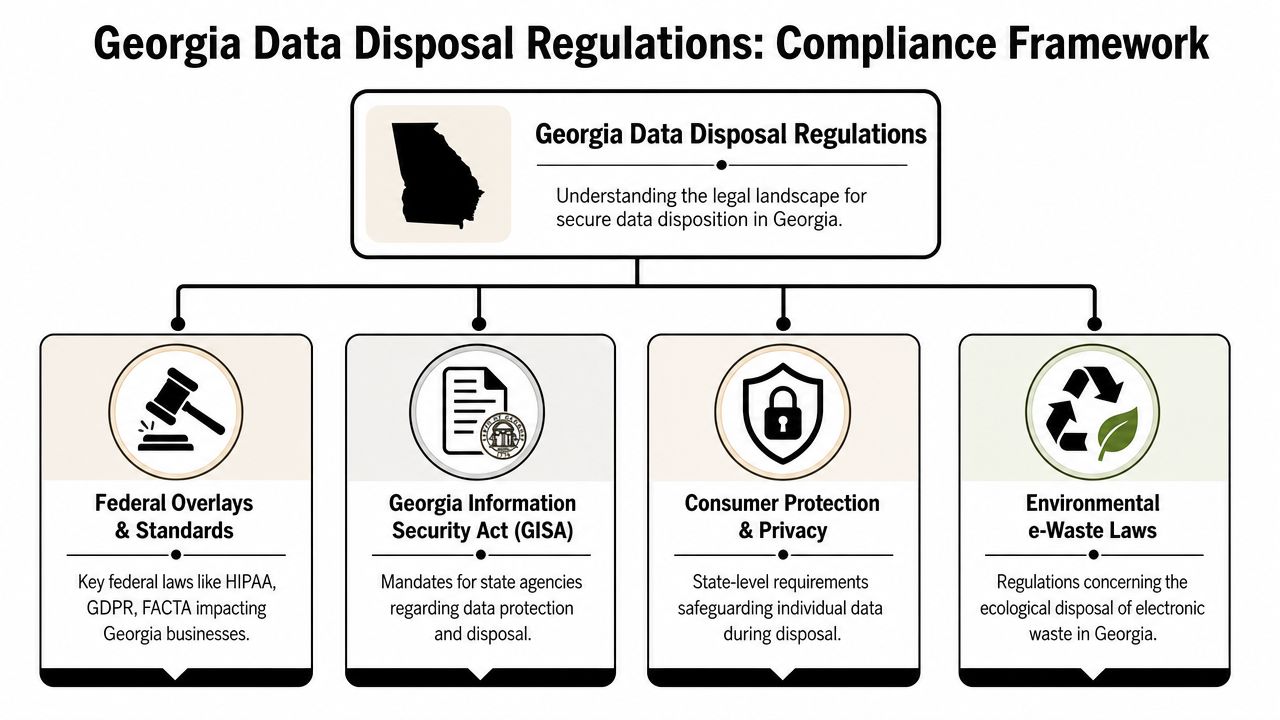
Navigating Georgia's Data Disposal Regulations
Georgia businesses usually don't struggle because the rules are invisible. They struggle because the rules come from multiple places at once. Your disposal program may need to satisfy contractual obligations, internal security standards, federal privacy requirements, and state breach-response expectations at the same time.
Start with the laws tied to your data
If your organization handles healthcare information, financial records, consumer reports, or other regulated data, disposal isn't optional housekeeping. It's part of your security program. The disposal requirement matters because data that was managed carefully in production can still create risk at end of life.
That's why experienced IT teams map asset classes to obligations before pickup day. A hospital won't treat retired nursing station drives the same way it treats surplus monitors. A financial firm won't handle branch-office laptops the same way it handles empty docking stations.
Use that logic when building internal controls:
- Identify regulated data holders: Servers, laptops, desktops, mobile devices, backup media, and removable storage.
- Separate data-bearing from non-data-bearing equipment: Keyboards and cables don't need the same workflow as storage devices.
- Match business units to requirements: Healthcare, finance, government contractors, and education often need tighter review.
State exposure is triggered by failure, not paperwork alone
Georgia organizations also need to think about what happens if disposal goes wrong. Once a device is lost, mishandled, or later found to contain accessible data, the issue can shift from operations to incident response. That is why disposal controls need to stand up after the fact, not just during the project.
Disposal compliance is less about saying “we have a policy” and more about proving the policy survived contact with real equipment.
A practical Georgia program should document ownership, movement, sanitization, and final disposition in one audit trail. If you're building or updating that process, this Georgia secure IT disposal guide is a useful operational reference point.
A workable compliance mindset
Don't ask, “Which law applies to disposal?” Ask, “Which devices could trigger a legal problem if disposal fails?” That question gets you to the right workflow faster.
For most IT managers, the answer is straightforward:
- Find the media.
- Control the handoff.
- Use a defensible sanitization method.
- Keep records that survive scrutiny.
Choosing the Right Data Destruction Method
The biggest technical mistake I see is choosing one destruction method for every device. That sounds simple, but it creates unnecessary loss in some cases and unnecessary risk in others.
Under NIST SP 800-88 guidance summarized here, clear, purge, and destroy are distinct sanitization levels, and a successful wipe must render data unrecoverable even with laboratory techniques. The same guidance notes that for SSDs, cryptographic erase or physical destruction is generally preferred over degaussing because flash memory and wear-leveling reduce the reliability of magnetic-only methods.
Match the method to the media
Hard drives, solid-state drives, phones, and embedded storage don't behave the same way. A method that's acceptable for one device may be weak or impractical for another.
Here's the decision logic most enterprises should use:
| Data Destruction Method Comparison | Security Level | Best For | Asset Reuse Potential | Compliance Suitability |
|---|---|---|---|---|
| Certified wiping | High when validated correctly | Reusable laptops, desktops, and some servers | High | Strong when the process is documented and appropriate to the media |
| Degaussing | Strong for magnetic media in the right use case | Some HDD environments where reuse is not needed | Low | Situational, and not a universal answer for modern mixed fleets |
| Physical shredding or destruction | Highest practical finality | Failed drives, damaged media, SSDs, and highly sensitive assets | None | Strong where destruction is required or reuse isn't appropriate |
When wiping is the smart choice
Certified data wiping makes sense when the device still has remarketing value and your organization wants a documented sanitization path instead of automatic destruction. That often applies to newer business laptops, desktops, and some server drives that can be processed, tested, and resold after successful sanitization.
Wiping is not “delete the files and move on.” It has to be validated, recorded, and tied back to the specific asset. If your vendor can't show the result at the serial-number level, the process is too thin.
When destruction is the better answer
Sometimes reuse isn't worth the risk. Failed drives, unsupported media, damaged devices, and assets from high-sensitivity environments usually belong in a physical destruction workflow. This is especially important when the media can't be reliably sanitized or when your internal policy requires irreversible destruction.
A lot of teams still ask about degaussing because they've used it for years. That's where understanding the hardware matters. If the fleet includes SSDs, degaussing should not be treated as the default answer. For teams comparing methods, this explanation of what a degausser does helps frame where it fits and where it doesn't.
The right question isn't “What's the strongest method?” It's “What method is defensible for this media, this risk level, and this disposition goal?”
The Secure ITAD Workflow from Pickup to Certificate
A compliant outcome starts long before destruction. By the time equipment reaches a processor, most of the important control decisions should already be made.
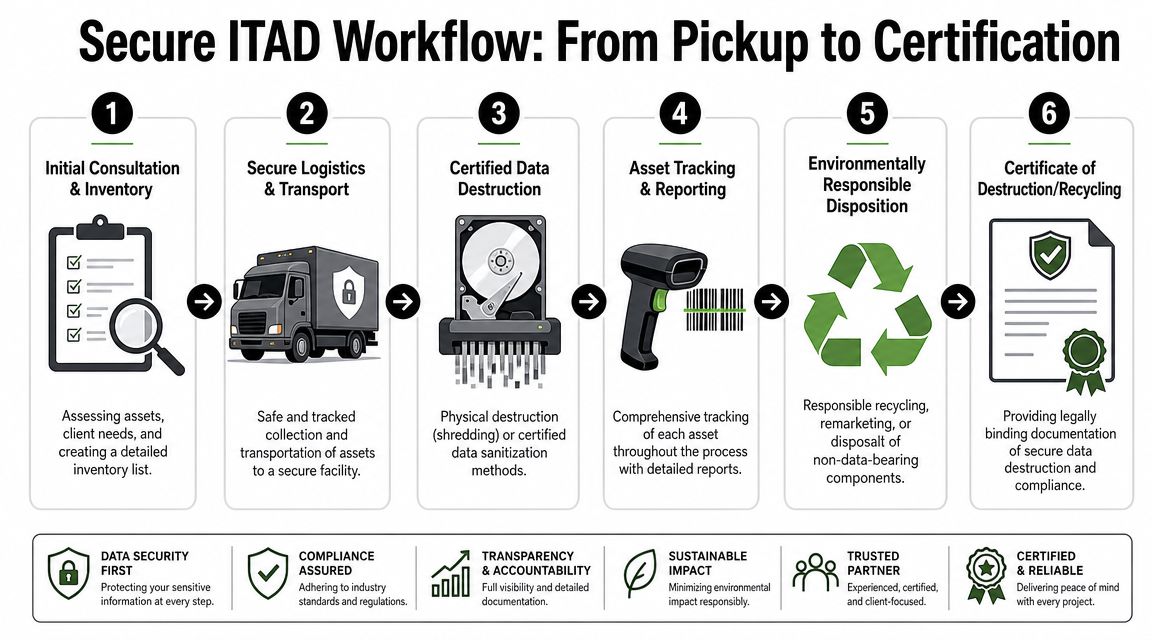
Step one through step three
The first phase is internal preparation.
Scope the assets
Separate data-bearing assets from peripherals and scrap. Confirm which items will be wiped, which will be destroyed, and which need special handling.Create the pickup inventory
At minimum, your list should tie devices to a serial number or another unique identifier. Bulk counts are useful for logistics, but they don't replace asset-level records.Secure the handoff point
Stage equipment in a controlled area with limited access. If multiple offices are involved, use one intake standard across all locations.
Step four through step six
The second phase is custody and processing.
Transfer with documented custody
Every move matters. The handoff from your staff to the transport team should be signed, dated, and traceable. If equipment sits overnight or moves through a consolidation point, that should be documented too.Process by approved method
Sanitization should follow the method assigned during scoping. Don't let working laptops get shredded by convenience, and don't let failed SSDs get routed into a weak reuse path because someone wants recovery value.Issue final reporting
The project should close with records that tie each relevant asset to its final outcome, whether that outcome is destruction, wiping, remarketing, or recycling.
What to ask your vendor before pickup
Use plain questions:
- Who records serial numbers, and at what stage?
- How is custody documented from our site to your facility?
- Which assets are eligible for wiping versus destruction?
- What does the final certificate include?
- How do you handle exceptions like unreadable drives or damaged SSDs?
A provider such as Beyond Surplus can coordinate IT equipment pickup in Georgia with logistics and downstream processing, but the larger point is vendor discipline. Whatever company you choose, the workflow must remain traceable from your floor to the final certificate.
Essential Documentation for Liability Transfer
If your ITAD file contains only an invoice and a truck receipt, you're missing the one thing that matters most when questions come later: proof.
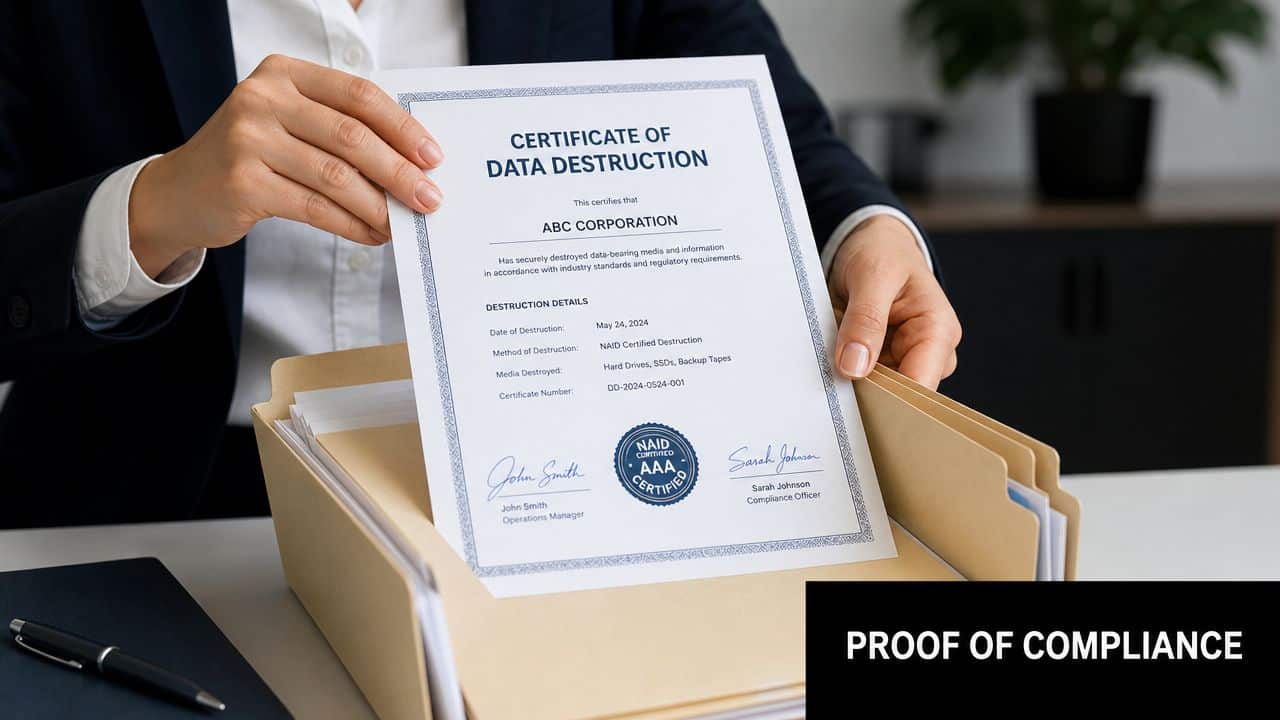
A defensible Georgia program depends on documented custody plus a serialized Certificate of Destruction listing each asset, the destruction method, date, facility, and authorized signature. That documentation is the practical control that helps transfer liability and support compliance evidence for laws such as the FTC Disposal Rule, HIPAA, GLBA, and state breach-notification obligations, as outlined in Beyond Surplus's Georgia data destruction documentation guidance.
What a real certificate needs to show
A proper destruction record is not marketing paperwork. It should stand on its own if legal counsel, an auditor, or a cyber insurer asks for evidence.
Look for these elements:
- Serialized asset identification: Each covered asset should be individually identifiable.
- Final method used: Wiped, shredded, degaussed, or another approved process.
- Date and facility: You need to know when and where the action occurred.
- Authorized signoff: Someone accountable has to certify the record.
Why this is the real liability trigger
Liability doesn't transfer because a vendor says it does. It transfers more credibly when your records show that your company used a controlled process, selected a qualified provider, documented custody, and retained evidence of final disposition.
Audit view: The certificate is the endpoint, but the chain of custody is what gives the certificate weight.
That distinction matters. Anyone can hand you a generic statement saying material was destroyed. A serialized certificate backed by custody records is much harder to challenge.
Build the file before you need it
Your internal file for each project should include:
- pickup authorization
- asset inventory
- custody records
- exception notes
- destruction or sanitization report
- final certificate
- recycling documentation where applicable
When a breach claim or audit question appears years later, that file is what keeps the conversation short.
Balancing Security with Value Recovery
A mature ITAD program doesn't assume every retired device should be shredded. That approach feels safe, but it often destroys recoverable value for no operational reason.
The better model is selective disposition. Data-bearing assets that can be sanitized properly may move into resale or redeployment. Assets that can't be trusted, tested, or validated move to destruction. Security and recovery aren't opposites if the decision process is disciplined.
Where value recovery actually works
Value recovery tends to make sense for newer business laptops, desktops, and some enterprise equipment still useful in secondary channels. The key is that sanitization comes first and documentation follows the asset. If the wipe result is defensible, the device can move forward without carrying your data risk with it.
That doesn't mean every asset should be remarketed. Devices with failed media, missing parts, physical damage, or uncertain storage history often belong in the scrap or destruction stream instead.
A practical decision model
Use three buckets:
- Reuse or resale: Working equipment with validated sanitization.
- Parts or commodity recycling: Nonviable equipment with no safe reuse path.
- Physical destruction: Media or systems that present too much residual risk.
ITAD functions as a lifecycle strategy rather than a disposal event. Procurement sees recovered value. Security gets proof of sanitization. Finance gets cleaner reporting on retired assets. For Georgia teams evaluating that balance, this overview of how businesses can maximize value with ITAD services is a practical next read.
FAQs for Atlanta and Smyrna Businesses
The most common questions from metro Atlanta companies are operational. They usually come up when a project is close to launch and someone wants to avoid mistakes that create cleanup work later.
Common questions and direct answers
| Frequently Asked Questions | Answer |
|---|---|
| Do we need to destroy every hard drive physically? | No. Some assets can follow a certified wiping path if reuse is appropriate and the sanitization is documented. Other assets should be physically destroyed based on media type, condition, and internal policy. |
| Are SSDs handled the same way as HDDs? | No. SSDs need their own decision process. Magnetic methods are not a universal answer for flash-based storage. |
| Is a pickup receipt enough for compliance? | No. A receipt only shows transfer. It does not prove final sanitization or destruction. |
| What if our branch offices have mixed piles of electronics? | Separate data-bearing devices from peripherals before pickup. That reduces errors and keeps the destruction scope clear. |
| Can we combine recycling and data destruction in one project? | Yes, and most business projects should. The important part is keeping the data-bearing workflow documented separately from general material recycling. |
Questions to settle internally first
Before you schedule service, align these points with your stakeholders:
- Ownership: Which team approves release of the assets?
- Scope: Which devices contain storage or embedded memory?
- Disposition path: Which assets are candidates for wiping, and which must be destroyed?
- Records retention: Who stores the final certificates and supporting logs?
If your security team, legal team, and facilities team each have a different answer about who owns retired assets, stop and fix that before pickup day.
Local execution matters
Atlanta and Smyrna businesses often manage multiple offices, fast refresh cycles, and shared storage areas where equipment accumulates. That makes consistency more important than speed. A smaller, well-documented project is safer than a rushed warehouse cleanout with vague records.
For most organizations, the winning move is simple: standardize intake, log assets before release, choose the right sanitization method, and retain the final records in one place.
When you need a documented, business-grade process for retired IT assets, contact Beyond Surplus. They provide secure data destruction, IT asset disposition, pickup logistics, and the certificates businesses use to support audits, risk reviews, and end-of-life compliance in Georgia.


