A remote employee leaves on Friday. HR closes the file, disables access, and assumes IT has the laptop return covered. A week later, nobody can confirm where the device is, whether it was shipped, or whether the drive was ever sanitized. That's the moment a routine offboarding task turns into a security incident.
Secure laptop return procedures for remote and hybrid workforces have to do more than retrieve hardware. They have to protect data, preserve chain of custody, support compliance, and give IT managers a process that still works when the employee is in another city, another state, or no longer answering email.
The mistake I see most often is treating returns as a shipping problem. It isn't. It's an end-of-life asset control problem. If you build one unified process that covers mail-in, pickup, and drop-off, you reduce exceptions, tighten documentation, and make vendor oversight easier.
Why a Secure Laptop Return Process Is Non-Negotiable
The ugly scenario is familiar. An employee exits. The laptop doesn't arrive. Somebody finds an old spreadsheet, somebody else checks a carrier portal, and nobody has a clean record of who last handled the device. Legal asks whether the laptop held regulated data. Security asks whether the disk was encrypted. IT asks whether a wipe command ever reached the endpoint.
That's why this process can't live in scattered emails and tribal knowledge. A 2026 enterprise security report found that 68% of data breaches involving remote employees were linked to improperly managed or unreturned end-of-life IT assets, costing companies an average of $1.7 million per incident. Those numbers change the conversation fast. This isn't about recovering a laptop. It's about controlling exposure.
A loose process also creates compliance trouble. If you can't show when the device was requested, how it moved, who received it, and what happened to the data, your team is left defending assumptions instead of records.
Practical rule: If a return isn't documented from handoff to final disposition, treat it as an uncontrolled asset until proven otherwise.
The operational answer is structure. HR triggers the event. IT validates the assigned asset list. The employee gets one approved return path. Logistics, receiving, sanitization, and final disposition all follow the same documented playbook. That's how you avoid the hidden cost spiral described in this look at unreturned company laptops.
Building Your Secure Return Policy
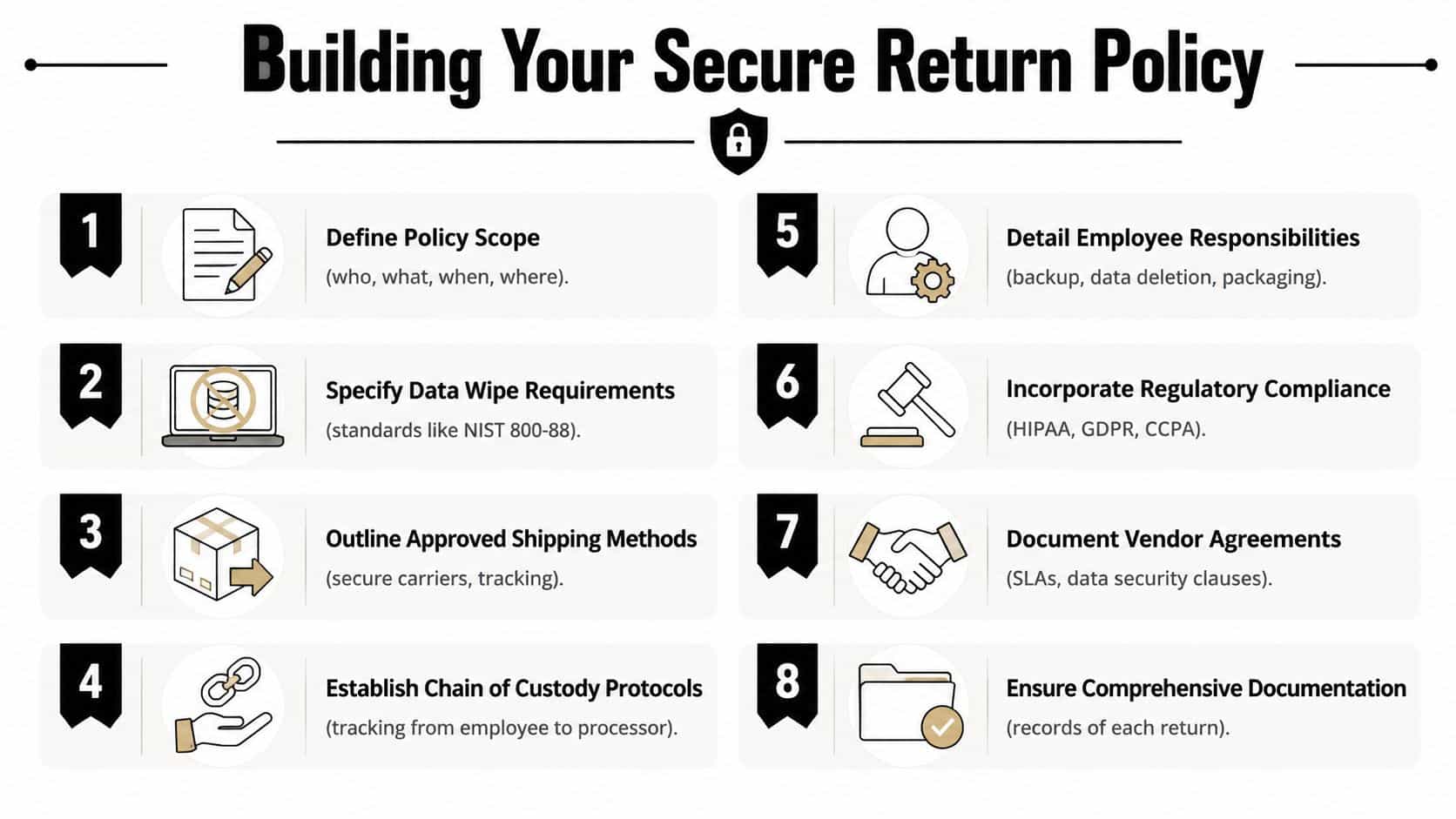
A secure process starts before the first label is created. Your return policy is the control document that tells employees, HR, IT, and outside vendors what happens, when it happens, and what evidence must exist at each step.
Define the scope and ownership
State exactly who the policy applies to. Include remote staff, hybrid staff, contractors if applicable, and employees changing roles internally. List covered assets clearly. Laptop, docking station, charger, security key, external storage, and any company-purchased accessories that must come back.
Then assign ownership for each handoff.
- HR ownership: Trigger offboarding and send the initial return notice to a personal email when appropriate.
- IT ownership: Confirm assigned assets, lock access, and authorize the return method.
- Employee responsibility: Back up approved personal material if policy allows it, stop using the device when instructed, package the asset correctly, and meet the deadline.
- Vendor responsibility: Provide tracked logistics, receiving records, sanitization documentation, and disposition evidence.
Set the non-negotiable controls
A policy without technical and documentation requirements won't hold up under audit. Include these elements in plain language:
- Approved return methods: Mail-in, scheduled pickup, or designated drop-off only.
- Packaging standards: Use company-issued or vendor-issued materials when possible.
- Tracking requirements: Every return must carry an asset ID, employee name, and shipment or transfer reference.
- Data handling rules: Employees must never attempt ad hoc wiping unless your policy expressly permits it.
- Receiving protocol: Devices go into a security hold until asset match and intake review are complete.
- Final evidence: IT or the ITAD partner must retain records of receipt, sanitization, and disposition.
A strong reference point is this guide to employee laptop return policies, especially if your current document still reads like a generic handbook paragraph.
Good policy language is specific enough to enforce and simple enough that an exiting employee can follow it without calling IT three times.
Cover the legal and compliance edge cases
Your policy should also address what happens when things go wrong. Spell out how you handle damaged equipment, missing accessories, international returns, and non-responsive employees. If your organization operates under HIPAA, GDPR, CCPA, SOX, or sector-specific contractual requirements, reference those obligations directly in the policy and align them with your evidence requirements.
That matters because enforcement and compliance are tied together. If your policy says a device must be returned through approved channels and sanitized through approved methods, then exceptions need manager approval and a documented rationale. Otherwise, your “policy” is just a suggestion.
Operational Workflows for Every Scenario
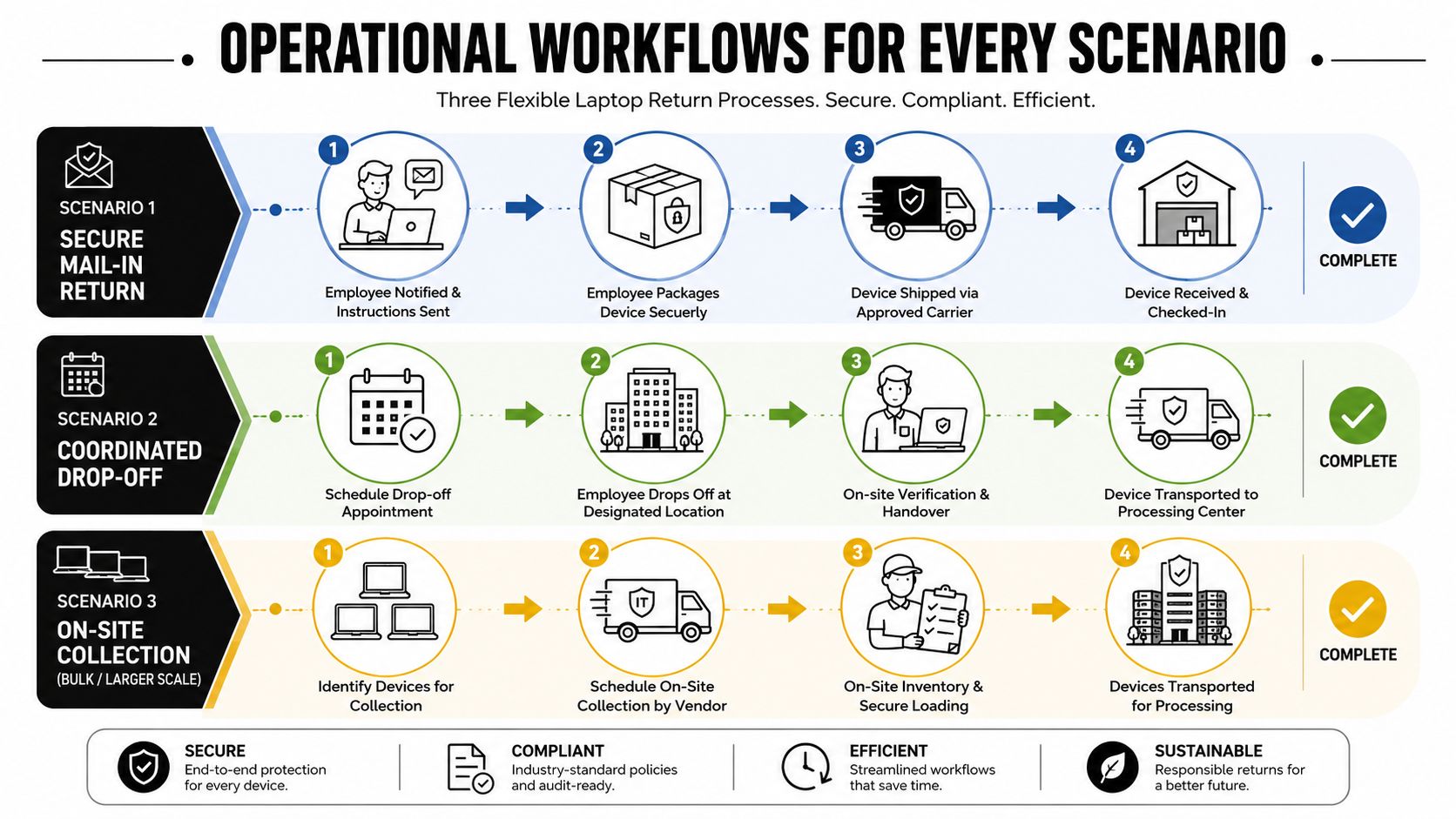
Most IT teams don't need three different programs. They need one program with three controlled workflows. The intake records, asset verification, security hold, and final processing should stay the same. Only the front-end logistics change.
Secure mail-in return
Mail-in works well for widely distributed teams, but only if you remove ambiguity. Don't tell employees to “ship the laptop back.” Send one instruction set tied to one return record.
Start with a return authorization. That record should include the employee name, asset tag, serial number if available, approved contents, and the destination. If you use return kits, assign a unique kit identifier to the asset record so receiving can match box to device without guesswork.
The operating sequence should look like this:
- Trigger the return: HR or IT initiates offboarding, and the system creates a return task.
- Send one complete instruction set: Include packaging steps, approved contents, deadline, and who to contact for problems.
- Use an approved carrier: Require tracking and delivery confirmation.
- Receive under controlled intake: Match the shipment to the return authorization before the box is broken down.
- Move to security hold: No redeployment, resale, or recycling decision happens until intake is complete.
Mail-in fails when teams improvise. Employees use their own packaging. Chargers get mixed with personal electronics. Labels are reused. Devices arrive with no reference number. That's avoidable.
Coordinated pickup
Pickup is the better option when the device contains sensitive data, the employee is local to a service area, or the equipment set includes more than a laptop and charger. It's also useful when an involuntary termination makes self-managed return less reliable.
For pickup, identity and custody matter more than convenience. Schedule the handoff in advance. Define who can release the asset and who can receive it. If a third-party logistics or ITAD provider is involved, require named personnel, appointment windows, and documented transfer.
Use this checklist:
- Verify the device list before scheduling: The pickup team should know what it expects to collect.
- Confirm the employee or site contact: No anonymous porch pickups for corporate devices.
- Capture transfer evidence: Signed handoff form, scanned asset tags, or both.
- Seal transport properly: Collected devices should move in secured containers or under documented handling procedures.
- Route directly to intake or a controlled consolidation point: Don't let equipment sit in unmanaged spaces.
Pickup costs more than standard shipping in some situations, but it buys tighter control. For executive devices, regulated environments, and terminations with heightened risk, that trade-off is usually worth it.
On-site drop-off
Drop-off sounds simple because the employee brings the device to an office or designated location. In practice, many teams botch it by letting front-desk staff accept equipment with no intake rules.
A drop-off program needs a receiving script. The employee arrives. Staff verify identity. They confirm the expected assets. They issue a receipt or acknowledgment. Then the device moves immediately into a locked holding area until IT or the designated processor logs it.
A laptop is not “returned” when it reaches the building. It's returned when your team has logged custody and matched the asset to the record.
Use a short intake table at the drop-off point:
| Intake item | What staff should verify |
|---|---|
| Employee identity | Name and approved handoff record |
| Device match | Asset tag, model, visible serial if accessible |
| Included items | Charger, dock, accessories listed in record |
| Condition notes | Obvious physical damage or missing parts |
| Transfer record | Signed or digital acknowledgment |
This workflow is effective for hybrid teams near a central office, but it only stays secure if receiving staff are trained and the storage path is controlled.
For teams building a broader operational program, this walkthrough on creating a remote employee equipment return program is useful because it treats retrieval as an operational system, not a one-off task.
Standardize the back end even when the front end changes
Varying initial return methods often lead to messy programs. Mail-in, pickup, and drop-off can differ at the start. They should converge immediately at intake. Every returned device should go through the same steps after receipt:
- Asset match and logging
- Condition review
- Security hold
- Data sanitization decision
- Disposition path selection
- Certificate and records retention
If you standardize that back end, you can scale. If you don't, every exception becomes manual labor, and manual labor is where custody gaps appear.
Mastering Chain of Custody and Asset Tracking
Chain of custody is just documented accountability. Who had the device, when they had it, what condition it was in, and what happened next. If any part of that trail is missing, your security posture weakens and your audit story falls apart.
Build the custody record at the point of assignment
The best chain-of-custody programs don't begin at return. They begin when IT issues the laptop. The asset record should already tie the device to a user, location, and assigned accessories. That way, offboarding starts with a verified baseline instead of a scavenger hunt through tickets and spreadsheets.
At return time, create or update a serialized transfer record. That record should follow the device through each handoff. If a carrier is involved, connect the shipment reference to the asset record. If a field technician or vendor collects it, record the collector identity and transfer date.
Make each handoff visible
The point of chain of custody is to eliminate “somebody must have had it” as an answer. Each transfer should generate a record with enough detail to stand on its own.
Use controls like these:
- Asset tags and serial verification: Intake staff should confirm what arrived, not what they expected to arrive.
- Tamper-aware packaging review: If packaging is damaged or resealed, note it before the device is processed.
- Receiving timestamps: Intake time matters, especially when access was revoked earlier.
- Security hold status: Returned doesn't mean cleared. Hold it until review is complete.
- Disposition milestone logging: Sanitized, redeployed, remarked, recycled, or physically destroyed.
If you ever need to explain a missing device to legal, the answer should come from records, not memory.
Know what your ITAD partner must document
A professional processor should extend your chain of custody, not restart it. Their documentation should show receipt, reconciliation against your manifest, sanitization method, and final disposition. If they can't produce that cleanly, they're adding risk.
That's why IT managers should ask for sample reporting before signing anything. You want to see whether the vendor can support internal audit, customer due diligence, and regulatory review without custom scrambling. This explanation of ITAD chain of custody is a useful benchmark for what complete custody documentation should look like in practice.
A strong custody trail also improves operations. It reduces disputes over missing accessories, speeds intake reconciliation, and gives procurement better visibility into what can be redeployed versus retired. Security benefit and operational benefit are tied together here. When the records are tight, the process moves faster.
Data Destruction and Compliance Certification
Getting the laptop back only solves half the problem. The critical control is proving the data is no longer recoverable by an unauthorized party and proving that through defensible records.
Compare the main sanitization methods
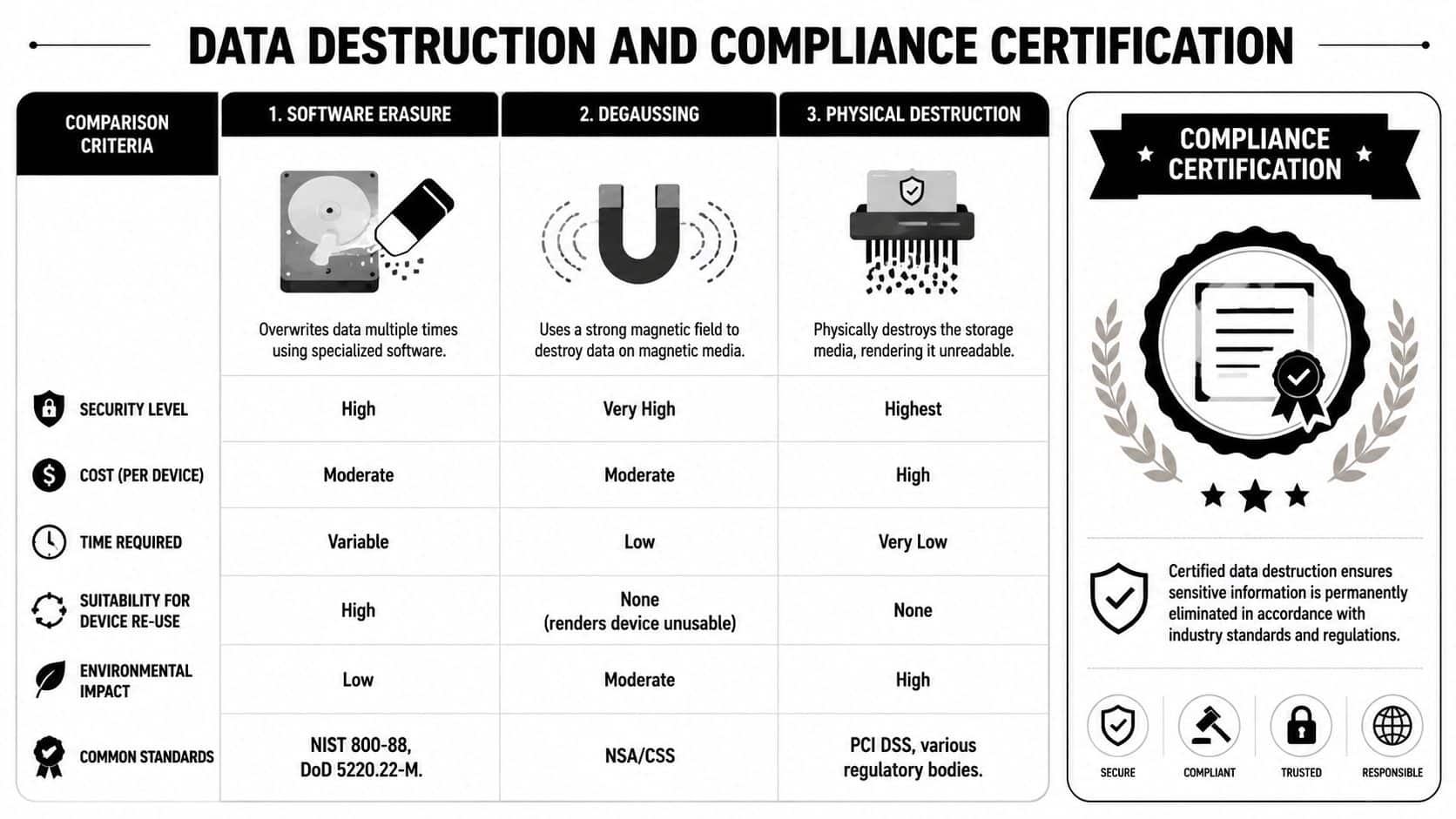
Different assets require different outcomes. Sometimes you want to preserve resale or redeployment value. Other times the only acceptable outcome is destruction.
| Method | Best use case | Reuse potential | Key trade-off |
|---|---|---|---|
| Software erasure | Standard corporate laptops slated for reuse or resale | Yes | Requires verified process execution |
| Degaussing | Magnetic media where reuse isn't required | No | Not suitable for preserving device value |
| Physical destruction | High-risk media or failed drives | No | Ends all reuse and recovery value |
Software erasure is the preferred route when the device can be reused and the media is functioning properly. The standard matters here. According to the ITAD Standards Association study on data recovery, devices sanitized using certified NIST 800-88 Purge methods have no known instances of data recovery, whereas over 40% of used devices sold on the open market after simple "factory resets" still contain recoverable personal and corporate data. That's the difference between a controlled sanitization process and a false sense of security.
Match the method to the risk
Use software erasure when you want a documented sanitization event and the hardware still has value. Use degaussing when you're working with magnetic media and reuse isn't part of the plan. Use physical shredding or crushing when the storage media is damaged, highly sensitive, or unsuitable for verified software sanitization.
The wrong move is relying on consumer-grade reset behavior for enterprise retirement. Factory reset is a convenience feature. It is not a compliance strategy.
Decision test: If you need the asset value, use a certified sanitization method that preserves hardware. If you need absolute finality on sensitive media, destroy the storage.
A practical reference is NIST SP 800-88 guidance, especially for teams defining when to clear, purge, or physically destroy.
Don't close the ticket without certification
The most important output isn't the wipe itself. It's the evidence. Your vendor or internal process should produce a Certificate of Data Destruction or equivalent record tied to the asset or media identifier. If the device is recycled or remarketed after sanitization, you also need disposition records that show where liability transferred.
This is one place where Beyond Surplus can fit into a broader program. The company provides secure IT asset disposal, sanitization logging, and certificates of recycling and data destruction for business clients, which supports the documentation side of laptop return processing.
Without certification, you're asking legal, compliance, and customers to trust that the process happened. Mature programs don't ask for trust. They keep the record.
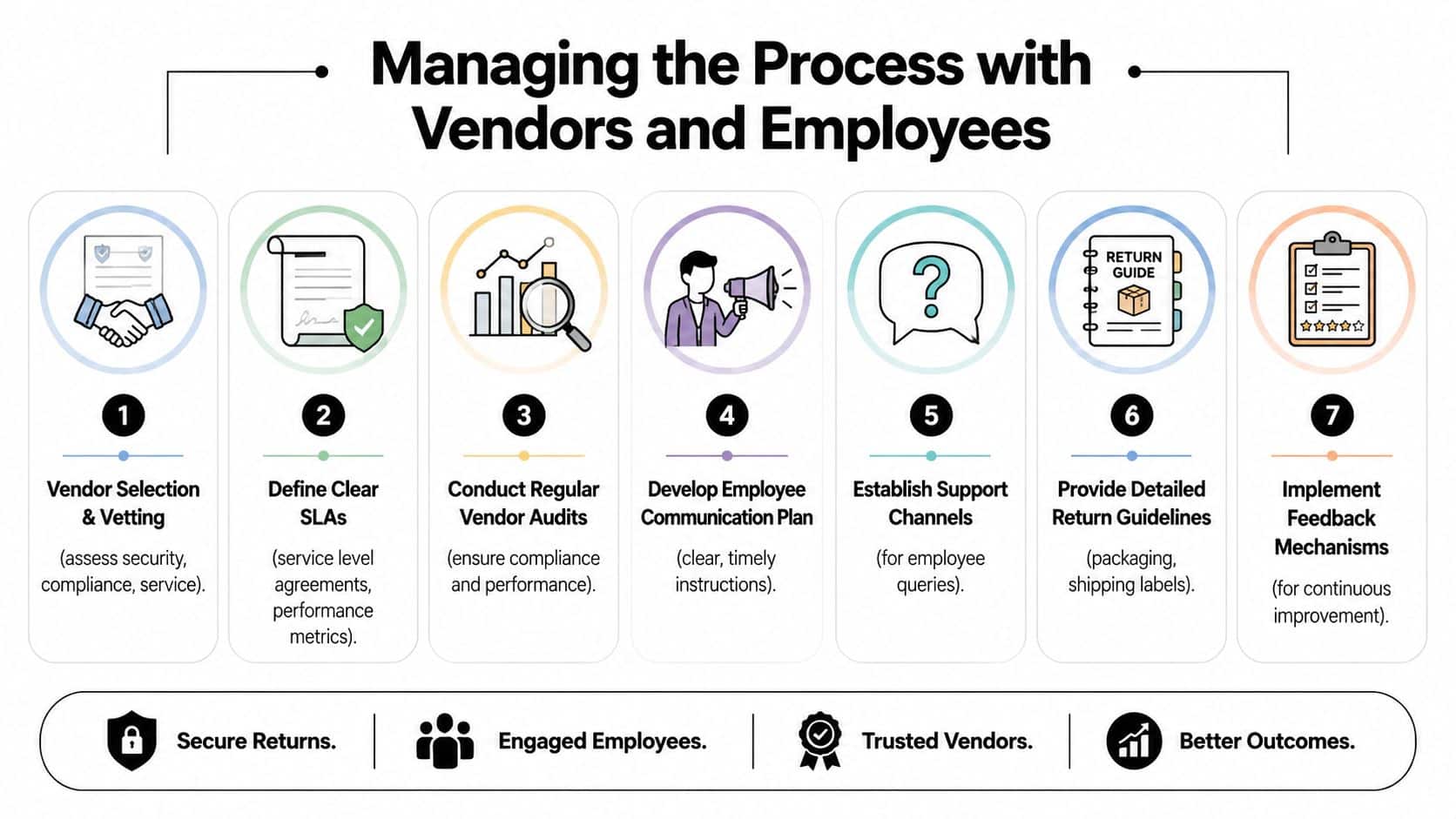
Managing the Process with Vendors and Employees
Most return programs fail in the space between policy and execution. The vendor assumes HR is sending instructions. HR assumes IT has approved the logistics. The employee gets partial information and delays the return because nobody answered a simple question about packaging or accessories.
The fix is to manage vendors and employees as one workflow, not two separate workstreams.
Vet the vendor like a risk partner
Your ITAD or logistics partner handles assets that may contain customer data, regulated information, credentials, or intellectual property. Procurement shouldn't treat that as a generic shipping contract.
Review these areas before onboarding a vendor:
- Security controls: Ask how devices are received, stored, sanitized, and moved between facilities.
- Certifications and audit readiness: Confirm whether the vendor maintains certifications relevant to your requirements.
- Insurance and liability language: Make sure the contract addresses loss, damage, and documentation failures.
- Reporting detail: Request sample intake reports, sanitization records, and certificates.
- Escalation handling: Find out how they manage exceptions such as damaged devices, incomplete kits, or disputed inventory.
A solid SLA should define service expectations in operational terms. Intake turnaround, exception reporting, certificate delivery, and manifest reconciliation all need to be written down.
Make employee instructions painfully clear
Employees don't need a policy lecture during offboarding. They need one message with one path to completion. That message should say what to return, how to return it, when it's due, and who to contact if something goes wrong.
Here's what works:
- Use a single instruction email: Don't scatter return details across HR, IT, and manager messages.
- Send to the right address: Company inboxes may be disabled quickly, so plan accordingly.
- Include the exact asset list: Laptop plus named accessories.
- Give approved packaging guidance: Show what good packaging looks like.
- Offer a support contact: A real owner reduces delays and excuses.
For HR teams formalizing approvals and acknowledgments, tools used for streamlining HR with e-signatures can also help capture policy acceptance, return instructions, and handoff confirmations without adding paper or side-channel emails.
Employees usually comply when the process is simple. They stall when the process makes them improvise.
Run one joined process
The strongest programs tie HR triggers, IT validation, employee communications, and vendor actions into one sequence. That sequence should start before separation is complete, continue through the chosen return method, and end only after the final certificate is stored with the asset record.
A simple operating model looks like this:
| Stage | Primary owner | Required output |
|---|---|---|
| Offboarding trigger | HR | Return event created |
| Asset validation | IT | Approved asset list |
| Return instructions | HR or IT | Complete employee notice |
| Logistics execution | Vendor or internal ops | Tracking or handoff record |
| Intake and sanitization | ITAD or internal IT | Receipt and sanitization record |
| Closure | IT and compliance records owner | Certificate and disposition file |
That joined model matters because employees and vendors respond to clarity. If ownership is blurred, exceptions multiply. If ownership is explicit, the process becomes repeatable.
Frequently Asked Questions on Laptop Returns
How should we handle a laptop from an international employee
Treat international returns as a separate logistics path inside the same control framework. Keep the same asset validation, custody documentation, and sanitization requirements, but use country-aware shipping and customs procedures. If shipping the device back creates unreasonable risk or delay, use an approved regional vendor with documented chain of custody and certification requirements.
What if the returned laptop is physically damaged
Document the condition at intake before any further handling. Photograph visible damage, log what was observed, and separate transit damage from user damage where possible. Then decide whether the device can go through software sanitization or whether the storage media needs physical destruction. Don't skip sanitization evidence because the device looks unusable.
Can employees buy their used laptops
They can, if policy allows it and the process is controlled. The key is sequence. The laptop must be returned, checked in, sanitized using an approved method, and formally released through an authorized disposition process before any employee purchase happens. Never let “employee buyout” become a shortcut that bypasses intake and data destruction.
What happens if an employee doesn't return equipment
Follow the escalation steps already defined in policy. Document every contact attempt, keep the asset flagged as unreturned, and involve HR, legal, or management according to your internal rules. Don't create ad hoc exceptions because someone says the device was lost or discarded. Require documentation and keep the record active until the matter is resolved.
Should we wipe devices before or after they come back
It depends on your controls, but the safest answer is to protect access as soon as offboarding begins and complete certified sanitization after intake. If your device management tools support remote lock or wipe workflows, use them according to policy. But still treat post-return sanitization and certification as the final authoritative control.
Who should own the laptop return process
One team needs operational ownership, even though several teams participate. In most organizations, HR triggers the event, IT owns asset validation and security decisions, and the ITAD or logistics provider executes approved handling steps. What matters is that ownership isn't split so loosely that nobody can answer where the device is right now.
Contact Beyond Surplus for certified electronics recycling and secure IT asset disposal. If your team needs a controlled process for returned laptops, data destruction, and documented chain of custody, they can support commercial programs with pickup coordination, sanitization records, and certificates that help close the loop properly.