Remote laptop return stopped being a simple shipping task a while ago. A 2026 analysis found that remote and hybrid employees are about 17% more likely to fail to return company laptops and peripherals than on-site employees, and with over 52% of remote-capable employees in hybrid arrangements, that gap has become an ongoing ITAM problem, not an edge case (streamlining laptop returns in 2026).
That number changes how IT leaders should think about offboarding. The comprehensive task isn't just getting a box back. It's controlling custody, protecting data, deciding whether the device should be reused, sold, or destroyed, and proving every step later if audit, legal, or security asks questions. Many organizations still separate those tasks. That's where programs fail.
This guide takes the full lifecycle view. It covers return policy, shipping workflow, security controls, compliance, and the final disposition decision that too many laptop-return playbooks treat as an afterthought.
Why Your Old Laptop Return Playbook Is Obsolete in 2026
Office-era return programs assumed a badge handoff, a desk pickup, and immediate inspection by local IT. That model doesn't survive a distributed workforce. If the employee is states away, working from a personal residence, and leaving on short notice, the weak points show up fast: no packaging, no owner, no tracking rhythm, no documented condition, and no clear endpoint after the device comes back.
Legacy processes break in predictable ways
The biggest mistake is treating return as a courtesy step after termination instead of a controlled business process. In older playbooks, HR sends a note, IT waits, the employee improvises packaging, and everyone hopes the laptop appears.
That approach ignores what current workforce design looks like. The return path now runs through home offices, shared spaces, local carrier counters, and regional shipping hubs. Every handoff increases uncertainty unless the company defines the process in advance.
A usable policy should answer four questions without ambiguity:
- Who owns the workflow: HR triggers, IT approves, asset management tracks, and security signs off on final data handling.
- When return starts: Before access is cut, not after silence begins.
- What the employee must do: Back up personal files if permitted, remove non-company accessories, photograph condition, and use only the provided method.
- What happens if deadlines slip: Escalation needs to be defined internally and applied consistently.
Practical rule: If your process depends on a departing employee figuring out packaging, carrier choice, or return timing alone, you don't have a process. You have a hope-based workflow.
Good policies start at onboarding
Return success doesn't begin during offboarding. It begins when the device is issued. The employee should acknowledge that the laptop remains company property, that return instructions will be company-directed, and that condition documentation may be required at the end of service.
That early clarity matters more in hybrid fleets because people normalize the device as part of their home setup. Docks, chargers, monitors, and peripherals get mixed into personal space quickly. By the time employment ends, retrieval is no longer a single-item task. It's a chain-of-custody problem spread across multiple pieces of equipment.
For IT leaders reviewing their current approach, it helps to compare it against broader lifecycle planning like the issues discussed in IT asset disposal trends in Atlanta for 2026. The same lesson applies nationwide. Ad hoc asset handling creates loss long before disposal begins.
Building a Bulletproof Logistics Workflow
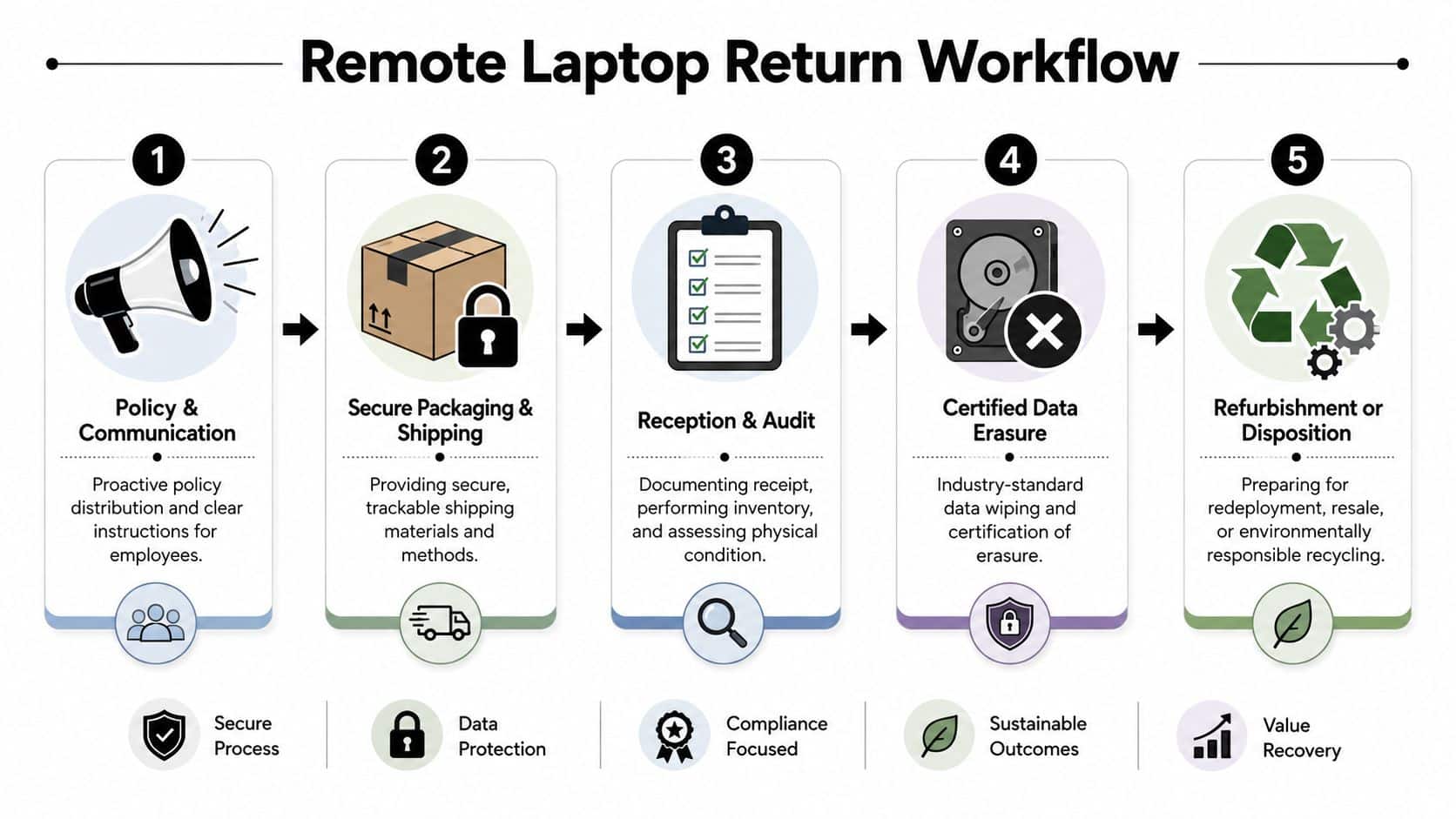
A strong return program removes decisions from the employee and replaces them with a standard sequence. That means the box, label, instructions, reminders, and inspection expectations are all predefined.
Research on enterprise offboarding shows that well-designed remote laptop return workflows can reduce non-return rates by 40 to 60 percent compared with ad-hoc offboarding, and that automated reminders, prepaid labels, and condition documentation can move non-return rates from over 15% to under 10% (remote retrieval workflow data).
Build the workflow around friction removal
The employee shouldn't need to buy packing tape, guess at the right carrier service, or ask where to send the device. Every extra task lowers completion odds.
A practical sequence looks like this:
- Trigger the return immediately once separation is confirmed.
- Send clear instructions that list the exact hardware to return.
- Ship a return kit with protective packaging and a prepaid label.
- Require condition photos before the item is sealed.
- Track movement actively until physical receipt is logged.
Effective reverse logistics discipline matters. If your internal asset process is still fragmented, a broader comprehensive guide to IT asset management is useful for tightening the connection between inventory, custody, and lifecycle status.
Choose carriers for visibility, not habit
Most enterprise teams default to UPS or FedEx because they already have business accounts. That's reasonable. DHL may fit cross-border scenarios. But the right choice depends less on brand familiarity and more on operational controls.
Use a carrier and service level that supports:
- Detailed tracking scans
- Business account billing
- Declared value or insurance options
- Delivery exception visibility
- Reliable pickup or drop-off convenience
A prepaid label alone isn't enough. Someone on the company side must watch exceptions and act when a box stalls, misses a scan, or shows damage.
Standardize what goes in the box
Not every return kit needs the same contents. A laptop-only kit differs from a full workstation recovery. Still, consistency helps.
A good kit usually includes:
- Protective packaging: Enough structure to survive normal transit.
- Prepaid shipping label: Company-paid, pre-addressed, and ready to use.
- Simple instructions: Short, visual, and hard to misread.
- Return checklist: Power adapter, dock, and any required accessories.
- Condition capture request: Photos before sealing reduce later disputes.
For companies that don't want to build that infrastructure internally, nationwide reverse logistics services can support kit distribution, routing, and shipment coordination.
The best logistics workflow feels simple to the employee because the hard work already happened inside the process design.
Securing Data from Remote Wipe to Final Certificate
Physical retrieval gets attention because it's visible. Data exposure is the bigger risk because it often stays invisible until legal, compliance, or incident response gets involved.
Organizations that use serialized device registration, remote wipe windows, and post-return diagnostics lower residual data-exposure risk by an estimated 60 to 70 percent. Combining a pre-return backup window with a factory reset on receipt and NIST-aligned sanitization reduces the likelihood of recoverable PII to negligible levels (remote employee laptop return controls).
Remote wipe is only one layer
Too many teams think a remote wipe command closes the issue. It doesn't. Devices can be offline. Employees can delay shipment. Local accounts, cached files, and storage media still need verified handling after receipt.
A defensible process uses multiple controls together:
- Serialized registration: Match the physical device to the assigned record before return starts.
- Pre-return backup window: Give the employee a defined period to separate allowed personal files.
- Access revocation: Shut off business access on schedule.
- Remote lock or wipe window: Issue commands while the device is still visible in management tools.
- Factory reset on receipt: Never rely solely on what happened remotely.
- Certified sanitization: Use a documented method aligned to accepted standards.
Chain of custody has to survive scrutiny
A missing audit trail can turn a clean technical process into a bad compliance story. The chain needs to show who had the device, when the label was issued, when the carrier accepted it, when your receiving team logged it, and what happened next.
Use a receiving checklist that records:
| Control point | What to document |
|---|---|
| Arrival | Serial number, shipment condition, date received |
| Inspection | Exterior damage, missing accessories, visible tampering |
| Processing | Reset status, diagnostic outcome, wipe or destruction path |
| Closure | Certificate issuance and asset status update |
That last line matters. A wipe is an action. A certificate is the record that lets legal, procurement, and audit confirm the action happened. Teams that need process guidance should align with NIST SP 800-88 practices for sanitization, then map those controls into their return workflow instead of treating sanitization as a separate downstream event.
A returned laptop isn't safe because it's back in your building. It's safe when the custody record and the data-destruction record both hold up.
Navigating the Compliance Minefield
Compliance failures in laptop return programs rarely start with bad intent. They start with incomplete workflows. A team retrieves the device, performs some kind of wipe, shelves the asset, and assumes that security handled the hard part. The problem is that regulators and auditors care about evidence, consistency, and reasonable controls, not verbal assurances.
One process should satisfy multiple obligations
The same return workflow can support several regulatory expectations if it's built properly. For example:
- FTC Disposal Rule: You need reasonable measures to protect consumer information during disposal.
- HIPAA environments: Devices that may hold protected health information require stronger control over handling, sanitization, and proof.
- Financial and public company contexts: Governance expectations often extend to asset records, retention discipline, and demonstrable control over sensitive systems and endpoints.
- GDPR-aligned operations: The focus shifts to data minimization, secure handling, and documented end-of-life action for devices that may contain personal data.
The practical takeaway is simple. Compliance doesn't begin when legal asks for paperwork. It begins when IT defines the workflow.
Documentation is what closes the loop
For remote returns, the strongest process usually produces at least four records:
- Assignment record: Who had the device and under what policy.
- Transit record: Label issuance, carrier tracking, receipt confirmation.
- Sanitization or destruction record: What happened to the data-bearing asset.
- Recycling or downstream disposition record: Where the hardware went after processing.
If you can't produce the return record, the wipe record, and the final disposition record together, your compliance posture is weaker than your team thinks.
One reason this matters more now is that the final stage is often under-designed. Many laptop return guides focus on shipping and local device wipe but gloss over the end-of-life question. That gap becomes serious when equipment is outdated, damaged, or no longer fit for redeployment. In those cases, your return program is also your disposal program, whether you planned it that way or not.
Special care for mixed-use devices
COPE and hybrid ownership models complicate everything. The issue isn't just technical. It's legal and human. If personal data lives on a device that the company expects to reclaim, the team needs documented consent language, a defined review path, and counsel where necessary. Broad, vague instructions are risky. Precision wins here.
From Return to Recovery A Financial Decision Guide
A laptop return program that ends at “device received” leaves money and risk on the table. Once the device is back, IT has to decide what path creates the best operational and financial outcome.
This is the step many organizations skip. That shows up in the market. Over 60% of enterprises still use ad hoc disposal methods, while only 22.3% of global e-waste is properly collected and recycled, according to the cited laptop-return analysis (laptop return guide and disposal gap).
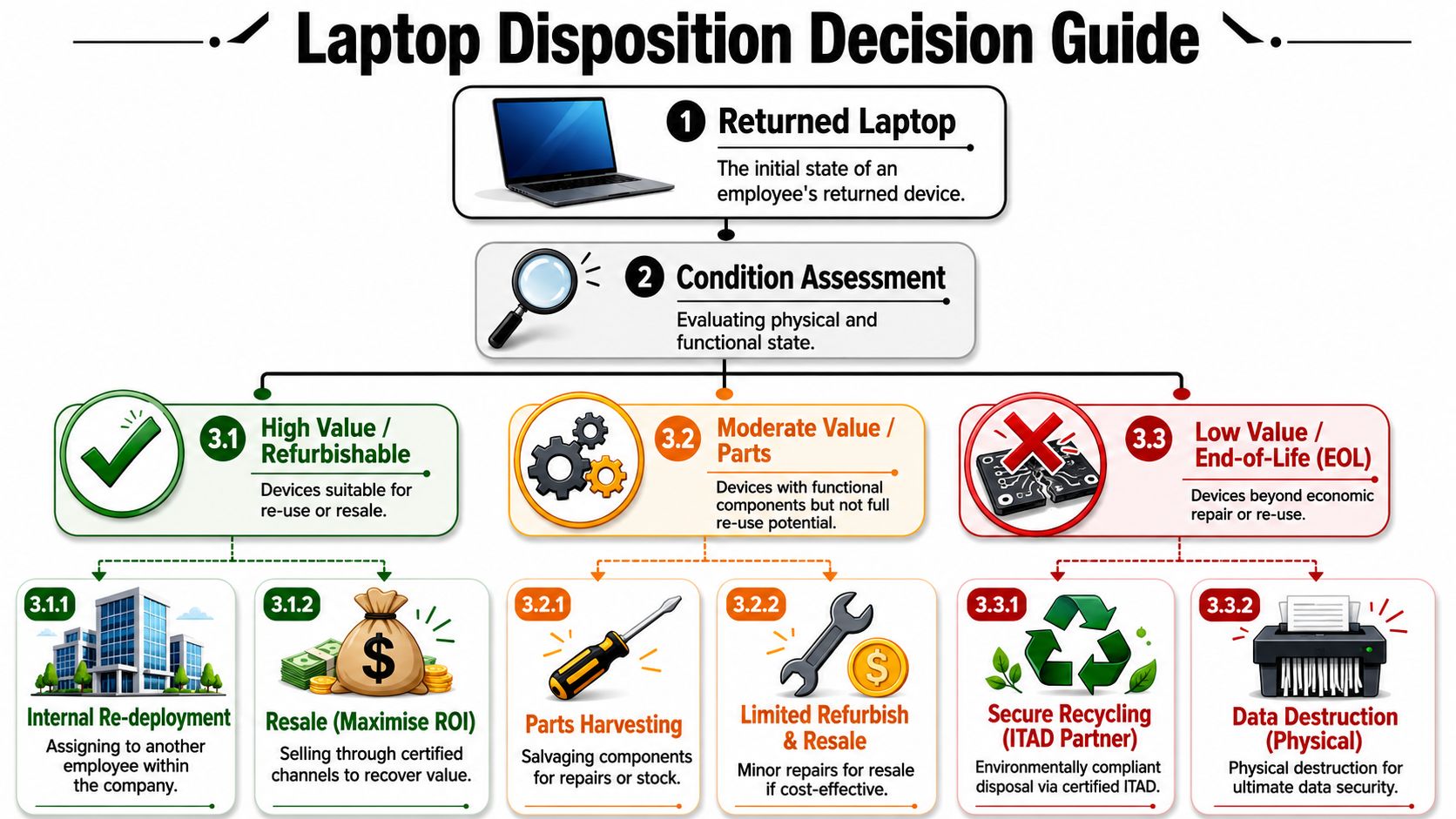
Four disposition paths
Not every returned machine deserves the same treatment. Use inspection data to separate devices into clear buckets.
| Path | Best fit | Main advantage | Main caution |
|---|---|---|---|
| Redeploy | Newer, compliant, good-condition devices | Fast internal value recovery | Only works if diagnostics are clean |
| Resell or buyback | Marketable devices your team doesn't need | Recovers residual value | Requires accurate grading |
| Harvest for parts | Devices with useful components but poor full-system value | Supports repair inventory | Tracking gets messy if parts controls are weak |
| Recycle or destroy | End-of-life or noncompliant assets | Reduces risk and clears storage | Must be documented properly |
Inspection should drive the decision
A useful review asks three questions in order:
Is the device safe to process?
If tampering, severe damage, or custody gaps exist, stop and escalate.Is it economically useful as a complete device?
Check battery health, display, keyboard, casing, and model relevance.If not, does it still hold parts value or only material value?
That determines whether it should be dismantled, recycled, or physically destroyed.
The true value of post-return diagnostics becomes apparent. Battery condition, visible damage, storage status, and refurbishment feasibility all shape the right outcome. Without formal inspection, teams over-retire usable hardware and under-document risky assets.
Disposal is a business decision, not a cleanup step
Returned devices often pile up in cages, closets, and back rooms because no one wants to make the final call. That's the worst option. Untracked storage keeps liability alive and usually kills residual value.
For organizations that want a structured recovery path, asset recovery services in Georgia show how value recovery and compliant end-of-life handling can be tied together in one process instead of split across separate vendors.
Old laptops don't become low risk just because they're powered off and out of circulation. They become low risk when you've documented whether they were reused, sold, dismantled, or destroyed.
Choosing an ITAD Partner for Secure Disposition
At some point, internal controls stop at the dock door. After that, your vendor becomes part of your risk posture. That's why ITAD selection can't be a price-only exercise.
What a serious ITAD partner should prove
The hardest cases usually expose weak vendors fast. COPE and hybrid ownership models are a good example. Those devices may hold personal content, mixed-use files, or privacy-sensitive edge cases. The legal and privacy nuances around wiping and reclaiming those systems often require expert consultation, which is why vendor sophistication matters far beyond shipping coordination.
Ask direct questions about:
- Sanitization standards: Do they document methods aligned to NIST 800-88?
- Certificates: Do they issue auditable records for data destruction and recycling?
- Chain of custody: Can they show custody points from pickup through final disposition?
- Downstream handling: Do they control where material goes after initial processing?
- Value recovery: Can they separate refurbishable assets from true end-of-life equipment?
If your team wants a framework for vetting providers, a vendor due diligence checklist is a practical starting point.
Reverse logistics and disposition have to connect
A weak handoff between retrieval and disposition creates blind spots. The box arrives, but no one can tie that shipment to the final destruction or resale record. That's a systems failure.
For procurement and operations teams that want a broader view of the movement side, it's worth reviewing how specialized providers think about reverse logistics with Routelink. The point isn't geography. It's process design. Retrieval, receiving, grading, and end-of-life reporting have to operate as one chain.
One factual example in this space is Beyond Surplus. The company provides ITAD, secure data destruction, certificates of recycling and data destruction, and logistics coordination for business pickups across the contiguous United States. In a remote return program, that type of service sits at the final control point where reuse, buyback, or certified destruction gets documented.
A Practical Guide to Return and Disposition FAQs
What if the employee stops responding
Escalate fast and keep the record clean. Confirm shipment instructions were sent, confirm the address on file, and document every contact attempt. HR, IT, and the employee's manager should all know who owns the next step. If recovery fails, mark the asset accordingly and preserve the audit trail.
What if the laptop comes back damaged
Separate accidental shipping damage from pre-existing condition issues. That's why pre-shipment photos matter. Log exterior damage at receipt, inspect for signs of tampering, and decide whether the machine is still suitable for wipe and resale, parts recovery, or destruction.
What about international returns
International retrieval often creates customs, timing, and cost issues that don't exist in domestic programs. Don't force a one-size-fits-all domestic return method onto global employees. Build regional rules, use approved carriers, and decide in advance when local disposal under controlled conditions makes more sense than cross-border return.
What if personal data is still on the device
Pause the standard workflow and follow the policy your legal and HR teams approved for mixed-use or COPE scenarios. The right answer depends on ownership, consent, and what the employee was told at issue. This is one of the few areas where improvisation creates unnecessary risk.
What if the device isn't worth redeploying
Move it quickly into the right end-of-life lane. Dead storage is rarely neutral. If the machine has no practical reuse case, document the sanitization decision and close it out through certified recycling, material recovery, or physical destruction.
What's the simplest way to improve the whole program
Fix the handoffs. Most failures happen between teams, not inside them. Define ownership, send return kits automatically, require condition documentation, inspect on receipt, and connect every returned device to a final disposition record.
If your team needs a cleaner way to manage remote returns all the way through certified end-of-life handling, contact Beyond Surplus. They support business IT asset disposition, secure data destruction, electronics recycling, reverse logistics coordination, and documented value recovery so returned laptops don't stall between offboarding and final disposition.