Most businesses should replace employee computers every 3 to 5 years, with laptops commonly refreshed every 3 to 4 years and desktops every 4 to 5 years. Retired devices shouldn't sit in storage indefinitely. They need secure disposition, documented chain of custody, and certificates that prove data destruction and responsible recycling.
The familiar scene is a storage room lined with old laptops, desktops, monitors, and hard drives. Some machines are labeled “spares.” Others are waiting for a decision nobody has had time to make. Meanwhile, the business still carries the risks of forgotten data, unclear ownership, expired support, and undocumented disposal.
The better question isn't, “How old is this computer?” It's whether the device remains supported, secure, useful, and economical to operate. A computer might still start successfully while costing more in repairs, downtime, administrative effort, and compliance exposure than its remaining value justifies. This practical guide explains how to decide when to keep, repurpose, replace, or securely dispose of business computers. For additional context on the operational and environmental reasons to act, see why businesses should recycle old computers.
Table of Contents
- Introduction Why Holding Onto Old Computers Costs More Than You Think
- Understanding the Business Computer Lifecycle From Purchase to Retirement
- When Old Computers Become a Liability Cost Support and Security Risks
- Key Factors That Determine How Long to Keep Old Computers
- Recommended Retention Ranges and How to Build Your Policy
- Secure Disposition Steps That Protect Data and Prove Compliance
- Next Steps to Turn Old Computers Into Value and Reduce Risk
Introduction Why Holding Onto Old Computers Costs More Than You Think
A retired laptop kept “just in case” can look harmless. It takes up little space, and postponing a decision feels cheaper than arranging pickup, data destruction, and recycling. But a stored device still contains business information, still needs an inventory record, and still creates uncertainty about who is responsible for it.
Storage is not a lifecycle strategy
Consider an IT manager preparing for an audit. The team can account for active computers, but a cabinet contains machines from former employees and past projects. Some have asset tags, some have missing chargers, and several have no clear record of whether their drives were wiped. The longer those devices remain untouched, the harder it becomes to establish ownership, condition, data status, and final disposition.
That's why retention should be treated as a risk and compliance decision, not an age-only rule. A business may keep a computer longer when it remains supported and has a defined role. It should shorten retention when the device is exposed to sensitive data, no longer receives necessary updates, or costs more to maintain than its operational value supports.
The practical answer for most fleets
For standard employee equipment, a 3 to 5 year planning range is a useful starting point. Laptops often leave service sooner because mobility brings battery wear, physical damage, and heavier daily handling. Desktops can remain productive longer in stable office environments, provided their operating system, security controls, and business applications remain supported.
The decision also includes what happens after replacement. Businesses should plan secure data sanitization, certified recycling, value recovery where appropriate, and audit-ready documentation before equipment leaves their control. A clear policy turns a crowded storeroom into a managed pipeline, with every asset moving from service to disposition deliberately.
Understanding the Business Computer Lifecycle From Purchase to Retirement
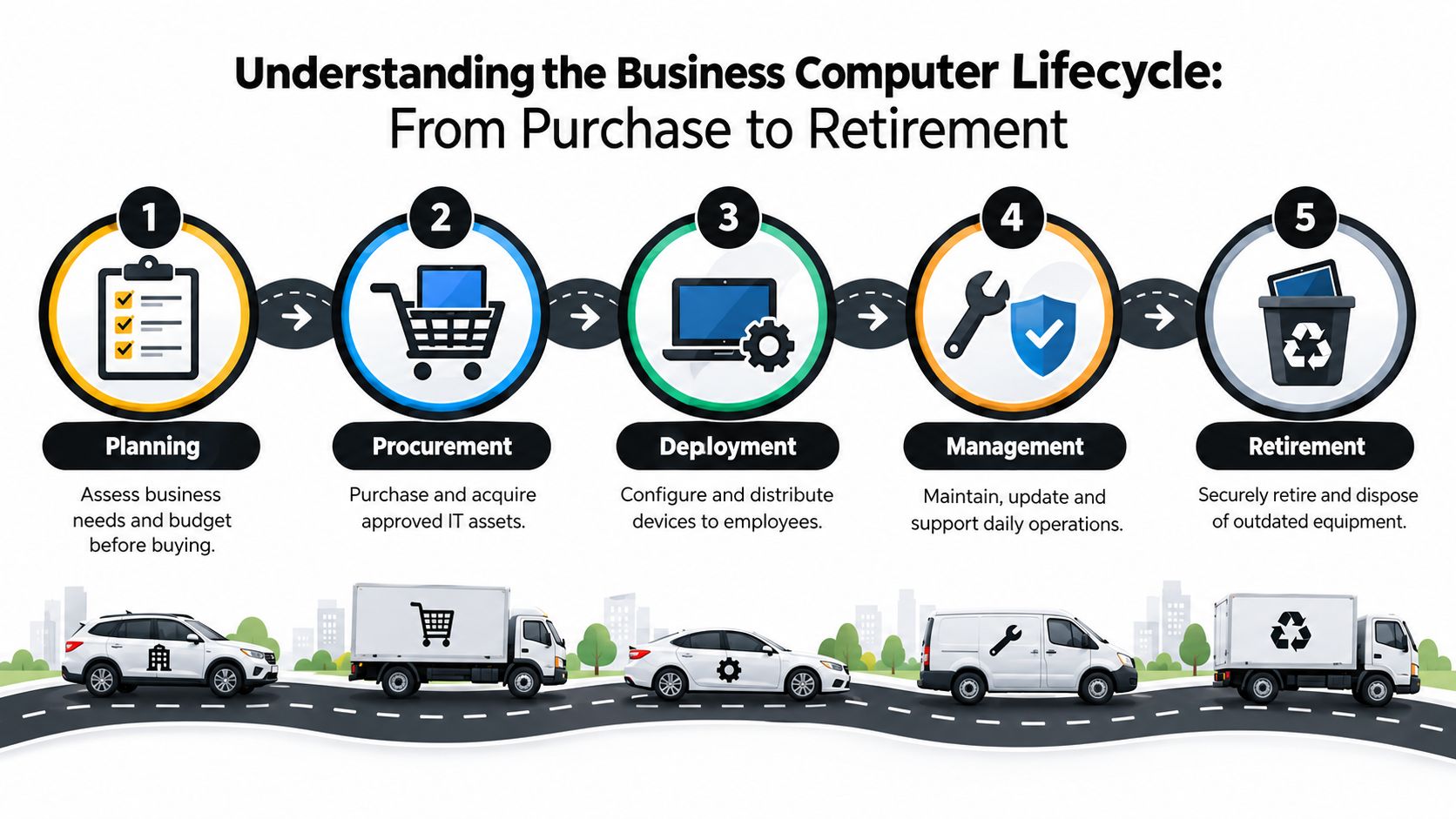
A business computer follows a lifecycle much like a company vehicle. Procurement chooses the vehicle, operations assigns it to a driver, maintenance keeps it roadworthy, and fleet management retires it before breakdowns disrupt work. The odometer matters, but so do service records, warranty coverage, safety requirements, and the job the vehicle performs.
Business IT teams should manage computers through five connected stages:
- Planning starts with workload, security, user requirements, budget, and expected service life.
- Procurement establishes approved models, warranty terms, suppliers, and asset records.
- Deployment covers configuration, encryption, management enrollment, assignment, and employee delivery.
- Management includes patching, repairs, endpoint protection, software compatibility, and ownership changes.
- Retirement removes the device from service, protects its data, records its disposition, and sends it for reuse, resale, destruction, or recycling.
Why age alone gives the wrong answer
Two computers purchased in the same quarter may deserve different treatment. One might serve a general office user and remain compatible with current tools. Another might support engineering, imaging, analytics, or a remote workforce and become inadequate much earlier. Conversely, a lightly used desktop may remain operational after its standard replacement window, but that doesn't automatically make continued use sensible.
The control point is a reliable inventory. Record each machine's age, warranty date, assigned owner, location, configuration, and lifecycle status. IT lifecycle guidance from Globe Machine's computer replacement overview emphasizes documenting age, warranty information, and ownership so staggered replacement plans can work in practice.
Businesses should also separate hardware records from broader retention obligations. If your organization stores contracts, personnel records, or regulated documents alongside IT asset records, this 2026 guide to company document storage offers useful context for organizing business documentation. For a deeper explanation of the lifecycle model, review IT lifecycle management explained.
Retirement is not a failure event. It's a planned stage that should happen while the device can be removed safely, data can be verified, and replacement capacity is available.
When Old Computers Become a Liability Cost Support and Security Risks
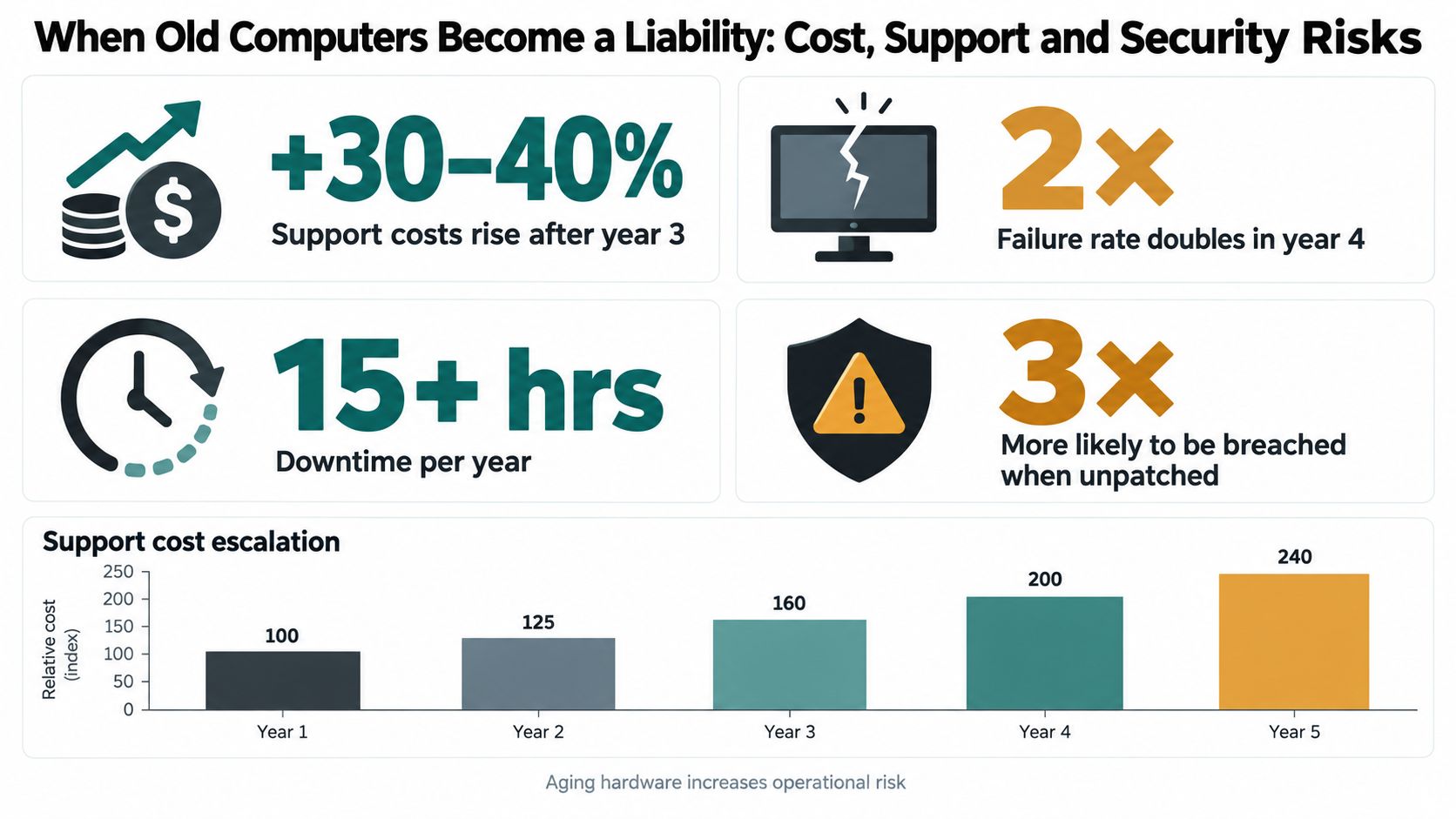
A computer usually becomes a liability gradually. The first signs may be longer support calls or an occasional repair. Later, the IT team spends more time finding compatible parts, addressing application conflicts, and maintaining exceptions for systems that no longer fit the company's standard environment.
Intel's analysis identifies an optimal lifecycle of about three years for business laptops and desktops, and warns that keeping PCs beyond an average of three years significantly increases support costs and security exposure. A Defense Business Board report identifies 36 months as an industry standard and cites research across 177 businesses, finding an average desktop-PC lifespan of 43 months and mobile-PC lifespan of 36 months. (Defense Business Board IT User Experience Report)
The year three to four tipping point
The same Defense Business Board report says a PC that's 4 or more years old is 2.7 times more likely to be repaired, with each repair causing 112 hours of productive time lost. Those figures explain why many organizations plan replacement during years three to four instead of waiting for a machine to fail.
Historical cost analysis points in the same direction. The report cites an estimate that the total operating cost of a PC aged 4 or more years was $2,736, enough to replace it with two or more newer PCs. These figures are historical benchmarks, not a universal invoice for every business, but they illustrate how support and disruption can outweigh the apparent savings of postponement.
Support and security move together
Warranty expiration removes a layer of financial predictability. Battery degradation affects mobile workers, while older components can become difficult to replace. When a device falls outside vendor support windows, maintaining patches and compatibility with endpoint protection, disk encryption, and modern management tools becomes progressively harder. (Perez Technology Group hardware refresh guidance)
Security risk also extends beyond the active employee. A retired laptop that remains in a storeroom can still contain credentials, cached files, customer information, or regulated data. Without a documented sanitization process, the organization may be unable to demonstrate what happened to that information. The practical warning signs are clear:
- Repair frequency: Repeated failures consume technician time and interrupt users.
- Support status: Expired warranties and unsupported operating systems increase exceptions.
- Compatibility: New applications, encryption controls, or management platforms may not function reliably.
- Data exposure: Unprocessed retired equipment remains an unmanaged information repository.
For more detail on the exposure created by informal handling, see data security risks of improper computer disposal.
Key Factors That Determine How Long to Keep Old Computers
Age provides a useful planning signal, but it shouldn't make the decision by itself. A finance workstation, a clinical endpoint, a warehouse terminal, and a developer laptop may have different risk profiles even when they're the same age.
Compare the retention drivers
| Retention Factor | When It Extends Retention | When It Shortens Retention |
|---|---|---|
| Compliance and records | The device has a documented role, controlled access, and approved retention requirements | The organization can't prove ownership, data status, or disposition history |
| Security | Current patches, encryption, endpoint protection, and management controls remain available | Support ends, controls become incompatible, or sensitive data is difficult to sanitize |
| Asset value | The equipment has resale, buyback, reuse, or parts value | Market value is low and handling costs exceed recovery potential |
| Sustainability | Reuse or refurbishment can extend useful service without compromising controls | Continued storage delays certified recycling and increases dormant inventory |
| Chain of custody | Inventory, transfer records, sanitization results, and certificates are complete | Devices sit untracked, mixed with other assets, or move without signed handoffs |
Compliance can extend retention when a business must preserve a specific record or maintain an approved system for a defined operational reason. It shouldn't become an excuse for indefinite storage. In most cases, the organization needs to preserve the required information, not the physical computer itself.
Security often shortens the window. A device that cannot support current encryption or endpoint management may be unsuitable even if its processor still handles basic tasks. Mission-critical users also need a more conservative approach because a failure can interrupt revenue-producing or regulated work.
Decide whether reuse still makes sense
Residual value changes over time. A functioning laptop might be suitable for internal reassignment, resale, or refurbishment, while another machine may be better suited for parts recovery or recycling. The right path depends on condition, data requirements, market demand, and the cost of preparing the asset.
Refurbish or recycle guidance can help teams compare those paths without treating sustainability and security as competing goals. Responsible reuse requires the same disciplined inventory and data controls as recycling.
The strongest policy weighs all five drivers together. If security and compliance are weak, residual value shouldn't justify delay. If a device remains supported and useful, planned reuse may be sensible. If no business owner can explain why it's being kept, it's probably ready for disposition.
Recommended Retention Ranges and How to Build Your Policy
A practical policy should give managers a default range while allowing documented exceptions. The following categories provide a workable planning structure for mixed estates:
- Laptops: 3 to 4 years, reflecting mobility, battery wear, and frequent handling.
- Desktops: 4 to 5 years, particularly in stable office settings.
- Servers: 4 to 6 years, depending on workload, warranty coverage, and support requirements.
- Network equipment: 5 to 7 years, unless capacity, compatibility, or vendor support creates an earlier trigger.
These ranges come from IT refresh cycle guidance for business hardware. They're planning ranges, not automatic disposal dates. Warranty expiration, workload, security support, and operational criticality can move a device forward or backward.

Use a rolling replacement model
Replacing an entire fleet at once can create budget pressure, deployment congestion, and a large disposal event. A rolling program spreads those demands across the year. One common planning rule is to retire approximately 25% of the fleet annually, allowing the organization to refresh gradually rather than waiting for a single large replacement cycle. (Expert IT equipment replacement guidance)
A simple decision tree can keep approvals consistent:
- Is the device supported and receiving required security updates? If not, prioritize replacement or approved retirement.
- Does it meet the user's current workload? If not, move it to a suitable role only if security controls remain intact.
- Is continued operation economical? Compare repairs, downtime, support effort, and replacement cost.
- Is there a documented owner and business purpose? If not, route it for review and disposition.
- Can the organization prove what happened to the data? If not, pause transfer until sanitization is verified.
Sample policy language
Business computers will be reviewed against device category, support status, warranty coverage, security requirements, workload, and documented ownership. Retired assets may not remain in storage without an approved disposition date, inventory record, and data handling status. The organization will retain certificates of data destruction and recycling in accordance with applicable audit and recordkeeping requirements.
The policy should name who approves exceptions, who updates the asset register, and who verifies certificates. A clear owner prevents retired equipment from becoming nobody's responsibility.
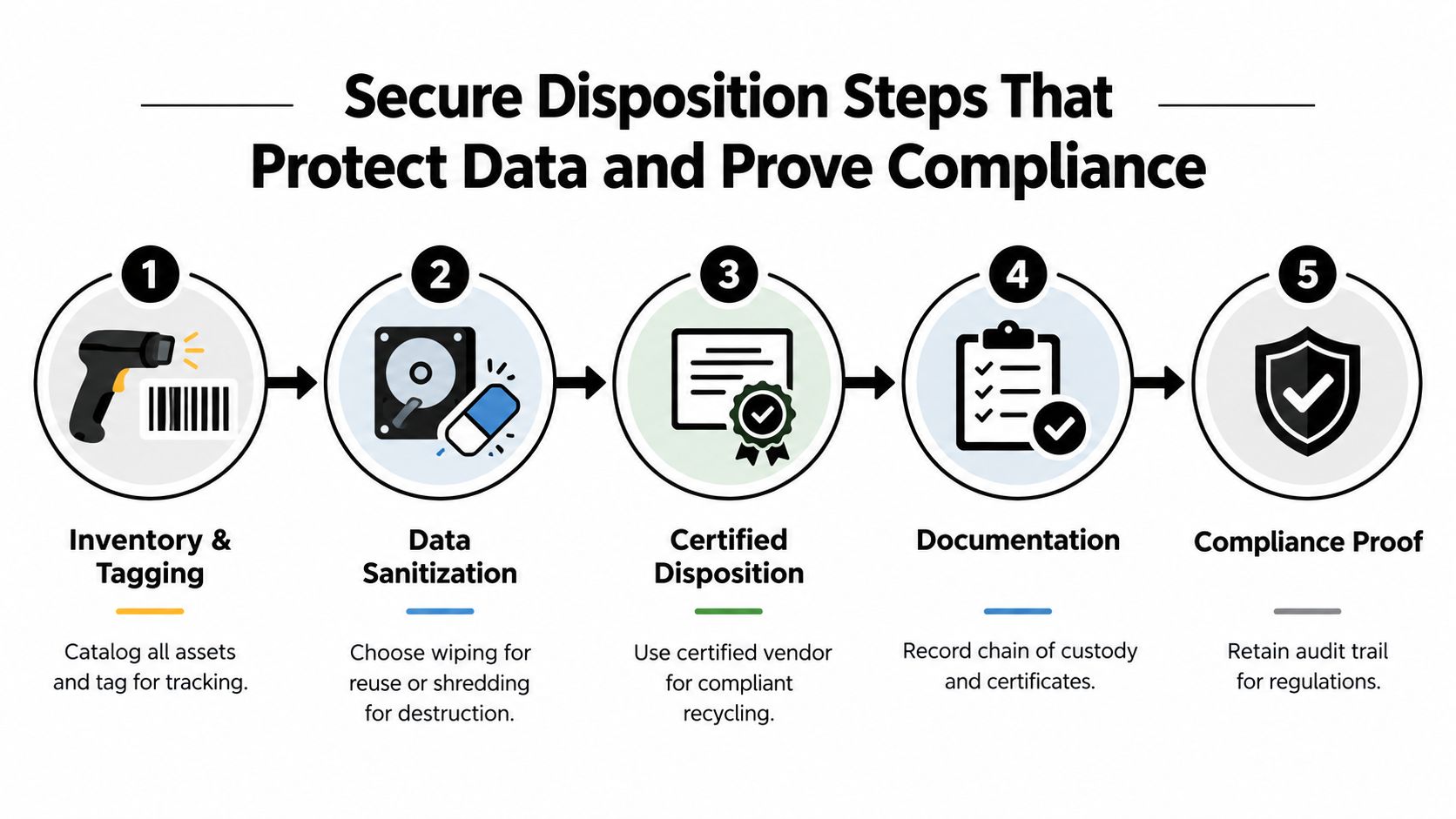
Secure Disposition Steps That Protect Data and Prove Compliance
Secure disposition works best as a controlled transfer, not a last-minute trip to a recycler. The organization should know what it has, what data it contains, what outcome is approved, and what evidence it will receive at the end.
Build the record before moving the equipment
Start with the asset inventory. Match serial numbers and asset tags to the owner, location, device type, condition, and disposition decision. Flag missing equipment, damaged drives, and devices that require special handling. This record becomes the foundation for chain of custody and value recovery.
Next, choose the sanitization method. Certified data wiping may support reuse or resale when the storage media and device condition are suitable. Physical shredding is appropriate when a drive must be destroyed or wiping cannot provide the required assurance. The decision should reflect data sensitivity, contractual obligations, and the intended outcome for the hardware.
Connect logistics with evidence
On-site service can reduce transport concerns and allow the business to witness destruction. Off-site processing may suit larger volumes or centralized workflows. Either option needs documented handoffs, controlled transport, processing records, and final certificates.
Beyond Surplus provides business IT asset disposition services that include electronics recycling, certified data wiping, hard-drive shredding, IT buyback, pickup coordination, and certificates of recycling and data destruction. For a plain-language explanation of the documentation, review what a certificate of data destruction means.
The certificate is not a substitute for internal records. Keep the asset list, transfer documentation, sanitization results, recycling certificate, and approval trail together. Industry guidance also emphasizes that businesses shouldn't store retired laptops and hard drives indefinitely. In the UK, one 2026 guide recommends retaining destruction and recycling certificates for at least five years, demonstrating that the audit record can outlast the hardware. (UK business computer disposal guidance)
A complete workflow turns disposal into proof. It shows which asset moved, who handled it, what happened to its data, and how the remaining materials were processed.
Next Steps to Turn Old Computers Into Value and Reduce Risk
The answer to how long businesses should keep old computers is usually simple to state but requires disciplined execution. Keep equipment while it remains supported, secure, useful, and economical. For many employee computers, that means planning around the 3 to 5 year window, then moving promptly into certified disposition rather than allowing retired devices to accumulate.
Start with a focused review:
- Inventory the fleet: Confirm age, owner, location, warranty date, condition, and lifecycle status.
- Flag exceptions: Identify unsupported systems, sensitive-data devices, frequent repairs, and mission-critical endpoints.
- Set the annual plan: Schedule rolling replacement and budget for sanitization, transport, recycling, and documentation.
- Choose the disposition path: Separate reuse, resale, product destruction, data center decommissioning, and electronics recycling requirements.
- Store the evidence: Keep certificates and chain-of-custody records with the asset register.
That approach can recover value where appropriate, support responsible e-waste management, and reduce the security exposure created by unmanaged equipment.
Beyond Surplus helps businesses coordinate secure IT equipment disposal, certified data wiping and hard-drive shredding, electronics recycling, IT asset recovery, and documented chain of custody. Visit Beyond Surplus to arrange a business pickup and create a compliant disposition plan for your retired computers.