When remote employees leave, laptop shipping looks like a minor offboarding task until the numbers land on an IT manager's desk. According to Gartner, only about 30% of company devices are returned by remote employees on time, and the true cost to recover a single device domestically ranges from $197 to $334 once labor, packaging, and insurance are factored in (Quip Teams). For a mid-sized company, that can mean millions tied up in missing hardware, delayed redeployment, and preventable security exposure.
That's why the best practices for shipping laptops back from remote employees should be treated as a control system, not a shipping task. A weak process leaks money in small increments. A strong one protects assets, preserves chain of custody, and gives IT, HR, and procurement a repeatable playbook. Teams that want a deeper view of the financial impact should review this breakdown of the hidden costs of unreturned company laptops.
The High Cost of Unrecovered Laptops
A missing laptop creates three problems at once. Finance sees an unrecovered asset. Security sees unmanaged corporate data outside company control. Operations sees one more exception case that someone on the team has to chase manually.
The shipping label is usually the smallest part of the cost. Labor stacks up fast when IT has to coordinate with HR, answer employee questions, reissue labels, track packages, inspect arrivals, and reconcile asset records. That's before damage claims, lost accessories, or replacement purchases enter the picture.
Why informal processes fail
A casual message like “please send your laptop back this week” almost never holds up at scale. Employees leave with competing priorities, access to company email may be shut off quickly, and packaging details are easy to get wrong. If the process depends on memory, goodwill, or improvisation, devices drift.
Practical rule: If return steps aren't documented before offboarding begins, the company is already behind.
What the business is actually managing
The retrieval program should be built around a few realities:
- Asset value matters: Many business laptops are expensive enough that non-return becomes a material loss.
- Data risk matters: A powered-on device in an ex-employee's home is a security issue, not just an inventory issue.
- Auditability matters: Teams need proof of who had the device, how it moved, and what happened to the data after it came back.
That combination is what makes retrieval a business function. Not a clerical task.
Building a Bulletproof Laptop Return Policy
A solid return process starts long before someone resigns. The policy should be written into onboarding documents, equipment agreements, and offboarding workflows so there's no debate over ownership, timing, or responsibility when a laptop has to come back.
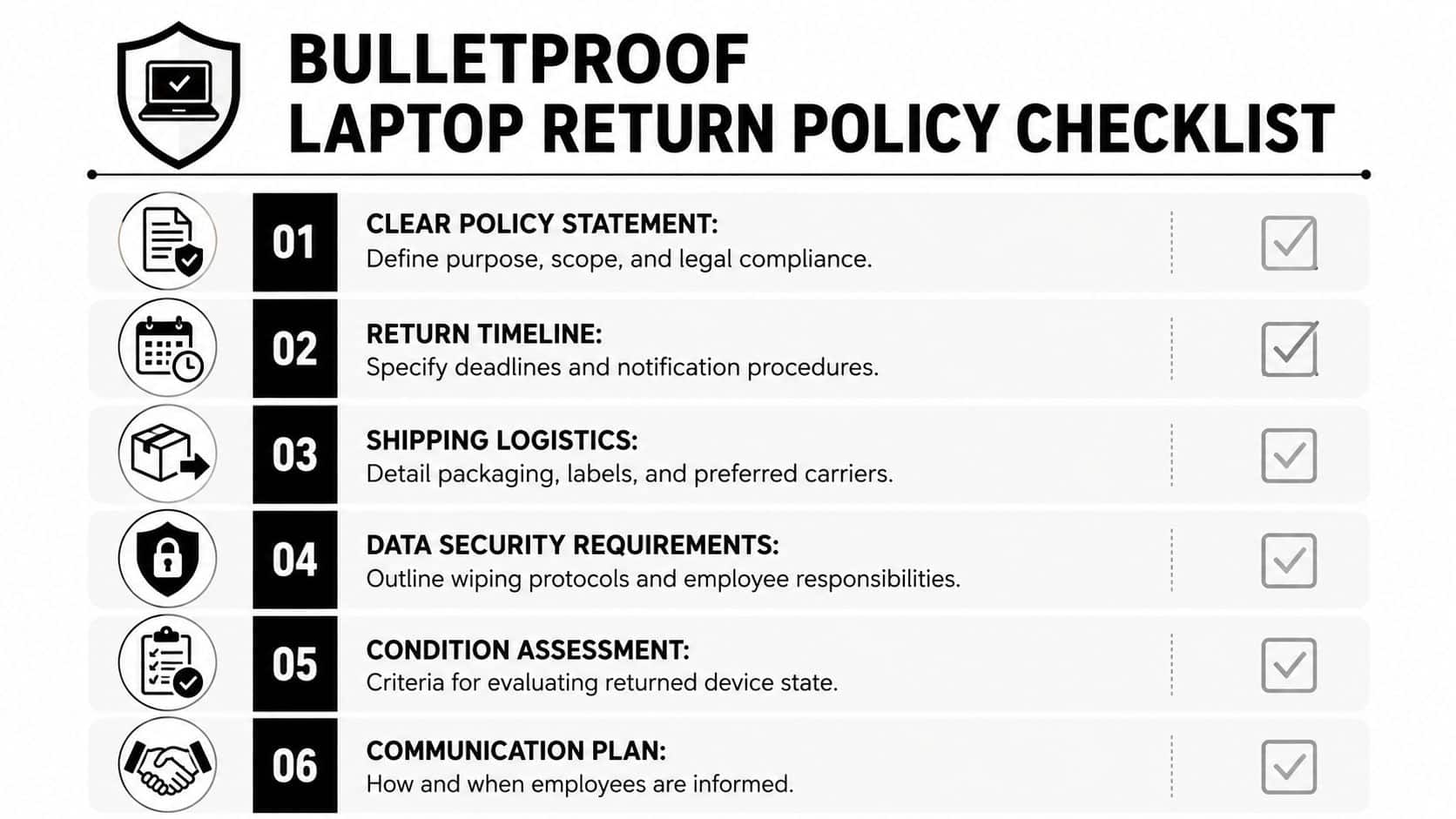
A good policy isn't long. It's precise. It names the equipment covered, defines who owns it, states how returns happen, and explains what employees should expect once employment ends. This guide to employee laptop return policies every business needs to know is useful background if you're tightening language across HR and IT documents.
What the policy must say
The most important line in the policy is the deadline. Employers must enforce a firm 5-to-7-day return deadline post-resignation or termination, and that window should be communicated within 24 to 48 hours of the event (Beyond Surplus remote employee laptop return best practices).
That timeline works because it creates urgency without turning every return into an escalation. It also gives HR and IT a standard operating rhythm.
Include language that covers:
- Ownership: The laptop, charger, dock, and assigned accessories remain company property.
- Condition expectations: Normal wear is one thing. Missing parts or obvious damage should trigger review.
- Communication channel: Send return instructions to a personal email address, not only a company address.
- Shipping method: State that the company provides packaging and prepaid tracked return materials.
What works better than vague wording
Avoid policy language that sounds discretionary. “Return equipment promptly” invites delay. “Return the assigned laptop and accessories using the prepaid kit within the stated deadline” doesn't.
Policies fail when they leave room for interpretation during offboarding.
A practical policy also names the operational owner. HR shouldn't assume IT is driving the process, and IT shouldn't assume HR has confirmed the employee's personal shipping address. One team owns the timeline. The other supports it.
Executing a Frictionless Return for the Employee
The easiest way to improve return compliance is to remove effort from the employee side. Don't ask the departing worker to find a box, buy packing tape, print a label, or guess which accessories belong in the package. Every extra step lowers the odds of a clean return.

A strong workflow feels simple to the employee because the company has already done the hard work. That's the core idea behind secure laptop return procedures for remote and hybrid workforces.
What goes in the return kit
Employers must provide a complete, pre-assembled shipping kit that includes a fitted box for the device, protective materials, a prepaid tracked shipping label, and simple printed instructions. Removing friction for the ex-employee is the most effective method for ensuring compliance (Unduit guidance on remote employee equipment return).
In practice, the best kits include more than the minimum. I'd make sure every kit contains:
- A fitted box: Generic oversized cartons invite movement and impact damage.
- Protective material: Padded inserts or bubble wrap sized for the assigned model.
- The return label: Already printed and matched to the employee record.
- Printed instructions: Short, visual, and written for someone who won't read a long email.
- Accessory reminder: Charger, docking accessories, and any specifically assigned peripherals.
Communication matters as much as packaging
The return email should answer five questions immediately:
- What has to be returned
- When it's due
- How to pack it
- Whether pickup or drop-off is available
- Who to contact if something is missing
The best messages are short and direct. They don't bury the date. They don't spread instructions across multiple emails. They don't assume the employee remembers the original hardware list from onboarding.
A frictionless return isn't about being nice. It's about reducing avoidable failure points.
Ensuring Data Security from Afar
Shipping a laptop back is only half the job. The harder question is when to sanitize the data. Teams usually choose between a pre-shipment wipe through Mobile Device Management and a post-return wipe performed after the device reaches IT.
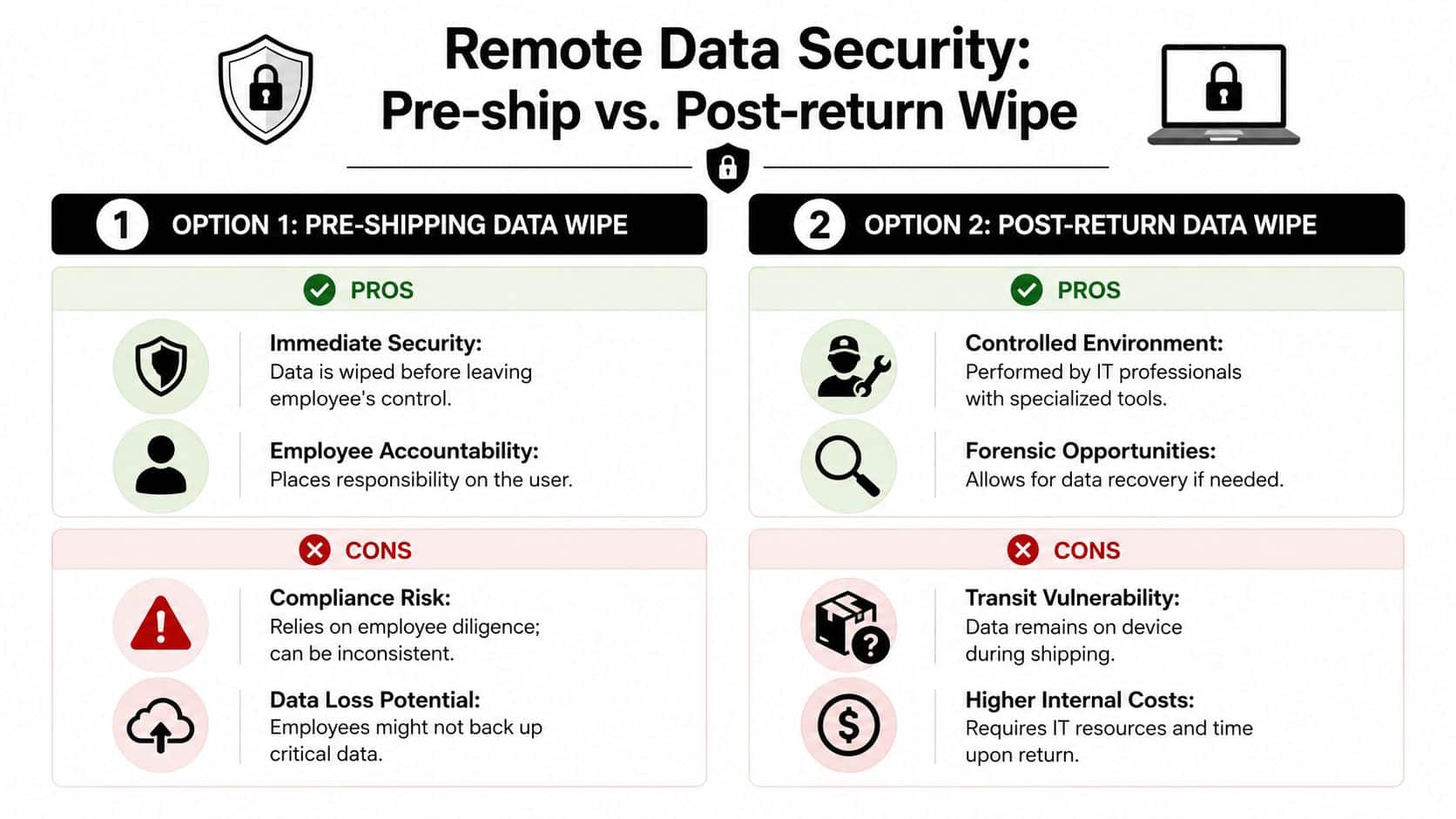
There isn't one right answer for every company. The right choice depends on your MDM coverage, the sensitivity of the data, and whether the device may need investigation, preservation, or selective data capture on arrival.
Pre-shipment wipe versus post-return wipe
Here's the practical trade-off:
| Approach | Best fit | Main downside |
|---|---|---|
| Pre-shipment wipe | Mature MDM environment with strong offboarding controls | Relies on remote execution before the box moves |
| Post-return wipe | Cases where IT needs to inspect the machine first | Corporate data remains on the device during transit |
If your fleet is consistently enrolled in MDM, pre-shipment wiping usually gives security teams more comfort. If devices are inconsistently managed, a post-return process may be more defensible because IT controls the sanitization directly once the unit is received.
Physical controls still matter
Logical security and transit security have to work together. Enforcing Mobile Device Management enrollment and using tamper-evident seals can increase physical damage protection by 40% and help achieve a 98% chain-of-custody compliance rate, which matters for GDPR, HIPAA, and SOX-aligned programs (Hello Retriever device lifecycle guidance).
That's why this topic belongs with broader thinking on why remote employee laptop recovery matters for data security.
Use tamper-evident seals when the device carries regulated data, executive communications, or access to sensitive systems. If a seal is broken on arrival, the intake team has an immediate signal to escalate inspection and documentation.
Security controls should survive a personnel change. If they depend on a former employee doing everything perfectly, they aren't strong enough.
Managing Shipping, Insurance, and International Logistics
Carrier selection affects more than transit time. It affects claims handling, customs clearance, pickup reliability, and how much chasing your team has to do when a shipment stalls. For domestic returns, consistency matters most. For international returns, expertise matters more.
Domestic shipping decisions
Start with a narrow approved-carrier list. Standardization gives IT one tracking workflow, one claims path, and one set of packaging rules. It also keeps employees from choosing the cheapest or most convenient option on their own.
Insurance should match replacement value, not shipping cost. If a company laptop goes missing, the financial issue isn't the postage. It's the device, the accessories, the configuration effort, and the operational delay that follows.
A simple checklist helps:
- Use tracked service: Every return should be traceable from pickup to delivery.
- Require signature confirmation: It closes a common custody gap at the receiving dock.
- Insure for replacement value: Claims are easier to defend when declared values are documented up front.
- Log the shipment before pickup: Tie the label number to the asset record before the box leaves the employee's hands.
International returns need a different playbook
International returns require 15 to 20 business days and proactive research into destination-country import regulations. Providing employees with pre-filled customs documentation and using carriers with international expertise like UPS or FedEx is essential to avoid delays (Remoasset laptop return guidance).
That means international returns shouldn't be run as a simple extension of the domestic process. They need country-specific instructions, customs paperwork prepared in advance, and realistic expectations on timing. Teams that don't handle cross-border logistics often benefit from broader operational reading such as this comprehensive guide to international shipping, especially when they're dealing with customs-sensitive electronics.
A late international return isn't always employee resistance. Sometimes it's paperwork, classification, or carrier handoff friction. The process has to account for that from the start.
The Final Mile Inbound Processing and Disposition
A return isn't complete when the carrier marks the package delivered. It's complete when IT verifies the asset, inspects condition, updates records, and routes the device into its next lifecycle stage.
Many teams lose discipline. Boxes pile up. Labels aren't reconciled. A machine gets marked “returned” before anyone confirms the serial number. That breaks the audit trail and creates confusion later when finance, security, or procurement asks what happened to a specific device.
What intake should do on arrival
The inbound process should be standardized and fast:
- Open and inspect: Check packaging condition before removing the laptop.
- Verify the asset tag and serial number: Match both against the assigned record.
- Document damage or missing accessories: Record it immediately while claim windows are still open.
- Confirm receipt quickly: The receiving team should close the loop with HR or the offboarding owner right away.
For organizations with limited space, seasonal hardware surges, or multi-stage intake needs, operational planning around finding the right business storage can help prevent returned assets from sitting in unsecured or poorly tracked holding areas.
Decide the next lifecycle step
After intake, the laptop should move into one of three paths:
| Path | When it fits | Operational priority |
|---|---|---|
| Redeployment | Device is current and in good condition | Wipe, reimage, reassign |
| Value recovery | Device still has market value but won't be reused internally | Secure erase and remarket |
| Disposition | Device is obsolete, damaged, or nonstandard | Certified recycling and data destruction |
That transition is where formal ITAD controls matter most. Companies reviewing their downstream process should look at the role of ITAD in remote employee laptop recovery. Once a device is no longer headed back into service, the organization needs documented data destruction, environmentally responsible handling, and a clean transfer of liability.
A disciplined inbound process turns laptop recovery into a closed loop. That's the difference between “we got the box back” and “we can prove exactly what happened to the asset.”
Beyond Surplus helps organizations turn remote laptop recovery into a secure end-to-end process with certified electronics recycling, IT asset disposition, data destruction, and nationwide logistics support. If your team needs a tighter chain of custody, cleaner disposition records, or a more efficient way to manage returned hardware, contact Beyond Surplus.