

Two weeks after a cloud cutover, the migration dashboard can look finished while the data center tells a different story. Workloads are running in AWS, but racks of Dell PowerEdge and HPE ProLiant servers still hum under fluorescent lights. Storage arrays, SAN shelves, switches, backup appliances, and endpoint devices remain powered, undocumented, or waiting for someone to decide whether they should be wiped, resold, recycled, or destroyed.
That gap is where cloud migration and legacy hardware disposal becomes a security and compliance issue. A cloud move changes where applications run, but it doesn't automatically resolve residual data, rollback capacity, support contracts, colocation charges, or the chain of custody for retired equipment. The safest approach treats disposition as a post-cutover workstream inside the migration runbook, not as a cleanup task assigned after the project closes.
Table of Contents
- Why Cloud Migration Leaves a Hardware Problem Behind
- Planning the Risk Assessment Before Anything Leaves the Building
- Choosing Between On-Site and Pickup Disposal Services
- Secure Data Erasure and Destruction Standards
- Compliance and Chain-of-Custody Requirements
- Timing Resale, Buyback, and Phased Exits
- Vendor Selection Checklist and Next Steps
Why Cloud Migration Leaves a Hardware Problem Behind
The physical residue after a migration is usually more complicated than the approved scope suggests. A production cluster may move successfully while development systems, warm disaster recovery nodes, local backups, network appliances, and forgotten edge devices remain outside the decommissioning list. Those assets can still contain cached snapshots, virtual machine images, credentials, or historical data.
Cloud adoption has made this problem mainstream. By 2024, 56% of organizations ran workloads in public cloud, including 63% of SMBs and 54% of enterprises, according to public cloud adoption statistics. The same source reported that 53% stored data in public cloud, with SMBs at 61% and enterprises at 51%. A separate benchmark cited there found that roughly 94% of enterprises use cloud services in some form.
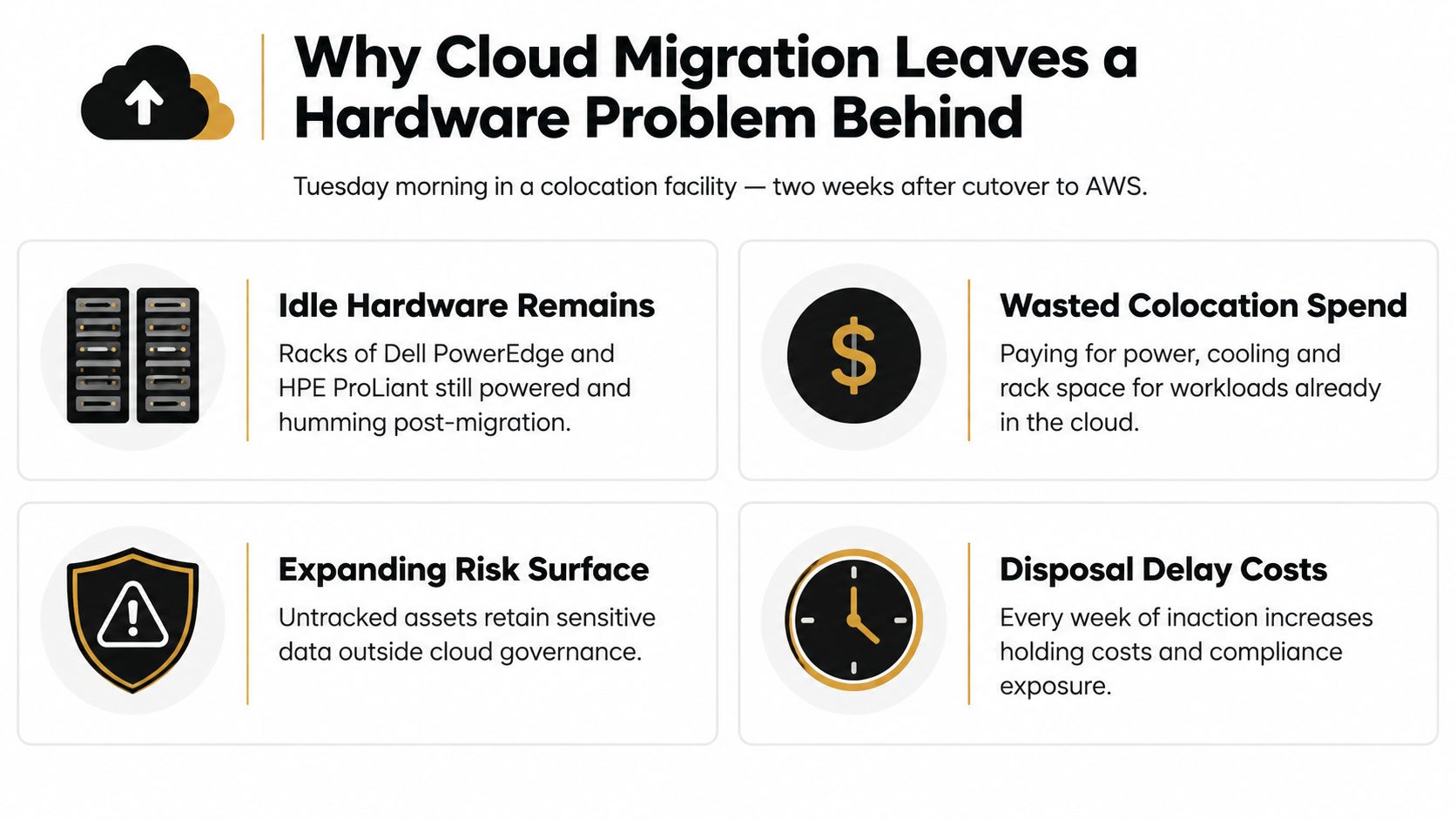
Each migration wave can leave behind compute, storage, networking gear, and drives that no longer have a clear owner. The equipment continues consuming power and floor space, while its resale value declines and its security status remains uncertain. Global e-waste reached 62 million tonnes in 2022 and is projected to reach 82 million tonnes by 2030, according to the Global E-waste Monitor 2024. Small IT and telecommunications equipment represented 4.6 million tonnes, yet only 22% was documented as collected and recycled.
Practical rule: A migration isn't complete when the workload starts in the cloud. It's complete when the old environment has a documented disposition decision for every asset and every data-bearing component.
A useful starting point is to connect each migration wave to a hardware list, an application owner, a data classification, and a release date. Teams planning regional modernization can also review cloud computing trends for Atlanta businesses when evaluating how cloud operating models affect local infrastructure decisions.
Planning the Risk Assessment Before Anything Leaves the Building
Before a server reaches a loading dock, validate that the replacement environment can support production recovery. One complete backup and restore cycle provides stronger evidence than a successful cutover alone. Confirm that monitoring, identity, scheduled jobs, integrations, and recovery procedures work in the new environment before releasing equipment that might still be needed for rollback.
Then build a physical inventory that doesn't depend on a stale spreadsheet. Record the serial number, asset tag, BIOS-validated model, drive count, RAID configuration, rack position, and current owner. Include every RAID member, cache device, tape, SAN shelf, switch, and appliance. A SAN shelf that appears empty can still contain LUN metadata, and an old array may retain local copies of data that no longer appears in the application inventory.
Classify the data, not just the equipment
Use CMDB records, application-owner interviews, and a targeted disk scan to identify the data class associated with each asset. Don't trust labels such as “retired,” “development,” or “empty.” Those labels describe intended use, not what the media contains.
Prioritize removal waves by combining three questions:
- Data sensitivity: What confidential, regulated, or proprietary information may remain?
- Credential exposure: Could local accounts, keys, tokens, or cached credentials still function?
- Replacement and recovery value: Would removing the asset impair rollback, disaster recovery, or an active dependency?
Define “verified decommissioned” before the vendor arrives. The checklist may include BIOS reset, BMC reset, iLO or iDRAC reprovisioning, rack-position confirmation, support-contract cancellation, and an approved sanitization route. The asset shouldn't move to disposition until the responsible owner signs off.
| Risk Factor | Low (1) | Medium (2) | High (3) |
|---|---|---|---|
| Data sensitivity | Public or non-sensitive data | Internal business data | Regulated, personal, or trade-secret data |
| Credential exposure | No credentials identified | Local accounts or cached tokens possible | Active keys, privileged accounts, or secrets suspected |
| Recovery dependency | No rollback requirement | Limited contingency use | Required for rollback or business continuity |
| Asset uncertainty | Complete inventory and owner | Partial records | Unknown media, ownership, or application dependency |
Keep the scoring record with the final disposition file. A documented equipment condition assessment can help separate reusable equipment from material that should move directly to certified recycling or destruction.
Choosing Between On-Site and Pickup Disposal Services
The right service model depends on the data classification, facility controls, equipment condition, and resale objective. On-site service keeps media inside the organization's secure perimeter while technicians perform witnessed wiping or physical destruction. Pickup or mail-in service can simplify logistics for lower-risk equipment, but it introduces a transport and custody event that must be controlled.
| Criterion | On-Site Service | Pickup / Mail-In |
|---|---|---|
| Physical control | Media stays at the facility until processing | Media leaves the facility in sealed containers |
| Best fit | Sensitive, regulated, or high-value environments | Lower-classification equipment and distributed sites |
| Evidence | Immediate technician logs and witnessed destruction records | Handoff records, tamper seals, transport tracking, and facility certificates |
| Facility demands | Requires secure work area, escort access, and scheduling | Requires staging, sealed containers, loading coordination, and inventory accuracy |
| Recovery model | Drives can be processed in place before resale evaluation | Equipment may be separated from drives before shipment |
On-site work is generally the stronger choice when systems held cardholder data, protected health information, or trade secrets, or when physical egress rules are strict. Pickup can work well for equipment with a clear inventory, low residual sensitivity, and an agreed chain of custody. The decision shouldn't be based on the lowest quoted removal price alone.
Compare the disposition paths
Certified wiping preserves the possibility of reuse when the media and policy allow it. Shredding or disintegration provides a more final outcome for failed drives, end-of-life media, or assets whose risk profile doesn't support reuse. Resale may recover value, but it creates additional requirements for testing, grading, documentation, and buyer controls.
The on-site versus off-site ITAD comparison is useful when facility access, transport controls, and evidence requirements need to be evaluated together. Ask for the exact certificate format before approving the service. A certificate that identifies only a lot or pallet won't support an audit as well as one tied to individual serial numbers.
Secure Data Erasure and Destruction Standards
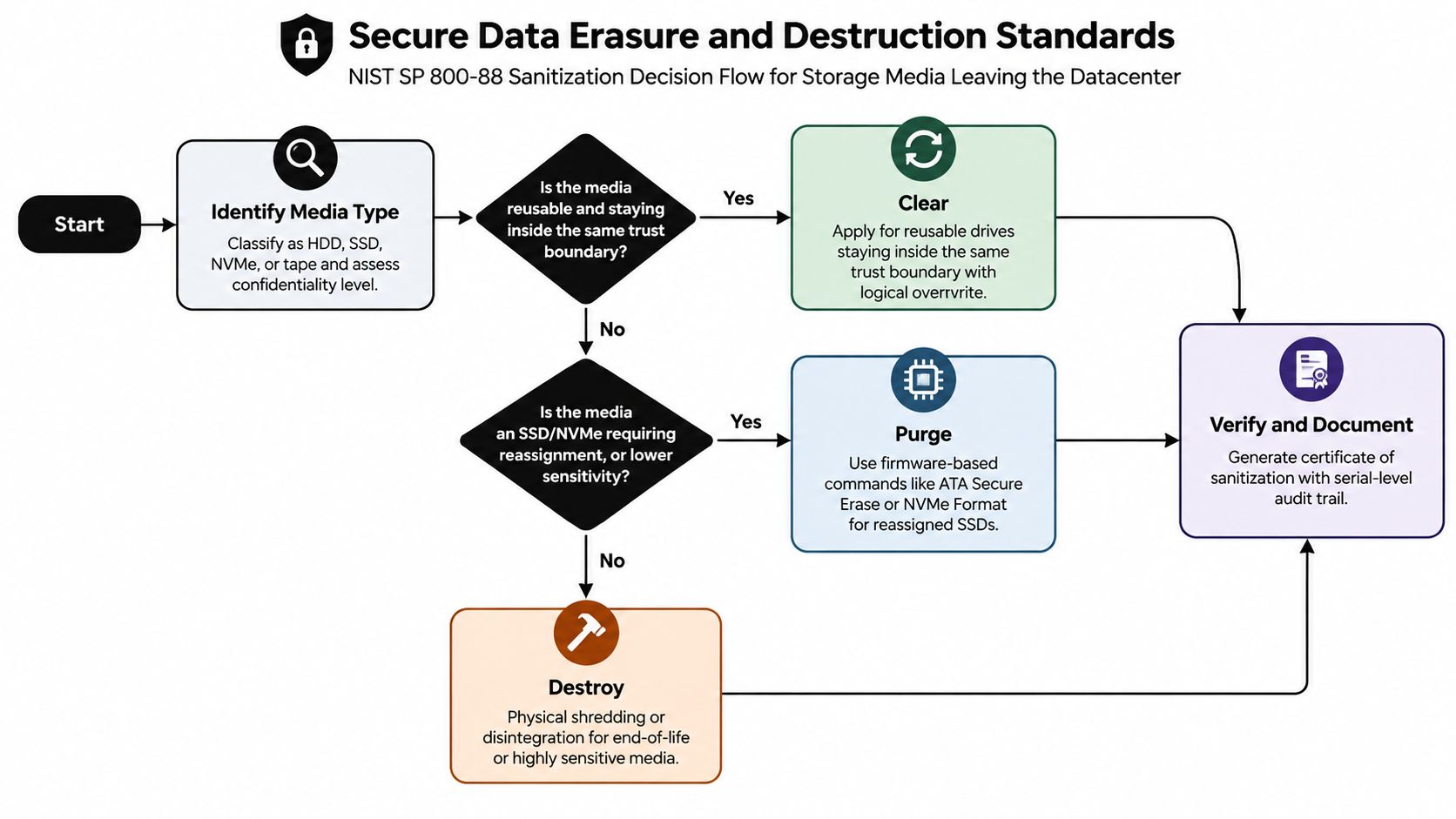
Data sanitization should follow the media type and the destination of the equipment. The U.S. EPA points organizations toward NIST Special Publication 800-88, which distinguishes between Clear, Purge, and Destroy methods in its media sanitization guidance. The important operational point is that wiping isn't a single command. It's a controlled process with an evidence trail.
Match the method to the medium
Clear is appropriate for reusable media that stays within the same trust boundary and can be logically overwritten under an approved procedure. It isn't a universal answer for every drive leaving the organization.
Purge uses stronger techniques, such as cryptographic erase or vendor secure-erase commands, for reassigned SSDs and other media where ordinary logical clearing may not address hidden cells or remapped blocks. NVMe Format and ATA Secure Erase may be part of the approved workflow, but the technician must record the command result and confirm that the device completed the operation.
Destroy uses physical shredding, disintegration, or another approved method when media exits the organization, has held highly sensitive data, has failed sanitization, or is unsuitable for reuse. The method should reflect the media type. A process designed for hard disk drives may not be sufficient for SSDs, NVMe devices, or tape.
Capture evidence at the point of work
The final file should connect the asset tag to the drive serial number and the sanitization result. Include:
- Device identity: Serial number, asset tag, model, media type, and capacity.
- Execution record: Technician, date, time, tool, firmware method, and result.
- Validation evidence: Tool output logs and hash verification where applicable.
- Physical proof: Photographs of shred size or other destruction evidence when used.
- Certificate details: Method, media count, serial-level listing, technician identity, and timestamp.
The NIST 800-88 data destruction standards provide a practical framework for turning these decisions into a repeatable workflow. The certificate is not a decorative document. It is the artifact that demonstrates what happened to the media and supports the transfer of post-cutover responsibility to the disposal provider.
Compliance and Chain-of-Custody Requirements
Regulatory obligations follow the data and the organization's policies, not the location where the application runs. A workload moved to the cloud can still leave historical records, local backups, audit logs, and residual copies on retired infrastructure. Depending on the business, the review may involve HIPAA, PCI DSS, SOX, GDPR, CCPA, NIST 800-53 media controls, and state data-destruction laws.
Build custody checkpoints into the removal plan
A defensible chain of custody begins at the rack. The technician identifies the media, seals it in a tamper-evident container, records the handoff, and keeps the inventory attached to the physical movement. The courier signs for the sealed shipment, and the receiving facility records arrival, container condition, and processing status.
A controlled workflow commonly includes:
- Rack-level identification: Match each drive and asset to the approved inventory.
- Sealed staging: Use serialized bags, bins, or containers with tamper evidence.
- Signed handoff: Record the person, time, location, and container identifiers.
- Tracked transit: Preserve shipment or vehicle records and note exceptions.
- Controlled processing: Use a gated facility with appropriate physical monitoring.
- Disposition confirmation: Match the final certificate to every asset and media serial.
Auditors don't need a confident verbal assurance. They need a record that connects the device in the rack to the method used at final disposition.
Avoid common evidence gaps
Certificates that list only a total count, mixed lots without segregation, and separate wiping and shredding records that can't be reconciled create avoidable questions. Regulated organizations may also need a business associate agreement or other contractual addendum covering data handling, proof of downstream recycling partners, insurance, incident notification, and the right to witness destruction.
| Industry | Applicable Regulation | Required Sanitization | Audit Evidence |
|---|---|---|---|
| Healthcare | HIPAA | Risk-based Clear, Purge, or Destroy selection | Media inventory, technician records, certificates, and contractual data-handling terms |
| Financial services | SOX and related controls | Documented sanitization matched to record sensitivity | Asset-to-certificate mapping, approvals, and retention records |
| Payment environments | PCI DSS | Controlled destruction or approved sanitization for cardholder-data media | Chain-of-custody logs, method records, and destruction certificates |
| Organizations handling EU data | GDPR | Documented deletion or retention decision before disposition | Data-owner approval, sanitization evidence, and legal basis records |
| Public-sector and controlled environments | NIST 800-53 media controls | Policy-defined media sanitization and verification | Control records, authorization, tool output, and final disposition evidence |
The chain of custody for IT asset disposal should be treated as part of the migration control framework, not as a logistics appendix.
Timing Resale, Buyback, and Phased Exits
Disposition timing creates a real trade-off between recovery value and operational safety. Releasing equipment too early can remove rollback capacity or disrupt a hidden dependency. Holding it too long increases storage, power, support, and handling costs while the secondary market value declines.
A practical exit plan uses waves tied to application retirement dates. The first wave might contain systems with validated cloud replacements and no remaining dependency. A later wave can hold disaster recovery equipment until recovery testing is complete. Another may remain in place until legal, compliance, or business owners resolve historical data.
Use the recovery window deliberately
One industry guide recommends allowing roughly 60 to 120 days after cutover for disposition work and notes that three-to-five-year-old enterprise servers may recover about 10% to 25% of original purchase price when sold with destruction documentation, as described in server decommissioning guidance. Those figures are planning references, not guaranteed offers. Condition, configuration, demand, shipping, documentation, and media treatment all affect the actual recovery.
A simple decision model compares expected proceeds with the cost and risk of waiting:
Expected recovery = resale or buyback offer minus testing, transport, storage, media processing, and administrative costs.
Recycling becomes the sensible route when testing and handling consume the likely recovery, when the equipment has no credible buyer, or when risk controls make resale impractical. A buyback offer may beat independent resale when the provider can process a mixed fleet quickly and accept the logistics burden. Independent resale may produce more value when the equipment is standardized, complete, tested, and supported by strong serial-level records.
Hold a wave only when a documented rollback need, secondary cloud move, unresolved dependency, or retention decision justifies the delay. Otherwise, release validated assets promptly and unwind cage space, power commitments, and support contracts in the same sequence as the migration.
Vendor Selection Checklist and Next Steps
A disposal provider should be evaluated like a security and logistics partner, not a recycler with a truck. Certifications matter, but the contract, evidence format, insurance, downstream controls, and operating capacity determine whether the service will withstand scrutiny.
Score the bidder before the pickup date
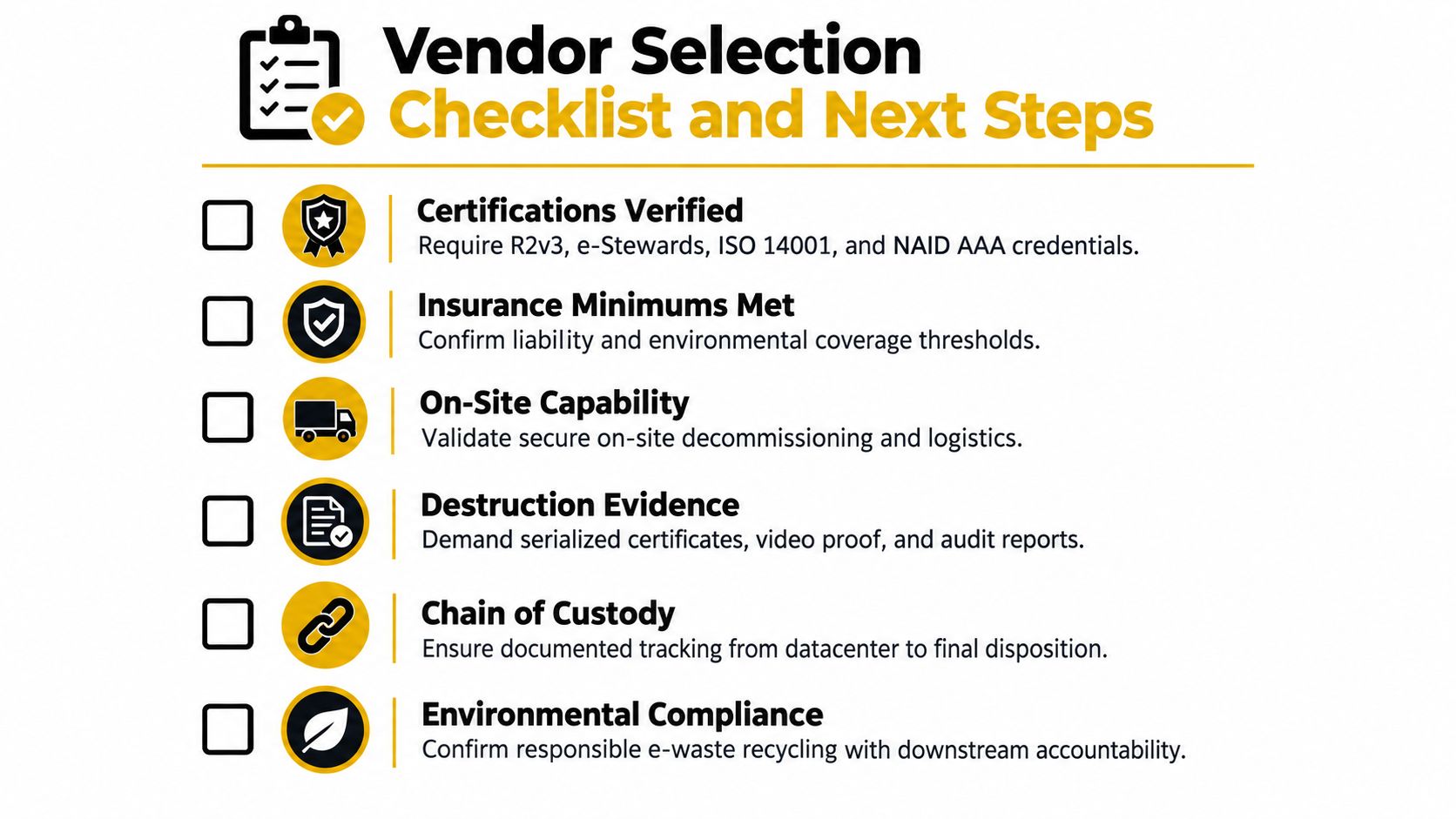
Use weighted criteria that reflect your environment rather than accepting a generic proposal. Confirm R2v3, e-Stewards, ISO 14001, and NAID AAA credentials where they fit the scope. Review general liability, environmental liability, workers' compensation, vehicle coverage, and cyber or professional coverage with your risk team.
Require the bidder to demonstrate:
- On-site capability: Secure de-installation, technician identification, escorts, and rack-level inventory.
- Destruction evidence: Serialized certificates, tool output, photographs, and audit-ready reports.
- Chain of custody: Sealed containers, signed transfers, transport tracking, and receiving records.
- Recovery controls: Testing, grading, buyer documentation, and a clear treatment of failed media.
- Environmental accountability: Responsible e-waste processing and visibility into downstream partners.
- Reporting service levels: Defined turnaround for inventory reconciliation, certificates, exception reports, and revenue statements.
Run a small pilot lot before authorizing the full exit. Send representative servers, SSDs, hard drives, networking equipment, and damaged assets. Compare the returned inventory against the pickup manifest, inspect the certificate, verify that serial numbers reconcile, and test the provider's response to an exception.
Beyond Surplus provides commercial IT asset disposition, secure data wiping and hard-drive shredding, electronics recycling, IT equipment pickup, data center de-installation, product destruction, and certificates supporting disposal records. For a migration exit, schedule a facility walkthrough, request a sample certificate of destruction, and place the cutover-to-disposal sequence directly into the migration runbook.
Contact Beyond Surplus to coordinate certified electronics recycling, secure data destruction, IT asset recovery, and commercial data center decommissioning. Share your migration waves, asset inventory, data requirements, and target dates so the disposal plan can protect rollback capacity, preserve recovery value, and produce the evidence your compliance team needs.


