The move is over, but the work isn't. Pallets of desktops, monitors, network switches, servers, laptops, and storage devices are still sitting in the old office, while the IT team is already handling cutover issues at the new site. Disposing of business electronics after an office move requires more than booking a recycler. You need a defensible process that matches each asset's residual value and data sensitivity to the right outcome.
The environmental stakes are substantial. The Global E-waste Monitor 2024 reports that the world generated 62 million tonnes of e-waste in 2022, up 82% from 2010, while only 22.3% was formally collected and recycled in an environmentally sound manner. The report projects 82 million tonnes by 2030, reinforcing the need to route office electronics into certified reuse, recovery, or recycling channels instead of general disposal.
Table of Contents
- Planning the Disposition Workflow Before Move Day
- Building the Asset Inventory and Tagging System
- Choosing the Right Data Sanitization Path
- Routing Each Asset to Buyback, Recycling, Donation, or Destruction
- Securing Chain of Custody and Selecting a Certified Vendor
- Running the Post-Move Disposition Checklist and Verifying Outcomes
Planning the Disposition Workflow Before Move Day
Once the old office is empty, the equipment clock starts. Landlords may require rapid clearance, facilities teams may need access for restoration work, and unsecured devices can remain a data liability while everyone assumes someone else is handling them.
Start planning 60 to 90 days before move day. That gives your team time to schedule an ITAD partner, establish valuation windows, complete data-classification reviews, and confirm whether equipment must be returned to a lessor. Decide early whether disposition will be handled internally or by a qualified vendor, which locations contain regulated or customer data, and what write-off thresholds finance will accept.
Use a four-phase playbook:
- Inventory: Identify every device, accessory, storage medium, and infrastructure component leaving the site.
- Sanitize: Apply the approved data-erasure or destruction method before transport or handoff.
- Route: Assign each asset to redeployment, resale, donation, destruction, or recycling.
- Certify: Reconcile serial numbers and retain destruction, recycling, settlement, and chain-of-custody records.
Teams often skip the most consequential preparation. Confirm lease-return obligations with hardware lessors. Separate customer-data devices from corporate-only equipment before anyone launches a wipe job. Flag failed drives, BIOS-locked systems, and assets with unclear ownership instead of allowing them into a generic pallet.
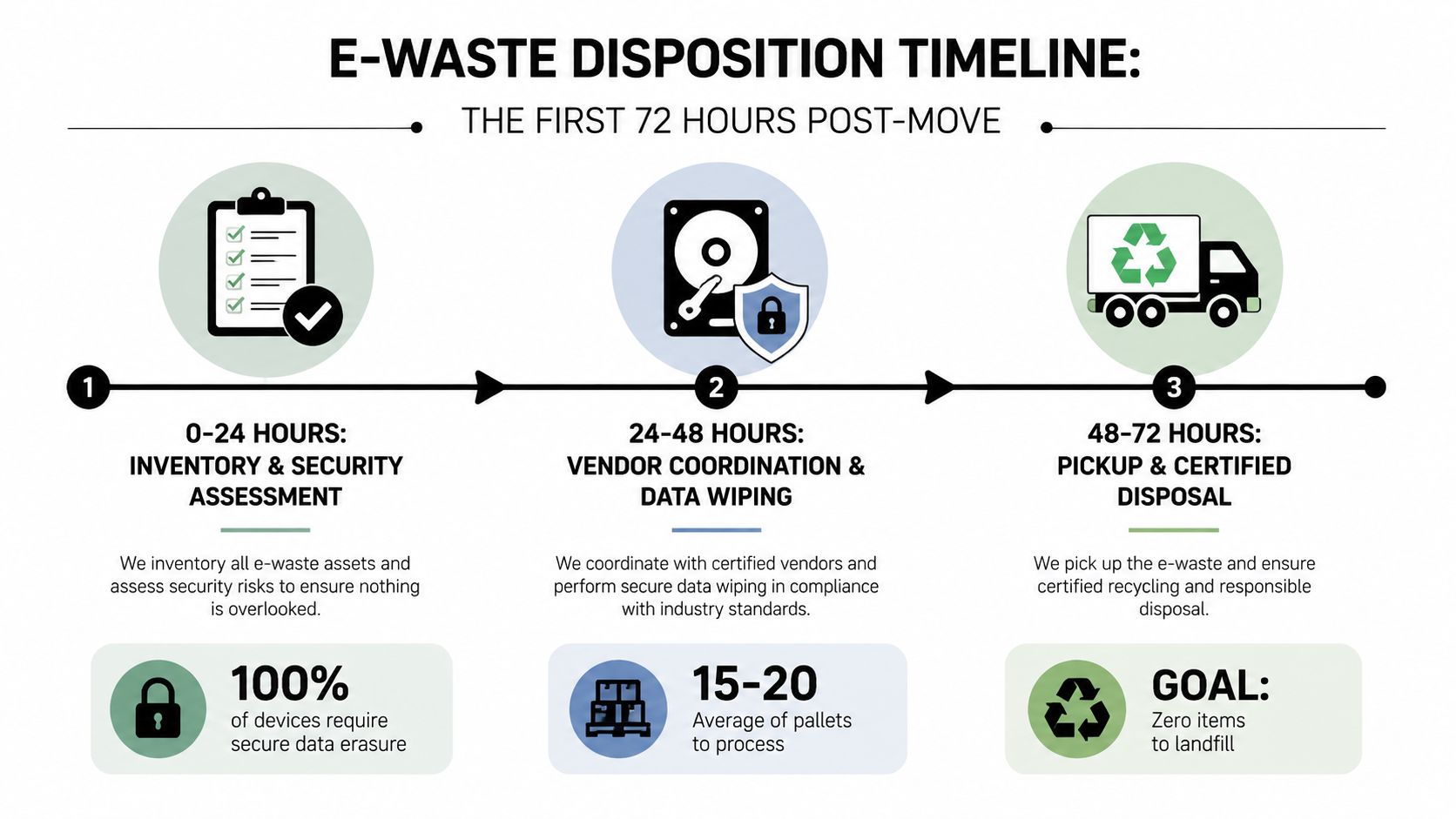
For a coordinated relocation, define responsibilities in writing. IT owns the asset register and sanitization decisions. Facilities controls access, staging, and pickup. Finance approves write-offs and reviews recovery settlements. Compliance determines retention and evidence requirements. A business office relocation disposition service can coordinate removal, logistics, and documented processing when internal teams don't have the capacity.
Building the Asset Inventory and Tagging System
The inventory is the spine of the project. Every certificate, resale settlement, audit response, and reconciliation depends on knowing exactly what left the building. A pallet count isn't an asset record, and a vague description such as “old laptops” won't support a defensible disposition decision.
Capture these fields for every item:
| Field | Purpose | Example |
|---|---|---|
| Asset tag | Links the device to the ITAM record | ATL-FIN-RESALE-0042 |
| Serial number | Enables certificate reconciliation | Manufacturer serial |
| Make and model | Supports valuation and processing | Dell Latitude model |
| CPU, RAM, and storage | Determines reuse or resale potential | Processor, memory, drive capacity |
| Hostname | Connects hardware to system records | FIN-LT-042 |
| User or cost center | Identifies ownership and accountability | Finance department |
| Purchase date and depreciated value | Supports finance review | Original purchase record |
| Data classification tier | Determines sanitization path | Confidential or regulated |
| Lease or owned status | Controls return and title requirements | Owned |
| Intended outcome | Establishes the planned route | Redeployment, resale, donation, destruction |
Use a consistent label such as SITE-DEPT-DISPOSITION-SEQUENCE, then print it as a barcode or QR code from the ITAM platform. If your team is improving stock control at the same time, this resource on how to manage second-hand stock with barcode scanning offers useful context for scan-based tracking.
Take the inventory twice. The pre-move walk identifies what should leave. The day-of walk confirms what shipped, catches substitutions, and records anything discovered in storage, conference rooms, server closets, or locked offices.
Make the manifest audit-ready
Export the final spreadsheet or CMDB record as the vendor manifest. Require the pickup team to scan or verify each asset against that list, then return a signed copy showing exceptions. The same file should drive serial-number reconciliation on destruction certificates, recycling reports, and buyback statements.
Don't let accessories disappear into an untracked “miscellaneous” category. Record docking stations, network equipment, printers, removable media, UPS units, and specialty devices separately when they carry ownership, data, lease, or environmental obligations. A well-structured inventory optimization service can help standardize those records before the pickup.
Choosing the Right Data Sanitization Path
Data sanitization is where many disposition programs fail. File deletion, quick formatting, and a single green “wipe complete” screen don't prove that a device is safe to transfer. NIST guidance says verification should determine whether the sanitization technique completed successfully, not merely whether the software reported a successful status.
NIST SP 800-88 identifies three actions:
| Method | How It Works | Best For | Verification Evidence |
|---|---|---|---|
| Clear | Logical, software-based sanitization within the device interface | Drives being prepared for controlled reissue | Overwrite logs and validation records |
| Purge | Stronger sanitization using secure erase, degaussing where appropriate, or cryptographic erase on self-encrypting drives | Confidential data headed for resale or redeployment | Secure-erase output, tool logs, and verification results |
| Destroy | Physical shredding, disintegration, pulverizing, or incineration | Failed media or data requiring recovery to be infeasible | Destruction certificate, process record, and particle-size report where applicable |
The earlier NIST standard recommends pseudorandom sampling across the addressable space, including the first and last addressable locations. It calls for enough subsections that two non-overlapping samples per subsection cover at least 10% of the media, followed by a separate secondary verification that randomly checks 20% of sanitized media with a different validation tool. These requirements are described in NIST SP 800-88 Rev. 2.
For hard disk drives, a single pass of a fixed pattern can be a clear method, but the control that matters is the post-wipe validation record tied to the asset ID, firmware, tool version, and anomalies. Use NIST 800-88 data destruction standards to align your policy language and vendor requirements.
Choose location based on risk
On-site sanitization keeps devices under company control longer and can suit regulated environments or assets with sensitive data. It also requires space, power, staffing, and a controlled work area. Off-site processing can move equipment out faster, but only when the vendor uses sealed transport, tamper-evident packaging, documented custody transfers, and verified processing.
Set Purge as the baseline for confidential or regulated data when the drive is technically sound and the result can be verified. Reserve Destroy for failed media, drives with uncertain history, or assets that legal, compliance, or security teams determine shouldn't carry resale risk.
Routing Each Asset to Buyback, Recycling, Donation, or Destruction
Don't put every device on the same pallet and let the vendor decide its fate. Build a decision tree that evaluates function, residual market value, data sensitivity, ownership, and organizational sustainability requirements.
| Lane | Best For | Data Risk | Value Outcome | Key Requirement |
|---|---|---|---|---|
| Buyback | Working equipment with identifiable resale demand | Controlled through verified sanitization | Recovery credit or settlement | Complete asset data and defensible wipe evidence |
| Recycling | End-of-life, damaged, or nonfunctional hardware | Media must still be sanitized or destroyed | Material recovery, usually without resale value | Certified downstream processing |
| Donation | Functional equipment suitable for an approved recipient | Wipe and ownership transfer are mandatory | Community benefit rather than maximum recovery | Recipient acceptance and transfer records |
| Destruction | Failed drives, legacy devices, or unacceptable resale risk | Lowest recovery risk when correctly executed | No resale value, processing cost may apply | Serialized destruction evidence |
Buyback should be the first review lane for working laptops, desktops, servers, and networking equipment with usable specifications and clean data records. Don't approve resale when the BIOS is locked, the asset tag is missing, the serial number doesn't reconcile, or the wipe log can't be validated.
Recycling is appropriate for equipment whose condition or age makes resale impractical. Require the recycler to identify how it handles batteries, displays, circuit boards, and downstream material streams. The EPA describes e-waste as the fastest-growing component of the U.S. municipal waste stream and notes that less than 30 percent is recycled globally in the cited figure, as explained in its electronic-waste management overview.
Donation can be worthwhile, but it isn't a shortcut around controls. Confirm functionality, sanitize the device, document transfer of ownership, and obtain recipient acceptance. If any of those records are missing, route the equipment to recycling or destruction instead. For a practical review of end-of-life choices, see what to do with end-of-life IT equipment.
Securing Chain of Custody and Selecting a Certified Vendor
The disposition partner should receive a controlled manifest, not an unverified pile. Stage equipment in a restricted area using sealed, tamper-evident bins or wrapped pallets. At pickup, require signatures against the asset list and record exceptions before the vehicle leaves. For larger volumes or sensitive sites, GPS-tracked transportation adds useful operational visibility.
Your RFP should demand evidence, not marketing language. Ask vendors to provide:
- Certification scope: Confirm current R2v3 or e-Stewards certification and verify that the scope covers the services and locations involved.
- Data-destruction credentials: Require NAID AAA certification where it fits your security policy, plus a written explanation of the sanitization and verification process.
- Control environment: Request a SOC 2 Type II audit report when your organization requires independent evidence of operational controls.
- Downstream accountability: Identify every downstream recycler or processor and require documentation showing how the vendor controls that chain.
- Insurance coverage: Confirm cyber and environmental insurance levels that match the potential exposure created by your equipment and data.
- Exception handling: Establish what happens when a serial number is missing, a drive fails verification, or a device arrives in a condition different from the manifest.
Specify the completion package
A vendor hasn't completed the job because the truck left. Require serialized certificates of data destruction by device or lot, weight tickets or serialized recycler reports, resale or buyback settlement statements, and a final reconciliation matching expected and actual outcomes.
The vendor due-diligence checklist can help structure the review before contract signature. Ask for sample certificates during the RFP, not after processing. If the sample doesn't show asset identifiers, method, date, location, responsible party, and exceptions, reject it before the project starts.
Practical rule: If your vendor can't explain how an individual serial number moves from pickup manifest to final certificate, the chain of custody isn't finished.
Running the Post-Move Disposition Checklist and Verifying Outcomes
A 30-60-90 day schedule keeps the project from ending with an unclosed spreadsheet. Assign named owners and define the artifact that proves each milestone is complete.
Before move day and pickup
IT asset lead
- Close the pre-move inventory and identify every data-bearing device.
- Assign each asset a disposition lane.
- Approve Clear, Purge, or Destroy based on data classification and condition.
- File the final manifest and exception list.
Facilities coordinator
- Confirm the staging location, building access, loading requirements, and pickup window.
- Check that pallets, bins, labels, and seals are ready.
- Record the handoff with signed custody documentation.
Finance
- Confirm write-off treatment and residual-value expectations.
- Approve lease-return obligations and ownership exceptions.
Compliance
- Approve evidence requirements and retention rules.
- Identify assets requiring heightened controls.
By day 30
Require the vendor to provide processing status, open exceptions, and proof that all received assets remain tied to the manifest. The IT asset lead should compare shipped records against received records. Facilities should close any access or loading incident. Compliance should escalate missing certificates or unexplained custody gaps.
By day 60
Collect destruction certificates, recycling or weight reports, resale settlements, and updated serial-number files. Finance should compare the settlement against the approved residual estimate. IT should confirm that redeployed devices appear in the active asset register and that decommissioned devices no longer appear as available equipment.
By day 90
Run the final reconciliation. Spot-check a sample of assets marked destroyed and confirm the destruction evidence supports the recorded outcome. Review any resale variance within the tolerance approved by finance, update the CMDB, archive ESG documentation, and store the complete disposition package for the retention period required by your data-destruction policy and applicable regulations.
The EPA reported that U.S. consumers and businesses discarded 2.37 million tons of electronics in 2009, with only about 25 percent collected for recycling and much of the remainder landfilled, as described in its e-waste recycling and recovery guidance. Your post-move closeout should prevent that kind of uncontrolled endpoint by proving where every asset went.
Beyond Surplus coordinates business electronics recycling, IT equipment disposal, secure data wiping, hard-drive shredding, buyback, product destruction, and office-move logistics with documented chain-of-custody records. Visit Beyond Surplus to plan a controlled disposition workflow that protects data, recovers value where appropriate, and routes remaining equipment through responsible processing.