

A lot of IT teams have one of these spaces. A cage in the data center. A locked closet near facilities. A row of pallets behind active equipment. It holds retired servers, old laptops, failed switches, backup drives, and gear nobody wants back on the network but nobody has fully processed either.
That hardware usually gets labeled as surplus, scrap, or e-waste. Operationally, that’s the wrong lens.
It’s inventory. Not sales inventory, but a high-risk, fast-depreciating inventory category with carrying costs, security exposure, chain-of-custody requirements, and value recovery potential. If it sits too long, finance loses recovery value, IT keeps unresolved risk on the books, and compliance inherits a documentation problem. A useful mindset shift starts with understanding that the lifecycle of a computer doesn’t end at disposal.
Why Your Retired IT Assets Are a Hidden Inventory Problem
A familiar example looks harmless at first. A virtualization project finishes, the old rack gear gets powered down, and the team stacks it neatly “for later.” A laptop refresh wraps up, but a few hundred devices are still waiting on sign-off, pickup coordination, or data destruction. Facilities asks when the floor space will open up. Security asks whether every drive has been tracked.
None of that feels like inventory optimization. It feels like cleanup.
What’s actually happening
Those assets are consuming resources while nobody is actively managing them. The space has a cost. The labor to move, count, relabel, and secure them has a cost. The longer they sit, the less flexibility you have if an auditor, legal hold, or internal security review asks for exact disposition records.
For some organizations, interim storage is necessary. In that case, it helps to look at how other commercial operators think about controlled holding environments, such as Safe & Sound commercial storage, where access, handling, and documentation matter as much as square footage.
Practical rule: If a retired device still has to be tracked, secured, and explained, it’s still part of your operational inventory.
Why teams miss the problem
Traditional inventory conversations focus on keeping products available for sale or production. Retired IT assets feel different because they’re moving out, not in. That’s why they often escape the controls you’d normally apply to valuable equipment.
A better way to classify them is this:
- Assets with residual value: Servers, storage arrays, networking gear, and newer enterprise laptops may still return value if processed quickly.
- Assets with embedded risk: Hard drives, SSDs, firewalls, and endpoint devices can hold regulated or confidential data.
- Assets with disposal cost: Cables, broken peripherals, obsolete accessories, and low-value mixed electronics still need compliant handling.
Once you see retired hardware as an inventory class, the priorities get clearer. You don’t just need a pickup. You need rules for timing, categorization, security control, and financial recovery.
Optimizing Inventory That Goes Backward Not Forward
Most inventory systems are designed for forward flow. You buy, receive, store, allocate, and ship. The objective is availability.
IT asset disposition works in reverse. You collect, verify, secure, segregate, wipe or shred, remarket, recycle, and document. The objective isn’t shelf readiness. It’s risk reduction and value recovery across a reverse-logistics chain, including nationwide reverse logistics services.
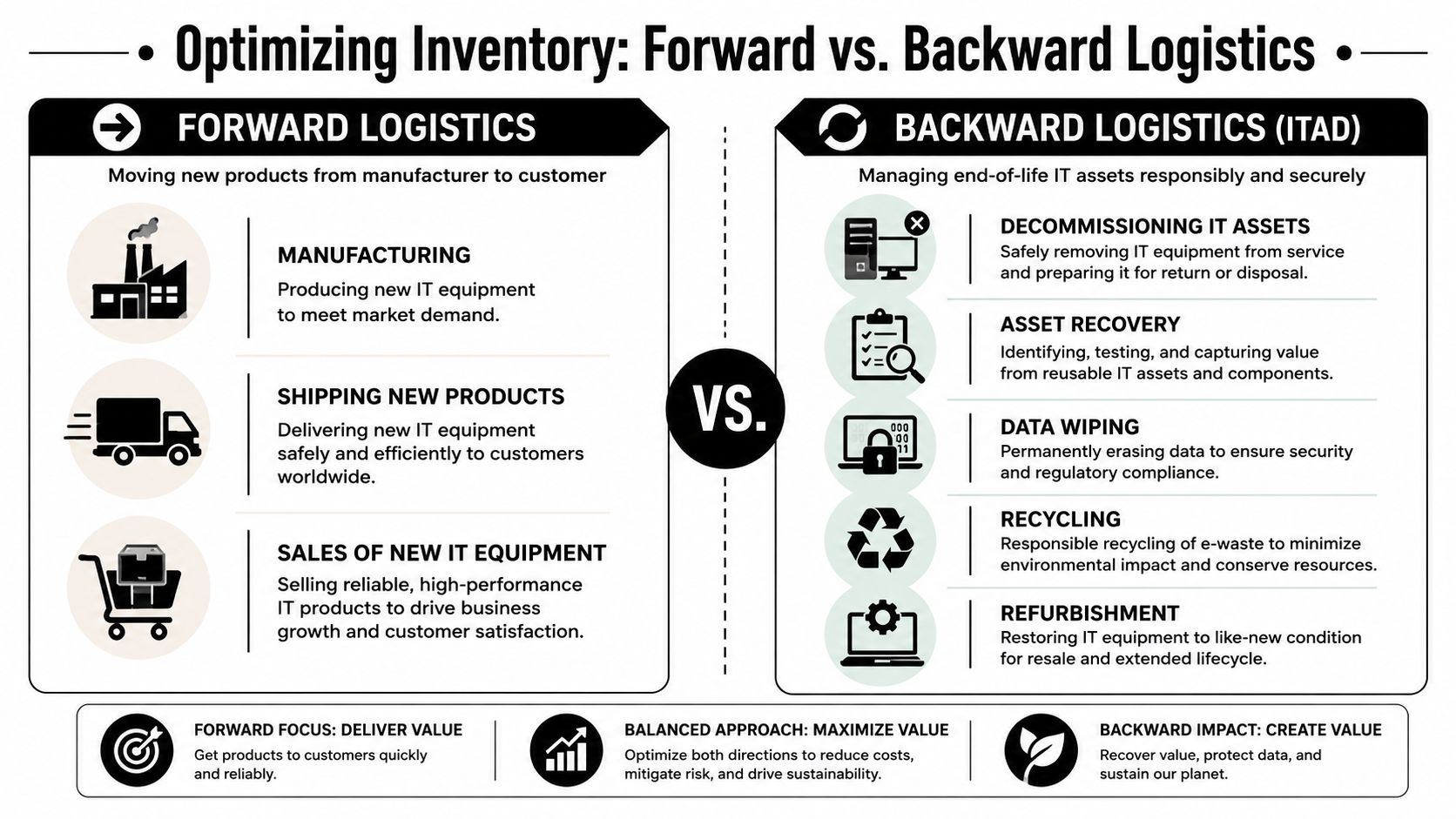
Forward inventory and reverse inventory aren’t priced the same way
In a normal supply chain, holding cost usually means warehousing, labor, insurance, and tied-up capital. In ITAD, holding cost also includes unresolved data risk, delayed certificate issuance, slower chain-of-custody closure, and missed resale windows for technology that depreciates quickly.
A projected 2025 Global Electronics Council report notes that end-of-life IT assets lose 15-20% of their residual value every 3 months due to technological obsolescence, which standard inventory formulas often fail to capture (Fact 5). That’s why a retired server waiting in a cage isn’t just sitting idle. It’s losing recoverable value while still carrying security obligations.
The idea of liability inventory
Some end-of-life assets should be treated less like stock and more like controlled liabilities.
Think about these examples:
- Drive-heavy storage gear: It may hold the highest data risk in the room.
- Network appliances: They can contain configs, credentials, and logs.
- Medical or lab systems: They may combine hardware value with regulated data exposure.
- Obsolete peripherals: They may have little resale value but still require documented downstream processing.
The reverse-logistics question isn’t “How much stock do we need?” It’s “How long can we safely hold this asset before risk outruns value?”
That single question changes the operating model. It pushes teams to build disposition triggers, route assets by priority, and stop lumping every retired device into one generic pile.
Essential Models and Metrics for IT Asset Inventory
Classic inventory tools still help. You just have to translate them into ITAD language.
ABC analysis for retired hardware
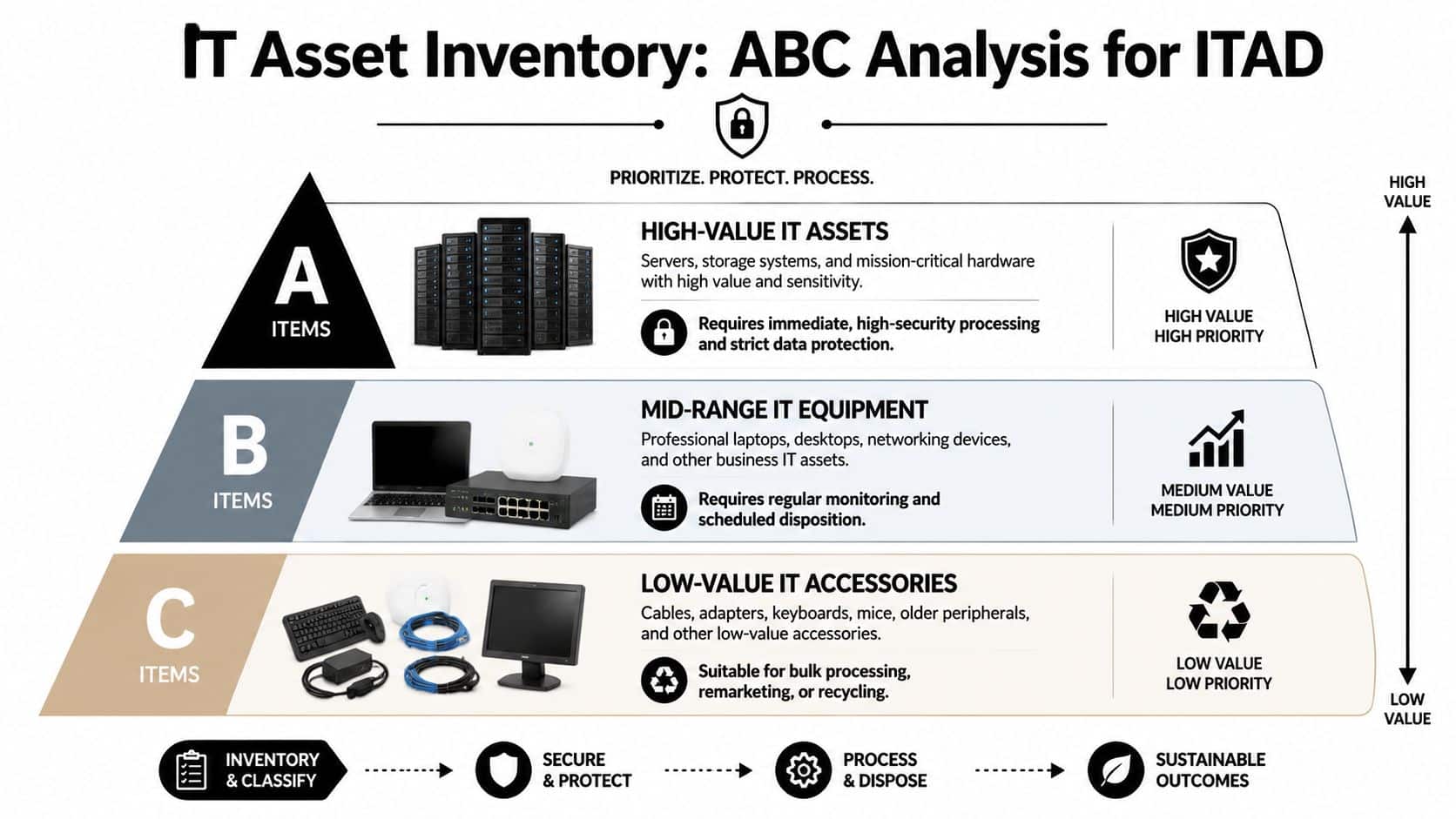
ABC analysis is one of the most practical starting points. In a reverse-logistics environment, the categories might look like this:
| Category | Typical IT assets | Operational meaning |
|---|---|---|
| A items | Data center servers, enterprise storage, switches, firewalls | Highest value or highest risk. Process first. |
| B items | Standard business laptops, desktops, monitors, access points | Moderate recovery value. Schedule in batches. |
| C items | Keyboards, mice, cables, docks, mixed accessories | Low value. Route for bulk recycling with cost control. |
The familiar 80/20 rule still matters here. The top 20% of inventory items typically account for 80% of inventory value, and focusing optimization on those high-value items can reduce overall holding costs by up to 15% annually (Fact 1). In ITAD terms, that means your best process discipline should surround the highest-value or highest-risk hardware, not the easiest pallets to move.
If you’re aligning accounting treatment with disposition strategy, a review of inventory valuation methods can help frame why asset category and timing affect reported value differently across equipment classes.
Reorder point becomes a disposition trigger
The traditional reorder point formula is:
ROP = (Average Daily Demand × Average Lead Time) + Safety Stock
For ITAD, the formula is less useful as a purchasing tool and more useful as a thinking tool. You can repurpose the idea into a disposition trigger point. Instead of asking when to buy more, ask when an asset group has reached the age, volume, or risk threshold that should trigger pickup, shredding, remarketing, or recycling.
Safety stock becomes secure processing capacity
Safety stock is where readers often get lost, so keep it simple. The formula is:
Safety Stock = Z × σ_dLT
In plain language, it’s a buffer for uncertainty. In ITAD, that buffer can mean secure processing capacity for an unexpected office closure, emergency device recall, breach response, or accelerated refresh project. The key point is that dynamically adjusting the Z-score based on real-time volatility reduces carrying costs by 15% while maintaining service levels above 95% (Fact 3).
That matters for teams planning decommissions, collection schedules, and downstream wiping throughput. A static assumption will usually fail right when a large batch arrives without much notice.
When retired assets move in surges, your bottleneck isn’t demand planning. It’s secure processing capacity.
EOQ still helps, with caution
The classic EOQ formula, EOQ = √[(2 × D × S) / H], can still guide thinking around shipment size, batch handling, and processing cadence. But don’t treat it as plug-and-play. For fast-depreciating IT hardware, holding cost can run 20% to 30% of item value annually (Fact 4), which makes delay more expensive than many teams assume.
Your 6-Step IT Inventory Optimization Framework
A workable ITAD program usually starts small. You don’t need a perfect enterprise platform on day one. You need a disciplined operating model and a way to improve it.
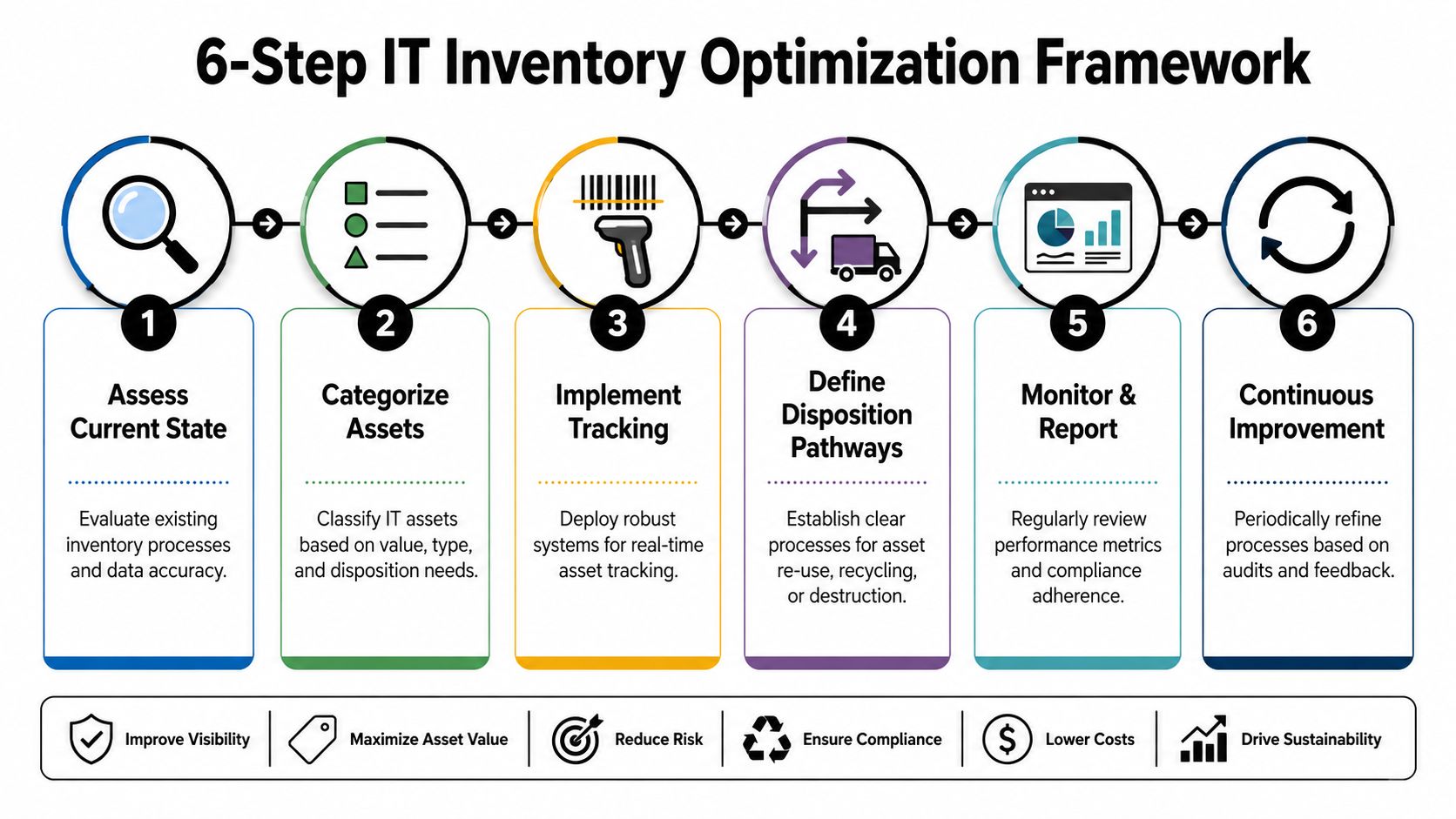
1. Assess the current state
Walk the sites. Count what’s sitting in closets, server rooms, cages, and staging areas. Reconcile what finance, IT, facilities, and security each believe exists.
Many organizations discover they don’t have one retired-asset inventory. They have several partial lists and a lot of memory.
2. Cleanse and centralize asset data
Create one working record for each item or asset batch. Pull in serial numbers, model family, device type, drive presence, physical location, user or department history, and required disposition path.
A useful input set for forecasting and planning is available in practical form through demand forecasting technique, especially when refresh cycles and project-based retirements create uneven flows.
3. Select tools that track reverse flow
A forward-looking CMDB alone usually won’t solve this. You need tracking that follows assets into retirement, not just into production.
Look for capabilities such as:
- Status transitions: Ready for pickup, pending wipe, pending shred, remarket candidate, recycle-only.
- Chain-of-custody records: Who touched it, where it moved, and when.
- Batch visibility: Pallet, room, project, or site-based grouping.
- Exception handling: Missing drives, unknown ownership, damaged units, or legal hold flags.
4. Define disposition policies
Different assets need different rules. A server with drives shouldn’t wait in the same queue as a pallet of low-value accessories.
Write policy around:
- Processing urgency: Which categories move first.
- Data handling: Wipe, shred, or hold.
- Value recovery: Which items merit testing and remarketing.
- Escalation paths: What happens when inventory sits unresolved.
5. Automate workflow where the handoffs break
Most delays happen between teams. IT signs off, facilities waits, procurement asks about residual value, and security wants proof of destruction. Automation should notify the next owner, create required documents, and flag aged inventory before it becomes stale.
Statistical analysis shows that effective inventory optimization can reduce stockout rates by 25-35% and lower overstock levels by 20-30% within the first year. Companies using AI-driven forecasting and dynamic safety stock achieved a 30% improvement in inventory turnover (Fact 2). The direct ITAD lesson is simple. Better forecasting and better buffers improve flow when hardware arrives in waves instead of neat schedules.
6. Review KPIs and improve
Don’t stop at pickup volume. Track aged inventory, time from retirement to final disposition, percentage routed to value recovery, chain-of-custody completeness, and exception counts by site.
Operational test: If you can’t tell which retired assets are aging, exposed, or awaiting proof of destruction, you’re not optimizing inventory yet.
Inventory Optimization for Data Centers and Enterprises
A theory only matters if you can apply it under pressure. Two common situations show how this works.
Data center decommissioning
A colocation exit or infrastructure consolidation creates a mixed inventory problem fast. Racks hold high-value servers, low-value rails and cabling, and storage devices that demand immediate data handling. If the team treats all of it as one outbound lot, the project slows down and value slips.
The better approach is triage. The 80/20 rule dictates that for ITAD, high-value assets like data center servers and switches, the 20%, must be prioritized for immediate recovery and destruction protocols to capture the value-driving 80%, while low-value items need a distinct, cost-separated handling strategy (Fact 8). A specialized data center workflow often starts with a tighter chain of custody and asset segregation model, similar to what teams look for in data center ITAD services.
In practice, that means:
- secure drive-bearing assets move first,
- remarketable network and compute gear gets evaluated quickly,
- bulk scrap categories are separated so they don’t consume high-touch labor.
Enterprise laptop refresh cycles
A company replacing a large laptop fleet runs into a different challenge. Devices retire in phases. Some come back from remote staff. Some sit with local office admins. Some are delayed because HR offboarding, legal review, or department approvals haven’t closed.
In this regard, inventory optimization improves coordination more than math. The team needs clear triggers for pickup, a standard intake record, and a rule for when devices shift from “pending return” to “aged exception.”
A strong laptop-refresh program usually includes:
- Department-level scheduling: So IT isn’t collecting devices one by one.
- Risk-based sorting: Devices with local storage and recent user activity get priority.
- Separate handling lanes: Better-condition units for recovery, damaged units for recycling, and unknown-condition units for inspection.
The financial result comes from speed. The security result comes from consistency.
Compliance Security and Common Pitfalls
Poor retired-asset inventory control usually shows up late. An auditor asks for destruction records. Security wants to confirm whether a set of drives was shredded or only removed from service. Finance asks why recoverable hardware sat long enough to lose market value.
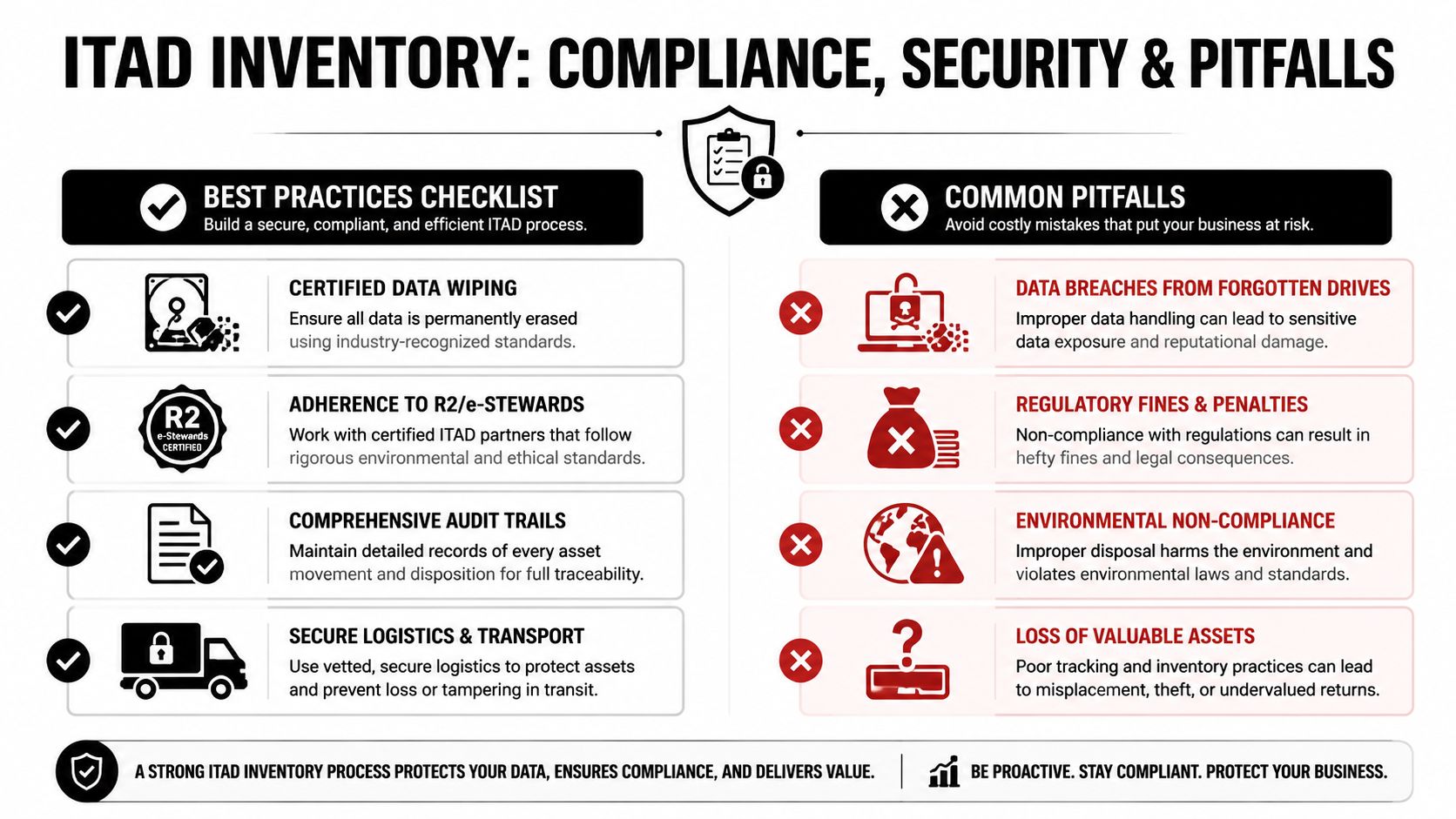
Why delay gets expensive
The average inventory carrying cost for U.S. enterprises is 24.5% of inventory value, and 57% of organizations have experienced significant financial losses due to stockouts or overstocking from poor inventory optimization (Fact 1). In the ITAD context, those costs show up as wasted space, repeat handling, unresolved data-bearing equipment, and missed value recovery.
Security teams also need standards, not assumptions. If your retired devices still hold data, a disposal workflow should align with recognized sanitization guidance such as NIST SP 800-88.
Common pitfalls to avoid
- Treating all retired assets the same: A pallet of keyboards and a rack of storage arrays shouldn’t follow the same process.
- Letting convenience drive timing: “We’ll clear it next quarter” often means more depreciation and weaker documentation.
- Running an inconsistent chain of custody: If site teams improvise labels and logs, exceptions pile up fast.
- Separating compliance from operations: The inventory record and the destruction record must connect cleanly.
- Choosing a handler without documented controls: If a partner can’t support audit trails and secure processing, your risk doesn’t leave with the truck.
Forgotten drives don’t become safe because they’re powered off. They become harder to account for.
Turn Your IT Liability Into a Strategic Asset
Retired hardware isn’t just clutter. It’s a managed inventory class with value, risk, timing pressure, and compliance consequences. Once you view it that way, inventory optimization stops being a warehouse concept and becomes an IT governance tool.
The practical shift is straightforward. Classify assets by risk and recovery potential. Set disposition triggers. Build secure processing capacity for surges. Track chain of custody from collection through final outcome. Measure aging so equipment doesn’t sit until the organization absorbs both the risk and the write-down.
Teams that do this well don’t just clear space faster. They close security gaps, produce cleaner records, and make better decisions about what to wipe, shred, remarket, or recycle.
Contact Beyond Surplus for certified electronics recycling and secure IT asset disposal. Their team supports nationwide business pickups, secure data destruction, IT asset recovery, data center decommissioning, product destruction, and documented chain-of-custody processes that help enterprises reduce risk and recover value from end-of-life technology.


