

A hardware refresh usually ends the same way. New laptops are deployed, a closet fills with retired desktops and monitors, and someone asks whether Facilities can just “get rid of it.” For a College Park IT manager, that's the point where routine cleanup turns into a data security and compliance problem.
IT equipment disposal in College Park isn't just hauling away old electronics. Business devices hold customer records, employee data, credentials, and licensed software. Some assets still have resale value. Others need documented destruction. The process has to account for security, environmental handling, logistics, and proof.
Your Guide to Professional ITAD in College Park
When companies search for help with end of life hardware, they often start with the word “recycling.” That's too narrow. IT asset disposition, or ITAD, is the business process for retiring technology in a controlled way. It covers pickup, inventory, data sanitization, downstream recycling, remarketing, and final reporting.
For College Park organizations, that matters because old equipment rarely leaves in neat, low-risk categories. A single pickup can include laptops ready for reuse, failed SSDs that need destruction, network gear with configuration data, and monitors that require responsible downstream processing. Treating all of it as scrap is inefficient. Treating it casually is dangerous.
The practical approach is to separate the job into three decisions:
- What can be reused: Devices with remaining life may be wiped, tested, and routed into recovery channels.
- What must be destroyed: Media with sensitive data or failed storage components needs a higher level of sanitization.
- What must be documented: Every asset should map to a final disposition with records your audit or compliance team can use.
That's the difference between ad-hoc disposal and a real program. If you're evaluating local options for College Park computer and electronics recycling, start by asking whether the provider handles chain of custody and business reporting, not just whether they pick up equipment.
Practical rule: If your team can't show where each retired device went and how its data was handled, the job isn't finished.
Why Ad-Hoc Disposal Is a Risk for College Park Businesses
A lot of disposal mistakes start with a reasonable but flawed idea. Someone sees a local drop-off option and assumes it can handle business equipment too. That's where the risk begins.
College Park's resident electronics drop-off program is built for household convenience, not commercial ITAD. The city states that residents are limited to no more than 3 items per visit and must present a valid College Park ID. Its guidance also notes that some other local options may charge fees, including $25 for TVs and monitors at Best Buy in the area, according to College Park recycling guidance.

Why public drop-off doesn't fit business disposal
A business refresh doesn't happen three items at a time. It happens by department, floor, clinic, warehouse, or site. Commercial disposal needs pickup scheduling, packing coordination, asset tracking, and documented handoff. Public programs don't provide that structure.
They also don't solve the main business problem, which is liability. If drives leave your control without verified sanitization, your company absorbs the risk. If a recycler can't prove downstream handling, your company still carries the exposure.
The three failures that cause the most trouble
- Data left on media: Deleting files or reformatting a drive doesn't create defensible data destruction. Storage media has to be sanitized using a recognized process.
- No documented custody: When equipment changes hands without serialized inventory or signed transfer records, nobody can prove what happened to specific assets.
- Improper environmental routing: Monitors, terminals, and other electronics can contain regulated materials, which makes casual disposal a bad idea for any business that expects to pass internal review.
Most disposal problems don't come from dramatic failures. They come from missing paperwork, missing serial numbers, and assumptions about what “recycled” means.
What works better
A business-grade ITAD process is designed around volume and accountability. It gives IT managers a way to retire hardware without improvising every pickup. More important, it creates evidence. That evidence is what protects the company later.
Navigating ITAD Compliance Laws in Georgia
Compliance in IT disposal isn't one law and one checkbox. It's a combination of privacy duties, records handling, and environmental responsibility. If your organization operates in healthcare, finance, education, or any data-heavy industry, retired equipment sits directly inside that risk area.

What compliance means in practice
For most College Park businesses, the baseline is simple. If a device stored sensitive information, you need a disposal process that prevents unauthorized recovery and leaves a record. Rules like the FTC Disposal Rule and sector-specific requirements such as HIPAA push companies toward controlled destruction, documented handling, and qualified vendors.
That expectation didn't appear out of nowhere. Regulatory history around electronics disposal made it clear that organizations can't treat obsolete equipment like ordinary trash. Purchase College notes that the New York State Department of Environmental Conservation determined that non-working and obsolete computer products must be treated as hazardous waste, and that monitors and terminals contain 4 to 8 pounds of lead. The same source also states that the generator remains responsible if products are improperly disposed of, which is why documentation matters so much in enterprise programs, according to Purchase College's computer equipment disposal guidance.
The operational lesson for IT managers
Compliance problems often look like logistics failures first. Equipment sits too long after a move, devices get mixed together, and nobody owns the final audit trail. The same budgeting blind spots show up in other operational projects. A useful comparison is this article on costs beyond your removalists, which captures how secondary handling details can create avoidable risk and cost when teams plan only for pickup.
Use a disposal workflow that includes:
- Asset identification: Record device type, serial number, and media status before it leaves the site.
- Policy matching: Route devices based on data sensitivity and retention requirements.
- Final records: Obtain destruction or recycling documentation that your compliance team can retain.
For broader context on state-specific service considerations, review this Georgia ITAD guide.
Secure Data Destruction Methods Explained
Data destruction is where many disposal plans fail. Teams assume deleted files are gone, or they rely on quick formatting before equipment leaves the building. That doesn't hold up when you need a defensible process.
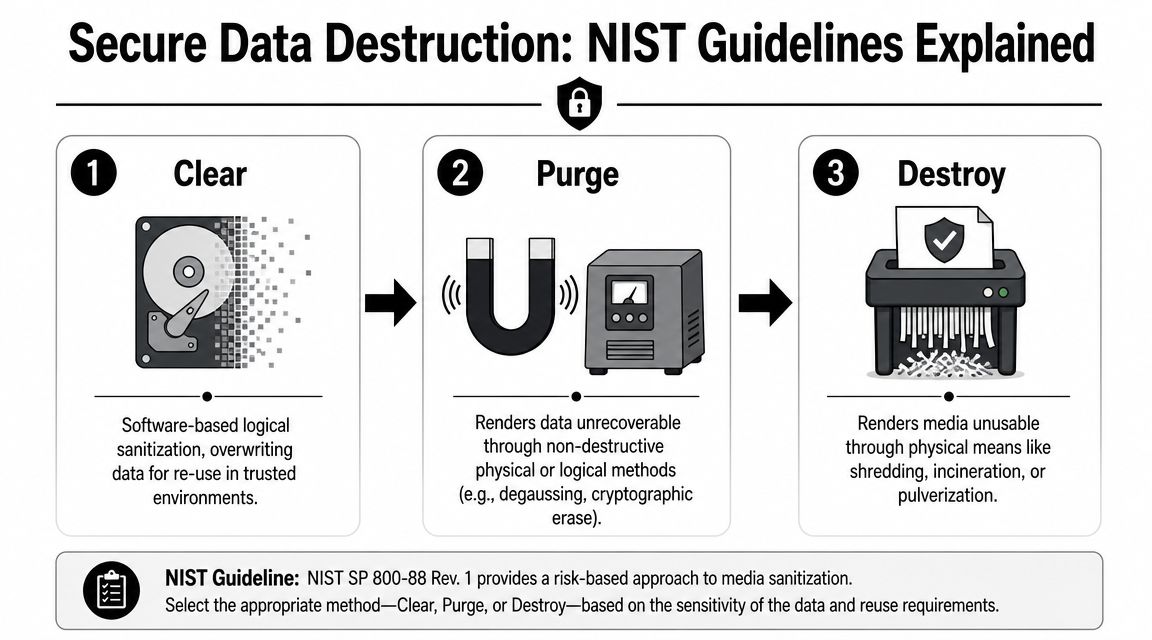
A sound ITAD workflow follows NIST SP 800-88-style media sanitization decisions: Clear, Purge, or Destroy. The right method depends on the media type and the intended outcome for the asset.
Clear
Clear is logical sanitization. In plain terms, it uses software methods to overwrite data so the device can be reused in a trusted context. This is often the right choice when equipment still has value and your organization wants remarketing or redeployment.
It is not the same as dragging files to the recycle bin. It is also not the same as a quick operating system reset.
Purge
Purge uses more intensive methods to make data unrecoverable. Depending on the media, that can include techniques such as cryptographic erase or other approaches that go beyond standard overwrite. Purge fits assets that won't stay in your controlled environment but may still be suitable for non-destructive processing.
The media type becomes more significant. HDDs and SSDs do not behave the same way.
Destroy
Destroy is physical destruction. Shredding and similar methods render the media unusable. This is often the right path for failed drives, highly sensitive storage, and SSDs that can't be reliably sanitized for reuse because controller behavior and wear-leveling may leave data in inaccessible blocks.
The neutral guidance in this area is clear. A robust ITAD program should choose Clear, Purge, or Destroy based on drive type and reuse target, because simple deletion is insufficient for HDDs, while SSDs often require purge or physical destruction due to wear-leveling and controller behavior. Verifiable logs are also essential for audits, as described in this ITAD process and compliance guide.
Delete and format are user actions. Sanitization is a controlled security process.
A practical decision framework
Use this quick comparison when retiring storage media:
| Method | Best fit | Main goal |
|---|---|---|
| Clear | Reuse in trusted channels | Sanitize while preserving asset value |
| Purge | Higher security without immediate physical destruction | Make recovery infeasible |
| Destroy | Failed media or high sensitivity assets | Eliminate reuse and recovery |
What to ask a provider
- Which media gets wiped and which gets shredded
- How SSDs are handled
- Whether logs tie each action to a serial number
- What certificate you receive at the end
If your internal team needs a refresher before pickup day, this guide on how to erase a hard drive is a useful starting point. It helps frame the conversation, even if final sanitization is performed by an ITAD vendor.
The Importance of Chain of Custody and Certification
Chain of custody gets overused as a phrase, but the concept is simple. It's the documented story of each asset from the moment your staff releases it to the moment it is sanitized, recycled, or remarketed.
Without that story, you can't prove control. And if you can't prove control, your legal and compliance teams are left arguing from assumptions.
What an auditable chain looks like
The strongest programs track equipment at the serial-number level. Pickup teams document what they receive. Transportation is controlled. Facility intake confirms the same assets arrived. Sanitization or destruction records attach to those items. Final reports show disposition by asset, not by vague batch descriptions.
Park Place Technologies emphasizes that effective ITAD is more than pickup. It requires serial-number-level inventory, secure transport, and auditable certificates of destruction, with final reporting that shows assets were handled under recognized standards such as NIST 800-88, as outlined in its ITAD services guidance.
Why certification and reporting matter together
A certificate by itself isn't enough if the underlying records are weak. Good reporting ties together:
- Pickup documentation: What left your site, when, and under whose control.
- Processing evidence: Whether the item was sanitized, destroyed, recycled, or prepared for reuse.
- Final disposition records: The document set your organization keeps for audits, vendor management, and future inquiries.
If a provider can't map a certificate back to specific assets, treat that as a reporting gap, not a paperwork inconvenience.
For businesses vetting vendors, this overview of R2 certified ITAD providers in Georgia gives a practical lens for evaluating process maturity.
Logistics and Value Recovery with Beyond Surplus
The disposal plan has to work operationally, not just on paper. That means scheduled pickups, site coordination, packing expectations, and a process that doesn't pull your IT staff away from production work longer than necessary.
Many organizations miss a second opportunity. Not every retired asset is waste. Some equipment can move through IT asset recovery channels after proper data handling and testing. That can offset part of the cost of the project and reduce unnecessary destruction of usable hardware.
What a workable commercial process looks like
A useful vendor workflow usually includes pickup scheduling, asset consolidation guidance, and a decision tree for reuse versus recycling. The important point is that data security and value recovery have to be coordinated together. You don't maximize recovery by relaxing sanitization standards. You maximize it by sorting assets correctly before processing.
Beyond Surplus offers scheduled business pickups, secure data destruction, electronics recycling, and IT asset recovery services for organizations managing end-of-life equipment. For companies evaluating whether older devices may still hold value, its Georgia asset recovery services page shows how remarketing fits into the larger ITAD workflow.
Where teams usually go wrong
- They wait too long: Equipment piles up, models age further, and resale options narrow.
- They mix everything together: Reusable assets get treated like scrap because nobody triaged them.
- They focus only on removal: Fast pickup feels productive, but poor sorting can erase recoverable value.
A disciplined pickup and recovery process does the opposite. It clears space, protects data, and gives procurement or finance a cleaner picture of the total project cost.
Your ITAD Partner Checklist and Local FAQs
Choosing an ITAD vendor gets easier when you stop asking “Do you recycle electronics?” and start asking operational questions. Business disposal is about control, evidence, and downstream handling.

Vendor checklist
Use this shortlist during vendor review:
- Certifications: Ask what certifications apply to recycling and data destruction workflows.
- Serialized reporting: Confirm that inventory and final disposition are tracked by asset, not just by pallet or load.
- Sanitization methods: Ask how the provider decides between Clear, Purge, and Destroy.
- Transport controls: Find out how equipment is secured from pickup through facility intake.
- Downstream transparency: Ask who handles final recycling and whether the provider audits those outlets.
- Certificates and reports: Confirm what records you'll receive and how quickly they're issued.
Local questions College Park teams usually ask
Can a business use public residential drop-off as its disposal plan?
That's a poor fit for commercial volumes and documentation needs. Business equipment should move through a scheduled, auditable process.
What about healthcare or other sensitive environments?
If devices may contain regulated information, the disposal method and the paperwork matter as much as the pickup itself. Your vendor should be able to explain how data is sanitized and how that action is documented.
Should every drive be physically shredded?
Not always. Some devices are better candidates for sanitization and reuse. Others should be destroyed based on media type, condition, and data sensitivity.
How do you start a quote?
Prepare a basic inventory first. Include asset types, approximate quantities, whether storage media is present, and whether you need pickup, on-site services, or reporting for audit purposes.
The right partner for IT equipment disposal in College Park should make your next refresh less risky, less manual, and easier to document.
If your team needs a documented path for electronics recycling, secure data destruction, or IT asset recovery, contact Beyond Surplus. Start with an inventory and pickup discussion, then match each asset to the right disposition path before anything leaves your control.


