A remote laptop doesn't become low-risk once it's back in the building. Liability often stays with the employer until data destruction is documented and the chain of custody is complete. That's the part many offboarding programs miss, and it's why remote employee laptop recovery services have shifted from a shipping task to a compliance process.
The New Normal of Offboarding Remote Employees
Remote work changed the physical location of company assets. It also changed who owns the last mile of control when an employee leaves. In 2025, approximately 28% of U.S. workers were fully remote, and only about 30% of devices are returned on time, according to Unduit's remote employee laptop return service guide. That gap is why hardware return and lifecycle management now sit squarely inside offboarding, security, and IT asset disposition.

A lot of new IT managers inherit a process that was built for office exits. Someone resigned, HR notified IT, the laptop came back to a help desk, and the asset record closed. That process breaks when the device is sitting in another state, the employee account is already disabled, and no one can confirm whether the laptop is boxed, wiped, in transit, or still on a kitchen table.
Why the old handoff model fails
Distributed work exposed three weak points at once:
- Ownership gaps: HR, IT, security, and procurement often assume someone else is driving retrieval.
- Visibility gaps: Without centralized tracking, teams can't tell whether a device is delayed, lost, or unclaimed.
- Process gaps: Ad hoc labels and reminder emails don't create a defensible chain of custody.
That's why mature teams move to standardized retrieval workflows instead of relying on good intentions. A practical example is a managed process with prepaid kits, documented touchpoints, and tracked return status like the workflow described in remote workforce IT asset management and equipment returns.
Practical rule: If your offboarding checklist ends when the employee ships the laptop, your recovery program is incomplete.
What the job looks like now
Remote employee laptop recovery services now cover more than freight. They sit at the intersection of offboarding operations, data protection, device triage, and final disposition. Good programs remove friction for the departing employee while increasing control for the business.
That's the new normal. Retrieval has to be easy for the user, visible to IT, and auditable for compliance.
Why Asset Recovery Is a Critical Business Process
Unreturned laptops create two problems at once. You lose a physical asset, and you lose control over the data and credentials that may still be on it. That's why retrieval belongs in risk management, not just logistics.
Remote workers are 17% more likely to fail to return company equipment than on-site employees, creating a visibility and security gap where devices containing sensitive data remain vulnerable, according to Hello Retriever's analysis of remote equipment recovery. That single fact changes the business case. Recovery isn't optional clean-up after termination. It's part of your control environment.
The three risks that matter most
Financial exposure
Every missing laptop represents sunk hardware cost and lost residual value. It also creates replacement demand for the next hire. In larger organizations, this compounds quickly because devices don't disappear one at a time. They accumulate through missed returns, delayed follow-up, and poorly documented exceptions.
If you want a practical cost lens, review what unreturned employee laptops cost a business. The point isn't just the device itself. It's the total cost of replacement, redeployment delays, and write-offs.
Security exposure
A recovered laptop that hasn't been sanitized is a risk. An unrecovered laptop is worse. It may still hold email tokens, browser sessions, VPN credentials, downloaded files, and local application data. Even when a device is password protected, you're still relying on controls you can no longer physically supervise.
A laptop outside your control is an active security problem, not a closed ticket.
Compliance exposure
Many teams assume risk transfers back to the company as soon as the box arrives. It doesn't work that way in practice. Until the device is inventoried, processed under controlled conditions, and documented, your audit trail is still thin.
What doesn't work
The weakest recovery programs usually rely on some combination of these:
- Manual chasing: HR sends emails, then IT sends more emails, and no one owns the escalation.
- Employee-funded returns: This adds friction and invites delay.
- No proof of custody: Teams know a label was created but can't prove where the asset went next.
- Late security action: The company waits for physical return before taking logical control of the device.
A critical business process has to be measured by control, not optimism. If the process can't show status, custody, and final disposition, it won't stand up when a device goes missing or an auditor asks for proof.
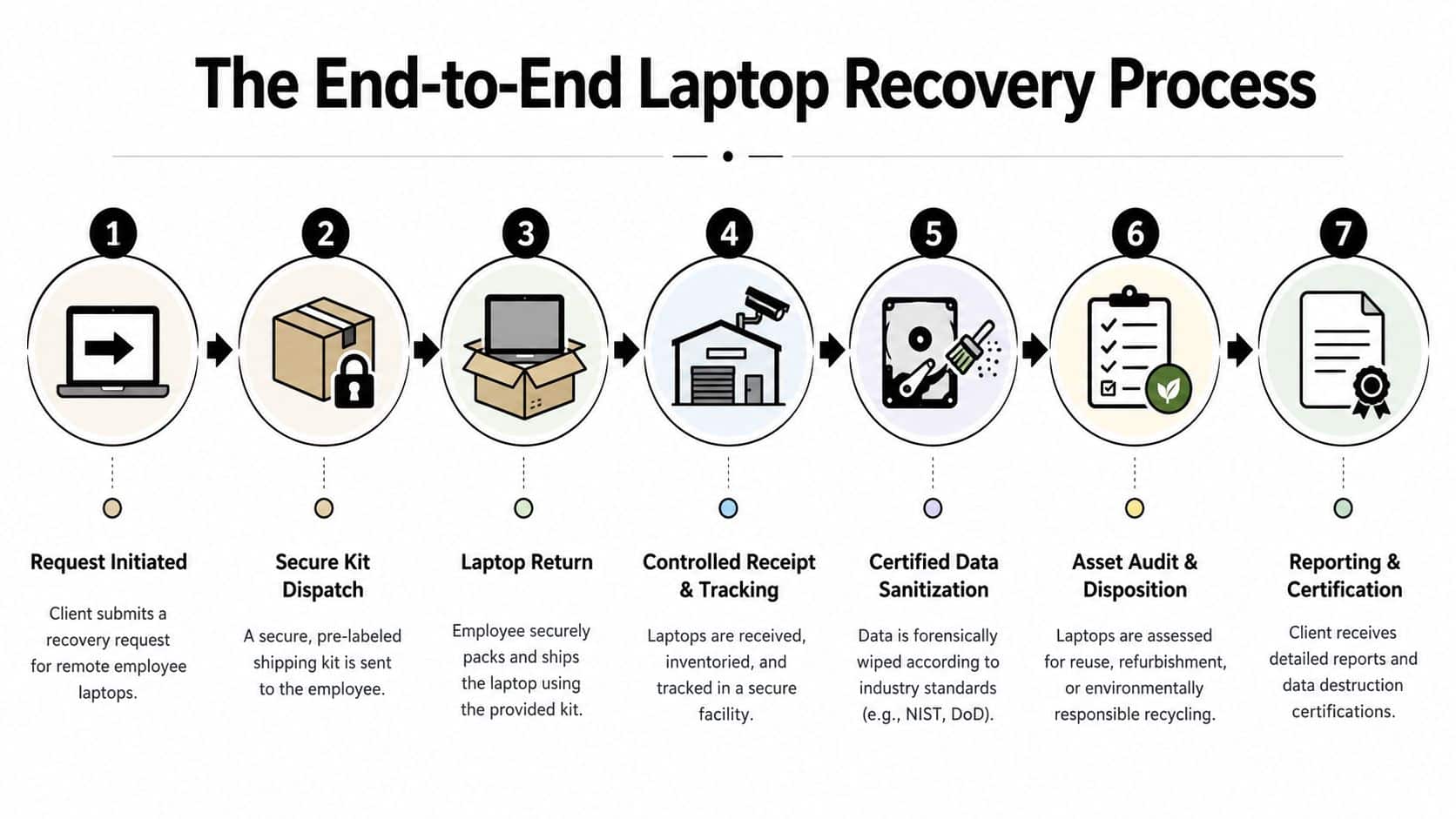
The End-to-End Laptop Recovery Process Explained
A strong recovery workflow should feel boring. That's a compliment. Predictable processes recover more assets and create fewer exceptions.
The basic model is straightforward, but each step has to be controlled.
The operational sequence
Request initiation
HR, IT, or security triggers the return as part of offboarding. This should happen from a system of record, not an informal chat or inbox thread.Kit dispatch
The employee receives a pre-labeled return kit with packing instructions. Good kits reduce packing damage and eliminate the excuse that the employee didn't know how to ship the device.Employee handoff
The employee packs the laptop and accessories, then tenders it through the approved method. Convenience matters here. If the process is clumsy, compliance drops.Tracked transit
The business needs visibility from shipment to receipt. Automated notifications and exception handling are valuable for this. Teams that want cleaner control often adopt workflows similar to those described in how automated logistics improve remote employee laptop returns.
What happens after the box arrives
Physical receipt is only the midpoint.
| Stage | What the vendor should do |
|---|---|
| Intake | Log the device, confirm identifiers, and record receipt |
| Inspection | Review condition, accessory completeness, and obvious tampering |
| Reconciliation | Match the returned asset to the original assignment record |
| Disposition decision | Route for redeployment, refurbishment, recycling, or destruction |
| Reporting | Produce asset-level records for IT and compliance stakeholders |
The difference between basic and professional recovery
A basic service gets the package back. A professional service controls the asset through the full lifecycle.
That means the vendor can answer questions like these without guessing:
- Was the serial number matched on intake?
- Was the unit wiped before or after transit?
- Was the charger returned and logged?
- Was the asset suitable for reuse or routed to recycling?
- What document closes the record?
Some providers also integrate recovery with broader ITAD workflows. Beyond Surplus, for example, offers managed retrieval tied to downstream electronics recycling and certified data destruction for business equipment. That matters when your recovery process doesn't end at receipt and has to feed a formal disposition program.
The cleanest recovery programs treat every laptop return like a controlled asset transfer, not a parcel event.
Navigating Data Security and Compliance Requirements
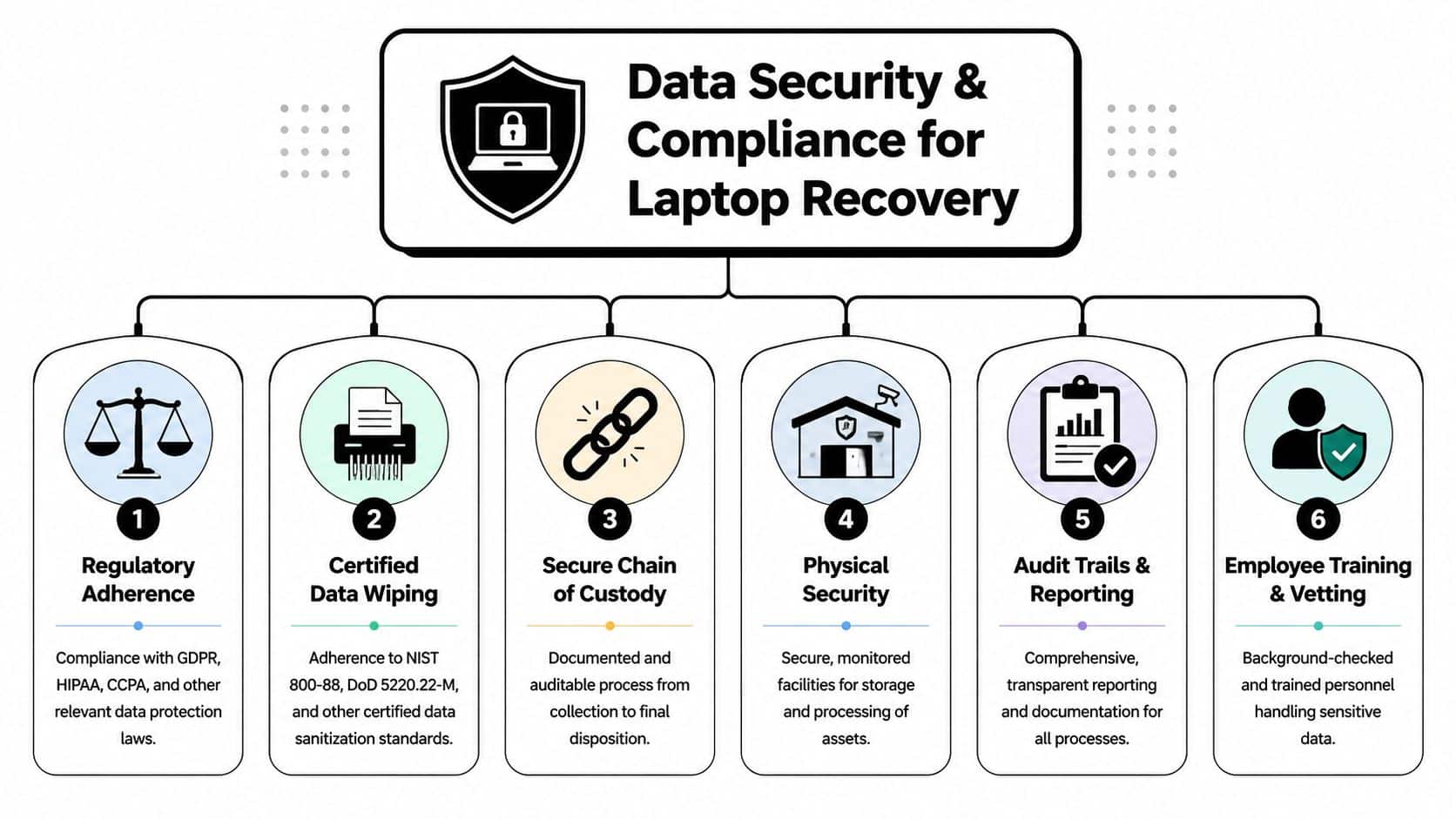
A remote laptop return is a liability chain, not a mail event. Your exposure starts when the employee separates and does not end until you have a documented sanitization record and the final Certificate of Data Destruction.
Professional recovery programs usually follow a two-step sanitization process. First, they trigger a remote wipe or device lock as soon as policy allows. Then, after controlled intake, they verify the asset and perform the approved sanitization method required by the organization's standard. That structure supports NIST 800-88-aligned media sanitization practices and gives legal, HR, and security teams the records they need when GDPR, HIPAA, SOX, or internal retention policies come into play.
Why the wipe sequence matters
Order matters because each step covers a different risk.
Many companies allow a short window for the departing employee to collect approved personal files. After that, IT should revoke access, issue the return instructions, and start the remote wipe or lock process based on the device state and management controls in place. Once the laptop reaches intake, the vendor should confirm the asset ID, inspect the unit, and complete the final sanitization step before any reuse, resale, recycling, or destruction decision is made.
That sequence reduces three common problems:
- Personal data disputes: A defined retrieval window limits arguments over lost personal files.
- Transit risk: A wiped or locked device creates less exposure if the package is delayed, misrouted, or stolen.
- Audit failure: Intake verification plus final sanitization creates a record that stands up better in reviews and investigations.
The trade-off is operational. Waiting too long to wipe increases exposure. Wiping too early can trigger employee complaints or interfere with legal hold requirements. Good programs set that timing in policy before the first offboarding case goes sideways.
Chain of custody is what auditors test
Security teams often focus on whether the drive was wiped. Auditors and counsel usually ask a harder question. Can you prove who controlled the device at each stage, what happened to the data, and when liability transferred?
A defensible record should show:
- Who initiated the recovery
- When the employee was instructed to return the device
- When access was revoked or the device was locked
- When the asset left the employee's possession
- When it arrived at controlled intake
- What sanitization method was performed
- Who approved the final disposition
- What certificate closed the record
For a practical example of the controls used during the riskiest handoff stage, see this guide on protecting sensitive data during remote laptop returns.
Compliance lens: Delivery confirmation does not close the file. The record closes when the asset is sanitized, dispositioned, and documented.
Where hidden compliance gaps show up
The biggest gap is assuming the carrier scan is enough. It is not.
A tracking event shows movement. A dock signature shows receipt. Neither proves the device was sanitized correctly, matched to the right user, checked for missing storage, or routed to the approved disposition channel. I have seen teams discover this only after an audit request or a legal inquiry, when nobody can produce asset-level evidence beyond a shipping label and an email thread.
This is why the final certificate matters so much. Until the Certificate of Data Destruction or equivalent disposition record is issued, the organization may still be carrying unresolved risk tied to data exposure, recordkeeping failures, or improper disposal controls. Hidden compliance gaps usually sit in that space between physical return and formal closure. That is the part weak recovery services tend to gloss over.
How to Evaluate and Select the Right Recovery Vendor
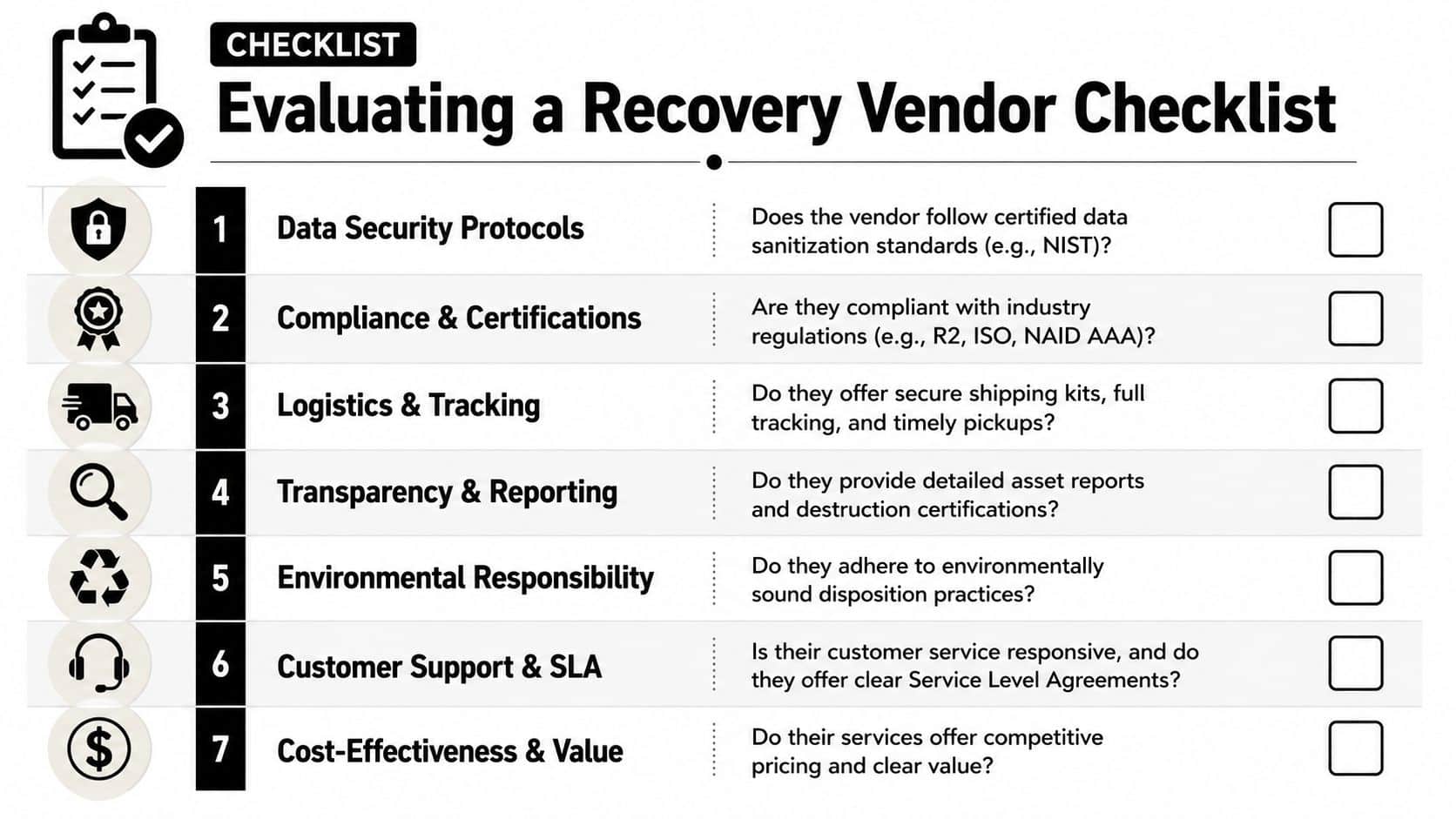
Vendor selection gets easier when you ignore the glossy overview and ask operational questions. The right provider should be able to describe exactly how they handle exceptions, not just routine returns.
One question matters more than most buyers expect. Legal liability can persist for 5 to 10 business days after device intake until formal certification is issued, and that delay has been linked to 68% of enterprise compliance penalties in one study, according to Beyond Surplus's discussion of remote laptop recovery liability transfer. If a vendor can't explain when liability transfers, keep digging.
The questions that expose weak vendors
Ask these in plain language:
- When does liability transfer? Not when the package arrives. When is certification issued?
- How do you document chain of custody? You want asset-level records, not summary emails.
- What happens if a device arrives damaged or incomplete? Look for a defined exception workflow.
- Do you wipe before transit, after intake, or both? The answer should be precise.
- How do you handle non-responsive employees? Good vendors have escalation paths, not just reminders.
- What final documents do you provide? Certificates matter.
A useful companion is a formal vendor due diligence checklist for ITAD and recovery services, especially if procurement is involved.
What a strong vendor relationship looks like
Clear service boundaries
The provider should define what is included. Return kit creation, shipping coordination, intake logging, sanitization, asset reporting, recycling, resale, and certification may not all be bundled. You need to know where handoffs occur.
Transparent exception handling
Most failures don't happen in standard cases. They happen when the employee moved, the laptop is damaged, the charger is missing, or the shipment stalls. Ask how the vendor documents those events.
Reporting that closes the loop
Good reporting should be useful to multiple teams:
| Stakeholder | What they need |
|---|---|
| IT | Asset status, identifiers, and disposition outcome |
| Security | Sanitization evidence and custody records |
| HR | Confirmation that offboarding property obligations were completed |
| Compliance | Certificates and auditable documentation |
A vendor that can't explain the liability timeline is selling transport, not full recovery.
Frequently Asked Questions About Laptop Recovery Services
What if the employee has personal data on the laptop
This comes up constantly, especially with long-tenured remote staff. The cleanest practice is a defined backup window before the first wipe action. In professional programs, that window is typically built into the workflow so the company protects its data without creating avoidable conflict.
The mistake is improvising. If one employee gets extra time and another doesn't, disputes follow. Put the backup window in writing and apply it consistently.
What happens if the device arrives damaged
Treat damage as an intake event, not an argument. The receiving facility should document condition immediately, reconcile the asset record, and determine whether the device can be redeployed, refurbished, recycled, or destroyed. A disciplined vendor records the condition on arrival and keeps that evidence with the asset history.
This is another reason generic parcel return programs fall short. They can confirm delivery, but they often can't support downstream disposition decisions with usable records.
What if the laptop is lost during transit
You need to think in layers. First, reduce exposure before shipping through your sanitization workflow. Second, use tracked shipping and documented custody changes. Third, make sure the vendor has a clear exception process if the package stalls or disappears.
A lost shipment is not only a carrier issue. It becomes a security and compliance issue the moment the organization can't prove where the asset is or what data state it was in when it left.
How are non-responsive employees handled
Recovery services prove their worth. A good process starts with simple instructions and low-friction returns, then moves to scheduled reminders, escalation, and documented attempts to recover the property. The goal is to remove excuses early and create a complete record if cooperation fails.
What doesn't work is jumping straight to aggressive language. In practice, convenience and clarity recover more devices than threats do.
Can recovery services support international employees
Yes, but international recovery is where weak logistics networks get exposed. For multinational firms, 43% report failed laptop retrievals in certain global regions due to a lack of localized pickup networks, and 72% of these failures stem from mismatched logistics providers without a true in-country presence, according to Deel's guide to recovering company laptops in hard-to-reach countries.
That finding matches what experienced ITAD teams already know. Capital-city coverage isn't enough. The vendor needs real local execution, multilingual support when necessary, and practical routing options that reflect country-level realities.
What documentation should the business receive at the end
At minimum, you want asset reporting, custody records, and final certificates that support liability transfer. For many businesses in the United States, the most important closing documents are the Certificate of Recycling and Certificate of Data Destruction because they support compliance obligations, including the FTC Disposal Rule. Those documents are often the effective end of the recovery lifecycle.
A box on a loading dock isn't the finish line. Certification is.
Is remote employee laptop recovery only for large enterprises
No. Smaller organizations often feel the pain faster because one lost executive laptop or one failed offboarding can create a disproportionate burden on IT. Larger enterprises have volume. Smaller teams have less margin for process failure. Both need structure. The difference is scale, not importance.
What should a new IT manager fix first
Start with ownership and documentation. Decide who triggers recovery, who tracks status, who approves exceptions, and what document closes the record. Then standardize kits, notifications, and intake reporting. If you skip ownership, the rest turns into email archaeology.
Contact Beyond Surplus for certified electronics recycling and secure IT asset disposal tied to remote laptop recovery, chain-of-custody reporting, and final data destruction documentation for business offboarding programs.