A remote employee resigns on Friday. Their laptop still holds cached email, saved browser sessions, local files, and who knows what in the Downloads folder. The device is sitting on a kitchen table in another state, and someone in HR is asking whether you can “just send a label.”
That's the moment when weak offboarding habits turn into security exposure. Nearly 10% of all data breaches originate from lost or stolen devices, which is why a remote laptop return can't be treated like ordinary parcel shipping, according to guidance on safeguarding company data when returning laptops. Protecting sensitive data during remote laptop returns starts before the box is taped shut.
The High-Stakes Challenge of Remote Laptop Returns
Remote work gave companies reach and flexibility. It also pushed high-risk endpoints into spare bedrooms, coworking spaces, and home networks that IT doesn't control. If your business wants to empower staff to work from anywhere, the offboarding process has to be just as distributed and disciplined as onboarding.

Where the real risk sits
A common focus is on whether the laptop comes back. The bigger question is what state the data is in while the device is still outside your custody.
A remote return introduces several failure points at once:
- The employee still has access: Local files, saved credentials, and synced folders may remain on the machine after separation.
- Home environments aren't controlled: Devices may sit unattended, be shared, or connect over weak home Wi-Fi.
- Transit creates a blind spot: Once the courier has the box, the device is physically exposed and no longer under direct supervision.
- Standard offboarding checklists miss verification: IT may disable accounts but fail to confirm whether the laptop itself was sanitized before shipment.
Practical rule: A returned laptop isn't a secure laptop. Security comes from verified erasure, controlled shipment, and documented receipt.
Why “mail it back” fails
The informal approach sounds efficient. It rarely is. A label-only process assumes the employee reads instructions, backs up anything personal, signs out properly, packs the device correctly, and ships it promptly. That's too many assumptions for a device that may hold regulated, proprietary, or customer-facing data.
The most dangerous gap is timing. If the laptop ships with live data still on the drive, your exposure window stays open until the device is received and sanitized. That can mean days of unnecessary risk. For IT asset managers, that's the wrong sequence.
Building Your Ironclad Remote Return Policy
A secure return starts with policy, not packaging. If the written process is vague, the execution will be inconsistent. If the policy only addresses asset recovery, it will miss the data lifecycle entirely.
A strong policy also needs to work across jurisdictions. There is no single US federal law requiring electronic waste recycling, meaning compliance relies entirely on a patchwork of 25 state-level laws. For national employers, that means your offboarding and disposition standards need to be higher than the loosest local rule.
What the policy must define
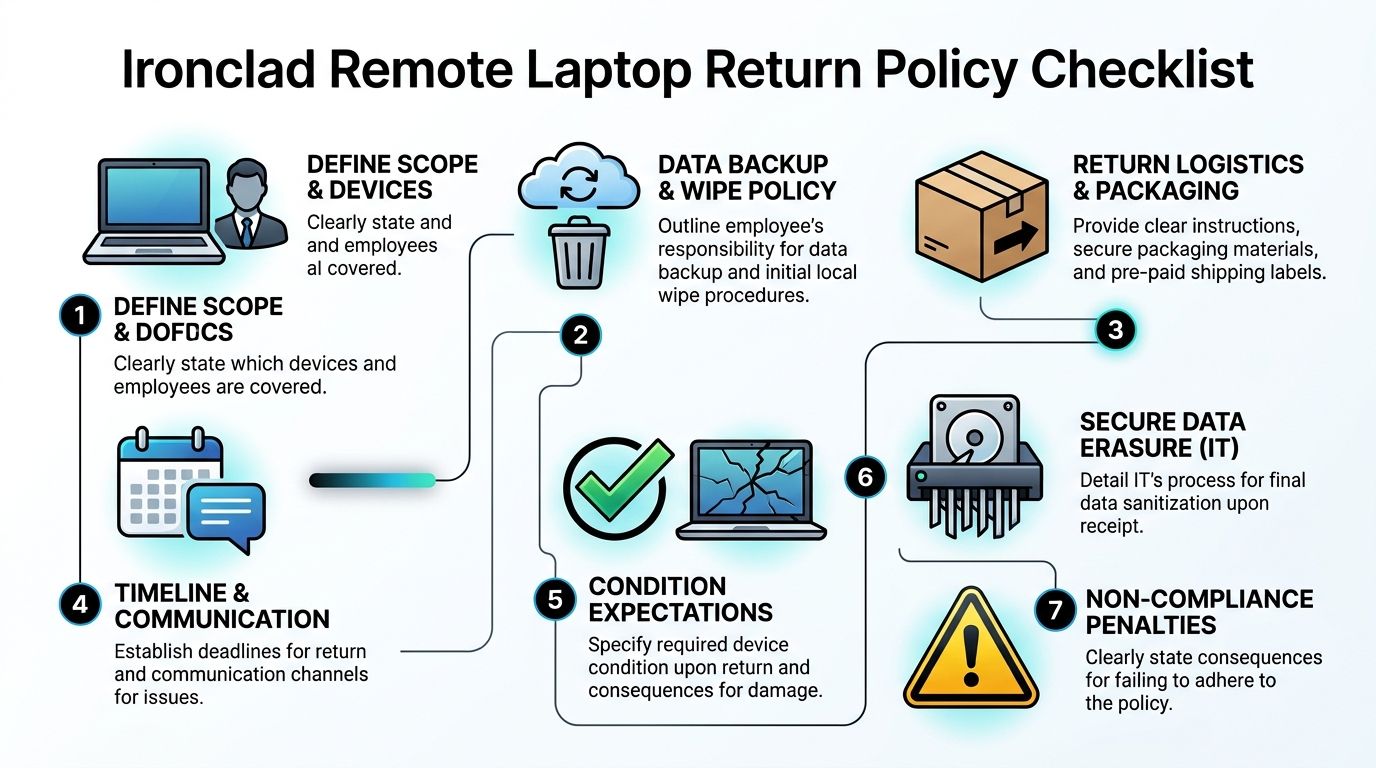
Your remote asset return policy should answer basic operational questions before a departure happens.
- Covered assets: Laptops, docks, chargers, monitors, tokens, and any removable media.
- Trigger events: Voluntary exits, terminations, role changes, and hardware refreshes.
- Employee obligations: Backup personal files within the allowed window, stop using the device when instructed, and follow packaging and shipping instructions exactly.
- IT obligations: Revoke access, initiate approved wipe actions, track shipment status, inspect on receipt, and complete final sanitization or destruction.
- Escalation path: What happens if the employee doesn't respond, misses the deadline, or returns incomplete equipment.
Policies that actually hold up
The best policies are short enough to follow and strict enough to enforce. They separate employee-facing instructions from internal IT procedures. They also avoid legal improvisation during offboarding.
Use one operational standard across the business, then layer in local disposal requirements as needed. That approach is more reliable than trying to build a separate return script for each office or state.
For teams tightening their process, Beyond Surplus has a useful reference on employee laptop return policies every business needs to know.
Write the return policy as if HR, IT, procurement, legal, and a former employee will all read it. Because eventually they will.
What doesn't belong in the policy
Don't bury the critical actions in legal language. Don't rely on company email as the only communication channel for separated staff. Don't leave backup timing undefined. And don't treat recycling as an afterthought once the device reaches end of life.
A policy that says “return equipment promptly” isn't operational. A policy that defines sequence, proof, and accountability is.
Executing Flawless Pre-Shipment Security Protocols
This is the phase most companies under-control. A staggering 82% of companies lack a verified policy requiring data erasure to be completed by the remote employee before transportation, according to BitRaser's remote work data erasure guidance. That means many laptops enter transit with active data still on them.
The fix is straightforward in concept and harder in practice. You need a verifiable pre-shipment workflow, not just a written instruction.
The sequence that works
Start with access revocation and endpoint control. MDM tools matter here because they let IT act on the device before it leaves the employee's hands. If your team needs a broader framework for tooling and policy alignment, this mobile device management guide is a practical reference.
Then run the offboarding sequence in this order:
- Send instructions to a personal address so the employee can still access them after company accounts are disabled.
- Give a backup window before any wipe action. The point is to reduce disputes and accidental loss of personal material.
- Confirm the device is online and connected through an approved secure channel before the erase command is issued.
- Launch the remote erase workflow using your approved platform and policy.
- Capture proof of completion in your ticketing or asset system before shipping is authorized.
- Release shipping materials only after verification unless the laptop has failed and must go straight into a destruction path.
A detailed operational template for this handoff appears in Beyond Surplus's remote employee equipment return checklist for HR and IT managers.
Verification matters more than instruction
Many teams stop at “employee confirmed wipe completed.” That isn't evidence. IT needs a system-generated result, device status confirmation, or a logged record in the endpoint platform. If you can't verify the erase step, you should treat the device as carrying live data.
That changes shipping, intake, and sanitization handling immediately.
If the wipe isn't verified, assume the data is still there.
Handling devices that won't cooperate
Some laptops won't check in. Some have damaged drives. Some employees ignore instructions until the final day. Those situations don't justify skipping controls.
When remote erasure fails, shift the laptop into a restricted path. That means tighter shipment controls, explicit chain-of-custody handling, and quarantine on receipt until IT determines whether certified wiping or physical destruction is appropriate. The key is that exception handling should already be in the playbook. It shouldn't be invented during a separation call.
Managing a Secure Chain of Custody in Transit
Shipping is part of security. Too many organizations still treat it like an admin task. That's how devices disappear between “label sent” and “asset received.”
Over 30% of non-returned laptops are attributed to logistical gaps rather than intentional theft, which is why signature controls matter, as noted in Beyond Surplus's article on remote employee laptop return challenges and how to solve them.
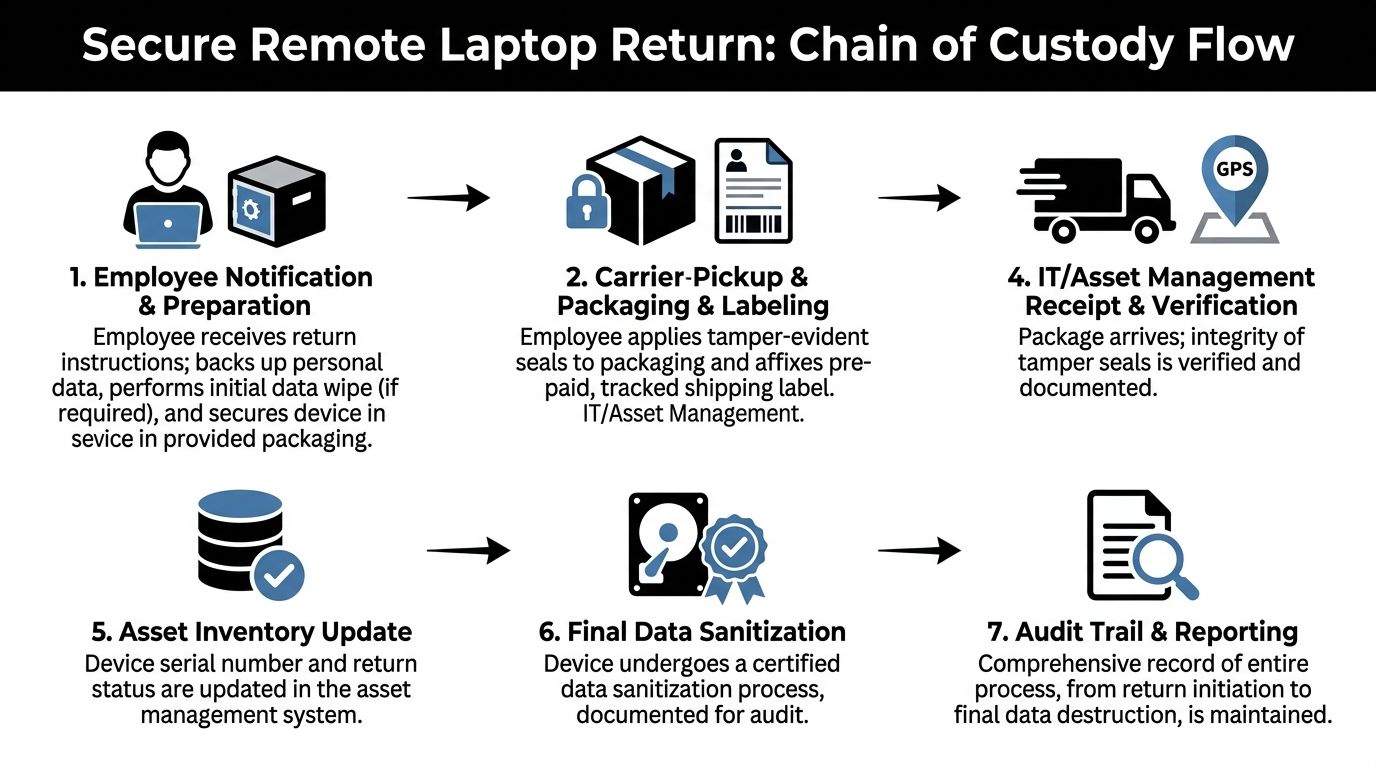
Build security into the shipment itself
A defensible chain of custody usually includes:
- Prebuilt return kits: Use the right box size, internal padding, and clear packing instructions.
- Tamper-evident packaging: If the seal is broken on arrival, intake should document that immediately.
- Tracked labels tied to the asset record: Don't keep tracking data in someone's inbox.
- Signature confirmation: This closes one of the most common logistical gaps.
- Escalation for sensitive roles: Executive devices and regulated data sets may require GPS-tracked transport and tighter exception handling.
Teams refining this area can borrow ideas from broader logistics disciplines. This article on optimizing asset tracking in Australia is useful because the core discipline is the same. Document every custody change and remove ambiguity.
Communication discipline prevents loss
Shipment control also depends on how you communicate.
Use personal email. Keep return instructions in one message. If the employee doesn't respond, escalate on a timed schedule through SMS or alternate approved channels. Don't rely on memory or manual follow-up. A missed reminder can turn into an unrecoverable asset.
Beyond Surplus outlines the operational side of this in its guide to best practices for shipping laptops back from remote employees.
The courier is part of your control environment, whether you planned for that or not.
Receiving Verifying and Sanitizing Returned Assets
Once the box arrives, the process shifts from logistics to evidence. Receipt is where you confirm whether policy was followed, whether the shipment stayed intact, and whether the data disposition path can be closed cleanly.
A mature intake process starts with physical inspection, serial number validation, and documentation of any signs of tampering. Only then should the device move to sanitization, reimage, remarketing, or destruction.
Intake before action
On receipt, IT or the asset team should check:
- Package integrity: Were tamper seals intact and was the box appropriate for the hardware?
- Asset identity: Does the serial number match the assigned record?
- Completeness: Charger, accessories, removable media, and any peripherals tied to the employee.
- Device state: Does it boot, is storage accessible, and are there signs the pre-shipment workflow failed?
Receipt without documentation creates the same audit problem as a missing device. If it isn't logged, it didn't happen.
The dual-layer sanitization model
For returned laptops, the strongest operating model uses two layers. Pre-transport remote erasure compliant with NIST 800-88 standards comes first, with secure, GPS-tracked shipping to a certified facility for physical destruction as the backup for failed devices, as described in this overview of data destruction for remote teams securing offsite and hybrid work devices.
That matters because returned assets don't all arrive in the same condition. Some can be wiped and redeployed. Others need quarantine and destruction.
For teams standardizing sanitization decisions, Beyond Surplus provides a useful primer on NIST SP 800-88.
Data Sanitization Methods for Returned Laptops
| Method | Process | Best For | Verification |
|---|---|---|---|
| Remote erasure before shipment | IT initiates approved erase workflow while the device is still with the employee | Devices that are online, manageable, and expected to return for reuse | Logged erase status in endpoint or asset records |
| Certified software sanitization on receipt | Device is processed through approved wiping software after intake inspection | Working laptops intended for redeployment, resale, or internal reuse | Sanitization report tied to serial number |
| Physical destruction | Drive or storage media is destroyed when wipe cannot be completed or hardware has failed | Failed devices, inaccessible storage, or high-risk exceptions | Certificate of Destruction and chain-of-custody record |
The mistake to avoid is treating every returned laptop the same. Reuse, legal hold, hardware failure, and sensitivity level should drive the disposition path.
Closing the Loop Documentation and Vendor Selection
A laptop return isn't complete when the asset is delivered. It's complete when your records show what came back, what happened to the data, and who handled the device at each step.
That means storing the return ticket, shipment tracking, intake notes, sanitization records, and any destruction or recycling certificates in one place. Documentation is what turns a good process into a defensible one during audits, disputes, or internal investigations.
What to demand from an ITAD partner
If you use a recycler or ITAD vendor, due diligence matters more than sales language. Ask for proof of process, not just a promise of secure handling.
Use this checklist when evaluating providers:
- Documented chain of custody: They should show how assets are tracked from pickup through final disposition.
- Sanitization standards: Their wipe and destruction processes should align with your internal control requirements.
- Exception handling: They should have a defined path for failed drives, damaged devices, and nonstandard media.
- Certificates and audit records: You need final paperwork that maps to specific assets.
- Service coordination: Pickup, packaging, and reporting should fit your offboarding workflow, not fight it.
For a practical screening framework, use Beyond Surplus's vendor due diligence checklist.
The best return programs don't separate security, logistics, and disposal. They treat them as one continuous control process. That's how protecting sensitive data during remote laptop returns becomes repeatable instead of reactive.
If your team needs a documented path for secure offboarding, asset recovery, certified data destruction, and compliant IT equipment disposition, contact Beyond Surplus.