

A remote laptop return usually breaks down in the same place. HR marks someone offboarded. IT disables access. Then the physical device sits on a kitchen table, under a spare monitor, or in the trunk of a car while three teams trade emails about boxes, labels, chargers, and deadlines.
That gap between account shutdown and device recovery is where risk grows. The laptop may still hold cached files, browser sessions, local sync folders, or regulated data. It may also be a perfectly usable asset that could have been reassigned, bought back, or routed into certified recycling. If your process depends on a shared spreadsheet and whoever remembers to send the next message, it isn't a process. It's hope.
How automated logistics improve remote employee laptop returns comes down to one practical shift. You stop treating retrieval as a shipping task and start treating it as a digital chain of custody.
The Growing Challenge of Remote Laptop Retrieval
Manual retrieval feels manageable until exits cluster. One employee leaves with proper notice. Another is involuntary. A contractor rolls off on Friday. A field manager moved twice and never updated their address. By Monday, IT is chasing serial numbers and asking whether the charger matters.
Where manual returns usually fail
The common failure points are boring, which is exactly why they cause damage:
- No packaging on hand: Former employees don't keep laptop boxes, and most won't source proper padding themselves.
- Unclear instructions: People ask whether accessories are required, whether they should power the device off, and where to place the label.
- Fragmented tracking: HR has one email thread, IT has another, and procurement wants to know whether the asset is recoverable.
- Long idle time: The device stays outside your control longer than anyone expected.
A lot of teams recognize these patterns from day one, but they still underestimate how much coordination work hides inside them. Remote employee laptop return challenges and how to solve them becomes less of a policy question and more of an operational discipline issue.
The real problem isn't shipping. It's the lack of a documented handoff between the employee, the carrier, and the ITAD process.
The cost isn't only financial
Unreturned or delayed devices affect more than inventory accuracy. They slow redeployment, complicate audits, and create uncomfortable conversations with legal and compliance teams when nobody can prove where a laptop has been since separation. In remote environments, that uncertainty is now normal unless you design against it.
Good programs remove judgment calls. They don't ask a former employee to figure out packing, labeling, or next steps. They issue clear instructions, standard materials, and trackable actions from the start.
Defining Automated Logistics in IT Asset Disposition
Automated logistics in ITAD means the return workflow starts from a system trigger, not a manual reminder. The employee separation, lease end, refresh event, or role change creates a return task. From there, the platform handles communications, labels, packaging requests, carrier coordination, status updates, and reporting.
That sounds simple, but the difference in control is major.

Manual work creates blind spots
A manual program usually relies on email, spreadsheets, and one or two people who know how the process works. It can function at low volume. It doesn't scale well, and it rarely produces a clean audit trail.
By contrast, teams that understand the logic of automated logistics usually focus on rule-based execution. That's the right model for laptop returns too. When the process is policy-driven, less depends on memory, timing, and improvisation.
Manual vs. Automated Laptop Return Process
| Process Stage | Manual Approach (High-Touch, High-Risk) | Automated Approach (Low-Touch, Low-Risk) |
|---|---|---|
| Initiation | HR or IT sends ad hoc requests | Workflow triggers from offboarding or asset event |
| Packaging | Employee finds materials or asks for help | Standardized return kit is dispatched |
| Shipping | Labels are created manually and emailed | Prepaid label and instructions are generated automatically |
| Tracking | Status is checked across inboxes and carrier sites | Centralized visibility shows each status change |
| Escalation | Follow-up happens when someone remembers | Reminder cadence and exception alerts are built in |
| Receipt | Asset details are reconciled after arrival | Device intake ties back to the original record |
| Reporting | Evidence is assembled later | Chain of custody is created as the process runs |
Practical rule: If your team has to ask, "Did anyone send the label?" more than once, the workflow isn't automated.
Automation also changes employee behavior. People are more likely to return equipment promptly when the path is obvious. One box. One label. One pickup option. One set of instructions.
Core Components of an Automated Return Workflow
A strong workflow doesn't need to be flashy. It needs to be predictable, easy for the employee to complete, and visible to IT from start to finish.
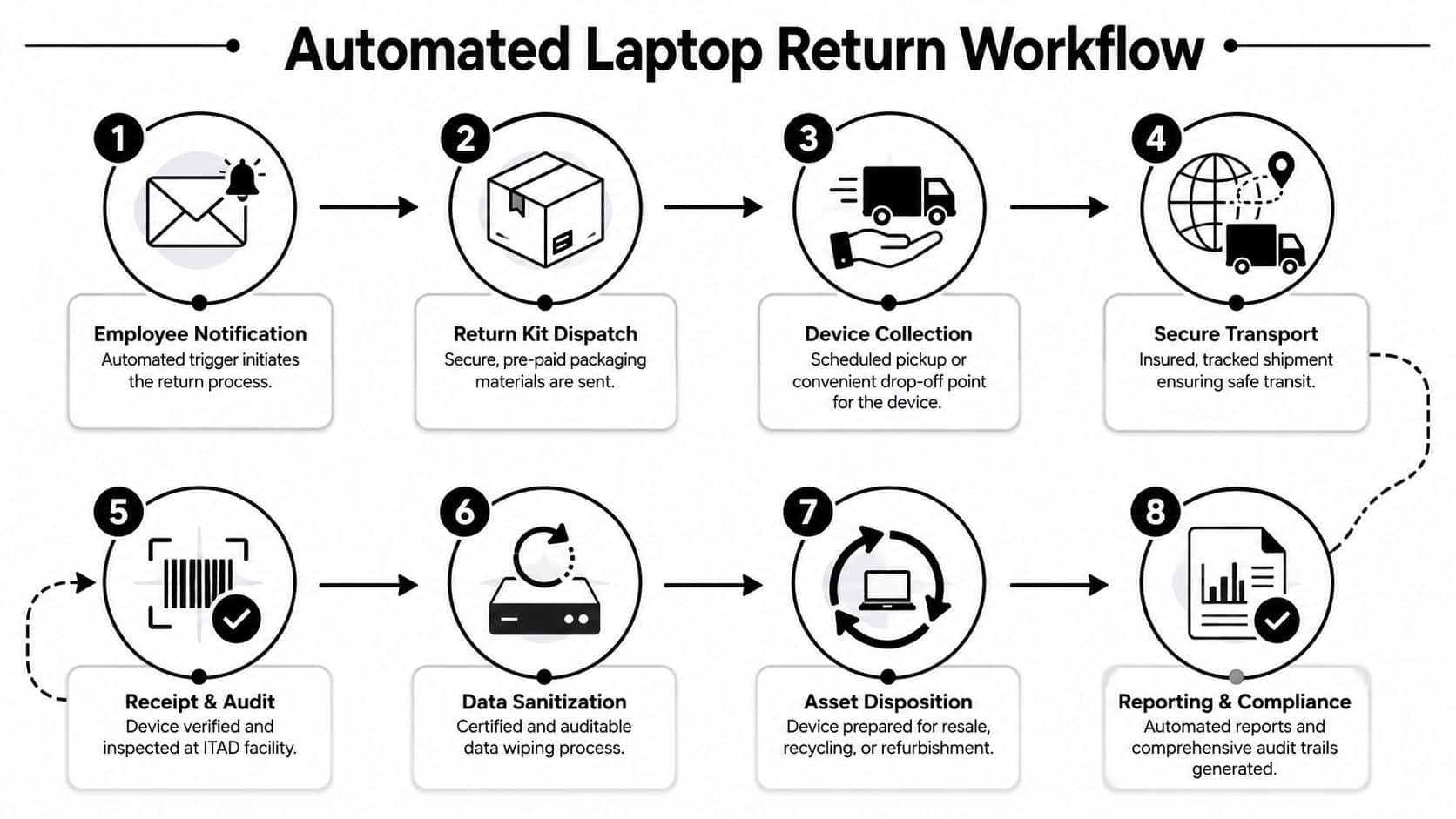
Triggering the workflow correctly
The best trigger is usually the same system event that starts offboarding. That can sit in HRIS, ITSM, UEM, or an asset platform. What matters is consistency. Once the trigger fires, the return should open automatically with the employee's shipping address, assigned equipment list, and required actions.
If you leave kickoff to a service desk ticket, delays creep in immediately. That's why many teams tie retrieval to access deprovisioning and inventory status changes rather than waiting for a human handoff.
The parts that actually matter
A usable return workflow usually includes:
- Employee notification: Clear instructions with deadlines, support contact, and a list of what to return.
- Return kit fulfillment: A fitted box, cushioning, prepaid label, and packing guidance.
- Carrier integration: Pickup scheduling or drop-off options tied to the shipment record.
- Status updates: Notifications to IT, HR, and asset managers when the kit ships, the package moves, and the device is received.
- Facility intake mapping: The arriving device is matched to the original asset record, not logged as a mystery box.
A practical reference for packing standards is best practices for shipping laptops back from remote employees. That part often gets overlooked until devices start arriving cracked or incomplete.
What works and what doesn't
What works is reducing choices. Give the employee a prepared kit and a narrow set of instructions. What doesn't work is asking them to print their own label, find their own materials, and decide whether accessories should be included.
Another mistake is separating logistics from data handling. The return process should already define what happens when the device is still online, when it goes offline, and when it reaches the facility. Some organizations use MDM or UEM controls to lock, retire, or wipe based on policy. Others wait for intake before final sanitization. Either can work if the rule is clear and documented.
Beyond Surplus is one example of a provider that coordinates prepaid tracked labels, packaging kits, courier instructions, and downstream ITAD handling as part of the retrieval flow. The key point isn't the brand. It's that logistics and disposition should sit in the same operational record.
Strengthening Security and Ensuring Compliance
The strongest reason to automate returns isn't convenience. It's risk reduction.
When a separated employee still has a laptop, you have an asset-control problem and a data-governance problem at the same time. A manual process leaves too many moments where nobody can say who had the device, whether it shipped, whether it stalled, or whether it arrived intact.
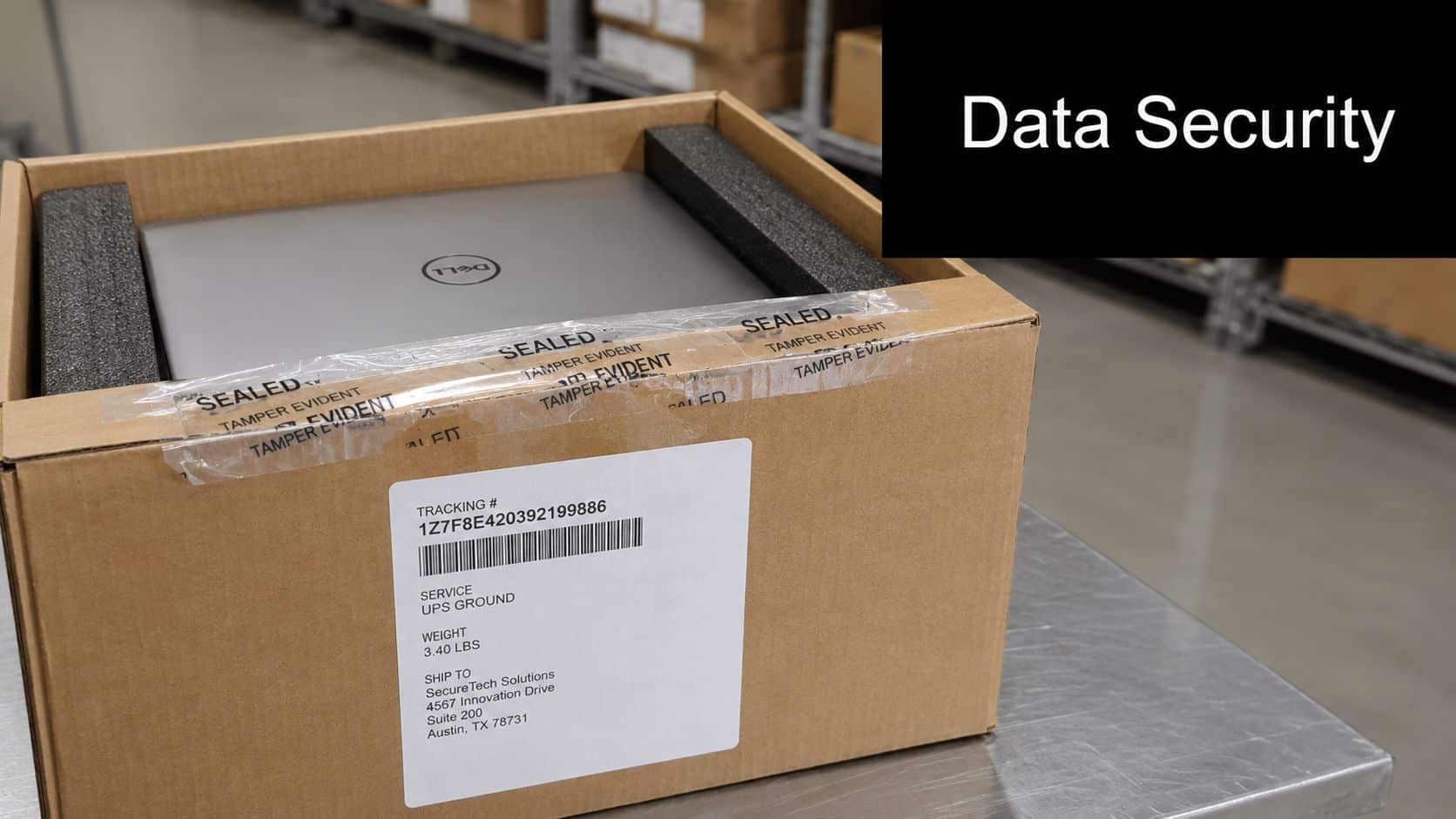
Chain of custody has to be digital
In remote programs, chain of custody can't live on paper alone. It has to capture the sequence of events across systems:
- Label creation and dispatch
- Carrier handoff
- In-transit status
- Receipt at facility
- Inspection and asset verification
- Data sanitization or destruction outcome
- Final disposition record
That record matters when internal audit, legal, privacy, or a regulated customer asks for proof of due diligence. ITAD chain of custody in Georgia and why it matters explains the principle clearly, but the lesson applies well beyond one state.
Compliance depends on evidence
Rules tied to disposal, privacy, healthcare data, or customer information all point to the same operational need. You must be able to show what happened to the device and its data. A polished policy isn't enough if the supporting evidence sits in scattered inboxes.
If a laptop disappears between termination and intake, the compliance issue starts long before final destruction.
Automation helps because it timestamps actions as they happen. It also reduces the gray area around exceptions. If a return kit wasn't delivered, if a pickup was missed, or if the shipment stopped moving, the workflow should flag that condition fast enough for someone to act.
Security controls should start before the box moves
Good return programs don't wait for the facility to think about security. They align endpoint controls, identity offboarding, asset records, and shipping events. That may mean disabling local access, confirming encryption status, collecting power adapters needed for testing, or routing high-risk devices through a different path. The logistics workflow becomes the spine that connects those controls.
Measuring Success with KPIs and ROI Modeling
If leadership sees laptop retrieval as admin work, funding will stay thin. The program gets traction when you frame it as asset recovery, labor reduction, and risk control.
KPIs worth tracking
Don't measure everything. Measure the points where the process fails or improves:
- Time to recovery: How quickly assets move from separation to receipt.
- Return completion rate: Whether assigned equipment comes back.
- Administrative effort per return: How much service desk, HR, or procurement time each case consumes.
- Condition on receipt: Whether devices arrive reusable, repairable, or only recyclable.
- Exception rate: Missed pickups, wrong addresses, missing accessories, or stalled shipments.
- Documentation completeness: Whether each return produces the records needed for audit and downstream ITAD handling.
A softer metric also matters. Ask internal stakeholders whether they can see return status without emailing another department. That's where a lot of hidden friction sits. Customer satisfaction measurement is useful here because a smoother internal handoff often matters as much as the shipment itself.
Build ROI from operational realities
A practical ROI model doesn't need complex finance language. Start with three buckets.
First, labor. Estimate the coordination work your team spends on labels, reminders, address corrections, tracking checks, and reconciliation.
Second, asset value. Faster returns improve the odds that a laptop can be redeployed, resold, or processed while it still has useful life.
Third, risk exposure. You don't need to invent a breach figure to make the point. A controlled return path reduces uncertainty around devices holding company data.
Track what your team touches by hand. Every repeated manual action is a candidate for automation and a line item in the business case.
Implementation Roadmap and Vendor Selection Criteria
Many teams don't need a full rebuild. They need a cleaner operating model, then a pilot that proves the workflow.
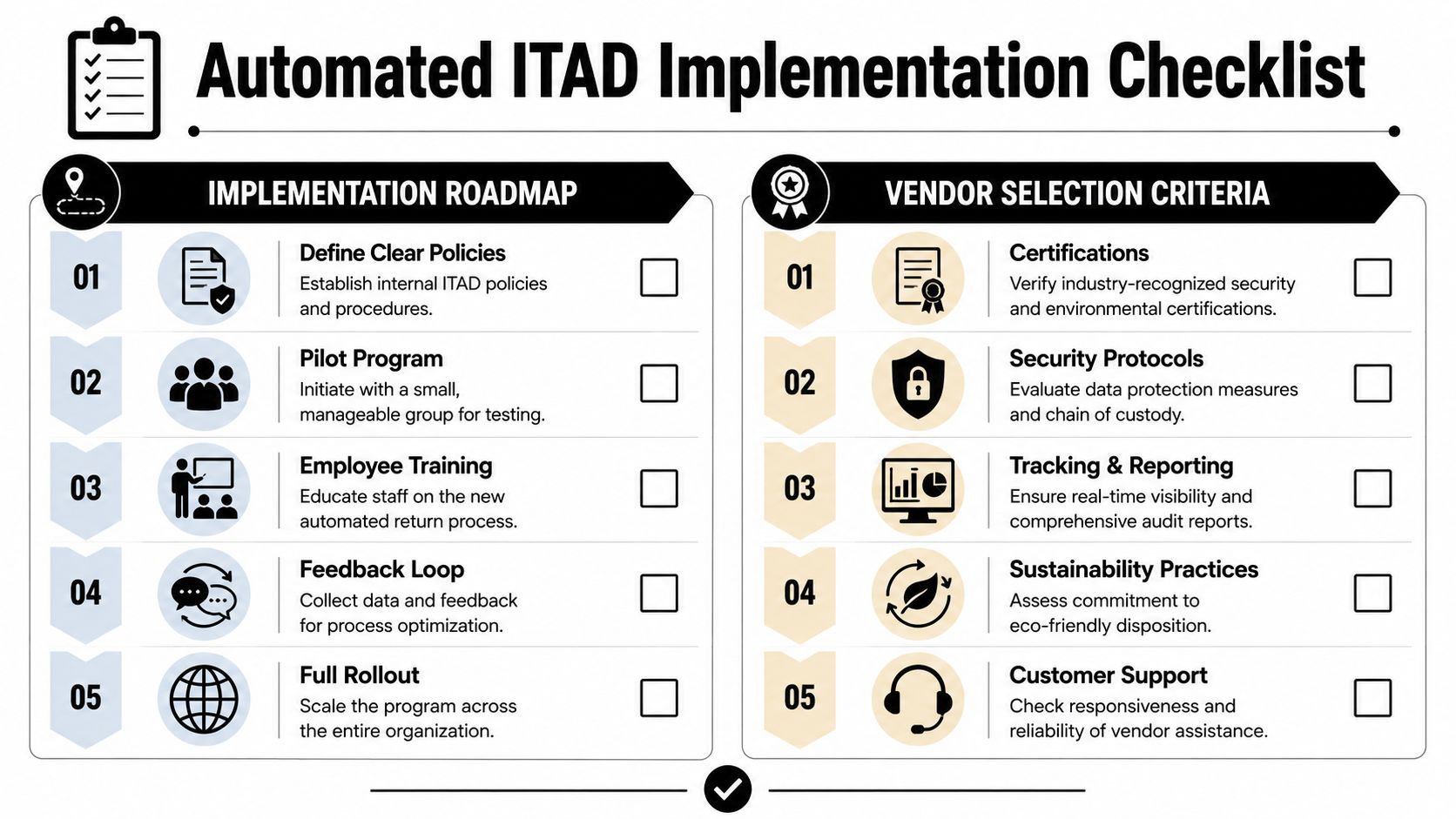
Roll out in phases
A practical rollout looks like this:
Define policy boundaries
Decide which events trigger retrieval, what equipment must be returned, when remote lock or wipe applies, and who owns exceptions.Pilot with a narrow group
Start with one business unit, one region, or one device class. You want messy real-world cases before broad rollout.Train the teams that touch the workflow
HR, IT, procurement, legal, and service desk staff need the same handoff rules.Tighten exception handling
Build responses for bad addresses, no-response cases, damaged returns, and disputed accessory lists.Scale after intake reporting is clean
Don't expand until the receiving side can reliably match shipments to asset records and disposition outcomes.
Ask vendors better questions
Vendor selection gets sloppy when teams focus only on recycling certificates. For remote returns, ask operational questions first.
- Coverage and logistics: Can the provider support returns across the locations where your workforce is located?
- Packaging standards: Do they supply fitted kits, prepaid labels, and instructions that reduce packing errors?
- Tracking model: Will your team see the shipment path and exceptions in one place?
- Security handling: How is chain of custody documented from shipment through sanitization?
- Disposition options: Can devices be redeployed, remarketed, destroyed, or recycled under policy?
- Reporting: Will you receive usable audit records, certificates, and asset-level outcomes?
For a more structured procurement lens, how to choose an ITAD vendor in Georgia step by step is a helpful checklist.
Certifications matter, but they aren't enough
Yes, ask about certifications and environmental practices. Also ask how the vendor handles the ugly middle of the process. Lost box. Wrong serial. Employee says they sent it. Carrier shows no movement. Intake receives a different charger than expected. That's where capable partners separate themselves from vendors that only perform well at the end of the chain.
Transform Your Remote Offboarding Process
Remote laptop retrieval stops being chaotic when you build it as a controlled workflow instead of a courtesy request. The strongest programs automate the trigger, standardize the kit, track each handoff, and tie the shipment record to the final ITAD outcome. That gives IT fewer manual tasks, gives compliance better evidence, and gives the business a better chance of recovering asset value.
The bigger shift is cultural. Once retrieval is treated as part of offboarding governance, teams stop asking whether automation is worth it. They ask where else the same chain-of-custody model should apply.
Contact Beyond Surplus for certified electronics recycling and secure IT asset disposal, including remote employee laptop return logistics, data destruction, and documented chain-of-custody support for business organizations across the United States.


