

The last bus has left in August, but the technology workday isn't over. A district technology coordinator opens a storage room and finds retired Chromebooks that reached Auto Update Expiration, a pallet of desktops removed during a refresh, and interactive boards with no clear owner. The problem isn't just finding a recycler. It's proving which devices left each building, how their storage was sanitized, and where every serial number went afterward.
A workable School District Computer Recycling Guide treats end-of-life technology as a logistics, custody, data protection, and value-recovery program. The process below gives technology, facilities, procurement, and finance teams a repeatable way to manage Chromebook waves, summer pickup windows, secure transfers, vendor documentation, and final reconciliation.
Table of Contents
- Why Your District Needs a Real Recycling Plan
- The E-Waste Reality Facing K-12 IT Teams
- Building an Inventory and Chain of Custody
- Matching NIST 800-88 Methods to Each Device
- Certified Destruction Options Compared
- RFP and Vendor Language That Protects the District
- Scheduling, Cost Recovery, and Sustainability Reporting
- Ready-to-Use Checklists and Templates
Why Your District Needs a Real Recycling Plan
K-12 technology disposal is no longer an occasional haul-away after a long refresh cycle. Chromebook AUE dates, one-to-one device programs, staff laptop rotations, and earlier emergency purchases create recurring waves of equipment across multiple buildings. If those waves aren't planned, devices collect in classrooms, offices, maintenance areas, and unsecured storage rooms.
A real program starts before pickup day. The district identifies retired assets, assigns a sanitization path, stages equipment in a controlled area, and records every handoff. That sequence protects the district from a common failure: a device disappears from a classroom inventory before anyone can show whether it was wiped, refurbished, recycled, or destroyed.
For a district-specific example of coordinated school electronics handling, review school electronics recycling services. The important lesson isn't the pickup itself. It's the documentation surrounding the pickup.
What the plan must prove
A defensible program should produce:
- A sanitization record: The method must align with NIST SP 800-88 Rev. 2, which distinguishes Clear, Purge, and Destroy treatment.
- A custody trail: Staff should be able to follow each device from classroom collection through transport and processor receipt.
- A serialized outcome: The final record should identify whether each asset was refurbished, recycled, or destroyed.
- A vendor file: Certificates, processor details, insurance documents, and audit records should remain available for district review.
- A board-ready explanation: If a parent, auditor, superintendent, or board member asks where student data went, the district should answer with records rather than assumptions.
Practical rule: If a device can't be matched to a serial number, a custody handoff, and a final disposition, treat it as an exception requiring investigation.
The plan also separates environmental responsibility from data security. A processor may responsibly recycle metals and plastics, but that doesn't prove the storage media was sanitized correctly. Technology leaders should manage both outcomes through one controlled workflow.
The E-Waste Reality Facing K-12 IT Teams
The global electronics stream is expanding faster than informal school cleanouts can handle. In 2022, the world generated 62 million tonnes of e-waste, or about 7.8 kg per person, while only 22.3% was formally collected and recycled in an environmentally sound way, according to the Global E-waste Monitor 2024. The same report projects 82 million tonnes by 2030, and says annual volume is rising by roughly 2.6 million tonnes.
Schools participate in that stream through laptops, Chromebooks, desktops, displays, printers, tablets, network equipment, chargers, and classroom peripherals. A study of schools in Surabaya City, Indonesia, found that 83% generated e-waste from information and communication technology devices. Annual generation ranged from 3 to 24 units, 12.25 to 115.40 kg per school, or 0.032 to 0.161 kg per student, as documented in the school-focused material within the Global E-waste Monitor report. The figures are a historical baseline, not a universal forecast for U.S. districts, but they demonstrate that campuses can generate recurring device streams.
The U.S. Environmental Protection Agency has described e-waste as about 1-2% of the total U.S. waste stream in its overview of electronics waste. That share can still represent a substantial operational burden for a district managing many buildings and storage locations.
Why informal estimates fail
The table below is a planning framework, not a statistical benchmark. It intentionally avoids invented device counts. District teams should populate it from their own enrollment, asset register, MDM reports, and AUE calendar.
| District Size | Avg. Annual EOL Devices | Chromebook AUE Share | Typical Pickup Frequency |
|---|---|---|---|
| Small | Pull from serialized asset records | Calculate from Google Admin Console | Set around actual retirement waves |
| Mid-sized | Reconcile building inventories before scheduling | Map AUE dates by model | Use recurring or seasonal pickups |
| Large | Forecast by school, program, and device class | Segment by fleet and expiration window | Coordinate multiple building routes |
Only 17.4% of e-waste discarded in 2019 was recycled globally, according to the Green Schools Alliance e-waste guide. That context makes certified pathways important, but certification alone doesn't solve a district's operational gaps. The district still needs ownership, inventory controls, approved methods, and a documented release process.
FERPA, state student privacy requirements, public-records obligations, and environmental rules make disposal an IT governance issue. Facilities staff may move the equipment, but technology leadership must define the data treatment and procurement must verify vendor accountability. The district's annual recycling plan should therefore sit beside refresh planning, not at the end of a facilities work order.
Building an Inventory and Chain of Custody
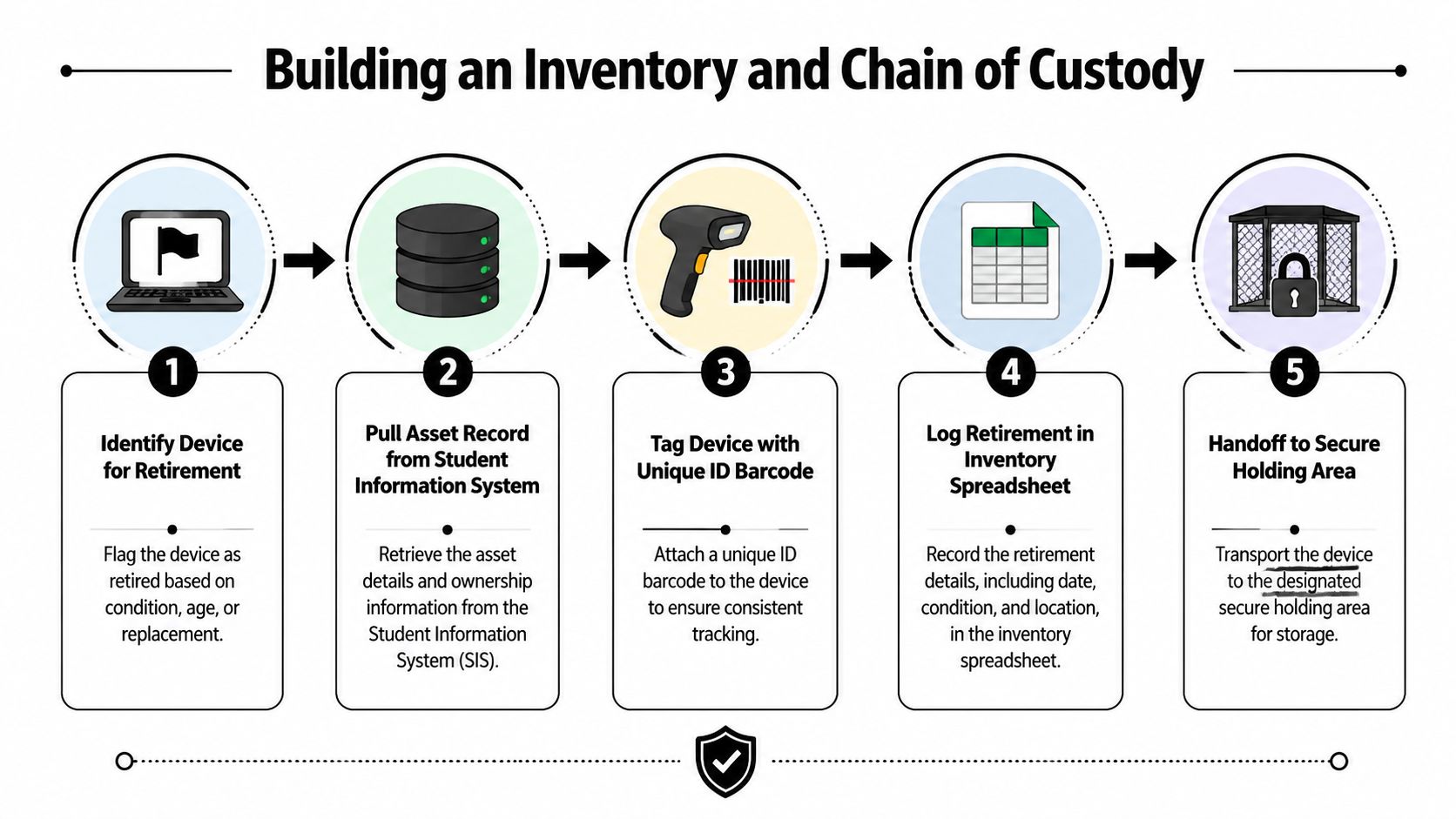
The inventory process begins when someone flags a device for retirement, not when a vendor arrives. A technician should pull the asset record from the district's student information or asset system and compare it with the MDM record in tools such as Google Admin Console, Lightspeed, or Securly.
Next, staff should inspect the physical unit. Record the serial number, district asset tag, model, condition, media type, assigned building, and intended disposition. If the barcode is damaged, add a replacement barcode or QR tag that remains tied to the original serial number.
Use one ticket per building
A building-level disposal ticket gives staff a common control document. It should include:
- The asset identity: Serial number, barcode, model, and current location.
- The device condition: Working, damaged, incomplete, or unknown.
- The storage type: Magnetic hard drive, SSD, removable media, or flash storage.
- The planned treatment: Clear, Purge, Destroy, refurbishment, or exception review.
- The approving staff member: Name, role, and date of approval.
The custody log then records three handoffs. The building technician signs when equipment enters the secured staging area. The courier or district representative signs when a sealed container leaves the building. The processor signs when the container arrives and the manifest is accepted.
Districts should use sealed carts, locked cages, or tamper-evident containers appropriate to the equipment and building. The seal number belongs on the handoff record. A missing seal, unexpected quantity, or damaged container should trigger an exception before processing continues.
For a detailed custody workflow, use this chain-of-custody approach for IT asset disposal. The final control is reconciliation. Compare the district's pickup manifest with the vendor's received, sanitized, refurbished, recycled, and destroyed records. Don't sign a completion certificate until every serialized exception is resolved.
Matching NIST 800-88 Methods to Each Device
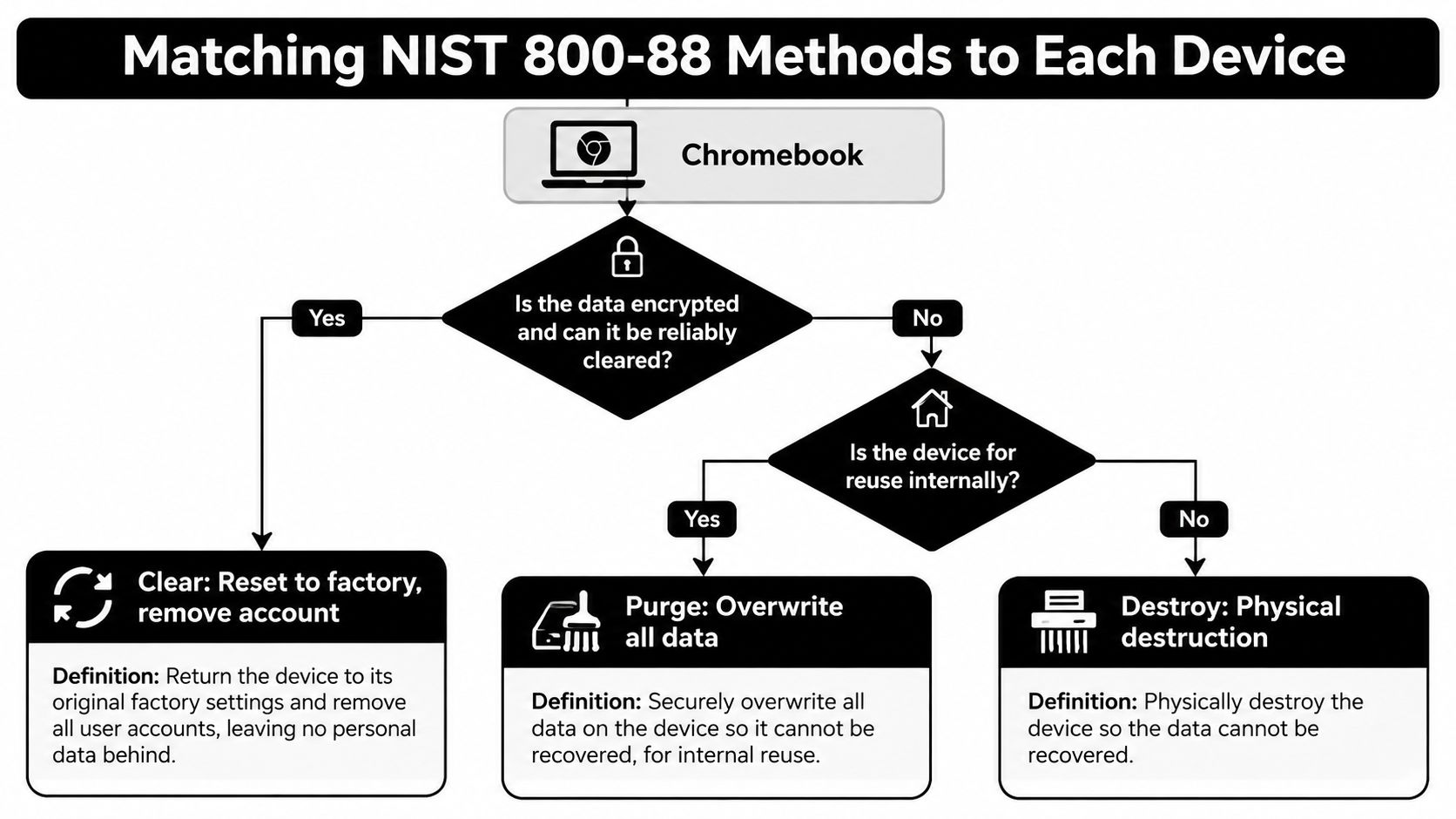
NIST SP 800-88 Rev. 2 gives district teams three practical treatment levels. Clear uses logical sanitization for reusable media. Purge applies stronger firmware-based or physical techniques that make laboratory recovery infeasible. Destroy renders the storage media unusable for storage.
The decision must match both the media and the intended outcome. An older Windows laptop with a magnetic hard drive may qualify for a validated overwrite workflow when the district plans reuse and the risk assessment permits it. A faculty MacBook with an SSD needs controls suited to flash storage. A Chromebook or tablet with embedded flash may require a different process because wear leveling means software can't necessarily address every physical storage location directly.
Sort mixed carts before processing
Use a triage sheet so a general technician can separate devices before a specialist applies the final method.
| Device class | First question | Possible treatment |
|---|---|---|
| Magnetic hard drive | Is the drive reusable and is the chosen overwrite validated? | Clear, or Purge when the risk and method require it |
| SSD | Does the approved tool support this drive and its firmware? | Purge or Destroy when verification isn't possible |
| Chromebook | Is the device eligible for reuse and can the storage be reliably cleared? | Clear or Purge based on documented controls |
| Tablet or embedded flash device | Can the process address the storage architecture reliably? | Purge or Destroy after technical review |
| Damaged media | Can the district verify sanitization? | Destroy |
A factory reset isn't automatically a complete sanitization record. Staff should document the method, operator, device identifier, completion status, and verification result. The NIST 800-88 data destruction standards explanation can help translate the standard into procurement and operating language.
The standard notes that a single-pass fixed-value overwrite can be sufficient for Clear on many HDDs. Purge may include secure erase, degaussing, or an equivalent method, depending on the media. The district should require post-sanitization verification and should never use one process for every storage technology by default.
Certified Destruction Options Compared
Districts usually choose among three paths, and each fits a different operational need. On-site mobile shredding keeps media within district control until witnessed destruction. Off-site shredding can handle larger consolidated lots, but the vendor must maintain serialized tracking from pickup through processing. Serialized software wiping preserves reuse potential when a device can be reliably sanitized and has remaining value.
Don't choose by label alone. Ask what happens to a device that fails verification, how the vendor records serial numbers, who controls transport, and which documents the district receives.
| Criteria | On-Site Shredding | Off-Site Shredding | Serialized Software Wiping |
|---|---|---|---|
| Best fit | Sensitive or failed media requiring physical destruction | Consolidated lots and mixed building pickups | Reusable laptops, Chromebooks, and supported drives |
| Custody strength | High visibility because destruction occurs at the district | Depends on sealed transport and downstream controls | Depends on verified custody and tool records |
| Reuse potential | None for destroyed media | None for destroyed media | Preserves potential refurbishment |
| Documentation | Serialized destruction certificate and witness record | Pickup manifest, processor receipt, and destruction certificate | Device-level wipe report and verification record |
| Main concern | Scheduling equipment and a secure work area | Vendor and subcontractor transparency | Media compatibility and failed verification |
| District control | Witnessed event | Audit and reconciliation after transfer | Policy-driven approval and technical validation |
For magnetic drives that cannot be trusted for reuse, physical destruction may be appropriate. For newer flash-based devices with legitimate refurbishment value, a validated Purge or Clear workflow may produce a better recovery outcome. The district's written policy should define who can approve exceptions and when failed verification automatically moves a device to Destroy.
A blended program is often easier to administer than a single universal method. It lets technology staff preserve usable equipment while directing damaged, unsupported, or technically uncertain media into physical destruction.
RFP and Vendor Language That Protects the District
A strong request for proposals turns expectations into enforceable deliverables. Ask bidders to identify their own processing site, every downstream processor, the media destruction method, transportation controls, insurance, and the exact certificate format.
District procurement teams can monitor public opportunities through a government RFP database, then adapt the requirements below to the district's purchasing rules. The vendor due diligence checklist can support the review file.
Copy-ready requirements
Use language such as:
- Certification evidence: “The contractor shall provide current evidence of applicable R2v3, e-Stewards, and ISO 14001 certifications. Any media destruction subcontractor shall provide current NAID AAA certification or equivalent district-approved evidence.”
- Serialized reporting: “For each serialized asset, the contractor shall report pickup date, receiving date, disposition, sanitization or destruction method, technician name, verification result, and downstream processor identification.”
- Custody control: “The contractor shall document each custody transfer and shall notify the district of any missing, damaged, or unidentifiable asset before processing.”
- Insurance: “The contractor shall maintain insurance limits approved by the district, including coverage appropriate to data breach, transportation, general liability, and professional risk.”
- Export restriction: “The contractor shall not export equipment or material through channels prohibited by the district's environmental and responsible-recycling policy, including restrictions aligned with Basel Action Network standards.”
- Audit rights: “The district may review processing records, certificates, downstream processor information, and applicable facility documentation during the contract term and retention period.”
- Indemnification: “The contractor shall indemnify the district for obligations arising from contractor or subcontractor violations involving FERPA, COPPA, applicable state student data laws, or the agreed data destruction requirements.”
Don't accept a generic “certificate of recycling” as proof of data destruction. The certificate should identify the asset or serialized lot, method used, date, facility, and responsible technician. Contract language should also state how long records remain available and who pays for corrective action when a reconciliation fails.
Scheduling, Cost Recovery, and Sustainability Reporting
The district calendar should prevent retired equipment from becoming a summer emergency. Start with the AUE calendar and refresh plan, then map building volumes and assign owners. Google Admin Console can help technology teams identify Chromebook expiration information, while the asset register supplies the physical reconciliation layer.
A quarterly operating rhythm
| Quarter | Primary Activity | Owner | Key Deliverable |
|---|---|---|---|
| First quarter | Review AUE dates, refresh forecasts, and policy exceptions | Technology director | Approved annual disposition forecast |
| Second quarter | Validate building inventories and vendor capacity | Asset manager and facilities lead | Pickup map, packaging rules, and draft manifests |
| Third quarter | Execute summer or scheduled pickups and sanitize devices | Building technicians and processor | Signed custody records and processing reports |
| Fourth quarter | Reconcile outcomes, record recovery, and report sustainability | Finance, procurement, and technology | Closed asset register and board-ready report |
Value recovery should follow documented grading. A working device with complete accessories and a clear sanitization record may have a different recovery outcome from a damaged unit or a device that fails verification. Record the vendor's assessment against the original asset register, then route proceeds according to district policy, whether that means the general fund, instructional technology, or another approved account.
Sustainability reporting needs more than a truck weight. Track material diverted from landfill in pounds and metric tons, devices refurbished, equipment recycled, storage media destroyed, and any processor documentation supporting environmental claims. If the district reports carbon-equivalent savings, use the approved methodology consistently and label estimates clearly.
Finance and technology should close the same file. The asset register, vendor settlement, certificates, and sustainability report should describe the same population of equipment.
State sustainability mandates, district strategic plans, STARS reporting, and board dashboards may require different fields. Build a master disposition report first, then map its fields to each reporting format instead of asking technicians to maintain separate spreadsheets.
Ready-to-Use Checklists and Templates
Policies become reliable only when staff can complete them during a busy building pickup. Keep the forms short, assign one owner for each field, and store the completed record with the purchase order, manifest, and certificate file.
Forms worth standardizing
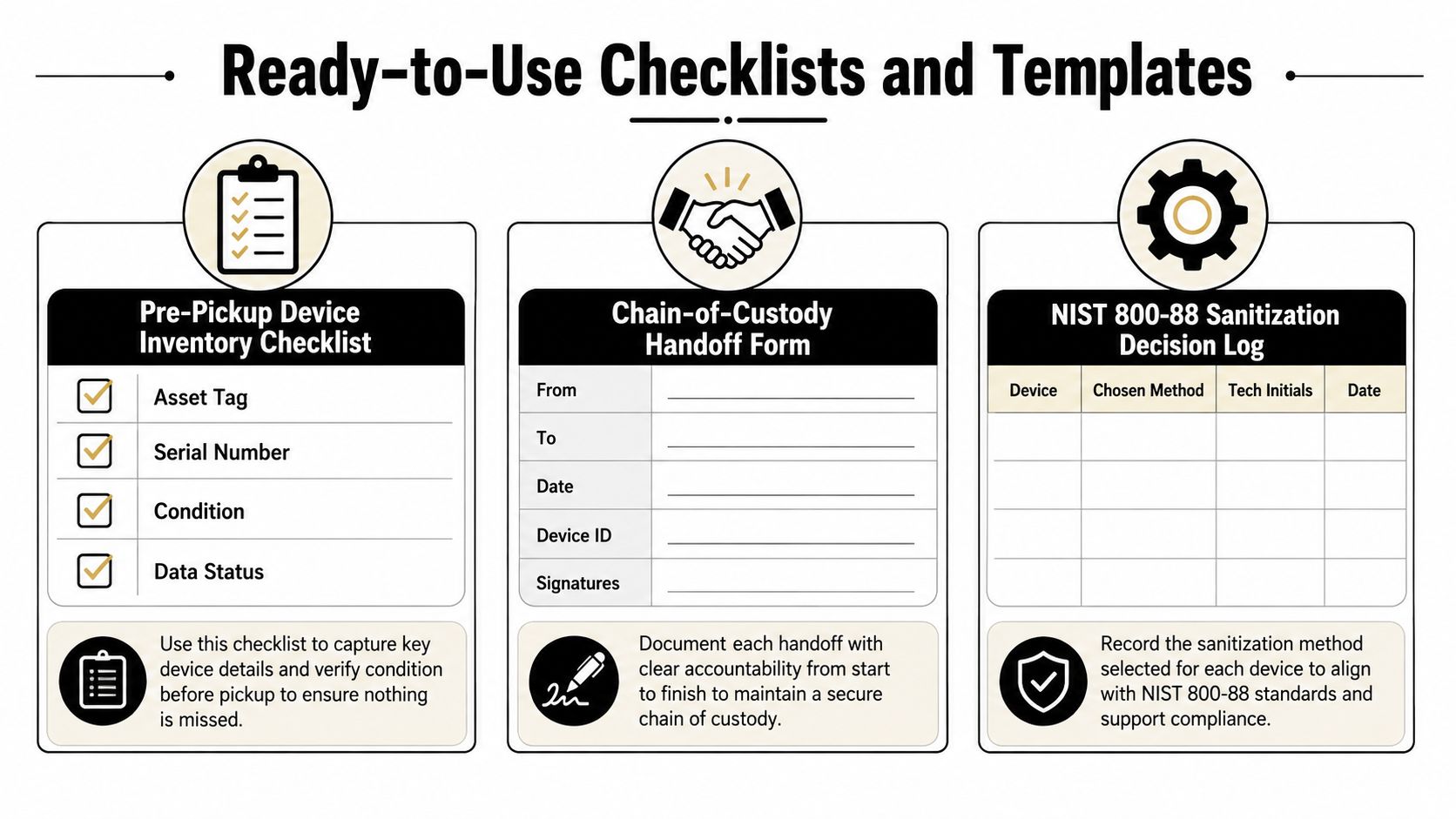
- Pre-pickup inventory checklist: The building technology contact records asset tag, serial number, model, condition, media type, data status, accessories, and staging location. File it with the building manifest.
- Custody handoff form: The releasing technician and receiving courier record names, dates, container or seal identifiers, device count, and signatures. Retain it with the transport record.
- NIST sanitization decision log: The data protection or technology lead records the device class, selected Clear, Purge, or Destroy method, approving policy, technician initials, completion date, and verification result.
- Vendor scorecard: Procurement evaluates certifications, insurance, downstream transparency, reporting quality, custody controls, recovery terms, and exception handling. Store the completed scorecard with the solicitation file.
- Post-pickup reconciliation worksheet: The asset manager compares the district manifest with the processor's receipt and final disposition report. List every unresolved serial number separately.
- Exception register: The program owner records missing tags, damaged media, failed wipes, quantity mismatches, and corrective actions until closure.
The data center decommissioning checklist offers a useful model for handling larger equipment populations, even when a school district's immediate project involves endpoint devices rather than servers.
Give building staff a clear filing rule. One copy stays with the building, one enters the central asset record, and the final processor documentation remains with procurement or records management. That structure helps the district respond months later to an audit, public-records request, insurance question, or board inquiry without reconstructing the event from email threads.
A successful program isn't measured only by how quickly a truck leaves. It is measured by whether the district can account for every device, demonstrate the chosen sanitization method, recover legitimate value, and document responsible processing.
Beyond Surplus can coordinate bulk school electronics pickups, secure data wiping, hard-drive shredding, IT asset inventory, value recovery, and certified recycling documentation for district refresh programs. Visit Beyond Surplus to discuss a pickup plan built around your buildings, custody requirements, and Chromebook or laptop disposition schedule.


