

According to the Ponemon Institute's analysis for Absolute Software, the cost of a missing endpoint extends well beyond the device itself because every unresolved laptop creates operational, security, and compliance exposure at the same time. That is the right starting point for finance. An unreturned laptop is not a simple replacement event. It is an unclosed liability with several cost centers attached.
For a CFO, the primary issue is total exposure per missing asset. The purchase price sits in one budget line, but the full financial impact spreads across IT labor, HR coordination, legal review, software reassignment, security investigation, audit exceptions, and delayed asset recovery. If the device still holds customer data, regulated information, or active credentials, the risk profile changes again.
I have seen offboarding programs underestimate this because each team records only its own portion of the loss. Procurement sees new hardware spend. IT sees manual follow-up and re-provisioning work. Security sees an endpoint it can no longer physically control. Finance needs a single model that combines those costs into one number, because that number reflects the actual liability of unmanaged offboarding.
That is the lens for the rest of this analysis: not what the laptop cost to buy, but what the business stands to lose when it does not come back.
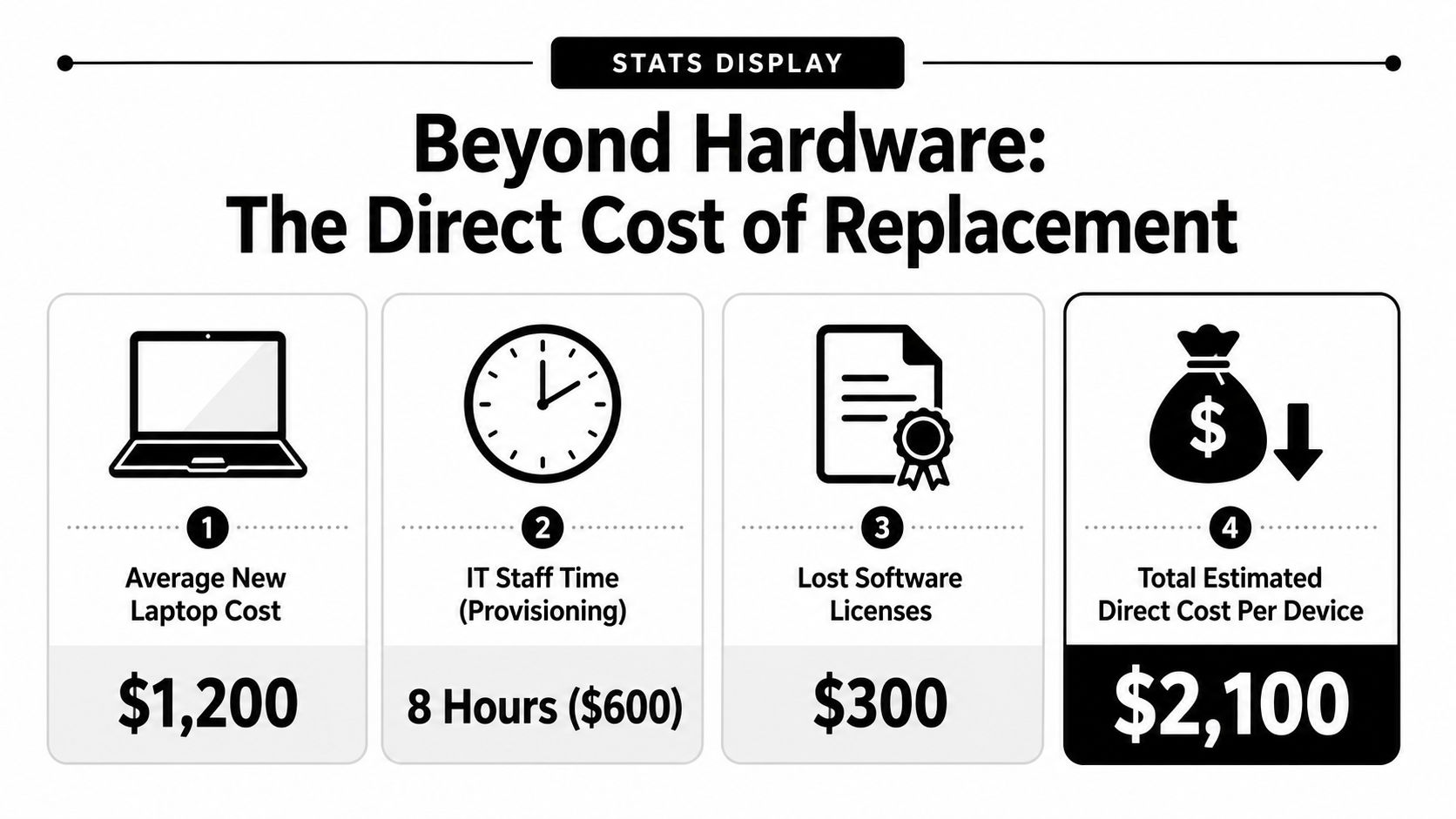
Beyond Hardware The Direct Cost of Replacement
The first visible loss is the replacement order. That makes the financial exposure look smaller than it is.
For finance, the direct cost of an unreturned laptop should be modeled as an immediate cash outlay plus avoidable duplicate spend. A replacement device has to be purchased, staged, enrolled, configured, and shipped before the business is back where it started. If the missing laptop still carries assigned software or accessories, those costs stay in the equation until someone closes them out properly.
Why replacement cost is the floor, not the total
A CFO rarely has trouble approving one more laptop. The problem is that an unmanaged offboarding event often creates two assets on paper and only one under control. The company pays to replace the missing machine before it has confirmed whether the original device can be recovered, wiped, reassigned, or remarketed.
That turns a routine hardware refresh cost into a loss event.
The direct exposure usually includes four line items:
- Replacement hardware: A new laptop must be purchased to keep the role staffed.
- Configuration and deployment cost: IT still has to prepare the new endpoint for use, whether that work is handled internally or through a vendor.
- Stranded software and accessories: Licenses, docks, monitors, and peripherals tied to the old device can remain assigned longer than they should.
- Duplicate spend: The business has funded a second asset while the first remains unresolved.
There is also a timing issue. Urgent replacement buying reduces purchasing discipline. Teams may pay retail pricing, accept shipping premiums, or buy outside normal standards because the vacancy in the device pool needs to be filled quickly.
This is why return discipline matters before separation is complete. A formal remote employee equipment return program lowers the odds that finance absorbs replacement cost as a default outcome.
The practical takeaway is simple. Treat every unreturned laptop as a direct financial exposure event with multiple attached costs, not as a single hardware purchase. That gives finance a number closer to the actual liability and a better basis for recovery targets, reserve planning, and offboarding controls.
The Hidden Drain on Productivity and Administrative Overhead
The softer costs start showing up in calendar time. HR closes out the employee. Payroll finishes final processing. Then IT spends the next stretch cleaning up what should have been routine.
A common pattern looks like this: the employee exits, the assigned laptop isn't returned on schedule, and nobody can confirm whether the device is offline, sitting in a home office, or still being used. IT has to chase shipping details, disable access, review assigned software, order a replacement device for the next hire, and rebuild a standard workstation image from scratch. Meanwhile, the new employee waits.
Where the labor actually goes
The labor isn't glamorous, but it's real:
- Asset reconciliation: Matching serial numbers, user assignments, and shipping records.
- Access cleanup: Confirming which business apps, VPN tools, and cloud services were tied to the missing machine.
- Rebuild work: Reissuing hardware, restoring a working software environment, and re-establishing permissions.
- Onboarding delay: A new hire can't contribute normally without a ready device.
The gap gets wider in remote environments, where retrieval depends on return labels, communication follow-up, and physical shipping coordination. A practical framework for that process is a remote employee equipment return program, because informal reminders rarely hold up once the employee has already left.
What doesn't work
Teams usually struggle when they rely on email reminders and goodwill. That approach breaks down fast in layoffs, disputed exits, and distributed workforces.
What works better is boring and disciplined:
- Tie offboarding to an asset record, not just an HR event.
- Assign one owner for retrieval logistics.
- Freeze the process until device status is confirmed.
- Document every handoff.
When a laptop isn't returned, IT doesn't just replace equipment. IT rebuilds continuity.
That administrative overhead rarely appears as a single line in the budget. It shows up as slower onboarding, ticket backlogs, and staff time diverted from security and infrastructure work.
The Data Breach Ticking Time Bomb in Every Lost Laptop
A single unreturned laptop can turn a routine offboarding miss into a breach investigation, legal review, customer notification exercise, and insurance event. For finance leaders, that matters because the exposure is rarely limited to one budget line. It spans incident response, outside counsel, forensics, communications, premium impact, and management time.
An unrecovered device often holds far more than local files. It may contain saved credentials, email archives, customer records, browser cookies, synced cloud folders, cached tokens, and access to line-of-business systems that were never fully cut off. If the company cannot recover the laptop or prove the data on it is unreadable, the risk model changes fast.

Why finance and security often assess this risk differently
Security teams usually focus on controls such as encryption, MDM, remote lock, and identity revocation. CFOs focus on financial impact if those controls were missing, misconfigured, or never applied to that specific device. Both views are necessary.
In practice, the expensive cases start with uncertainty. Was the drive encrypted? Was the device checking into MDM at the time of separation? Were cached sessions still active? Did the employee store regulated data locally? If those answers are unclear, counsel and insurers tend to assume a wider exposure until the facts are proven.
That proof depends on process.
A practical reference is this guide on how to wipe a computer hard drive. The key takeaway is not the technical method alone. The company needs a documented, repeatable sanitization standard tied to asset records, separation workflows, and evidence retention.
The real cost sits in the combined exposure
Boards often hear breach risk and compliance risk as separate warnings. On a missing laptop, they are usually the same event viewed from different departments. Security sees possible unauthorized access. Legal sees notification thresholds and documentation gaps. Finance sees uninsured loss, deductible exposure, and internal labor that will not appear in the original hardware budget.
Insurance can soften part of the blow, but carriers pay attention to operational discipline. Weak offboarding records, inconsistent device controls, and poor documentation can complicate claims or increase scrutiny at renewal. The Select Insurance Group commercial insurance guide is a useful plain-language reference for how insurers evaluate business risk and coverage decisions.
A missing laptop becomes a financial liability the moment the company cannot show what data was on it, whether access was cut off, and whether the device was encrypted or wiped.
The commercial answer is straightforward. Treat every unreturned laptop as a blended risk event with hardware, security, legal, and insurance consequences attached. That gives leadership a more accurate number to manage, and it justifies investment in retrieval controls, verified encryption, remote disablement, and documented data sanitization before a simple asset loss turns into a far more expensive incident.
Navigating the Maze of Compliance Failures and Legal Fines
According to the FTC, businesses that maintain consumer information for a business purpose must dispose of it by taking reasonable measures to protect against unauthorized access or use. That standard comes from the FTC Disposal Rule, and it matters the moment a laptop is not returned.
At that point, the company is no longer dealing with a missing asset alone. It is carrying a proof problem. Legal, compliance, and finance all need the same evidence. What data may have been on the device, who last had custody, whether access was revoked, and whether the device was ever sanitized through an approved process.
Chain of custody determines whether the issue stays operational or becomes regulatory
The R2v3 Standard summary published here highlights documented chain of custody from collection through final processing. In practice, that record is what lets a company show an auditor, regulator, customer, or insurer that it controlled the asset until disposition was complete.
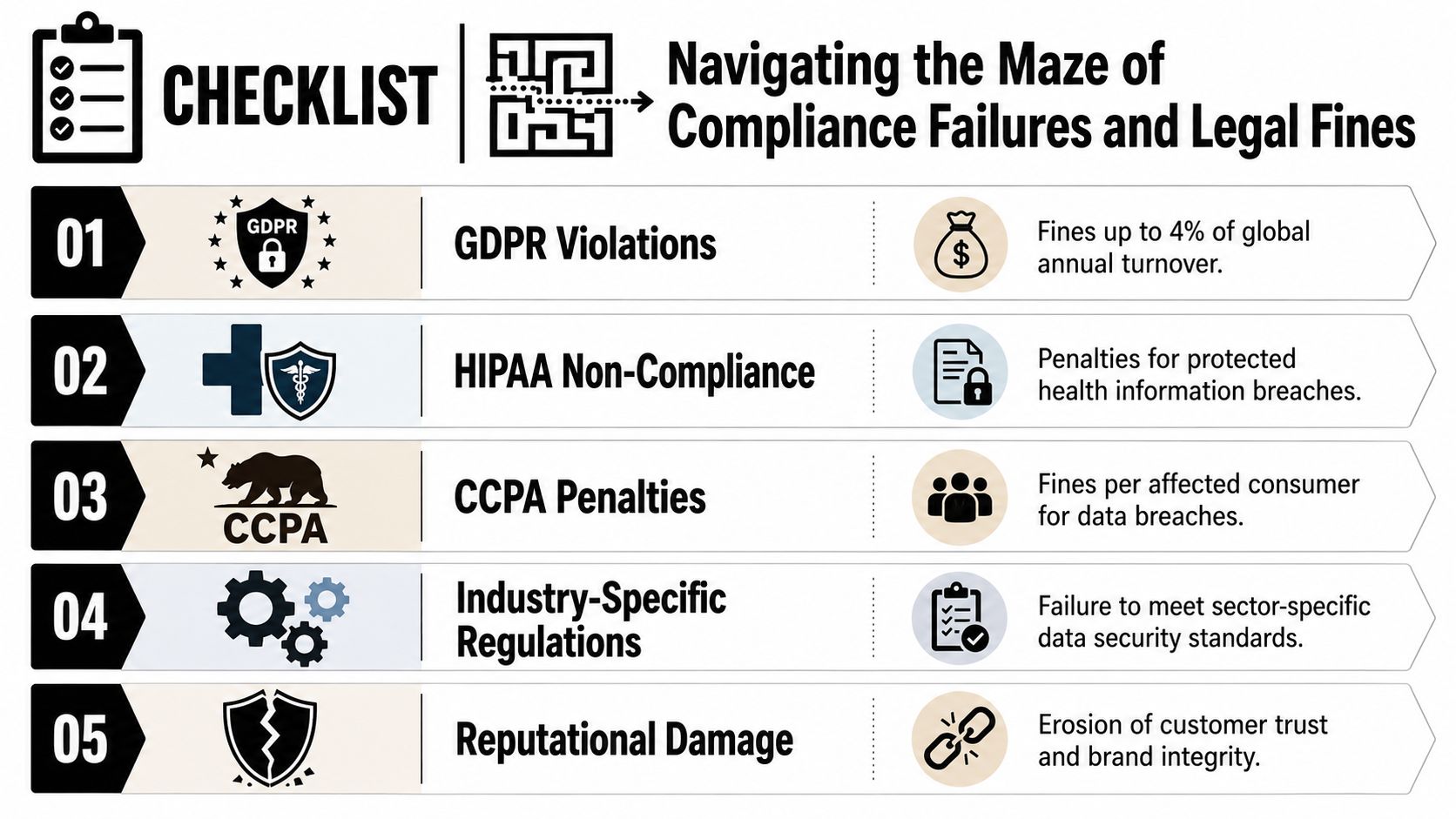
Without that evidence, the financial exposure widens fast. Counsel spends time reconstructing basic facts. IT pulls logs to determine whether the user account was disabled. HR searches offboarding records. Procurement or asset management tries to confirm serial numbers and ownership. Those hours rarely get booked against the original laptop loss, but they are part of the same event and should be counted that way.
That is the gap many leadership teams miss. The replacement cost is easy to see. The compliance cost sits in exception handling, legal review, delayed closeout, and a weaker position if a regulator or customer asks for documentation.
What a defensible process looks like
A workable standard includes:
- Documented possession history: who had the laptop, when it was issued, and when recovery was attempted
- Access control evidence: confirmation that accounts, VPN, MDM, and SSO access were disabled on time
- Verified sanitization records: proof that wiping or physical destruction was completed if the device was recovered
- Disposition documentation: whether the asset was reused, resold, recycled, or destroyed
- Audit-ready records: certificates, tickets, and logs that survive staff turnover and support legal review
Regulated organizations feel this first, but the discipline applies more broadly. Customer contracts, cyber insurance questionnaires, and internal control reviews often ask for the same thing. Show that devices are tracked, recovered, and processed under a documented policy. A practical benchmark is this secure data destruction and ITAD compliance guide, which outlines the records companies use to support defensible disposition.
Compliance reality: If a laptop disappears without records, the company keeps the burden of proof.
From a CFO perspective, the risk model must mature in this area. An unreturned laptop can trigger hardware replacement, internal investigation time, outside counsel review, contract exposure, and potential regulatory scrutiny in one incident. Treating those as separate buckets understates the liability. A better approach is to price them together and fund offboarding controls accordingly.
The Missed Opportunity for IT Asset Value Recovery
Not every old laptop is worthless. Many still carry resale value, especially when they're returned on time, tested, sanitized, and routed through a structured ITAD program.
The value gap is larger than most finance teams expect. According to the 2023 Asset Recovery Value Report cited here, the average resale value of a 2-year-old unreturned laptop is $185, but organizations recover only $42 per device because 73% of laptops are lost or untracked. Across U.S. enterprises, that drives $2.1 billion in annual value loss.
The financial mistake companies make
Many organizations frame retrieval only as loss prevention. That's too narrow. A good return program also protects recoverable value.
Consider the difference:
| Asset outcome | Financial result |
|---|---|
| Returned, tracked, sanitized | Eligible for reuse or resale |
| Returned late, undocumented | Lower recovery potential |
| Never returned | Near-total value loss plus added risk |
That's why mature IT asset managers work backwards from residual value. If a device still has market value, every weak handoff, missing serial number, and delayed pickup erodes that value.
Better recovery starts earlier than disposal
Value recovery doesn't begin when the laptop reaches a recycler. It begins when procurement, IT, HR, and finance agree on how assets are assigned, tracked, and reclaimed.
A useful model is to treat each endpoint as having three possible outcomes: reuse, resale, or secure destruction. If there's no structured route into one of those paths, devices drift into the most expensive category, which is “missing.”
For companies evaluating the upside of formal disposition, this overview of how businesses can maximize value with ITAD services is a practical lens. The key idea is straightforward. Asset control doesn't just reduce losses. It preserves salvageable value that would otherwise disappear.
Building an Ironclad Process with a Certified ITAD Partner
The cleanest way to reduce the hidden costs is to stop treating laptop returns as an informal courtesy. They need to sit inside a controlled IT asset disposition workflow with accountable owners, documented custody, and a defined end state for every device.
The risk profile supports that approach. According to Beyond Surplus's discussion of common ITAD challenges, unreturned company laptops represent 28% of all discarded IT assets, and 19% of those devices contain sensitive data that was never sanitized. Those unreturned assets carry a 65% higher likelihood of regulatory fines under state e-waste laws compared with properly managed assets.
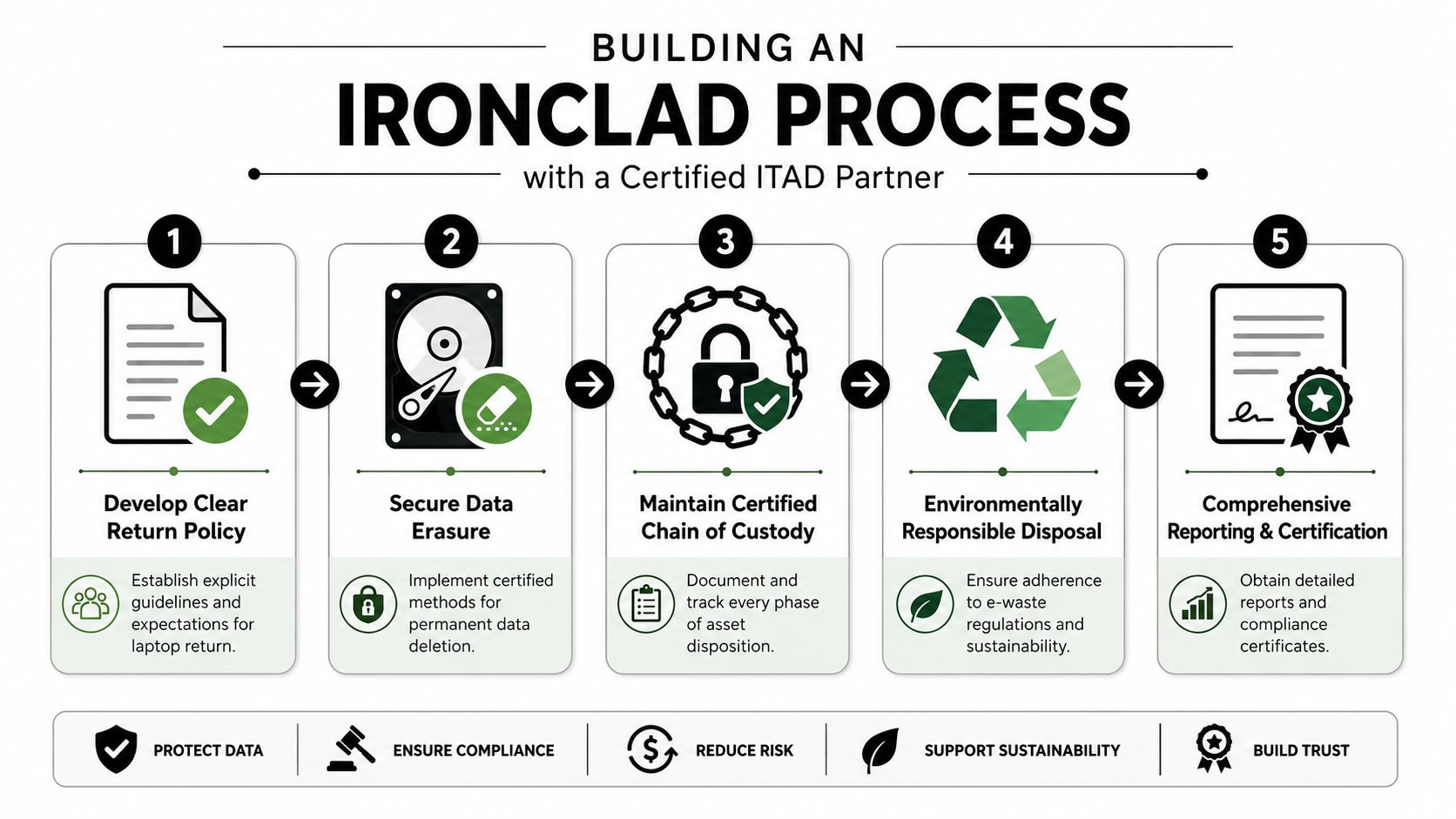
What an ironclad process looks like
A defensible process usually includes five parts.
A written return policy
The policy should define return deadlines, acceptable condition, approved shipping methods, and escalation steps if an employee doesn't comply.Immediate offboarding triggers
HR, IT, and security should all act from the same event. Device recovery shouldn't wait for manual follow-up days later.Certified data handling
Every returned endpoint needs a defined sanitization path, whether that means data wiping, drive shredding, or both, depending on policy and risk.Documented chain of custody
Every handoff needs a record, including pickup, receipt, processing, and final disposition.Reporting that finance can audit
CFOs need more than a pickup confirmation. They need asset lists, disposition outcomes, certificates, and value recovery reporting.
What to look for in a vendor
Not every vendor is equipped for this level of control. Before engaging an ITAD provider, companies should review logistics coverage, downstream transparency, data destruction controls, environmental practices, and reporting standards. A vendor due diligence checklist is the right place to start because it forces the procurement conversation beyond price.
A good partner should be able to support:
- Nationwide business pickups: Especially for remote workforces and multi-site operations.
- Secure data destruction options: On-site or off-site, depending on risk tolerance.
- Certificates of recycling and destruction: So liability doesn't stay ambiguous.
- Asset remarketing and buyback: To capture residual value where appropriate.
- Clear exception handling: For missing, damaged, or disputed returns.
The best offboarding process doesn't rely on reminders. It relies on controls, custody records, and proof.
For leadership teams, that's the compelling commercial argument. The Hidden Costs of Unreturned Company Laptops aren't isolated to IT. They affect procurement efficiency, compliance posture, cyber exposure, insurance conversations, and recoverable asset value. Once those costs are modeled together, unmanaged offboarding stops looking like an administrative nuisance and starts looking like a preventable financial liability.
Businesses that want to reduce offboarding risk, recover value, and document every handoff should contact Beyond Surplus. Beyond Surplus provides certified electronics recycling, secure IT asset disposal, data destruction, logistics coordination, and reporting that helps organizations close the loop on unreturned devices with less risk and more financial control.


