

When a company laptop doesn't come back, the loss isn't just a line item. Departing employees who don't return company equipment cost organizations an average of $2,000 per person, according to a Capterra study highlighted in industry reporting and summarized by Xantrion. That figure is large enough on its own. The bigger problem is what often rides on the device: email access, saved credentials, local files, collaboration histories, and regulated data.
Most equipment loss during offboarding doesn't happen because one team failed. It happens because HR, IT, security, and logistics work in sequence instead of as one operating process. HR logs a resignation. IT disables a few accounts. Someone sends a return email. Days later, nobody is sure which monitor, dock, or phone was assigned in the first place.
That's why how to reduce equipment loss during employee offboarding has to be treated as integrated risk management. The companies that recover more equipment don't rely on reminders and goodwill alone. They establish clear ownership, document every asset, trigger immediate security actions, make return logistics easy, and close the loop through certified disposition. For a useful look at the business impact of missed returns, see the hidden costs of unreturned company laptops.
The High Cost of an Incomplete Handover
A missing device creates two problems at once. One is obvious: the company must replace hardware it already bought. The other is harder to contain: the device may still hold access to business systems or sensitive data.
Financial loss is only the opening hit
The direct replacement cost gets attention because it's easy to count. The hidden operational cost is usually larger. Procurement has to source a replacement. IT has to configure it. Managers lose time tracing ownership. Finance may need to write off the asset. If the employee had specialized hardware, the disruption can spread across a team.
A reactive offboarding process usually makes that worse. If nobody confirms what was assigned before the last day, the organization starts recovery from memory, inbox threads, and spreadsheets. That's where avoidable loss turns into a governance issue.
Practical rule: If your offboarding process starts with “What did this employee have?” you've already started too late.
The security risk moves faster than the hardware
The more serious exposure is data security. An unreturned device isn't just missing property. It's a potentially unmanaged endpoint outside your control. If that laptop still has active email, VPN, CRM, or collaboration access, the asset loss becomes an access management failure too.
This is why ad hoc offboarding breaks down. HR may know the departure date. IT may know the account inventory. Facilities may know badge access. Logistics may know how to ship a return box. If those actions aren't coordinated, each department does part of the job and no one completes the handover.
A stronger model treats offboarding as one controlled workflow with four outcomes:
- Access is cut quickly: no lingering credentials or open sessions.
- Assets are identified clearly: every assigned item is known before departure.
- Recovery is simple: in-office collection and remote returns follow a defined path.
- Disposition is documented: returned devices are wiped, redeployed, or recycled with records.
That integrated approach is what prevents small misses from becoming security incidents.
Build Your Offboarding Policy Foundation
Policies don't recover equipment by themselves. But weak policies make recovery harder, slower, and more contentious. The cleanest offboarding programs start at onboarding, when the employee receives equipment and acknowledges the rules tied to it.

A good equipment agreement should be part of the hiring packet, not a separate document someone forgets to send later. If you want a deeper policy-focused reference, review employee laptop return policies every business needs to know.
What the policy must spell out
The document should be plain enough for employees to understand and specific enough for legal and operational use.
- Ownership terms: State that laptops, monitors, phones, badges, accessories, and licensed software remain company property.
- Assigned asset detail: Reference that issued equipment is logged by asset tag, serial number, or both.
- Return timing: Define when property must be returned after notice of resignation or termination.
- Condition expectations: Explain normal wear versus damage, missing components, or altered configurations.
- Return method: Cover in-person handoff, shipment, pickup coordination, and approved packaging methods.
- Access obligations: Require the employee to stop using company systems and devices when instructed.
- Consequences for non-return: Include the company's escalation path, subject to applicable law and internal review.
What works and what doesn't
What works is a policy HR, legal, IT, and security all support. It should align with your payroll practices, your asset records, and your separation process. It should also be easy for managers to reference when a departure starts.
What doesn't work is vague language like “return all company property promptly.” That sounds fine until someone asks whether a dock, security key, or spare charger counts. It also doesn't help when managers make exceptions informally and IT never hears about them.
A policy only works when the employee signs it, the manager can enforce it, and IT can map it to a real asset record.
Build for disputes before they happen
The policy should answer common points of friction before they arise. For example:
| Issue | Strong policy response |
|---|---|
| Employee says they never received an item | Tie every issued asset to a signed assignment record |
| Remote worker isn't sure how to return equipment | Define shipping, packaging, and contact steps in writing |
| Manager wants to skip recovery for low-value items | Require asset review by IT, not ad hoc judgment |
| Device returns without charger or accessories | Treat kits as complete assigned packages, not loose items |
That foundation reduces ambiguity later. Offboarding gets easier when expectations were set on day one.
Master Your IT Asset Inventory and Tracking
If your inventory is incomplete, your recovery rate will be inconsistent. That's not a process problem alone. It's a visibility problem. Teams can't retrieve what they never documented.
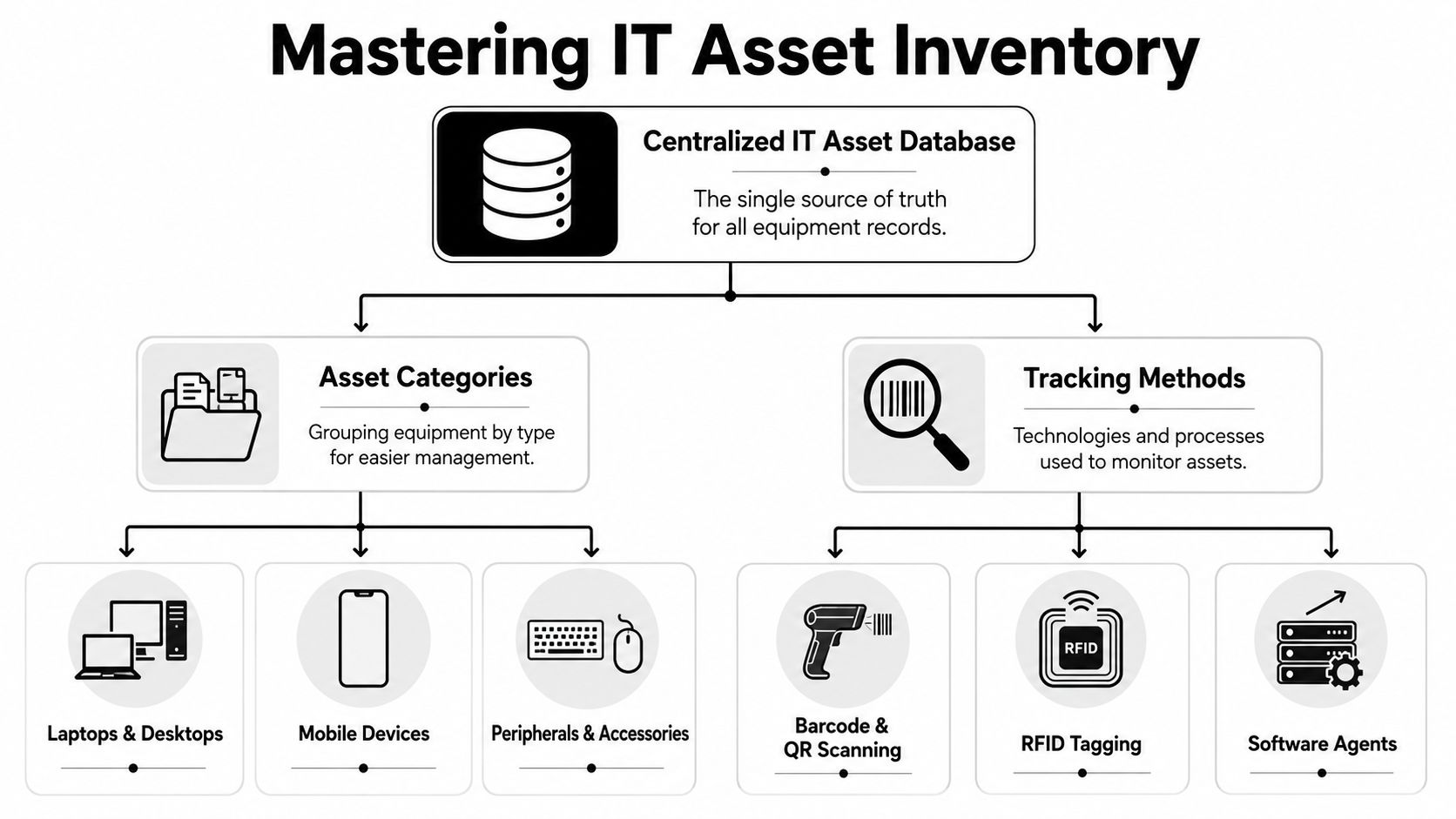
A report from Oomintza says half of surveyed companies lost at least 5% of their corporate-issued assets during employee offboarding, as cited by InvGate. That's the clearest argument against spreadsheet-only tracking. Once devices move across locations, managers, and remote users, static records stop reflecting reality.
For teams trying to tighten broader field and equipment visibility, it can help to look at operational models outside IT as well, such as real-time vehicle location tracking, where live status and location data reduce guesswork. The same principle applies to assets: current state beats historical assumptions.
What a usable asset record looks like
Every issued asset should connect to a person, a status, and a recovery path. At minimum, the record should identify:
- The item itself: laptop, phone, monitor, tablet, headset, keycard, storage media, or accessory bundle
- Unique identifiers: asset tag, serial number, model, and assigned software licenses where relevant
- Assignment details: employee name, department, manager, location, and issue date
- Status markers: active, in repair, in storage, pending return, returned, wiped, redeployed, recycled
- Recovery notes: shipping requirement, last known location, and any exceptions
Companies often improve recovery by tightening inventory hygiene long before an employee leaves. That means checking records at refresh cycles, role changes, office moves, and manager transfers. If you're cleaning up stale records, inventory optimization guidance is a useful starting point.
Spreadsheets fail in the places that matter most
A spreadsheet can list issued devices. It can't reliably tell you whether the listed laptop was swapped, whether the employee still has the secondary monitor, or whether a phone was reassigned informally during a department move.
That's the distinction between a list and a system. A list stores entries. A system creates accountability.
When IT, HR, procurement, and security each maintain their own version of asset truth, offboarding turns into reconciliation instead of control.
The non-negotiable controls
A mature inventory process usually includes these operational controls:
- Single source of truth for assigned hardware and key digital entitlements.
- Check-in and check-out discipline whenever assets move between users or locations.
- Manager-visible records so supervisors can confirm what team members hold.
- Audit-ready status changes after return, wipe, redeployment, or disposal.
- Exception handling for lost, damaged, or disputed equipment.
The goal isn't perfect paperwork. It's fast, defensible recovery. Good tracking shortens every later step because no one is debating what existed in the first place.
Execute a Flawless Departure Day Playbook
Departure day is where good intentions usually collapse. The resignation is known, but the handoffs aren't synchronized. HR updates the record. IT hears about it later. The manager assumes facilities collected everything. Nobody owns the full sequence.
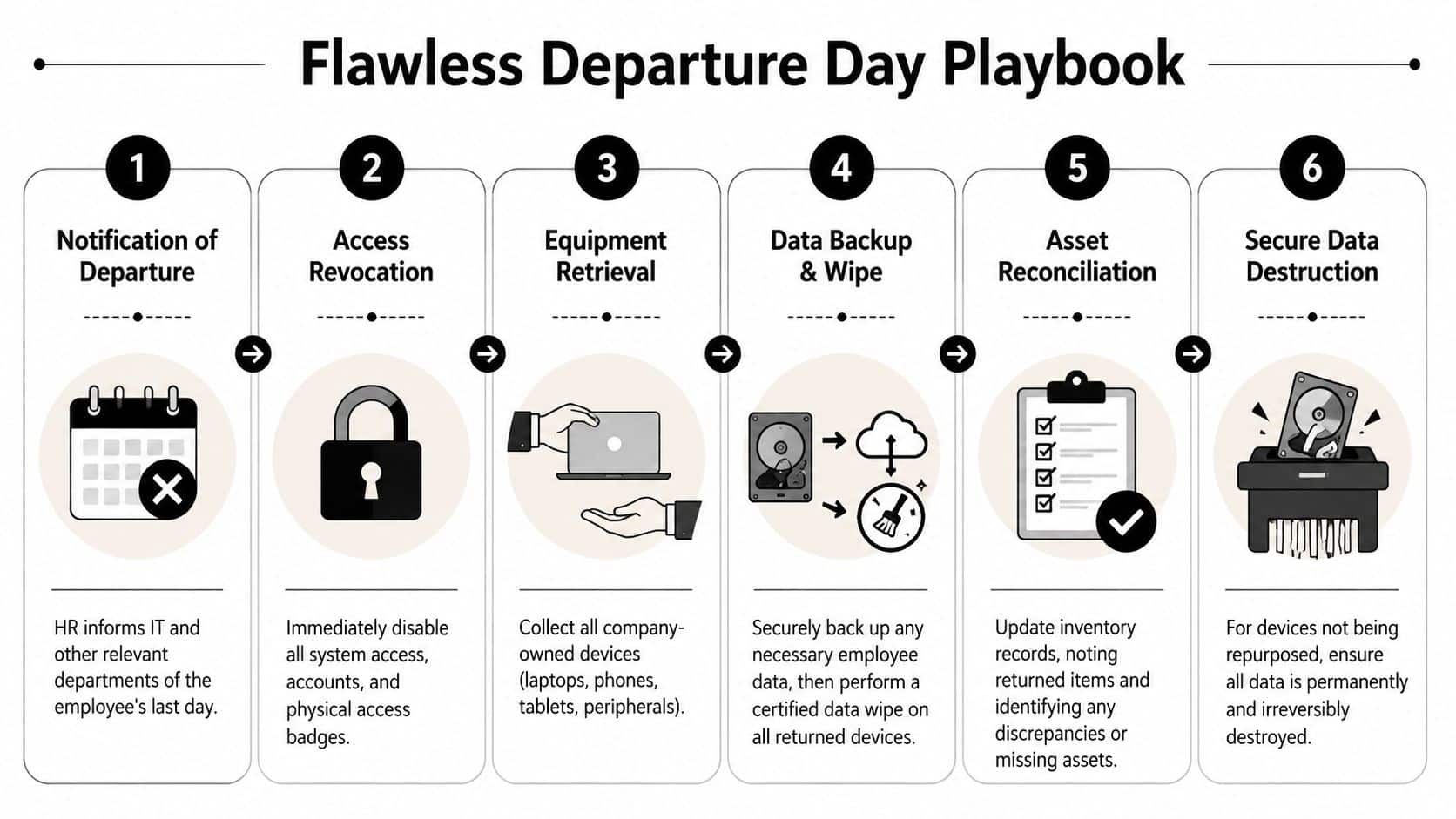
The strongest departure playbooks are time-bound. They don't leave revocation and retrieval to email chains. Critical technical specifications for asset recovery include system-wide access revocation within 15 minutes of departure notification, covering tools such as email, VPN, CRM, and collaboration platforms, according to Phenom's offboarding guidance.
That same discipline matters during broader workplace transitions too. Teams that have managed office consolidations or expansions often recognize the overlap with corporate office move planning, where dependencies break down unless every department follows one timeline.
The first hour
Treat the first hour after confirmed departure notice as the containment window.
- HR triggers the workflow. The event must create immediate tasks for IT, security, facilities, and the employee's manager.
- IT disables access. Focus on identity providers, email, VPN, CRM, file sharing, chat, ticketing, and any privileged systems.
- Facilities cuts physical access. Badges, entry codes, and shared workspace credentials need the same urgency.
- The asset list is locked. Pull the assigned inventory record before any handoff confusion starts.
For involuntary terminations, access revocation should happen before or at the moment of separation. For voluntary departures, collection can be coordinated face-to-face when possible, but the workflow still needs a fixed owner.
The handoff sequence that prevents misses
A simple operating table helps:
| Team | Immediate responsibility |
|---|---|
| HR | Confirm departure type, timing, and manager |
| IT | Revoke system access and pull assigned asset records |
| Manager | Confirm local equipment, accessories, and work files |
| Facilities or workplace | Disable badge access and recover physical items on site |
| Logistics | Prepare shipment, pickup, or transfer plan for remote returns |
This isn't bureaucracy. It's how you stop assumptions from creating blind spots.
Field note: The most common failure on departure day isn't refusing to act. It's everyone assuming someone else already did.
What to avoid
Avoid end-of-day access shutdowns if the employee left in the morning. Avoid manual reminders as the primary control. Avoid asking the departing employee to self-report what was assigned unless you're confirming against an existing record.
Also avoid mixing business continuity tasks with recovery tasks without ownership. Someone may need files preserved, a device reimaged, or a mailbox transferred. Those are valid needs. They should never delay account disablement or asset reconciliation.
The cleanest playbooks separate those tasks into parallel tracks: secure first, preserve what's needed second, then process the hardware.
Manage Secure Collection and Logistics
Collecting equipment from an on-site employee is mostly a coordination task. Collecting equipment from a remote employee is a logistics and communication task. The mechanics look similar on paper, but the return rate often depends on whether the process feels clear, fair, and easy to complete.
The human side matters more than many IT teams expect. 71% of employees fail to return company equipment, and many remote workers perceive return requests as adversarial or confusing when instructions aren't multilingual or visual. That's why shipping labels alone don't solve the problem.
In-office versus remote recovery
The comparison is straightforward:
| Scenario | What usually works | What usually fails |
|---|---|---|
| In-office employee | Scheduled handoff with manager or IT present | Casual desk pickup after the employee has already left |
| Hybrid employee | Pre-confirmed return location and item checklist | Assuming the asset is at the office because the employee visits occasionally |
| Remote employee | Prepaid return kit, clear instructions, support contact | Sending a label with no packaging guidance or return timeline |
For remote returns, reduce friction wherever you can. If your team needs a practical shipping checklist, review best practices for shipping laptops back from remote employees.
Make the return process easy to say yes to
A secure collection workflow should include:
- Prepaid packaging: the employee shouldn't have to source a box or padding.
- Simple instructions: include short written steps and visual guidance.
- Clear contacts: one named person or team for questions.
- Reasonable scheduling: don't force the employee to decode a courier process alone.
- Itemized checklist: list the laptop, charger, dock, phone, and accessories expected back.
Small details matter here. If a departing employee has to print labels, buy packing tape, locate a drop-off point, and guess whether the monitor should be returned, delay becomes predictable.
Remote workers are more likely to comply when the process feels organized, not accusatory.
Use language that lowers resistance
The wrong message sounds like an accusation. The right message sounds procedural and supportive. “Here is your return kit, what's included, and who to contact if anything is missing” works better than “Failure to return property may result in consequences” as the first and only message.
That doesn't mean being soft on enforcement. It means sequencing communication properly. Start with clarity. Follow with reminders. Escalate only when the process has been made straightforward and the employee still doesn't respond.
Remote offboarding succeeds when logistics and communication are designed together. One without the other leaves too much room for avoidance, confusion, or dispute.
Ensure Secure Disposition and Chain of Custody
Recovery isn't the finish line. Once equipment comes back, the company still has to secure data, document custody, and decide whether to redeploy, remarket, destroy, or recycle the asset. Often, offboarding workflows lose discipline during these subsequent steps. They recover the laptop, but they don't close the record.
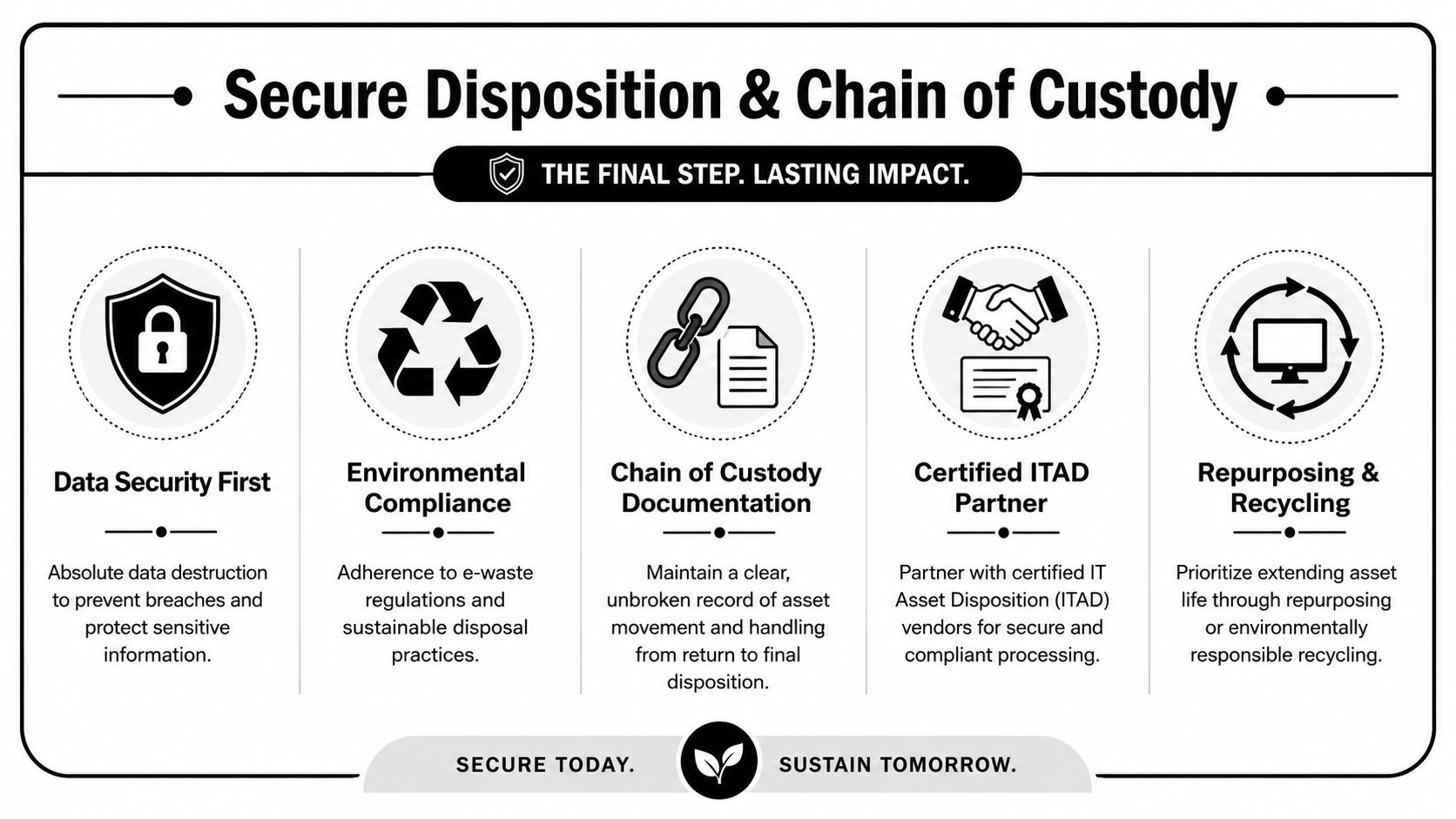
That gap matters because nearly half of companies lose at least 5% of their devices during offboarding, but few guides explain how to recover value, transfer liability, or comply with regulations like the FTC Disposal Rule when devices are never returned. The same issue applies to returned assets that sit in storage without proper processing.
A defensible end state requires more than possession. It requires custody records, data handling standards, and final disposition documentation. For a close look at why records matter, see ITAD chain of custody in Georgia and why it matters.
What a closed-loop process includes
A proper final-stage workflow should answer five questions:
- Was the asset received and logged?
- Was data preserved or destroyed according to business need?
- Was the device wiped or physically destroyed under a recognized process such as NIST 800-88?
- Was the final outcome documented?
- Was liability transferred through certificates and vendor records where applicable?
Why a certified ITAD partner changes the risk profile
A certified ITAD partner proves its worth. Internal teams can collect devices and update status fields. What they often can't sustain at scale is audited chain of custody, certified data destruction, compliant recycling documentation, and value recovery decisions across mixed asset streams.
Returned hardware still creates risk until someone documents exactly what happened to the data and the device.
A qualified ITAD partner closes that loop by creating a documented path from pickup or receipt through processing. That includes logging serial-numbered assets, supporting wipe or destruction workflows, issuing certificates of data destruction and recycling, and separating reusable equipment from end-of-life material.
The broader compliance layer
Disposition also sits inside a fragmented regulatory environment. There is no U.S. federal law requiring electronic waste recycling or prohibiting export to developing countries, and 22 states lack statewide e-waste mandates as of 2025, according to Wharton. At the same time, 25 states plus the District of Columbia have enacted mandatory e-waste recycling laws as of 2025, while other states still lack those laws, creating a patchwork businesses must manage, according to ERI Direct.
That's why secure offboarding doesn't end when the box arrives. It ends when custody is documented, data is destroyed or preserved correctly, and the asset has a verified final disposition.
If your organization wants a tighter offboarding process with certified electronics recycling, secure data destruction, and documented IT asset disposition, contact Beyond Surplus. Their team helps businesses recover equipment, protect data, maintain chain of custody, and close the loop on end-of-life IT assets across the United States.


