

A lot of companies have the same scene somewhere in the building. A shelf, closet, or locked room filled with retired laptops waiting for someone to decide what to do next. They aren't in production, but they still contain corporate email, saved credentials, customer files, finance records, and cached access to business systems.
That backlog creates a business problem, not a housekeeping problem.
The business benefits of professional laptop recovery services start with one shift in thinking. Old laptops aren't just used hardware. They're assets, evidence, and liability at the same time. If your team treats them like scrap, you increase the chance of data exposure, compliance trouble, budget waste, and unnecessary operational drag.
Your Company's Old Laptops Are A Hidden Liability
An IT manager usually doesn't lose sleep over one retired laptop. The trouble starts when one turns into twenty, then fifty, then a rolling pile from refresh cycles, remote employee returns, office closures, and department upgrades. At that point, the issue isn't storage space. It's the fact that nobody has closed the chain of responsibility.
A decommissioned laptop still holds risk until your business can prove what happened to the data, the drive, and the device itself. If that laptop sits in a storeroom for months, your exposure sits there with it. So does the administrative mess. Teams waste time checking serial numbers, chasing former users, confirming whether drives were wiped, and deciding whether equipment should be remarketed, recycled, or destroyed.
Stored laptops create three separate problems
- Security exposure: Devices may still contain recoverable information, even when employees assume they were reset.
- Compliance uncertainty: If your company can't document disposition, auditors won't accept good intentions as proof.
- Operational drag: IT staff end up managing end-of-life hardware instead of working on active infrastructure and user support.
This is why unreturned and unmanaged endpoints become expensive over time. The hidden cost isn't only in the hardware. It's in the unresolved control gap. For companies already dealing with remote work and employee turnover, the issue gets worse fast, which is why many teams start by reviewing the hidden costs of unreturned company laptops.
Professional laptop recovery services solve the core problem by taking custody, documenting process, protecting data, and routing each asset into the right next step. That's a very different outcome from letting old devices pile up until they become an incident response story.
Secure Your Data with Professional Chain of Custody
Deleting files, reimaging a laptop, or asking an internal tech to “wipe it before recycling” isn't enough for business risk transfer. The missing piece is chain of custody. Without it, your company may have performed a technical action, but it still can't prove who handled the asset, when it moved, what was done to it, and whether the data was destroyed or preserved for recovery under controlled conditions.
Why internal wiping often falls short
A DIY process usually breaks in ordinary places. Devices sit on desks waiting for pickup. Asset tags don't match spreadsheets. A wiped laptop gets mixed with an unwiped one. Someone powers on a machine to “double-check” it. Then nobody has a complete record.
Professional handling is different because it treats each laptop like a tracked asset from the first touch. That means serialized intake, documented transport, controlled storage, and a defined destruction or recovery path. It also means the same provider can separate machines that need forensic recovery from machines that should go straight to sanitization.
Practical rule: If your business can't reconstruct the custody trail for a laptop, it can't confidently say liability ended.
That's where specialist capability matters. Professional data recovery services offer a 96% success rate in restoring lost files, which shows how much data can remain accessible when devices are handled by experts. That same forensic-level capability is why professional disposition matters on the destruction side too. If experts can recover data from complex failures, you shouldn't assume a casual reset or basic wipe made a drive safe.
What a real custody process should include
A defensible business process usually includes:
- Controlled collection: On-site pickup or scheduled transfer that records who released the equipment.
- Asset serialization: Matching laptop make, model, and identifier to your inventory records.
- Secure transport: Moving devices in a documented, restricted process rather than informal staff handoffs.
- Verified sanitization or shredding: Using repeatable methods appropriate for the media type and risk level.
- Final documentation: Issuing records that show the asset's disposition and support legal defensibility.
For regulated organizations, chain of custody isn't paperwork for its own sake. It's how liability moves away from your company and into an auditable process. Teams evaluating options often start with a practical reference like this guide to ITAD chain of custody in Georgia and why it matters.
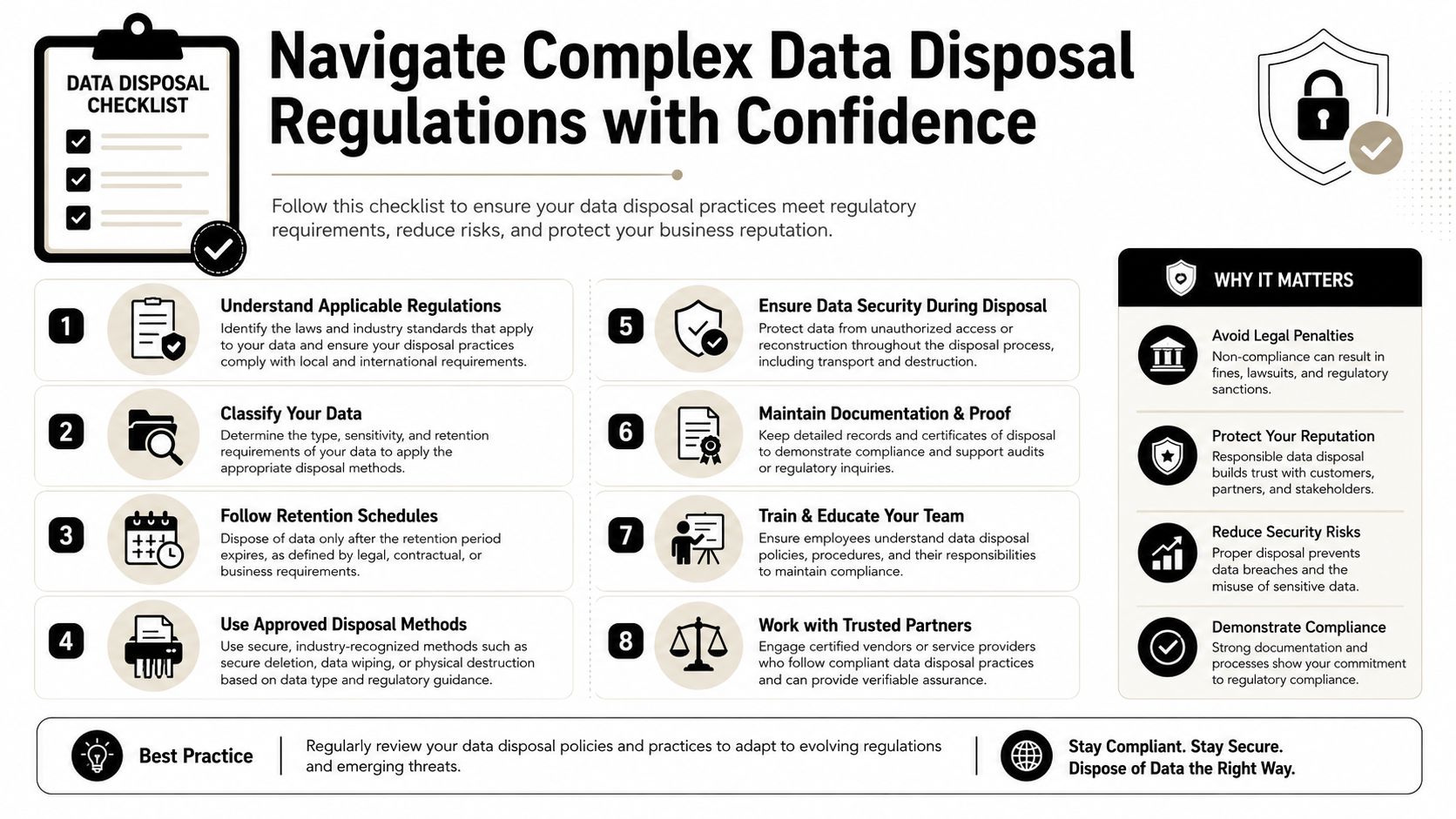
Navigate Complex Data Disposal Regulations with Confidence
Laptop disposition gets harder when legal, privacy, and records obligations enter the picture. Healthcare groups, financial firms, manufacturers, schools, and multi-state employers don't just need devices removed. They need a process that stands up to audit questions and internal policy review.
Compliance depends on documentation
Rules such as the FTC Disposal Rule, HIPAA, and FINRA don't reward vague internal practices. They require a business to show that sensitive information was handled responsibly at end of life. That means your process must be documented, repeatable, and tied to actual assets.
Investing in certified professional recovery and disposal services ensures compliance with regulations like GDPR and HIPAA, directly preventing legal penalties and costly litigation fees that arise from data loss or improper disposal. That matters because the exposure from a mishandled laptop doesn't stop at the device. It can expand into litigation, contractual disputes, and regulator scrutiny.
What businesses should verify
When reviewing a vendor, check whether they provide:
- Certificates of data destruction: These create a record that the media was sanitized or destroyed.
- Asset-level reporting: You need more than a generic pickup receipt.
- Defined handling methods: Different media types require different destruction or erasure controls.
- Support for regulated workflows: Healthcare, finance, education, and government environments often need tighter documentation.
A lot of organizations also benefit from reviewing outside operational examples before they set policy. If you're comparing disposal practices across markets, this resource on how to safely dispose of old computers in Edmonton gives useful context on why secure handling matters before devices leave your control.
Compliance failures usually begin with ordinary shortcuts. An undocumented handoff. An incomplete inventory. A drive that was assumed to be blank.
For Georgia-based teams building a defensible process, a practical starting point is this secure IT disposal guide. The value is simple. If an auditor asks what happened to a retired laptop, your team should be able to answer with records, not memory.
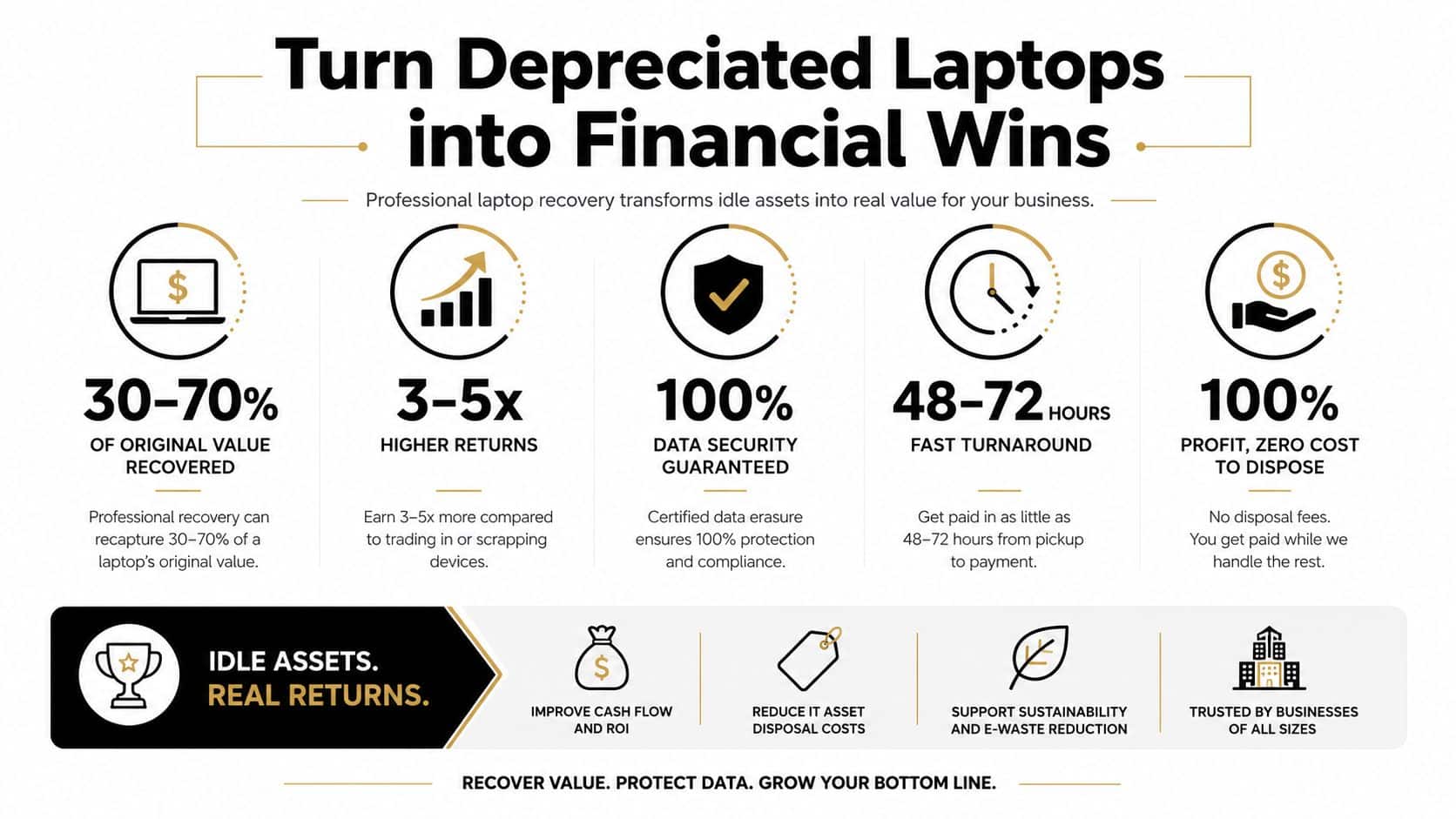
Turn Depreciated Laptops into Financial Wins
The financial case for professional laptop recovery has two sides. First, it helps your business avoid expensive outcomes tied to data loss and mishandled equipment. Second, it gives you a structured path to recover residual value from devices that still have market life.
Cost avoidance is the bigger win
Most companies focus first on what recovery services cost. That's the wrong starting point. The more important question is what unmanaged laptop loss can cost if critical files, customer records, legal data, or financial history can't be restored or properly destroyed.
Studies indicate that 60% of small businesses close within six months of a major data loss event. That statistic isn't just about backups. It shows how quickly a data incident can become a survival issue when a business loses operational continuity, customer trust, and required records.
The cheapest disposition process often becomes the most expensive one after a dispute, breach review, or failed recovery.
Asset value doesn't disappear at retirement
Not every laptop should be shredded on arrival. Some units still have resale value. Others can be harvested for parts or routed through compliant recycling after data destruction. The business benefit comes from sorting correctly instead of treating every retired asset the same way.
A disciplined recovery program helps companies:
- Capture resale value: Usable laptops can move into remarketing channels after secure processing.
- Reduce storage waste: Idle equipment ties up space and internal attention.
- Avoid duplicate spend: Better inventory visibility can delay unnecessary purchases in some refresh cycles.
For IT leaders, that changes the conversation from “How do we get rid of this?” to “What's the safest and most financially sensible path for each asset?” Teams looking to build that model can review approaches for maximizing value with ITAD services.
The strongest programs don't choose between security and recovery. They do both. They preserve value where appropriate and destroy risk where necessary.
Boost Operational Efficiency and Minimize Business Disruption
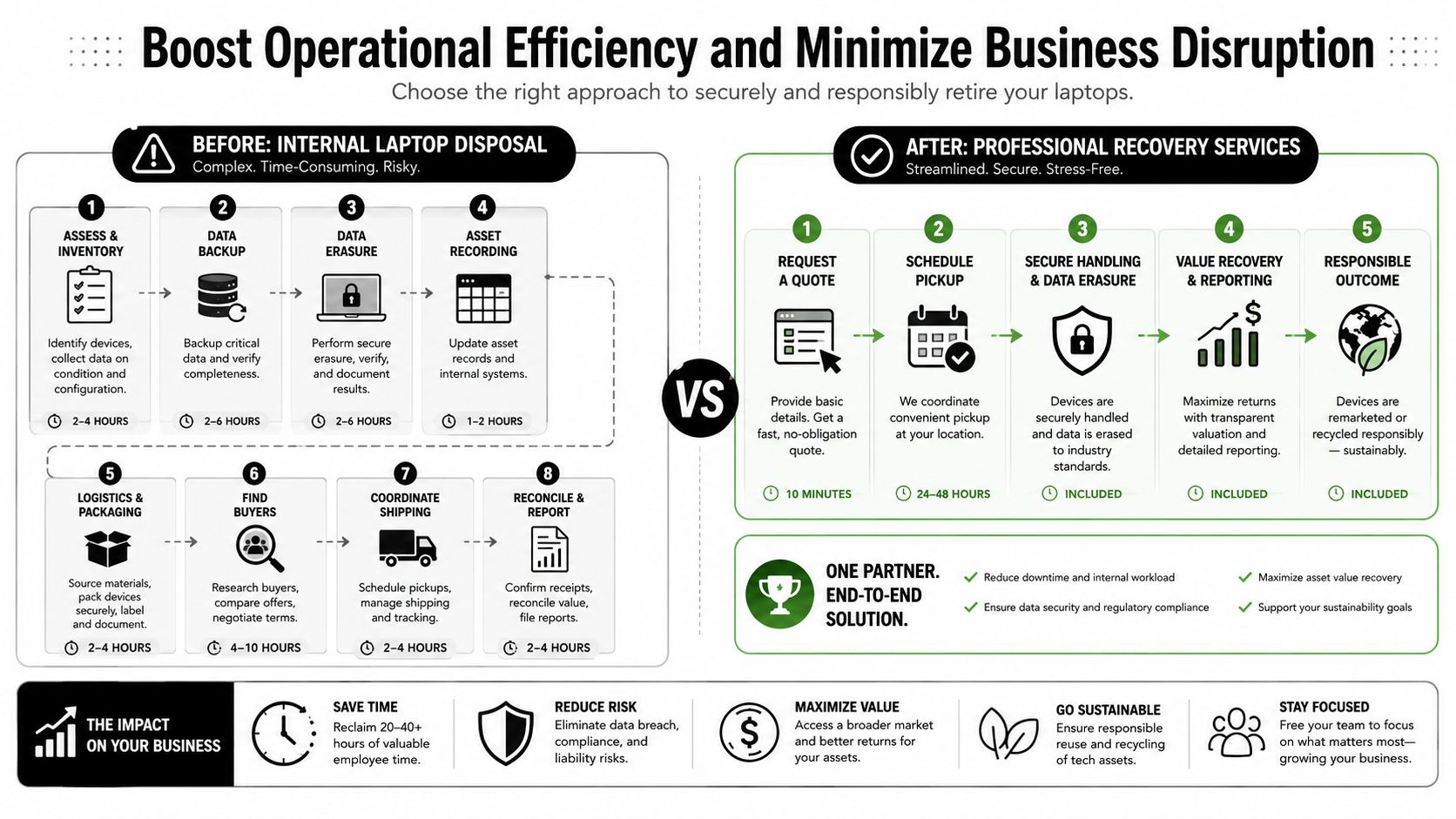
Internal laptop disposition sounds manageable until you map the actual work. Someone has to collect devices, validate ownership, update inventory, confirm user separation, package equipment, store it securely, arrange transport, erase data, process exceptions, and document final outcomes. That work usually lands on IT staff who already have better uses for their time.
Internal handling versus outsourced execution
Here's the practical difference:
| Approach | Internal team burden | Business impact |
|---|---|---|
| Internal disposition | High coordination, storage, documentation, and exception handling | Pulls IT away from active priorities |
| Professional recovery service | Vendor manages pickup, processing, destruction, reporting, and downstream routing | Keeps internal teams focused on operations |
What that efficiency looks like in practice
When the process is outsourced well, your team doesn't spend its week chasing retired hardware. It approves scope, releases assets through a controlled workflow, reviews reporting, and closes the project.
That matters during office moves, M&A activity, refresh projects, remote employee offboarding, and data center support work. In those moments, the hidden cost isn't just labor. It's delay. Every day that laptops remain in limbo, IT carries open tasks that should already be closed.
A service provider can also coordinate logistics at scale. That includes pickup planning, staging, de-installation support where needed, and consistent reporting across locations. The result is less improvisation and fewer internal bottlenecks.
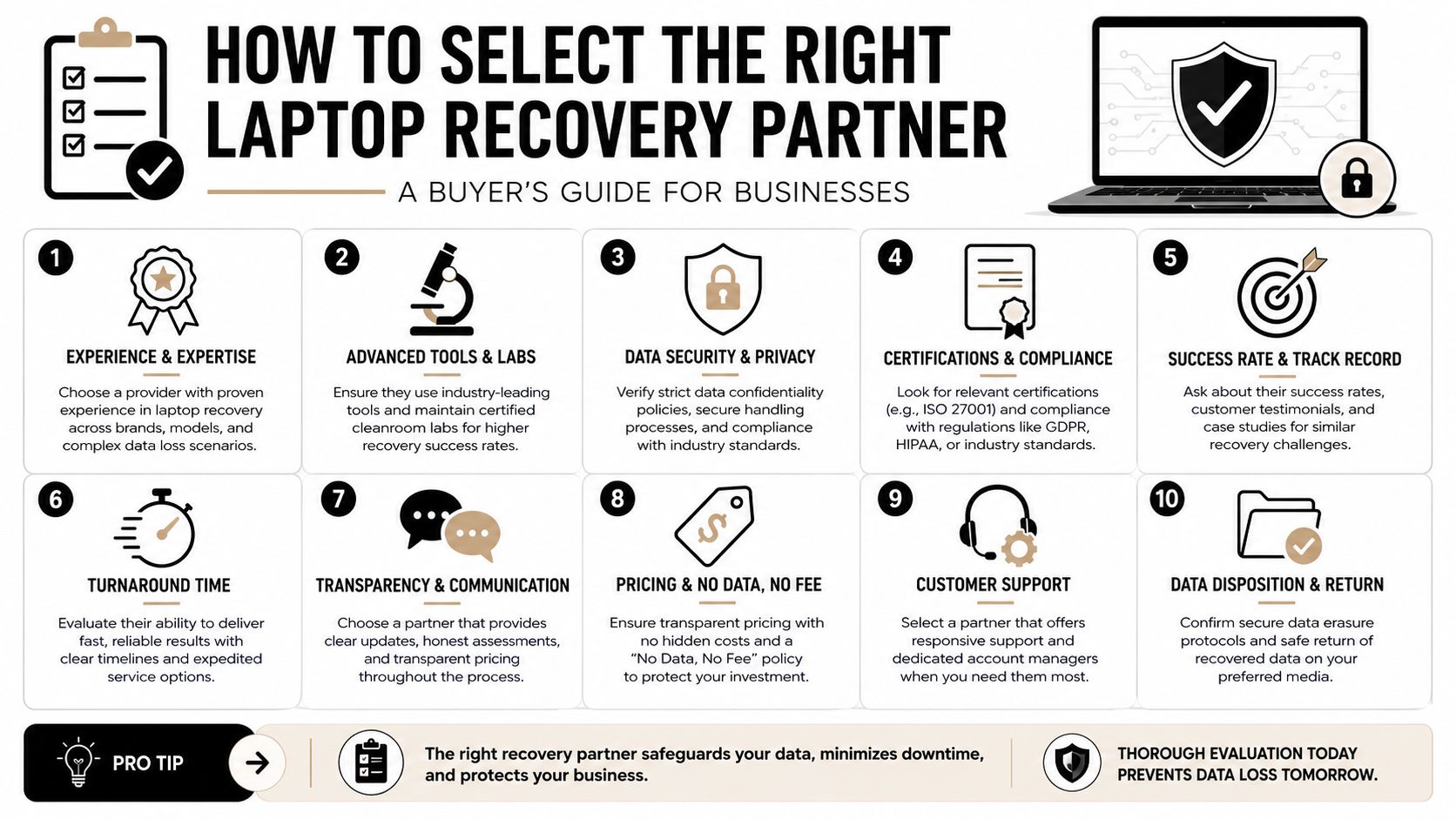
How to Select the Right Laptop Recovery Partner
The right vendor should make your controls stronger, your budgeting clearer, and your reporting easier to defend. If a provider can't explain custody, destruction methods, downstream handling, and documentation in plain terms, keep looking.
What to put on your shortlist
Use this checklist when comparing providers:
- Certifications: Ask whether the company operates under recognized ITAD and recycling standards such as R2 or e-Stewards.
- Insurance and liability terms: Review how responsibility transfers during pickup, transport, storage, and processing.
- Data destruction methods: Confirm whether they offer certified wiping, shredding, or both, depending on your policy.
- Reporting quality: Require asset-level documentation, not summary paperwork.
- Logistics capability: Multi-site pickups and remote asset returns need repeatable coordination.
- Value recovery process: If resale is part of the program, ask how assets are graded and routed.
- Downstream transparency: You should know where equipment goes after collection.
Be careful with consumer-style pricing models
A lot of providers market “no data, no recovery fee” as a simple benefit. For consumers, that can sound attractive. For enterprise IT, it often creates procurement friction because it makes worst-case budget exposure harder to forecast.
While many providers advertise "no data, no recovery fee," 68% of enterprise IT directors reject this model due to its unpredictability for budget forecasting, preferring fixed-price SLA-based services that offer financial certainty. That's an important distinction. A business usually needs predictable service levels, scope definitions, escalation paths, and reporting commitments more than it needs a consumer-style guarantee.
Vendor screen: Ask for the statement of work, sample reporting, destruction certificate, and pricing model before discussing pickup dates.
One example in this market is Beyond Surplus, which provides chain-of-custody documentation, data destruction services, logistics coordination, and asset disposition support. The useful lesson isn't the brand name. It's the operating model. Look for a partner that can show process maturity before your assets leave the building.
Make Laptop Recovery a Strategic Business Advantage
Laptop recovery sits at the intersection of security, compliance, finance, and operations. That's why mature companies stop treating it like a cleanup task. They build a process that documents custody, protects sensitive data, supports audits, reduces internal workload, and recovers value where possible.
That shift changes the outcome. Old laptops stop being unresolved risk sitting in storage. They become managed assets moving through a controlled business workflow. When the process is handled professionally, your company gains clearer accountability, better budget control, and less disruption for IT.
The business benefits of professional laptop recovery services are strongest when leadership treats end-of-life hardware as a strategic function instead of an afterthought.
Contact Beyond Surplus for certified electronics recycling and secure IT asset disposal. If your business needs documented chain of custody, data destruction, IT asset recovery, or nationwide pickup coordination, a structured laptop recovery program can reduce risk and keep your team focused on core operations.


