An IT manager has 40 retired laptops in a storage closet, a distributed workforce that makes a truck roll inconvenient, and a security review demanding evidence that the data is gone. A mail-in program can solve the logistics, but only if the shipment is inventoried, packed, transported, sanitized, and documented as one controlled process.
This Mail-In Laptop Recycling Service Guide is written for business owners, IT managers, facilities teams, and procurement leaders. It focuses on the risks that generic “back up your data and ship it” advice ignores, including chain of custody, NIST SP 800-88 decisions, lithium-ion battery restrictions, and the proof auditors expect.
Table of Contents
- Why a Mail-In Laptop Recycling Service Is Worth Using
- Preparing Your Laptop for Shipment the Right Way
- Packaging and Shipping Rules You Cannot Skip
- Data Sanitization and What Counts as Proof
- Costs, Timelines, and What Influences Both
- Certifications and Vendor Selection Checklist
- Chain of Custody and Documentation
- Next Steps and Frequently Asked Questions
Why a Mail-In Laptop Recycling Service Is Worth Using
A mail-in service makes sense when the fleet is dispersed, the volume doesn't justify a dedicated truck, or the organization needs a defensible record for every asset. It isn't merely a convenient shipping option. Properly managed, it creates a controlled path from the employee, office, or storage room to the recycler's receiving dock.
Three operational problems mail-in programs solve
Controlled logistics reduces the number of uncontrolled handoffs. A standardized label, a reconciled serial-number list, and a single receiving location give the IT team a practical way to confirm what left the business and what arrived. A drop-off run may move equipment, but it rarely creates the same asset-level audit trail.
Documentation depth separates an ITAD process from a shredding bin. Require the recycler to connect each asset tag and serial number to its intake record, sanitization result, disposition, and final certificate. A certificate that only states “electronics received” doesn't prove what happened to a particular laptop.
Compliance evidence matters because retired equipment can contain customer, patient, financial, or employee information. The FTC Disposal Rule took effect on June 1, 2005, and requires businesses to use reasonable measures to prevent unauthorized access when disposing of consumer-report information, including electronic media that can't be read or reconstructed. See the FTC Disposal Rule guidance for the underlying requirement.
The broader environmental case is also substantial. The world generated 62 million tonnes of e-waste in 2022, equal to 7.8 kg per person, while only 22.3% was formally collected and recycled in an environmentally sound manner, according to the Global E-waste Monitor 2024. Mail-in laptop recycling won't solve that crisis alone, but it gives organizations a practical recovery channel for equipment that might otherwise sit indefinitely or enter an undocumented waste stream.
Operational rule: Ship retired laptops only through a program that can reconcile the physical device, the data process, and the final disposition record.
Preparing Your Laptop for Shipment the Right Way
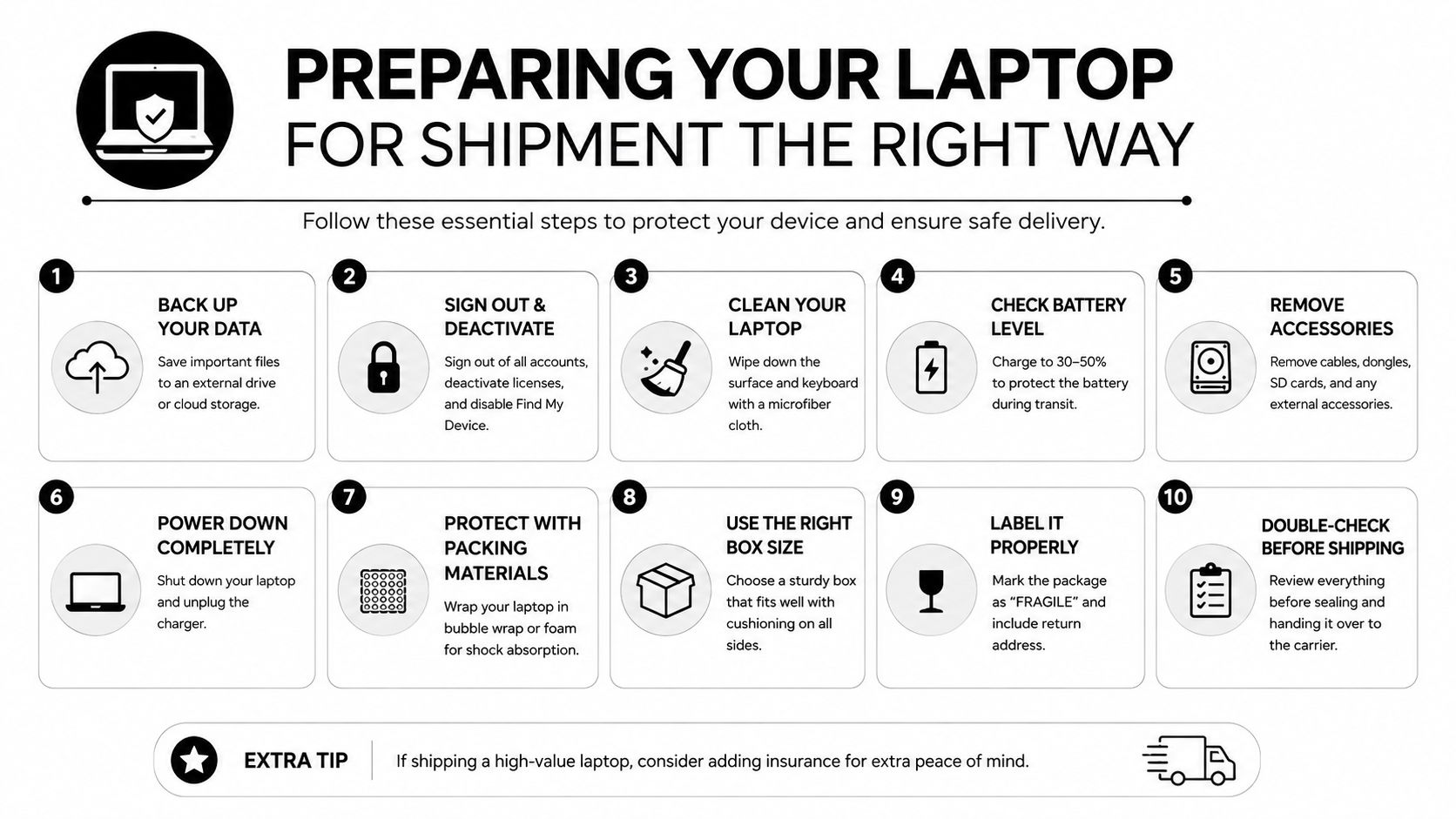
Preparation starts with records, not bubble wrap. Export the laptop list from your MDM or endpoint-management platform, add the internal asset tag, record the serial number, and identify the assigned user or location. Confirm whether the power adapter is included and flag missing, damaged, or swollen batteries before the package is sealed.
The receiving recycler should perform or verify sanitization against NIST SP 800-88 even if your team already ran a factory reset or operating-system wipe. NIST guidance recognizes clear, purge, cryptographic erase, and destruction as possible approaches, with destruction appropriate when reliable sanitization can't be applied. A reset is not evidence by itself.
Execute the pre-shipment inspection
Remove SIM cards, SD cards, USB security keys, employee-owned accessories, and biometric components that remain paired to a user account. Photograph the screen, lid, asset tag, and serial-number plate. Those images establish condition before transit and help resolve disputes about damage or missing components.
Decide whether each laptop should remain intact for resale or be harvested for parts. Working units usually need stronger protection because cosmetic and functional condition affects recovery value. Units destined for destruction still need secure packaging, but the declared value and handling plan may differ.
Use this one-page checklist:
- Inventory: Export serial numbers and asset tags.
- Ownership: Confirm every device belongs in the shipment.
- Accessories: Separate adapters, dongles, SIM cards, and SD cards.
- Battery: Isolate any swollen, leaking, loose, or damaged battery.
- Accounts: Remove device-management locks and user associations.
- Data: Record the internal wipe status, without treating it as final proof.
- Condition: Photograph the device and serial-number plate.
- Disposition: Mark resale, parts recovery, or destruction.
- Packaging: Match cushioning and carton strength to the device.
- Records: Save the manifest, photographs, label, and tracking number.
For a practical preparation reference, use Beyond Surplus's computer recycling preparation guidance.
Packaging and Shipping Rules You Cannot Skip
Lithium-ion batteries are the shipment's most common failure point. A recycler may reject or return a package if it contains a loose, swollen, leaking, or otherwise unsafe battery, so inspect every laptop before it enters the carton. Don't mail a damaged battery and hope the carrier handles it.
Use a rigid inner package, cushioning, and an outer carton that prevents movement. The device should be fully powered off, protected from contact with metal objects, and unable to shift during transit. Follow the recycler's instructions rather than improvising labels or combining devices with loose spare batteries.
Treat carrier rules as part of the disposal process
USPS guidance states that lithium-ion battery terminals must not contact one another. Under the specific USPS program described in its lithium battery mailing guidance, only up to three IMDAs lithium-ion batteries may be placed in one box, and the box must be taped shut and labeled for surface transportation only. USPS also warns that waste batteries can't be sent to certain mail recovery and distribution locations, as described in its battery restriction notice.
The organizer of a mail-in program must provide instructions that comply with USPS requirements for USPS shipments and DOT requirements for other carriers. That obligation is emphasized by the Pipeline and Hazardous Materials Safety Administration lithium battery guidance.
| Carrier | Ground, installed battery ≤100Wh | Air, installed battery ≤100Wh | Standalone spare battery | Declared value limit |
|---|---|---|---|---|
| USPS | Follow USPS surface-mail packaging, marking, and acceptance rules | Confirm current USPS air restrictions before tendering | Use only if the program and service permit it | Confirm with USPS and the service provider |
| UPS | Follow current UPS ground lithium-battery requirements | Air service can impose additional restrictions | Usually requires stricter packaging and marking | Confirm the shipment's service terms |
| FedEx | Follow current FedEx ground requirements | Confirm air eligibility and required marks | Treat as a separate hazardous-material question | Confirm the shipment's service terms |
For remote employee returns, apply the procedures in Beyond Surplus's laptop shipping best practices. Declare value against the pre-shipment manifest, retain tracking information, and consolidate shipments only when the battery and carrier rules allow it.
Data Sanitization and What Counts as Proof
A recycler's wipe method must match the storage technology and the risk profile. NIST SP 800-88 distinguishes between clear, purge, and physical destruction. Your vendor should document why the selected method was appropriate, not just mark every device “wiped.”
Match the method to the media
Clear uses logical techniques to make data inaccessible through ordinary user interfaces. It can fit working drives when the tool reliably addresses the media, but the report must identify the drive and verification result.
Purge applies a stronger technique, such as cryptographic erase or a manufacturer secure-erase function, to make recovery impractical. It is often the more suitable decision for self-encrypting drives, provided the vendor verifies that encryption keys and residual areas are handled correctly.
Physical destruction is the defensible route for failed, inaccessible, or specially controlled drives when software or cryptographic methods can't be trusted. Shredding may be necessary when the media won't accept commands or when the organization can't establish reliable sanitization.
| Method | Best for | Mechanism | Required proof items |
|---|---|---|---|
| Clear | Working media with a supported logical process | Software-based clearing and verification | Tool name and version, drive serial number, date, technician initials, method code, verification result |
| Purge | Self-encrypting or securely erasable media | Cryptographic erase or approved secure erase | Erase command or key result, drive serial number, tool or firmware details, date, technician initials, verification result |
| Physical destruction | Failed, inaccessible, or high-risk media | Shredding or another approved destruction process | Destruction method, serial or batch identity, date, technician initials, destruction record, final disposition |
Don't accept a report showing only a deleted partition table. The vendor should explain how it handles hidden Host Protected Area and Device Configuration Overlay regions, remapped sectors, and drives that fail verification.
Use Beyond Surplus's NIST SP 800-88 resource when evaluating whether a proposed process produces audit-ready evidence. For regulated environments, the record should let an auditor connect the laptop's serial number to the sanitization method, technician, result, and final certificate.
Costs, Timelines, and What Influences Both
Mail-in pricing depends less on the box than on the evidence attached to each device. A small shipment with serialized reporting and individual sanitization records requires more handling than a bulk load with no asset-level reconciliation. Ask for a written quote that separates processing, shipping, battery handling, reporting, insurance, and any value recovery.
Compare the cost drivers
For a single device, the recycler may offset labor through recovered value. A small-business batch can cost more per unit when the vendor must capture serial numbers and issue individual certificates. Larger enterprise deployments may reduce unit handling costs, but only if the manifest, packaging, freight, and documentation workflow is standardized.
The quote should identify these variables:
- Reporting scope: Serialized certificates cost more to produce than a bulk weight receipt.
- Sanitization status: Already-wiped assets still need verification if the organization requires defensible proof.
- Disposition path: Resale, parts harvesting, and destruction involve different handling and testing.
- Transport model: Customer-ship, prepaid mailer, pallet freight, and pickup transfer logistics in different ways.
- Turnaround: Standard processing costs less than an expedited receiving and sanitization queue.
- Risk controls: Secure transport insurance and hazardous-battery handling can change the final price.
Parcel shipments commonly take a business-day cycle that includes carrier movement, receiving, inventory, sanitization, and certificate issuance. Palletized fleets follow a different schedule because freight pickup, dock appointments, and receiving capacity control the clock. Demand a service-level statement that defines when the certificate is issued, what happens to failed devices, and whether the clock starts at pickup or facility check-in.
Budgeting advice: The cheapest quote is often the one that omits serial capture, failed-media handling, or proof of final disposition. Compare deliverables before comparing unit prices.
Vendor credentials should also be separated by function. R2v3 and e-Stewards address responsible recycling and downstream accountability. NAID AAA focuses on data destruction. SOC 2 Type II and ISO 27001 address information-security controls, while ISO 14001 addresses environmental management. No single credential replaces a complete operating review.
Certifications and Vendor Selection Checklist
Certification names don't all prove the same thing. R2v3 and e-Stewards are relevant for responsible recycling and downstream control, but they don't independently prove that a laptop's SSD was wiped correctly. NAID AAA Certification is directly relevant to destruction operations, including mobile and plant-based work.
A vendor handling asset manifests and customer information should also be able to explain its information-security controls. A SOC 2 Type II report evaluates internal controls over a reporting period. ISO 27001 addresses an information-security management system. ISO 14001 concerns environmental management. Ask for the scope, issuing body, current status, and facilities covered, not just a logo on a sales page.
Use a hard shortlist filter
Require at least one responsible-recycling credential, a destruction credential such as NAID AAA when destruction is part of the program, and either SOC 2 Type II or ISO 27001 when the vendor handles sensitive manifests and data records. Then request a sample certificate, insurance details, downstream processor list, escalation process, and sanitization decision tree.
Red flags are easy to identify:
- Verbal confirmation: The vendor won't provide a sample certificate or written workflow.
- Unclear downstreams: The vendor refuses to name or qualify downstream processors.
- Weak liability terms: The contract doesn't address errors, omissions, cyber incidents, or custody transfer.
- Generic wiping language: The report says “military-grade” without naming the method or verification.
- Incomplete scope: The credential covers a different facility or service than the one receiving your laptops.
Use Beyond Surplus's vendor due diligence checklist to organize the review. Verify certificate authenticity by checking the issuer's address, accreditation details, digital signature, or QR code against the certifying body's public registry.
Chain of Custody and Documentation
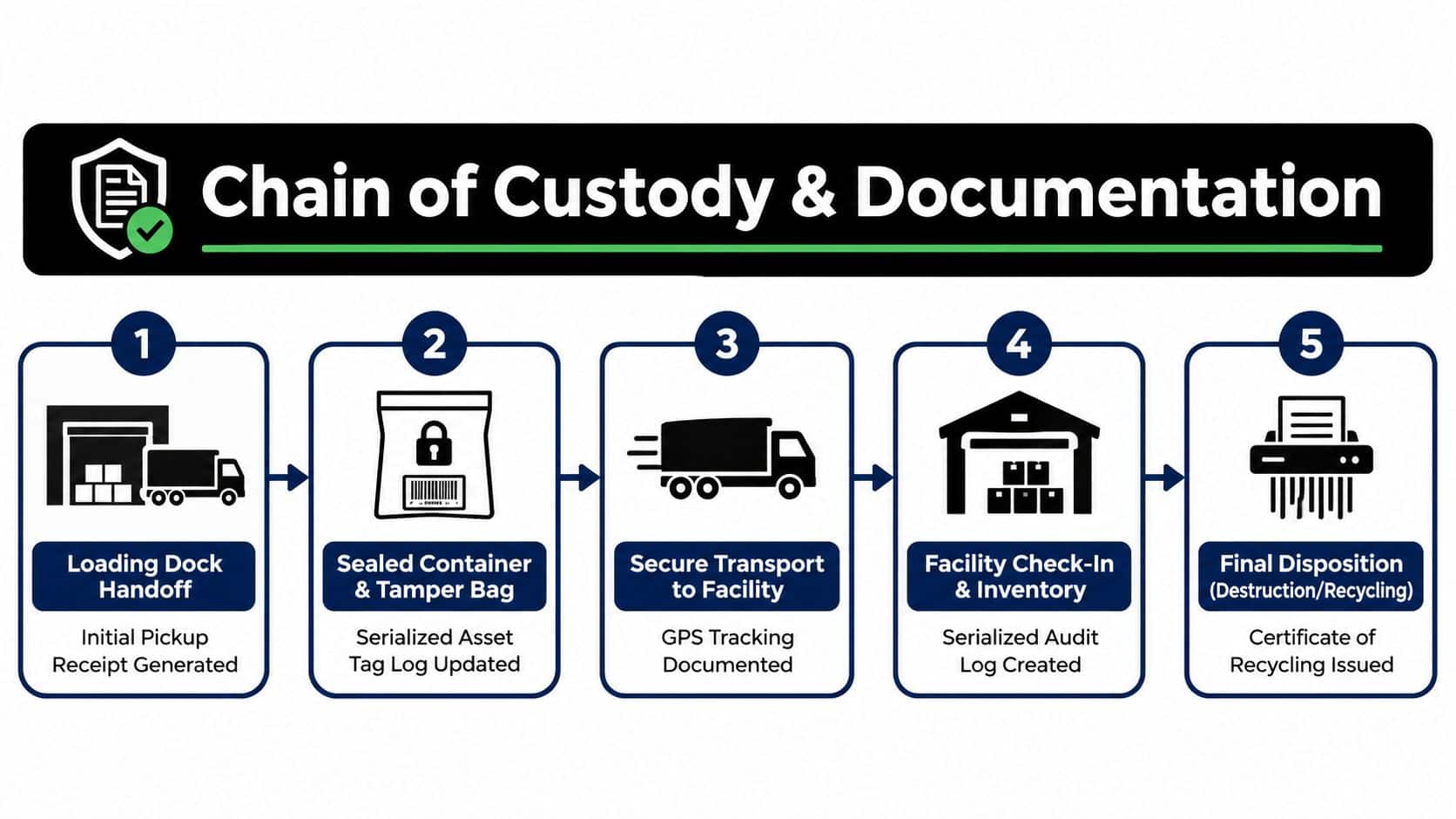
The chain of custody begins before the carrier scans the parcel. Your loading-dock receipt should identify the sender, date, package or pallet count, seal numbers when used, and the attached serial-number manifest. If a device is handed to a courier without a count or receipt, the first evidence gap already exists.
At the recycler, require an intake scan tied to the asset tag and serial number. The receiving record should show the arrival date, condition notes, package condition, and any discrepancy between the manifest and the physical shipment. A weigh-in ticket can support the shipment record, but weight alone can't replace serialized inventory.
The record should follow the laptop
Each device should have a traceable record containing:
- Handoff receipt: Sender, date, carrier, package identity, and count.
- Tamper evidence: Container or bag number and seal condition.
- Transport record: Carrier tracking and delivery confirmation.
- Facility intake: Receiving scan, serial number, asset tag, and condition.
- Sanitization log: NIST method, tool or process, technician, date, and verification.
- Disposition record: Resale, reuse, parts recovery, recycling, or destruction.
- Final certificate: Certificate number, serial list, disposition path, issuer, and signature.
The certificate should not be a standalone PDF detached from the manifest. Cross-check its serial list against the intake report, then confirm that every exception, failed wipe, missing unit, and substituted component has a documented resolution.
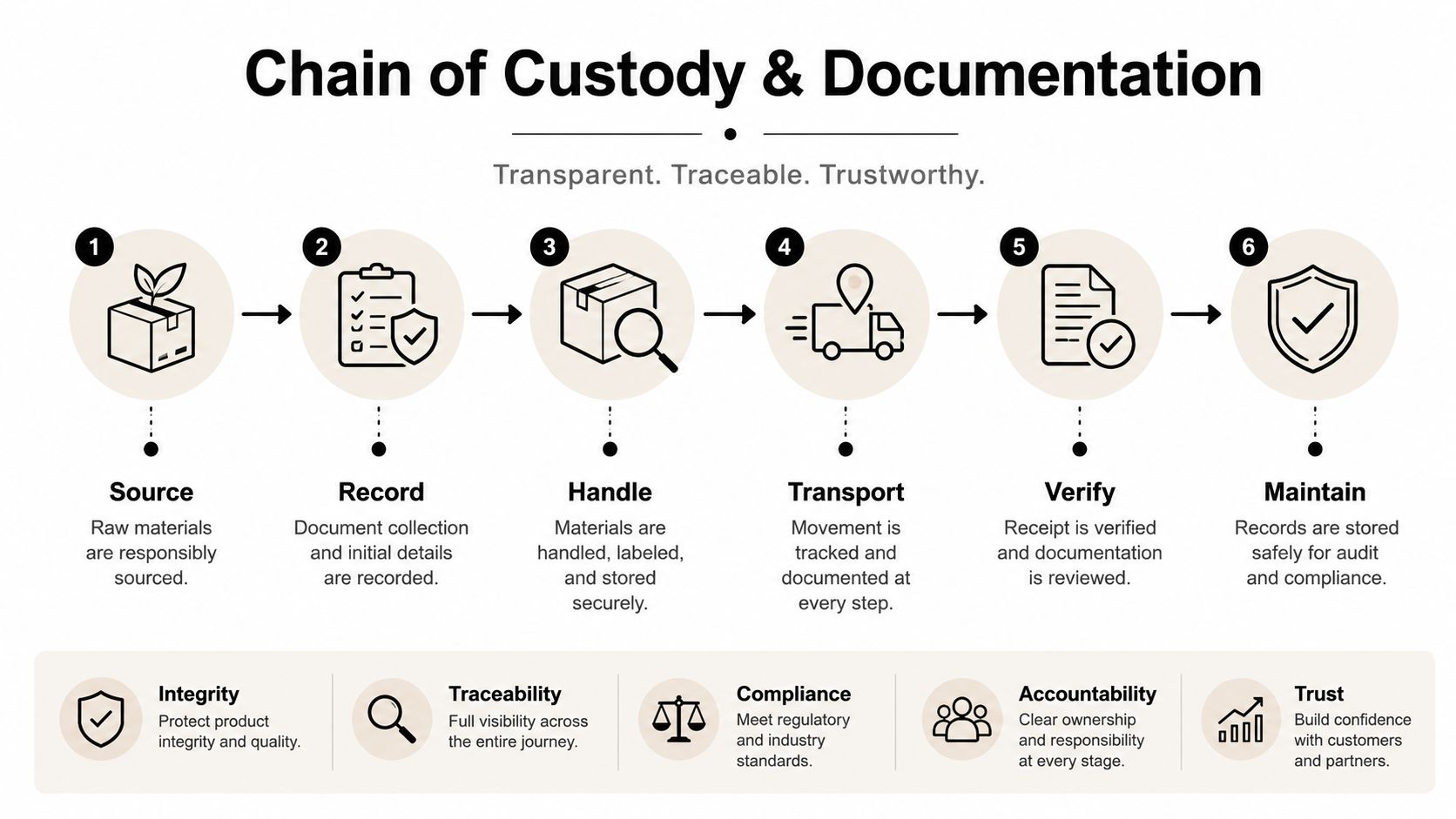
Store the records according to the applicable policy and regulation. Don't assume every audit has the same retention expectation. Match the file plan to the data type, contractual obligations, and legal counsel's direction, then preserve the manifest, tracking record, sanitization evidence, certificate, and vendor correspondence together.
For a structured process covering collection through disposition, review Beyond Surplus's chain-of-custody guidance for IT asset disposal.
Next Steps and Frequently Asked Questions
Organizations should start with an asset list, not a shipping quote. Identify serial numbers, battery condition, storage type, assigned users, desired disposition, and required evidence. Then send the vendor a questionnaire covering responsible-recycling credentials, destruction credentials, downstream processors, insurance, NIST sanitization methods, certificate samples, and the proposed pickup or mail-back workflow.
Residents may use a prepaid mailer, print an approved label, or use an available drop-off option, but commercial programs need tighter controls. A business should confirm who owns the equipment during transit, who carries loss liability, when custody transfers, and what happens when a device fails sanitization. Teams comparing documentation practices can also browse compliance and tachograph FAQs for broader compliance-recordkeeping context.
Common questions
Does recycling automatically qualify as a donation deduction?
No automatic tax treatment should be assumed. Recycling, resale, donation, and destruction have different accounting implications, so ask your tax adviser what records your organization needs.
How long will an audit accept a certificate?
A certificate doesn't expire into compliance by itself. Auditors assess whether it accurately identifies the asset, method, date, issuer, and applicable control at the time of disposal.
What happens when a laptop fails sanitization?
The vendor should quarantine it, record the failure, and use an approved purge or physical-destruction route. Require the final record to show the exception and its resolution.
Do encrypted drives skip wiping?
No. Encryption can support a purge decision, but the recycler still needs to verify the drive state, erase process, identity, and result.
What should a business do first?
Freeze the inventory, separate unsafe batteries, select the required disposition, and demand a sample asset-level report before shipping anything.
Don't approve a mail-in program until the vendor demonstrates the complete evidence trail from your manifest to final disposition. The next click should be a service review that confirms packaging, battery acceptance, sanitization, reporting, and transport requirements for your specific fleet.
Beyond Surplus provides commercial electronics recycling, secure data destruction, IT asset disposition, product destruction, and nationwide pickup coordination with documented chain of custody. Visit Beyond Surplus to request a mail-in or pickup plan built around your laptop inventory, battery conditions, sanitization requirements, and audit evidence needs.