

That back room in your Suwanee office usually becomes a holding area first and a risk later. Old laptops from the last refresh, failed SSDs from a storage upgrade, a few switches nobody wants to redeploy, maybe a rack server still waiting for signoff. The problem isn't just clutter. Every one of those assets may still hold business data, and every delay increases the chance that custody, inventory accuracy, or disposal records start to slip.
That's why Suwanee IT asset disposal has to be handled as an operational control, not a cleanout project. A strong program protects regulated data, documents every handoff, and routes equipment through reuse or certified recycling instead of vague downstream channels. For local businesses trying to satisfy internal audit, legal, security, and sustainability teams at the same time, that structure matters.
Your Guide to Suwanee IT Asset Disposal
A typical situation looks like this. The IT manager knows which systems were replaced, facilities wants the space back, procurement wants to know whether any value can be recovered, and compliance wants proof that nothing left the building without controls. If the answer is “we have a certificate somewhere,” that usually isn't enough.
The scale of the disposal problem is bigger than most organizations realize. The world generated a record 62 million metric tons of e-waste in 2022, and only 22.3% was formally collected and recycled, according to the Global E-waste Monitor summary cited by Iron Mountain. That's one reason documented ITAD workflows matter. They help keep retired equipment out of informal channels and reduce the chance that sensitive data leaks during disposal.
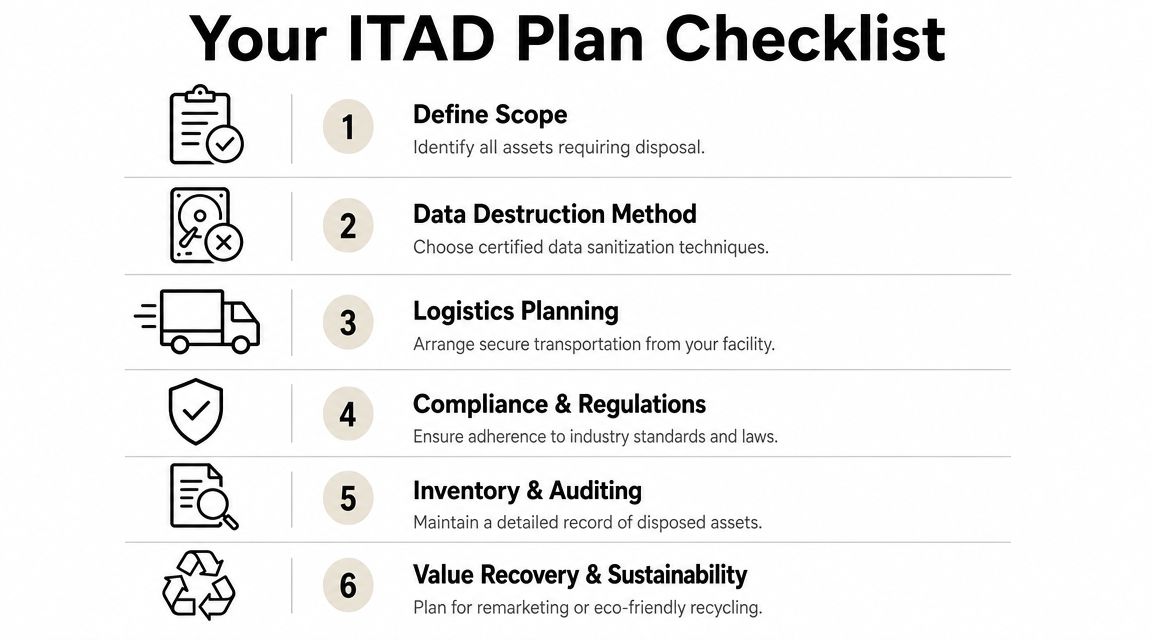
In practice, the safest approach starts before anything leaves your site. You need a list of assets, a decision on whether each one will be wiped, destroyed, remarketed, or recycled, and a record that follows each item from pickup through final processing. Businesses looking for local Suwanee computer and electronics recycling services should evaluate whether the provider can support that full record, not just remove equipment quickly.
Secure disposal isn't proven by pickup alone. It's proven by the documentation that survives an audit months later.
Building Your ITAD Plan Before the Pickup
At 4:30 p.m. on pickup day, the problems usually show up fast. A cart of laptops appears with no owner list. Someone adds a box of loose drives from a storage room. Compliance asks which assets contain regulated data, and nobody can answer with a record they would want to defend later.
That failure starts before the truck arrives. A sound ITAD plan defines which assets are in scope, who approved their release, how each item is classified, and what evidence will follow it through disposition. If you want an audit trail that stands up under the FTC Disposal Rule, HIPAA, or internal policy review, the planning phase has to produce asset-level records, not a general shipment summary.
Start with scope and inventory
Begin with the systems of record you already have. Export the CMDB, endpoint management platform, lease schedule, and any storage or backup inventories, then compare that list against what is physically on site. The gaps matter more than the clean entries. Missing serial numbers, retired devices still assigned to former users, and loose media with no asset tag are the items that create audit exposure.
Include more than office PCs:
- End-user devices such as laptops, desktops, tablets, and monitors
- Infrastructure equipment including servers, switches, firewalls, and storage arrays
- Loose media such as hard drives, SSDs, backup tapes, and failed devices
- Specialized systems in medical, lab, or industrial settings that may contain embedded storage
For each asset, document the serial number or other unique identifier, current location, assigned user or department if known, media type, and intended disposition path. That last field matters. If your team marks an item for reuse, resale, recycling, or destruction before pickup, you reduce the number of judgment calls made under time pressure in the loading area.
Classify by data risk and proof requirement
Age is a weak sorting method. Function is not enough either.
A receptionist desktop, an HR laptop, a hypervisor host, and a failed SAN drive can all be retired in the same project, but they do not carry the same compliance burden. Classify assets by the data they held, the likelihood that data remained on the device, whether encryption was enforced and documented, and whether a law or contract requires a specific disposal method or retained evidence.
A practical framework looks like this:
- Assets eligible for verified sanitization because the media is functional and reuse is permitted
- Assets that require physical destruction because the media failed, the data sensitivity is too high, or policy prohibits remarketing
- Items with no data-bearing components that can move into electronics recycling after verification
Write down the reason for each decision. I advise clients to require a short disposition rationale in the project file, especially for exceptions. If a drive was shredded instead of wiped, or a laptop was wiped instead of destroyed, that decision should be traceable to policy, media condition, or data sensitivity. NIST 800-88 sanitization guidance is a useful reference point when your security team needs that decision tied to a recognized standard.
Assign internal ownership before release
Unclear ownership causes bad records. IT may know the hardware. Security may own the disposal standard. Facilities may control dock access. Finance may need confirmation that leased assets were removed on time. If those roles are not assigned before pickup, chain-of-custody breaks usually show up in small ways first, then in bigger ones.
Set these approvals in advance:
- IT confirms the asset list and device status
- Information security or compliance approves the destruction or sanitization path
- Facilities controls staging area access and release timing
- Finance or procurement identifies leased, owned, and remarketable assets
- Project owner signs off on the final release list
This step is administrative, but it is also evidence. During an audit, documented approvals show that assets did not leave the Suwanee facility through an informal cleanout process.
Define what documentation must exist before pickup
Do not wait for the downstream certificate and assume it will fix weak intake records. It will not.
Before the provider arrives, set the minimum documentation package your team expects for the job. In practice, that means a release list with asset identifiers, container or pallet counts if used, named custodians at handoff, exception handling for untagged items, and a requirement that downstream sanitization or destruction results tie back to the individual asset or media item. If the documentation only proves that a truck picked up 200 devices, it does not prove which 200 devices they were.
The business objective should be documented here too. Some organizations want strict destruction because the data profile leaves little room for reuse. Others want resale where policy allows it, because newer equipment can offset replacement costs. Both approaches can work, but the record has to show that the chosen path matched policy and was approved before release. A provider such as Beyond Surplus can fit into that process, but your internal controls should be defined before any pickup is scheduled.
Choosing Your Certified Data Destruction Method
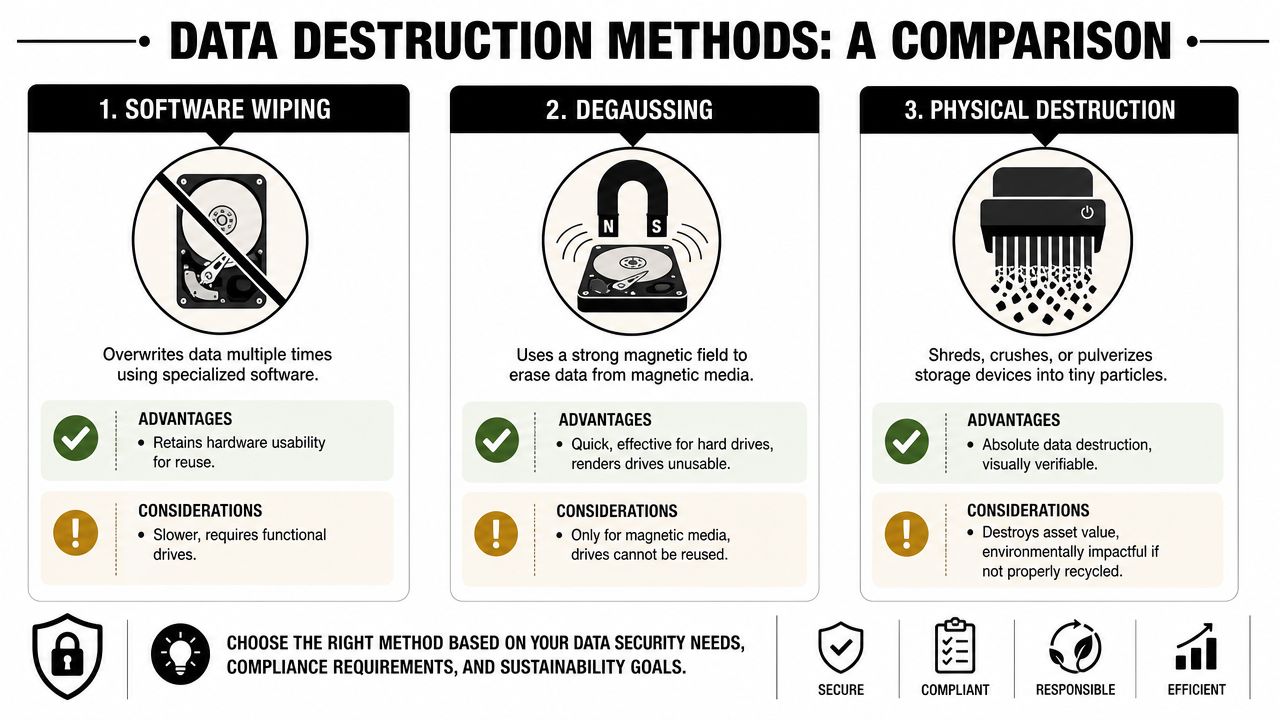
Data destruction decisions should be made asset by asset, not lot by lot. “We wipe everything” is too broad. “We shred everything” can be expensive and can eliminate legitimate value recovery. The right answer depends on media type, condition, data sensitivity, and whether reuse is allowed.
When software wiping makes sense
For devices intended for reuse, software-based sanitization is often the best path. The standard to look for is NIST 800-88-compliant sanitization, because the process has to be validated, logged, and tied back to the specific device. That's the key difference between deletion and defensible erasure.
Software wiping works well when:
- The drive is functional and can complete a validated sanitization cycle
- The asset has residual value and may be redeployed or remarketed
- Your organization needs reuse to support cost recovery or sustainability goals
A practical reference point is NIST SP 800-88 guidance and related service criteria, especially if your security team wants the sanitization method aligned with recognized disposal standards.
When physical destruction is the safer call
Some devices shouldn't be wiped and returned to market. Failed drives, damaged SSDs, unsupported media, or highly sensitive devices often belong in a destruction workflow. In those cases, shredding or other physical destruction methods remove uncertainty by making the media unusable.
That approach is usually appropriate when:
| Method choice | Best fit | Main trade-off |
|---|---|---|
| Software wiping | Reusable devices with functioning media | Preserves value but requires successful validation |
| Degaussing | Certain magnetic media | Fast, but limited to specific media types |
| Physical destruction | High-risk, damaged, or non-reusable media | Ends data risk, but also ends reuse value |
What works and what fails in the real world
What works is a decision tree. Functional laptops slated for remarketing get validated wiping. Loose failed drives from a data center refresh get physical destruction. Specialty devices with uncertain storage profiles get examined before release.
What fails is treating formatting as destruction, relying on a spreadsheet that only shows quantities, or assuming a downstream vendor will “handle the drives.” For organizations that must satisfy HIPAA or the FTC Disposal Rule, the evidence matters as much as the action. You need a record of what method was used, whether it succeeded, and what happened if the wipe failed.
If wipe software reports a failure, the process isn't complete. The media needs a documented exception path, usually into destruction.
Securing Logistics from Your Suwanee Facility
A pickup can go wrong even when the destruction method is right. I have seen organizations choose an approved sanitization process, then weaken their position by letting equipment leave the Suwanee office on a vague packing list with no asset-by-asset custody record.
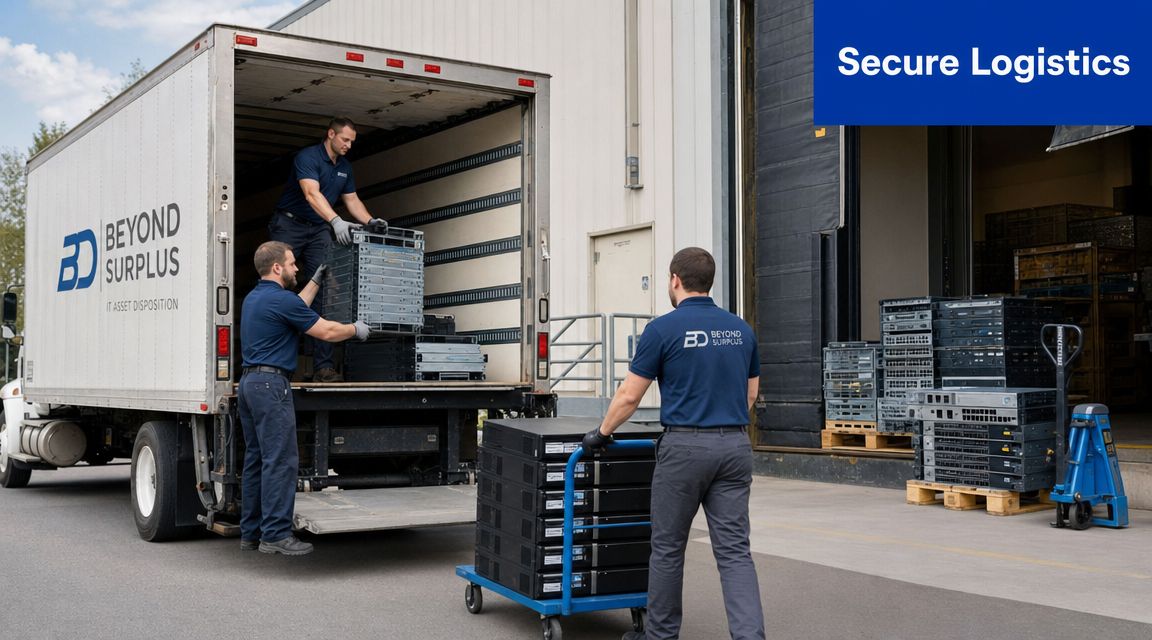
Transit is where a defensible audit trail either holds up or breaks. For HIPAA-covered entities, financial firms, and any business subject to the FTC Disposal Rule, it is not enough to know that equipment was picked up. You need records that show which asset left the building, who accepted custody, how media was secured, and whether the receiving count matched the pickup count. Iron Mountain's discussion of secure chain-of-custody controls highlights the same point from a lifecycle-management perspective.
The controls that actually matter
Start with asset-level reconciliation at the dock. If laptops, desktops, servers, and loose drives are all being removed, each category should be counted and logged in a way that can be matched later to processing results. Serial numbers are best for whole assets. For boxed peripherals or bulk loads, use lot IDs and seal numbers so exceptions can be traced to a specific container.
Strong logistics controls usually include:
- Asset-level pickup records tied to serial numbers, scan IDs, or container IDs
- Tamper-evident seals on totes, gaylords, or pallets that contain drives and other data-bearing media
- Signed handoff logs each time custody changes between site staff, driver, dock team, and processor
- Arrival verification that documents receiving counts, seal condition, and any discrepancy before processing starts
Carrier choice matters too. A low-cost carrier can reduce freight expense, but if the process lacks documented custody checks, your compliance exposure goes up. Peak Transport's carrier guide is a useful reference for evaluating accountability, handling discipline, and service fit before equipment moves.
What a regulated client should ask
Ask direct operational questions before scheduling the truck.
- Who scans or verifies the inventory at pickup?
- How are loose drives separated from general equipment?
- What record is created if a seal is broken, a pallet is rebuilt, or a count changes in transit?
- Can the provider reconcile the pickup manifest to final wipe, destruction, or recycling results at the asset level?
If you are arranging IT equipment pickup in Georgia, judge the provider by the paperwork and controls, not by a promise that a certificate will appear later. The certificate is only the end document. Proof comes from the chain of custody behind it.
Unlocking Value and Ensuring Sustainability
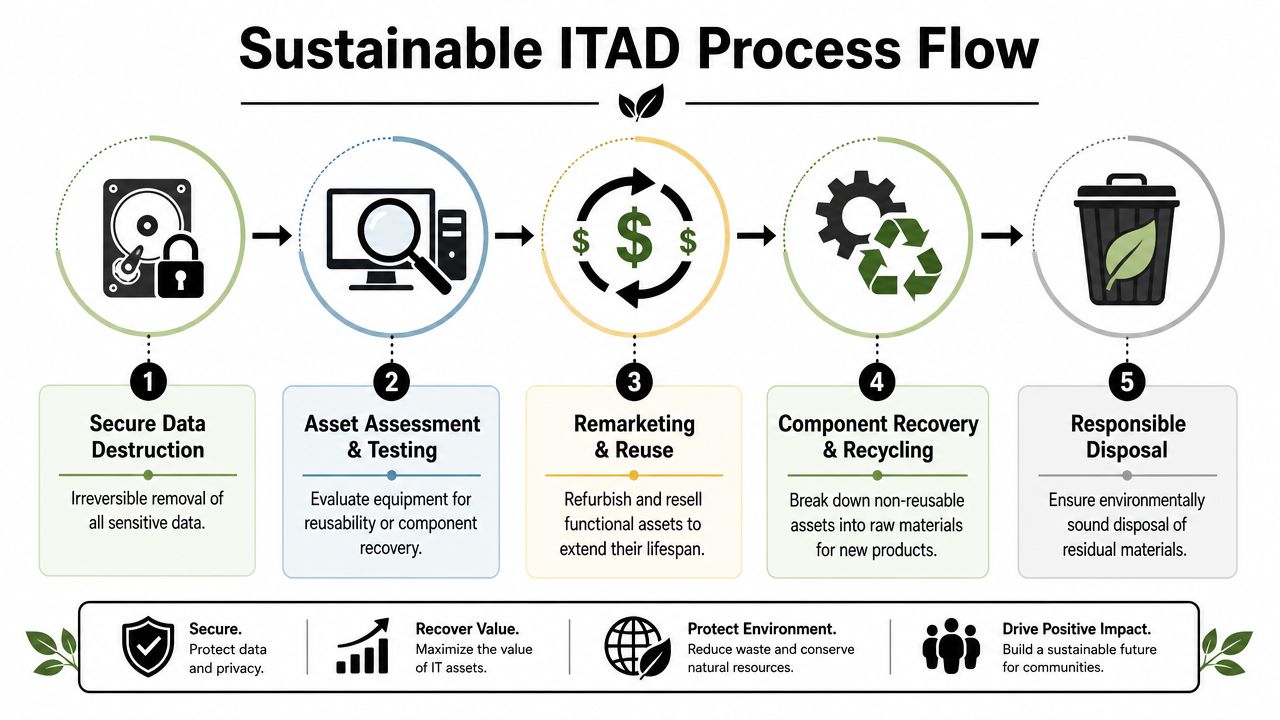
A disposal program that only destroys hardware leaves money and useful life on the table. A stronger model separates what can still serve a business purpose from what should be broken down into responsible recycling streams.
Effective ITAD follows a dual-disposition model. Assets with residual value are refurbished for remarketing to offset costs, while non-reusable units go to certified recycling. That structure supports both recovery and documented environmental handling, as described in Astralis Tech's discussion of ITAD and sustainability outcomes.
Where value recovery actually comes from
Remarketing isn't guesswork. It comes from identifying equipment with enough life left to justify testing, wiping, grading, and resale. Newer business laptops, enterprise desktops, some servers, and selected networking hardware are common candidates. The key aspect is that value recovery only works if data destruction is completed first and documented correctly.
Assets that usually fit reuse workflows include:
- Business-class laptops coming out of a refresh cycle
- Desktop fleets with consistent models and manageable wear
- Servers and networking gear with active secondary market demand
- Component lots that can be tested and harvested responsibly
For organizations reviewing Georgia asset recovery options, the useful KPI set is practical rather than flashy: which assets were remarketed, which were recycled, which drives were sanitized, which were shredded, and whether the chain-of-custody file is complete for each lot.
What sustainable recycling should look like
Not every asset belongs in resale. Damaged systems, obsolete hardware, or equipment with failed media often belong in recycling. But “recycling” should mean material segregation, hazardous-waste handling where required, and records that show where equipment went.
The sustainability claim only holds up if the downstream process is auditable.
That's why uncertified downstream channels create two problems at once. They weaken the environmental story, and they weaken your data security posture because you lose visibility into what happened after pickup.
The Final Step A Defensible Audit Trail
A Suwanee company finishes a laptop refresh, hands the retired devices to a vendor, and files the certificate. Six months later, legal, compliance, or internal audit asks a simple question: can you prove what happened to each asset, who handled it, and how the data was removed? If the answer depends on a summary PDF and a spreadsheet that does not match, the process is exposed.
A defensible ITAD record ties each asset from release approval through final disposition. That means NIST 800-88 aligned sanitization records, verified results, custody logs, and end-state reporting that reconcile at the serial level. For organizations subject to the FTC Disposal Rule, HIPAA, or strict internal security standards, that reconciliation is what turns disposal activity into evidence.
What the file should contain
The documentation package should connect the same asset across every handoff and every processing step:
- Original inventory records showing which assets were approved for disposition
- Internal release authorization that confirms the business owner approved removal from service
- Pickup and custody records showing dates, locations, handlers, and container or seal details where used
- Sanitization or destruction logs tied to specific serial numbers or asset tags
- Verification records showing whether the wipe passed, failed, or required physical destruction
- Disposition reporting showing remarketing, recycling, parts harvest, or destruction by asset
- Final certificates that match the asset list instead of reporting only total quantities
A generic certificate is not enough. If the provider cannot show asset-level detail, exception handling, and verification results, your team still has a control gap. For internal teams reviewing vendor records, this destruction certificate template shows the fields that should appear before you sign off on the process.
Why auditors care about reconciliation
Auditors do not stop at the certificate. They test whether the records agree.
They want to know whether the laptop listed in the release file is the same laptop collected at pickup, processed under the approved data destruction method, and reported in the final disposition record. If one system uses serial numbers, another uses internal asset tags, and the certificate lists only quantities, your staff will have to rebuild the chain after the fact. That is slow, expensive, and avoidable.
A practical review usually comes down to four questions:
| Audit question | Evidence that should exist |
|---|---|
| Was the asset authorized for disposal? | Inventory record and internal release approval |
| Who had custody during movement? | Pickup log, handoff record, and transport or seal documentation |
| How was data handled? | Sanitization verification record or physical destruction log |
| What was the final outcome? | Asset-level certificate and disposition report tied to the same device |
The difference between paperwork and proof
Paperwork records that an event was supposed to happen. Proof shows that it did happen, to the correct asset, under the correct controls, with records that match across systems.
That distinction matters in real audits. A failed wipe should appear as a failed wipe, followed by escalation to shred or crush, with the final destruction event logged against the same serial number. Missing exceptions are one of the first weaknesses I look for when reviewing an ITAD file, because they usually show where process discipline broke down.
For Suwanee organizations handling patient data, consumer records, financial files, or regulated employee information, the cleanest approach is to require documentation standards before the pickup is scheduled. Set the asset identifiers, define the required custody records, confirm how failed media will be documented, and require final reporting that maps back to the original release list. That is how disposal holds up under audit.
Partner with Beyond Surplus for Your Suwanee ITAD Needs
Suwanee IT asset disposal works best when security, logistics, value recovery, and documentation are handled as one controlled workflow. That means planning the inventory before pickup, matching destruction methods to risk, protecting custody during transit, and closing the process with records that stand up to audit. Beyond Surplus provides business-focused ITAD, electronics recycling, secure data destruction, pickup coordination, and reporting that supports that model for organizations managing end-of-life technology in Georgia and beyond.
Contact Beyond Surplus for certified electronics recycling and secure IT asset disposal.


