

A storage room full of retired laptops. Network switches pulled during a refresh. A row of de-racked servers waiting for facilities to reclaim floor space. That's usually when Georgia IT teams realize bulk disposal isn't a junk-hauling job. It's a chain-of-custody project with compliance, data security, logistics, and cost implications tied to every asset.
For commercial organizations, bulk IT equipment disposal in Georgia usually means one of three things. An office cleanout with mixed user devices. A department-wide refresh with pallets of standardized equipment. Or a data center decommissioning that requires coordinated removal, documentation, and downstream processing. Each scenario needs a different plan, and the wrong assumptions create avoidable risk.
The practical goal is simple. Remove equipment without exposing data, breaking internal controls, or losing recoverable value. The process that gets you there is not simple, but it is manageable when you know what to expect.
Navigating Bulk IT Disposal in Georgia for Your Business
Bulk disposal starts long before a truck arrives. The first decision is scope. Are you clearing out desktops and monitors from an office floor, or are you retiring racks, storage arrays, and networking gear from a server room? Both are “bulk,” but the labor, packaging, access needs, and documentation requirements are different.
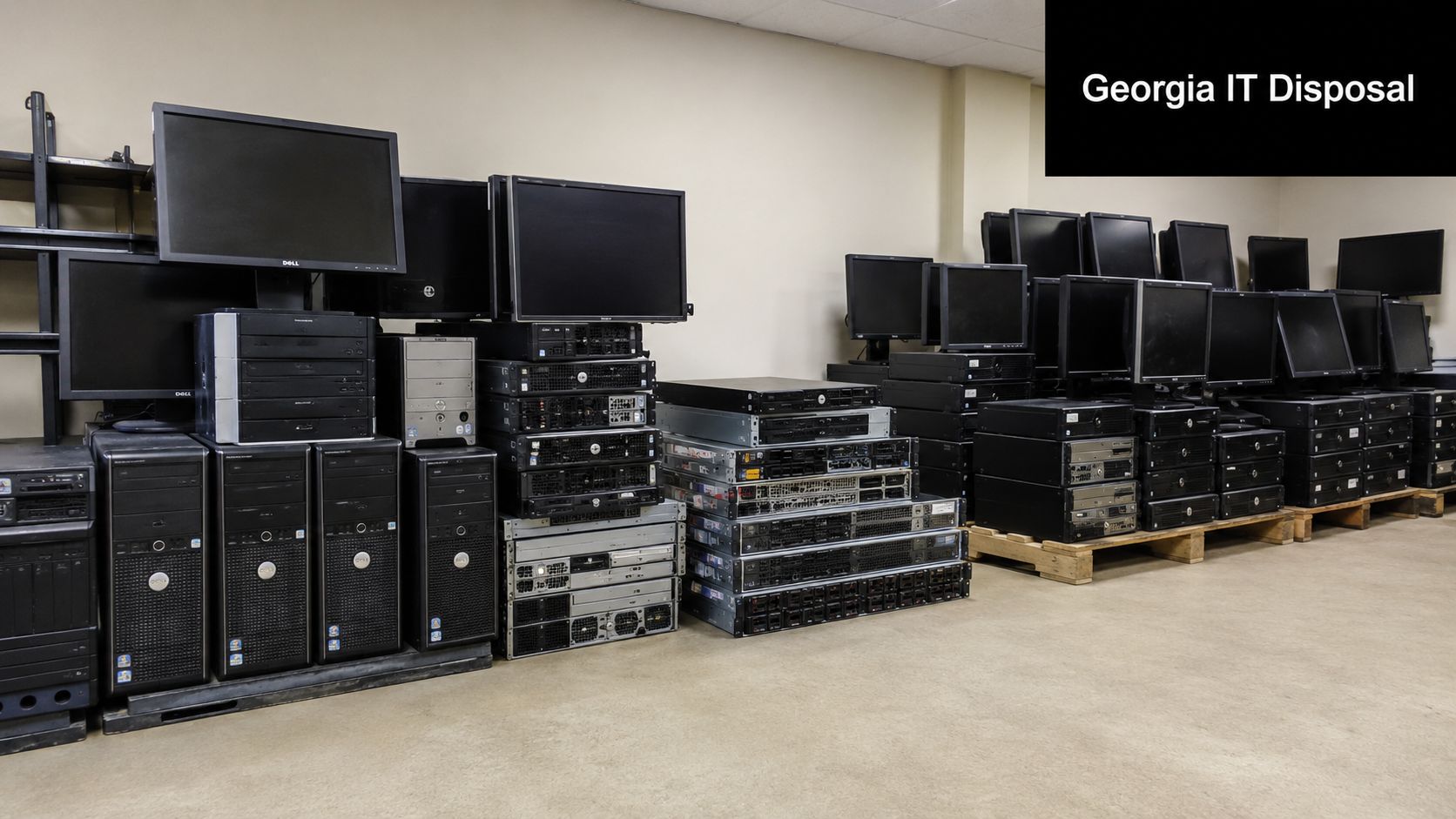
What bulk usually means in practice
For an IT manager, bulk disposal often falls into these operating buckets:
- Office refresh loads: Laptops, docks, monitors, printers, phones, and accessories staged by department or floor.
- Warehouse or storeroom clear-outs: Mixed legacy equipment, often with missing power supplies, unknown asset status, and inconsistent labeling.
- Data center work: Servers, rails, PDUs, storage, cabling, and removed components that may need de-installation before transport.
- Multi-site pickups: Equipment consolidated from branch offices, clinics, campuses, or regional facilities.
The mistake I see most often is treating all four as the same project. They aren't. A palletized office load can move quickly if the inventory is organized. A data center decommissioning can stall if access windows, badge requirements, and rack-level responsibilities aren't defined before pickup day.
Practical rule: Define the asset mix and the physical environment first. Vendor coordination gets easier once you know whether the job is a loading-dock pickup, an inside removal, or a de-installation.
What works before collection
A clean project plan usually includes:
- Asset grouping: Separate data-bearing devices from peripherals.
- Basic inventorying: Record what's leaving and where it came from.
- Staging controls: Keep retired equipment in a limited-access area.
- Exit planning: Confirm elevators, loading docks, after-hours entry, and any building COI requirements.
What doesn't work is a last-minute “take everything” request with no asset list, no access details, and no internal owner for signoff. That creates confusion over what was collected, what should have been sanitized, and what still had resale potential.
Understanding Georgia's Compliance and Disposal Rules
Georgia does not treat retired electronic media like ordinary trash. The state's handling of surplus electronic media has been standardized for years through policy SS-08-034, which establishes a statewide standard for disposition and signals that electronic disposal is a regulated process, not a casual cleanup task (Georgia Department of Administrative Services policy SS-08-034).
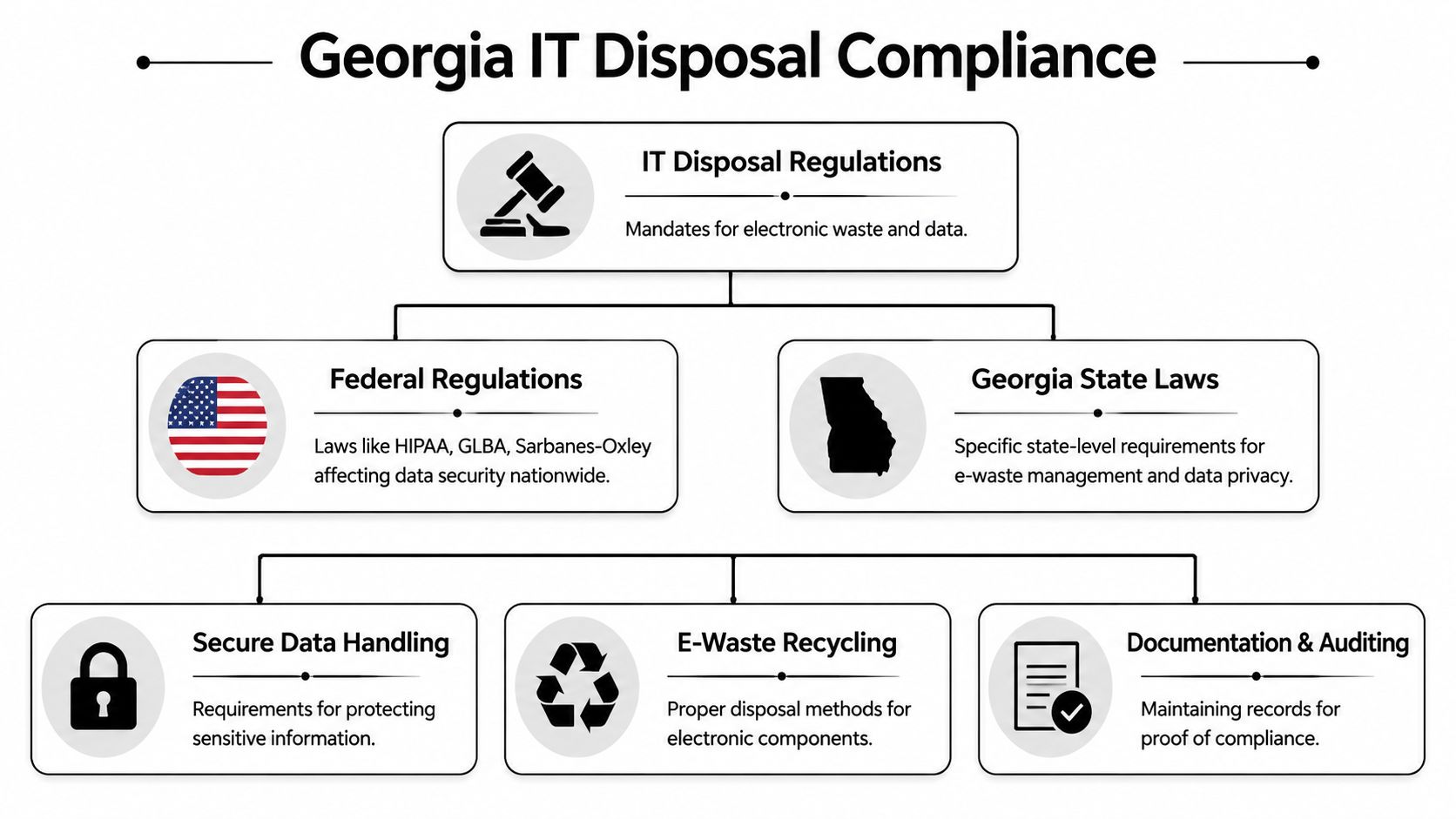
That matters even if you're not a state agency. The policy reflects how organizations in Georgia should think about retired computers, phones, tablets, servers, drives, and other media-bearing equipment. Once data is involved, disposal becomes a controlled business process. It needs custody records, approved handling, and proof that the asset moved through the right path.
The compliance issue isn't just recycling
Many internal teams focus first on environmental disposal. That's necessary, but it's only one part of the risk picture. The larger exposure is usually information security and the ability to prove proper handling after the fact.
A strong disposal record should answer basic audit questions:
| Question | What your records should show |
|---|---|
| What assets left the site | Inventory, serials if tracked, and pickup records |
| Who handled them | Named provider and custody documentation |
| What happened to the data | Sanitization or destruction method by asset class |
| What happened to the equipment | Reuse, recycling, or destruction path |
| When liability shifted | Pickup confirmation and final certificates |
Why federal rules still matter
State handling standards are only part of the picture. Federal obligations can apply depending on the information your business holds. The FTC Disposal Rule requires firms that collect consumer report information to dispose of it properly by taking reasonable measures to protect against unauthorized access. That means “we recycled it” is not enough if you can't show how the data risk was addressed.
A recycling receipt and a data destruction record are not the same document, and they should never be treated as interchangeable.
For Georgia businesses, the practical takeaway is that your disposal partner should support audit readiness, not just removal. If your team needs a broader state-specific operational overview, this Georgia ITAD guide for business equipment disposal is a useful reference point for process planning.
Secure Data Destruction Options for Retired IT Assets
The most important decision in any IT disposition project is what happens to the data-bearing media. That decision affects compliance posture, residual value, and the kind of documentation you'll need later.
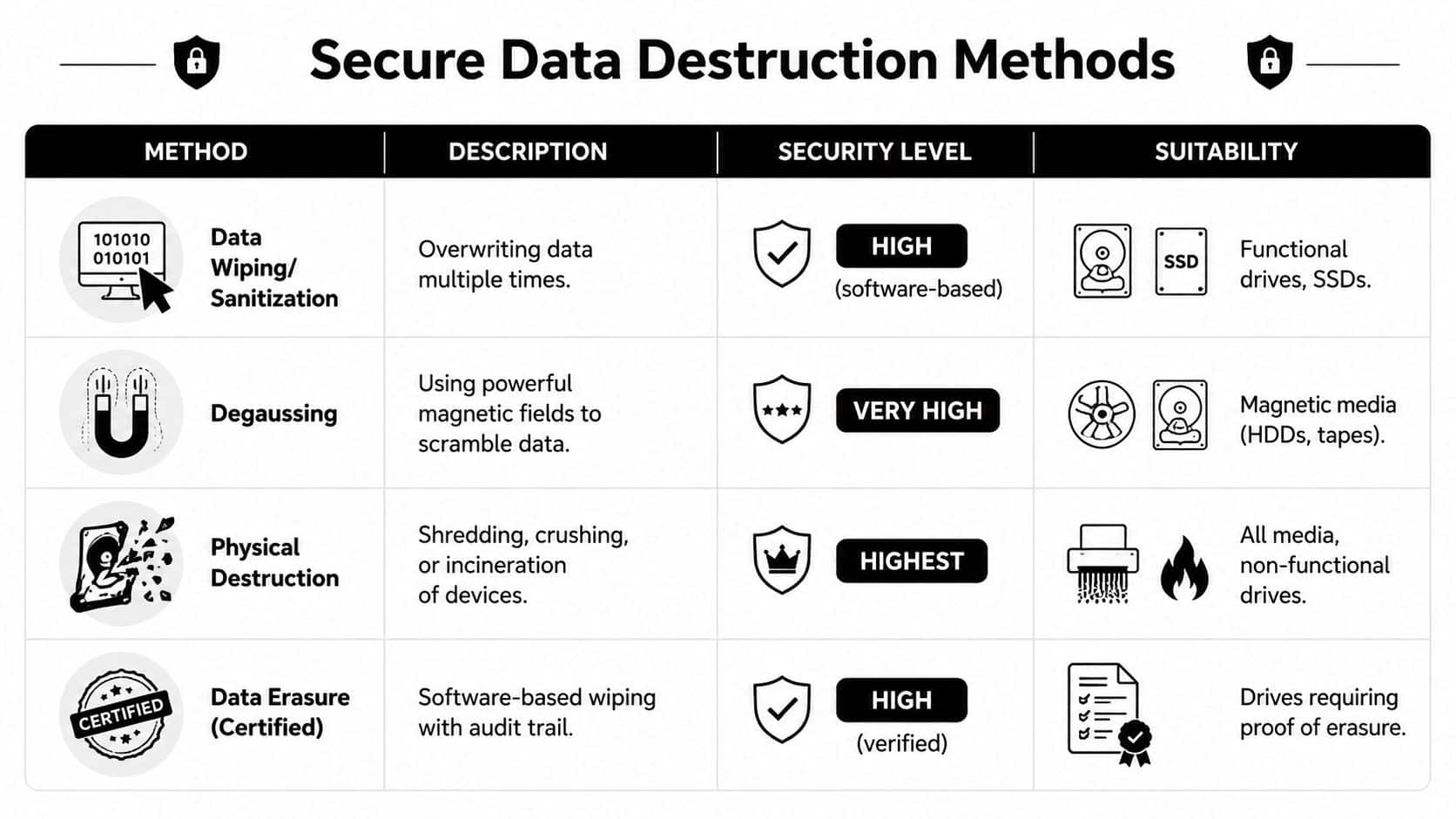
Neutral guidance from NIST says media sanitization should be selected based on the media type and intended reuse, and it distinguishes clearing, purging, and destroying instead of treating all devices the same. The FTC Disposal Rule also requires reasonable measures to protect against unauthorized access when disposing of consumer report information (FTC Disposal Rule guidance for consumer report information).
When wiping makes sense
Software-based sanitization fits assets that are still functional and suitable for reuse or resale. That usually includes late-model laptops, desktops, and some servers. If the drive can be processed correctly and the asset retains market value, wiping preserves that value.
This route works best when:
- The device is operational: Failed media often can't be reliably sanitized for reuse.
- Resale matters: Reuse depends on retaining the device rather than destroying the storage.
- You need an audit trail: Certified erasure processes should tie the result to the specific asset.
When destruction is the better choice
Physical destruction is often the cleaner option for failed drives, high-sensitivity workloads, mixed legacy media, and assets with low resale value. It also reduces ambiguity. If a drive can't be read consistently, arguing for software erasure is usually a bad trade-off.
A simple comparison helps:
| Method | Best fit | Main trade-off |
|---|---|---|
| Certified erasure | Reusable, working devices | Requires device functionality and process verification |
| Physical shredding or destruction | Failed media, high-security assets, end-of-life drives | Eliminates resale value of the storage media |
If your team can't explain why a drive was wiped instead of destroyed, or destroyed instead of wiped, your documentation is incomplete.
For organizations that need a more detailed operational view, this Georgia secure data destruction and ITAD compliance guide outlines the records and process controls buyers usually ask about.
The document that actually matters
A Certificate of Data Destruction is useful only when it is specific. “All data destroyed” is weak language if there's no tie to assets, method, date, or custody path. In practice, the certificate should line up with your inventory and your internal retirement approval. That's what makes it defensible during an audit or incident review.
Coordinating Logistics for Pickup vs Drop-Off
Logistics is where many disposal projects go sideways. The confusion usually starts with one word: bulk. For one company, bulk means a few pallets from an office refresh. For another, it means a scheduled removal team handling de-racking, elevators, and dock appointments across multiple floors.
Many providers say they handle bulk pickups, but they don't always explain eligibility clearly. One important distinction is that Beyond Surplus states that business customers can get nationwide pickup, while residential customers in Georgia use Smyrna and Atlanta drop-off or mail-in options, with no residential pickups available. For commercial buyers, that matters because pickup logistics are built around business volume, site access, and chain-of-custody controls.
Pickup is usually the right commercial model
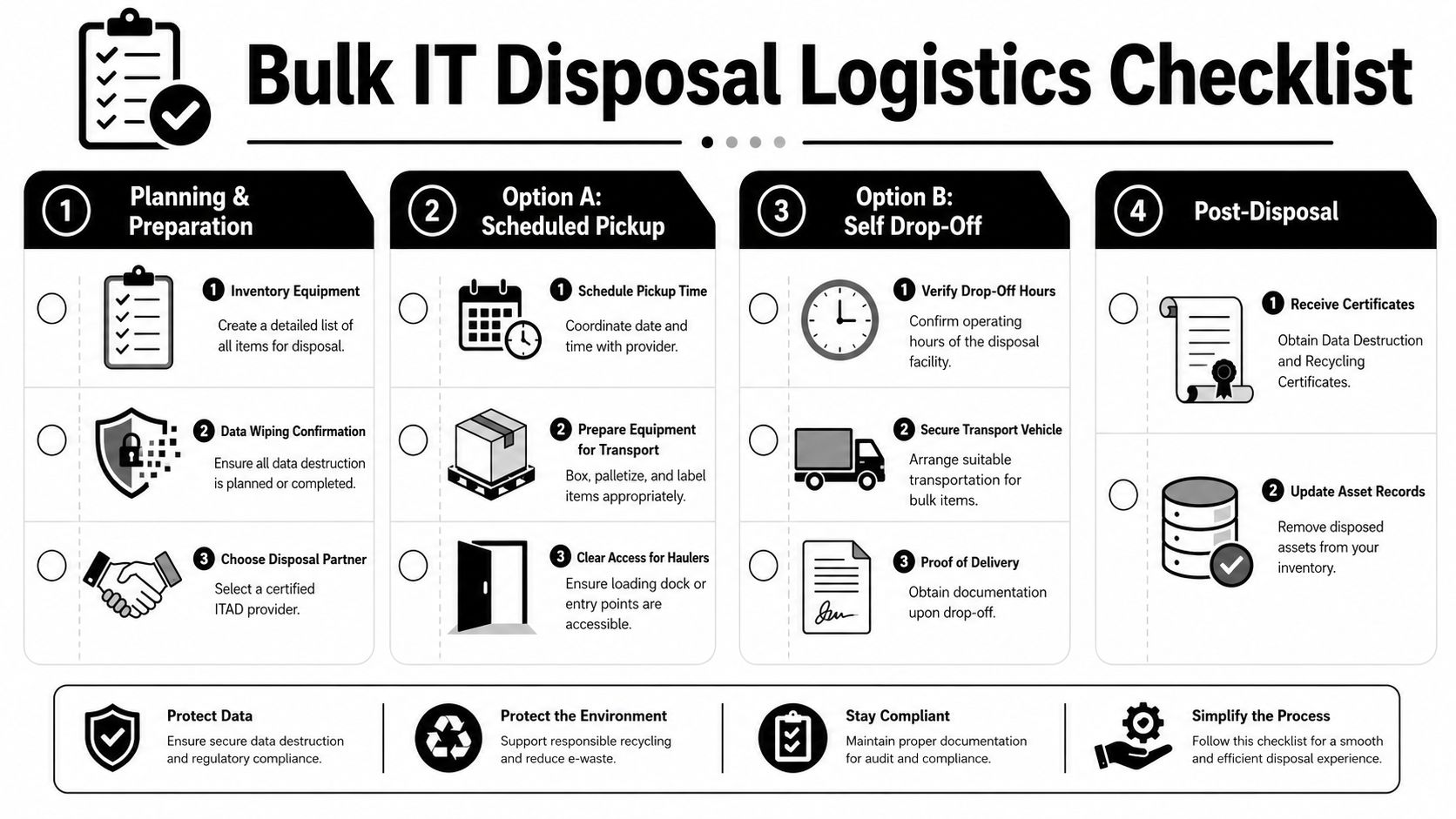
For business projects, scheduled pickup is usually better than self-transport. It reduces handling touches, centralizes custody, and makes it easier to document transfer at the point of removal.
Use pickup when you have:
- Pallet-level volume: Enough equipment that multiple trips would create internal disruption.
- Data-bearing assets: Devices that shouldn't sit in unsecured vehicles or pass through informal handling.
- Facility constraints: Loading docks, freight elevators, or after-hours access requirements.
- Decommissioning labor needs: Equipment that must be disconnected, de-racked, or removed from installed positions.
What to prepare before the truck arrives
The easiest pickups happen when IT and facilities coordinate a short checklist in advance:
- Create a pickup scope: Note asset categories, approximate load type, and whether anything needs de-installation.
- Stage by disposition type: Keep resale candidates, scrap, and media for destruction separated if possible.
- Confirm building access: Dock scheduling, COI requirements, security desk instructions, and freight routes should be settled before the appointment.
- Assign one site contact: One person should approve what leaves and sign the transfer paperwork.
- Secure loose drives and phones: Small data-bearing items are easy to miss in mixed loads.
What doesn't work is using a drop-off mindset for a commercial purge. Teams lose time re-handling equipment, and custody records get weaker when assets are moved ad hoc. If you're planning a commercial removal, this Georgia IT equipment pickup page shows the kinds of service details worth confirming before scheduling.
What Happens to Your Equipment After Collection
Once the truck leaves, the project isn't over. The quality of the downstream process determines whether your company reduced risk or only moved it off-site.
A responsible flow usually starts with intake and triage. Equipment is received, matched against transfer records, and separated by asset type and likely disposition path. A newer server may go to testing and evaluation. A damaged switch may go straight to parts recovery. A failed laptop with a compromised chassis may move directly into dismantling after the media decision is complete.
The normal downstream path
Most commercial loads pass through stages like these:
Intake and sorting
Teams separate reusable equipment from end-of-life material. In this phase, mixed loads get cleaned up. Cables, monitors, docks, desktops, and rack gear don't move through the same stream at the same speed.
Testing and reuse screening
Assets with market life left are checked for function and condition. This is the step that determines whether remarketing is realistic or whether the device belongs in recycling.
Dismantling and material recovery
Non-reusable units are broken down into component streams. Batteries, boards, metal chassis, and plastics need different downstream handling. The goal is controlled processing, not bulk dumping.
The best question to ask after pickup is not “Did you recycle it?” It's “What path did each asset class follow after intake?”
Final documentation
At the end, your records should reconcile with the original transfer. If your team wants a plain-language overview of that chain, this explanation of what happens to recycled electronics is a practical reference.
Maximizing Value Recovery and Managing Costs
Bulk disposal doesn't always sit in the budget as a pure cost center. The modern ITAD model often combines recycling with resale of reusable assets, which can offset part of the project cost. That shift is visible in Georgia, where one ITAD provider says it removes retired business computer equipment from every central business district in the state and handles not only recycling but also resale of used servers, desktops, and laptops (Georgia ITAD recycling and resale service description).
What usually has value
Value recovery tends to come from equipment that is still usable, identifiable, and worth refurbishing or remarketing. In practical terms, that often means recent business-class laptops, desktops, servers, and some networking gear.
The factors that usually help:
- Working condition: Functional devices are easier to process for remarketing.
- Complete units: Missing drives, adapters, rails, or power supplies can reduce resale options.
- Consistent lots: Standardized models from a refresh are easier to move than random mixed legacy equipment.
- Clear ownership records: Assets with clean retirement records are simpler to process.
What usually becomes a cost
Older peripherals, damaged hardware, obsolete gear, and mixed scrap loads generally move toward recycling rather than resale. That doesn't mean the project failed. It means the financial model shifts from recovery to compliant handling.
A realistic budgeting mindset looks like this:
| Asset type | Likely financial effect |
|---|---|
| Reusable business laptops and servers | May support value recovery |
| Mixed obsolete peripherals and scrap | More likely to generate recycling cost |
| Data destruction on failed media | Adds handling cost but reduces risk |
| Clean, organized staging | Reduces labor friction and surprises |
The strongest financial results usually come from planning, not optimism. If you separate reusable assets early, keep inventories clean, and decide the data method before pickup, you give the provider more options. If everything is mixed together in a storeroom with unknown status, processing costs go up and recovery usually goes down.
Partner with Beyond Surplus for Certified IT Disposal
A disposal partner should make your controls stronger, not ask you to relax them. For a Georgia business, that means the provider needs to handle more than transport. The real test is whether they can support chain-of-custody, data destruction decisions, downstream processing, and final documentation without leaving gaps for your team to explain later.
Beyond Surplus is one example of a Georgia-based option that offers business IT equipment disposal, electronics recycling, secure data destruction, logistics coordination, and certificates that support compliance workflows. Companies comparing vendors can review its Georgia ITAD service offerings alongside other providers and use the same checklist for everyone: asset tracking, pickup scope, sanitization method, audit documentation, and downstream transparency.
Choose the partner that answers operational questions directly. Ask how they handle office cleanouts versus data center removals. Ask what documents you'll receive, when you'll receive them, and how the records map back to your asset list. Ask what happens to reusable equipment versus end-of-life material.
Those answers tell you whether the project will run cleanly.
If your team is planning a Georgia office refresh, equipment liquidation, or data center decommissioning, contact Beyond Surplus to coordinate certified electronics recycling and secure IT asset disposal for your business.


