

The FTC Disposal Rule, effective June 1, 2005, requires organizations to dispose of consumer report information so it becomes unreadable and unreconstructable. The right data destruction service depends on your media type, recovery requirements, reuse plans, and ability to prove what happened to every asset.
That decision often arrives during a compressed window. A data center is being decommissioned, laptops are leaving an office, or a healthcare facility is replacing storage systems. The equipment may still contain customer records, employee information, financial data, credentials, intellectual property, or regulated records. Sending it to a recycler without a documented process isn't a disposal strategy. It's an unresolved liability.
Table of Contents
- Why Secure Data Destruction Matters More Than Ever
- Comparing Physical and Logical Destruction Methods
- Understanding NIST Standards for Media Sanitization
- On-Site Versus Off-Site Destruction Logistics
- Calculating Costs and Maximizing Asset Value
- Choosing the Right Vendor for Your Business
Why Secure Data Destruction Matters More Than Ever
A retired server can look harmless once it's disconnected from the rack. It isn't harmless if the drives still contain recoverable information. The same applies to laptops, multifunction printers, backup media, laboratory systems, and medical equipment with embedded storage. Asset retirement changes the custody of the hardware, but it doesn't erase the organization's responsibility for the data.

The legal baseline
The FTC Disposal Rule established a foundational requirement for organizations handling consumer report information. Disposal must make that information unreadable and unreconstructable, and the FTC recognizes physical destruction and electronic media destruction as reasonable approaches. Those approaches include shredding, pulverizing, burning, erasing, or using a document destruction contractor after performing due diligence.
That language has practical consequences for IT directors. A vendor's general recycling claim doesn't demonstrate that storage media was sanitized. A truck leaving your facility doesn't prove that a specific drive reached an approved destruction process. Compliance depends on the method, the authorization, the custody record, and the completion evidence.
Practical rule: Treat every storage device as a data-bearing asset until a documented sanitization result says otherwise.
From cleanup to lifecycle governance
A mature program starts before equipment reaches the loading dock. Teams identify assets, record serial numbers, classify the information risk, choose an appropriate sanitization outcome, control transport, and retain certificates that connect each device to its final disposition. The workflow should also account for reuse, resale, recycling, and product destruction where those outcomes are appropriate.
That model is more useful than a blanket “destroy everything” policy. Physical destruction may be necessary for damaged media, high-risk information, or devices that can't be safely repurposed. Functional equipment may be better served by verified erasure followed by remarketing or redeployment. The decision should reflect the data, the device, the business need, and the evidence an auditor will expect.
Secure data destruction services therefore reduce more than breach exposure. They help finance teams recover value, help facilities teams clear equipment safely, and help compliance teams show who authorized the work and how the provider completed it.
Comparing Physical and Logical Destruction Methods
The wrong method can create two different failures. A weak process may leave information exposed, while an unnecessarily destructive process can eliminate usable equipment and its recovery value. Start by separating logical sanitization, which preserves the device when successful, from physical destruction, which makes the original hardware unusable.
Software wiping is generally the first consideration for functional drives intended for reuse. A verified tool can apply a clear or purge technique, record the result, and allow the asset to move into redeployment or resale. It isn't a universal answer. Failed, damaged, inaccessible, or unsuitable media may require another route, and flash storage needs careful treatment because ordinary overwrite assumptions don't always address every storage area.
Degaussing is designed for magnetic media. It can render magnetic hard drives or tapes unusable, but it isn't a solution for SSDs, NVMe drives, USB flash drives, or other flash-based storage. Industrial shredding provides the strongest physical endpoint because the media is fragmented rather than merely erased or disabled. For a closer explanation of why formatting is not enough, consider what happens when a device's file system changes while the underlying storage remains intact.
| Method | Data Security Level | Hardware Reusability | Best For |
|---|---|---|---|
| Software erasure | Clear or Purge, depending on the technique and verification | Preserved when the process succeeds | Functional drives planned for reuse, resale, or redeployment |
| Degaussing | Purge for suitable magnetic media | Not preserved | Magnetic hard drives and tape where rapid irreversible erasure is acceptable |
| Industrial shredding | Destroy | Eliminated | Damaged media, high-risk data, and assets that must become unrecoverable |
Match the method to the media
Hard drives, SSDs, optical discs, and tapes don't respond identically to sanitization. A provider should inventory the media before quoting a job, not place every device into one generic processing category. The decision also depends on whether the organization needs a working asset back.
For physical destruction, particle size affects assurance and recovery potential. One industry explanation describes standard hard-drive shredders producing platter strips of about 1.5 to 2.0 inches, while stricter workflows may target 6 mm or 2 mm particles. Smaller output makes reconstruction more difficult, but it also removes the possibility of component reuse. See secure SSD destruction methods compared when flash storage is part of the inventory.
What works and what doesn't
Formatting, deleting files, or resetting a device isn't the same as a verified sanitization outcome. Degaussing an SSD doesn't solve the problem because the device doesn't store information magnetically. Shredding a functional drive solves the security question, but it also destroys resale value.
The practical answer is often a mixed workflow. Erase reusable assets, isolate devices that fail verification, and physically destroy media whose condition or risk profile makes reuse inappropriate. Require the provider to document that decision instead of accepting one bulk description for a mixed shipment.
Understanding NIST Standards for Media Sanitization
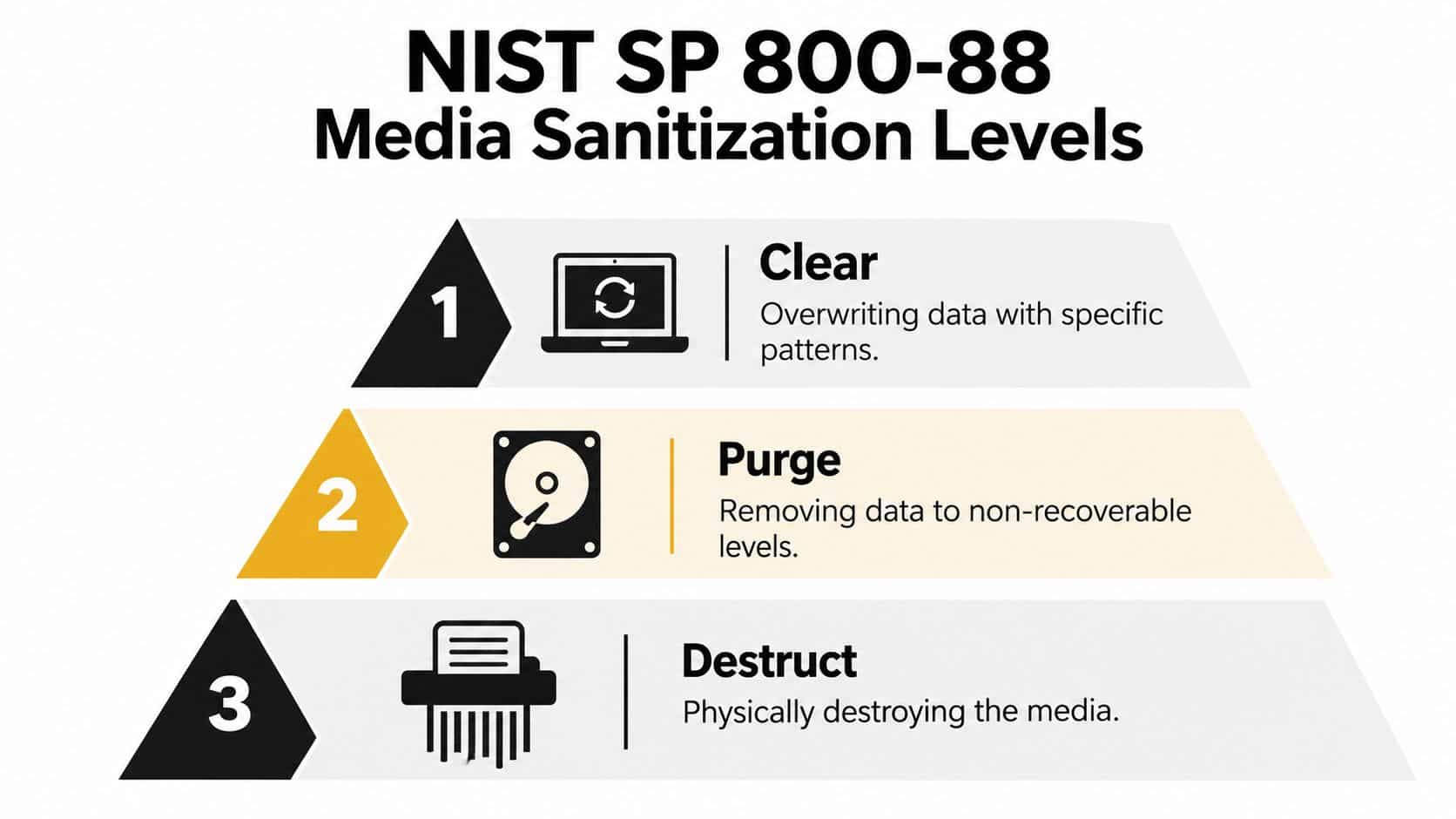
NIST SP 800-88 gives IT teams a useful vocabulary for making defensible decisions. Its three outcome levels are Clear, Purge, and Destroy. These aren't interchangeable marketing labels. Each describes a different resistance level and a different consequence for the asset.
Clear for controlled reuse
Clear uses logical techniques intended to resist simple, non-invasive recovery. NIST describes a clear pattern as at least a single pass with a fixed value such as zeros. A factory reset or overwrite may fit this outcome when the device, tool, and policy support it.
Clear can be appropriate when the organization has assessed the information risk and plans to keep the equipment within a controlled environment. It requires more than clicking a reset button. The process must identify the media, run the approved technique, and preserve evidence that the operation completed successfully.
Purge for stronger resistance
Purge applies stronger techniques intended to defeat more advanced recovery attempts. Depending on the technology, it may involve overwrite, block erase, or cryptographic erase. Firmware secure erase can be useful for reusable assets when the device supports it and the provider can verify the result.
The critical question is whether the selected technique covers the actual media architecture. A method that works for one hard-drive model may not be appropriate for a solid-state device with wear-leveling and over-provisioned areas. Your provider should explain the technique by media type, rather than label every job “NIST compliant.”
Destroy when reuse isn't acceptable
Destroy renders the media physically unusable. NIST lists methods including disintegration, incineration, pulverizing, shredding, and melting, with trained and authorized personnel responsible for the work. For certain optical media, NIST identifies pulverizing, crosscut shredding, or burning, and specifies nominal residue dimensions of 5 mm edge length and 25 mm² surface area for shredded or disintegrated material.
Use the NIST 800-88 data destruction standards explained resource to review the framework before approving a vendor's statement of work. The right level depends on risk, reuse, media condition, and policy. Destroy isn't automatically better if it eliminates a safe recovery path, and Clear isn't sufficient only because it costs less.
On-Site Versus Off-Site Destruction Logistics
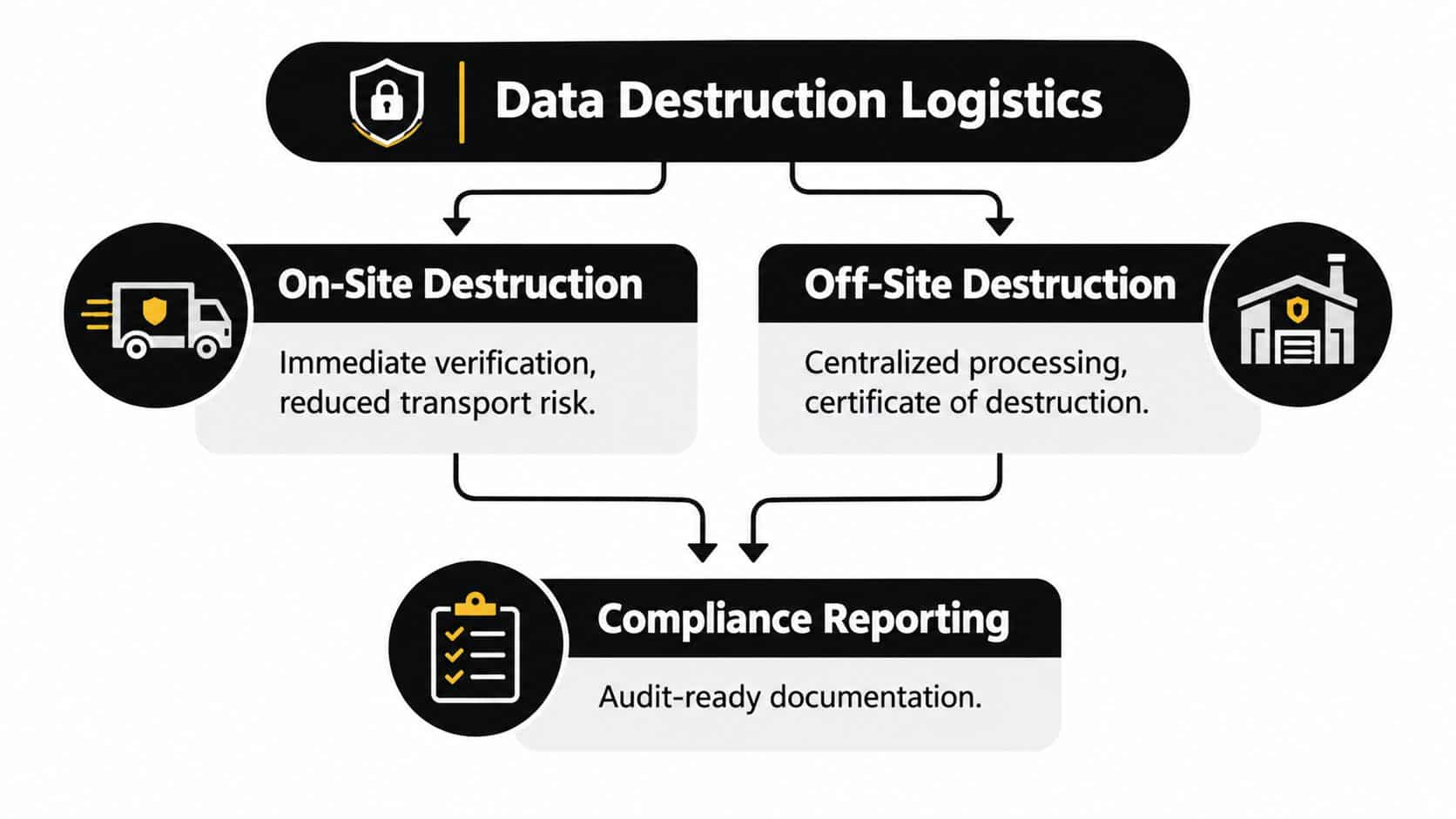
The destruction method answers what happens to the media. The service location answers how much visibility and transport control your team has before that outcome occurs. Both on-site and off-site models can work, but only when the handoffs are recorded and the approved process is clear.
When on-site service makes sense
On-site destruction gives the client direct visibility. A mobile unit can process selected drives at the facility, allowing an authorized representative to witness the event and reducing the period during which the assets are in transit. This model can suit a sensitive data center exit, a government location, or a business with strict internal custody rules.
The trade-off is operational. Mobile equipment, scheduling, site access, safety controls, and processing capacity all affect the job. On-site work may also be less efficient for a large mixed inventory that needs sorting, testing, erasure, resale evaluation, and recycling.
Why off-site processing can be efficient
Off-site destruction moves the assets to a specialized facility. That can provide centralized equipment, controlled processing areas, trained staff, and a single reporting workflow for multiple locations. It also allows a provider to separate reusable devices from media that requires destruction.
Transport is the key risk to manage. Before assets leave, the client should receive an itemized manifest, sealed-container controls where appropriate, authorized pickup records, and a defined receiving process. The provider should document every transfer through the final disposition rather than treating the first pickup signature as proof of destruction.
A certificate is useful only when it connects the completed result to the assets your organization actually released.
A practical chain-of-custody record identifies the asset, sender, carrier or handler, receiving location, processing method, authorization, and completion date. On-site versus off-site ITAD services can help teams compare the visibility benefits of mobile work with the efficiency of centralized processing.
Recent market coverage describes a move toward certified destruction, auditable custody, authorization records, destruction methods, and completion reporting, particularly as enterprises manage distributed infrastructure and more frequent equipment retirement. The operational standard is simple: if your team can't reconstruct the asset's journey, the process has a documentation gap.
Calculating Costs and Maximizing Asset Value
A destruction quote rarely reflects only the act of destroying a drive. Providers may price around volume, media type, location, sorting requirements, on-site equipment, transportation, reporting, and the requested assurance level. The cheapest line item can become expensive if it destroys equipment that could have generated recovery value or fails to produce documentation your compliance team needs.
The market itself reflects the scale of the operational problem. One forecast valued global data destruction services at $12 billion in 2025 and projected $22.84 billion by 2029, while another estimated $18.6 billion in 2025 and $42.3 billion by 2034. These are different forecasts, but both describe a large and expanding market shaped by IT turnover, regulatory demands, and storage retirement. (DataIntelo market forecast)
Build a disposition decision before requesting prices
Separate the inventory into practical groups:
- Reusable equipment: Functional laptops, servers, and drives may support secure erasure, redeployment, or resale.
- Failed media: Devices that can't be reliably accessed or verified may need physical destruction.
- High-risk assets: Sensitive media may require a purge or destroy outcome regardless of residual value.
- Specialized equipment: Medical, laboratory, networking, and data center equipment may require extra identification and handling before recycling.
This approach avoids paying to destroy everything by default. It also gives the vendor enough information to provide a meaningful proposal instead of a generic per-unit estimate.
Count recovered value as part of the equation
Secure erasure can preserve the physical asset, but only when the result is technically appropriate and fully documented. That creates a route to IT asset recovery, resale, or redeployment. Shredding and degaussing remove that route, so reserve them for media that needs those outcomes.
Environmental handling belongs in the same workflow. EPA guidance says certified electronics recyclers must maximize reuse and recycling, minimize exposure to people and the environment, manage downstream processing safely, and require data destruction for used electronics. The process for recovering value from used business IT assets should therefore connect sanitization, resale, recycling, and reporting rather than treating them as unrelated services.
Ask for a quote that shows what happens to reusable assets, what happens to destroyed media, how transportation is controlled, and which certificates you receive. That comparison is more useful than a single low processing fee.
Choosing the Right Vendor for Your Business
A vendor should be able to explain its process before it receives your equipment. If the sales conversation focuses only on pickup speed or a broad “secure recycling” promise, ask for operational detail. Your organization needs proof that the provider can identify, control, sanitize, destroy, and report on the assets under its care.

Questions that expose weak processes
Use the following questions during vendor evaluation:
- Which media types do you process? Confirm that the provider distinguishes HDDs, SSDs, NVMe devices, tapes, optical media, and embedded storage.
- Which outcome will you apply? Ask whether the job uses Clear, Purge, or Destroy, and why that outcome matches your risk policy.
- How do you track each asset? Require serial-level or otherwise traceable records that connect the device to the final result.
- What happens when erasure fails? A credible workflow should define escalation to physical destruction instead of returning an exception without notice.
- Where does processing occur? Request information about on-site controls, off-site facilities, transport, access, and downstream partners.
- What documentation will we receive? Certificates should identify the method, completion, authorized personnel, and the assets covered.
Certifications aren't a substitute for evidence
Certifications and insurance can support due diligence, but neither replaces a clear chain of custody. A provider should explain how it manages authorization, custody transfers, destruction verification, recycling, and exceptions. It should also make its environmental downstream process understandable, especially when the project includes e-waste recycling or asset recovery.
Beyond Surplus provides business IT asset disposition services that include secure data erasure, hard-drive shredding, on-site and off-site processing, electronics recycling, IT equipment disposal, product destruction, and documentation such as certificates of data destruction and recycling. Its questions to ask before hiring an ITAD company can help procurement and IT teams structure vendor due diligence.
The strongest partner is the one that makes the decision path visible. It should tell you which assets can be reused, which require destruction, how transport is controlled, and what evidence closes the record. That standard protects security while avoiding needless destruction of equipment that still has business value.
Contact Beyond Surplus for secure data destruction, certified erasure, on-site or off-site shredding, electronics recycling, and documented IT asset disposal. Visit Beyond Surplus to arrange a business pickup and discuss the right lifecycle plan for your storage media.


