Most SSD disposal advice starts with the wrong binary: wipe or shred. That framing encourages teams to choose the fastest familiar action instead of asking the operational question that matters, whether the drive is being prepared for reuse or permanently retired. A controller-level sanitization method can be defensible for a reusable, properly encrypted SSD. It isn't a substitute for destruction when the drive is damaged, unencrypted, unreliable, or leaving your custody permanently.
This Secure SSD Destruction Methods Compared guide uses that two-path model. It evaluates controller-level erase methods for reuse, physical destruction for retirement, verification, chain of custody, environmental consequences, and the evidence an auditor should receive.
| Disposal path | Appropriate objective | Preferred method | Main condition |
|---|---|---|---|
| Reuse or redeployment | Preserve a functional SSD | Verified purge or cryptographic erase | Encryption and controller behavior must be validated |
| Permanent retirement | Eliminate recoverable media | Shredding, pulverizing, or disintegration | Output must be fine enough to destroy NAND packages |
| Unknown or failed state | Remove residual-data uncertainty | Physical destruction | Controller commands can't be trusted or completed |
| Magnetic media | Sanitize magnetic storage | Degaussing may apply | It isn't an SSD method |
Table of Contents
- Why the Wipe Versus Shred Question Is the Wrong One
- NIST Sanitization Categories and Why They Matter for SSDs
- Controller-Based Erase Methods Compared
- Physical Destruction Methods Compared
- When Physical Destruction Is Overkill and When It Is Not
- Onsite Versus Offsite Workflows and Certification
- Recommended Workflows and Final Decision Checklist
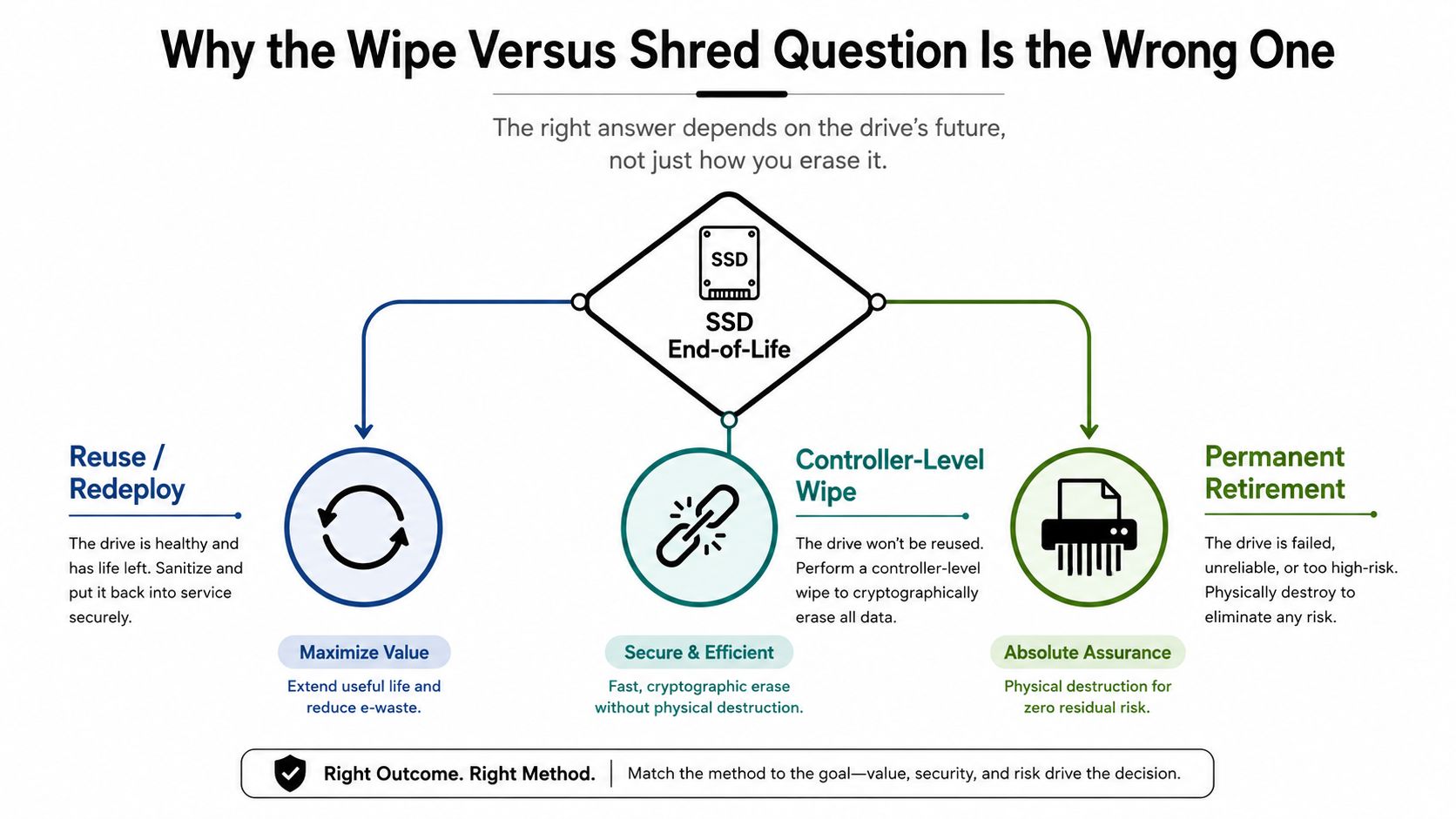
Why the Wipe Versus Shred Question Is the Wrong One
The popular advice treats wiping and shredding as competing security levels. They aren't. They solve different disposition problems.
If an SSD will be redeployed, resale value and operational continuity matter. The defensible route is controller-level sanitization, usually through a supported cryptographic erase or another firmware command that addresses the drive's storage architecture. If the SSD is permanently leaving the organization, reuse is irrelevant. Physical destruction becomes the cleaner decision because it doesn't depend on a functioning controller, trustworthy firmware, or complete access to every flash location.
NIST's 2014 SP 800-88 Rev. 1 guidance established this practical split. It recognized ATA SECURITY ERASE UNIT and similar controller-based commands when supported, while identifying shredding, disintegration, pulverizing, and incineration for media that can't be reused or must be rendered unrecoverable. The guidance also warned that ordinary overwrite isn't generally reliable for SSDs because wear leveling can remap blocks beyond the host's reach.
The two defensible paths
Sanitize for reuse when the drive is functional, its encryption state is known, the relevant firmware command is supported, and your team can verify and validate the result. A successful command alone isn't enough if the controller has a history of failures or the implementation is opaque.
Destroy for retirement when the drive is damaged, unencrypted, unstable, or outside your custody model. Physical destruction also makes sense when your policy requires a visibly destroyed device rather than a software report.
For a practical comparison of the broader decision, review hard drive shredding versus data wiping. The key takeaway is simple: don't ask which method sounds more secure. Ask which end state you need, then select the method that can prove it.
NIST Sanitization Categories and Why They Matter for SSDs
NIST's sanitization model is useful because it describes the intended outcome, not merely the tool a technician happens to use. The categories are Clear, Purge, and Destroy. They should function as decision filters, not as a ladder where every organization must choose the highest available option.
| Category | Goal | Typical technique on HDD | Works on SSD? | Verifiable evidence |
|---|---|---|---|---|
| Clear | Remove data through normal interface access | Supported overwrite or logical erase | Generally unreliable as ordinary overwrite | Tool report and verification results |
| Purge | Make recovery infeasible using stronger media-specific controls | Firmware erase or cryptographic method | Yes, when the controller method is supported and verified | Command result, validation records, and device identity |
| Destroy | Eliminate the media as a usable storage object | Shredding, pulverizing, melting, or incineration | Yes | Serialized records, destruction evidence, and particle-size attestation |
Why flash changes the analysis
An SSD's flash translation layer remaps logical addresses to physical NAND locations. Wear leveling and over-provisioning can leave old data outside the host's ordinary address space. A conventional overwrite may report completion while never reaching those remapped or inaccessible cells. That is why NIST's current SP 800-88 Rev. 2 materials favor media-specific purge methods or destruction for flash storage.
Degaussing belongs on a magnetic-media checklist, not an SSD checklist. A degausser affects magnetic domains, while SSDs store information in NAND flash cells. It won't sanitize an NVMe drive, SATA SSD, USB flash device, or other non-magnetic storage.
Practical rule: If the procedure depends on overwriting every addressable block, it isn't automatically a reliable SSD purge procedure.
Destroy removes the controller question entirely. NIST Rev. 2 lists disintegrating, incinerating, melting, pulverizing, and shredding, with pulverizing meaning mechanical reduction to fine powder or dust. For a vendor-facing explanation of the standard, use NIST 800-88 data destruction standards. Your procurement team should require the provider to identify the category, method, device population, verification process, and resulting evidence.
Controller-Based Erase Methods Compared
Controller-based erase is not one universal function. SATA and NVMe drives expose different command sets, and vendors implement encryption and sanitization behavior differently. The right command is the one the drive supports, the operator can document, and an independent process can validate.
| Method | Interface | Scope of coverage | Verification output | Known failure modes |
|---|---|---|---|---|
| ATA Secure Erase | SATA | Controller-managed user data and supported internal areas | Command status, device record, post-process validation | Frozen state, unsupported behavior, faulty controller, misleading completion |
| NVMe Sanitize | NVMe | Defined sanitize operations, including supported user-data and cryptographic variants | Sanitize status, namespace and device identifiers, validation record | Firmware defects, interrupted operation, unsupported variant, controller failure |
| Cryptographic erase | SATA or NVMe, vendor dependent | Destroys the key protecting encrypted data | Key-destruction evidence, command log, validation and asset record | Encryption wasn't active, implementation weakness, lost administrative control |
| Format NVM | NVMe | Namespace-level operation according to the selected format behavior | Device response and validation results | May not address every physical location or meet the intended purge outcome |
ATA Secure Erase
ATA SECURITY ERASE UNIT can be appropriate for supported SATA SSDs, but operators must account for frozen security states, passwords, firmware behavior, and unexpected command failures. A technician shouldn't treat a returned success code as the complete evidence package. The record needs the drive serial number, command used, result, operator, timestamp, and post-process validation.
NVMe Sanitize
NVMe Sanitize offers media-specific options that can include user-data erase and cryptographic variants. The command's name isn't proof of coverage. The technician must select the operation supported by that model and firmware, capture the completion status, and test whether the device behaves as expected afterward.
Tools such as hdparm, nvme-cli, Parted Magic, and Blancco can support operations or reporting, but tool availability doesn't remove the need for a controlled procedure. A faulty controller can fail to execute a command correctly, and a drive can become inaccessible before the organization obtains useful evidence.
For general procedural background, see how to erase a hard drive completely. The strongest workflow separates verification, did the command complete as reported, from validation, does the evidence support the intended sanitization outcome across the actual device population.
Physical Destruction Methods Compared
Physical destruction is the correct retirement path when the organization can't rely on controller cooperation. But “shredded” isn't a sufficient specification for SSDs. The process must reduce the media far enough to destroy the NAND packages, not merely bend the enclosure or split the circuit board.
NIST SP 800-88 Rev. 2 identifies multiple destroy methods. Its guidance and industry interpretations commonly use a 2 mm particle-size benchmark for SSD destruction workflows because the flash packages must be reduced sufficiently to prevent reconstruction. That requirement makes ordinary HDD shredders a poor default for mixed fleets. A machine that creates large metal pieces may leave SSD memory packages intact.
| Method | Typical particle size | Throughput | Resale value | Best for |
|---|---|---|---|---|
| Shredding | 2 mm-class output when specified for SSDs | Depends on equipment and service model | None | Retired SSDs requiring documented destruction |
| Disintegration | Fine reduction matched to the required outcome | Depends on industrial system | None | High-assurance, high-volume retirement |
| Pulverizing | Fine powder or dust through crushing or grinding | Depends on equipment | None | Media requiring very substantial physical reduction |
| Incineration | Ash or thermally destroyed material | Depends on licensed facility capacity | None | Exceptional security or material-destruction requirements |
Match the equipment to the media
Rotary shredders, granulators, and hammer mills can produce different output profiles. Purpose-built SSD destruction equipment is preferable when the contract specifies a particle-size result. A portable crusher may deform a drive, but board flexure can leave NAND packages substantially intact. Crushing therefore needs careful scrutiny if the buyer's requirement is particle reduction rather than simple inoperability.
Incineration is the most aggressive option and carries the greatest recycling consequence. It destroys resale value completely and requires an appropriately licensed facility with emissions controls. It should be reserved for a documented need, not selected because it sounds more secure.
Degaussing has no role in SSD destruction. For service specifications, secure hard drive shredding should be distinguished from SSD shredding, with the output requirement, chain of custody, and certificate scope written into the statement of work.
When Physical Destruction Is Overkill and When It Is Not
Physical destruction is often unnecessary for a properly managed, self-encrypting enterprise SSD that is headed for legitimate reuse. If encryption was enabled from the beginning and the encryption key can be destroyed through a supported, validated process, cryptographic erasure can provide a defensible purge path while preserving the drive as an asset.
That decision fails when the organization assumes encryption without proving it. A drive may support hardware encryption without having used it, or the team may lack evidence that the key was destroyed. A completed erase command also doesn't settle whether the controller behaved correctly.
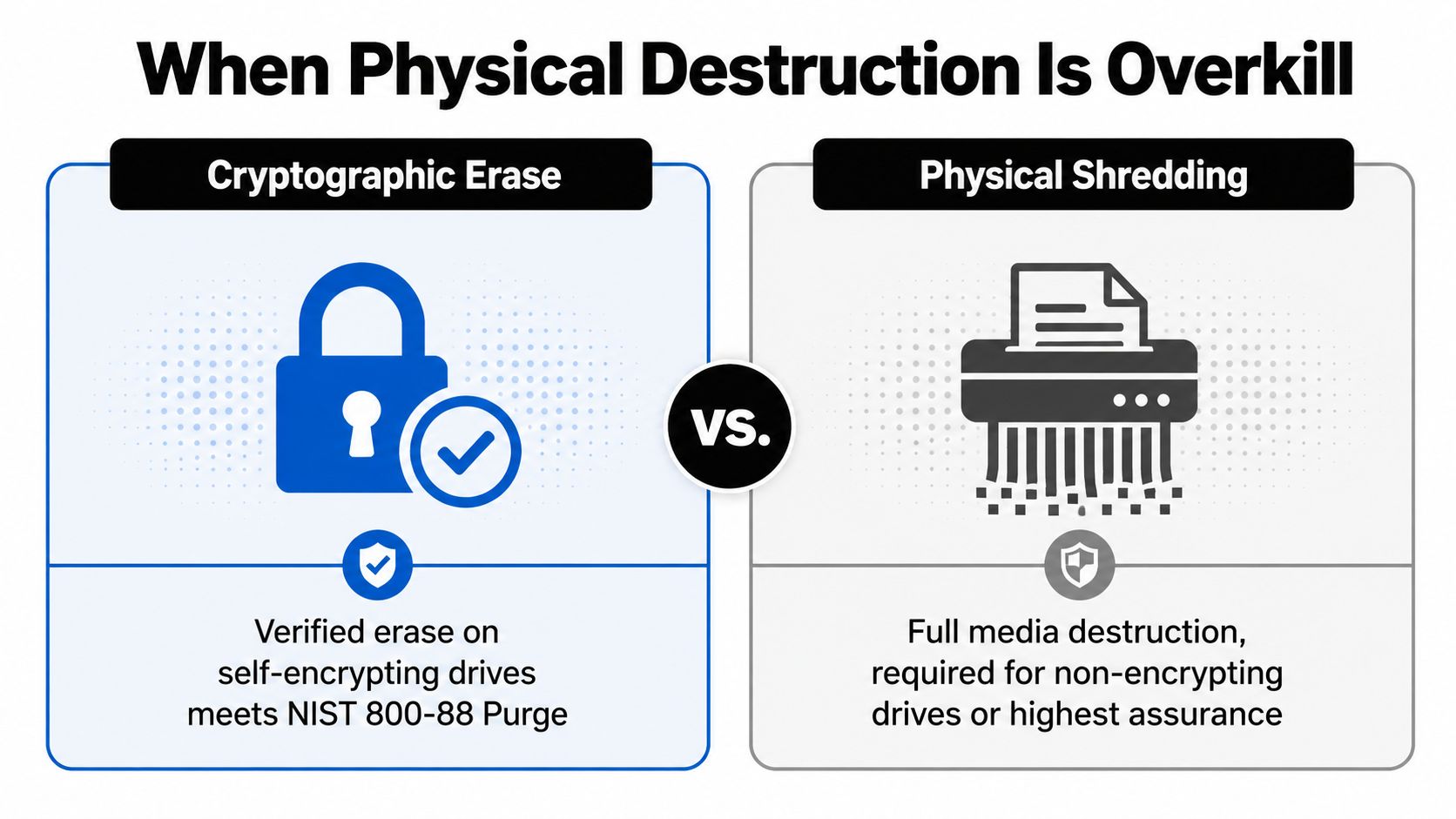
Use destruction when uncertainty is material
Physical destruction is the only sensible answer for:
- Failed or unstable drives: A controller that hangs, disappears, or reports inconsistent status can't provide dependable purge evidence.
- Unencrypted media: Without encryption active from the start, cryptographic erasure doesn't invalidate the underlying data.
- Unknown consumer SSDs: A non-SED drive with unclear firmware behavior shouldn't be treated like a validated enterprise device.
- Strict policy environments: Certain classified or tightly controlled workloads may require demonstrable physical destruction.
- Uncontrolled downstream custody: If the organization can't guarantee who handles the drive after collection, destroy it before that handoff.
The trade-off is real. Shredding eliminates resale value and increases material-processing burden, while verified cryptographic erasure supports reuse and downstream recycling. Don't destroy an encrypted drive solely because shredding is easier to explain. Destroy it when the evidence, device condition, policy, or custody model makes reuse indefensible.
Onsite Versus Offsite Workflows and Certification
Onsite destruction offers direct visibility. A mobile team collects the drives, processes them at the organization's facility, and provides immediate evidence. Authorized staff can witness the operation, and the organization avoids transporting intact data-bearing media beyond its own site.
Offsite processing offers a different operational advantage. A specialized facility can use controlled intake, serialized scanning, repeatable equipment, and established downstream recycling channels. That model introduces a custody transition, so the transport process must be as disciplined as the destruction process.
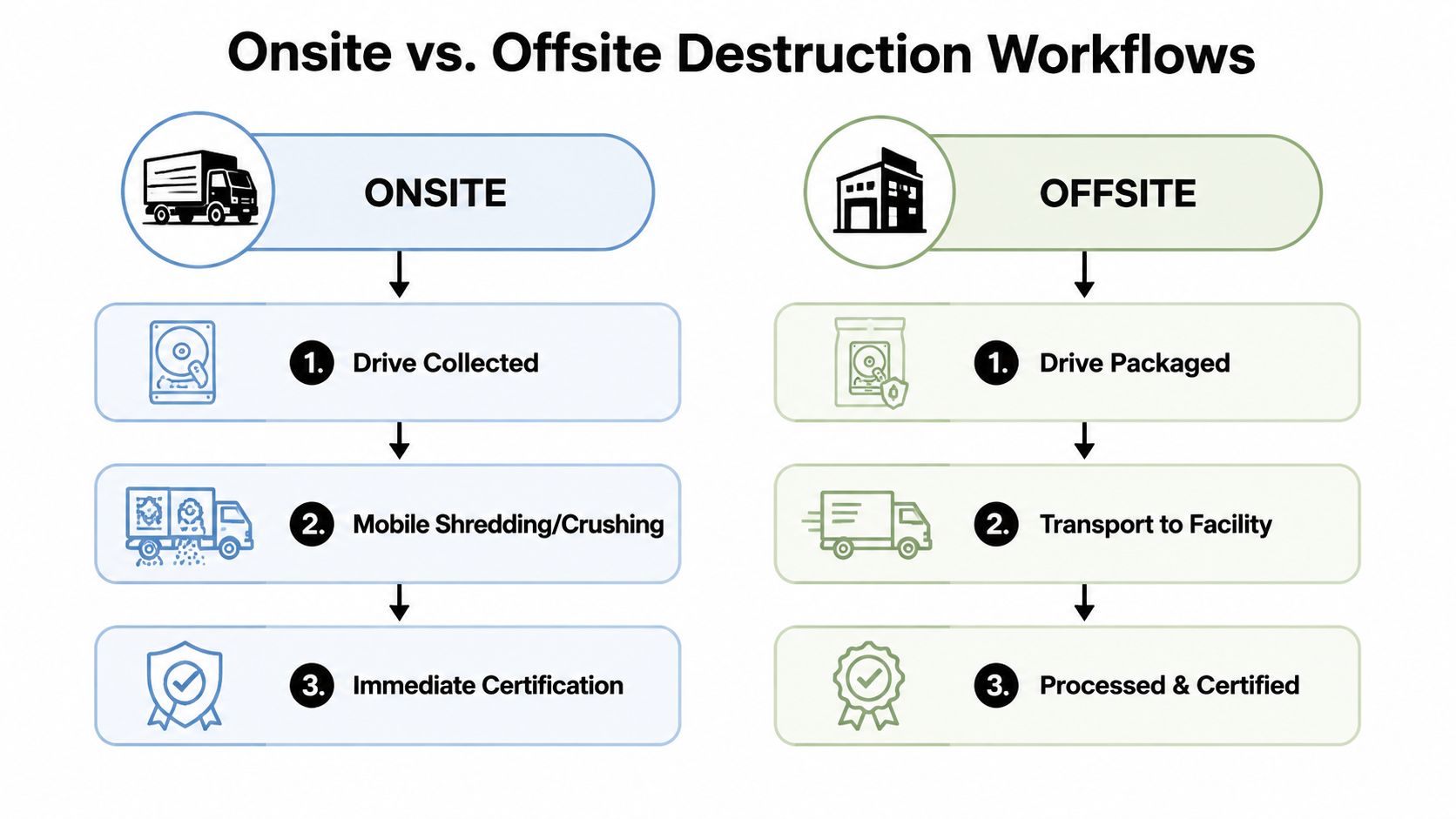
Specify the proof before the pickup
Require documentation that lets your team reconcile the physical inventory to the final disposition:
- Serialized certificates: Each certificate should identify the manufacturer, model, serial number, method, date, and responsible technician.
- NIST method citation: The record should state whether the drive was sanitized through purge or physically destroyed.
- Particle-size evidence: For SSD shredding, require an attestation that the contracted output specification was met.
- Custody records: Use sealed containers, controlled handoffs, transport records, and receiving confirmation.
- Witness evidence: Capture signatures or video where your policy requires direct observation.
- Recycling manifests: Confirm where the resulting material went and which downstream processor handled it.
Vendor badges deserve verification, not automatic trust. R2v3, NAID AAA, e-Stewards, and ISO 27001 can be relevant indicators, but the scope of certification and the audited practice matter more than a logo on a webpage. Onsite versus offsite ITAD services offers a useful operational comparison, but your contract should still define the evidence you need.
A strong buyer samples records and periodically re-audits the provider's actual process. Annual paperwork alone won't reveal whether technicians scan every serial number or whether an SSD shredder produces the contracted output.
Recommended Workflows and Final Decision Checklist
Different organizations should not use the same SSD disposition rule.
Smaller business fleets with encrypted SATA SSDs should audit encryption first, separate reusable drives from retirement candidates, and use verified cryptographic erasure for assets intended for redeployment. Drives that fail the procedure should move directly to physical destruction.
Mid-market ITAD programs handling mixed SATA and NVMe fleets need a model-based decision matrix. Use the supported firmware sanitization path for validated reusable drives, then route unknown, failed, damaged, or non-encrypting media to an SSD destruction process that specifies particle reduction.
Regulated enterprises handling healthcare, payment, government, or contract-controlled information should align the method with their written policy and regulator-facing evidence requirements. If the policy calls for destroy-level treatment, send retired or uncertain SSDs to shredding or pulverization rather than arguing that a convenient erase command should count.
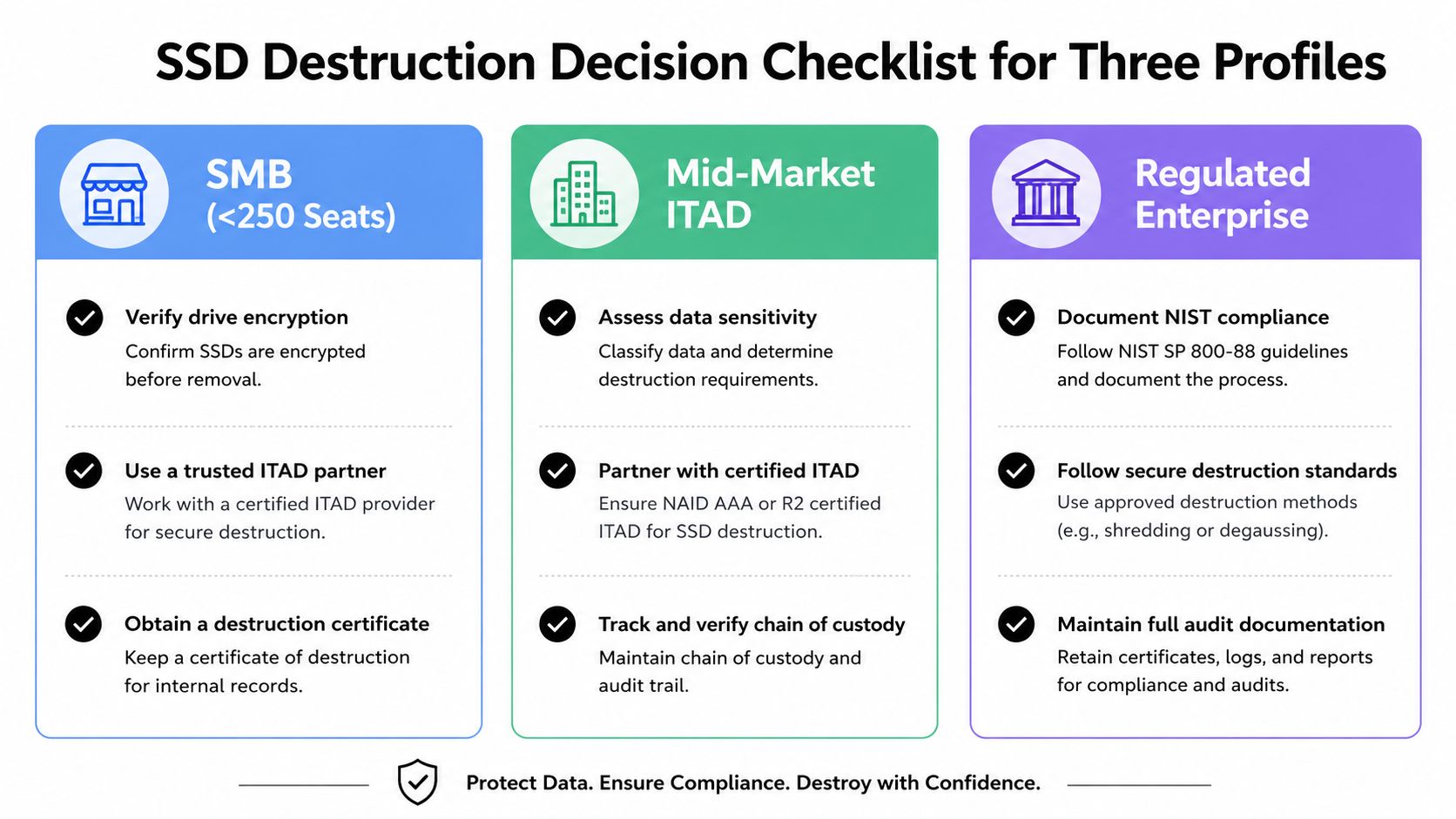
The procurement checklist
Before authorizing work, require written answers to these questions:
- Encryption audit: Was encryption enabled, and can the provider prove the state?
- Firmware method: Which ATA, NVMe, or vendor command will be used?
- Verification: What shows that the command completed?
- Validation: How will the provider confirm that the intended outcome was achieved?
- Certificate scope: Will every serial number appear on the destruction or sanitization record?
- Custody evidence: How are collection, transport, intake, and processing controlled?
- Downstream certification: Is the recycler operating under R2v3 or e-Stewards controls where required?
- Witness record: Will staff signatures or video support the destruction event?
- ESG capture: Will reuse, recycling, and material outcomes be reported?
- Evidence retention: How long will the organization retain regulator-defensible records?
Beyond Surplus provides business IT asset disposition, electronics recycling, secure wiping, onsite or offsite shredding, product destruction, and certificates of data destruction. Its service model can support organizations that need to separate reuse-bound SSDs from permanently retired media while maintaining chain-of-custody records.
Contact Beyond Surplus to review your SSD inventory, encryption state, compliance requirements, and preferred onsite or offsite workflow. Ask for a method-specific disposition plan that identifies which drives can be sanitized for reuse and which should be physically destroyed with documented evidence.