The average U.S. data breach cost reached a record $10.22 million, after rising 9%, according to IBM's 2025 Cost of a Data Breach Report. For Atlanta law firms, that figure changes how retired laptops, servers, phones, copiers, and networked printers should be viewed. They aren't ordinary waste. They're potential repositories of personally identifiable information, financial records, medical information, litigation strategy, and attorney-client communications.
Secure law firm electronics recycling in Atlanta should therefore operate as a documented risk-control process. The firm needs to know what left its custody, who handled it, which sanitization method was used, and whether the final records reconcile with the internal asset register. A vendor certificate matters, but it doesn't prove completeness by itself.
Table of Contents
- The True Cost of Improper IT Asset Disposal
- Identifying Hidden Data Risks in Overlooked Office Equipment
- Choosing the Right Media Sanitization Method
- Maintaining Chain of Custody and Legal Hold Compliance
- Vetting Atlanta Electronics Recycling and ITAD Vendors
- Building an Audit-Ready Documentation and Verification Trail
The True Cost of Improper IT Asset Disposal
Improper disposal can expose client information long after an employee deletes files or returns leased equipment. Retired devices may retain cached documents, browser artifacts, credentials, encryption keys, virtual-machine images, or remnants outside ordinary user-accessible areas. A technology refresh becomes a confidentiality incident when the firm treats equipment as scrap instead of controlled information-bearing property.
The financial exposure is only one part of the problem. For a law firm, an incident involving retired equipment may require disclosure to malpractice insurers, internal risk committees, clients, or regulators. It can also complicate responses to bar-association expectations for protecting client information, particularly when the firm cannot show which assets left its custody or how their media were sanitized.
IBM's research measured an average breach lifecycle of 241 days, covering identification and containment, according to IBM's full report. A delayed discovery makes incomplete disposal records more than an administrative weakness. They can leave partners and IT directors unable to determine whether a device contained client data, who handled it, or when exposure may have occurred.
Why retired equipment remains sensitive
A device can appear empty while retaining information users never see. Copiers may preserve print jobs, scanned pleadings, fax records, or address books. Servers can contain retired virtual machines, and smartphones may retain synchronized mail, authentication tokens, or client documents. Deleting visible files does not establish that information cannot be read or reconstructed.
The data security risks of improper computer disposal become harder to control across multiple offices, leased equipment, remote workers, and active litigation holds. Every asset needs an approved disposition decision before it enters a truck or storage cage.
Practical rule: Secure recycling is not complete until the firm can connect the physical asset to a verified disposition record.
A defensible process uses a serialized manifest, documented custody transfers, media-appropriate sanitization, and final certificates identifying each device or an auditable batch. The certificate is evidence of a reported service, not proof that every asset was reconciled. The firm should compare vendor records with its asset register and investigate missing, duplicate, or unexpected serial numbers before closing the disposition.
The process includes inventory work, secure transport, verification, and record retention. Reuse can preserve value, but only after the firm confirms that the selected purge method suits the device. For a law firm, an undocumented handoff can affect client trust, insurance discussions, regulatory responses, and the ability to reconstruct events after an alleged exposure.
Identifying Hidden Data Risks in Overlooked Office Equipment
Many IT teams have a clear procedure for laptops and hard drives. The blind spot is often the equipment that sits outside the traditional endpoint inventory. Multifunction printers, copiers, scanners, smartphones, tablets, servers, and network appliances can all process or retain confidential information.
A copier may store scanned pleadings, print queues, fax records, address books, and system logs. A networked printer can retain job metadata or documents in internal storage. A scanner may hold temporary files, while a phone can preserve mail attachments, cached credentials, and authentication data after a user performs a basic reset.
Build a device-by-device inventory
Start with an asset census that extends beyond the IT department's endpoint list. Facilities, records management, office administration, litigation support, and branch offices may each control data-bearing equipment.
For every item, record:
- Device identifier: Capture the serial number, asset tag, or another auditable identifier.
- Custodial owner: Link the equipment to a department, employee, office, or lease record.
- Storage profile: Note whether it contains a hard disk, SSD, NVMe drive, removable media, embedded storage, or unknown media.
- Disposition status: Mark whether the device is under legal hold, scheduled for reuse, approved for purge, or designated for destruction.
- Collection details: Record location, collection timestamp, transporter, receiving employee, and custody transfer.
The FTC Disposal Rule guidance requires reasonable measures when disposing of consumer-report information, including destroying or erasing electronic files and media so the information cannot be read or reconstructed. That requirement applies to cached documents and embedded system logs in office equipment, not just to conventional computer drives.
Coordinate holds before collection
A factory reset isn't a litigation-hold review. Before processing, suspend automatic cloud synchronization where appropriate, identify affected custodians, and confirm that records scheduled for retention aren't being destroyed with the hardware. The legal department should approve exceptions, while IT or records personnel should document the decision.
A useful internal question is simple: Can the firm prove that every data-bearing device was identified, assigned a disposition method, and reconciled after processing? If the answer depends on a box count or a vendor's generic intake label, the process needs more control. The guidance on business copier disposal best practices is relevant because copiers deserve the same inventory discipline as laptops and servers.
Choosing the Right Media Sanitization Method
The right method depends on the media, sensitivity, condition, and intended outcome. A reusable drive may justify a verified purge. A damaged SSD with uncertain internal behavior may require destruction. Treating every device as if it were a magnetic hard disk is a technical error.
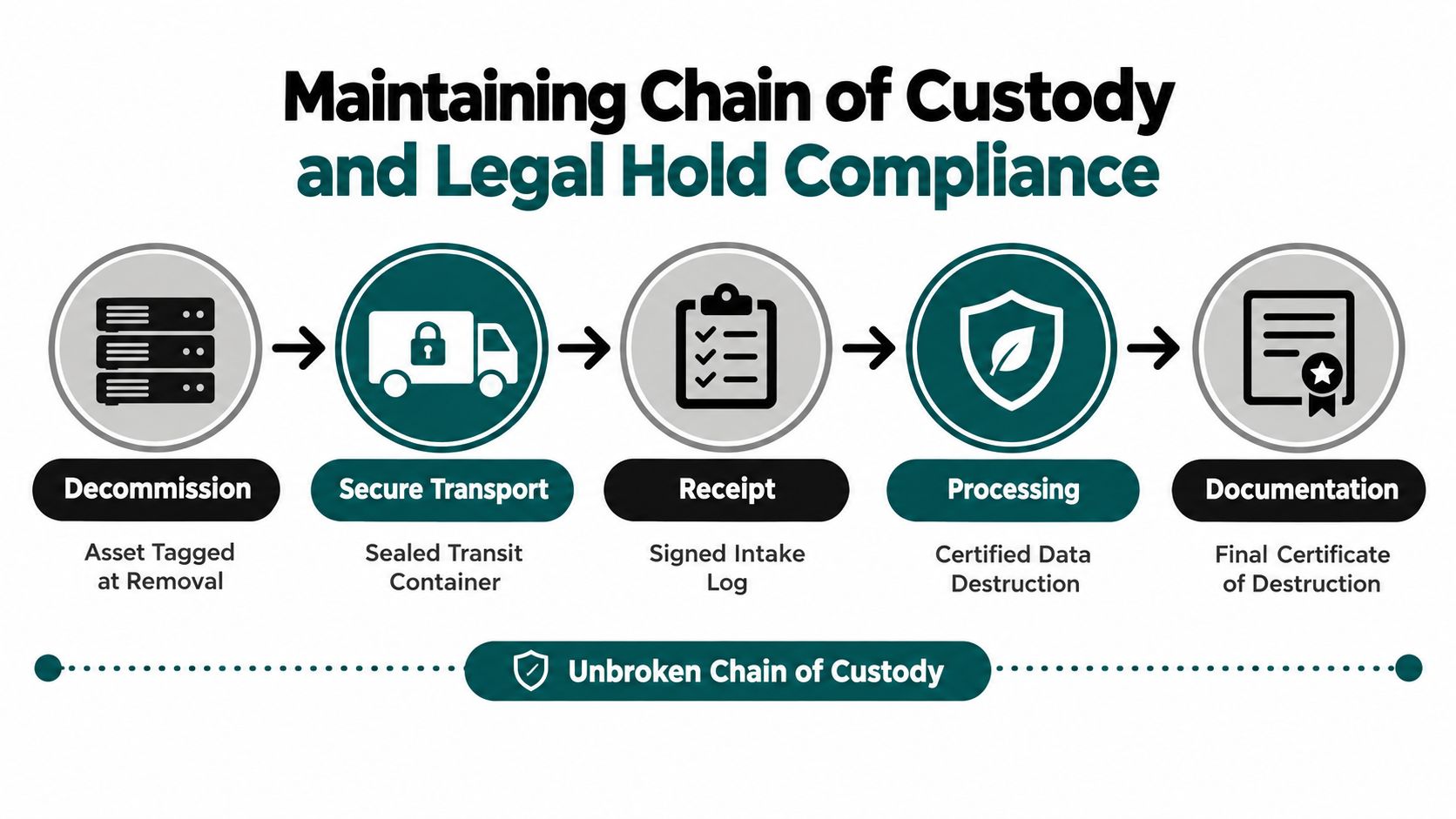
NIST SP 800-88 defines three distinct media-sanitization outcomes:
Clear
Clear uses logical techniques in user-addressable storage locations, such as supported overwrite commands or an approved factory-reset function. It protects against simple, non-invasive recovery and may be suitable when the device remains within a controlled environment and the information sensitivity permits that level of protection.
A basic file deletion or quick format isn't the same as a documented clear operation. The firm should record the tool, command or procedure, operator, verification result, and asset identifier.
Purge
Purge uses physical or logical techniques intended to make recovery infeasible using state-of-the-art laboratory methods while preserving the media for reuse. This approach can support IT asset recovery, but it requires a method that matches the technology.
Overwriting is not automatically equivalent to secure erasure on SSDs and NVMe drives. Flash translation layers, overprovisioned areas, and inaccessible blocks can prevent conventional software from reaching every location. For encrypted systems, the process should document the encryption algorithm, key strength, mode, key hierarchy, and whether the relevant media-encryption or wrapping key was sanitized.
Destroy
Destroy makes recovery infeasible using those laboratory methods and leaves the media unable to store data. Physical destruction is appropriate when verification can't be completed, the device is damaged, the media type is uncertain, or the sensitivity warrants eliminating reuse.
The trade-off is clear. Purge can preserve residual value, while destroy provides a more definitive end state but eliminates the storage device's reuse potential. Secure data destruction in Atlanta should be planned around that decision rather than selected after equipment has already left the firm.
Maintaining Chain of Custody and Legal Hold Compliance
A chain of custody begins before the recycler arrives. The firm should freeze the asset list, confirm disposition approvals, and place equipment in a controlled staging area. Sealed containers, restricted access, signed handoffs, and documented transport reduce the chance that a device disappears between decommissioning and processing.
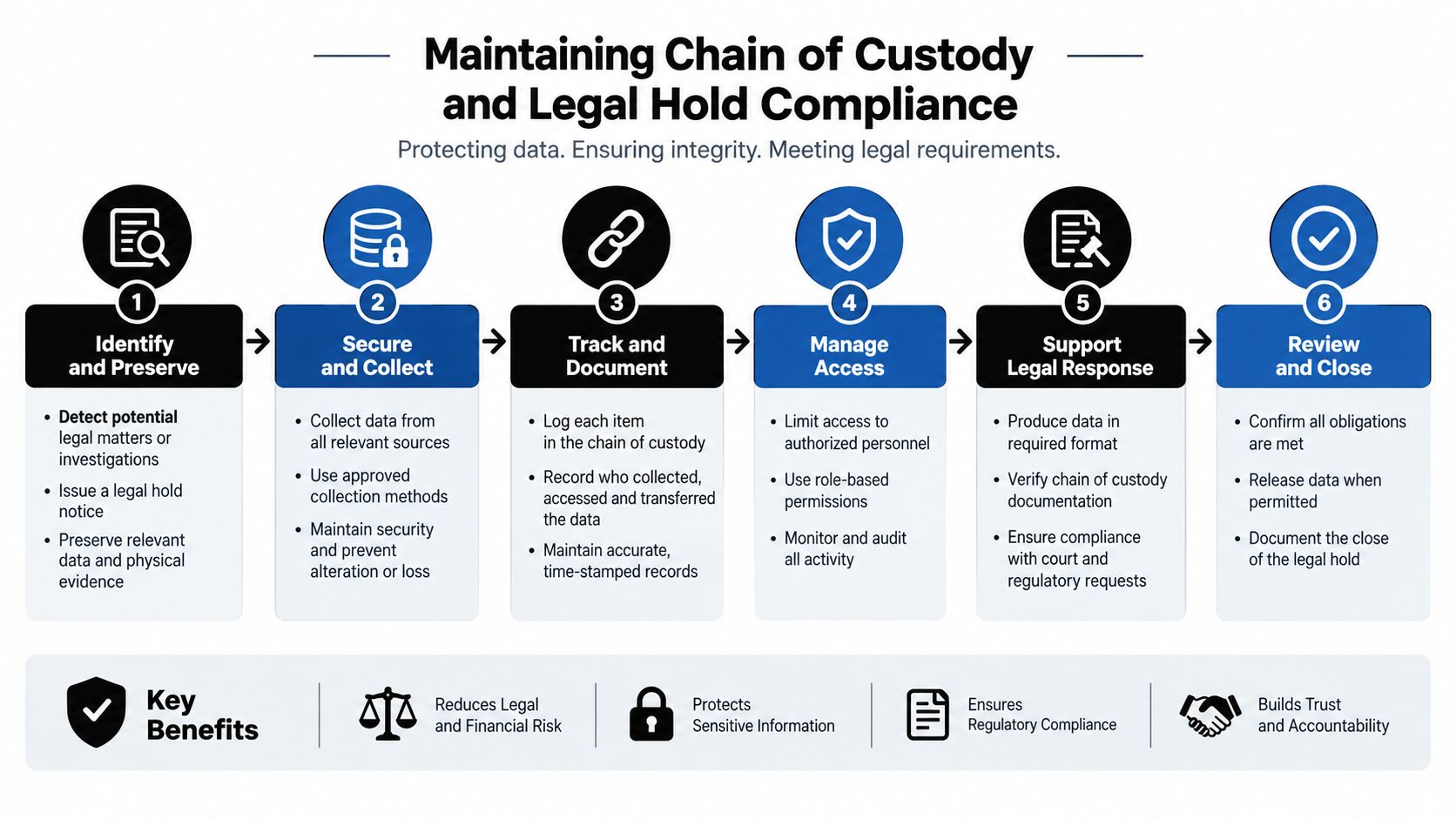
The required record should identify the device identifier, custodian, location, media type, encryption status, collection timestamp, transporter, and sanitization method. This supports 100% asset reconciliation and zero unexplained custody gaps before equipment is released, as described in the FTC's disposal guidance.
Separate legal review from processing approval
IT shouldn't make the only decision about whether equipment can be destroyed. A legal-hold check belongs in the workflow, especially when a device contains local files, removable media, or records not captured by centralized systems.
A workable approval sequence looks like this:
- Inventory: Compare endpoint, lease, branch, offboarding, and facilities records.
- Quarantine: Hold unidentified or disputed assets in a restricted area.
- Legal review: Check active holds, retention requirements, and client-specific instructions.
- Method selection: Approve clear, purge, or destroy based on media and sensitivity.
- Processing: Log the technician, tool, verification result, and exception status.
- Release: Reconcile all assets before reuse, resale, recycling, or final destruction.
Automatic cloud synchronization also deserves attention. A device may upload or delete records during a transition unless IT suspends synchronization under an approved procedure. That action should be recorded alongside the custody event, not assumed after the fact.
The strongest process treats each movement as an evidence point. If a device changes hands, the receiving person signs for it. If a serial number is unreadable, the firm assigns a controlled identifier and documents the exception. If a hold blocks destruction, the equipment stays quarantined until the responsible authority clears it.
Vetting Atlanta Electronics Recycling and ITAD Vendors
A generic e-waste hauler and a security-focused ITAD provider offer different levels of evidence. The first may provide a pickup receipt or weight ticket. The second should be able to explain how assets are serialized, transported, sanitized, verified, reconciled, and routed for recycling or recovery.
The FTC's contractor due-diligence guidance recommends reviewing an independent audit, checking several references, requiring certification by a recognized trade association, and evaluating the contractor's information-security policies and procedures.
Ask for evidence before awarding the work
Request samples of the records you'll receive, with confidential information redacted if needed. The vendor should explain:
- Asset intake: How are serial numbers and unknown devices recorded?
- Secure logistics: Who transports the equipment, and how are custody transfers documented?
- Sanitization controls: Which tools and methods are used for magnetic drives, SSDs, NVMe media, phones, copiers, and servers?
- Verification: How does a second person or separate tool confirm the result?
- Exceptions: What happens when a drive fails verification or cannot be identified?
- Downstream control: Where do recyclable materials go, and what documentation supports those destinations?
- Final records: Do certificates identify individual serials or only a container count?
The vendor should also distinguish service scope. Computer recycling, laptop disposal, product destruction, medical equipment disposal, laboratory equipment disposal, and data center decommissioning can involve different custody and processing requirements. A provider that treats every asset as a uniform box of electronics may not be prepared for a law firm's risk profile.
Law firms that coordinate specialized remote personnel may also find it useful to review how MedicalVirtual vets remote staff, particularly when evaluating third parties that may access sensitive workflows. Staff screening and operational security are separate from media destruction, but both affect the broader vendor-risk picture.
For a practical evaluation sequence, use this step-by-step guide to choosing an ITAD vendor in Georgia. The goal isn't to collect the most certificates. It's to confirm that the provider's procedures produce evidence your firm can use.
Building an Audit-Ready Documentation and Verification Trail
A certificate of destruction closes the vendor's process. It does not reconcile the firm's inventory. If a certificate reports a processed batch but the asset register cannot identify the devices in it, auditors still face a material gap.
Compare the vendor manifest with offboarding records, lease-return schedules, branch inventories, storage-room logs, and legal-hold exceptions. The final package should connect every serialized asset to its collection event, processing decision, verification result, disposition, and certificate. This reconciliation is especially important for networked printers and copiers, whose internal storage may be absent from ordinary drive-shredding records.
Make verification independent
NIST recommends representative secondary verification with a different tool and, where possible, personnel independent of the original sanitization action. Sample magnetic hard drives, SSD and NVMe media, removable storage, and embedded devices separately because their failure modes differ.
Do not release a batch after a verification failure. Quarantine the affected media, identify the cause, reprocess it, and retest it. Track assets received, reconciled assets, successful sanitizations, failed verifications, physical-destruction exceptions, secondary-sample results, and custody dwell time. A failed sample weakens confidence in the relevant batch until the exception is resolved, so avoid reporting an unsupported success rate.
A certificate proves what the vendor says happened. Reconciliation proves that the vendor handled the assets your firm intended to retire.
Retain serial-level disposal documentation for the retention period defined by your compliance counsel. Perform representative secondary verification with a different tool to check that recoverable client files, browser artifacts, and encryption keys do not remain. Store records with access controls and assign clear ownership.
The audit trail and reporting resources from Beyond Surplus can help firms define the evidence expected from an ITAD engagement. An auditor, insurer, regulator, or client should be able to trace each asset from internal approval through final processing without relying on assumptions.
Beyond Surplus provides commercial electronics recycling, secure data wiping, hard-drive shredding, IT asset recovery, product destruction, and documented ITAD logistics for organizations in Atlanta and across the United States. Visit Beyond Surplus to arrange a controlled pickup and build a serialized, audit-ready disposition process for confidential client technology.