

A server room is being cleared before a lease-return deadline. Decommissioned laptops are stacked beside the loading dock, several rack servers still have rails attached, and nobody can say with confidence which drives were wiped, which were encrypted, or where the final paperwork will come from. That's the point at which an electronics recycling pickup stops being a hauling task and becomes an IT asset disposition project.
A professional pickup has to answer three operational questions. What left the building, who handled it, and what happened to each asset afterward? The answers depend on the inventory, data-destruction decision, transport controls, and certificates created during processing. The process below focuses on the unglamorous middle, from tagging equipment to loading trucks and reconciling the final records.
Table of Contents
- When a Scheduled Electronics Recycling Pickup Makes Sense
- Choosing Between On-Site and Off-Site Pickup
- Building the Pre-Pickup Asset List
- Handling Data-Bearing Devices Before Pickup
- Chain of Custody and Certificates
- What Actually Happens on Pickup Day
- Pricing, Lead Times, and Common Questions
When a Scheduled Electronics Recycling Pickup Makes Sense
A scheduled pickup makes sense when equipment has become a business risk rather than ordinary surplus. Common triggers include a data-center migration, an office consolidation, an end-of-lease obligation, an audit finding involving outdated hardware, or a hardware refresh that leaves an entire department's laptops in storage.
Keeping those assets on-site creates work that rarely appears on the original project plan. Someone has to secure the room, maintain access controls, separate data-bearing devices, answer questions about ownership, and prevent equipment from being mixed with active inventory. Bulky servers and UPS units also create loading and storage hazards, particularly when the business has no suitable pallet space or lifting equipment.
Practical rule: Don't schedule a truck until someone owns the inventory and someone else can approve the data-destruction method.
A structured electronics recycling pickup removes the need for staff to transport heavy, sensitive equipment themselves. It also creates a documented handoff that supports internal audits, sustainability reporting, lease returns, and liability transfer. The broader environmental context is significant. In 2022, the world generated 62 billion kilograms of e-waste, or 7.8 kilograms per person, while only 22.3%, approximately 13.8 billion kilograms, was formally collected and recycled in an environmentally sound way, according to the Global E-waste Monitor backgrounder.
The gap makes collection logistics important. A device sitting in a storeroom has not entered a documented recycling stream, and a device handed to an unknown transporter may be impossible to reconcile later. Businesses should choose a pickup route that matches their security requirements, facility constraints, and reporting needs.
Start with the site, not the truck
Before requesting a quote, identify the pickup address, loading dock rules, elevator access, stairs, security procedures, parking restrictions, and available labor. Tell the provider whether equipment is loose, palletized, rack-mounted, or spread across multiple floors.
A short site description prevents avoidable surprises. Include the approximate number of servers, laptops, monitors, printers, storage devices, and networking components, along with photographs of the staging area. The more accurately the vendor understands the site, the less likely the crew is to arrive without the right vehicle, carts, liftgate, packaging, or labor.
For a fuller explanation of the commercial process, review this business electronics pickup service guide. The key question is whether a provider accepts electronics. It's whether the provider can document the entire journey from your storage room to final processing.
Choosing Between On-Site and Off-Site Pickup
The choice between on-site and off-site service is mainly a question of control, throughput, security, and facility practicality. On-site processing keeps the work at the client's location. Technicians may wipe or destroy media there, and a client representative can witness the action. Off-site service moves equipment in secured vehicles to a controlled processing facility, where the provider can use dedicated tools and a higher-throughput workflow.
On-site service suits organizations that cannot allow live assets to leave before processing. Hospitals, financial institutions, government offices, laboratories, and facilities with restricted media-handling policies may prefer this model. It can also work well when a project requires witnessed destruction or when the equipment is too sensitive to release without immediate treatment.
Off-site pickup is usually more practical for a corporate refresh, school district, warehouse cleanout, or multi-floor office move. The crew loads equipment, secures it for transport, and completes processing at the facility. That model can reduce disruption at the client site and gives the provider more room for sorting, testing, wiping, dismantling, and material recovery.
| Factor | On-Site Pickup | Off-Site Pickup |
|---|---|---|
| Processing location | Client facility | Secured processing facility |
| Best fit | Restricted environments and witnessed destruction | High-volume refreshes and routine business clearouts |
| Data handling | Wiping or physical destruction can occur before removal | Devices are secured, transported, and processed after receipt |
| Throughput | Limited by the mobile setup and site conditions | Supported by dedicated processing equipment and workspace |
| Client involvement | Direct observation and immediate sign-off | Review of manifests, receipts, and final certificates |
| Cost drivers | Mobile labor, travel, and on-site equipment | Transport, facility processing, and selected data services |
| Hybrid option | De-installation or initial treatment on-site | Destruction, reuse, and recycling completed off-site |
Lead time shouldn't be treated as a universal promise. A small, clearly inventoried pickup may be scheduled quickly, while a data-center decommissioning requires access planning, de-installation labor, special handling, and coordination with building management. Ask for the expected scheduling window, the crew size, the vehicle type, and the point at which the final certificate will be issued.
A hybrid arrangement often works best. Technicians can remove rack equipment and prepare pallets on-site, then transport devices to a facility for wiping, shredding, testing, resale, or recycling. This approach preserves site control without forcing the client to host every processing step. The comparison of on-site and off-site ITAD services provides additional context for making that decision.
Building the Pre-Pickup Asset List
The pre-pickup asset list is the document that connects the physical pile to the commercial quote and the final report. A vague description such as “three pallets of computers” may be enough to start a conversation, but it won't support asset-level reconciliation or a defensible certificate.
Begin with categories:
- Servers and storage: Record rack count, chassis type, drive count, and whether rails or shelves remain attached.
- Endpoints: Separate laptops, desktops, thin clients, tablets, and workstations.
- Displays and peripherals: List monitors, printers, scanners, docks, keyboards, and other accessories.
- Network equipment: Identify switches, routers, firewalls, wireless controllers, and patching hardware.
- Media and power equipment: Isolate hard drives, SSDs, tapes, UPS systems, batteries, and removable media.
For each identifiable asset, capture the manufacturer, model, serial number, asset tag, and condition. For larger equipment, add an approximate weight, pallet count, rack count, or handling note. Serial numbers matter more than purchase dates because they allow the processor to connect a particular device to a wiping record, destruction record, resale decision, or recycling certificate.
Photograph the constraints
Take wide photographs of the staging area, racks, pallets, corridors, elevators, dock doors, and stairs. Add close photographs of unusual items such as CRT monitors, battery-backed UPS systems, mercury-bearing backlights, laboratory instruments, medical equipment, and devices with damaged enclosures. These details affect packaging, routing, and labor.
Don't disconnect active equipment merely to improve the inventory. Mark live systems clearly and identify who has authority to approve shutdown and de-installation. A rack photograph showing cable paths and rail positions can save hours on pickup day.
Export the list from the system of record
Businesses should export inventory data directly from their IT asset management platform whenever possible. Add a column for physical location, last-known user, encryption status, and required disposition. A small business with limited records can provide a simple count, photographs, and a list of available serial numbers, but the provider should know which fields are missing before quoting.
A useful business technology disposal planning guide can help teams organize this information before contacting a vendor. The goal isn't administrative perfection. It's to prevent an unlabeled drive, mixed pallet, or unidentified server from becoming an exception at the end of the job.
Handling Data-Bearing Devices Before Pickup
Every data-bearing device needs a disposition decision before it leaves the building. The practical sequence is straightforward: identify the media, determine whether the device can be reused, select an approved sanitization method, and record the decision against the asset.
For reusable hard drives, laptops, and workstations, a NIST SP 800-88-aligned wiping or cryptographic-erasure process may be appropriate when the media and policy allow it. Devices that are unrecoverable, restricted by policy, or unsuitable for reuse may require physical destruction, including shredding, crushing, or degaussing. The industry guidance on chain of custody for electronics recycling and ITAD identifies every handoff as a risk point and notes that more than 30% of organizations do not record serial numbers during destruction or recycling.
SSDs require particular care. Their flash-storage architecture means ordinary block overwriting may not provide the same assurance as a supported cryptographic-erase process or physical destruction. Tapes, removable drives, mobile devices, and embedded storage also need their own handling decisions rather than a one-size-fits-all wipe instruction.
Match the method to the device
| Device Type | Recommended Method | Compliance Coverage |
|---|---|---|
| Hard disk drives | Verified wiping when reuse is approved, or shredding when destruction is required | Supports documented sanitization or destruction records |
| SSDs | Cryptographic erasure where supported, or physical destruction | Addresses flash-media risks through a media-appropriate method |
| Mobile devices | Managed reset and verified sanitization, or physical destruction | Supports device-level disposition records |
| Magnetic tapes | Media-specific erasure or physical destruction | Provides evidence that archived data was handled intentionally |
| Damaged or inaccessible media | Physical destruction | Creates a destruction record when logical access isn't reliable |
Regulations and frameworks such as HIPAA, GLBA, PCI-DSS, and state breach laws generally shape the required outcome, not one universal tool. The organization must be able to show that unauthorized parties couldn't access the information after disposal. The secure data destruction comparison for wiping and hard-drive shredding explains the operational difference between those routes.
Before pickup, document the last-known user, encryption status, media type, and approved disposition. Have an authorized representative sign the media inventory. An industry FAQ reports that over 50% of surveyed companies left devices in place for at least two weeks before wiping, close to 40% relied on free wiping software, and almost 20% didn't audit destruction steps, according to its electronics recycling and data-destruction guidance. Those failures usually begin before the truck arrives.
Chain of Custody and Certificates
A defensible chain of custody starts before loading. The crew verifies the job sheet, applies serialized or bar-coded tags, records the handoff, and places assets into sealed containers, carts, or pallets. At the processing facility, staff weigh or count the load, reconcile it against the manifest, and route each item to reuse, data sanitization, physical destruction, material recovery, or another approved disposition.
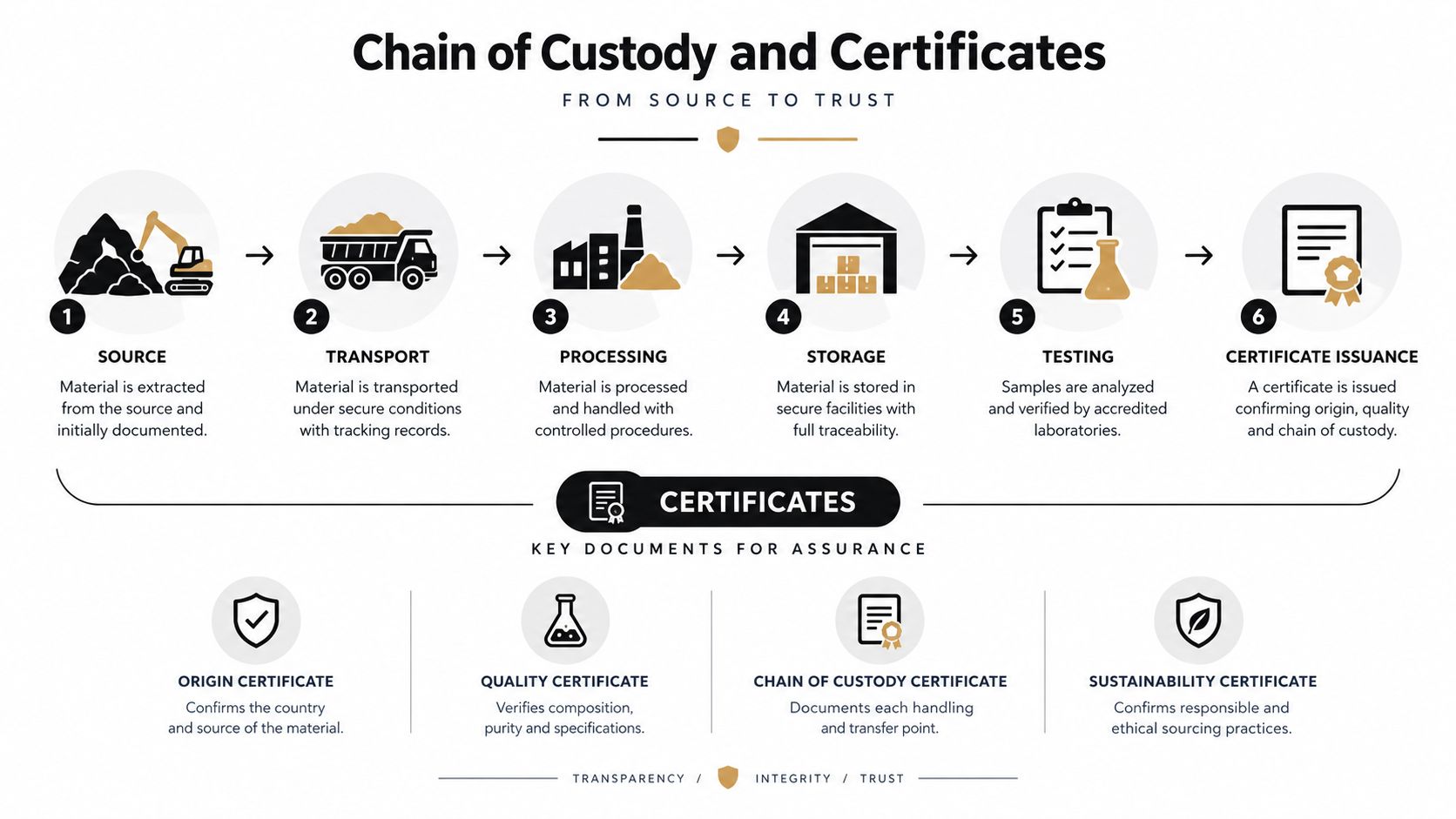
The handoff record should show who released the assets, who accepted them, when the transfer occurred, and whether the count matched the expected load. A sealed truck or container is useful, but seals don't replace an inventory. Physical controls and asset-level records have to agree.
Know which certificate answers which question
A Certificate of Destruction confirms that specified assets or media were physically destroyed. It should identify the relevant serial numbers, destruction method, date, location, technician or operator, and a unique certificate number tied to the job.
A Certificate of Data Sanitization documents a successful wiping or cryptographic-erasure process. It should identify the device, sanitization method, result, and associated operator or system record.
A Certificate of Recycling confirms that material entered the provider's recycling workflow. It may cover a batch rather than a single asset, depending on the reporting arrangement and material type.
The five-record chain-of-custody framework for data destruction identifies an inventory with serial numbers and asset tags, a collection manifest, a destruction or sanitization record, a disposition record, and a final certificate of destruction as core records. Retain the complete package for the period required by your policy, contract, insurer, or applicable framework. Retention requirements vary, so the compliance owner should set the actual period rather than relying on a generic vendor promise.
For additional process detail, review this explanation of what chain of custody means in ITAD. A certificate is only as credible as the records that connect it to the device.
What Actually Happens on Pickup Day
The crew arrives during the agreed window and checks in with the site contact. Before touching equipment, they verify the job sheet, loading instructions, access rules, and the staging area. The client representative should have the latest inventory available, including any changes since the quote.
The first physical task is reconciliation. Technicians compare the equipment on the floor with the pre-pickup list, identify missing or added assets, and flag devices whose serial numbers can't be read. They don't substitute a vague quantity for an identified asset. Exceptions should appear on the pickup record.
Rack work adds time and risk. Technicians may power down approved systems, remove cables, detach rails, label components, and lower equipment using appropriate handling methods. A server with rails still attached may not fit safely through a doorway or onto a pallet, while loose power cords and patch cables can create trip hazards during the load-out.
Loading is controlled work
Commercial crews commonly bring carts, shrink wrap, straps, pallets, and vehicles equipped for heavy loading. Two-person handling is often necessary for servers, UPS systems, printers, and other dense equipment. Oversized units are strapped rather than stacked, and batteries or damaged equipment are separated from ordinary electronics when the handling route requires it.
The crew should keep data-bearing devices together or clearly segregated, not buried under mixed peripheral equipment. Each pallet, cart, or container should have a reference to the manifest. If the client has a secure cage, the representative should inspect it after removal and confirm that no drives, tapes, or loose accessories remain.
At the handoff, the client representative signs the bill of lading or collection manifest and receives a preliminary receipt. That receipt is not the final destruction certificate. It proves that the provider accepted the listed material for processing, while the later certificate documents what happened after intake.
The provider should state when final records will be available and how exceptions will be handled. If an asset is missing from the manifest, has an unreadable serial number, or fails a wipe, the client needs a documented exception, not an unexplained gap in the report.
Pricing, Lead Times, and Common Questions
Commercial electronics recycling pickup pricing can be structured per pound, per asset, or per project. The correct basis depends on the mix of equipment, labor, transportation, data services, resale potential, and material handling. A quote should identify whether it includes de-installation, packing, pallets, liftgate service, wiping, shredding, certificates, downstream recycling, and reporting.
Short-notice work, witnessed destruction, difficult access, and on-site processing can change the price. So can lithium-battery UPS systems, CRT displays, medical equipment, laboratory equipment, and product destruction requirements. Ask the provider to separate standard pickup charges from optional services instead of accepting one unexplained total.
Scheduling also depends on scope. A pre-inventoried office refresh is easier to place on a route than a live data-center decommissioning with restricted access and rack removal. Request the expected pickup window, processing turnaround, certificate delivery timing, and escalation contact in writing.
Questions operations teams should ask
Are monitors, batteries, and unusual equipment accepted?
Ask for an itemized acceptance list. Monitors, batteries, medical devices, laboratory instruments, printers, and UPS systems may require different handling or downstream routes. Never assume that “electronics accepted” covers every item in a warehouse.
Can the provider remove rack-mounted equipment?
Confirm whether de-installation, cable removal, rail removal, and palletization are included. If the client must power down systems or disconnect network infrastructure, assign that responsibility before the crew arrives.
What happens if an item is missing from the manifest?
The provider should create an exception record, investigate the discrepancy, and explain whether the asset was omitted, misidentified, left on-site, or received without a readable identifier. A final report should not absorb an unresolved difference.
How can a company verify a certificate?
Check that the certificate number connects to the job, the serial numbers match the inventory, and the destruction or sanitization method is stated. Confirm the date, location, technician or operator record, and disposition route. A certificate with only a weight and a general equipment description may not satisfy an enterprise audit.
Does a pickup create tax documentation?
A pickup receipt and a tax-deductible donation record are different documents. If equipment is donated or transferred, ask what documentation the provider can issue and have the company's tax adviser determine whether the record supports a deduction.
Can a provider collect from multiple offices?
Ask whether the same inventory format, chain-of-custody process, data-destruction standard, and reporting structure will apply at every location. Multi-site programs need consistent records, not merely separate truck appointments.
What legal requirements apply to disposal?
The FTC Disposal Rule applies to businesses that maintain consumer-report information for a business purpose. It requires reasonable measures to protect against unauthorized access or use when disposing of that information, including when media is discarded, abandoned, sold, donated, or transferred, as summarized in this ITAD compliance overview. State rules and industry obligations may add requirements, so compliance and legal teams should review the service agreement.
Business size and location can affect program economics. For example, New York provides free and convenient manufacturer recycling for for-profit businesses with fewer than 50 full-time employees, while for-profit businesses with 50 or more full-time employees may be charged, according to the New York electronic equipment recycling guidance. Wisconsin guidance also distinguishes between public drop-off operations and off-site electronics processors, with certain storage activities potentially requiring a solid-waste storage license under NR 502.05, as described by the Wisconsin business electronics recycling rules.
A sound provider will answer these questions before loading begins. The right pickup isn't just the one that removes the most equipment. It's the one that leaves the business with reconciled assets, defensible data handling, clear disposition records, and no unanswered question about what happened next.
Beyond Surplus provides commercial electronics recycling pickup, IT equipment disposal, secure data wiping, hard-drive shredding, data-center de-installation, product destruction, and chain-of-custody documentation. Visit Beyond Surplus to request a business pickup and discuss the inventory, handling method, and certificates your organization needs.


