

Erasing a computer hard drive securely is about much more than just dragging files to the trash can. For businesses managing sensitive corporate data, it requires a deliberate, certified process—either with specialized software or through physical destruction—to overwrite or destroy the data so it's absolutely unrecoverable. If you just delete files or format a drive, you're leaving the original data wide open for anyone with basic recovery tools to find. That's a massive security risk that no organization can afford to take.
Why Simply Deleting Files Is Not Enough
When your business retires old IT equipment, the primary objective is ensuring no sensitive data leaves the premises with it. A common—and dangerous—misconception is that hitting 'delete' or performing a standard format is sufficient to wipe a hard drive clean. It is not.
Think of it this way: deleting a file is like tearing the table of contents out of a book. All the pages and their content are still there; they're just not easy to find anymore.
The operating system simply removes the pointer that tells it where the file is, marking that space as "available" for new data. But until something new is actually written over that exact spot, the original file can be easily recovered with widely available software. This creates a significant vulnerability for your organization.
The Real-World Risks of Incomplete Erasure
Relying on simple deletion is an open invitation for a data breach. The fallout from improperly disposed hardware can be severe and ripple through your entire organization, impacting finances, compliance, and reputation.
- Data Breaches and Financial Loss: A single hard drive could hold customer lists, financial records, employee PII, or your company's trade secrets. The average cost of a data breach is staggering, often running into the millions of dollars.
- Compliance Violations and Penalties: Regulations like HIPAA, GDPR, and FACTA have very strict rules about data privacy and disposal. Failure to comply can lead to heavy fines, legal battles, and the nightmare of publicly disclosing the breach.
- Reputational Damage: Trust is hard to earn and easy to lose. News that your company failed to protect customer or partner data can destroy brand credibility that took years to build.
The core principle of secure data disposal for businesses is verifiability. You must be able to prove that the data is gone forever, not just hidden. This is where professional data sanitization methods become non-negotiable for any responsible enterprise.
Understanding True Data Sanitization
To truly erase a computer hard drive, you must use methods that render the data permanently unreadable. This process is called data sanitization, and it's the only way to guarantee information can’t be pieced back together. You can get a deeper dive into what is data sanitization and why it's a critical part of any IT asset disposition plan.
It also helps to be aware of what data is collected by the applications you use and how it's handled. For a practical example, you can explore common questions in these data privacy and collection FAQs.
Ultimately, the difference between "deleting" and "erasing" is the line between thinking you're secure and having actual, defensible data destruction. From here, it's all about understanding the right methods that align with your security policies and compliance needs.
Choosing The Right Hard Drive Erasure Method for Your Business
Picking the right way to erase a computer hard drive is a critical business decision. It’s a balancing act between security, cost, and the intended future of the hardware. Your choice really boils down to the type of drive you're dealing with, your company's risk tolerance, and the compliance regulations you must follow.
Not all erasure methods are created equal. What works perfectly for one asset might be a major security mistake for another. The decision really comes down to three paths: wiping it with software, degaussing it, or physically destroying it. Each one has a specific role in a smart IT asset disposition (ITAD) plan.
Software Wiping For Asset Reuse
If you plan to reuse, redeploy, or resell your IT assets, software-based wiping is the industry-standard method. This approach uses specialized software to write random data over every single sector of the drive. It effectively scrambles the original information, making it completely unrecoverable while preserving the hardware.
This is nothing like a simple format. Professional erasure software performs multiple overwrites, often following strict standards set by government and industry. For any business trying to maximize value recovery from its IT assets, software wiping is the only method that keeps the hardware functional while ensuring data security.
The flowchart below does a great job of showing the difference between just "deleting" a file and actually erasing it for good.
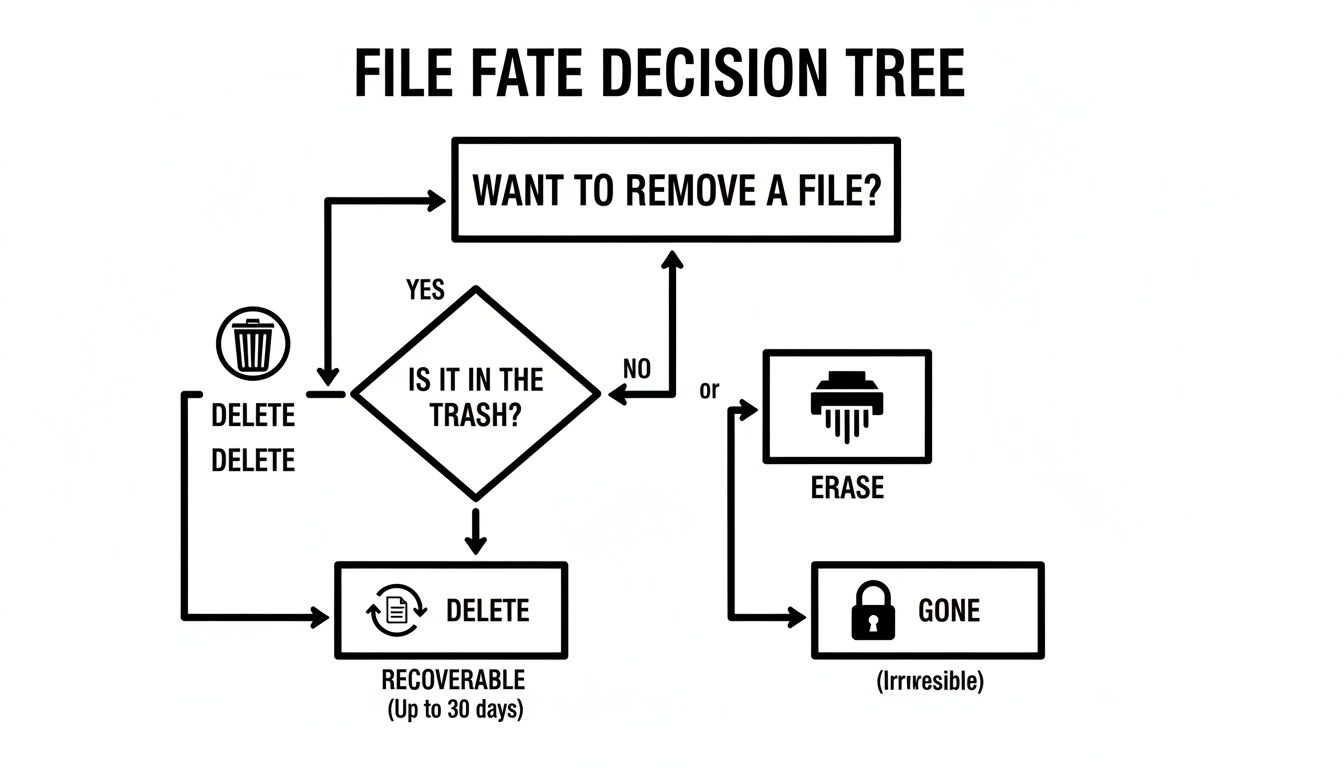
As you can see, deleting a file just removes the shortcut to it, leaving the data wide open for recovery. A real erasure process makes that data gone for good.
Degaussing For Magnetic Media
Degaussing is a powerful, though more specialized, technique. It’s designed specifically for magnetic storage like traditional Hard Disk Drives (HDDs) and legacy magnetic tapes. A degausser blasts the drive with an incredibly intense magnetic field, completely scrambling the magnetic bits on the platters where your data lives.
The process is extremely fast and effective at making the data unreadable. The catch? It also destroys the drive's firmware, rendering the hardware useless. Degaussing is an excellent choice for quickly sanitizing a large batch of end-of-life HDDs before they are sent for recycling, but it’s completely ineffective on Solid-State Drives (SSDs) since they do not use magnetic storage.
Degaussing offers a very high level of security for magnetic drives, but it's a one-way trip for the hardware. It's often used for an extra layer of security right before physical shredding.
Physical Destruction The Final Guarantee
Sometimes, data is so sensitive that no risk is acceptable, or perhaps the drive is damaged or obsolete. In these cases, physical destruction is the only absolute answer. This means shredding, crushing, or pulverizing the hard drive into tiny pieces.
There’s zero chance of data recovery because the platters that held the data are literally in pieces. This is the ultimate guarantee and is often mandated by regulations for highly sensitive information in sectors like defense, healthcare, and finance. This process should always come with a Certificate of Destruction, which is a critical piece of your audit trail for proving compliance.
Comparison of Hard Drive Erasure Methods
To help you decide which path to take, it’s useful to see the methods side-by-side. Each technique has its place, depending on your goals for the hardware and the data it holds.
The table below breaks down the key differences to help you align your strategy with your security needs.
| Method | Best For | Drive Types | Allows Reuse? | Compliance Level |
|---|---|---|---|---|
| Software Wiping | Drives intended for redeployment, resale, or donation. | HDD & SSD (using appropriate commands) | Yes | High (e.g., NIST 800-88) |
| Degaussing | Rapid sanitization of end-of-life magnetic media. | HDD & Magnetic Tapes | No | Very High (for magnetic media) |
| Physical Destruction | Highest-sensitivity data, faulty or obsolete drives. | All Drive Types (HDD, SSD, etc.) | No | Absolute |
Choosing correctly means you need a solid grasp of industry standards. For a deep dive into the official guidelines, it’s worth getting familiar with the NIST SP 800-88 standard, which is widely considered the gold standard for data sanitization.
Ultimately, a secure and efficient ITAD program comes down to matching your erasure method to your data's sensitivity and the hardware's next step in its lifecycle.
A Deep Dive Into Software-Based Data Wiping
When you need to securely erase a computer's hard drive but want to keep the hardware for reuse or resale, software-based wiping is the go-to industry method. This isn't just about deleting files; it's a process that uses specialized programs to overwrite every single sector of a drive with layers of new, random data, making the original information completely unrecoverable.
Think of it like painting over a canvas. A simple format is like removing the frame—the original art is still there. A software wipe, on the other hand, is like meticulously covering that entire canvas with multiple coats of thick, black paint. The original image is gone for good. This is exactly why it’s a cornerstone of any responsible IT asset disposition (ITAD) strategy.
How Data Overwriting Really Works
Data wiping software doesn't just write a single layer of zeros across a drive. It uses specific, complex algorithms—or patterns—to guarantee a thorough sanitization. These patterns are engineered to counteract the faint magnetic traces left on traditional hard disk drives (HDDs) and to properly reset the memory cells on modern solid-state drives (SSDs).
Different standards dictate the complexity of these overwrite patterns:
- DoD 5220.22-M: An older, 3-pass standard that's still referenced but has largely been superseded. It was a solid benchmark in its day.
- NIST 800-88 Purge: This is the current gold standard for commercial data destruction. It specifies methods that are verified to be effective against even sophisticated, lab-level data recovery techniques.
- Gutmann Method: A 35-pass beast of a method. It was designed for very old drive technologies and is almost always overkill for modern hardware.
Choosing the right standard is key. For most business applications today, a method compliant with NIST 800-88 Purge hits the sweet spot between bulletproof security and efficiency. Most importantly, it provides the auditable proof you need to show that data has been irretrievably destroyed.
Open-Source vs. Enterprise-Grade Tools
When it's time to pick your software, you'll find everything from free, open-source tools to licensed, enterprise-level platforms. For a one-off, non-critical system, a tool like DBAN (Darik's Boot and Nuke) has long been a popular choice for basic HDD wiping.
But for business use, free tools like DBAN fall short. They typically lack the critical features required for compliance, like certified reporting, detailed audit trails, and proper support for modern hardware like SSDs and NVMe drives.
For any corporate environment, auditable verification isn't just a nice-to-have; it's non-negotiable. Free tools rarely provide the certified documentation needed to pass an audit, opening up a huge liability risk.
This is where enterprise solutions from vendors like Blancco shine. They provide detailed, tamper-proof reports for every single drive, capturing its serial number, the exact erasure standard used, and a clear confirmation of success. This documentation is your proof of compliance for regulations like HIPAA, GDPR, and other data privacy laws. Understanding how these tools fit into a broader strategy is crucial, and you can explore a full breakdown of the various secure data destruction methods to see the bigger picture.
The Unique Challenge of Wiping SSDs
Software wiping isn't a one-size-fits-all process, especially when you bring SSDs into the mix. Unlike HDDs with their predictable magnetic platters, SSDs use flash memory managed by complex features like wear-leveling and over-provisioning. The drive's controller is constantly moving data around behind the scenes, which means a traditional overwrite pass could easily miss hidden or remapped blocks of data.
In fact, trying a multi-pass overwrite on an SSD is not only ineffective but can actually degrade the drive's performance and shorten its lifespan. The right way to sanitize an SSD is to use commands built directly into its firmware.
ATA Secure Erase vs. NVMe Format
- ATA Secure Erase: This command is built into the firmware of nearly all modern SATA drives (both HDDs and SSDs). When triggered, it tells the drive’s internal controller to flush all stored electrons from the NAND flash, resetting every cell to its original, empty state. It’s incredibly fast and completely effective.
- NVMe Format: Newer NVMe SSDs have a similar function. The NVMe Format command includes a secure option that wipes the drive at the controller level, ensuring all user data is purged from the media.
Certified, enterprise-grade erasure software knows how to properly trigger these built-in commands, log the results, and include them in the final audit report. This ensures even the most modern storage media is sanitized correctly and verifiably.
Physical Destruction: The Ultimate Security Guarantee
When software-based methods won't cut it, the hardware is end-of-life, or the stakes are simply too high, there’s only one surefire solution: physical destruction. This is the ultimate guarantee that your data is gone for good, with absolutely zero chance of recovery. For the most sensitive information, this method isn’t just an option; it's a necessity.
Physical destruction means taking a hard drive and making it completely inoperable by shredding, crushing, or pulverizing it. There are no software commands or overwriting patterns here—just the irreversible process of turning a data-storing device into a pile of useless scrap. This is the endgame for data security.
Industrial Shredding and Particle Size
The most common and effective form of physical destruction is industrial shredding. This isn't your office paper shredder; we're talking about powerful, purpose-built machinery that tears hard drives into small, mangled pieces. The goal is to completely obliterate the platters (in HDDs) or the tiny NAND flash chips (in SSDs) where the data lives.
Government and industry compliance standards often get very specific about the final particle size of the shredded material.
- Standard Shredding: Typically breaks drives down into fragments around 20mm in size. This is perfectly suitable for most commercial data.
- High-Security Shredding: For classified or top-secret data, regulations can demand a particle size as small as 2mm. This ensures not a single recoverable bit of data could possibly remain on any fragment.
Hitting these specific particle sizes requires specialized equipment and a certified process. You can learn more about the details in our guide that explains everything you need to know about hard drive shredding and why it works.
The demand for physical destruction has grown alongside software erasure methods for good reason—it offers undeniable finality. For many organizations, the tangible, verifiable evidence of destruction is the only proof of data sanitization they'll accept.
This need for irreversible disposal is a major force in the security world. The global hard drive destruction service market was estimated at about USD 1.65 billion in 2024 and is projected to climb to roughly USD 5.05 billion by 2035. This growth is fueled by compliance mandates, the ever-present risk of data theft, and corporate policies demanding physical proof of destruction. You'll often see this in regulated fields like healthcare and finance, where a verifiable destruction certificate is non-negotiable.
The Role of Degaussing Before Destruction
For traditional magnetic hard drives (HDDs), degaussing is often a preliminary step before they even hit the shredder. A degausser blasts the drive with a powerful magnetic field, instantly and permanently scrambling the magnetic domains on the platters where your data is stored.
This process offers a powerful one-two punch for security:
- Data Sanitization: First, the data is rendered unreadable by the magnetic pulse.
- Physical Obliteration: Then, the drive is physically destroyed, eliminating even the most remote, theoretical possibility of a lab-based recovery.
It’s crucial to remember that degaussing is completely useless on SSDs, as they don't use magnetic storage. For those drives, shredding is the direct and definitive solution.
The Certificate of Destruction: Your Proof of Compliance
Perhaps the most critical part of the physical destruction process is the documentation you receive afterward. A Certificate of Destruction (CoD) is a formal, auditable document issued by a certified ITAD vendor. This certificate is your official proof that your assets were destroyed securely and in compliance with all regulations.
A proper CoD is your audit trail armor. It should always include:
- Serial numbers of all destroyed devices.
- The date and location of destruction.
- The specific method used (e.g., shredding to a 20mm particle size).
- A statement confirming the transfer of custody and liability to the vendor.
For any business operating under data privacy laws, this document is non-negotiable. It officially closes the loop on your IT asset's lifecycle, giving you the undeniable evidence you need to prove due diligence and shield your organization from liability.
When to Partner with a Certified ITAD Vendor
While DIY data destruction tools exist, there is a clear tipping point where the scale, complexity, and risk of managing end-of-life IT assets demands professional intervention. That's the moment when partnering with a certified IT Asset Disposition (ITAD) vendor like Beyond Surplus becomes a strategic necessity for your business.
Engaging an expert isn't about giving up control; it’s about gaining a higher level of security, compliance, and efficiency. Knowing when to make that call is key, and several common business scenarios make it clear it's time for professional services.
Handling Equipment at Scale
Wiping a single hard drive might be a manageable task. But what happens when you're facing a hundred drives? Or a thousand during a major hardware refresh or data center decommissioning?
At that volume, the logistics become overwhelming. Your IT team's valuable time is consumed by repetitive, low-value work instead of driving projects that grow the business. A professional ITAD partner is built for this. They have industrial-grade equipment, streamlined workflows, and trained staff to process thousands of assets quickly and securely, ensuring every single drive is handled according to strict protocols.
The real cost of a DIY approach at scale isn't just software licenses or man-hours. It's the opportunity cost of pulling top IT talent away from their primary responsibilities to manage a complex logistics and security operation.
Requiring Bulletproof Compliance Documentation
In today’s regulatory environment, if you can't prove it, it didn't happen. Simply wiping a drive is not enough. You need an unshakable audit trail to prove compliance with regulations like HIPAA, SOX, GDPR, and FACTA. This is where professional ITAD vendors provide immense value.
They provide detailed, serialized documentation for every step of the process:
- Chain of Custody Records: Tracking each asset from the moment it leaves your facility.
- Certificates of Data Destruction: These are legally binding documents that confirm every data-bearing device was sanitized for good, complete with serial numbers and the exact erasure method used.
- Responsible Recycling Certificates: Verifying that all non-reusable materials were handled in an environmentally compliant manner.
This documentation is your shield in an audit or legal dispute. It effectively shifts the burden of proof from your team to a certified expert whose entire business model depends on providing verifiable compliance.
Lacking In-House Expertise and Equipment
The technology and standards for data destruction are constantly evolving. Do you know the specific overwrite requirements for a modern NVMe SSD versus a helium-filled HDD? Do you have a degausser powerful enough to meet current NSA specifications, or an industrial shredder that can reduce SSDs to the required particle size?
Most companies don't—and they shouldn't have to. A certified ITAD vendor invests heavily in staying on top of the latest technologies and standards. They own specialized equipment that is often too expensive for a single organization to purchase and maintain. Partnering with them gives you on-demand access to that expertise and infrastructure, ensuring the job is done right every time, no matter the media type. For a deeper dive into the whole process, you can learn more about what IT asset disposition entails and how it fits into your broader security plan.
Transferring Liability to an Insured Expert
At the end of the day, one of the strongest arguments for using a certified ITAD vendor is risk transfer. When you hand your assets over to a reputable partner like Beyond Surplus, you're also handing over the liability for data security and environmental compliance.
Certified vendors carry significant insurance policies, including errors and omissions (E&O) and pollution liability coverage. In the unlikely event of a data breach or an environmental issue traced back to the disposal process, their insurance—not yours—is on the hook. This strategic transfer of liability provides a critical layer of financial and reputational protection that a DIY approach simply cannot match.
Frequently Asked Questions About Erasing Hard Drives
When it comes to securely destroying corporate data, the details matter. A small misunderstanding can lead to a massive data breach. Let's clear up some of the most common questions we hear from businesses about how to properly erase their computer hard drives.
Is Formatting a Hard Drive the Same as Erasing It?
No, not even close—and confusing the two is a classic, costly mistake for any business.
Formatting a drive is like ripping the table of contents out of a book. The chapters (your data) are all still there, just harder to find. It simply removes the file system pointers, making the data invisible to your operating system. Anyone with basic recovery software can easily recover the information.
Secure erasure, on the other hand, is the process of completely overwriting every single sector of the drive with random data, often in multiple passes. This effectively destroys the original information until it's impossible to recover. For any business concerned with security or compliance, secure erasure is the only acceptable method.
How Do You Erase an SSD Differently Than an HDD?
This is a critical distinction for modern IT departments. You cannot treat a modern Solid-State Drive (SSD) like a legacy spinning Hard Disk Drive (HDD). The technology is fundamentally different.
Traditional overwriting software does not work reliably on SSDs. They have sophisticated features like wear-leveling, which spreads data around to prolong the drive's lifespan. This means a standard wipe could easily miss data hiding in over-provisioned areas or remapped sectors.
The only correct way to wipe an SSD is by using its own built-in firmware command.
- ATA Secure Erase: This is the command for SATA-based SSDs. It triggers the drive's internal controller to flush every single memory cell, resetting it to a clean, factory-like state.
- NVMe Format: For the newer, faster NVMe drives, a similar secure format command accomplishes the same thing, purging all user data right at the hardware level.
These commands are not only far more effective than trying to overwrite an SSD—they're also much faster.
What Is a Certificate of Destruction and Why Do I Need One?
Think of a Certificate of Destruction (CoD) as your legal and procedural armor. It’s a formal, legally binding document you receive from a certified ITAD vendor that serves as an official audit trail. It proves, without a doubt, that your data-bearing assets were securely and irreversibly destroyed according to industry standards.
A Certificate of Destruction is your definitive proof of due diligence. It formally transfers the liability for the destroyed assets from your organization to the certified vendor, protecting you in the event of a legal challenge or compliance audit.
This document isn't just a receipt; it's essential for any business operating under data privacy regulations like HIPAA, GDPR, or FACTA. It will list critical details like the serial numbers of the destroyed drives, the date, and the exact method used (e.g., shredding to a 20mm particle size), creating a complete and defensible record of your actions.
When your business needs certified, auditable, and secure data destruction services for retired IT assets, the experts at Beyond Surplus are here to help. We offer comprehensive IT asset disposition solutions that guarantee compliance and protect your most sensitive information. Contact us today to schedule a secure pickup and ensure your retired IT assets are handled responsibly.


