

Most companies lose control of remote asset returns because they treat them as an administrative follow-up instead of a controlled recovery program. That approach leaves too many handoffs, too little accountability, and no reliable record of what happened to the device after separation.
For IT operations, the problem is larger than shipping a laptop back. A single missed return can leave corporate data on an unmanaged endpoint, break the audit trail for custody, delay redeployment, and turn a recoverable asset into a write-off. The operational and financial impact becomes clearer in this breakdown of the hidden costs of unreturned company laptops.
A sound remote return program tracks each asset from notice of termination through receipt, inspection, data destruction, and final disposition. That last step matters. If a device cannot go back into service, the process still needs documented sanitization and a clear chain of custody. Many internal offboarding workflows, though, often neglect these critical requirements.
The companies that handle this well do not run returns as a loose coordination exercise between HR, IT, and the departing employee. They run a recovery system designed to reduce loss, contain security risk, and close liability. In practice, that often means pairing internal controls with a professional ITAD vendor that can document custody, perform certified data destruction, and provide the records needed if questions come up later.
The High Cost of Unreturned Remote Assets
Unreturned equipment is rarely just a hardware loss. It is usually a compound failure across finance, security, and compliance.
For remote teams, every laptop, phone, monitor, dock, and security key leaves the building and enters an environment IT does not control. Once an employee exits, the risk is no longer limited to replacement cost. The organization also has to account for data exposure, missing accessories, delayed redeployment, and weak documentation if anyone later asks what happened to the device.
That cost stacks up fast. This breakdown of the hidden costs of unreturned company laptops explains how organizations with weak recovery processes can lose devices outright, absorb write-offs, and spend more staff time chasing returns than the asset is worth.
Why ad hoc tracking breaks down
Ad hoc offboarding fails because it relies on memory and goodwill. HR sends a notice. IT checks a spreadsheet. The manager assumes the employee knows what to ship back. No one owns the full recovery timeline from separation notice through receipt, inspection, sanitization, and final disposition.
That gap creates two problems at the same time. The company may lose the asset, and it may lose the ability to prove whether corporate data was secured, wiped, or left on an unmanaged endpoint.
I have seen teams focus on the shipping label and miss the bigger exposure. If the device does come back, but there is no documented chain of custody after receipt, the organization still has an evidence problem. If the device never comes back, the issue is no longer an inventory exception. It becomes a security and liability issue.
Unreturned remote assets create hardware loss, data risk, custody gaps, and audit exposure in a single offboarding failure.
What gets missed first
Laptops get the attention. The rest of the assigned kit often does not.
Monitors, docks, adapters, external drives, headsets, smart cards, and specialty peripherals are easy to miss when the return request is built from memory instead of an assigned-asset record. That is how recoverable equipment turns into shrinkage and why reconciliation gets messy at quarter end.
A stronger approach treats returns as a controlled recovery program with a documented endpoint. If the asset is recovered, it must be checked in, inspected, and routed for approved reuse or retirement. If it cannot go back into service, the process still needs secure data destruction, custody records, and disposition documentation. That is the difference between closing a ticket and closing the liability.
Building Your Asset Return Policy Framework
An asset return policy decides whether offboarding runs on evidence or on guesswork. By the time an employee gives notice, the company should already have written terms that define ownership, return timing, custody expectations, and what happens to the device after it comes back.
That last point matters more than many managers expect. A policy that stops at "send the laptop back" handles shipping. It does not close the security issue. A complete policy ties return requirements to intake, inspection, secure data destruction when needed, and documented final disposition. That is how a company closes the loop on liability instead of just requesting hardware.
Put HR, Legal, and IT in the same draft
Policies break when one team writes them alone.
HR should own the employee-facing language in offer letters, handbook terms, and separation notices. Legal should confirm the policy works across the states and countries where the company employs people. IT should define the exact asset classes covered, the return conditions, the acceptance criteria, and the custody records required once equipment is received.
As noted earlier, companies lose equipment during offboarding often enough that this cannot be treated as a paperwork detail. Ambiguity creates delay, arguments, and missing assets. Clear language creates an operating standard.
What the policy should include
Write the policy so a manager can execute it without improvising. A strong version usually includes:
- Ownership language stating that laptops, phones, monitors, docks, adapters, external storage, security keys, badges, and specialty peripherals remain company property.
- Assigned asset records tied to the employee, including serial numbers, model details, and a separate accessory list.
- A defined return window with a firm deadline. Many companies use a 7 to 14 day window, depending on role, location, and local employment rules. A useful reference point is this guide to employee laptop return policies every business needs to know.
- Approved return methods such as prepaid shipment, scheduled pickup, or office drop-off.
- Employee cooperation requirements covering response times, packaging instructions, shipment coordination, and pickup availability.
- Condition standards that distinguish normal wear from missing parts, neglect, or obvious damage.
- Post-return handling rules that state how devices are checked in, who records receipt, when data is wiped, and when the asset is approved for reuse, recycling, or ITAD processing.
One test works well. If a new manager cannot read the policy and explain who contacts the employee, what must be returned, when it is due, and what documentation closes the record, the policy is still incomplete.
Write for edge cases, not ideal cases
The cleanest process on paper usually fails at the edges. Account for disabled company email, no response after separation, personal leave before termination, international shipping, executive departures, and involuntary exits where direct coordination may not be appropriate.
Accessory recovery also needs its own control. Teams remember the laptop and forget the dock, headset, smart card, external drive, or power adapter. That creates avoidable replacement cost and weakens record accuracy during reconciliation.
Policy should also spell out custody expectations after shipment starts. Tracking is part of control, not just convenience. The same principle applies in other logistics programs. Visibility during transit lets teams intervene before a package disappears, which is the same operational logic behind guides on how to track car delivery.
The strongest policies treat asset return as one part of a larger risk process. Recovery, receipt, sanitization, chain of custody, and final disposition all need written ownership. If your internal team cannot perform every step with audit-ready documentation, the policy should define when equipment is transferred to a professional ITAD vendor to complete destruction and disposition records properly.
Streamlining the Physical Return Process
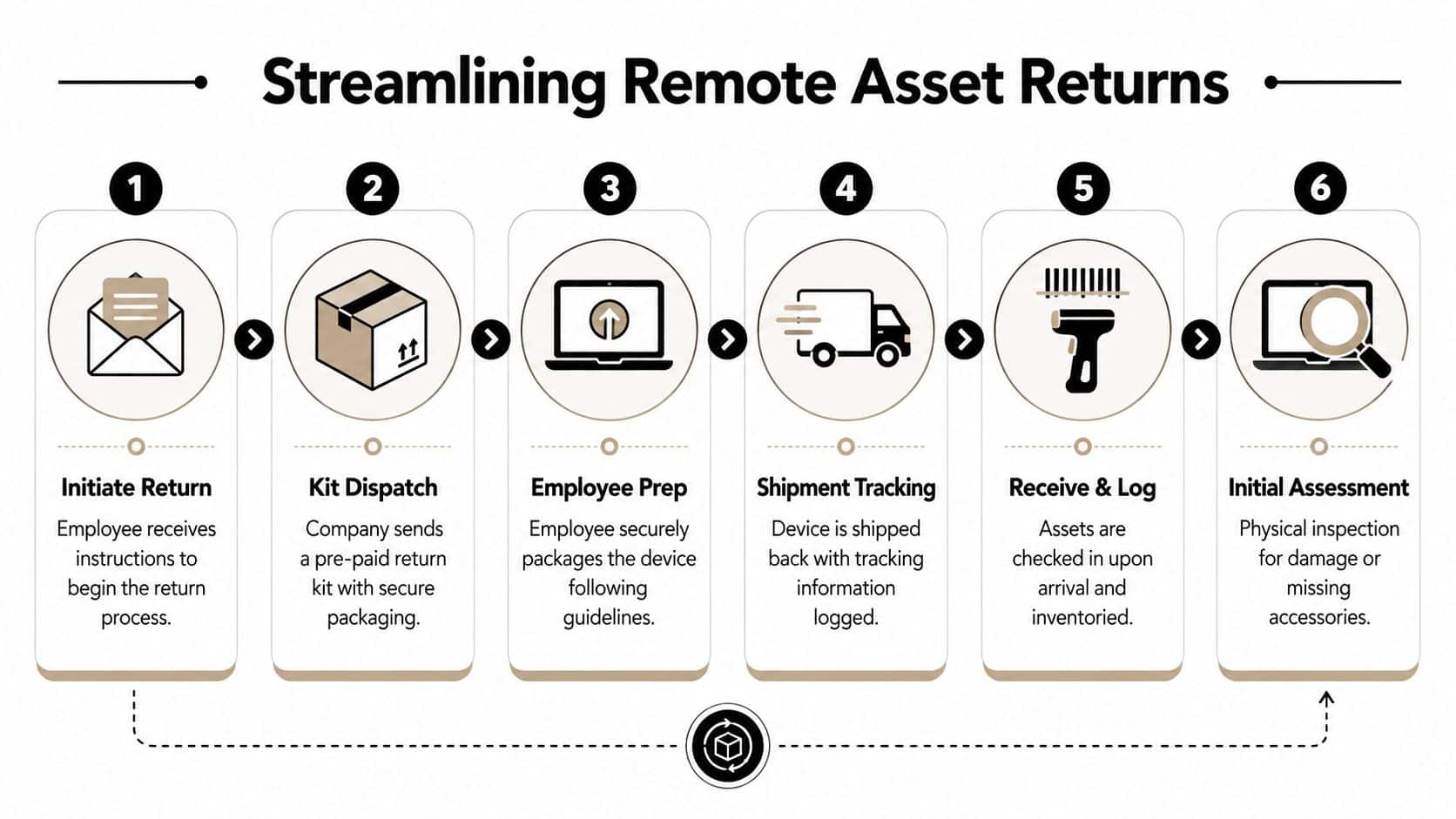
Every extra step in a return workflow lowers completion rates. If a departing employee has to find a box, print a label, or ask where the device goes, the process is already costing the company time, recovery dollars, and control.
Physical recovery needs to be designed like an operations process, not treated like a one-off shipping task. The goal is to get the asset back fast, preserve package visibility in transit, and hand off the device with clean documentation so receipt, sanitization, and final disposition can be proven later.
Choose the right return model
Organizations should standardize on two return paths and assign one by risk level.
| Return model | Best fit | Strength | Trade-off |
|---|---|---|---|
| Prepaid mail-in kit | Standard laptop and accessory returns | Scales well and gives consistent packaging | Relies on employee follow-through |
| Coordinated pickup | Sensitive terminations, bulky items, executive gear | Improves control and reduces employee effort | Adds scheduling work |
Mail-in kits work well for routine offboarding because they remove avoidable decisions. The employee gets the box, inserts the listed items, seals it, and ships it. Pickup is the better choice when the device contains regulated data, the departure is contentious, or the equipment value justifies tighter handling.
The same control principle applies across logistics programs. Shipment visibility lets teams intervene before a package becomes a loss, which is also the logic behind guides on how to track car delivery.
Set a fixed communication cadence
A return process fails when every manager writes their own version of the instructions. Use one approved workflow, automate it, and send it to the employee's personal contact details when company access may be cut off early.
Guidance in this remote employee equipment return checklist for HR and IT managers supports a simple point that holds up in practice. Prepaid, trackable shipping and automated reminders improve return compliance versus manual follow-up.
Use a sequence your team can run every time:
- Send the first notice to a personal email address and mobile number. Do not rely on corporate email remaining active.
- List every assigned item in one message. Include the laptop, dock, charger, headset, badge, token, external drive, and any other accessory tied to the asset record.
- Provide one action path. Include either a prepaid label with packing instructions or a pickup scheduling link.
- Send reminders on a preset schedule. Keep the cadence consistent so HR, IT, and the employee all know what happens next.
- Confirm receipt the day the package arrives. Record what was received, what is missing, and whether the shipment arrived damaged or tampered with.
Consistency matters more than tone. Clear instructions, one response channel, and visible tracking reduce the amount of chasing your team has to do.
Remove friction before it becomes loss
The same failure points show up in almost every remote return program:
- Packaging confusion delays shipment.
- Missing labels create procrastination.
- Incomplete asset lists lead to partial returns.
- Untracked or uninsured shipping weakens the custody record.
- No intake check on arrival turns a recoverable discrepancy into an audit problem.
The best process is the one that gives operations, security, and finance the same answer about where the device is, who had it last, and what happens after it reaches your dock or ITAD partner. That is how physical return stops being a basic logistics task and becomes a controlled handoff into data destruction, chain of custody, and final liability closure.
Ensuring Secure Data Destruction and Sanitization
Recovering the device is only half the job. The primary liability often sits on the drive, not in the chassis.
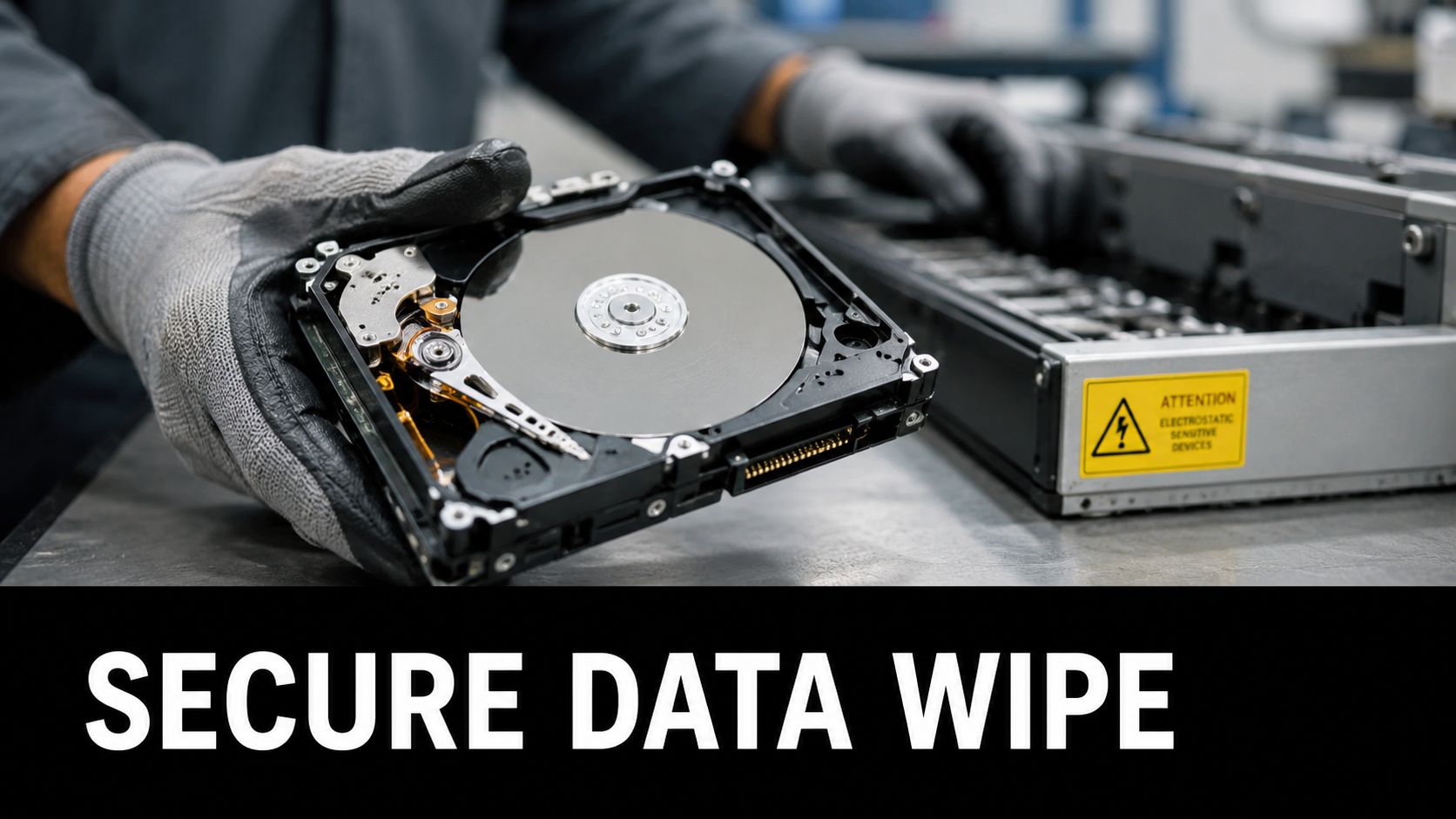
A basic reset or quick format isn't enough for business offboarding. It may make the device look clean for the next user, but it doesn't give security, compliance, procurement, or leadership the proof they need. If the company later faces an audit, dispute, or suspected exposure, "we reset it" is not a defensible answer.
Why formatting isn't enough
Formatting changes how the operating system sees the data. It doesn't automatically create a verified sanitization record, and it doesn't establish a standard your auditors or customers can rely on. That's why mature programs use defined sanitization methods and preserve evidence.
Certified data destruction following NIST 800-88 or DoD 5220.22-M, with documented wipe certificates, ensures data security and increases employee trust in return processes by 40% (protecting sensitive data during remote laptop returns).
That employee trust point matters more than many teams expect. Departing staff are often more cooperative when the process clearly explains what happens to any remaining personal material and how corporate data will be handled after recovery.
Build sanitization into the return workflow
Sanitization should be planned at the same time as recovery, not after the box arrives. In practice, that means:
- Set backup expectations clearly before any wipe action. The cited operational guidance calls for an explicit 48 to 72 hour backup window before remote data wipes to avoid disputes and reduce return resistance (Hello Retriever on remote offboarding best practices).
- Use recognized standards such as NIST 800-88 or DoD 5220.22-M for media sanitization.
- Document every completed wipe with a certificate tied to the asset record.
- Separate reuse from destruction decisions after the sanitization status is verified.
A returned laptop without certified sanitization is still an open risk item.
Data handling needs plain language
Employees are more likely to cooperate when instructions are direct and respectful. Tell them when the device will be wiped, what they should back up, and who to contact if they need help. Basic user education also helps. If you need a simple reference to share with less technical users before the cutoff, these CTF data protection tips are a practical example of the kind of backup guidance that reduces confusion.
A disciplined sanitization process protects more than regulated data. It protects the company's reputation, shortens redeployment time, and closes a liability gap that informal offboarding leaves open.
Mastering Chain of Custody and Compliance
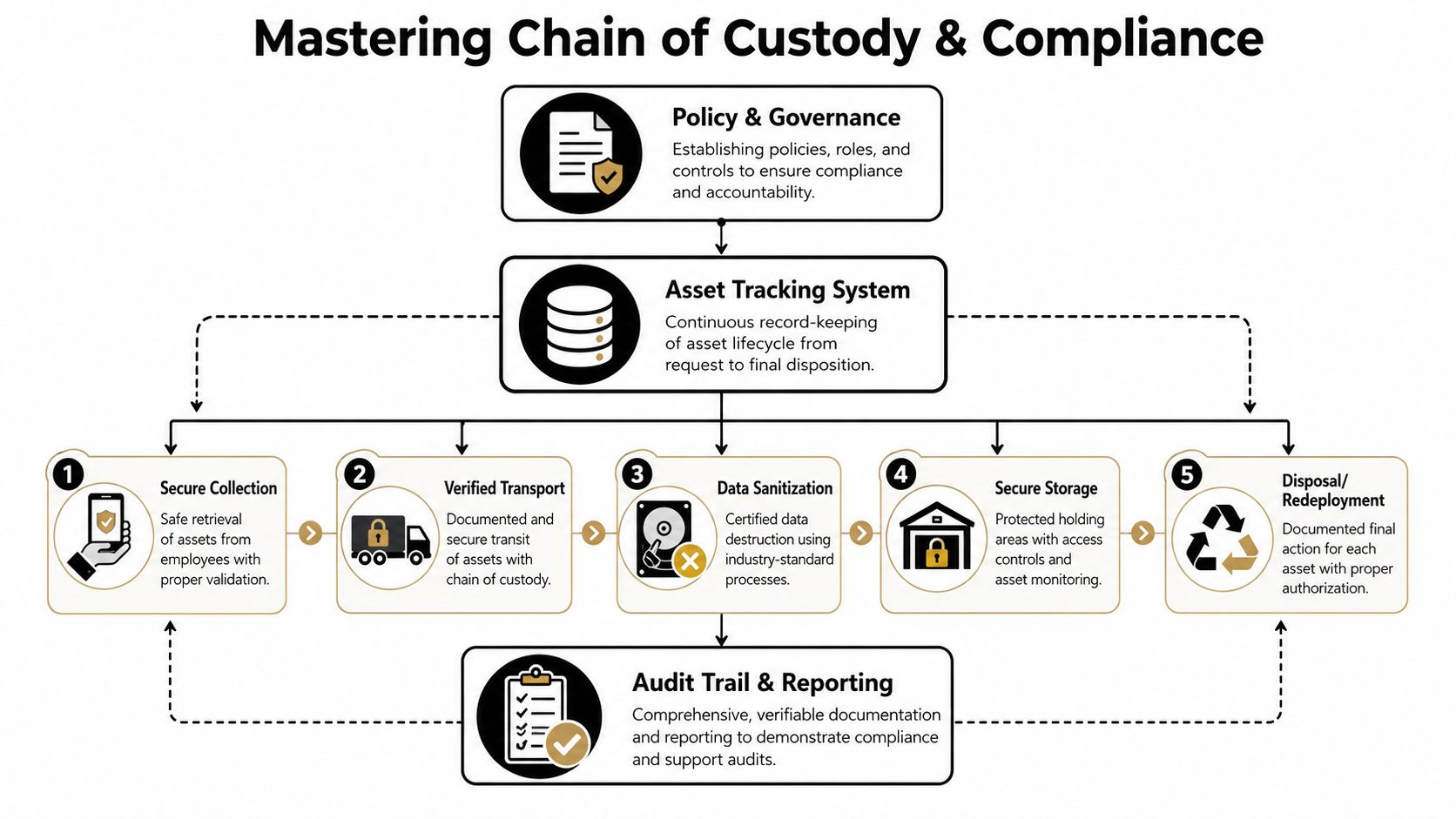
A secure process has to be provable. If you can't show where the asset was, who handled it, when it was sanitized, and how it was finally retired or redeployed, your controls are weaker than they look.
The documents that matter
Chain of custody isn't one form. It's a connected record set. Each document closes a different risk gap.
- Serialized asset list proves what was assigned and expected back.
- Shipping manifest or carrier record shows when the asset left the employee's possession and entered transit.
- Receiving report confirms arrival, date, condition, and completeness.
- Inspection log captures damage, missing accessories, or serial mismatches.
- Certificate of data destruction proves the media was sanitized under a recognized process.
- Disposition record shows whether the asset was redeployed, remarketed, recycled, or destroyed.
Why this is now a business priority
Compliance isn't a niche concern in ITAD. In the North America ITAD market, data destruction and sanitization services accounted for the largest market share of 38.20% in 2025, which reflects how strongly organizations prioritize defensible security controls (ITAD chain of custody in Georgia and why it matters).
That market focus lines up with day-to-day operations. Security teams want proof of sanitization. Finance wants reconciliation. Procurement wants value recovery data. Legal wants a record that shows reasonable handling throughout the device lifecycle.
Compliance check: If your team can't assemble the full asset history in one place, you're depending on memory and inbox searches to answer audit questions.
Where chain of custody usually fails
The biggest breakdowns happen at handoff points. The employee ships the package, but nobody ties the tracking number to the asset. The receiving team opens the box, but missing accessories aren't noted. The device gets wiped, but the certificate isn't stored with the asset record.
Those aren't small administrative misses. They create doubt around possession, control, and final handling. Chain of custody fixes that by replacing narrative with evidence.
Choosing Tools and Measuring Your Program Success
If your return process lives across email threads, spreadsheets, HR notes, and a shipping portal, you don't have one process. You have fragments.
The right toolset centralizes the lifecycle. It ties the employee, assigned asset, return deadline, shipment status, receiving record, sanitization status, and final disposition into one workflow. That doesn't just save labor. It prevents blind spots that manual coordination creates.
What to look for in a system
The most effective technical setup is a centralized asset management portal that provides real-time visibility into every device's location, status, and condition, and this approach can reduce administrative errors by over 60% while enabling intervention when returns stall. Organizations implementing carrier tracking integrated with HR and IT dashboards also report 90%+ return completion within 14 days of offboarding (Synetic on managing remote employee IT assets).
Look for capabilities such as:
- HR and IT workflow triggers so offboarding launches the return process automatically.
- Carrier tracking integration tied directly to the asset record.
- Accessory-level inventory fields so docks, adapters, and monitors aren't buried in notes.
- Receiving and inspection logging with photos and condition notes.
- Certificate storage and reporting for sanitization and disposition records.
- Dashboard reporting that leadership can read without manual cleanup.
The KPIs worth tracking
Not every metric helps. Track the ones that change operational decisions.
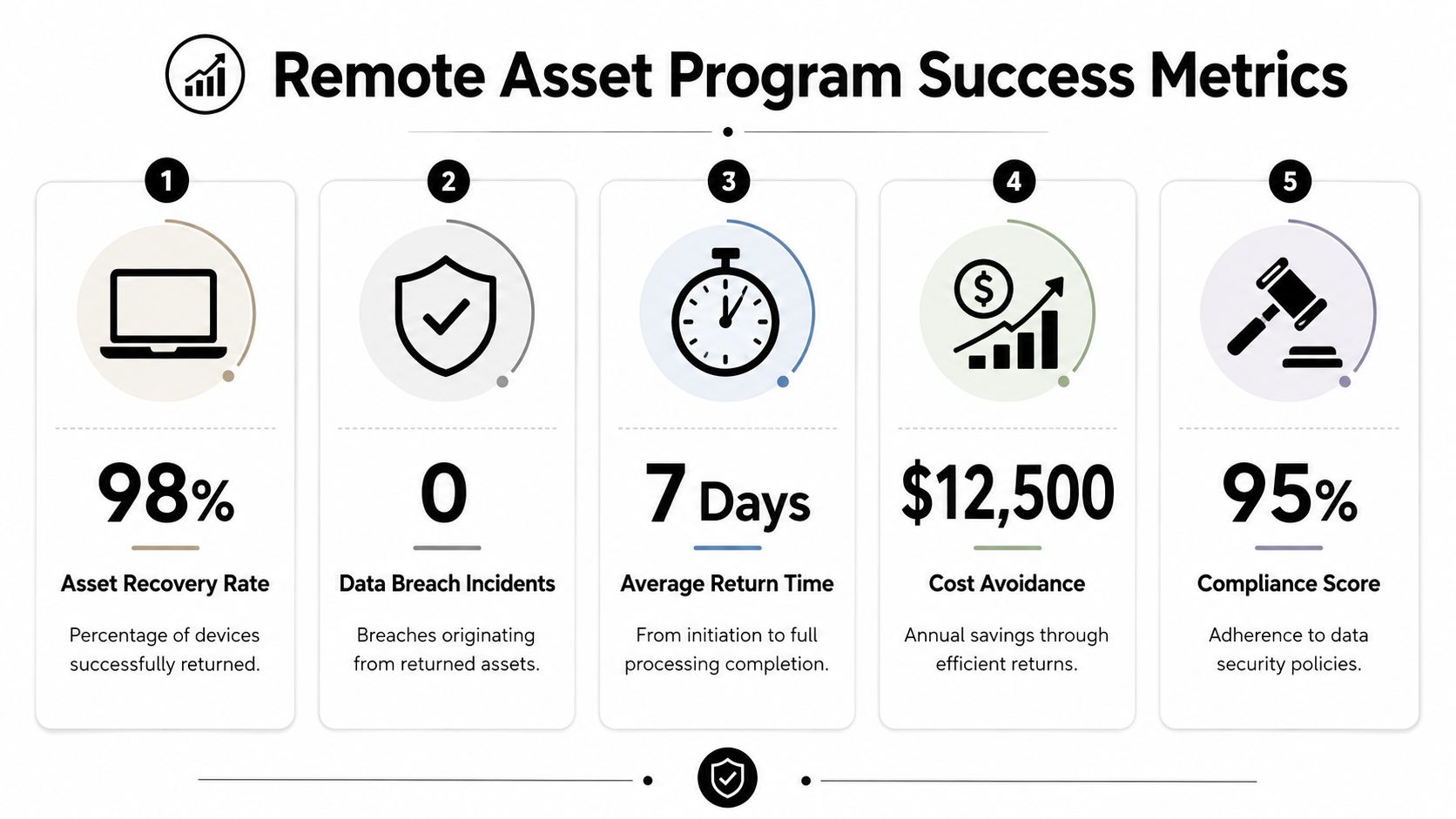
A practical scorecard includes return rate, average time to recover, percentage of returns received complete, percentage of assets with documented sanitization, and exceptions that required escalation. It should also track what happened after recovery, including redeployment, remarketing, or recycling.
The need for mature programs will keep rising. The United States IT Asset Disposition market is projected to grow to USD 12.9 Billion by 2034, driven by environmental management and data security requirements (customer satisfaction measurement and program improvement).
The best metric set does two jobs at once. It shows where the workflow is breaking, and it gives leadership a clean reason to fund better tooling or outside support.
For organizations that need secure, documented recovery of remote IT assets, Beyond Surplus provides certified electronics recycling, IT asset disposition, secure data destruction, and chain-of-custody support for business equipment across the United States. Contact Beyond Surplus for certified electronics recycling and secure IT asset disposal.


