A Tuesday morning in Midtown starts with an email no Atlanta IT director wants to mishandle: 240 laptops are coming off lease in 30 days. Finance needs the depreciation cleared, security needs defensible NIST evidence, facilities needs the storage cage emptied, and the vendor decision was supposed to happen yesterday. Add a server-room refresh or office closure, and a routine technology transition quickly becomes a recovery, compliance, and logistics problem.
IT asset recovery in Atlanta should never end at a recycling dumpster. The right workflow identifies resale value early, destroys data according to media type, documents every custody handoff, and routes non-resalable equipment through certified recycling channels. That matters whether the pickup involves a MARTA-accessible office, a loading dock window in a Buckhead tower, or a data center near the Perimeter. One misplaced drive can create a serious client issue for a financial-services firm across Peachtree.
Use this office technology refresh planning guide before the equipment moves. For larger shutdowns, a sector for decommissioning work can also help structure the removal scope.
Table of Contents
- When Atlanta IT Leaders Hit a Refresh, Refresh, or Closure
- Inventory and Value the Retired Equipment First
- Choose How Data Will Be Destroyed
- Decide Resale or Recycling by Asset Class
- Plan Pickup, Logistics, and Chain of Custody
- Pick an Atlanta ITAD Vendor You Can Audit
- A Final Checklist and Next Step
When Atlanta IT Leaders Hit a Refresh, Refresh, or Closure
The first mistake is treating a refresh as a removal project. A refresh is an asset-recovery event with several owners, each expecting a different result. Finance wants a clean disposition record. The security team wants proof that stored data was sanitized. Facilities wants an orderly pickup that fits the building's access rules. Procurement wants a vendor that can perform without adding emergency costs.
Start by freezing the equipment list. Stop informal transfers, label every device, and identify the room, floor, and business owner associated with each asset. In a multi-floor Midtown office, the loading dock schedule can matter as much as the resale market. A vendor that arrives without a manifest or misses the building's freight-elevator window can turn a planned pickup into a second mobilization.
Turn pressure into a controlled workflow
Run the project in this order:
- Inventory first: Capture serial numbers, model details, condition, and location before equipment leaves user desks or server racks.
- Separate media: Mark HDDs, SSDs, self-encrypting drives, removable media, and failed storage devices.
- Value before processing: Hold potentially marketable servers, laptops, switches, and storage arrays out of the recycling stream until they're assessed.
- Approve destruction methods: Match the sanitization method to the media, not to a generic vendor package.
- Schedule the handoff: Confirm loading dock access, elevator requirements, pallet staging, security escorts, and pickup documentation.
- Close the file: Reconcile the serialized manifest with receiving records, destruction certificates, recycling reports, and any resale settlement.
The objective is simple: move usable equipment into a resale channel quickly while protecting data and preserving proof of responsible disposition. Atlanta's traffic, tower access, and dispersed business districts make preparation a direct contributor to recovered value.
Inventory and Value the Retired Equipment First
A Midtown office can send a truckload of laptops, servers, and monitors to an Atlanta dock, yet still lose recovery value before pickup. Missing serials, untested devices, absent chargers, and mixed storage media force the vendor to sort the load after arrival. Build the asset record while equipment remains accessible, then use it to decide what deserves testing, resale preparation, secure destruction, or recycling.
Start with fields that buyers and processors can verify: manufacturer, model, CPU, RAM, storage type and capacity, service tag, purchase or deployment age, operating status, and cosmetic grade. Use Grade A for clean, complete equipment with limited wear, Grade B for normal business use, and Grade C for damaged, incomplete, or heavily worn units. List missing power supplies separately. A laptop without its charger may need extra handling before it can enter a resale channel.
A useful asset file answers these questions:
- What is it: Dell Latitude, Lenovo ThinkPad, HPE ProLiant server, Cisco switch, storage array, monitor, or peripheral?
- How old is it: Deployment age and warranty status often affect value more than the retirement date.
- What does it contain: Record CPU, RAM, storage, network configuration, and installed expansion components.
- Can it be tested: A powered-on unit with a readable service tag can move through assessment faster than an unidentified pallet.
- What condition is it in: Note cracked housings, missing drives, battery swelling, rack-rail shortages, and cosmetic damage.
Pull the initial record from systems already in use. Microsoft Intune can provide device identity and hardware information for managed Windows fleets. Jamf can supply Mac inventory data. A PowerShell report can collect model, serial, memory, and storage fields when endpoint records are incomplete. Then reconcile those exports with a physical count. Software records will not show a laptop in a locked drawer or a server removed from a rack but still marked active.
Use this equipment condition assessment to apply the same grading approach across the lot before a buyer reviews it. Keep HDDs, SSDs, failed drives, and removable media identifiable at this stage. Media type affects the later sanitization route, while condition and completeness affect whether an asset can be prepared for resale quickly.
| Asset Class | Value Factors to Record | Likely Disposition |
|---|---|---|
| Business laptops | Model, battery, screen, charger, cosmetic grade | Resale, repair, parts, or recycling |
| Enterprise servers | CPU generation, RAM, drives, rails, support status | Resale, component recovery, or recycling |
| Networking gear | OEM, licensing, ports, reset status, condition | Resale or recycling |
| Storage arrays | Controllers, drives, expansion shelves, media type | Resale, secure destruction, or component recovery |
| Desktops and peripherals | Age, completeness, testing cost, handling effort | Mixed-lot resale or recycling |
Do not approve a buyout from a rough count. A mixed Atlanta load may contain valuable servers beside equipment whose testing, packaging, and transport costs consume its recovery potential. The verified inventory gives you a defensible basis for timing resale, separating destruction work, and negotiating the final ITAD disposition.
Choose How Data Will Be Destroyed
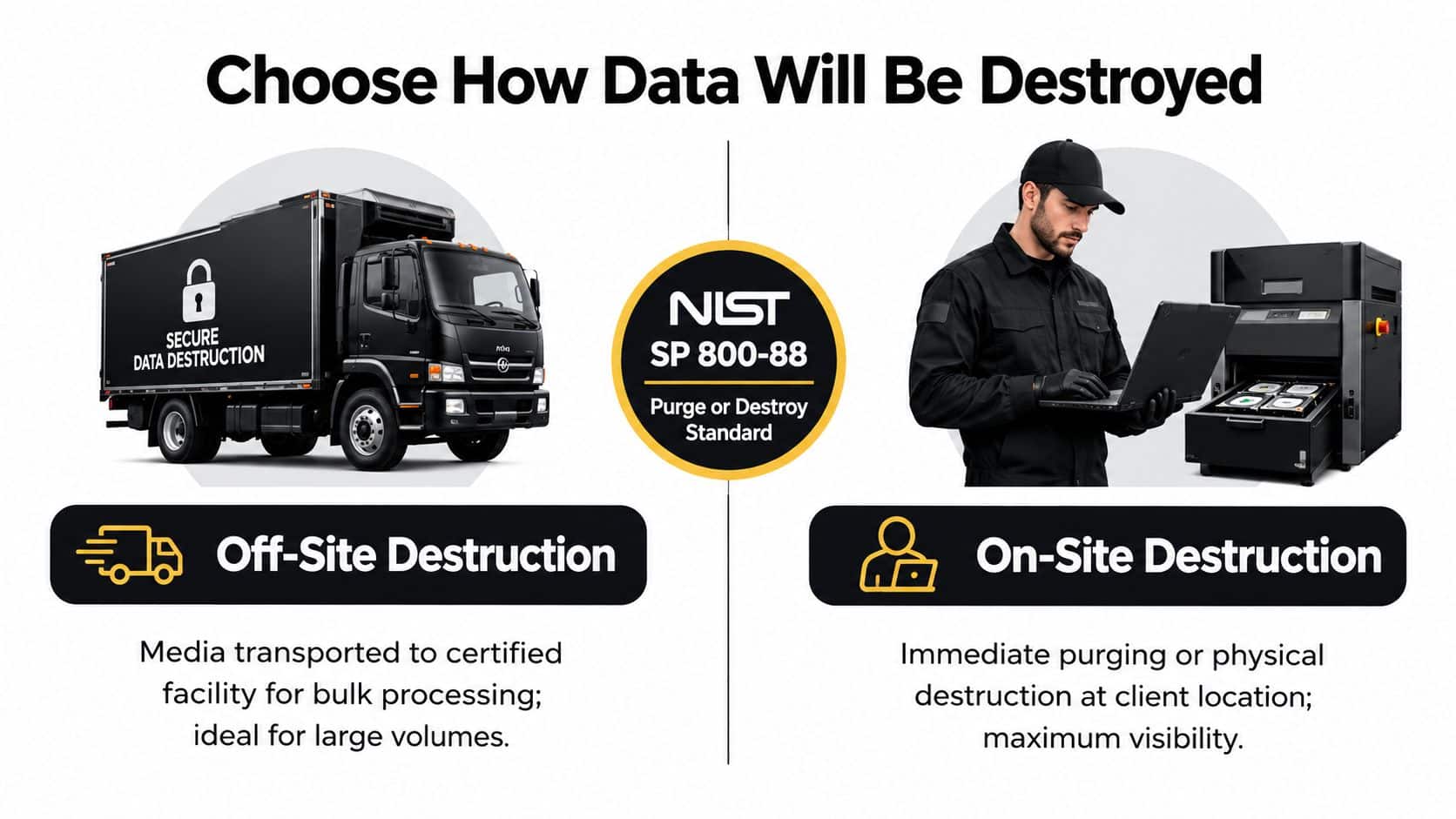
Data destruction decisions should follow media type and risk, not a vendor's preferred sales package. NIST SP 800-88 Rev. 2 is the central sanitization reference for current programs, and the FTC Disposal Rule requires reasonable measures to prevent unauthorized access during disposal. The practical question is whether the media will be cleared, purged, or destroyed in a way you can prove per device.
Match the method to the drive
HDDs can often be securely erased when they function and the organization permits reuse. Degaussing is an option for magnetic hard drives, but it must be documented and followed by a process that addresses the device's disposition. Degaussing is not valid for SSDs, USB drives, memory cards, or phone storage. Flash media stores data differently and requires an appropriate clear, purge, or physical-destruction method.
SATA SSDs and other flash devices need a validated secure-erase or purge process when resale is allowed. Self-encrypting drives may support cryptographic erase when the encryption architecture and key management meet the required conditions. Failed drives and media that can't be reliably sanitized should be physically shredded or otherwise destroyed, regardless of whether the device is an HDD or SSD.
Off-site destruction suits large, consolidated volumes and controlled facility processing. On-site destruction gives the client direct visibility and can reduce concern around transport, especially for failed drives or highly sensitive environments. Neither option is automatically superior. The certificate and process evidence determine whether the service is defensible.
Demand device-level evidence
A generic “recycled” receipt isn't enough for a regulated business. Each certificate or destruction report should identify:
- Asset identity: Serial number, service tag, or another unique device identifier.
- Media details: HDD, SSD, tape, removable flash, or embedded storage.
- Sanitization method: Clear, purge, cryptographic erase, degaussing, or destruction.
- Standard reference: The applicable NIST SP 800-88 method or procedure.
- Execution record: Date, technician identity, facility address or GPS record, and witness signature where applicable.
Review the certificate of data destruction explained before approving a provider's paperwork. The common Atlanta audit failure is accepting a broad recycling certificate when HIPAA, GLBA, PCI, or contractual evidence required a device-level destruction record.
Decide Resale or Recycling by Asset Class
A retired server can lose resale value while it sits in an Atlanta staging room. A damaged display may already be worth more as controlled material recovery than as a repair project. Set the route by asset class, condition, data status, buyer demand, and the cost of testing, packing, and transport.
Start with enterprise servers, supported network switches, and business laptops with intact screens and batteries. Assess current-generation equipment for remarketing before sending anything to a recycler. Obsolete desktops, damaged LCDs, incomplete peripherals, and failed storage usually belong in certified recycling or component recovery.
Make the disposition call from three operating questions
For each device, ask:
- Can a buyer deploy it without unusual refurbishment?
- Can its data be sanitized with a documented method?
- Will testing, packing, transport, and processing leave meaningful recovery after costs?
A yes to all three sends the asset to resale evaluation. Equipment with data that cannot be reliably sanitized goes to destruction. Obsolete, damaged, incomplete, or expensive-to-handle equipment goes to certified recycling, with the downstream route documented.
Media type still matters. HDDs can often be cleared or purged when they pass testing and the selected method is documented. SSDs require a method suited to flash storage, and failed SSDs should be destroyed rather than treated like working hard drives. The resale decision and the sanitization decision must be connected before equipment leaves the site.
Timing affects the result. A March 2026 value-recovery study reports that enterprise servers retain about 35–45% of original value at two years, 15–25% at four years, and 5–10% at five years or more, with the strongest results when assets enter remarketing within six months of retirement (ServNet's value-recovery study). Servers, storage arrays, and network switches are particularly exposed to delayed processing. Assess inventory before a quarter-end or lease-return rush, then release saleable equipment while buyers still support the platform.
| Asset Class | Recommended Path | Age Cutoff | Primary Value Driver |
|---|---|---|---|
| Enterprise servers | Assess and remarket first | Before the platform becomes obsolete | CPU generation, RAM, drives, supportability |
| Business laptops | Remarket if complete and functional | Before condition and battery issues grow | Model, screen, battery, charger |
| Network switches | Remarket if identifiable and supported | Before firmware and licensing concerns limit buyers | OEM, model, ports, configuration |
| Storage arrays | Separate controllers, shelves, and media | Before platform support ends | Controllers, expansion capacity, drive type |
| Older desktops | Recycle unless a buyer is identified | When testing and handling exceed demand | Completeness and local processing cost |
| Damaged displays and peripherals | Certified recycling | Once repair is uneconomic | Material recovery and downstream controls |
Atlanta healthcare, finance, and logistics operations often face concentrated volume around lease returns and fiscal-year deadlines. Build the assessment ahead of that window, and use selling used enterprise IT equipment to structure resale around serialized inventory, condition, and actual buyer demand instead of a blanket per-pound offer.
Plan Pickup, Logistics, and Chain of Custody
Atlanta pickups fail before loading starts when access details are vague. Confirm freight-elevator rules, loading-dock reservations, security-desk procedures, floor access, pallet staging, and escort requirements. Midtown and Buckhead towers may offer narrow windows, while Perimeter campuses can require separate routing and receiving instructions. Put every requirement in the work order.
Stage equipment by asset class and final destination. Shrink-wrap each load without covering serial labels, apply readable pallet identifiers, and keep high-value servers and network equipment serialized individually. Loose drives, laptops, and adapters placed in an unmarked gaylord create reconciliation work and can weaken the resale record.
Require signed evidence at each transfer. Your pickup packet should contain:
- Client handoff: A signed manifest listing pallets, containers, and serialized high-value assets.
- Transport: The driver's Bill of Lading, vehicle or shipment identification, and secure-transit record.
- Facility intake: A receiving scan that reconciles serial numbers, quantities, condition, and weight.
- Processing: Destruction, resale, recycling, and downstream records linked to the original assets.
- Final reporting: A Certificate of Destruction or Recycling, resale settlement, and disposition summary.
Demand media-specific destruction records. HDDs can be cleared through verified wiping or physical destruction, while SSDs require a method appropriate to flash storage and its wear-leveling behavior. The certificate should identify the media type, method, serial numbers, date, technician, and witness where applicable. Failed or unprocessed assets must appear separately, not disappear into a bulk line.
An unsigned manifest is a custody gap. The same applies when a pallet arrives without weight verification or a serial list is scanned as one quantity. Use this chain of custody for IT asset disposal workflow to document continuity from the locked room through final processing.
Operational rule: If intake cannot reconcile the manifest, custody is incomplete.
Pick an Atlanta ITAD Vendor You Can Audit
The vendor you choose determines whether retired equipment produces recoverable value or an unverified disposal bill. Select an Atlanta ITAD provider that can prove what happened to each asset, from decommissioning and media sanitization through resale, recycling, or destruction.
Start by matching certifications to the services you are buying. Ask whether the provider maintains R2v3, RIOS, NAID AAA, and ISO 14001 credentials where relevant. Verify the certification scope, audited facility, and expiration status. A logo in a proposal does not confirm that the site processing your equipment holds that credential.
Review the paperwork before scheduling a full refresh. Require samples that show how the provider records decisions and outcomes:
- Certificate of Destruction: Media type, method, serial numbers, date, technician identification, and witness record.
- Certificate of Recycling: Equipment or material categories, downstream disposition, and weight-based reporting where applicable.
- Settlement report: Asset-level resale results, deductions, buyer channel, and payment terms.
- Audit evidence: Current certification, corrective-action history, and relevant facility or process records.
- Downstream disclosure: The identity and role of refurbishers, shredders, smelters, and other processors.
Your vendor should connect data destruction to value recovery rather than treating them as separate handoffs. HDDs may be cleared through verified wiping or physical destruction. SSDs need a method suited to flash storage and wear-leveling behavior. Require certificates that identify the media type, sanitization method, serial numbers, date, technician, and witness where applicable. Failed or unprocessed assets must be listed separately.
The EPA says certified electronics recyclers should follow standards that support reuse and recycling, protect people and the environment, manage downstream handlers safely, and destroy data on used electronics (EPA certified electronics recyclers guidance). It also emphasizes verification by an accredited, independent auditor (EPA electronics recycling information).
| Criteria | What to Require | Red Flag |
|---|---|---|
| Data destruction | Media-specific methods and device-level certificates | One generic certificate for every device |
| Certification | Current scope and audited facility details | Unverified badges or expired credentials |
| Downstream control | Named processors and available audit evidence | “Our partners handle it” with no disclosure |
| Value recovery | Asset-level assessment and settlement reporting | One flat per-pound price for everything |
| Facility access | Site visit or credible process evidence | Vendor refuses operational questions |
| References | Atlanta healthcare, legal, or financial examples | No comparable regulated-client references |
Run a small Atlanta pickup before committing the full refresh. Compare the intake report, destruction certificates, resale accounting, and response quality against the promised process. Beyond Surplus provides business IT pickup, secure data destruction, IT buyback, electronics recycling, product destruction, and data center de-installation services. Evaluate those deliverables against the same audit criteria used for any provider.
A Final Checklist and Next Step
Recovering value from retired technology requires one connected operating file. Don't create a pickup spreadsheet, a security ticket, and a recycling receipt that never reconcile. Build one disposition record that follows each asset from inventory through final outcome.
Before equipment leaves the site
- Inventory: Produce a serialized asset list with model, age, specifications, location, condition, and assigned owner.
- Value: Separate likely resale assets from recycling candidates, failed equipment, and media requiring destruction.
- Access: Confirm the Atlanta building's dock, elevator, escort, pallet, and staging requirements.
- Approval: Record who authorizes resale, destruction, recycling, and any exceptions.
During sanitization and processing
- Classify media: Separate HDDs, SSDs, self-encrypting drives, removable flash, and failed devices.
- Approve the method: Use clear, purge, cryptographic erase, degaussing for HDDs only, or physical destruction according to the device and risk.
- Preserve evidence: Require serial numbers, media type, method, NIST SP 800-88 reference, technician ID, date, location, and witness information.
- Protect resale value: Sanitize promptly, test complete equipment, and move viable inventory into market-aligned channels rather than storing it through another refresh cycle.
The global context explains why this discipline matters. The world generated a record 62 billion kilograms of e-waste in 2022, equal to 7.8 kilograms per person, while only 22.3% was formally collected and recycled in an environmentally sound manner, according to the Global E-waste Monitor 2024. The same reporting says e-waste rose from 34 billion kilograms in 2010 to 62 billion kilograms in 2022 and projects 82 million tonnes by 2030, so enterprises need a repeatable recovery process rather than an improvised disposal event.
File the closeout package
Your final project file should contain the signed pickup manifest, Bill of Lading, receiving scan, weight verification, serialized destruction report, Certificate of Destruction, Certificate of Recycling, resale settlement, and downstream-vendor audit evidence. For regulated programs, retain the records required by your contracts and compliance counsel for HIPAA, FACTA, and Georgia data breach law. Maintain the supporting documentation for at least seven years when that is your approved retention requirement.
Before selecting a provider, request a sample audit report and ask who performs the work, where data is destroyed, and which downstream processors receive non-resalable material. Also confirm whether the provider guarantees recovered value or absorbs logistics costs for qualifying Atlanta loads. A vague answer usually predicts a vague closeout.
Schedule the pickup only after the vendor confirms the inventory process, media-specific destruction methods, chain-of-custody documents, resale accounting, and certified recycling path. That is how an Atlanta refresh becomes a controlled recovery program instead of an expensive removal exercise.
Beyond Surplus provides Atlanta business IT asset recovery, secure HDD and SSD data destruction, electronics recycling, IT equipment pickup, buyback assessment, product destruction, and data center de-installation. Visit Beyond Surplus to request a pickup, review your retired inventory, and obtain the certificates and chain-of-custody records your organization needs.