

Your office refresh probably started with a familiar problem: laptops are slowing down, warranty dates are approaching, employees are working from more locations, and finance wants a defensible plan before approving new equipment. Meanwhile, the old devices still contain company data, and nobody wants deployment delays, lost files, or an undocumented disposal process.
A reliable Office Technology Refresh Planning Guide treats replacement as a complete lifecycle program. Inventory, role-based requirements, budgeting, staging, user testing, deployment, data migration, and secure IT asset disposition must work together. The refresh isn't complete when the new laptop reaches the employee. It's complete when the retired asset has been accounted for, sanitized, documented, and either redeployed, resold, recycled, or destroyed appropriately.
Table of Contents
- Laying the Groundwork for a Smooth Refresh
- Securing Budget and Procuring New Technology
- Managing Logistics with Staging and Migration
- Executing a Seamless Rollout with User Testing
- Closing the Loop with Secure IT Asset Disposition
- Partnering for a Successful Technology Lifecycle
Laying the Groundwork for a Smooth Refresh
An unplanned refresh creates predictable problems. Procurement orders hardware before IT understands application requirements, departments receive inconsistent configurations, deployment teams discover missing accessories, and old equipment accumulates without a documented chain of custody. The business then pays for rushed shipping, emergency support, avoidable downtime, and last-minute disposal.
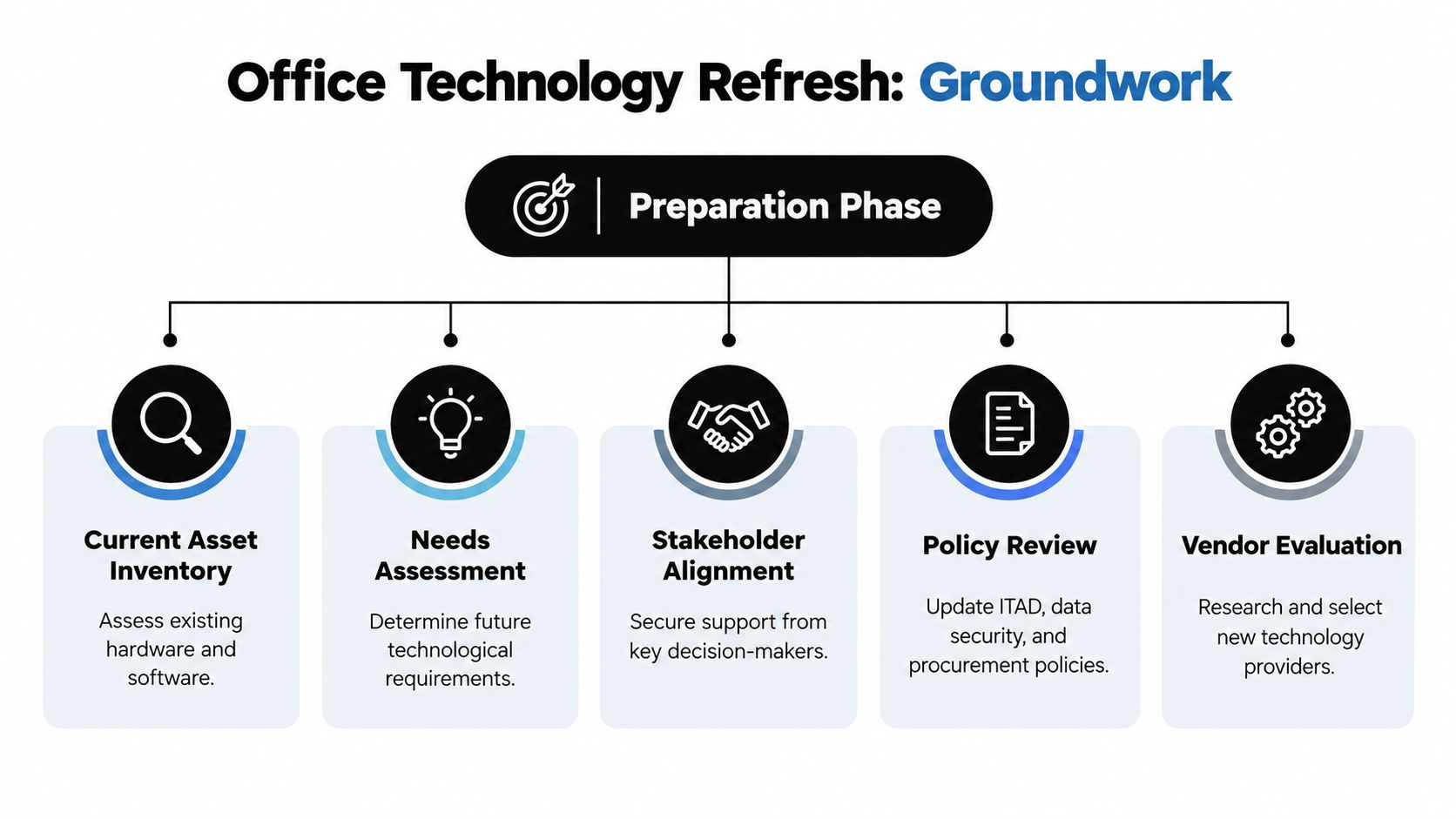
Start with three decisions: who must approve the program, what assets exist, and what each asset is worth.
Align stakeholders before you count devices
Finance needs a cost model. Department leaders know which workflows can't tolerate disruption. Security and compliance teams define data-handling requirements. Facilities may control loading areas, storage, access badges, and removal windows. Procurement needs lead times, contract terms, and warranty details.
Create a decision group with clear ownership. One person should approve technical standards, another should own the budget, and a named project manager should control dependencies. Without that structure, every department can request exceptions and the refresh loses consistency.
Hybrid work also makes role analysis more important. A useful resource on hybrid-team routines can help stakeholders discuss how location, meeting patterns, and collaboration habits affect device requirements. A remote knowledge worker, an executive who travels, and an engineer running demanding applications shouldn't automatically receive the same specification.
Audit the estate, not just the asset register
Export the asset register, then validate it against reality. Record serial number, assigned user, location, operating system, warranty status, processor, memory, storage, battery condition, installed applications, encryption status, and current owner. Include monitors, docks, printers, servers, network equipment, lab hardware, and medical equipment where those assets fall within the project.
Telemetry can reveal whether a proposed premium configuration is justified. Review application usage, memory pressure, storage capacity, crash history, help desk incidents, and endpoint compliance. Pair that information with interviews from specialized teams. A device that looks underused in a spreadsheet may support a critical application that isn't captured by standard reporting.
Use an equipment condition assessment to separate equipment suitable for redeployment or resale from equipment better suited to recycling or destruction.
Build a rolling replacement schedule
A single company-wide replacement date is easy to communicate but difficult to execute. A rolling schedule by asset class supports more predictable procurement, warranty alignment, support planning, and disposition.
One lifecycle guide recommends 3–4 years for laptops, 4–5 years for desktops, and 5–7 years for servers and network equipment, with assets flagged for replacement 12 months before end-of-life. See the asset-class lifecycle benchmarks before setting your internal thresholds.
| Asset category | Recommended refresh cycle | Key considerations |
|---|---|---|
| Laptops | 3–4 years | Battery health, mobility, security support, docking needs |
| Desktops | 4–5 years | Application performance, fixed-location workflows, warranty status |
| Servers | 5–7 years | Support contracts, capacity, firmware, migration dependencies |
| Network equipment | 5–7 years | Vendor support, security updates, redundancy, configuration migration |
Finally, estimate residual value before approving the purchase. Condition, age, model, completeness, demand, and data-bearing components all affect whether an asset should be redeployed, sold, or recycled. That valuation belongs in the business case and the retirement plan, not in a last-minute spreadsheet.
Securing Budget and Procuring New Technology
A refresh proposal gets approved more easily when it explains the cost of keeping aging equipment, not just the price of replacing it. Total cost of ownership should include hardware, warranty coverage, support labor, replacement parts, application compatibility, security remediation, user downtime, shipping, deployment labor, and end-of-life handling.
The widely cited Dell benchmark places the optimal PC replacement cycle at three years, based on total-cost-of-ownership analysis. Dell also explains that holding devices beyond the optimal window can produce rising support and maintenance costs that outweigh the savings from delaying purchase. Review the Dell total-cost-of-ownership white paper when preparing the financial case.

Turn operational pain into financial language
Finance may not respond to “users are frustrated,” but it can evaluate recurring incidents, overtime, lost work time, unplanned purchases, and deferred security work. Present the current-state cost beside the proposed refresh cost, then identify which assumptions are measurable and which are estimates.
Your proposal should answer:
- What changes: Define device standards, affected departments, applications, accessories, and deployment waves.
- Why now: Tie timing to warranty expiration, vendor support, security requirements, application compatibility, or recurring failure patterns.
- What happens if delayed: Describe rising support effort, operational risk, and procurement compression without inventing unsupported savings.
- How retirement is funded: Include transport, data destruction, documentation, recycling, resale handling, and storage avoidance.
- How success is measured: Track completion, exception volume, unresolved incidents, asset accountability, and disposition documentation.
A practical value engineering guide for commercial projects offers a useful budgeting mindset: evaluate the function required, then remove unnecessary cost without weakening the outcome. In IT, that means standardizing configurations where possible while reserving premium hardware for users whose applications or working conditions justify it.
Choose the procurement model deliberately
Buying gives the organization ownership and may simplify resale or redeployment decisions. It also places the burden of forecasting demand, managing residual value, and funding replacement waves on the company.
Leasing can smooth expenditure and create a more regular replacement cadence, but contracts require careful review. Confirm return conditions, data-removal responsibilities, damage provisions, approved equipment substitutions, and end-of-term logistics. A low periodic payment doesn't eliminate ITAD obligations.
Negotiate around the complete lifecycle. Ask vendors to provide asset tags, serialized packing lists, advance replacement terms, staging support, and clear warranty escalation. If old laptops have potential residual value, compare buyback options with independent ITAD pricing through a documented process. A business laptop buyback program guide can help procurement teams account for recovery decisions before equipment leaves service.
Managing Logistics with Staging and Migration
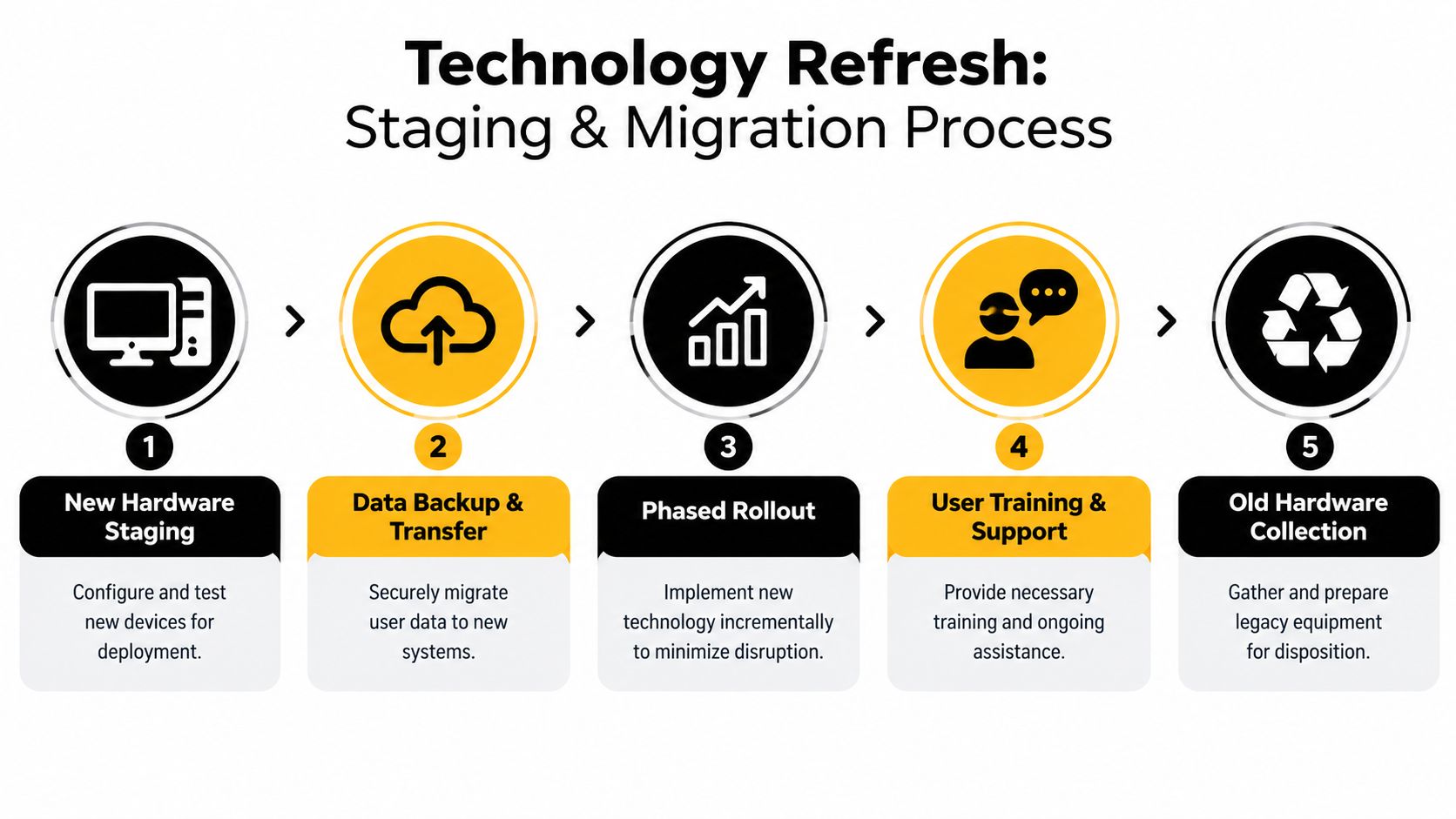
Deployment quality depends less on how quickly boxes arrive than on what happens before users receive them. New equipment should pass through a controlled staging process where technicians verify the configuration, record the serial number, apply the asset tag, enroll the device in endpoint management, and test the business applications.
Create a staging line with clear acceptance criteria
Reserve a secure area with power, network access, packing supplies, and room to separate ready, exception, and collected equipment. Use a repeatable checklist for firmware, operating system updates, encryption, endpoint security, VPN, printing, conferencing, accessibility settings, and required line-of-business applications.
A standardized image or automated provisioning profile reduces configuration drift. It should still allow role-based applications and peripherals. Test the actual build on representative hardware, including docks, displays, smart-card readers, barcode scanners, and specialized accessories.
Refresh guidance warns that teams create cascading delays when they underestimate logistics, skip staging, or fail to coordinate vendors. The enterprise refresh workflow guidance supports inventory-first planning, phased deployment, testing before retirement, and a deliberate downtime buffer.
Migrate data with ownership and rollback
Decide what moves, who approves the move, and how the old device remains available until validation is complete. Options include managed cloud synchronization, profile migration, department file shares, application-specific export, or technician-assisted transfer. The right method depends on data sensitivity, bandwidth, application behavior, and the user's role.
Don't treat migration as a file-copy exercise. Confirm browser profiles, certificates, templates, local databases, macros, mapped drives, accessibility settings, and application licenses. Have the user validate critical work before the old device enters the collection stream.
Use a wave plan that includes delivery, installation, user confirmation, old-device collection, exception handling, and post-deployment support. The office relocation IT equipment checklist provides a useful reference for coordinating physical movement, labeling, inventory control, and collection logistics.
Executing a Seamless Rollout with User Testing
A pilot is the point where technical assumptions meet actual work. Select users who represent different departments, applications, locations, accessibility needs, and work patterns. Don't choose only cooperative power users. Include people whose workflows expose compatibility problems, unusual peripherals, or connectivity constraints.
Make user acceptance testing operational
Give pilot users the proposed device, standard software, security controls, and accessories they'll receive during production. Ask them to complete normal work rather than only confirm that the device starts. Test meetings, printing, file access, VPN, line-of-business applications, docking, external displays, authentication, and recovery procedures.
Capture every issue in a shared log with an owner, severity, workaround, and release decision. A pilot should answer whether the configuration is ready, not merely generate positive feedback.
Pilot rule: Don't scale a configuration until the support team can reproduce, resolve, or formally accept its known exceptions.
Communicate the change before the delivery date
Employees resist surprises more than they resist technology. Send a concise communication plan that covers:
- Purpose: Explain the business reason, expected user benefits, and security requirements.
- Timing: State the deployment window, preparation tasks, and expected interruption.
- Preparation: Tell users what to save, what to leave connected, and which applications or files require review.
- Support: Provide the service desk channel, escalation path, and after-hours coverage where relevant.
- Collection: Explain when the old device will be collected and why employees must not retain drives or accessories.
- Exceptions: Give managers a process for travel, leave, accessibility accommodations, or critical business deadlines.
After the pilot, update the image, documentation, training, and support scripts before expanding. Vendor performance also affects rollout stability, so document responsibilities, escalation contacts, delivery commitments, and acceptance criteria in an IT vendor management framework.
Closing the Loop with Secure IT Asset Disposition
The old equipment is now the highest-risk part of the project. It may contain customer records, employee information, credentials, intellectual property, regulated data, or recoverable business value. Leaving it in a hallway, sending it to an informal recycler, or relying on a quick delete creates an accountability gap exactly when the project should be closing one.
Secure disposition begins before collection. Assign every retired asset to a disposition category: redeployment, resale, parts recovery, recycling, or destruction. Keep the serial number, assigned user, location, condition, data-bearing components, collection date, transport details, and final outcome together.
Make data destruction auditable
The FTC Disposal Rule requires businesses that maintain consumer report information to use disposal practices that are reasonable and appropriate to prevent unauthorized access or use. It allows electronic files or media to be destroyed or erased so they can't be read or reconstructed, and it permits a destruction contractor when the business performs due diligence. The rule became effective on June 1, 2005, as summarized in this FTC Disposal Rule compliance resource.
Choose the method according to the asset and risk. Certified wiping may preserve a drive for reuse when the process produces verifiable results. Physical destruction is appropriate when media is damaged, encryption status is uncertain, policy requires it, or reuse isn't acceptable. For data centers, plan server de-installation, rack removal, cable handling, access controls, and transport as one controlled work package.
Required records should include:
- Chain of custody: Document each handoff from department to transporter to processing facility.
- Certificates of destruction: Identify the media or asset covered, method used, date, and responsible processor.
- Certificates of recycling: Record environmentally responsible downstream processing.
- Disposition reports: Show resale, redeployment, parts recovery, recycling, and destruction outcomes.
- Exception records: Explain missing serial numbers, failed wipes, damaged media, or unresolved ownership.
Recover value without weakening controls
Resale isn't automatically the right answer. First confirm that the device meets security, contractual, and policy requirements for reuse. Remove organizational accounts, validate sanitization, inspect condition, and maintain documentation before transfer.
EPA data illustrates why organizations should treat electronics disposition as a managed environmental process. In 2018, U.S. consumers generated an estimated 2.7 million tons of selected consumer electronics, while 1.04 million tons were collected for recycling, a 38.5% recovery rate, according to the EPA durable-goods data. Older EPA analyses found substantially lower recycling levels for earlier electronics waste streams, reinforcing the need for documented downstream management rather than informal disposal. See the EPA e-waste analysis and its electronics management overview.
An ITAD partner should be able to receive inventory, coordinate pickup, perform or arrange certified data destruction, sort for reuse and recycling, and return auditable documentation. Beyond Surplus is one option for business electronics recycling and IT asset disposition, including secure data destruction, IT equipment disposal, buyback, product destruction, and logistics coordination. Its certificate of data destruction explanation outlines why the certificate belongs in the project record, not in an afterthought email.
Partnering for a Successful Technology Lifecycle
A controlled refresh starts with stakeholder alignment and a verified inventory, then connects role-based requirements to budget, procurement, staging, migration, testing, and phased deployment. The final control is secure disposition, where every retired laptop, server, drive, and accessory receives a documented outcome.
The strongest programs treat retirement as part of IT asset lifecycle management, not as a cleanup task after procurement. A structured IT asset lifecycle management approach helps organizations coordinate security, recovery value, compliance records, recycling, and operational continuity from the first inventory export through final disposition.
Contact Beyond Surplus to coordinate business electronics recycling, certified data destruction, IT equipment disposal, buyback, and secure logistics for your next office technology refresh. Share your inventory, locations, data requirements, and timeline so the retirement phase can be planned alongside procurement and deployment.


