

The quarter closes Friday, and the CFO wants a recovery number before the finance team locks the books. Your team has a large laptop fleet coming out of a Windows 10 migration, some units still boot, others are damaged, and nobody trusts the asset register enough to price the lot confidently. That's the moment many companies discover they don't have a buyback program. They have a pile of devices and a deadline.
A sound Business Laptop Buyback Program Guide starts with a different premise. Buyback is a finance, security, and operations decision inside the refresh cycle. The strongest programs connect asset inventory, data sanitization, resale timing, pickup logistics, and vendor reporting before equipment leaves the user's hands.
Table of Contents
- Reframing Laptop Buyback as a Recurring Program
- What Drives Laptop Resale Value
- Building a Sanitization and Documentation Workflow
- Timing Buyback Against Refresh and End-of-Support Cycles
- Logistics and Pickup Options for Business Laptops
- Choosing an ITAD Vendor With the Right Credentials
- Implementation Checklist and Rollout Plan
Reframing Laptop Buyback as a Recurring Program
Treating laptop recovery as a one-time cleanout creates predictable problems. Devices arrive without complete serial records, data status is unclear, cosmetic condition gets graded inconsistently, and the vendor receives a mixed lot that takes longer to process. Those delays make it harder to separate resale units from destroy-only equipment.
A recurring program gives the work an owner, a calendar, a budget line, and measurable controls. It also aligns buyback decisions with lease returns, refresh approvals, warranty expirations, and end-of-support milestones. For a practical overview of the broader lifecycle, review what IT asset disposition means.
Build the program around three operating controls
Predictable intake windows should begin well before equipment becomes stranded. Start planning around lease expiry and end-of-support dates, then give business units a firm return deadline. The exact trigger depends on your contract, security profile, and refresh policy, but waiting until the migration weekend is almost always a value-destroying choice.
Standardized valuation checkpoints prevent every refresh from becoming a negotiation. Capture manufacturer, model, processor generation, memory, storage, battery condition, display condition, accessories, and functional status. Require a preliminary estimate before pickup, then a final reconciliation after inspection. That makes the difference between a quoted value and a settled value visible to finance.
A vetted vendor pool needs response and settlement expectations in writing. Define who owns transportation, who performs sanitization, how exceptions are handled, and how quickly the vendor must return serialized reports. A vendor that offers a high preliminary quote but cannot provide clean reconciliation creates administrative cost and security exposure.
Program rule: Never schedule a fleet retirement without assigning a decision date for resale, reuse, parts recovery, or destruction.
The market itself can move sharply. One industry benchmark reported that average refurbished laptop values rose 16% in Q4 2023 compared with Q4 2022, after falling 44% during 2022. The same report placed average enterprise laptop retirement age at 4.29 years, compared with 4.02 years a decade earlier, useful baselines for refresh and depreciation planning. The ITAD benchmarking report supports the point that timing assumptions should be reviewed rather than copied from an old depreciation schedule.
A recurring program should track units received, units cleared for resale, units diverted to destruction, time from pickup to settlement, recovery by model, and certificates reconciled to finance records. Those measures turn laptop disposal into an operating process instead of a quarterly fire drill.
What Drives Laptop Resale Value
Raw age matters, but it isn't the only factor and often isn't the most useful one. Buyers in the secondary market care about whether a laptop can be remarketed quickly, supported reliably, and sold into a broad channel.
Four levers deserve attention.
Age and generation
Processor generation determines how buyers position the device. Newer business platforms typically have a wider resale audience, while older hardware may move into parts recovery even when it still powers on. Don't let a functional test alone determine value. A laptop that boots but lacks a practical resale profile can consume testing, storage, and handling time without producing a meaningful return.
Specification and configuration
Business-grade chassis, solid-state storage, adequate memory, modern connectivity, and replaceable components generally improve buyer interest. Configuration can also narrow the channel. Touchscreens, proprietary docking systems, unusual ports, and nonstandard accessories may appeal to the original deployment but reduce flexibility for secondary buyers.
Cosmetic condition
Use consistent A, B, and C grading with photographs and written definitions. A scratched lid, damaged hinge, worn keyboard, cracked bezel, or poor battery can change the commercial route even if the operating system loads correctly. Grade devices at the same point in the workflow, not informally during packing.
Market timing
Secondary prices move with corporate demand, inventory levels, and the availability of comparable models. Historical benchmarks show why recovery can be material: a 2019 industry report cited laptop pricing at an average of $101.55 per device, with prices up 23% year over year. The same source reported average desktop pricing of $52.23 and server pricing of $367.48. An earlier end-of-life electronics study found refurbishing and resale averages of $20 to $100 per unit, while direct reuse sales to individuals reached $250 to $350 per unit, demonstrating how condition and channel affect the outcome. These figures appear in the Cascade public benchmarking report, and they're historical benchmarks, not a quote for your fleet.
| Driver | High-Value Profile | Low-Value Profile | Typical Recovery Range |
|---|---|---|---|
| Generation | Current business platform with supportable components | Older platform with limited buyer demand | Varies by model and channel |
| Specification | SSD, adequate memory, business chassis | HDD, low memory, proprietary accessories | Varies by configuration |
| Cosmetic grade | Clean housing, intact display, healthy battery | Cracks, heavy wear, hinge or keyboard damage | Varies by grade |
| Sell window | Planned release with active demand | Delayed release after support or market changes | Varies by timing |
For finance teams, laptop recovery should sit alongside fixed-asset and 2026 BPP tax filing strategies, because asset classification and disposition records need to agree. Use a documented condition assessment, such as commercial equipment condition assessment, before accepting a vendor's price.
The decision rule is simple. Grade, specification, and sell window usually matter more than age by itself.
Building a Sanitization and Documentation Workflow
A refresh deadline can turn a clean buyback into a security failure if the team treats wiping as a verbal assurance. Release devices only with evidence showing which asset was processed, which method was used, who performed it, and when the result was verified. That record protects resale value and gives finance a defensible audit trail.
Use the risk-based approach in NIST SP 800-88 Revision 2. Categorize the information, assess media and confidentiality risk, then select the appropriate sanitization method. For a practical walkthrough of these categories and methods, see our NIST 800-88 data destruction standards guide. Document the work, verify results, and review a defined media sample before devices enter the resale batch.
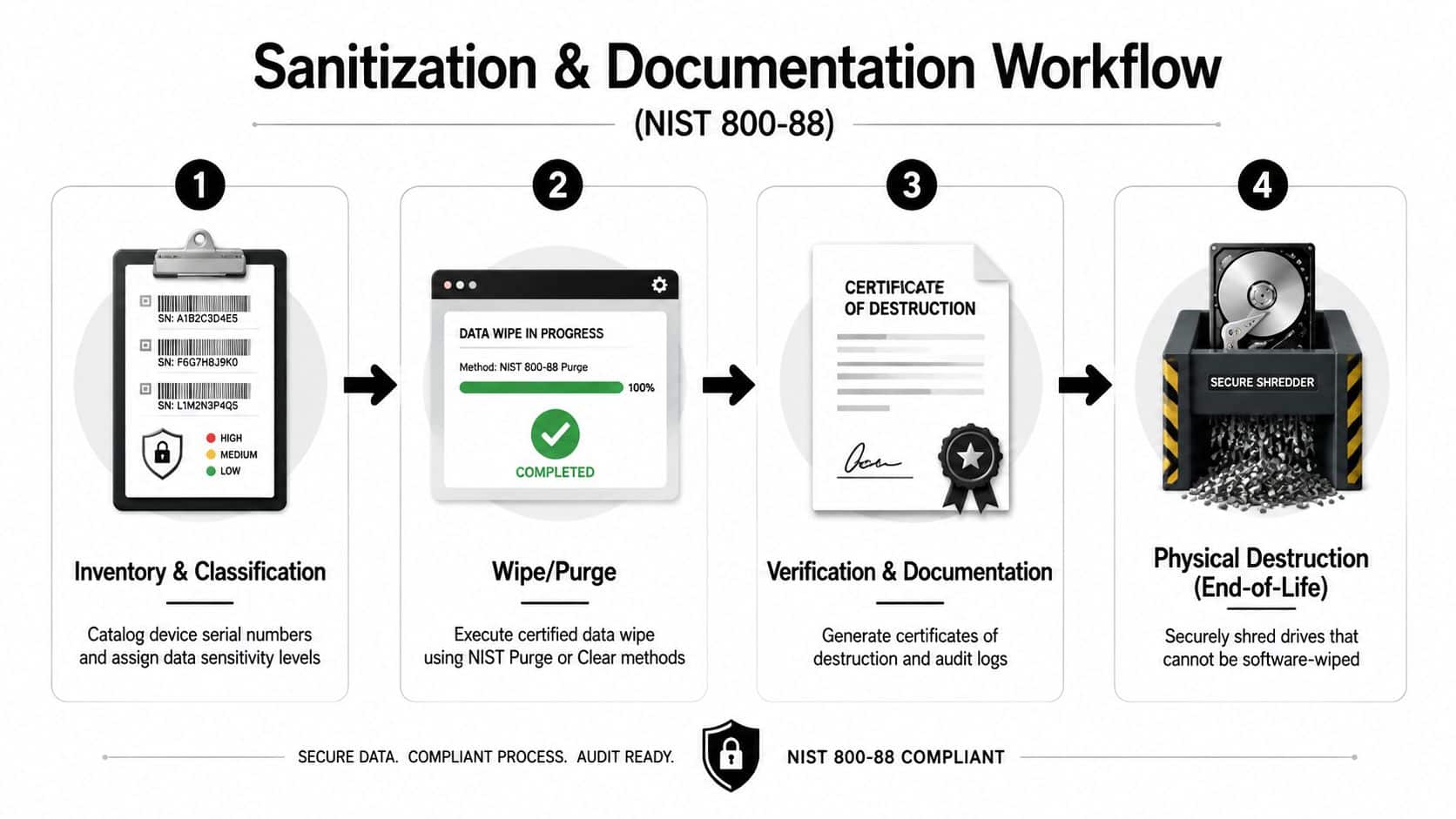
Four stages that survive an audit
Inventory and classification starts before release. Record the serial number, asset tag, assigned user or department, data classification, encryption status, and physical condition. Freeze the record when custody changes so later edits cannot obscure the original handoff.
Sanitization must match the storage technology and risk. Use an approved Clear or Purge method where appropriate. Send drives for physical destruction when they cannot be reliably sanitized or have reached end of life. Log the software or hardware tool, version, operator, start and completion timestamps, and result.
Verification confirms the process worked. Define the sample review in advance and test exceptions more aggressively than ordinary units. Quarantine any device that fails verification. Do not return it to the resale batch.
Certification and custody close the record. The certificate should identify the device or batch, serial list, sanitization method, operator, date, and vendor attestation. Track every transfer with timestamps, releasing and receiving parties, signatures, and condition notes, as outlined in this IT disposal documentation guide.
Keep four working records:
- Custody form: Asset ID, serial, parties, signatures, timestamps, and condition.
- Sanitization log: Method, tool, version, operator, device identifier, and outcome.
- Verification log: Sample selection, test method, reviewer, exceptions, and disposition.
- Certificate record: Serial list, destruction or sanitization method, date, operator signature, and vendor attestation.
For consumer report information, the FTC requires disposal practices that are “reasonable and appropriate” to prevent unauthorized access or use. Its examples include erasing electronic files or media and hiring a qualified disposal contractor, as explained in the FTC disposal rule guidance. For payment terminals or related equipment, choose wipes for payment terminals within the physical handling procedure, separately from the sanitization control.
Timing Buyback Against Refresh and End-of-Support Cycles
Buyback timing should be set before the refresh project starts. Three clocks govern the decision: the internal refresh cycle, the vendor's support timeline, and the secondary market's appetite for the model.
An early sale preserves optionality. A standard sale aligns with a planned refresh. A destroy-only posture applies when security, condition, or support constraints make resale impractical. Don't confuse the last option with a default. Destruction may reduce risk, but it also eliminates any recoverable value.
The current Windows migration cycle makes the question more urgent. A recent market report says refurbished laptop values reportedly rose 37.3% year over year, while enterprises are compressing refresh intervals from five to seven years to three to four years and an estimated 240 million Windows 10 PCs are being retired in 2025 as organizations move toward AI-capable devices. Those are market-report estimates, not a universal forecast for every fleet. The figures are discussed in the 2025 ITAD benchmarking release.
| Timing Posture | Device Age | Estimated Value Retention | Primary Trigger | Best For |
|---|---|---|---|---|
| Early sale | Earlier in the lifecycle | Higher resale optionality | Strong demand, upcoming refresh | Standardized fleets with active secondary buyers |
| Standard sale | Mid-lifecycle | Balanced recovery and use | Refresh, lease, warranty, or depreciation event | Most enterprise refresh programs |
| Destroy-only | Post-support or unsuitable condition | No resale objective | Security, failure, or unsupported configuration | Sensitive or nonrecoverable equipment |
Windows 10 reached end of support in October 2025, so organizations with remaining fleets should treat unsupported devices as a risk decision rather than a routine resale batch. Reverse-engineer the trigger date from warranty expiration, lease return terms, depreciation treatment, migration readiness, and the time required for secure processing.
Finance rule: Sell when expected residual value, less another quarter of depreciation, exceeds the cost of holding the devices and carrying the security risk.
That calculation shouldn't rely on a single vendor quote. Request an early indication, update it near the release date, and separate functional resale, parts recovery, employee reuse, and destruction values. Bulk decommissioning may simplify logistics, but staggered releases can preserve marketability. Choose the posture that fits your risk tolerance and operational capacity, not the posture that creates the neatest warehouse exit.
Logistics and Pickup Options for Business Laptops
The right logistics model depends on device count, geographic spread, and data classification. Price comes later. A cheap pickup that loses serial visibility or moves unencrypted devices through uncontrolled staging isn't cheap.
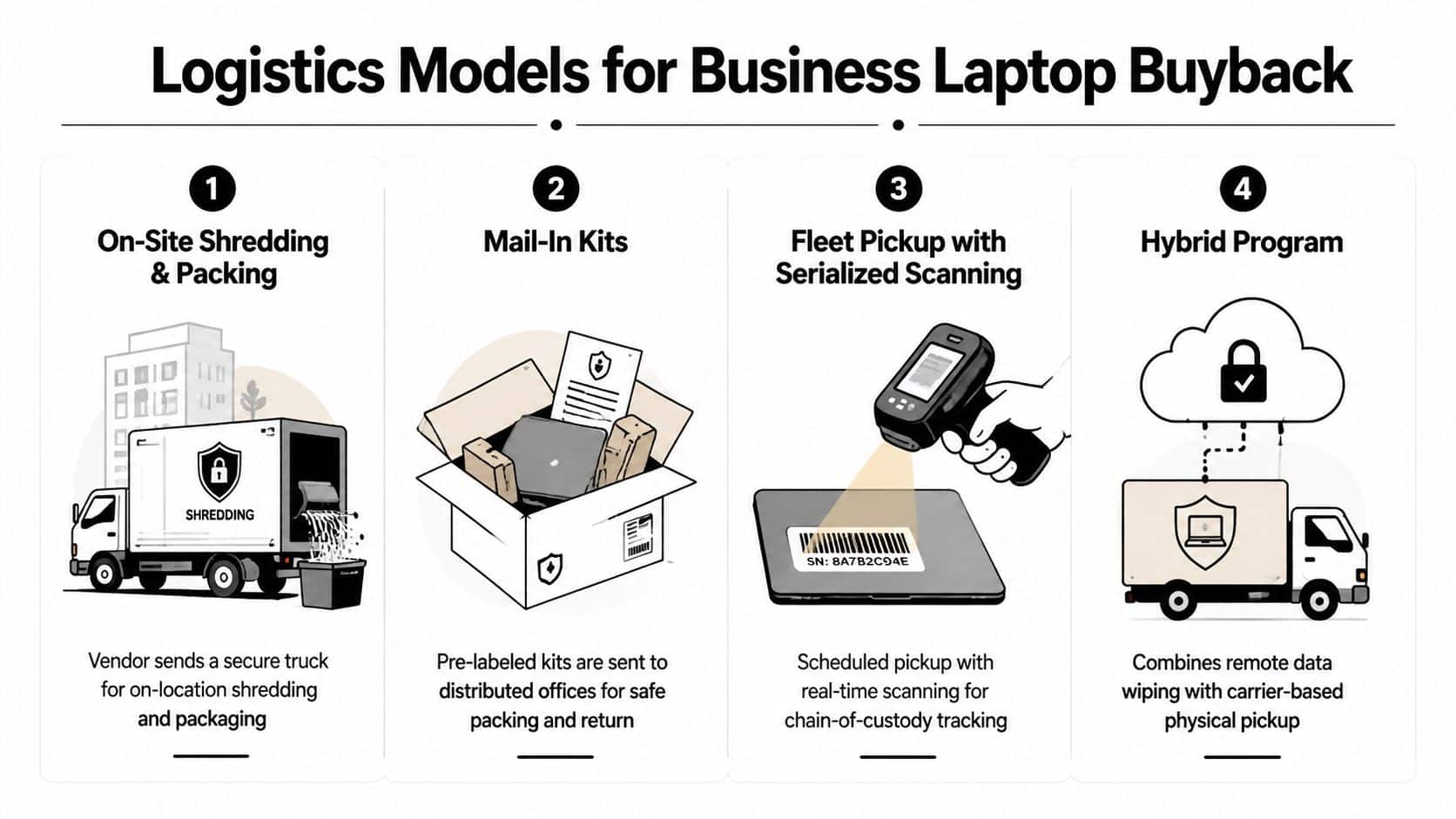
Match the model to the fleet
On-site shredding and packing suits end-of-life drives or highly sensitive environments. The vendor performs destruction at the facility, then packages approved equipment. Require controlled access, documented serial capture, and a certificate tied to the destroyed media.
Mail-in kits work for distributed offices with modest local volumes. Pre-labeled packaging reduces improvisation, but each site needs tamper-evident seals, a packing checklist, and a scan before shipment.
Fleet pickup with serialized scanning is the strongest general option for multi-site refreshes. The carrier or ITAD team scans each asset at pickup, records exceptions, seals the shipment, and provides transport visibility. This model makes reconciliation practical when equipment leaves several locations.
Hybrid programs combine remote wiping with physical pickup. They can shorten staging time, but remote completion must be recorded before the device is handed to a carrier. The remote employee laptop return discussion covers the operational issues created by distributed workforces.
Use tamper-evident bagging, serial capture at every handoff, controlled staging, and transport tracking. Reconcile the pickup manifest against the asset register before the truck departs. Missing assets, unencrypted devices leaving the building, and multi-site reconciliation gaps are the failures that create expensive investigations later.
Choosing an ITAD Vendor With the Right Credentials
A vendor's sales presentation isn't a control framework. Score the provider against evidence you can verify, then apply the same questions to every bidder.
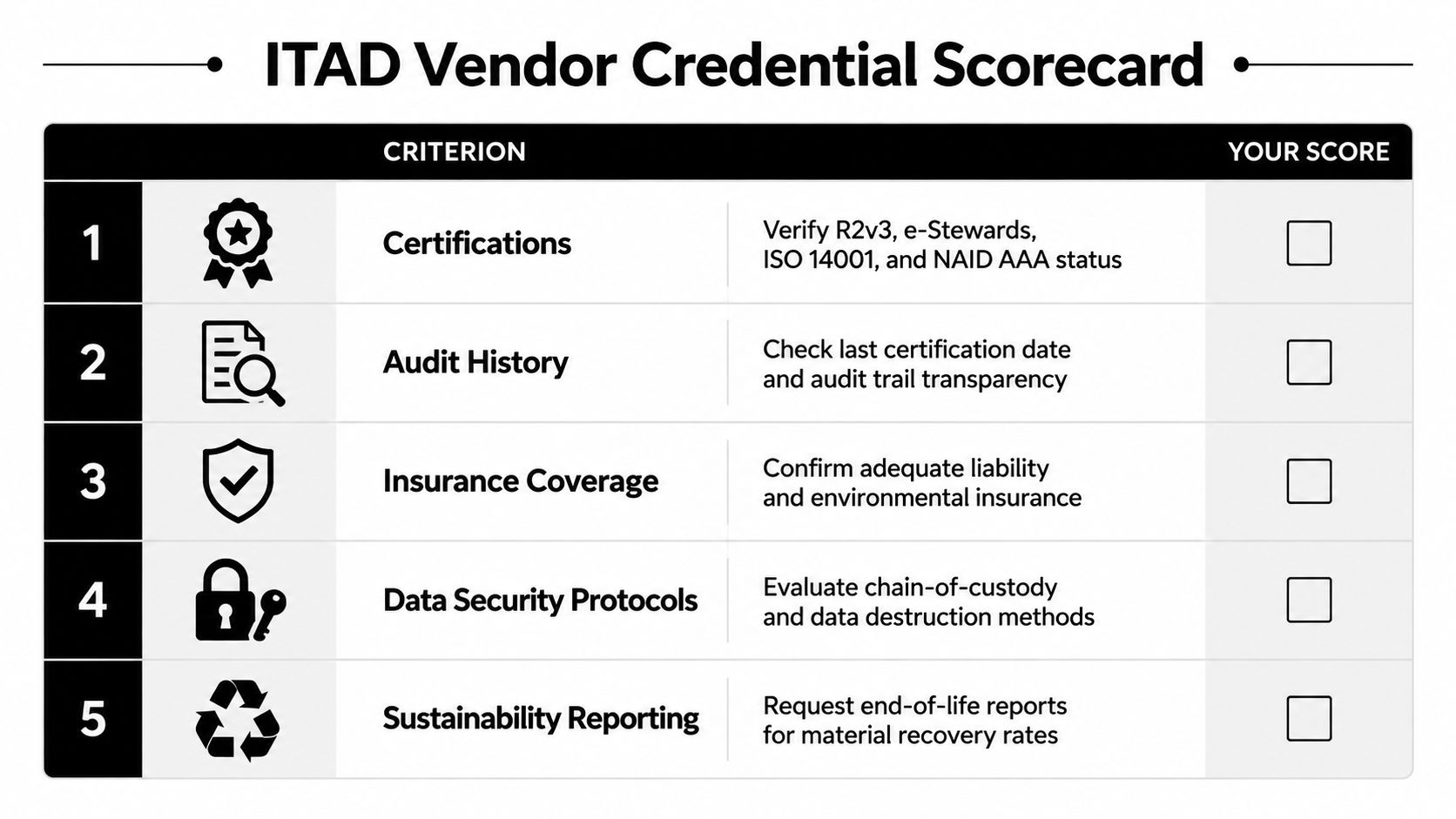
Use a five-part scorecard
Certifications: Verify current R2v3, e-Stewards, ISO 14001, and NAID AAA status where relevant to your requirements. An expired certificate or unclear scope is a disqualifier.
Audit history: Ask for the last certification date, audit findings, corrective actions, and processing-site scope. Offshore-only processing without clear disclosure deserves heightened scrutiny.
Insurance: Confirm cyber, environmental, workers' compensation, and general liability coverage. Ask for certificates, limits, exclusions, and renewal dates.
Financial stability: Request evidence that the provider can operate through commodity volatility and settle buyback proceeds reliably. A vendor that depends on immediate resale cash may create payment risk.
Reporting depth: Require per-unit certificates, serialized asset reports, downstream chain-of-custody, exception logs, and recovery statements. Certificates without device serials don't adequately close the audit trail.
Your RFP should ask who performs sanitization, where processing occurs, how failed wipes are handled, which downstream buyers receive resale units, and how quickly the vendor reports exceptions. Ask bidders to provide a sample settlement report and certificate before award. Use a documented vendor due diligence checklist so procurement compares operating evidence rather than polished marketing language.
Implementation Checklist and Rollout Plan
A buyback program can launch in a controlled sequence without waiting for a perfect asset database. Assign one accountable owner, define the first fleet, and make exceptions visible from day one.
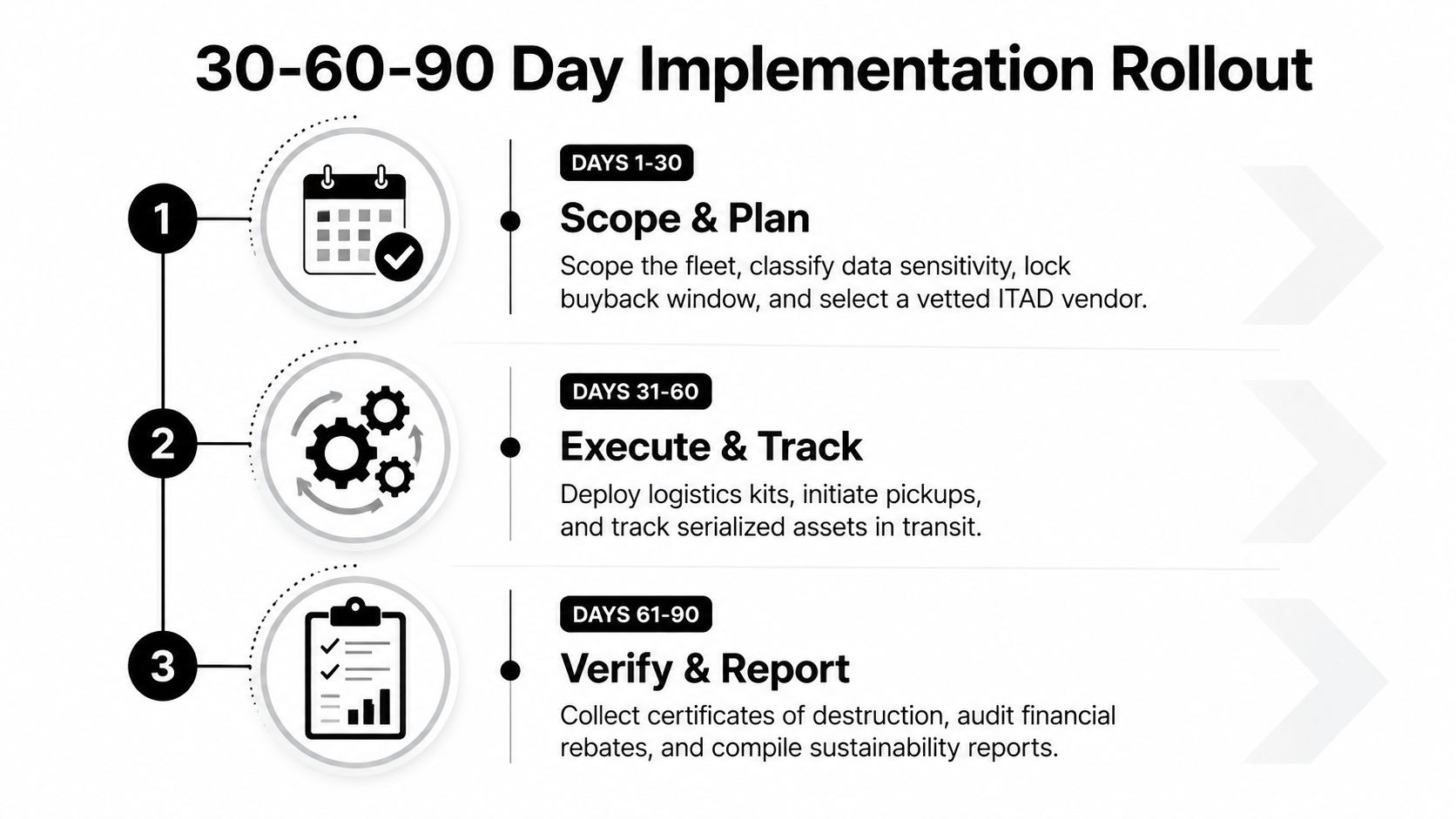
Days 1 to 30
Scope the fleet and identify the refresh, lease, warranty, and support dates. Classify data, set the buyback window, define resale and destruction rules, and select a vetted ITAD vendor. Put certificate and chain-of-custody requirements into the statement of work before pickup is scheduled.
Days 31 to 60
Execute approved Clear, Purge, or Destroy methods. Deploy packing materials, perform serialized pickups, track assets in transit, and reconcile every received unit against the asset register. Quarantine missing, failed, or unidentified devices rather than allowing them into the resale stream.
Days 61 to 90
Close the financial and compliance loop. Reconcile residual-value remittance, review downstream-channel reporting, document ESG outcomes, and compare results against recovery, turnaround, and audit targets.
Your audit file should contain:
- Asset register and BOM: Device identifiers, specifications, ownership, and disposition.
- Sanitization evidence: Tool records, operator details, timestamps, and outcomes.
- Certificates: Certificates of destruction or sanitization tied to serial numbers.
- Logistics records: Pickup manifests, signatures, condition notes, and transport evidence.
- Material records: Weight tickets and downstream-buyer attestations where applicable.
- Finance reconciliation: Settlement reports matched to asset records and remittance.
Track two measures that teams routinely overlook. First, measure the share of devices sold inside the planned value window. Second, measure the share of certificates reconciled to finance records within 30 days of pickup. The exact KPI targets should reflect your environment, but both measures expose whether the program creates value and closes its control obligations.
A practical 30-60-90 rollout turns laptop disposal into a repeatable operating rhythm. Beyond Surplus provides commercial IT equipment buyback, asset valuation, secure data wiping, hard-drive shredding, pickup coordination, and certificates of recycling and data destruction for business programs.
Schedule a buyback consultation with Beyond Surplus to evaluate your laptop fleet, set a defensible release window, and coordinate serialized pickup, secure sanitization, resale, or destruction. Ask the team to map the workflow to your refresh calendar and reporting requirements before your next migration creates another quarter-end pileup.


