The movers are already on the vacant floor. Eighty desktops are coming out, two dozen laptops are stacked beside a rack of retired servers, and a wall of CRT monitors still needs a destination. The CFO wants the space cleared by Friday. Legal wants proof that every storage device was handled correctly. IT wants working laptops returned to circulation, not destroyed with the scrap.
That's the starting point for an Office Computer Recycling Guide. Commercial electronics recycling isn't a single pickup task. It's a controlled IT asset disposition project involving inventory, data sanitization, documentation, value recovery, and physical logistics. The global e-waste stream reached 62 million tonnes in 2022, equal to about 7.8 kilograms per person, yet only 22.3% was formally collected and recycled in an environmentally sound manner, according to the 2024 Global E-waste Monitor. Your retired computers are part of that expanding problem, but your organization also has a direct obligation to control the data and prove what happened to each asset.
Table of Contents
- Mapping the Office Computer Recycling Project
- Matching Data Destruction Methods to Each Device
- Building the Asset Inventory That Survives an Audit
- Staying Compliant Without Memorizing Regulations
- Choosing Between Pickup Drop Off and Mail In Options
- Recovering Value Before Recycling the Rest
- Your Reusable Office Computer Recycling Checklist
Mapping the Office Computer Recycling Project
Start by treating the refresh like a project with an owner, a scope, and fixed deliverables. Don't wait until equipment is shrink-wrapped on pallets to decide whether drives will be wiped or destroyed. That decision affects inventory fields, transport controls, resale potential, staffing, and the paperwork your ITAD provider must produce.
Put four workstreams in motion
Assign one internal project owner, usually someone in IT operations, facilities, or procurement. That person should coordinate four workstreams:
- Asset identification: Count equipment by floor, department, device type, and storage location. Separate desktops, laptops, servers, monitors, printers, and peripherals.
- Data sanitization: Decide whether each asset class will be cleared, purged, or destroyed based on drive type, data sensitivity, and intended disposition.
- Compliance records: Require device-level results, serial numbers, chain-of-custody entries, and certificates that match the inventory.
- Physical logistics: Plan staging, loading access, elevator use, security escort requirements, palletization, and pickup timing.
The first deliverable should be a defined scope. Write down which assets are included, which will be redeployed internally, which may be resold, and which must go directly to material recovery. Include servers and removable media even if they're disconnected from production systems.
Practical rule: Never let a recycler receive an unidentified pallet. If the serial number wasn't captured before processing, the final certificate may not prove which machine was handled.
The 2024 Global E-waste Monitor from the International Telecommunication Union records formal collection and recycling rising from 8 billion kilograms in 2010 to 13.8 billion kilograms in 2022, while total generation rose from 34 billion kilograms to 62 billion kilograms over the same period. Recycling is increasing, but device turnover is increasing faster. That's why an office computer recycling project needs a scheduled workflow rather than an improvised clearance.
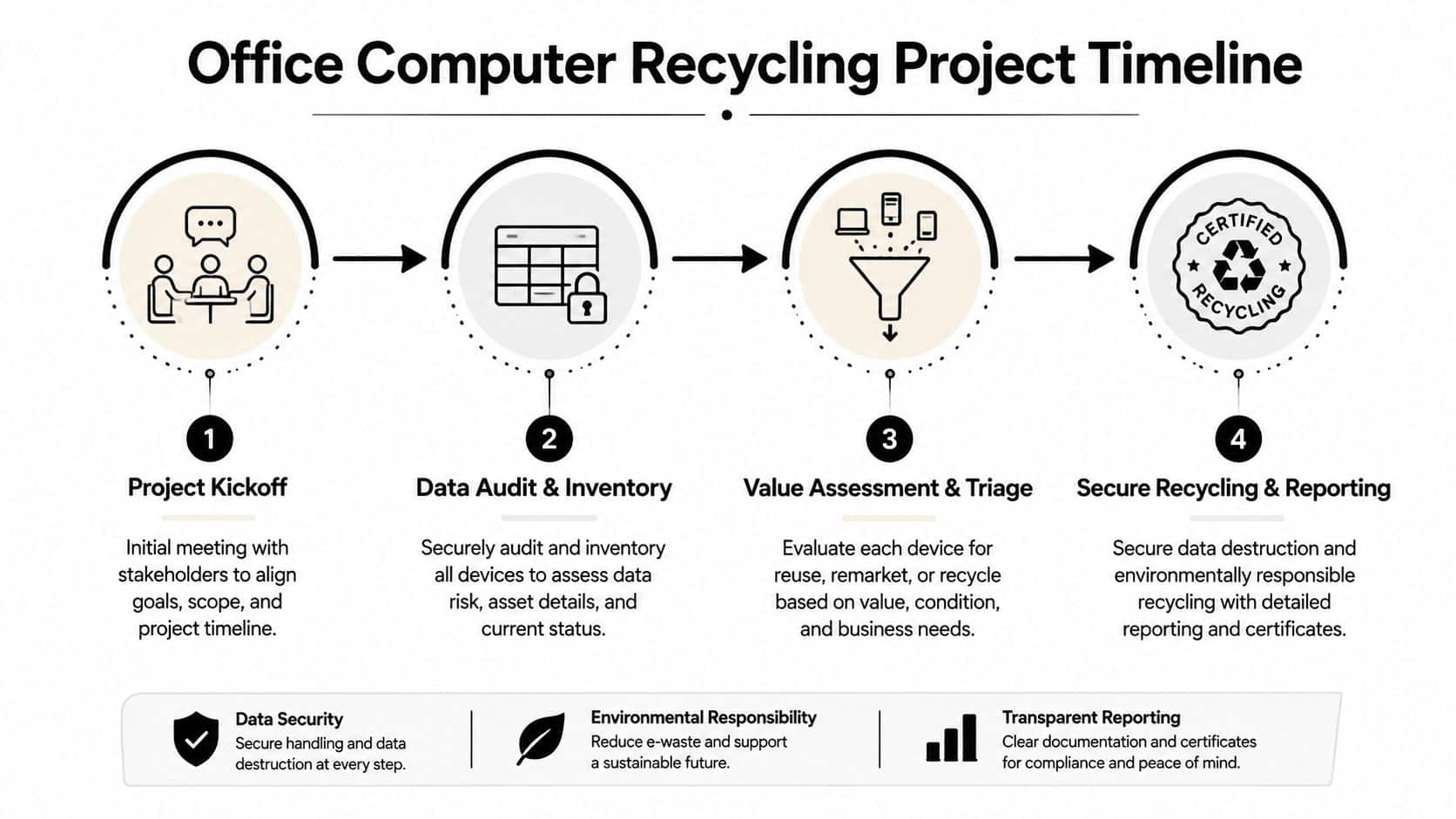
Use a commercial office cleanout service when the project includes furniture removal, multiple floors, or a hard deadline. The remaining workflow is straightforward: build an audit-ready inventory, select sanitization methods by asset and risk, choose the right transport model, triage reusable equipment before recycling, and close the project with verified certificates.
Matching Data Destruction Methods to Each Device
A mixed pallet reaches the staging area: laptops for redeployment, failed SSDs, older desktops, and drives containing sensitive records. “Wipe everything” gives the recycler no usable decision rule. Assign the method to the media type, information risk, hardware condition, and intended disposition before transport.
Overwrite fits traditional magnetic hard disk drives when the process covers bad sectors and verifies the result. Do not use it as the default for SSDs or NVMe media. Flash controllers and wear-leveling can leave data beyond the areas a conventional overwrite reaches.
Cryptographic erase suits functioning self-encrypting drives. Removing the encryption key makes stored data inaccessible while keeping the hardware available for reuse. Reject this method if the key is unavailable, the controller has failed, or the drive's encryption state cannot be verified.
Degaussing disrupts magnetic recording and can permanently disable a hard drive. It does not produce useful audit evidence by itself, and it does not work for SSDs because SSDs store data without magnetic recording.
Physical shredding destroys the media across drive types. Choose it when policy requires destruction or sanitization cannot be verified. The trade-off is permanent loss of resale and redeployment value. Do not shred every drive automatically. Working equipment may be securely reused through an approved Clear or Purge process.
Compare the decision, not just the tool
| Method | Best For | Allows Reuse | NIST 800-88 Reference | Audit Evidence |
|---|---|---|---|---|
| Overwrite | Verified HDDs intended for reuse | Yes | Clear | Device log, method, verification result |
| Cryptographic erase | Functioning self-encrypting SSDs | Yes | Purge | Drive record, key-erasure result, verification |
| Degaussing | Magnetic media that will not be reused | No | Destroy | Equipment log and destruction record |
| Physical shredding | Any media requiring irreversible destruction | No | Destroy | Serial record, method, and destruction evidence |
Apply Clear when an approved process matches the drive technology and the device will be redeployed. Apply Purge when the media will leave the organization but remains suitable for controlled reuse or recovery. Apply Destroy when the device is too damaged to verify, the data risk is unacceptable, or policy requires physical destruction. These terms refer to the NIST 800-88 framework. Keep the selected method attached to the individual asset record, not a generic batch label.
The certificate should identify the serial number, method, verification result, processing date, and responsible operator. That evidence turns a disposal decision into an audit trail and lets facilities prove what happened to each device.
Protect hardware before transport. Follow guidance on how to pack electronics for moving for cushioning, separation, and handling of fragile office equipment. For drive-specific preparation, use Beyond Surplus's guide to wiping a hard drive before recycling a computer, then require verification and device-level logging before pickup.
Building the Asset Inventory That Survives an Audit
An auditor usually starts with a simple question: Which asset was this certificate issued for? Your inventory must answer that without detective work.
Capture the asset tag, manufacturer, model, serial number, and service tag before a device moves into a staging area. Then record the storage media type and capacity, such as HDD, SSD, or NVMe, along with the device's assigned user or cost center. Add the data classification, including whether the equipment held PHI, PCI data, PII, financial records, or routine office files.
Give every device a disposition path
Your inventory should show the decision already made for each unit:
- Redeploy: The organization will use the device again after approved sanitization.
- Resell: A third party may receive the equipment after data removal and functional testing.
- Parts recovery: Components such as memory or storage may be retained for internal use.
- Material recycling: The equipment has no useful recovery path or requires destruction.
A live spreadsheet is more useful than a one-off CSV because it preserves status changes and ownership. Version history can show who changed a device from pending to destroyed. Filters let compliance staff isolate every laptop that held payment information, while separate owners can maintain finance, IT, and legal fields without replacing one another's work.
The two failures that repeatedly weaken disposal records are easy to prevent. Teams retire laptops without recording the assigned user, or they sanitize equipment before capturing the serial number. In both cases, the certificate may exist, but the organization can't confidently connect it to the physical machine.
For larger refreshes, inventory optimization helps turn a scattered equipment list into a controlled asset register. Keep the register protected, restrict editing rights, and export a final locked version after every processing lot.
Staying Compliant Without Memorizing Regulations
You don't need every manager to memorize every regulation. You do need one operating vocabulary and a written decision rule that staff can apply consistently.
NIST SP 800-88 Rev. 1 provides that vocabulary. Clear is the reusable-drive path when the selected method can remove data from the addressable storage areas. Purge is appropriate when media is leaving the organization but the hardware may still have recovery value and the process meets the required assurance. Destroy applies when the media must be made unusable or the organization can't verify an acceptable sanitization result.
Translate risk into action
Map the data and device categories before the pickup:
- Workstations with regulated health information: Assign Destroy when the organization can't verify complete sanitization or policy requires irreversible handling.
- Customer PII on serviceable media: Assign Purge when the method is supported, verified, and documented, allowing controlled resale or recovery.
- Routine office files on reusable equipment: Assign Clear followed by testing and redeployment.
- Financial or credit information: Escalate the decision to the responsible compliance owner and require a documented method, date, technician, and asset reference.
The relevant obligations can include the FTC Disposal Rule for consumer report information, the HIPAA Security Rule for electronic protected health information, GLBA Safeguards requirements for financial institutions, FACTA requirements for credit information, and state breach notification laws in places such as California, New York, Massachusetts, and Texas. Your compliance mapping should show which sanitization level applies to each asset class and who approved it.
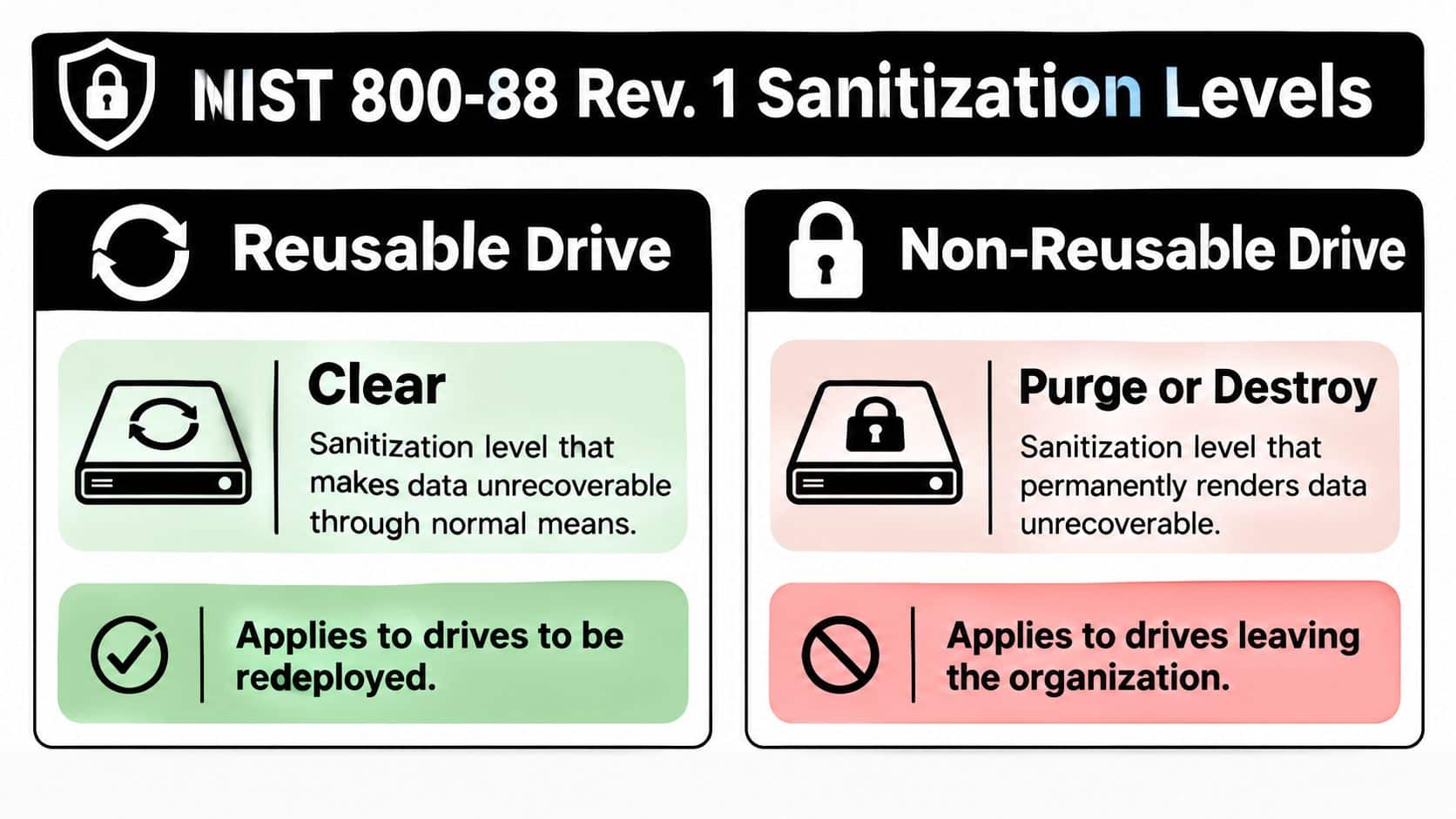
A concise audit guide from MD TECH TEAM can help teams organize broader evidence controls, but your ITAD file still needs asset-specific proof. Beyond Surplus explains the practical application in its guide to NIST 800-88 data destruction standards. Require certificates that identify the device, method, date, responsible party, and final disposition.
Choosing Between Pickup Drop Off and Mail In Options
Logistics should match volume, geography, access conditions, and risk tolerance. There isn't one universally correct route. The wrong choice is the one that creates an uncontrolled handoff or forces your staff to spend days moving equipment that a commercial provider could have handled.
| Factor | Certified Pickup | Drop-Off | Mail-In |
|---|---|---|---|
| Minimum batch size | Fleet or consolidated project | Small batch or satellite site | Single device or remote exception |
| Cost structure | Pickup and handling fee, potentially offset by labor savings or recovery | Lower service cost, internal transport effort | Packaging and insured shipping cost |
| Chain-of-custody strength | Provider-controlled loading and handoff | Customer controls transport to facility | Carrier tracking plus tamper-evident packaging |
| Scheduling lead time | Coordinate dock, loading, and site access | Usually easier to arrange | Depends on packaging and carrier collection |
| Certificate turnaround | Confirm before booking | Confirm at intake | Confirm after receipt and processing |
Match the option to the site
Certified pickup is the most controlled approach for a substantial fleet, multiple floors, or equipment that can't sit unattended. Require a locked vehicle where appropriate, witnessed loading, a signed handoff, and a chain-of-custody record that begins at the point of collection.
Drop-off works well for a satellite office with a manageable batch or a site without loading-dock access. The trade-off is responsibility. Your team must secure the equipment during transport, prevent unauthorized stops, and obtain an intake receipt that identifies what was delivered.
Mail-in service belongs at the edge of the operating model. Use it for an isolated laptop or a remote site with no practical ITAD route. Demand serialized tamper-evident packaging, carrier tracking, insured shipping, and written confirmation when the provider receives the package. Don't send a mixed enterprise pallet through ordinary parcel shipping.
Recovering Value Before Recycling the Rest
A mixed fleet of 120 devices should not move through one disposition path. Separate 45 corporate laptops, 18 rack servers, 27 aging desktops, and 30 monitors and peripherals, then grade each group for resale, redeployment, parts recovery, or recycling.
Grade laptops before processing
Assess laptops by processor generation, specifications, cosmetic condition, battery health, and functional-test results. The 45 laptops with i5 or i7 processors, SSDs, and serviceable condition may have resale potential if they are three years old or younger. Confirm data sanitization before release, and document the condition supplied to any buyer.
Require the ITAD provider to test working equipment, identify buyback candidates, and apply approved recovery value to the final recycling invoice. Recovery will not remove processing costs, but it can offset part of the project expense. Require a valuation or settlement report so finance can reconcile the credit to serialized assets.
Set the disposition before scheduling pickup. A device marked for resale needs a different processing record from a unit sent directly to material recycling.
The servers need a separate review. The 18 rack servers contain customer PII, so their resale yield may not justify added verification, testing, and transfer controls. If policy does not allow confident purging and verification, authorize physical destruction. Record the destruction certificate against each affected serial number, even when the chassis or components retain market value.
Recover usable parts
For the 27 aging desktops, test functional RAM and SSDs for internal redeployment. Record the receiving department and asset transfer for anything reused, then send the remaining towers to recycling.
Sort the 30 monitors and peripherals by type and condition. CRTs contain regulated materials and often have limited resale demand. LCD recovery depends on panel type, size, working condition, and buyer demand.
Organizations evaluating buyback, reuse, and responsible disposition can review Beyond Surplus's asset recovery services in Georgia. Ask the provider for separate records covering resale, internal reuse, component recovery, and recycling. That separation gives facilities, finance, and compliance teams a defensible account of where each asset went, without relying on a single invoice or a general recycling weight.
Your Reusable Office Computer Recycling Checklist
Use the same control sequence for every refresh cycle. The checklist should produce a file that another manager can understand without relying on the memory of the person who ran the project.
Phase one defines scope and ownership
- Name the project owner: Assign one person to coordinate IT, facilities, procurement, finance, legal, and the ITAD provider.
- Map the site: List each floor, room, storage area, loading zone, elevator, and security requirement.
- Set the cutoff: Decide when devices stop being available for business use and when the staging area must be empty.
- Create the inventory: Record asset tag, manufacturer, model, serial number, service tag, media type, capacity, user, cost center, data class, and proposed disposition.
The deliverable is a controlled inventory spreadsheet, not a rough count. Freeze the initial version before any device is wiped, moved offsite, or stripped for parts.
Phase two assigns the sanitization posture
- Classify the media: Separate HDD, SSD, NVMe, hybrid, removable, and failed storage.
- Classify the information: Mark routine office files, internal information, PII, PCI data, PHI, financial records, and other restricted content.
- Choose the outcome: Assign Clear for approved reuse, Purge for eligible media leaving the organization, or Destroy when policy or verification requirements demand it.
- Record exceptions: Flag failed drives, missing serials, damaged controllers, unknown encryption states, and assets awaiting legal approval.
The deliverable is a sanitization matrix tied to NIST 800-88 terminology and approved by the responsible data owner. Don't allow technicians to choose a method ad hoc at the loading dock.
Phase three schedules controlled movement
- Book the provider: Share the device count, floor plan, access rules, equipment types, and required completion date.
- Prepare the staging area: Use restricted access, clear labels, separated lots, and a visible status for pending, processed, and exception assets.
- Start the chain of custody: Require the first handoff record to show who released the equipment, who accepted it, when the transfer occurred, and what lot or asset range changed hands.
- Confirm transport controls: Document vehicle, driver or crew, destination, and any witnessed loading requirement.
The deliverable is a pickup request and an initial chain-of-custody entry. Keep unprocessed storage media away from general recycling containers.
Phase four closes the evidence file
Demand three documents from the ITAD provider:
-
- Client and project name
- Processing date
- Equipment categories and quantities
- Environmental disposition
- Provider representative and authorization
-
- Asset tag and serial number
- Media serial number
- Sanitization method
- Clear, Purge, or Destroy classification
- Technician or responsible party
- Processing date and timestamp
- Verification result or destruction evidence
Chain-of-Custody Log
- Asset or lot identifier
- Releasing employee
- Receiving employee or provider
- Handoff date and time
- Transport event
- Processing event
- Final disposition event
- Signatures or authenticated approvals
A generic receipt isn't enough for a compliance-heavy organization. Expert SOPs call for quarantining assets with storage media, matching the method to the drive type, verifying the result, and retaining device-level logs with the asset ID, media serial number, technician ID, method, and timestamp. One expert workflow also calls for re-verifying at least 5% of wiped units per lot, with a failed wipe reattempted once before escalation to destruction or specialized handling, as described in this refurbishment grading and data-wipe SOP.
Finally, cross-reference every delivered certificate against the inventory. Investigate missing serials, duplicate records, unprocessed exceptions, and disposition mismatches before archiving the final file under your organization's required retention policy.
Beyond Surplus provides commercial electronics recycling, IT equipment disposal, secure data wiping, hard drive shredding, IT asset recovery, product destruction, and data center decommissioning support with documented chain of custody. Review your equipment list, identify the assets that require Clear, Purge, or Destroy treatment, and contact Beyond Surplus to plan a controlled pickup and receive the certificates your audit file requires.