Most advice on how to wipe a hard drive before recycling a computer starts with the wrong question. It tells business teams to run seven or even 35 overwrite passes, then treats the finished progress bar as proof that the drive is safe. That approach can waste processing time, miss failing or remapped sectors, and destroy a device that could have been securely reused.
A better decision starts with three factors: the drive's technology and condition, the data classification, and the intended downstream use. Modern hard disk drives can often be cleared efficiently with a single full-disk overwrite and verification, while solid-state drives require different treatment. Drives that can't be reliably sanitized, or whose risk profile makes reuse unacceptable, should move to documented destruction instead of an improvised drill or hammer.
For commercial IT equipment disposal, data wiping is only one control. Inventory, chain of custody, certificates, secure logistics, and responsible electronics recycling determine whether the entire disposition process stands up to an audit.
Table of Contents
- Why Multi-Pass Overwrites Are No Longer the Standard
- Preparing Your Systems Before Wiping Begins
- Understanding NIST Sanitization Methods for Hard Drives
- Executing a Single-Pass Overwrite with Verification
- Deciding Between DIY Wiping and Professional ITAD Services
- Completing the Recycling Workflow with Certification and Logistics
Why Multi-Pass Overwrites Are No Longer the Standard
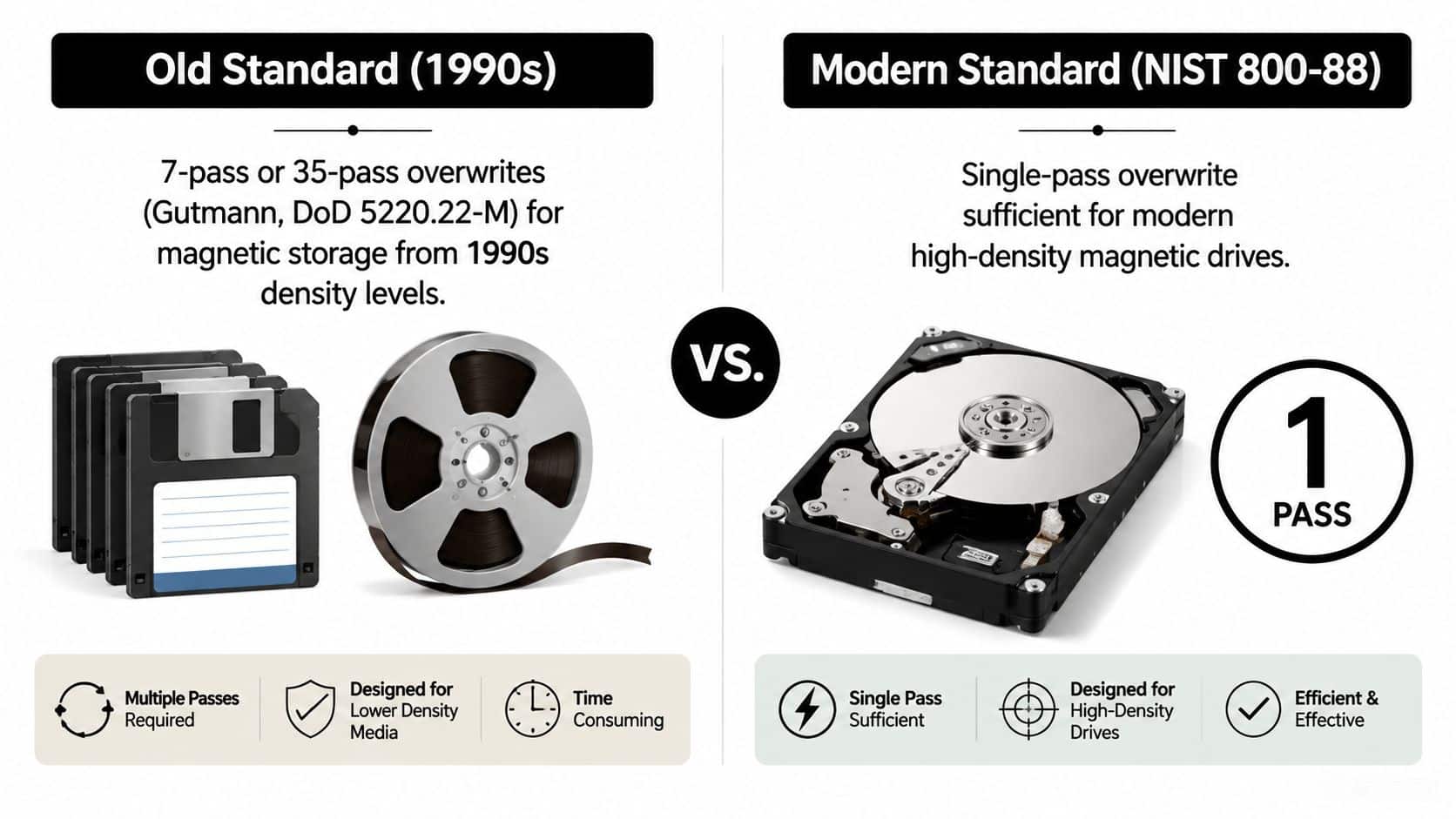
Seven, 35, or another large number of overwrite passes is not a universal security requirement. That belief comes from older magnetic-storage practices. The DoD 5220.22-M pattern, introduced in the National Industrial Security Program Operating Manual in 1995, used three passes with zeros, ones, and a random bit pattern. The pattern was removed from that manual by 2006 as standards-based sanitization guidance gained influence. CompuCycle's history of the DoD wipe myth provides context for the change.
The practical decision is whether the drive can be sanitized reliably and still retain resale value. A healthy magnetic HDD with ordinary business data may justify wiping and reuse. A failing drive, a device with restricted data, or media that cannot produce trustworthy verification may justify destruction, even when destruction reduces recovery value and adds e-waste.
NIST SP 800-88 Rev. 1 defines three outcomes, Clear, Purge, and Destroy, rather than assigning one pass count to every device. For ATA hard disk drives, Clear uses logical techniques to remove data from user-addressable storage locations, typically through standard read and write commands. It specifies at least a single write pass with a fixed value, such as zeros, while allowing additional passes without requiring them. The guidance also states that for ATA drives manufactured after 2001 and larger than 15 GB, a single overwrite is adequate against keyboard and laboratory attacks.
How storage type changes the sanitization answer
A single overwrite suits many modern magnetic HDDs because it addresses the sectors exposed to the host. Extra passes increase workload and delay resale without automatically correcting unreadable or remapped areas. Verification provides the evidence that matters.
SSDs require a different decision. Wear leveling and over-provisioning can keep ordinary overwrite routines from reaching every physical flash location, making secure erase, cryptographic erase, or destruction more appropriate. A degausser is also limited to magnetic media. Businesses should match the method to the drive technology, as explained in Beyond Surplus's explanation of what a degausser does.
NIST SP 800-88 Rev. 1 was published in 2014 and withdrawn on September 26, 2025, when NIST superseded it with Rev. 2, published in September 2025. The operational lesson remains clear: choose a recognized sanitization outcome, match the method to the media and data risk, and retain evidence that the process succeeded.
Preparing Your Systems Before Wiping Begins
A wipe is irreversible. Before connecting a drive to a sanitization workstation, confirm that the business has preserved everything it is required to keep and identified every device accurately. A technician who starts with the wrong disk can complete a technically successful wipe and still create a serious operational incident.
Build the record before the process
Back up critical data to a secure, tested repository, then verify that the business can restore what it needs. Include shared folders, local archives, application data, credentials managed outside central systems, and configuration information required for migration. Teams that need a refresher on backup fundamentals can consult CTF Mobile Phones Computer Repairs data backup guidance as a general reference, then apply their own retention and approval policies.
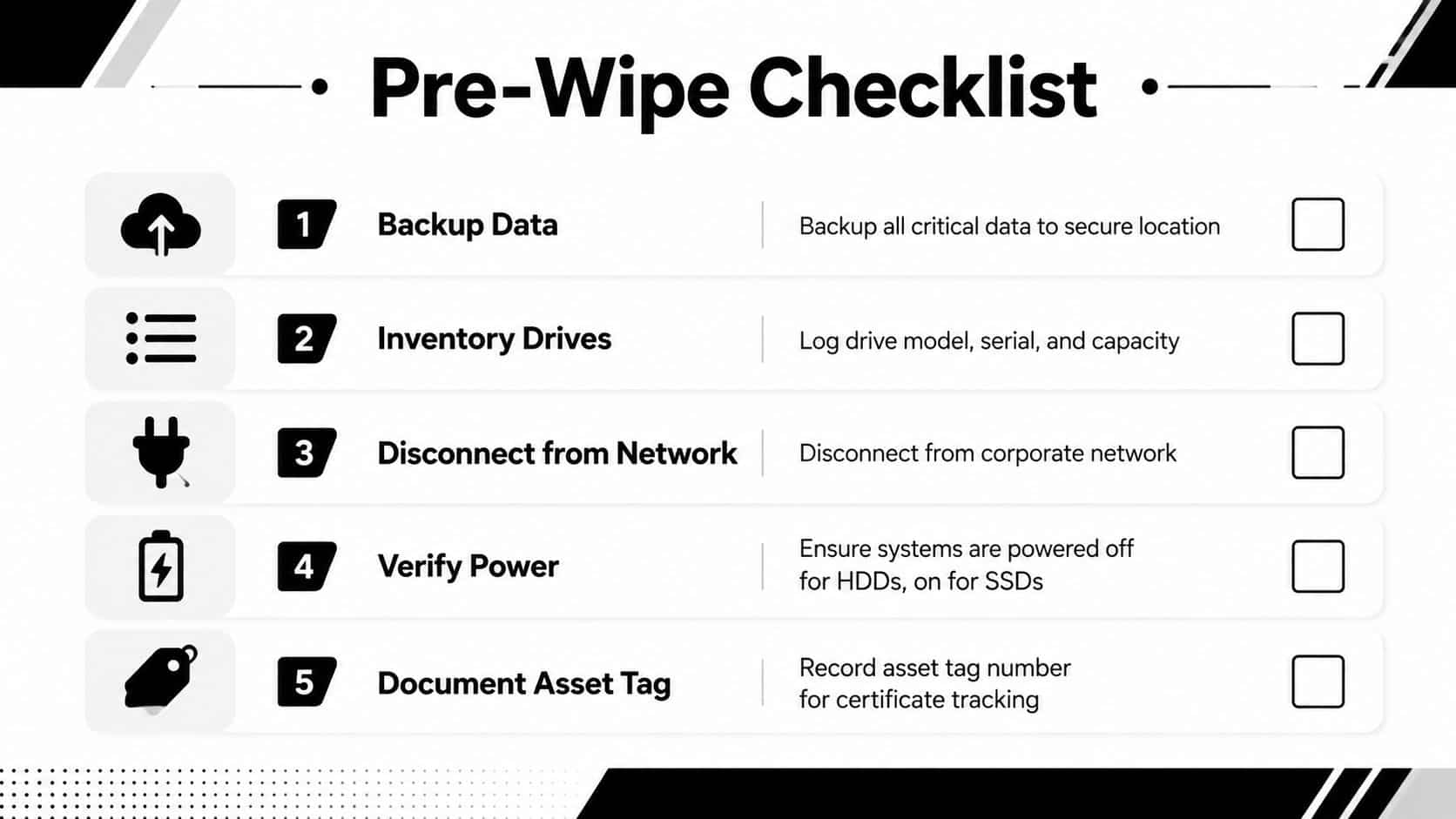
Create or update the asset inventory before wiping begins. At minimum, record:
- Identity: Capture the asset tag, manufacturer, model, serial number, and storage identifier.
- Ownership: Note the assigned department, site, custodian, and disposition authorization.
- Risk: Mark the data classification, encryption status, legal hold status, and applicable retention requirements.
- Condition: Record whether the computer boots, whether the drive reports errors, and whether reuse is realistic.
- Destination: Define whether the asset is headed for redeployment, resale, parts recovery, or destruction.
Remove avoidable process failures
Check legal holds, regulatory retention requirements, and encryption before selecting a method. A drive containing records under preservation shouldn't enter a routine recycling batch, and an encrypted drive may support a different sanitization decision than an unencrypted one.
Prepare the workstation with compatible adapters, boot media, supported software, power protection, and enough capacity to process the fleet. Disconnect systems from business networks before wiping, and label every drive so the operator can reconcile the physical item with the digital result.
Practical rule: If the inventory record can't identify the drive before the wipe, the certificate won't repair the gap afterward.
Understanding NIST Sanitization Methods for Hard Drives
NIST's framework gives business buyers a way to align the treatment with both risk and asset value. Clear is a logical method intended to make data inaccessible through ordinary user tools. For an ATA HDD, that can mean a full overwrite using a fixed value, such as zeros, followed by verification. A healthy drive with lower or moderate sensitivity data and a credible reuse path may fit this outcome.
Purge applies a stronger technique intended to make recovery infeasible even with advanced laboratory methods. Depending on the media and equipment, purge can involve firmware-level commands, cryptographic erasure, or degaussing for suitable magnetic media. Dell's NIST 800-88r1-supported sanitization matrix maps ATA Enhanced Security Erase to Purge, illustrating why a drive's built-in capabilities matter.
Destroy makes the storage medium physically unusable. Shredding, disintegration, or another controlled destruction process is appropriate for failed drives, drives that can't be verified, or media whose sensitivity and policy requirements outweigh potential reuse value. Destruction should be serialized and documented, not improvised.
The choice isn't “wipe or recycle.” It is a disposition decision:
| Method | Technique | Data Sensitivity | Drive Reuse | Typical Use Case |
|---|---|---|---|---|
| Clear | Logical overwrite and verification | Lower or moderate | Usually preserved | Healthy HDD prepared for redeployment or resale |
| Purge | Firmware, cryptographic, or suitable magnetic technique | Higher | Often preserved when technically supported | Sensitive drive requiring stronger sanitization |
| Destroy | Physical destruction | Highest, failed, or unverifiable media | Eliminated | Damaged drive or policy-controlled destruction |
Businesses should treat the matrix as a starting point, then apply their own data handling policy and contractual obligations. Beyond Surplus's NIST SP 800-88 resource can help teams frame that policy discussion.
Executing a Single-Pass Overwrite with Verification
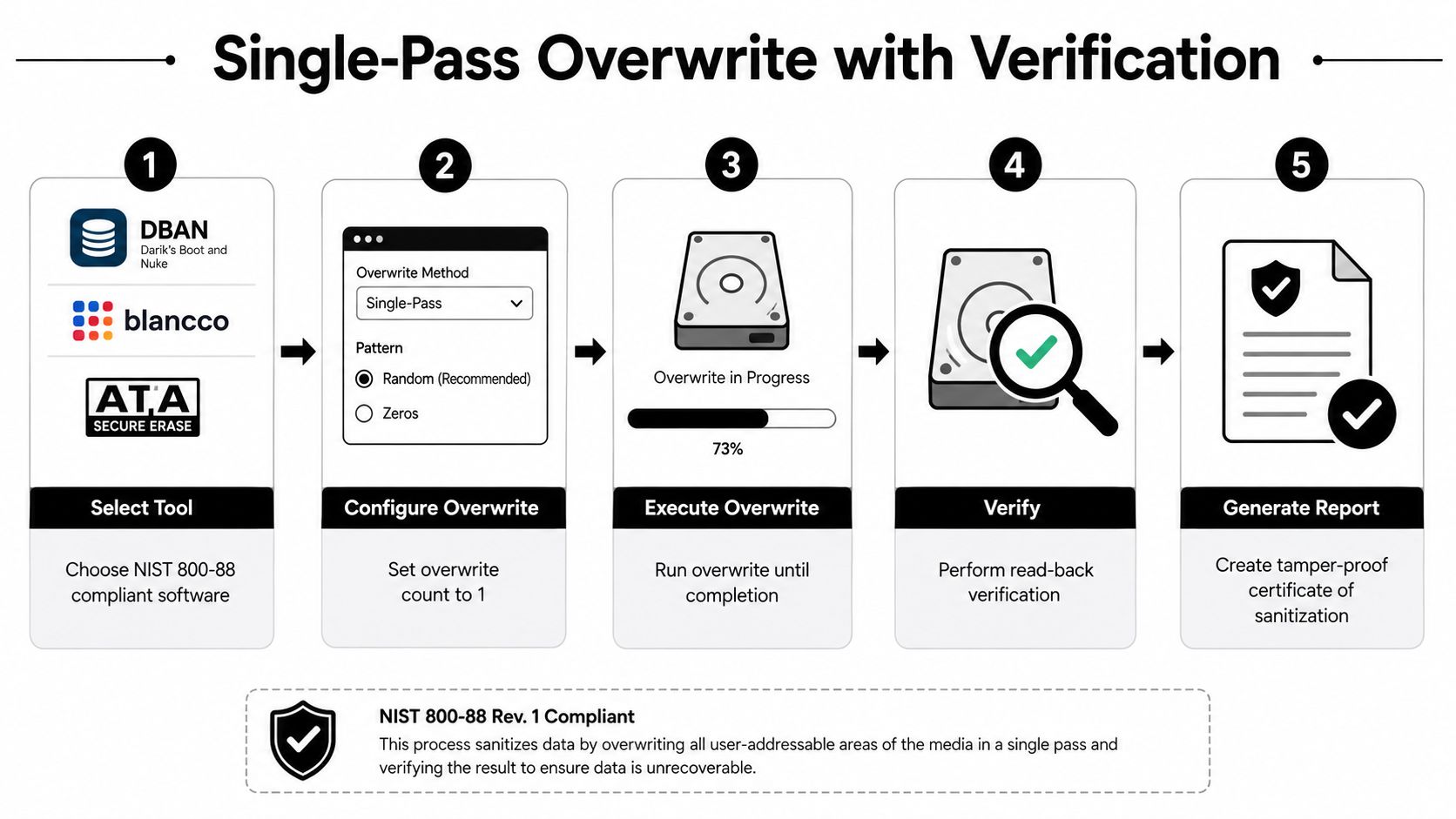
For a functioning magnetic HDD approved for Clear, use a tool that identifies the drive precisely, overwrites all user-accessible sectors, verifies the result, and creates a durable record. DBAN can suit controlled internal work. Blancco and vendor-supported ATA tools fit environments where reporting, fleet management, and audit evidence affect the disposition decision.
The operating procedure
- Identify the media. Match the serial number and drive type to the asset record. With multiple drives attached, never select a target by position alone.
- Boot the sanitization environment. Use approved boot media or a supported firmware utility. Disconnect the host from production networks.
- Select the method. Configure one complete overwrite pass with zeros or another pattern allowed by the approved procedure. As noted earlier, Clear guidance for ATA HDDs does not require a multi-pass routine.
- Run to completion. Keep the workstation powered on. Monitor unreadable sectors, controller faults, errors, and interruptions.
- Verify the result. Re-read sampled sectors or perform a full read-back check, according to the software and policy. Confirm that the expected pattern is present and that the tool reports no unexplained exceptions.
- Reconcile the report. Match the result to the serial number, asset tag, method, operator, date, and disposition decision.
Why verification is the control teams often skip
A completed wipe command does not prove that every targeted area was handled. Bad sectors, failing controllers, and remapped blocks can interrupt coverage or leave uncertainty. A hard-drive sanitization tutorial from the Center for Magnetic Recording Research emphasizes full user-accessible coverage and verification instead of relying on extra passes.
Independent enterprise guidance reports that failed sanitization dropped from 23% to under 2% when verification was added. It recommends randomly sampling around 10% of drives from each batch with forensic recovery tools while retaining logs and certificates. The verification guidance supports a risk-based validation program, but each organization should define its sampling rule in policy.
A failed verification result ends the resale or redeployment path until the issue is resolved. Quarantine the drive, preserve the failure record, and escalate to Purge or physical destruction. For BIOS-level preparation, Beyond Surplus's guide to formatting a hard drive from BIOS may help, but formatting alone is not auditable sanitization.
Deciding Between DIY Wiping and Professional ITAD Services
DIY wiping is reasonable for a small, manageable fleet when drives are healthy, data classification permits internal processing, and trained staff can execute and verify each step. The calculation changes when a large batch competes with production work, or when the organization must document custody, transport, exceptions, and final disposition for an auditor.
Resale value belongs in the decision, not just data risk. A healthy HDD with a realistic redeployment or resale route may justify controlled sanitization because reuse keeps working equipment in service and reduces unnecessary e-waste. A failing drive can absorb technician time, fail verification, and still end in destruction. Horizon Technology's coverage of the HDD circularity gap illustrates why organizations should assess reuse before destroying serviceable assets, while recognizing that sensitive data may justify a stricter outcome.
| Decision Factor | DIY Wiping | Professional ITAD |
|---|---|---|
| Fleet size | Practical for a limited, manageable batch | Efficient for distributed or complex fleets |
| Data classification | Suitable only when internal policy supports it | Better fit for sensitive or regulated records |
| Internal capability | Requires trained operators and controlled tools | Supplies specialized labor and process controls |
| Evidence | Internal logs must be complete and defensible | Certificates, serial tracking, and custody records are typically included |
| Asset value | Staff must evaluate reuse and resale themselves | Provider can combine sanitization, recovery, and recycling paths |
| Failed drives | Requires secure quarantine and destruction arrangements | Can escalate failed media within the same workflow |
| Logistics | Internal teams manage storage and transport | Provider coordinates pickup, custody, and downstream processing |
Healthcare records, financial information, and government-controlled data require a stricter review than ordinary office files. Asset condition matters just as much. Healthy, recoverable drives can follow a verified reuse path, while damaged, unverifiable, or high-risk media should be isolated for destruction.
A hybrid model can divide those routes without treating every drive alike. Internal staff may process straightforward, low-risk assets, while professional ITAD services and onsite or offsite handling options manage sensitive batches, failed media, custody records, and downstream disposition.
Beyond Surplus is one commercial option for businesses seeking certified data wiping, hard-drive shredding, electronics recycling, IT asset recovery, and logistics coordination. Its services can provide a documented processing route when internal teams lack the equipment, labor, or time to manage verification and disposition records.
Completing the Recycling Workflow with Certification and Logistics
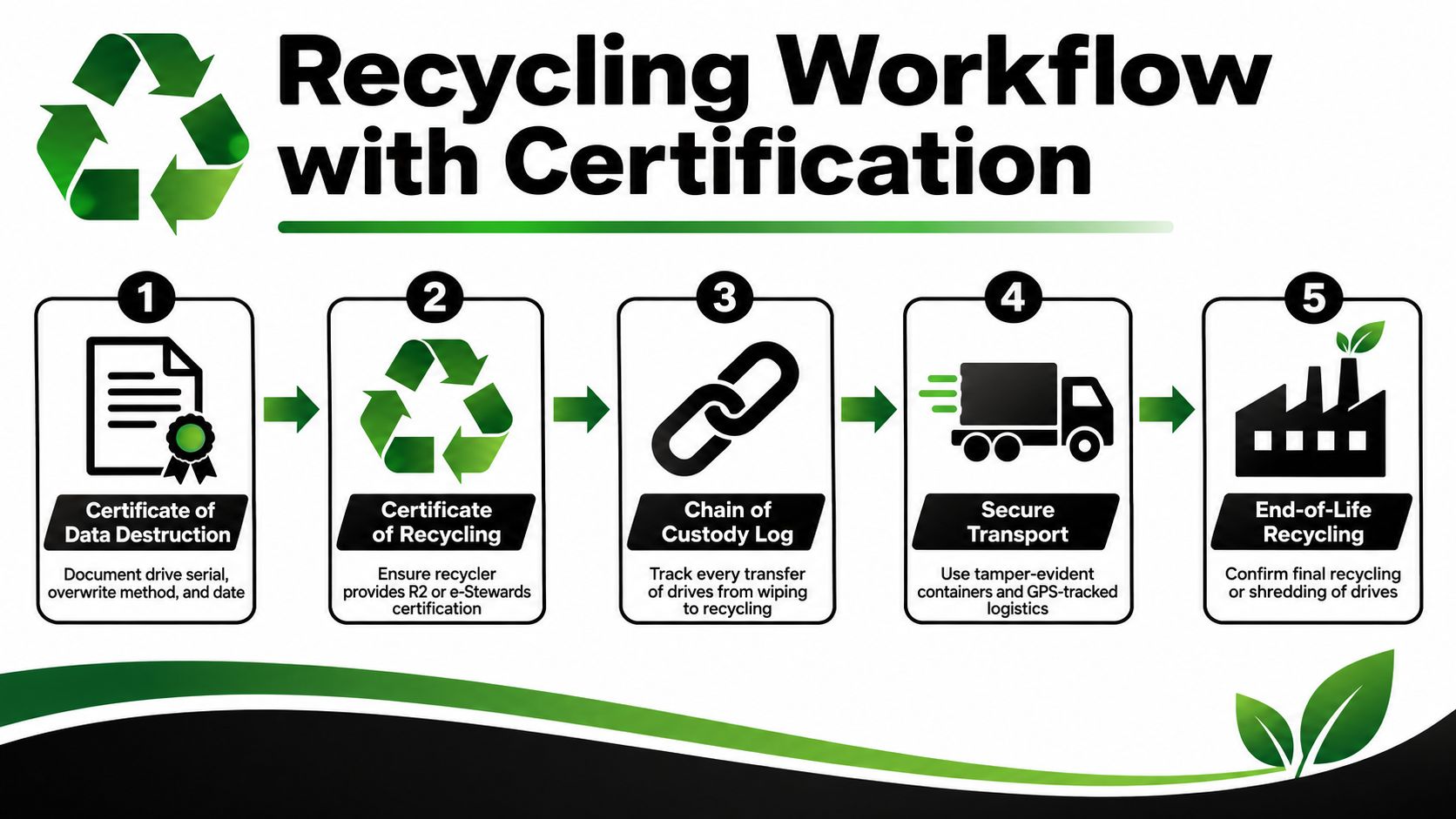
A drive doesn't become low-risk merely because it left the office. The organization needs evidence showing what happened from collection through final processing. That record should connect the physical serial number to the sanitization or destruction method, date, operator or provider, custody transfers, and final recycling outcome.
Keep the disposition evidence together
A business should request and reconcile:
- Sanitization certificates: Record the drive serial number, method, result, and processing date.
- Destruction certificates: Identify each physically destroyed drive and the destruction event.
- Chain-of-custody forms: Show every transfer from site pickup to processing.
- Recycling certificates: Confirm responsible downstream handling after data risk has been addressed.
- Asset manifests: Reconcile quantities, serials, exceptions, and missing or damaged items.
These records support internal audits and can help demonstrate compliance with applicable requirements, including the FTC Disposal Rule. Retention periods depend on industry, contract, jurisdiction, and policy, so legal and compliance teams should define the applicable period rather than copying a generic schedule.
Control the handoff
Use sealed or tamper-evident containers, documented pickup appointments, and transport arrangements appropriate to the data risk. Locked containers, GPS-tracked vehicles, and bonded couriers can reduce exposure during movement, but the provider should explain which controls apply to the job.
Check downstream certifications and processing practices. R2 or e-Stewards certification can provide a meaningful screening point, but procurement teams should still review the provider's scope, reporting, subcontractor controls, and treatment of failed media. Beyond Surplus's data destruction certificate information shows the type of documentation businesses should expect when serialized destruction is part of the workflow.
The strongest recycling program preserves value without treating security as an afterthought. Sanitize reusable equipment when the method, verification, and risk profile support it. Destroy what can't be trusted, then retain the evidence that proves the decision.
Beyond Surplus provides businesses with secure hard-drive wiping, serialized destruction, electronics recycling, IT asset recovery, and documented chain-of-custody logistics. Visit Beyond Surplus to arrange a commercial pickup and choose a disposition path that protects data while preserving recoverable equipment value.