

A plant manager finds three line-side PCs behind a maintenance cage, two laptops from a closed engineering project in an unsecured cabinet, and a stack of obsolete monitors waiting for someone to “deal with them.” Production can't stop for a leisurely cleanup, yet every device may carry credentials, designs, test records, or regulated information. This context underscores the purpose of a Manufacturing IT Equipment Disposal Guide. Factory disposal works when it's treated as an operations workflow, tied to refresh cycles and decommissioning windows, rather than as a last-minute haul-away task.
Table of Contents
- Why Manufacturing IT Disposal Needs Its Own Playbook
- Inventory and Risk Assessment Before You Touch Anything
- Secure Data Destruction Options That Actually Work
- Regulatory and Environmental Compliance You Cannot Skip
- Logistics Chain of Custody Value Recovery and Final Recycling
- Vendor Selection Checklist and Disposal Timeline That Keeps You Compliant
Why Manufacturing IT Disposal Needs Its Own Playbook
Manufacturing sites rarely have one clean category of retired technology. An end-of-life inventory may include office laptops, rugged tablets, servers, network equipment, shop-floor HMIs, programmable-control interfaces, laboratory instruments, barcode systems, printers, and legacy displays. Some assets still have resale or redeployment value. Others contain failed storage media, specialized components, or hazardous materials that require a different route.
The plant environment adds another constraint: downtime is expensive operationally, even when the disposal work itself looks simple. Technicians may need access approvals, lockout coordination, production-window scheduling, escort requirements, and safe removal plans around active lines. Pulling a device without recording its location or serial number can create an inventory problem that lasts long after the equipment leaves the floor.
The risks are connected
A forgotten line-side computer can expose data. An untracked pallet can weaken chain-of-custody evidence. A CRT display or mixed electronic load can enter the wrong processing pathway. EPA electronics guidance notes that discarded computers and other electronic devices may be managed as hazardous waste, while CRT-containing devices have special federal recycling considerations, so a factory must evaluate legacy equipment before pickup or shredding. EPA electronics disposal guidance provides the relevant regulatory context.
The environmental pressure is also growing. The Global E-waste Monitor 2024 reports that global e-waste reached 62 billion kg in 2022, or 7.8 kg per person, while only 22.3% was formally collected and recycled in an environmentally sound manner. Generation rose from 34 billion kg in 2010 to 62 billion kg in 2022, while formally documented recycling increased from 8 billion kg to 13.8 billion kg. For manufacturers, that gap represents both compliance exposure and an opportunity to recover value before material is sent for recycling.
A workable program produces four outcomes: less data exposure, more defensible compliance, better recovery from reusable equipment, and cleared production space. It starts with a complete inventory and ends with records that identify what happened to each asset.
Inventory and Risk Assessment Before You Touch Anything
The first mistake on a plant decommission is moving equipment before anyone has established control. Start with a physical walk-through, not a spreadsheet copied from an old refresh project. Visit offices, server rooms, maintenance cages, engineering areas, laboratories, tool cribs, production lines, and storage locations.
Record each item against a consistent set of fields:
- Location: Capture the building, department, line, room, cabinet, or rack position.
- Identity: Record the asset tag, manufacturer, model, and serial number where available.
- Data status: Mark whether the item contains a hard drive, SSD, NVMe device, removable media, firmware, or no data-bearing component.
- Condition: Separate functional, repairable, incomplete, damaged, and failed equipment.
- Handling flags: Note batteries, CRTs, lamps, chemicals, medical components, or other materials requiring review.
- Operational owner: Identify the department that must approve removal and confirm that the device is no longer needed.
Use an equipment condition assessment to support consistent grading rather than relying on a technician's memory. A clear condition record helps prevent a functioning workstation from being destroyed because it was found in a scrap area.
Build three disposition lanes
Redeploy equipment that remains useful, supportable, and suitable for another department after approved sanitization and testing. This may include monitors, laptops, network devices, or standard workstations that can move to a new project.
Resell or recover equipment with market value but no internal destination. Grading should include accessories, cosmetic condition, functionality, and whether the configuration can be securely cleared without compromising the device.
Destroy or recycle failed drives, damaged systems, obsolete media, and assets with no practical reuse path. A device can be physically intact and still belong in this lane if its storage cannot be reliably sanitized or its sensitivity requires destruction.
Do this triage during a planned refresh or decommissioning project. Waiting until a storeroom is full creates mixed pallets, unclear ownership, and rushed decisions. The available guidance on end-of-life IT equipment planning supports scheduling ITAD around operational milestones rather than treating accumulated equipment as an emergency.
Practical rule: Freeze the inventory before the first pallet moves. Every later document should be traceable back to that frozen list.
Secure Data Destruction Options That Actually Work
Sanitization fails when teams apply one method to every storage device. A hard disk drive, an SSD, and an NVMe device don't retain data in the same way, so the disposition decision must follow the media.
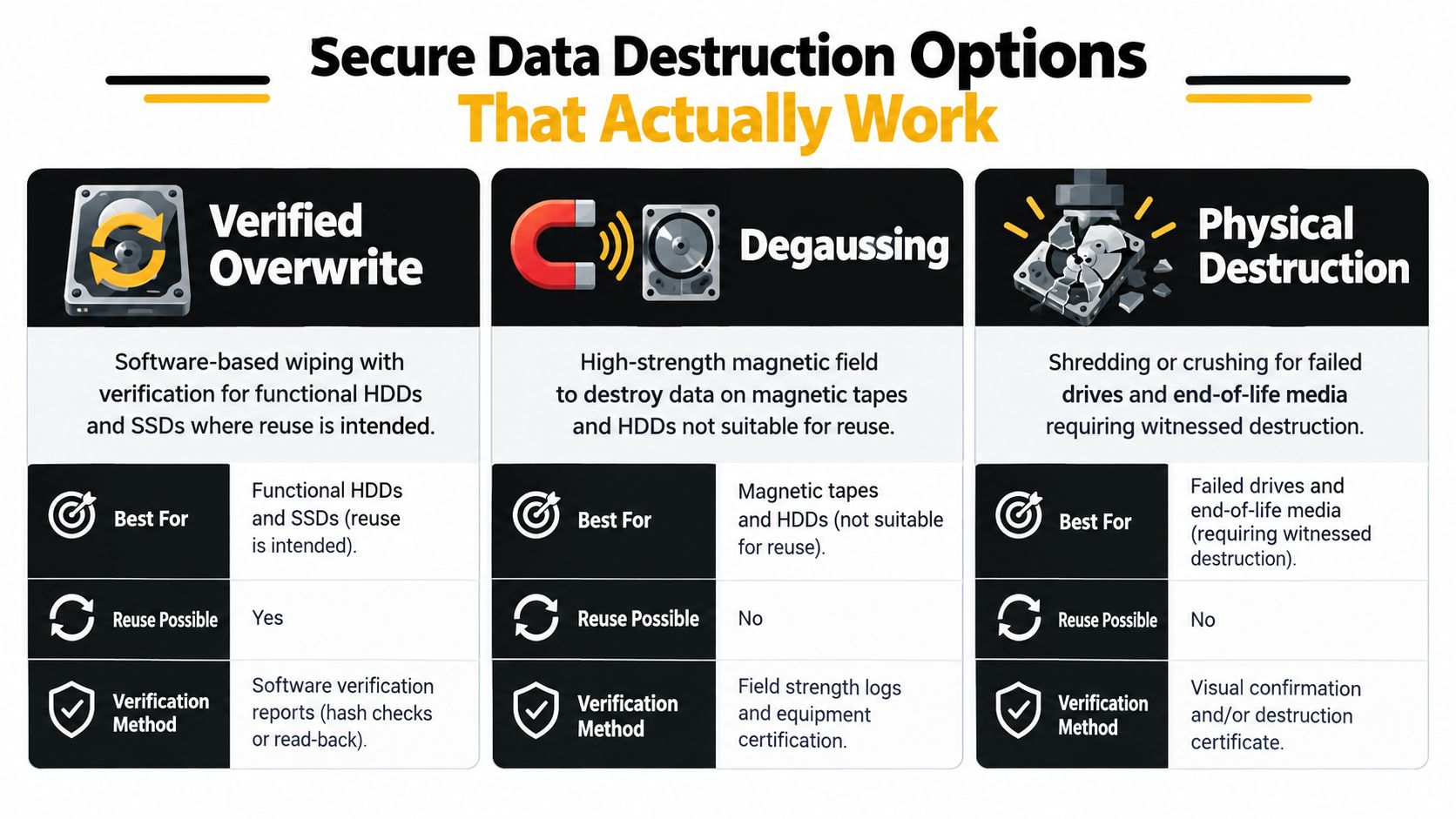
For functioning HDDs intended for reuse, a verified overwrite can be appropriate. Degaussing fits magnetic media that won't be reused, including HDDs and magnetic tape, but it isn't a universal answer for flash storage. SSDs and NVMe devices use wear leveling, which can leave data outside the logical blocks addressed by ordinary overwrite software. For those devices, firmware secure erase, cryptographic erase, or a device-specific sanitize command is generally the more suitable path.
The NIST SP 800-88 sanitization guidance is useful because it distinguishes clear, purge, and destroy outcomes by media type. It also treats verification as part of deciding whether the result is adequate. In enterprise testing cited in the supplied guidance, post-wipe verification reduced failed sanitization from 23% to under 2%, which demonstrates why a completion screen alone isn't enough. Media-specific sanitization methods and verification provide further operational detail.
Choosing the right sanitization method by media type
| Media type | Recommended method | Verification required |
|---|---|---|
| HDD intended for reuse | Verified overwrite, with degaussing reserved for magnetic media not intended for reuse | Review the wipe result and retain audit logs |
| SSD intended for reuse | Firmware secure erase, cryptographic erase, or manufacturer-specific sanitize command | Confirm the command completed and validate the outcome |
| NVMe device | Device-specific sanitize, firmware secure erase, or cryptographic erase | Record the device identity, method, result, and verification |
| Failed or highly sensitive media | Physical destruction, such as shredding or crushing | Retain serial-level destruction evidence |
| Magnetic tape not intended for reuse | Degaussing or physical destruction | Document the media count, identifiers where available, and disposition |
Formatting a drive isn't sanitization. Free wiping software may lack controlled reporting, and legacy multi-pass routines can create a false sense of assurance. Benchmark data cited in the supplied materials found that organizations reported formatting before disposal at 23.4%, free-software wiping at 14.9%, and legacy three-pass DoD wipes at 12.8%, while only 4.3% reported using NIST 800-88 software wiping and 2.1% used degaussing. The same benchmark reported that 53.2% relied on a third party for data control. ITAD benchmarking data shows why the method, verification, and evidence must be specified in the work order.
Regulatory and Environmental Compliance You Cannot Skip
A defensible disposal program connects the asset list, the handling method, the downstream processor, and the records. It doesn't rely on a generic certificate issued after a mixed load disappears.
The European Union created a formal legal framework for waste electrical and electronic equipment when it enforced its first specific WEEE directive in 2002. The policy was updated in 2012 and 2018, reflecting a long-term move toward producer responsibility and controlled recycling systems. In the United States, dumping e-waste became illegal under the Resource Conservation and Recovery Act. The regulatory history is one reason enterprise buyers now expect secure handling, documented custody, and qualified recycling pathways. Regulatory history for electronics disposal outlines that development.
Match the load to the regulatory question
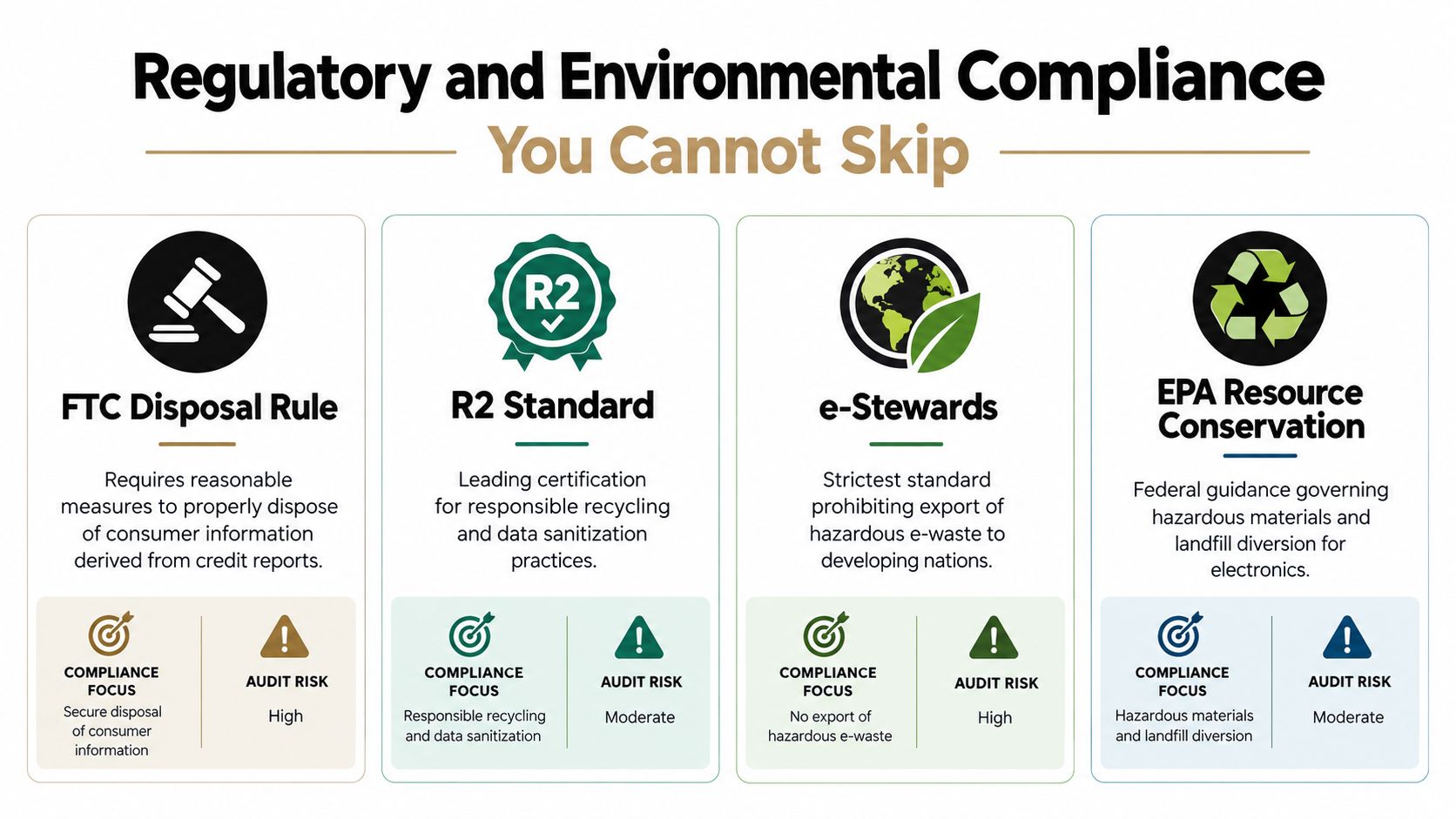
The FTC Disposal Rule matters when equipment contains consumer information derived from credit reports. R2 and e-Stewards are commonly used frameworks for evaluating responsible recycling and data-sanitization practices, but a vendor's certification claim should be checked against the services and facilities used for the project.
EPA guidance requires particular attention to equipment composition. A factory clearing old engineering offices may have standard laptops, while a laboratory or control area may contain displays and devices that need different handling. CRT-containing equipment must not be treated as ordinary mixed scrap without review, and computers may require hazardous-waste evaluation when discarded. The Beyond Surplus universal-waste resource can help teams organize that review before arranging transportation.
The environmental case is not separate from the audit case. The Global E-waste Monitor projection says worldwide e-waste generation is rising by 2.6 million tonnes per year and is projected to reach 82 million tonnes by 2030, a 33% increase from 2022. More downstream volume increases the importance of choosing processors that can show where material went and how final recycling occurred.
Retain records that let an auditor follow the asset without relying on verbal explanations:
- Pickup manifest: Signed by the releasing site and the transporter or receiving party.
- Serial-level destruction certificate: Identifies drives or devices destroyed.
- Recycling or disposition report: Separates reuse, resale, parts recovery, and recycling outcomes.
- Erasure audit logs: Shows the method, device identity, completion status, and verification result.
That evidence pack turns environmental responsibility into something the manufacturing team can prove.
Logistics Chain of Custody Value Recovery and Final Recycling
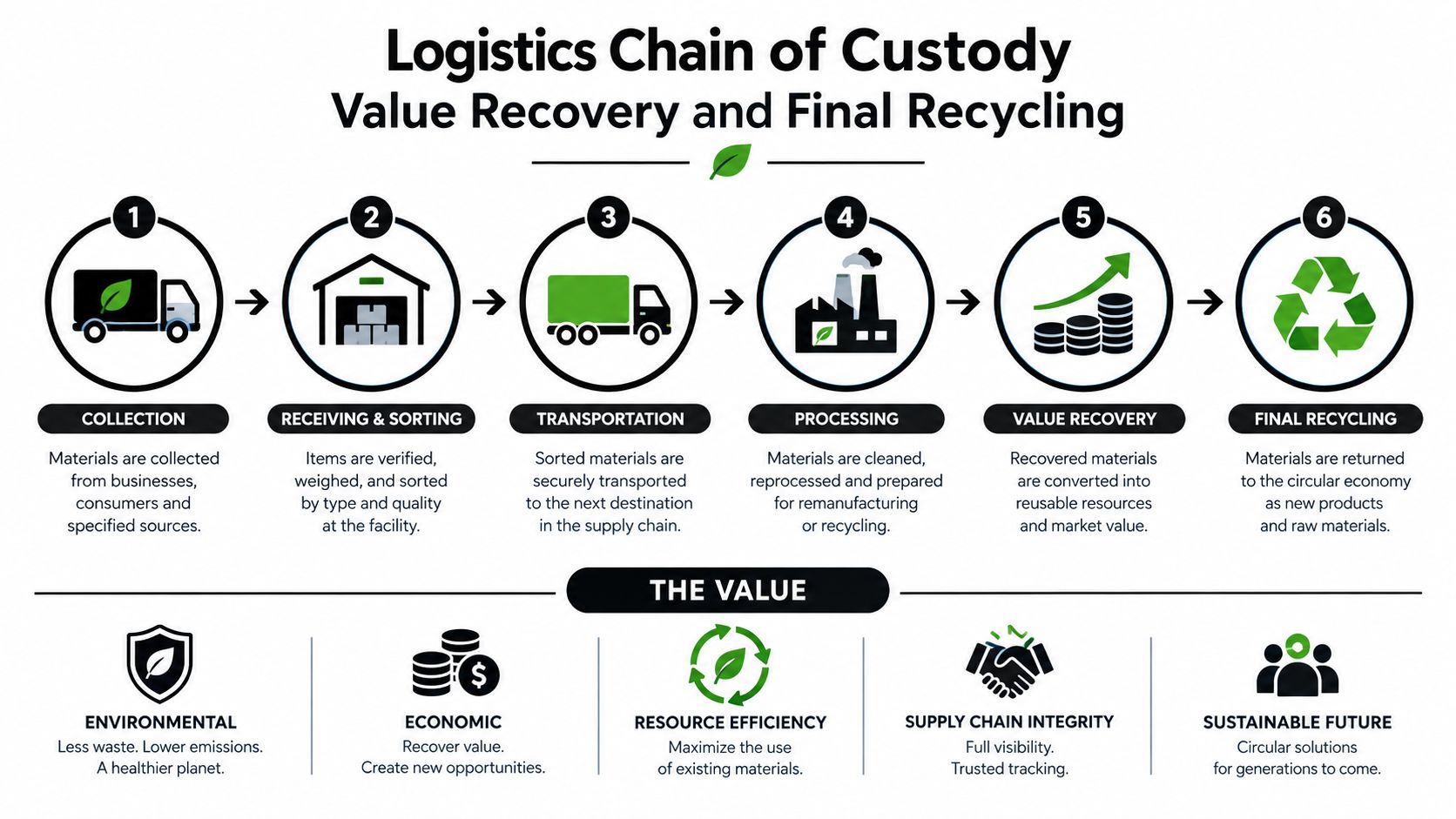
A secure disposition project is a sequence of handoffs. The work starts before the truck arrives, with an approved removal plan that respects production windows, access controls, loading areas, and safety requirements.
Deinstall equipment without stripping off the identifiers that make it traceable. Photograph or scan asset tags where appropriate, label pallets by project or location, and keep data-bearing devices physically controlled during staging. Shop-floor removal often fails when technicians place drives, laptops, and peripheral equipment into the same unmarked container.
Make each handoff visible
The pickup manifest should identify the releasing location, the equipment group, the responsible contacts, and the transport handoff. A sealed vehicle or controlled transport arrangement reduces casual access, but the seal itself isn't a substitute for item-level records.
At the receiving facility, the processor should reconcile the shipment against the manifest, grade reusable equipment, isolate data-bearing media, and apply the approved sanitization route. Reusable assets may enter testing, refurbishment, redeployment, or resale. Failed or sensitive media should move to destruction, with the result tied back to its identifier.
Here, chain-of-custody controls for IT asset disposal become operational rather than theoretical. Each handoff should answer four questions: who had the asset, when did they receive it, what condition was recorded, and what disposition followed?
A certificate without an asset identifier proves that a document exists. It doesn't prove what happened to a particular drive.
Preserve value before recycling
Don't send every retired device directly to a shredder. A functioning laptop, server, switch, or monitor may retain value after secure sanitization and testing. Conversely, a failed drive or damaged device may have no sensible reuse path, especially when recovery would create uncertainty about data exposure.
The final report should distinguish resale, internal redeployment, parts recovery, and certified recycling. It should also identify exceptions, such as missing serial numbers, equipment received in a different condition, or media that required destruction instead of wiping. That level of detail helps procurement reconcile the project and gives IT a defensible record for future audits.
Vendor Selection Checklist and Disposal Timeline That Keeps You Compliant
Choose an ITAD partner by examining the whole workflow, not just the pickup price. A vendor that can remove equipment quickly but cannot reconcile serial numbers or explain downstream processing leaves the manufacturer holding the risk.
Use this meeting checklist:
- Data controls: Ask which methods are used for HDD, SSD, NVMe, and failed media, and how verification is recorded.
- Documentation: Request examples of manifests, erasure logs, destruction certificates, and recycling reports.
- Logistics: Confirm coverage, plant access coordination, staging procedures, and secure transportation.
- Downstream visibility: Identify who performs sanitization, resale, destruction, and recycling.
- Disposition judgment: Require asset-specific recommendations for redeployment, resale, and destruction.
- Operational fit: Confirm the partner can work around refresh cycles, production shutdowns, and decommissioning windows.
A practical timeline begins with an inventory freeze and risk review. Next, approve the disposition matrix, schedule the removal window, and prepare the staging area. After pickup, require receipt reconciliation, media processing, grading, value recovery, and final certificate delivery before closing the project.
Use the ITAD vendor due diligence checklist to structure procurement questions and compare responses consistently. The vendor should be able to explain what works on the plant floor, what fails, and how exceptions are documented.
Beyond Surplus coordinates commercial IT equipment disposal, secure data wiping, hard-drive shredding, electronics recycling, IT buyback, product destruction, and data-center deinstallations with chain-of-custody documentation. Contact Beyond Surplus to plan a manufacturing pickup around your refresh cycle, protect production operations, and receive the records needed to close the disposition file.


