

Your team already knows the scene. Retired laptops are stacked in a closet. A few desktops sit under a folding table because nobody wants to decide whether they should be donated, sold, wiped, or scrapped. Then a security incident hits, or an auditor asks what happened to old devices, and the backlog stops looking like harmless clutter.
That's why nonprofit computer recycling programs should be treated as a compliance system first. Reuse is valuable. Community impact matters. But the first job is controlling data, documenting custody, and proving final disposition.
Table of Contents
- When Old Computers Become a Compliance Problem
- Designing a Recycling Policy Your Board Will Approve
- Choosing the Right Collection Model for Your Mission
- Running the Intake-to-Disposition Workflow
- Securing Data Before Any Device Leaves the Building
- Understanding the Economics of Reuse and Recycling
- Measuring Impact and Reporting to Stakeholders
When Old Computers Become a Compliance Problem
A program manager approves a laptop donation. A volunteer stores the pickup load in a garage for two weeks. One of those machines still holds donor records, employee tax forms, or client case files. At that point, you do not have a recycling program. You have a custody failure.
That is the right way to frame nonprofit computer recycling programs. Start with compliance, control, and evidence. Reuse, community benefit, and fundraising come after that. If your team treats retirement as a donation project first, you will make bad decisions about who handles devices, where they sit, and how they leave the building.
Where nonprofits actually get exposed
The problem usually starts in the gap between active use and final disposition. Devices are retired, but nobody owns them. IT assumes operations will handle pickup. Development wants to donate usable systems. Facilities wants the closet cleared. That gap creates risk faster than the recycler pickup itself.
Three failure points show up again and again:
- Unowned assets: Retired devices sit off the books or outside normal asset tracking, often with sensitive data still on them.
- Weak sanitization decisions: A factory reset, quick reimage, or volunteer-run wipe gets treated as proof of data removal.
- Broken chain of custody: Equipment moves through staff homes, community drives, local drop-offs, or informal donation partners with little or no release documentation.
If a device is out of service, it needs a documented status immediately. Hold for internal reuse, prepare for resale, send for recycling, or route as regulated waste. Anything else is unmanaged liability. A practical place to tighten those controls is a written records standard like this guide to business e-waste laws and documentation requirements.
Practical rule: If a device has left productive use but has not been classified, sanitized, and assigned to a documented disposition path, your organization still owns the risk.
Why the economics push you toward tighter control
Nonprofits often assume local collection is cheaper because it feels simpler. It often is not. If your staff spends weeks storing mixed equipment, answering donor questions, sorting junk from reusable assets, and chasing paperwork after pickup, your low-cost collection model becomes an expensive internal mess.
Direct shipping to a qualified ITAD vendor often beats local drives when you have a concentrated load, strict data obligations, or limited staff capacity. You reduce touches, shorten the custody chain, and get cleaner documentation. Local collection still has a place, but only when you can control intake standards, accepted equipment types, and transfer records from the first handoff.
The standard is straightforward
The federal framework for nonprofit computer refurbishing is useful because it follows the right order. Equipment is collected, evaluated for repair, refurbished if practical, redistributed under program rules, and recycled or otherwise disposed of if it cannot be repaired. It also requires annual reporting on what was distributed and what happened to unusable equipment under 40 U.S. Code § 549a.
That order matters. It puts custody and disposition discipline before feel-good outcomes. Executive teams should copy that logic even if they never operate a refurbishing program themselves. If you cannot prove where each device went, who handled it, and how data was addressed, you do not have a recycling success story. You have a recordkeeping problem waiting for an audit, donor complaint, or breach review.
Designing a Recycling Policy Your Board Will Approve
Boards don't approve vague sustainability language. They approve controls, authority, and evidence. Your policy needs to decide where every retired asset can go before the first pickup is scheduled.
Start with four disposition paths
A workable policy separates equipment into four buckets:
- Internal reuse for redeployment inside the organization.
- Resale when the asset still has market value.
- Recycling for material recovery when reuse isn't realistic.
- Regulated-waste handling for items that need special treatment, such as CRTs, batteries, or mercury-bearing components.
That distinction should be explicit in your written policy and matched to retained records such as pickup logs, chain-of-custody forms, certificates, weight tickets, and downstream documentation, as summarized in this business e-waste policy overview.
Disposition Paths and Policy Triggers
| Disposition Path | Required Approval | Data Handling | Documentation |
|---|---|---|---|
| Internal reuse | IT and department owner | Verified sanitization before redeployment | Asset record, reassignment log |
| Resale | IT, finance | Sanitization and release authorization | Asset list, buyer record, certificate if applicable |
| Recycling | IT or operations | Sanitization or destruction before release | Pickup record, chain-of-custody log, recycling certificate |
| Regulated-waste handling | IT, facilities, compliance if needed | Remove or isolate data-bearing media first | Vendor record, weight ticket, downstream documentation |
Clauses that survive scrutiny
Your board policy should cover:
- Covered equipment categories: Laptops, desktops, servers, mobile devices, drives, networking gear, and peripherals.
- Roles and segregation of duties: One team retires assets, another verifies data handling, a third approves release.
- Approved vendor qualifications: Only documented processors and downstream vendors.
- Minimum data-destruction standards: Clear methods for wipeable media and failed media.
- Prohibited destinations: No ad hoc staff giveaways, no undocumented exports, no unapproved downstream transfers.
- Reporting cadence: Quarterly or annual reporting to leadership.
A board doesn't need to bless every pallet. It needs to approve who has authority, what evidence must exist, and what destinations are off limits.
Review approval roles and vendor qualifications every year. Revisit prohibited destinations and destruction standards whenever regulations, contracts, or funding requirements change.
Choosing the Right Collection Model for Your Mission
A staff member loads retired laptops into personal cars for a Saturday donation drive. By Monday, one device is missing, nobody can prove who handled the rest, and your nonprofit now has a chain-of-custody problem, not a recycling program.
Choose your collection model as a compliance decision first. Reuse, donor goodwill, and event visibility come after that. If your team starts with convenience or public engagement, you will spend more time cleaning up exceptions than processing equipment.
Start with the release point
The right question is simple: where does custody change, and what proof do you get at that moment?
That answer determines whether your program stays manageable.
Collection Model Comparison
| Model | Cost Profile | Compliance Risk | Donor Reach | Best For |
|---|---|---|---|---|
| Direct ITAD vendor pickup | Usually best once you have enough equipment to ship in batches | Low if the vendor documents pickup and downstream handling | Low | Organizations retiring devices in volume or handling sensitive data |
| Municipal or institutional drop-off | Acceptable for small, steady streams | Moderate because your team still controls transport to the drop-off point | Low | Small programs with limited storage and no event staff |
| Volunteer-run collection drive | Unpredictable. Staff time and control costs rise fast | High unless a qualified processor manages the event onsite | High | Outreach campaigns where visibility matters as much as asset recovery |
What actually works
Choose direct ITAD pickup if you retire equipment in batches, operate across multiple sites, or handle donor, client, student, patient, or employee data. This model gives you the cleanest custody record and the fewest handoffs. In many cases, it also beats local collection on total cost once you count staff labor, temporary storage, internal transport, and exception handling.
Choose a drop-off partnership if your volume is too low to justify pickups but predictable enough to schedule. Keep this model narrow. It works for small streams of low-risk equipment, not mixed loads of unknown devices arriving from the public.
Choose a volunteer-run collection drive only if the event serves a real outreach goal and a qualified recycler or ITAD firm is present to control acceptance, segregation, and removal. If you need a reference point, this kind of e-waste collection event setup is the minimum structure you should accept.
Here is the blunt version. Pickup gives you control. Drop-off gives you simplicity. Public drives give you visibility and the highest chance of custody failures.
A practical rule for nonprofit teams
If the devices come from inside your organization, default to direct shipping or pickup through your approved ITAD channel.
If the devices come from the public, assume the stream will be mixed, poorly documented, and harder to control than expected. Plan staffing, intake limits, and vendor presence accordingly, or do not run the event.
Nonprofits get into trouble when they treat all incoming equipment as one pool. It is not one pool. Internal retirements and public collections should run under different operating rules because the risk profile is different.
Running the Intake-to-Disposition Workflow
A donated laptop shows up at reception. No label. No intake form. No one knows whether it came from your finance office, a board member, or a public drop-off. At that point, you do not have a recycling program. You have a chain-of-custody failure.
The workflow has one job: keep every device accounted for from first touch to final disposition. Reuse value comes later. Fundraising value comes later. If the record breaks, the rest of the program is guesswork.
Intake starts at the door
Tag the device as soon as it enters your control. Do not let it sit in a hallway, donation pile, or volunteer staging area waiting for someone to "process it later."
Capture at least:
- Unique asset ID
- Make and model
- Serial number
- Condition grade
- Source organization or department
- Whether it contains data-bearing media
That record needs to exist before the device moves again. If you cannot tie the physical unit to an intake record, you cannot defend what happened to it later.
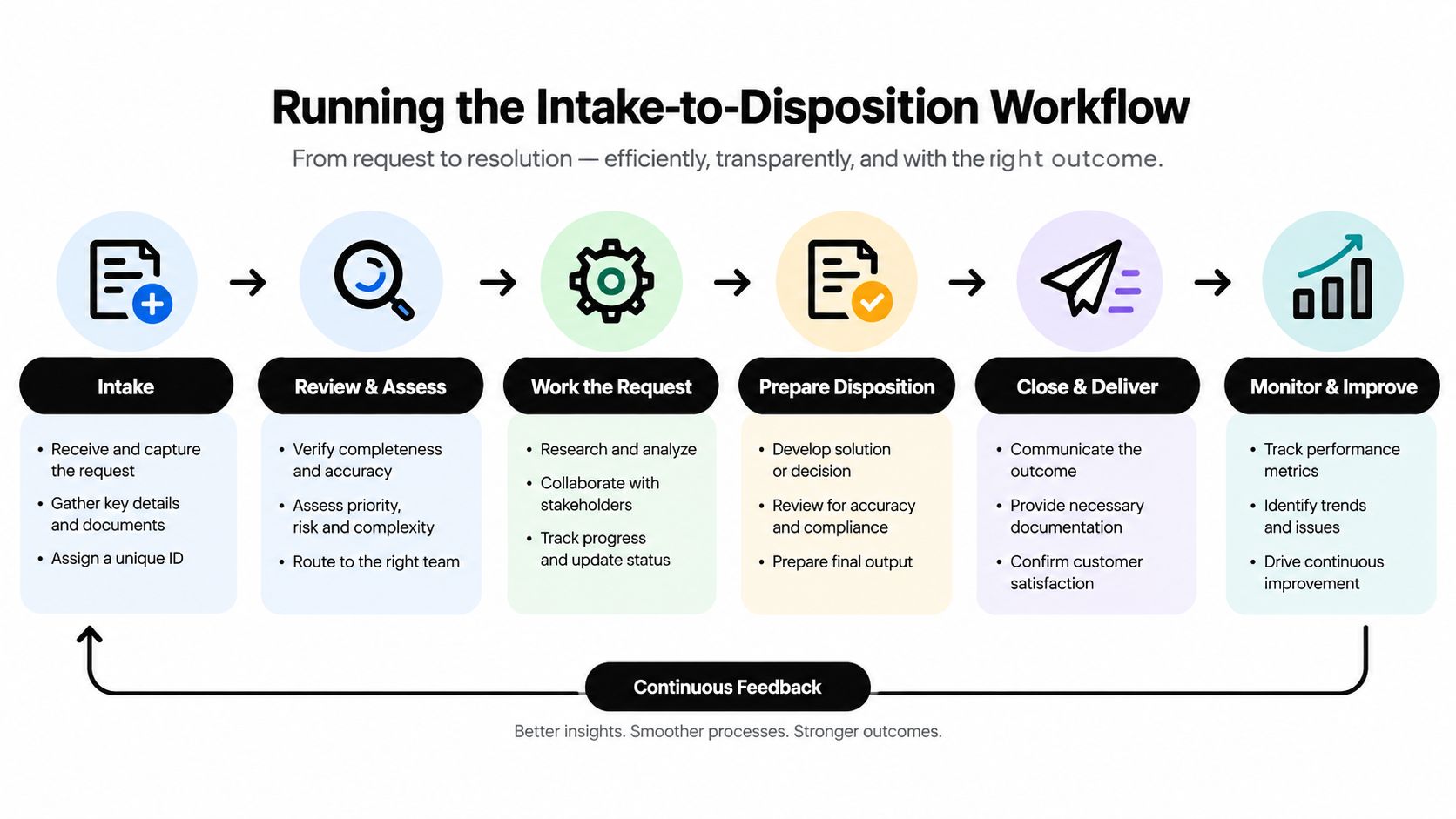
Triage determines whether you make money or make a mess
After intake, route every device into a defined path:
- Redeploy internally
- Refurbish for resale or redistribution
- Harvest parts
- Recycle through a certified downstream
Do not create a fifth category called "decide later." That is where devices disappear, storage fills up, and staff start making inconsistent calls.
As noted earlier, some donated and transferred equipment programs require clear reporting on where equipment went and how unusable units were handled. Use that as your operating standard even when you are not legally forced into the same format. Separate reusable inventory from scrap early, and track fallout as a normal part of the program.
The bench process needs gates, not good intentions
Before a unit leaves secured staging, record its status. Then run refurbishable devices through the same sequence every time:
- Verify hardware condition
- Sanitize or remove media
- Install approved image
- Run function test
- Approve final disposition
- Record handoff
Every handoff needs a name, date, and status update. If a volunteer, technician, or vendor touches the device, that touch should be visible in the log. A real chain-of-custody workflow for IT asset disposal is strict for a reason. Missing custody records turn a manageable process into an exception queue.
If volunteers are part of the model, assign work formally. Training acknowledgments, shift coverage, and task ownership should not live in scattered email threads. A tool like volunteer software can help if community labor is part of your operating model.
For low annual volume, a disciplined spreadsheet can work. Once your program starts handling regular batches, mixed sources, or multiple processing steps, switch to an asset-tracking system with exportable logs and user-level audit history.
Every missing serial number turns your recycling program into a trust exercise. Trust is not documentation.
Securing Data Before Any Device Leaves the Building
Data destruction is the liability-transfer event. Disposal happens after that. If your nonprofit treats recycling as the main event and sanitization as a side task, the process is upside down.
Classify first, destroy second
Every retired device should be placed into a data tier before anyone decides whether it will be reused or recycled.
A practical set of categories:
- Standard user devices with routine office data
- Privileged-access workstations used by admins, finance, or leadership
- Encrypted drives with known keys that can still be sanitized correctly
- Failed or non-functional media that can't be reliably wiped
Human-I-T's nonprofit-focused guidance is blunt about the core issue: a simple factory reset is not enough, and IBM's 2025 Cost of a Data Breach Report put the average breach at $4.44 million (nonprofit e-waste cybersecurity guidance).
Data Destruction Methods by Classification
| Data Classification | Approved Destruction Method | Certificate of Destruction Required Fields |
|---|---|---|
| Standard user drives | Verified clear or purge for functional media | Serial number, method, date, technician, standard applied |
| Privileged-access devices | Purge or physical destruction based on risk | Serial number, method, date, technician, witness, standard |
| Encrypted drives with known keys | Documented sanitization aligned to policy | Serial number, method, date, technician, standard |
| Failed or non-functional media | Physical destruction | Serial number, method, date, technician, downstream recycler |
What a real certificate must include
Recycling by itself isn't enough. Privacy-focused disposal guidance says devices should be classified before disposal, assigned a required destruction method, and tracked with device-level certificates listing serial numbers, destruction method, date, technician, and the standard applied (device-level certificate guidance).
If your certificate doesn't identify the device and method clearly, it doesn't transfer much liability. For organizations that need a practical explanation of sanitization standards, this overview of NIST 800-88 data destruction standards is the baseline.
Understanding the Economics of Reuse and Recycling
A nonprofit clears a storage room, loads everything into a local collection event, and feels productive. Then the invoices show up. Low-value scrap, unusable peripherals, and regulated items eat the budget, while the few reusable laptops that could have offset costs get mixed into the pile.
That is the mistake. Computer recycling is an operating model, not a donation drive.
Your cost structure depends on triage quality
The biggest financial split is not reuse versus recycling. It is sorted inventory versus mixed inventory.
If you separate working business-class laptops, recent desktops, and deployable monitors before pickup, you give yourself options. Those units can support internal redeployment, low-cost resale, or a vendor buyback. If you hand over gaylords full of mixed cables, broken printers, obsolete accessories, and dead monitors, expect processing fees and very little recovery value.
One nonprofit program makes that trade-off plain. PCs for People offers free white-glove pickup only at a minimum threshold of usable computers, and it lists exceptions such as CRT monitors or televisions at 55 cents per pound and multifunction copiers at 22 cents per pound (PCs for People FAQs).
Value recovery by disposition path
| Disposition Pathway | Financial Outcome | Typical Cost Driver |
|---|---|---|
| Internal reuse | Budget savings from avoided replacement purchases | Imaging, testing, staff time |
| Refurbished resale | Some revenue if age and condition are favorable | Labor, software, packaging, support |
| Parts harvesting | Inconsistent returns | Technician time, storage, demand uncertainty |
| Scrap recycling | Usually low, weight-based recovery | Freight, separation, regulated item fees |
Direct shipping often beats local collection
For small and midsize nonprofits, local collection sounds cheaper than it is. Community drop-offs and ad hoc pickup days create sorting labor, weak chain-of-custody, and contamination from items your program should not accept.
If your inventory is already boxed, serialized, and mostly business equipment, direct shipment to an ITAD vendor usually works better. You reduce handling, keep the custody record cleaner, and avoid turning staff into event managers. Local collection only makes sense when it supports your mission directly, such as community access programs that need public intake, volunteer engagement, or retail foot traffic.
Use a simple rule. High-quality, pre-sorted equipment should go straight to the processor. Mixed public donations need a separate model, separate labor plan, and separate economics.
Scale only helps if the material mix is good
Large output numbers can hide a weak program. A warehouse full of low-value devices is not an asset. It is a storage bill with compliance risk attached.
Strong operators track reuse yield and recycling volume together. Goodwill and TechSoup program reporting shows why both matter. TechSoup reports long-term device distribution activity, while Goodwill's ReCompute reporting emphasizes large-scale electronics recycling and refurbishment outcomes (Goodwill and TechSoup program figures).
Use that as the benchmark. Measure how many devices were redeployed, sold, or responsibly recycled after triage. Do not judge the program by scrap weight alone.
Board-level recommendation
Set financial policy around three buckets: reusable assets, fee-based commodities, and regulated waste. Price each bucket before you launch collection.
That one decision prevents the usual failure pattern. Staff stop treating every donated device as a gift, and leadership stops approving programs that look generous on the front end but lose money and control on the back end.
Measuring Impact and Reporting to Stakeholders
Most nonprofit reporting breaks because teams separate compliance numbers from community numbers. Don't do that. Build one dashboard and map each metric to the audience that cares about it.
Use one operating dashboard
Track these categories quarterly:
- Incoming assets and total intake weight
- Devices processed by type
- Refurbished units released
- Units recycled
- Certificates issued
- Value recovered from resale or buyback
- Items requiring regulated-waste handling
This doesn't need enterprise ESG software. For many nonprofits, a spreadsheet plus a CRM field for serial numbers is enough if one owner keeps it current.
KPI Map by Stakeholder
| Metric | Primary Audience | Source |
|---|---|---|
| Chain-of-custody completeness | Compliance officer, auditor | Intake log, handoff log |
| Certificates of destruction issued | Legal, IT, risk leadership | Vendor destruction records |
| Devices refurbished and redistributed | Grantmakers, community partners | Refurbishment records |
| Recycled weight and final disposition | Board, operations, sustainability stakeholders | Weight tickets, downstream records |
| Discounts or affordability support | Program leadership, funders | Sales and subsidy records |
| Volunteer hours | Community engagement leaders | Volunteer management records |
Use real benchmarks, not vanity claims
Cincinnati Computer Reuse is a good example of what a balanced metrics stack looks like. In its 2024 annual report, the organization said it refurbished and resold 377 computers, recycled 122,065 pounds of e-waste, provided $8,707.50 in discounts to 160 low- and moderate-income customers and nonprofits, and received more than 4,800 volunteer hours (Cincinnati Computer Reuse annual report).
Compudopt shows the same dual-track logic. It began in 2007 and reported that in 2023 it recycled 167,302 pounds of used electronics and reused 182,000 pounds. It also offers free pickup of donations of more than 25 devices within 50 miles of a physical location, which is a practical model for scaling intake without losing operational control (Compudopt performance results and history).
Those numbers matter because they report both throughput and diversion. That's how you keep both auditors and funders satisfied.
A 90-day plan that one owner can run
First month
- Inventory what's already retired: Count devices, locate storage areas, and separate data-bearing assets first.
- Define data classes: Decide which assets can be sanitized and which require destruction.
- Shortlist vendors: Ask for sample certificates, chain-of-custody documents, and downstream disclosure.
Second month
- Draft a one-page policy: Keep it board-ready and operational.
- Pilot one collection channel: Don't start with a public drive. Start with controlled internal retirement.
- Set documentation rules: No asset leaves without an ID, status, and destination.
Book the logistics first. Community-facing collection can wait. A locked-in disposition path prevents bad improvisation later.
Third month
- Publish first impact numbers: Even a simple board summary works.
- Report exceptions: Failed drives, unidentified devices, and fee items deserve visibility.
- Decide what scales: Expand only after your first batch closes cleanly.
If you need a practical commercial partner for pickups, secure data destruction, certificates, and documented downstream handling, Beyond Surplus offers those services for organizations managing retired IT equipment. If your nonprofit has a backlog of business-class devices, start with a controlled pickup and a serialized inventory review. That's the fastest way to turn a closet full of risk into a defensible end-of-life program.


