

Your finance director just approved the refresh, facilities wants the storage room back, and security is asking who touched the drives. That's the normal starting point when you sell used IT equipment. It's not a garage sale with servers. It's a controlled release of assets that still carry data, value, and your organization's name.
Table of Contents
- The Refresh Cycle Moment and the Four Risks You Are Actually Managing
- Inventory Intake and Triage That Sets Up Every Later Decision
- Data Sanitization as the Release Gate Before Anything Leaves the Building
- Choosing Resale, Redeployment, or ITAD With a Defensible Scorecard
- Valuation and Channels That Hold Up Beyond the First Pickup
- Paperwork and Compliance That Survive an Audit or a Board Question
- A Two-Week Rollout Checklist and When to Bring In a Certified Partner
The Refresh Cycle Moment and the Four Risks You Are Actually Managing
The approval email lands on a Tuesday. Six hundred seats are moving to new laptops, a rack of servers is coming out during the data center consolidation, and the switches those servers fed are suddenly surplus too. Procurement wants recovery value on the books this quarter. Your team wants the pallets gone before the next deployment arrives.
That pressure is exactly where programs go wrong. A truck gets booked before anyone agrees on what can leave, what must be wiped, and what shouldn't be resold at all. Selling equipment becomes a pickup date instead of a sequence of decisions.
The four risks on every pallet
Residual data is the first risk, and it's the least forgiving. A laptop that boots to a clean desktop can still hold recoverable files, cached credentials, or a drive that was never sanitized. If that device resurfaces with customer or employee information on it, the resale check won't matter.
Leaking value is quieter. Good business laptops get mixed with damaged units, tested servers get priced like untested scrap, and nobody can explain afterward why recovery was low. Value doesn't disappear at the sale. It disappears during sloppy intake.
- Regulatory exposure: Disposal isn't judged by your intentions. The FTC FACTA Disposal Rule effective June 1, 2005 uses a flexible, risk-based standard, so you're expected to match the method to the sensitivity of the information and be able to show your work.
- Brand exposure: Asset tags, management enrollment, and configuration remnants tie a resold device back to you. A buyer who finds your VPN profile or your logo on a boot screen has found your process failure.
The scale behind these decisions is not abstract. The world generated a record 62 billion kilograms of electronic waste in 2022, and only 22.3% was documented as formally collected and recycled in an environmentally sound manner, according to the Global E-waste Monitor 2024 from UNITAR and ITU. That gap is why documented reuse matters, and why undocumented diversion doesn't count as responsible management.
Treat every retired device as unreleased until triage, sanitization, and paperwork say otherwise. The pickup is the last step, not the first.
Get the right people in the room before anything is boxed. IT operations knows the configurations, security owns the data classes, finance owns ownership and lease status, and facilities controls the dock schedule. If one of those voices is missing, you'll make a fast decision you'll have to defend slowly later.
Inventory Intake and Triage That Sets Up Every Later Decision
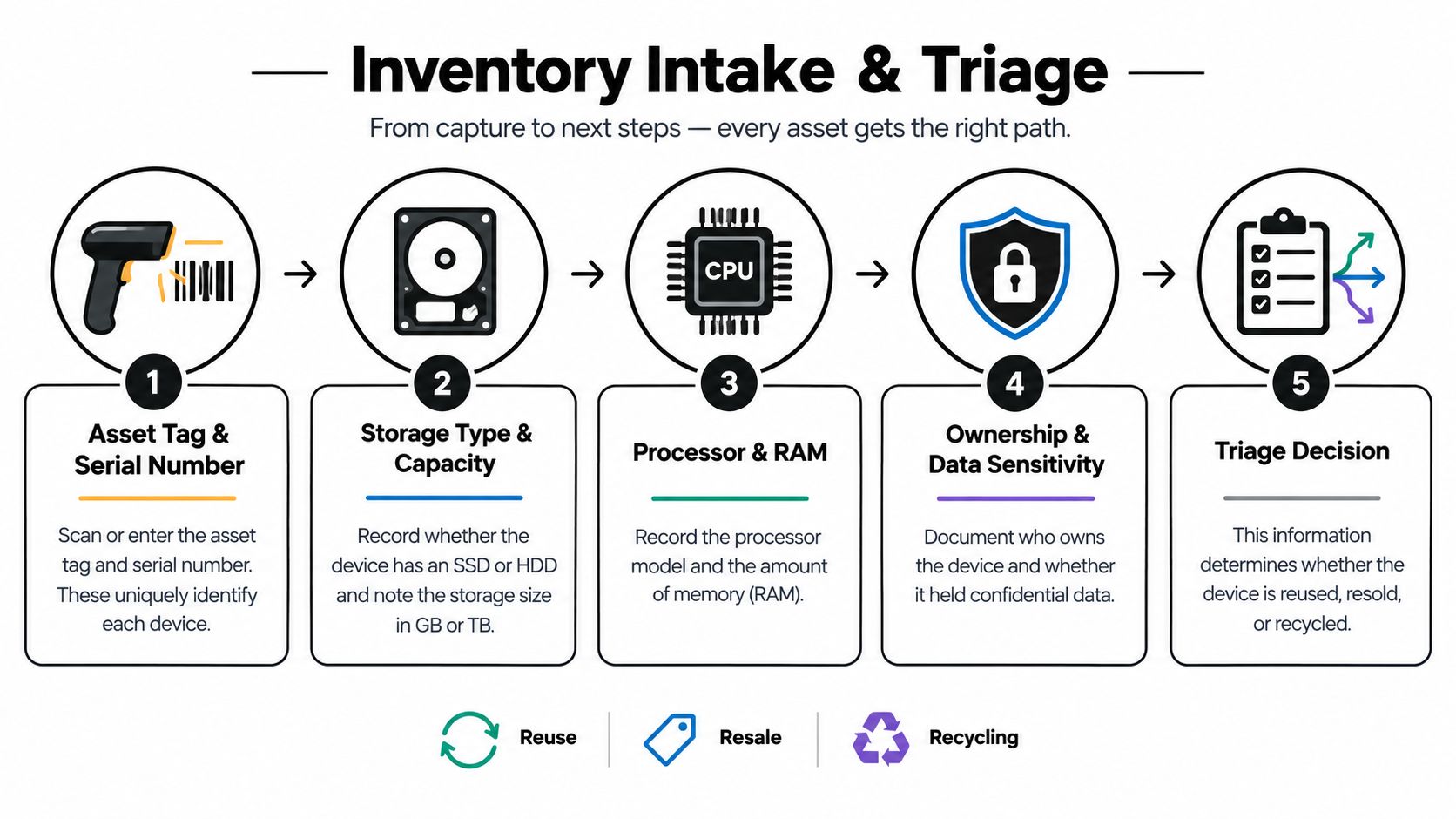
Start at the bench, not the loading dock. Every device gets captured before it gets stacked, because the intake record becomes the spine for sanitization certificates, resale listings, and audit answers. If a serial number isn't recorded here, you can't prove anything about that asset later.
Capture the same fields every time. Record asset tag and serial number, storage type and capacity, CPU and RAM, ownership status, data sensitivity class, and whether the device is still enrolled in mobile device management or tied to an activation lock. Note missing chargers, cracked screens, and swollen batteries while the unit is in front of you.
Grade first then route
Power each unit on and run diagnostics before you assign a path. Check storage health through SMART or the vendor equivalent, test ports and networking, confirm display output, and check battery condition and firmware status. A device you haven't tested doesn't have a grade. It has a guess.
Teams that also handle repairs often track this bench work in repair work order software, which keeps test results, parts used, and technician notes tied to the individual unit instead of scattered across spreadsheets. That record matters when a buyer disputes condition or when you need to show why a unit was routed to parts harvest instead of resale.
Routing follows four paths. Resale fits tested, complete, in-demand configurations. Redeployment fits units that are worth more filling an internal need than they'd fetch outside. Parts harvest fits damaged units with working screens, memory, or drives that passed sanitization. Recycling fits what's uneconomic or unsafe to reuse.
Take a mixed lot of 200 laptops and a dozen servers. The newer laptops with healthy batteries and clean diagnostics move toward resale. Older units with failed keyboards but good displays become parts donors. The servers split too, because current configurations with complete rails and power supplies sell, while incomplete chassis often don't cover their freight.
Bench rule: Never mix tested and untested inventory in the same lot. Buyers price the whole pallet at the quality of the worst unit they find.
Documented condition work is what separates a valuation from an opinion, and a structured equipment condition assessment process gives your team consistent grades to price against. Triage done well is where recovery rates are earned. Everything after this stage either protects that value or spends it.
Data Sanitization as the Release Gate Before Anything Leaves the Building
Sanitization is the gate, not a chore you squeeze in before the truck arrives. Nothing gets listed, donated, or redeployed outside your control until its storage has been handled at a level that matches the data it held. A factory reset is a starting point for that conversation, not the conclusion.
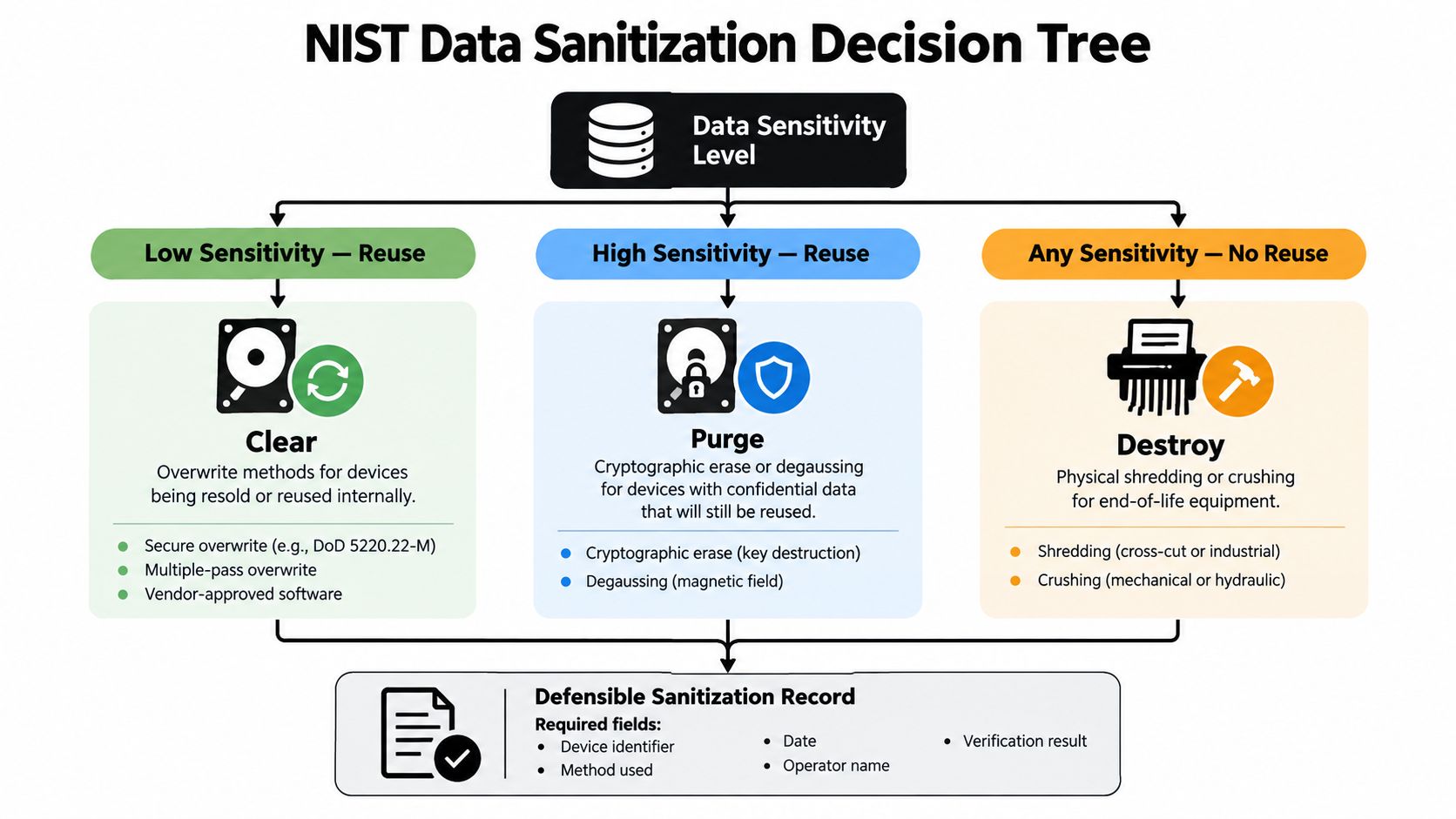
NIST gives you three methods to choose from. Clear uses logical techniques, such as standard read and write commands or a manufacturer reset, to prevent recovery through simple non-invasive methods. Purge uses physical or logical techniques intended to make recovery infeasible with state-of-the-art laboratory techniques while potentially preserving the drive for reuse. Destroy makes recovery infeasible and leaves the media unable to store data again, as defined in NIST SP 800-88 Revision 2 guidance on clear purge and destroy.
Same device class different answers
A finance laptop that held consumer-report data doesn't get the same path as a training-room laptop that never left the building. The finance unit points toward purge with documented verification, or destruction if the drive can't be reliably purged. The training unit may clear the bar with clear, provided the data class supports it.
A healthcare workstation drive raises the stakes again. If the medium is failing, encrypted with keys you can't account for, or unable to complete a purge command, don't negotiate with it. Shred it and sell the workstation without storage, disclosed that way.
Servers add a wrinkle because retired virtual machines spread data across arrays. Wiping one drive from a RAID set doesn't sanitize the set. You need a method per medium, applied across every member, with failed drives pulled for destruction rather than included in the lot.
Verification is not validation
A green status message means the software finished. It doesn't prove every addressable and hidden area was sanitized. NIST separates verification, which checks the operation completed without technical errors, from validation, which asks whether the evidence demonstrates effective sanitization for that data's sensitivity.
Validation needs independence. Sample with a different tool on a representative random selection, covering user-addressable and reserved areas, with consecutive sample locations covering at least 5% of the relevant subsection without overlap, per NIST SP 800-88 Rev 1 sampling guidance. Devices that fail get quarantined, reprocessed with a different method, or destroyed. They don't get sold with a note.
Record the fields an auditor will ask for. That's asset and serial number, method used, tool and version, operator identity, date, verification result, exceptions, and final disposition. The direction of current guidance reinforces this program-level thinking, as NIST's September 2025 media sanitization revision announcement describes a shift toward defined enterprise controls and validation. A complete NIST SP 800-88 aligned sanitization workflow is what makes that record consistent across every batch, not just the ones someone remembers to document.
Choosing Resale, Redeployment, or ITAD With a Defensible Scorecard
Resale is not the default answer. It's one outcome of a decision you should be able to explain device class by device class, using criteria that hold up when finance asks why recovery was low or sustainability reporting asks why functional gear was shredded. Gut feel produces neither good money nor good explanations.
Start with working condition and configuration. A tested unit with current CPU, adequate RAM, and healthy storage competes in a real market. A unit that needs a battery, a screen, and a charger before it's sellable is competing against its own repair bill, and it usually loses.
Resale Versus ITAD Decision Scorecard
| Decision Criterion | Resale Threshold | Routes to ITAD or Recycling | Data Sensitivity Multiplier |
|---|---|---|---|
| Working condition | Passes diagnostics, complete | Failed board, unsafe battery | Failed sanitization forces drive destruction |
| Age and repairability | Parts available, supportable OS | Orphaned parts, end-of-support | Older encrypted drives may need purge proof |
| Testing and repair cost | Uplift exceeds parts and labor | Repair cost exceeds resale uplift | Sanitization cost can erase thin margins |
| Market demand | Comparable units actively sell | No genuine second user | High sensitivity narrows buyer handling options |
| Energy efficiency | Reasonable operating cost for buyer | Obsolete, power-hungry platform | Inefficient servers rarely justify reuse risk |
| Logistics | Freight leaves positive net recovery | Shipping distance kills the margin | Chain of custody must survive every handoff |
Run two real cases through it. A three-year-old business laptop with strong battery health, complete accessories, and a purgeable SSD clears nearly every row. Resell it with full chain of custody and disclosed test results.
Now take a once-popular desktop line your fleet standardized on years ago. Power supplies are proprietary, the platform won't run a supported operating system well, and each unit needs bench time before it's even listable. That's not a failed resale. That's a correct recycling decision, and sending it through certified processing protects you from spending labor to create returns.
Resale isn't automatically the greener outcome. Shipping an obsolete, inefficient device to a buyer who won't really use it just moves the waste problem and adds freight to it.
The broader numbers support deciding carefully rather than reflexively. The EPA reported 2.7 million tons of selected consumer electronics generated in 2018, with 1.04 million tons collected for recycling, a 38.5% recovery rate, in its EPA materials and recycling facts and figures. That's a recycling recovery statistic, not a prediction of your resale yield, and treating it as one will distort your forecast.
Growth in the waste stream makes the reuse-versus-recycle call more consequential, a point reflected in the European Commission Joint Research Centre e-waste overview. Weighing refurbish or recycle options against documented criteria turns that judgment into a repeatable policy instead of a per-pallet argument.
Valuation and Channels That Hold Up Beyond the First Pickup
Original purchase price is the anchor that sinks most internal estimates. A laptop your organization bought at the top of a contract cycle is worth what a buyer will pay for that configuration, in that condition, this month. What you paid tells the buyer nothing.
Price from comparables instead. Match CPU, RAM, storage, screen condition, and battery health against units currently selling, then adjust for missing chargers, cosmetic wear, and absent warranty. Build in an allowance for returns and dead-on-arrival claims before you report a number to finance, not after the first chargeback.

What each channel actually trades
Internal redeployment returns the most utility per unit when a real internal need exists, and it returns nothing when units sit in a closet as spares nobody images. Count redeployment only when a receiving team and a deployment date exist.
Direct ITAD buyback trades some margin for speed, one chain of custody, and one settlement. For mixed lots with compliance requirements, that trade is often worth it because your team isn't running listings, packing single units, and fielding buyer questions for months.
- Wholesale lots: Fast movement of uniform inventory, priced at the lowest common condition, so grading discipline decides whether you win or lose.
- Retail refurbishment: Highest per-unit potential, but you're funding parts, warranty, support, and returns to earn it.
- Donation: Defensible when units are sanitized, functional, and usable by the recipient, with the same documentation you'd produce for a sale.
Identical laptops routinely return different money across channels for mundane reasons. The batch sold wholesale as tested and complete settles quickly at a predictable figure. The same model, graded cosmetically, fitted with new batteries, and sold with a short warranty earns more per unit and takes longer, with return risk attached. Neither number is wrong. They're answers to different questions about speed, labor, and risk tolerance.
There's also value below the whole-unit level. Globally, 2022 e-waste contained about 31 billion kilograms of valuable metals worth about US$91 billion, and recovered secondary raw materials were worth US$28 billion, as summarized in the ITU e-waste backgrounder. Functional assets preserve more original product value through reuse, while damaged ones can still return material value through compliant recycling.
Measure the program like an operation. Track batch-level yield, average processing minutes per unit, realized resale value, return rate, and net recovery after freight, separately by equipment class. Regional demand shapes what those numbers look like in practice, which is why sellers compare channels against IT equipment resale options in Georgia before committing a large lot to one route. Scale the channels that stay profitable after freight and returns. Retire the ones that only look good before them.
Paperwork and Compliance That Survive an Audit or a Board Question
Paperwork is not the administrative tail of the program. It's the evidence that your decisions happened, in the order you claim, handled by the people you name. When an auditor or board member asks a hard question, they aren't asking for reassurance. They're asking for a document.
The legal standard is deliberately flexible, which puts the burden on your records. The Federal Trade Commission's Disposal Rule requires covered organizations to use disposal practices reasonable and appropriate to prevent unauthorized access to consumer-report information, with destroying or erasing electronic files or media so information cannot be read or reconstructed given as an example of appropriate disposal, as the FTC Disposal Rule business guidance sets out. Reasonable and appropriate is a standard you prove with documentation, not a phrase you repeat.
What belongs on the certificate
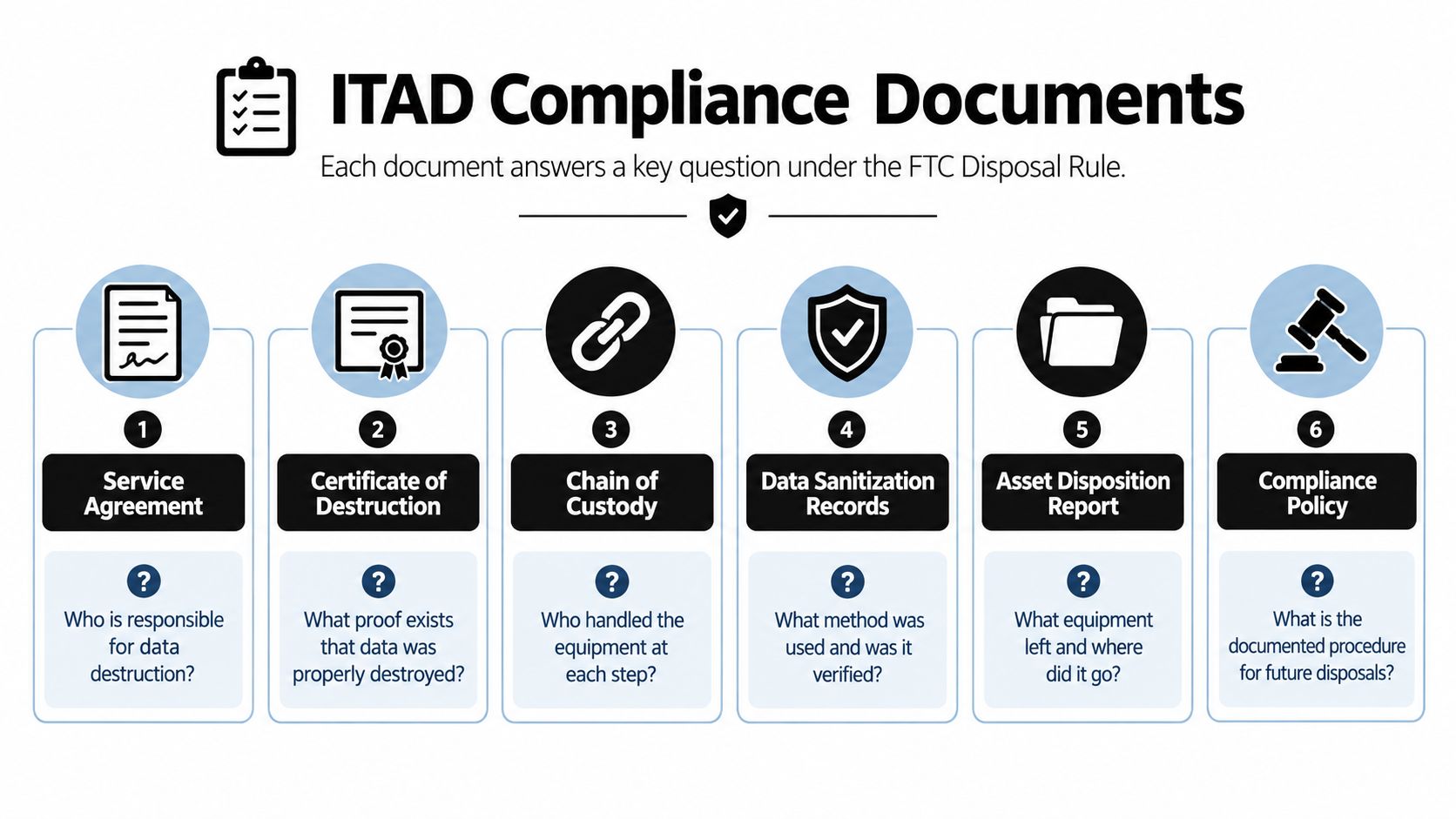
A certificate of data destruction should carry asset or batch ID, serial numbers, sanitization method, tool and version, operator, date, verification result, and disposition. If your certificate says a quantity of drives was destroyed without tying that claim to serials, it describes an event. It doesn't clear your assets.
Recycling documentation works in parallel. A certificate of recycling or weight-level report should show what material went where, through which downstream processors, so sustainability claims rest on records rather than vendor assurances. Asset-level reporting for resold units and weight-level reporting for recycled material answer different questions, and mature programs produce both.
- Chain of custody: Signed handoffs from your dock through transport to final processor, closing the gap where equipment most often goes unaccounted for.
- Vendor due diligence: Contract terms, method commitments, and downstream disclosure that show you qualified the contractor before handing over media.
- Exception log: Failed drives, quarantined units, and reprocessed assets, recorded instead of dropped from the manifest.
Physical handling has its own rules during commercial pickups. EPA universal-waste requirements cover container labeling, storage, personnel training, and transport for batteries, mercury-containing equipment, and lamps, and damaged batteries must go in closed, structurally sound, compatible containers, per the EPA universal waste frequently asked questions. That translates into labeled containers and trained handlers on your dock, not loose batteries in a gaylord.
Put it together in the scenario auditors run. They pick a returned lease unit from your manifest and ask for proof it was wiped before it left. You produce the intake record with its serial, the sanitization record with method and operator, the validation result, and the custody signature at pickup. That chain is what organized compliance documentation for IT asset disposition is built to deliver. Paperwork that merely looks official transfers no liability at all.
A Two-Week Rollout Checklist and When to Bring In a Certified Partner
Two weeks is enough time if the decisions are sequenced and nobody is waiting on information another team forgot to gather. It isn't enough time if intake starts after the pickup is booked.
The sequence that works
- Confirm scope and stakeholders: Lock the asset list, ownership, lease status, and the security, finance, and facilities contacts who can answer questions same-day.
- Run intake and triage: Capture serials and data classes, test and grade, then route each unit to resale, redeployment, parts, or recycling.
- Decide sanitization by data class: Assign clear, purge, or destroy per medium before anything is listed or packed.
- Execute and validate: Sanitize, verify every operation, sample independently, and quarantine failures for reprocessing or destruction.
- Book logistics and reconcile: Ship against the manifest, then match every certificate back to a serial or batch before you close the project.
Internal teams run out of road at predictable points. Bulk on-site shredding, multi-site pickups, downstream custody reporting, and specialist handling for medical or laboratory equipment all demand equipment and permits most IT departments shouldn't own. That's the point where a certified partner stops being a convenience and becomes the control itself.
Judge that partner on evidence, not promises. Ask what their certificates show, how they handle failed media, and whether custody stays documented through every handoff. The goal when you sell used IT equipment is value recovery wrapped in documented control, not the largest check you can announce this quarter.
If your refresh timeline is already moving, get the intake, sanitization, and custody records right before the first pallet leaves. Beyond Surplus runs certified electronics recycling and secure IT asset disposal for businesses, including data destruction with certificates, IT buyback for value recovery, and pickup logistics across the contiguous United States. Contact the team to turn your retired laptops, servers, and networking gear into documented recovery instead of open liability.


