

The last week of finals turns a quiet disposal plan into a traffic problem. Pallets of desktops sit beside a dorm loading dock, a facilities truck idles nearby, and a student worker scans asset tags by hand while departments rush to clear rooms. That familiar campus cleanout can't withstand modern scrutiny if nobody can prove which devices were released, how their data was sanitized, or who accepted them.
University IT asset disposal best practices treat retirement as a year-round operating program. Student records, clinic information, research files, grant obligations, environmental requirements, and procurement controls all follow equipment beyond the moment it leaves a desk. The practical standard is simple: every asset needs a documented decision, a controlled handoff, and evidence that the chosen disposition path was completed.
Table of Contents
- Why Campus IT Asset Disposal Is Now a Compliance Program
- Build the Policy, Inventory, and Classification Foundations
- Run a NIST-Based Data Sanitization and Destruction Workflow
- Select Vendors and Lock Down Chain of Custody
- Choose Between Reuse, Buyback, Recycling, and Destruction
- Map FERPA, HIPAA, and FTC Disposal Rule Requirements
- Track Outcomes and Roll the Program Out Across Campus
Why Campus IT Asset Disposal Is Now a Compliance Program
A retired university device may move through IT, facilities, procurement, sustainability staff, a carrier, and an IT asset disposition vendor. Every handoff needs an accountable owner and a record. Campus teams often believe devices were sanitized and transferred, but inventory and disposal records cannot always confirm those outcomes.
University policies increasingly treat disposal as a compliance control. One UK university requires IT equipment to go through an approved service provider whose contract covers WEEE compliance and data removal. The provider must also supply proof of disposal and evidence of data erasure or destruction (university IT asset management and disposal policy). Another procedure requires secure storage, updates to IT asset records, and collection by a contracted third-party supplier.
The risks behind a routine refresh
Student-services devices may contain education records. Clinic and counseling equipment may hold protected health information. Research laptops can carry controlled technical data, unpublished results, or files covered by sponsor retention terms. These categories require different release decisions, even when the equipment looks identical.
Legal holds, research exceptions, and lab-owned equipment need explicit rules. Staff should check for grievances, litigation, public-record requests, sponsor restrictions, and ownership disputes before disposal. One university guideline also requires software deletion and certified erasure or destruction of storage (ICT asset disposal guidelines.pdf)).
A year-round program keeps these checks active between refresh cycles. It pauses a device under legal hold, routes research equipment to the responsible administrator, and resolves lab ownership before a vendor receives it.
Practical rule: A device becomes disposable only after the institution has cleared its data obligations, ownership records, and retention requirements.
A formal program gives legal, risk, procurement, and sustainability teams one shared record. It also keeps end-of-semester work from becoming the only point when staff ask where obsolete equipment went. Campus leaders can review government electronics recycling requirements for broader regulatory context.
Build the Policy, Inventory, and Classification Foundations
When a department hands a vendor 30 retired laptops without a written inventory trail, no one can tell which drives held student records and which held public data. The policy, inventory, and classification system must answer that question before equipment leaves campus.
Put ownership in writing
Assign an accountable executive and name the people who execute each stage. Include CIO or IT leadership, IT security, procurement, sustainability, records management, facilities, and research administration. The policy should define:
- Scope: Cover computers, servers, networking gear, storage media, laboratory systems, medical equipment, peripherals, and components.
- Approval: Require authorized ITS or asset-management approval before release.
- Sanitization: List approved Clear, Purge, and Destroy methods, plus conditions requiring physical destruction.
- Vendor control: Require documented qualifications, downstream transparency, insurance, and environmental compliance.
- Records: Retain inventory history, sanitization logs, certificates, exception approvals, and disposition results.
- Exceptions: Pause assets under legal hold, containing research data, subject to grant restrictions, involved in lab ownership disputes, or awaiting privacy decisions.
A year-round workflow prevents end-of-semester collection from becoming the only control point. For each device, staff should check legal holds, sponsor retention terms, research ownership, and unresolved records questions. A lab-owned instrument may need its department or principal investigator to approve release. A device under litigation hold stays in place, even if its replacement has arrived.
Make the inventory usable at pickup
The inventory should connect the physical asset to its digital record. Capture the asset tag, serial number, device type, location, custodian, department, data classification, acquisition details, condition, approval status, sanitization result, destination, and final disposition. A CMDB or asset-management platform is preferable to a spreadsheet when departments share responsibility. Teams reviewing lifecycle controls can also consult this asset lifecycle management guide from Forge Reliability.
Classification labels must be short enough for a technician to apply during collection. A typical three-tier system might use Public Kiosk, Internal Workstation, and Restricted, FERPA/HIPAA. The label should determine the review path, not require staff to search a handbook.
| Tier | Example Data | Minimum Sanitization | Example Devices |
|---|---|---|---|
| Public | Public course materials or published content | Clear, with documented verification | Display computer or public kiosk |
| Internal | Routine administrative files | Clear or Purge, based on media and destination | Department workstation |
| Restricted | Student, employee, financial, or operational records | Purge with verification, or Destroy when verification fails | SIS-connected laptop |
| Highly Restricted | Protected health, regulated, controlled, or sensitive research data | Destroy, unless an approved higher-assurance sanitization path is documented | Clinic workstation or research server |
Receiving, relocation, repair, and disposal updates belong in the same system. A laptop that left a room but remains assigned to a departed employee is already a control failure. Campus teams can review inventory optimization services when designing a cleaner asset-record process.
Run a NIST-Based Data Sanitization and Destruction Workflow
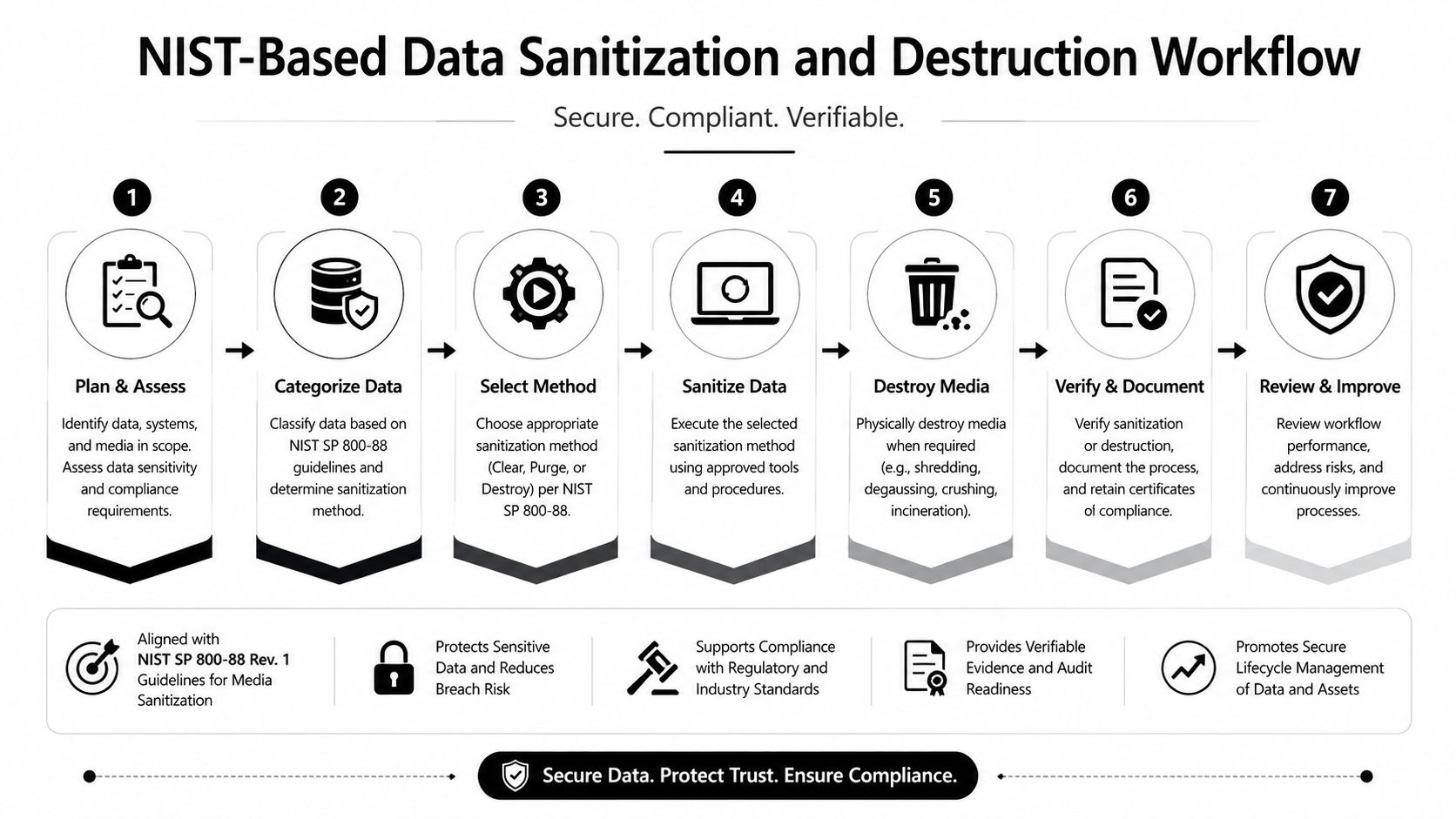
NIST SP 800-88 separates sanitization into Clear, Purge, and Destroy. The right method depends on data sensitivity, media condition, and the intended destination, not solely on whether the device powers on. NIST guidance also recommends selecting a random subset for secondary verification with a different verification tool, and the legacy version states that at least 20% of sanitized media should be verified (NIST-derived media sanitization best practices).
Match the method to the decision
Clear suits reusable media with low sensitivity when the organization has confirmed that the method addresses the relevant storage areas. Deletion and formatting aren't sanitization. They can leave recoverable information behind.
Purge is the usual route for functional laptops, desktops, and servers intended for redeployment, resale, or donation. Use an approved erasure process or cryptographic erase where the device architecture and encryption controls support it. Athabasca University's procedure requires a commercially proven, certified erasure solution and an erase audit report or certificate for review (IT asset disposal procedure).
Destroy applies when a drive has failed, the required sanitization can't be verified, the media carries highly sensitive data, or the asset will leave the controlled supply chain without an approved reuse route. Depending on the media, destruction can involve shredding, crushing, degaussing, or another validated method.
Make the evidence follow the device
At intake, record the tag, serial number, custodian, data class, storage type, condition, and approved method. The technician should attest to the work, while a second control verifies the result through sampling, witnessed destruction, video evidence, or a separate verification tool. A Certificate of Destruction or erasure report must match the asset record, whether the certificate covers one device or a clearly defined lot.
On-site work is useful for legal holds, research restrictions, sensitive laboratories, and failed media that shouldn't travel intact. Off-site processing can suit larger volumes when the provider controls transport, storage, access, downstream processing, and reporting. The decision belongs in the policy and project record, not in an informal conversation at the loading dock. See this explanation of NIST 800-88 data destruction standards when aligning campus procedures with the sanitization categories.
Select Vendors and Lock Down Chain of Custody
Treat vendor selection as a procurement audit. A low pickup quote says little about data control, reporting, or downstream handling. Certifications and attestations help, but campus staff must confirm that each document is current, issued by the relevant body, and applicable to the facility and service being purchased.
Request evidence suited to the work, including R2v3, e-Stewards, NAID AAA, and SOC 2 Type II attestations where applicable. Then trace the process after collection. The vendor should identify downstream processors, reporting fields, storage controls, and audit rights. If those details are missing, the university retains the uncertainty and may lack evidence during an audit.
Score the whole operating model
| Criterion | Weight | What to verify |
|---|---|---|
| Data destruction capability | High | NIST SP 800-88 alignment, certified wiping, physical destruction, and on-site options |
| Downstream transparency | High | Serialized reports, processor disclosure, downstream audit rights, and final disposition evidence |
| Operational fit | Medium | Campus access rules, pickup windows, insurance, trained staff, and loading requirements |
| Total cost | Medium | Pickup, sorting, storage, destruction, reporting, and fees that reduce recovery value |
Write the controls into the contract. Require serialized tagging at pickup, tamper-evident seals, controlled transport, documented handoffs, and an incident-notification window of 24 hours. GPS tracking can support transport oversight, but signed custody records still establish who accepted the equipment and when. Require two-person handoffs where risk warrants them, certificates by asset or lot, annual third-party audit evidence, and the right to conduct an unannounced downstream audit.
Give facilities a usable SOP
A one-page pickup procedure limits process drift. Tell staff to confirm the approved work order, compare the pickup list with physical tags, reject unlisted equipment, record exceptions, seal the load, obtain signatures, and upload the handoff record before the truck leaves.
Procurement teams can use this vendor due diligence checklist to structure questions before comparing commercial terms. Select providers that supply serialized certificates, downstream audit rights, and a documented 24-hour incident-notification window. The strongest vendor relationship rests on controls that can be verified, tested, and produced during an audit.
Choose Between Reuse, Buyback, Recycling, and Destruction
Retirement isn't a single destination. It's a routing decision based on data class, device condition, supported-use potential, market value, and the institution's ability to verify the downstream outcome.
A campus redeployment pool often wins when a laptop still supports the current image and can move to another department without a lengthy procurement cycle. Buyback is attractive when the device has clear residual value, intact media, and documented sanitization before shipment. Donation can extend useful service for functional equipment, but the agreement should assign data handling and eventual disposal obligations to the recipient.
Recycling is the practical route for equipment that fails reuse or market criteria. It keeps recoverable materials in a controlled channel and avoids informal disposal. A study of selected higher-education institutions found 100 tons of ICT e-waste generated in 2012, with a net recoverable material value of 0.3 million Malaysian ringgit (study of ICT e-waste in higher education). The finding supports structured recovery before final disposal.
Use a fast triage rule
| Condition | Preferred path | Non-negotiable control |
|---|---|---|
| Functional, suitable for another campus user | Internal reuse | Approved wipe and inventory reassignment |
| Functional, marketable, no unresolved hold | Buyback | Verified Clear or Purge before shipment |
| Functional, appropriate recipient | Donation | Recipient agreement and disposal responsibility |
| Nonmarketable but processable | Certified recycling | Environmental and data documentation |
| Failed, highly sensitive, or held | Destruction or hold storage | Physical control and documented authorization |
Don't choose destruction solely because it feels safer. It can eliminate reuse value and increase processing burden. Don't choose reuse solely because sustainability targets favor it. A device with unverifiable media or unresolved research restrictions stays out of the reuse pool. For a commercial perspective on recovery decisions, review this business laptop buyback guide for IT leaders.
Map FERPA, HIPAA, and FTC Disposal Rule Requirements
A regulation becomes operational only when staff can connect it to a device, a decision, and an artifact. Build that connection into the asset record instead of storing certificates in an unindexed vendor folder.
FERPA-related data may reside on laptops, tablets, lab machines, or systems that accessed student information, learning platforms, or financial aid records. Route those assets through the approved sanitization method for their classification, then file the verification record and certificate against the device tag.
HIPAA-related equipment requires tighter handling when a university clinic, counseling center, or research trial has used the device. Keep those assets out of an ordinary buyback queue unless the privacy and security owners approve the route. On-site witnessed sanitization or direct destruction may be appropriate when the institution can't verify the media condition or the complete wipe.
The FTC Disposal Rule calls for reasonable measures when consumer-report information is involved. That means faculty and administrative systems need documented sanitization, controlled release, and vendor attestation where a third party performs the work.
Convert obligations into records
| Regulation | Triggers | Required disposal step | Artifact to retain |
|---|---|---|---|
| FERPA | Student education records | Approved Purge or Destroy path | Sanitization log and certificate linked to tag |
| HIPAA | Protected health information | Witnessed high-assurance sanitization or destruction | Privacy approval, method record, and certificate |
| FTC Disposal Rule | Consumer-report information | Reasonable documented sanitization and controlled disposal | Vendor attestation and asset record |
| Research or grant terms | Sponsored or restricted research data | Hold, consult research administration, then follow approved timeline | Release approval and project closeout evidence |
Research equipment needs an additional gate. A lab owner may know that a device contains project data, export-controlled material, or files subject to sponsor retention. The Office of Research, privacy staff, records management, and IT security should decide whether the asset can move, be sanitized, or remain under hold.
Track Outcomes and Roll the Program Out Across Campus
A mature program gives leadership evidence beyond a completed pickup. Track the percentage of assets sanitized within the service-level target, certificates captured per pickup, material diverted from landfill, value recovered through buyback, and compliance exceptions by review period. Assign each measure to a named owner, such as IT security for sanitization performance, procurement for vendor reporting, and sustainability for recovery outcomes.
Establish a review rhythm
Hold a monthly project meeting while a refresh or decommissioning effort is active. Use a quarterly review with IT, procurement, sustainability, legal, records management, and research administration to examine exceptions, vendor performance, unresolved holds, and reporting quality.
Communication should reach the people who create exceptions:
- Faculty and lab owners: Explain the hold process, research-data review, and the contact who can stop a release.
- New staff: Add a short disposal and asset-return rule to onboarding.
- Procurement teams: Maintain an approved-vendor bulletin with required documentation and escalation contacts.
- Facilities staff: Post the pickup SOP where equipment is staged, not just in a policy repository.
Use a 90-day launch sequence
Start by publishing the policy and naming owners. Pull the first inventory, classify a manageable department's equipment, and identify missing tags or custodians. Next, execute the vendor contract, test the pickup SOP, and complete the first controlled disposition. Finish the initial cycle with a KPI report that records sanitized assets, certificates, exceptions, recovery outcomes, and open corrective actions.
The most reliable next move is a one-department pilot for one semester. Capture the metrics, correct the handoffs, obtain feedback from lab and facilities staff, then scale the service across campus. Global e-waste reached 62 billion kilograms in 2022, or 7.8 kilograms per person, while only 22.3% was formally collected and recycled in an environmentally sound manner, according to the Global E-waste Monitor 2024. The same report's coverage projects 82 million tonnes by 2030, making documented recovery pathways increasingly important for large organizations (ITU coverage of the Global E-waste Monitor).
Beyond Surplus provides business and university IT asset disposition support, including scheduled pickup, inventory-linked reporting, certified data wiping, hard-drive shredding, recycling, buyback, and controlled equipment removal. Visit Beyond Surplus to discuss a campus pilot that turns end-of-semester refreshes into a documented, repeatable disposal program.


