

A remote employee resigns on short notice. HR closes payroll tasks, the manager schedules a handoff, and IT assumes the laptop will show up eventually. A week later, nobody can confirm where the device is, whether local files were encrypted, or who owns the next step. That's when an ordinary offboarding task turns into a business risk.
This is why businesses need a formal remote employee equipment return process. Without one, companies don't just lose hardware. They lose time, create security gaps, invite compliance trouble, and force HR, IT, finance, and legal to clean up a preventable mess.
The Hidden Chaos of Remote Employee Offboarding
A weak offboarding process usually fails in the same way. HR sends a final checklist. IT disables email and core apps. The departing employee is told to “ship the laptop back when you can.” No return kit is issued. No one confirms the serial number. No one logs accessories. No one defines who signs off when the box arrives.

That looks minor until the device contains customer files, saved browser credentials, VPN access history, or regulated records. At that point, the problem isn't the laptop alone. The problem is the absence of control.
Where informal offboarding breaks down
In practice, the failure points are predictable:
- No assigned owner. HR thinks IT is managing the return. IT thinks HR already gave instructions.
- No documented asset list. Employees return a laptop but keep the dock, monitor, token, or company phone.
- No shipping standard. Devices travel in poor packaging, with no insurance or tracking discipline.
- No receipt workflow. Equipment arrives, sits in a corner, and waits for someone to inspect it.
- No closure record. Weeks later, nobody can prove what was returned, wiped, recycled, or reissued.
A detailed look at the hidden costs of unreturned company laptops shows how quickly an unresolved return issue can spread beyond the original employee departure.
Remote offboarding fails when companies treat equipment recovery as a favor the employee performs, not a controlled business process.
Quantifying the High Cost of an Informal Process
The fastest way to get leadership attention is to frame offboarding in terms of total cost of risk. Hardware replacement is only one line item. The larger exposure sits in data security, business interruption, and compliance.
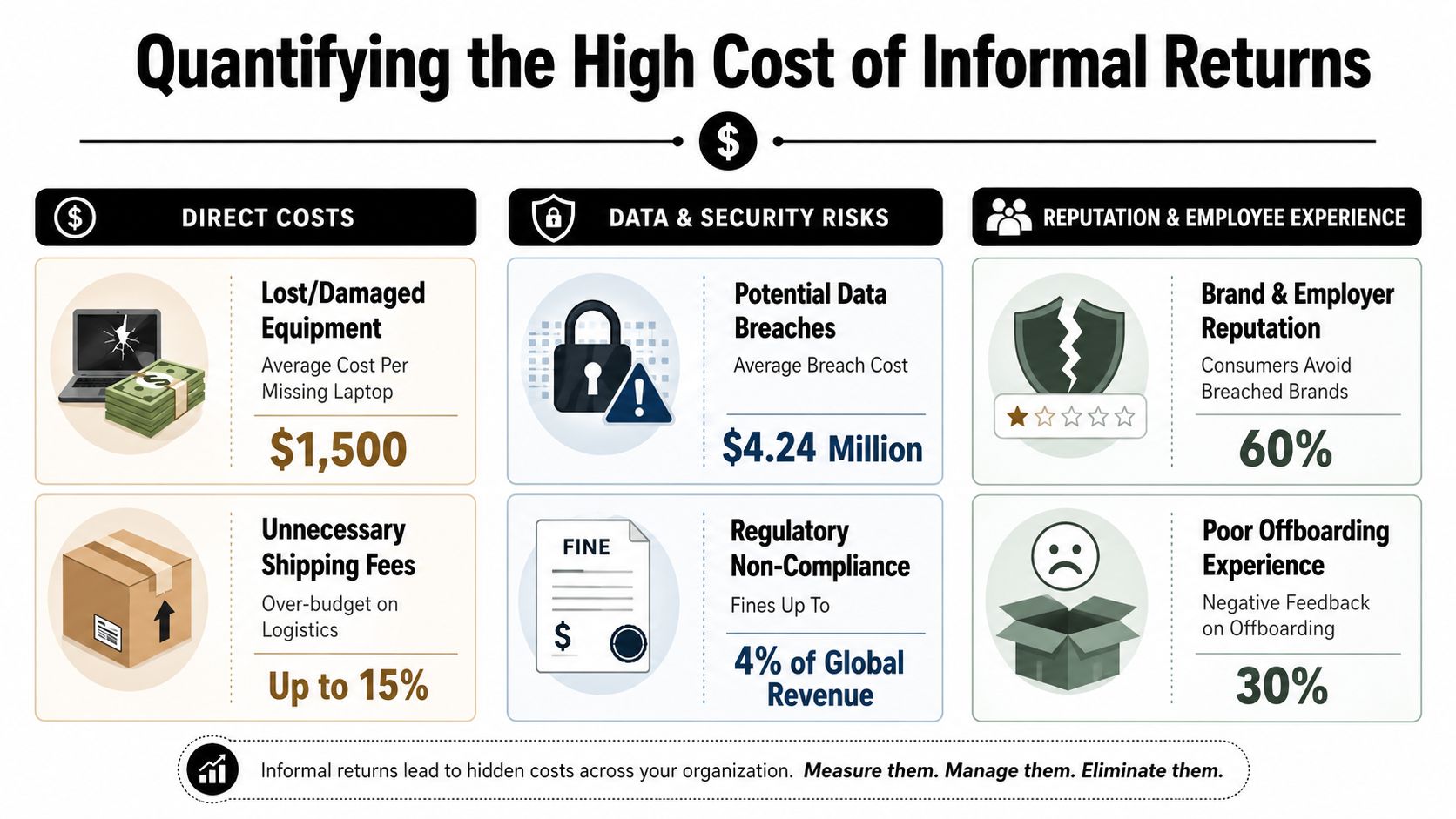
Direct financial loss is only the starting point
The one verified number most IT asset managers should know is this: companies without a formal offboarding process fail to recover 20-30% of their assets from remote employees, with the average cost of a lost corporate laptop, including data and productivity loss, exceeding $5,000, according to CompTIA.
That figure matters because it already moves beyond sticker price. It includes the downstream cost of replacing the machine, rebuilding the user setup, and dealing with productivity loss tied to missing equipment and unresolved data.
A stronger explanation of this issue appears in how to reduce equipment loss during employee offboarding, especially for organizations with large remote or hybrid teams.
Security exposure keeps running after the employee leaves
A returned laptop isn't safe just because the account is disabled. Local files may still exist. Cached credentials may still exist. Browser sessions, downloaded reports, customer spreadsheets, engineering documents, and messaging exports may still sit on the drive.
The risk gets worse when the company can't answer basic chain-of-custody questions:
| Risk area | What goes wrong | Business consequence |
|---|---|---|
| Asset recovery | Device is never returned or arrives damaged | Replacement cost, delayed redeployment |
| Data handling | Device sits unwiped after receipt | Unauthorized access risk |
| Documentation | No proof of return or destruction | Weak audit posture |
| Coordination | HR and IT work from different timelines | Missed revocation and delayed response |
Compliance risk changes the ROI calculation
For regulated organizations, informal returns can create a compliance problem even if nothing visibly goes wrong. If a device containing sensitive records is lost, mishandled, or discarded without proper controls, the company may have to defend its process to customers, auditors, regulators, or counsel.
That's why a formal return program isn't an administrative convenience. It's a control. It creates documented evidence that the company identified the asset, retrieved it, handled the data, and closed the lifecycle properly.
Practical rule: If your team can't show who had the device, how it moved, when it arrived, and what happened to the data, you don't have a defensible process.
Building a Bulletproof Equipment Return Policy
Most companies have an offboarding checklist. Far fewer have a real equipment return policy. A checklist helps people remember tasks. A policy defines obligations, deadlines, and consequences. You need both.
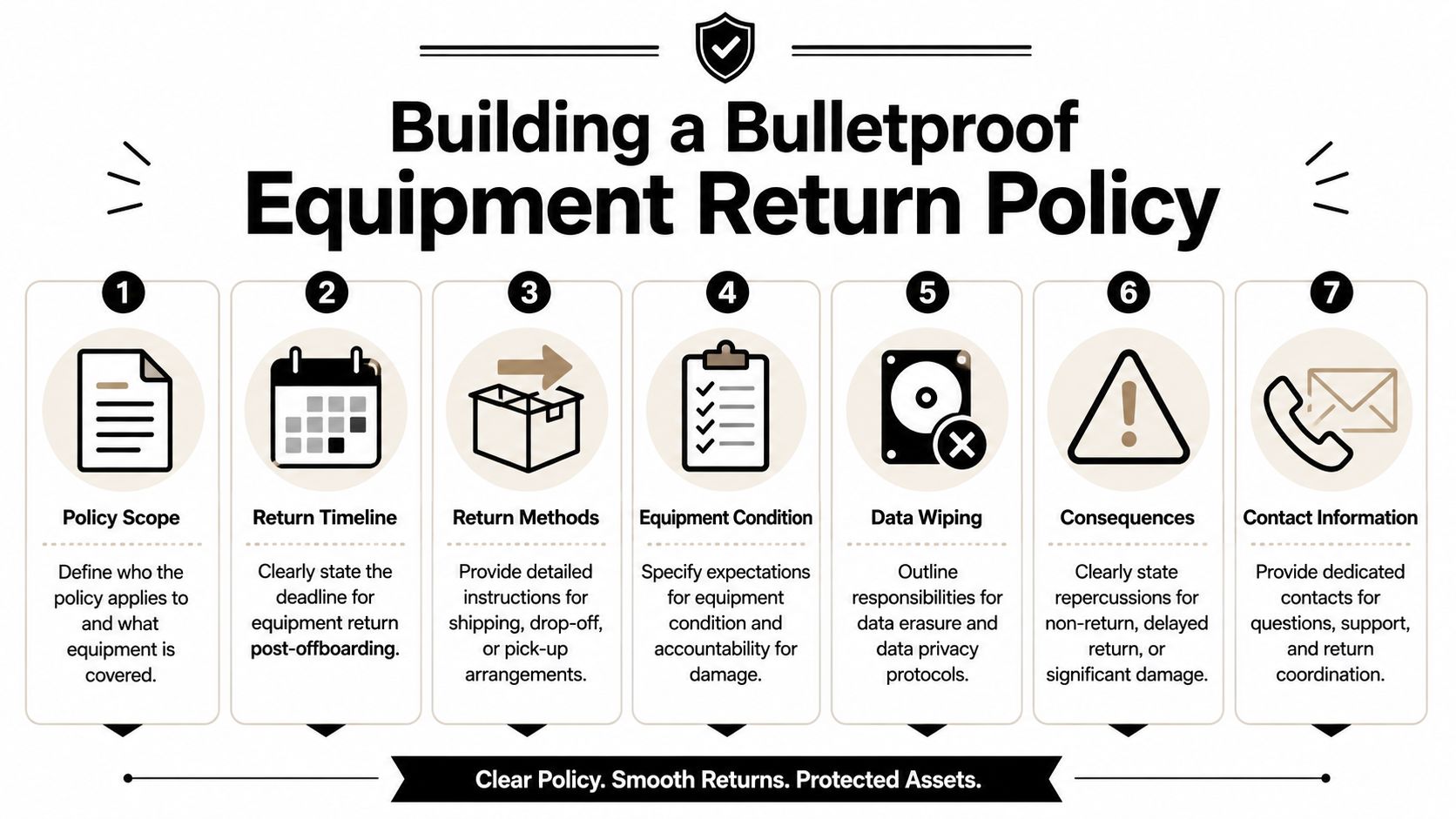
What the policy must cover
At minimum, the policy should answer these questions clearly.
- Who is covered. Include remote employees, hybrid employees, contractors if applicable, and any worker issued company-owned IT equipment.
- What must be returned. List laptops, phones, monitors, docks, chargers, headsets, security keys, storage devices, and any specialized equipment.
- When return is due. State the return deadline in plain language tied to the employee's separation date.
- How return happens. Spell out whether the company provides prepaid labels, boxes, pickup service, or drop-off instructions.
- What condition is expected. Require reasonable care, intact asset tags, and return of all assigned accessories.
- Who to contact. Give named teams or roles for HR, IT, and logistics support.
Put obligations in writing before offboarding starts
The policy works best when the employee signs it during onboarding or device issuance. That removes ambiguity later. When departure happens, HR isn't negotiating terms from scratch. The company is enforcing an existing agreement.
A good policy also includes acknowledgement language for:
- Asset assignment records
- Return instructions received
- Failure to return escalation
- Consent to remote management controls where applicable
What doesn't work
Some policy drafts fail because they're too vague to enforce.
Common mistakes include:
- Generic wording. “Return equipment promptly” invites argument.
- No ownership. The document doesn't say whether HR, IT, procurement, or facilities controls the workflow.
- No exception path. There's no method for lost items, damaged devices, or employees who relocate during notice.
- No tie to disposal controls. The policy ends at “device returned” and says nothing about wipe, reuse, resale, or recycling.
A usable policy reads more like an operational standard than an HR memo. If a manager, help desk analyst, or third-party logistics provider can't follow it step by step, it isn't finished.
Mastering Logistics and Chain of Custody
The hardest part of remote asset recovery isn't writing the policy. It's running the handoff cleanly. The device has to move from a former employee's home to the company or ITAD partner without losing visibility.
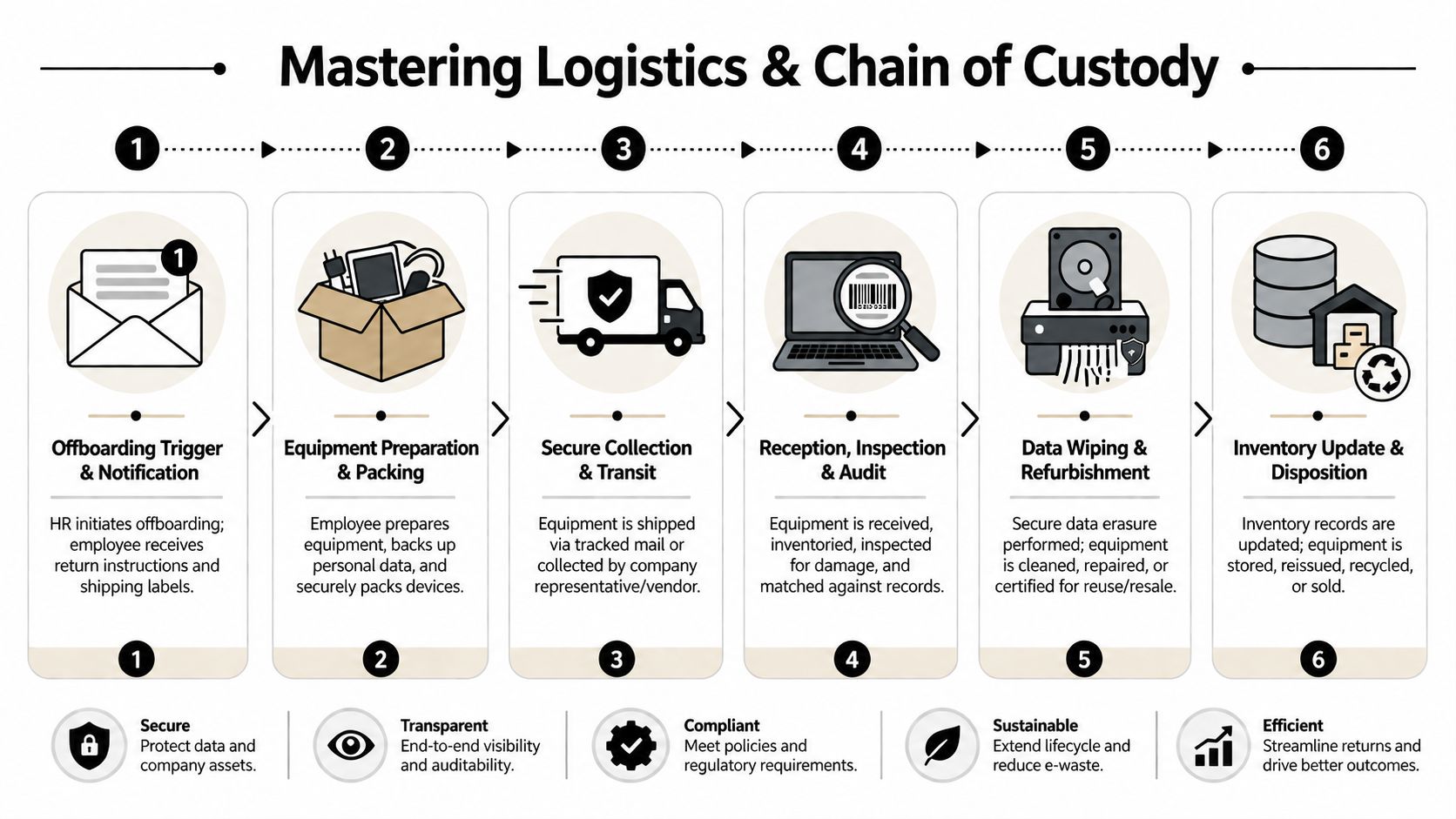
Choose a return model your team can actually manage
There are two common models.
Return kit model
The company sends a box with protective packaging, a prepaid label, and written instructions. This works well for standard laptops and accessories. It reduces friction and gives the employee one clear action to complete.
Managed pickup model
A courier or service partner coordinates collection. This is better for higher-value devices, multi-item returns, executive departures, or specialized equipment that shouldn't be packed casually.
For packaging guidance, best practices for shipping laptops back from remote employees covers the handling details many companies miss.
Maintain an unbroken record
Chain of custody doesn't need to be complicated, but it does need to be real. Every handoff should leave a record.
A reliable workflow usually includes:
- Trigger the process immediately when HR confirms the departure date.
- Match the employee to assigned assets using serial numbers and asset tags.
- Issue return instructions in writing with deadlines and support contact details.
- Track shipment or pickup status until the package is physically received.
- Inspect and log contents on arrival against the original asset record.
- Route the device to secure storage or processing without leaving it in an uncontrolled queue.
What strong teams document
The most useful records are simple:
- Employee name and last working date
- Assigned asset list
- Tracking or pickup reference
- Date received
- Condition on receipt
- Disposition path after intake
A laptop in transit is still a controlled asset. Treat the journey itself as part of the security process.
What fails is the “we'll sort it out when it gets here” approach. That usually creates gaps at intake, where nobody knows whether the missing charger was never shipped, stolen, or overlooked.
The Critical Last Mile Secure Data Destruction and ITAD
Getting the hardware back is only half the job. The primary liability often sits on the storage media.
Too many companies still rely on informal cleanup steps. Someone signs into the machine, deletes files, or reinstalls the operating system, then calls it done. That may be enough for basic reuse in a low-risk environment, but it isn't the same as controlled, documented data destruction.
Formatting is not the same as defensible erasure
A formal remote employee equipment return process should define what happens after intake:
- Devices for redeployment need verified data wiping before reissue.
- Devices leaving service may require physical destruction of storage media, depending on policy and risk profile.
- Devices with sensitive or regulated data need documentation that the destruction or sanitization process was completed.
This is where an IT asset disposition partner becomes relevant. For example, the role of ITAD in remote employee laptop recovery explains how recovery, sanitization, and final disposition fit into one controlled workflow. Beyond Surplus offers a remote employee equipment return program that can support return logistics, policy documentation, secure data destruction, and downstream recycling or remarketing.
Liability transfers through documentation, not assumptions
The last mile should produce records that stand up later. That may include intake logs, data destruction certificates, recycling certificates, and disposition reports tied to specific assets.
For businesses subject to privacy and disposal obligations, this documentation matters because it shows the company didn't abandon control once the device arrived. It completed the lifecycle.
If the device is back but the data handling isn't documented, the offboarding process is still open.
Real-World Scenarios The Good and The Bad
Company A has a remote sales employee leave on a Friday. HR sends an email asking for the laptop “as soon as possible.” IT disables accounts late in the day. The employee says they're traveling and will ship the device next week.
No return label is issued. No one confirms the dock and phone. The package eventually arrives in damaged packaging, with the laptop only. It sits in the IT room until someone has time to inspect it. Weeks later, finance asks whether the full asset set was recovered. Nobody can answer with confidence.
The bad outcome
Company A now has several problems at once:
- Missing accessories and unclear accountability
- No documented chain of custody
- No proof of when the device was received
- No clear record of data destruction
- Internal time loss across HR, IT, and finance
Company B handles the same departure differently. HR triggers the offboarding workflow the day notice is accepted. The employee receives written instructions and a return kit. The assigned assets are listed by serial number. Shipment is tracked. Intake staff inspect the contents on arrival and log condition. The device moves directly into a controlled wiping or destruction process, and the file closes with final documentation.
The good outcome
Company B doesn't eliminate risk through luck. It reduces risk through discipline.
A side-by-side difference makes the point clearly:
| Issue | Company A | Company B |
|---|---|---|
| Return instructions | Informal email | Standardized written workflow |
| Tracking | Inconsistent | Documented from dispatch to intake |
| Asset matching | Unclear | Serial-based verification |
| Data handling | Ad hoc | Controlled sanitization or destruction |
| Audit record | Weak | Complete closure file |
That's what a formal process changes. It turns uncertainty into evidence.
Take Control of Your Remote IT Asset Lifecycle
Remote work changed where devices live, but it didn't change your responsibility for them. If anything, it raised the stakes. A laptop in a spare bedroom carries the same business data, compliance exposure, and financial value as one sitting in headquarters.
A formal remote employee equipment return process gives your team control where ad hoc offboarding creates confusion. It sets deadlines, defines ownership, standardizes logistics, preserves chain of custody, and closes the loop with documented data destruction and disposition. That's how businesses reduce loss, protect data, and keep offboarding from turning into an avoidable incident.
For companies managing distributed teams, this work belongs inside a broader IT asset lifecycle management program. Equipment return isn't a standalone task. It's one stage in a lifecycle that has to be controlled from deployment through final disposal.
Contact Beyond Surplus for certified electronics recycling and secure IT asset disposal.


