

An unreturned laptop isn't a missing asset. It's an active compliance failure sitting outside your control.
That distinction matters because the downstream risk has little to do with hardware value. According to the HP Wolf Security Study summary published by Prey, lost and stolen corporate devices create $8.6 billion in global costs annually, and 81% of cybersecurity breaches originate from such devices (Prey). In practice, the laptop becomes an unmanaged endpoint with data, credentials, and no defensible chain of custody.
Most companies still treat this as an HR chase-down problem. It isn't. It's an audit problem, a disposal problem, and often a legal problem that starts the moment an employee leaves with a device and no verified return path.
The Growing Black Hole in Your Asset Inventory
Remote work exposed a weakness that many IT teams already suspected. Asset inventories often look complete right up until offboarding starts.
A laptop assigned to a user may still appear in the system, but once that employee departs without returning it, your record stops being operationally useful. You no longer control location, access status, handling, or end-of-life processing. That gap turns a line item into a liability.
Lansweeper found that 23% of companies reported employees failing to return laptops after leaving, with each unreturned incident costing an average of £2,847, approximately $3,600, when hardware replacement, licensing, and administrative opportunity cost are included (TechRecoverHQ). For many teams, that's still the wrong place to focus. The bigger issue is that the device is no longer governed by policy, technical controls, or documented disposition.
Why inventory accuracy stops mattering without custody
An inventory record can tell you who received a laptop. It can't prove what happened after control was lost.
That means several things break at once:
- Asset accountability fails because assigned ownership isn't the same as physical possession.
- Security assumptions fail because cached credentials, local files, and synced data may still exist on the device.
- Compliance evidence fails because auditors don't want assurances. They want records.
- Disposition controls fail because no one can verify sanitization or final downstream handling.
Teams that tighten receiving, assignment, and refresh workflows usually improve visibility, but offboarding is where control is won or lost. That's why mature programs put just as much emphasis on recovery workflows as procurement workflows. A disciplined inventory optimization process closes that gap before devices disappear into email threads and exception lists.
Unreturned laptops create a blind spot that finance, IT, security, and compliance all inherit at the same time.
Insurance can help with equipment loss, but it won't reconstruct missing audit evidence. For risk managers reviewing coverage alongside internal controls, this essential guide to equipment coverage is useful context because it separates insurable property loss from the harder problem of data and compliance exposure.
The Data-at-Rest Time Bomb Inside Every Lost Laptop
Most laptops leaving an organization contain far more than saved documents. They often hold fragments of the business.
That includes customer PII, employee records, contract files, spreadsheets exported for offline work, browser-stored sessions, password manager traces, cached email, collaboration files, and VPN artifacts. In healthcare, finance, and legal environments, the device may also hold PHI, regulated financial data, or privileged matter content. Even when the user mostly works in cloud apps, local caches and sync folders still matter.
The retrieval problem is also larger than many leaders assume. Research cited by Device Rescue states that 7 out of 10 terminated employees never return their laptops, and police departments typically classify the situation as civil theft rather than criminal theft unless intent can be proven, leaving companies to pursue civil remedies while managing the security fallout themselves (Device Rescue).
What usually remains on the device
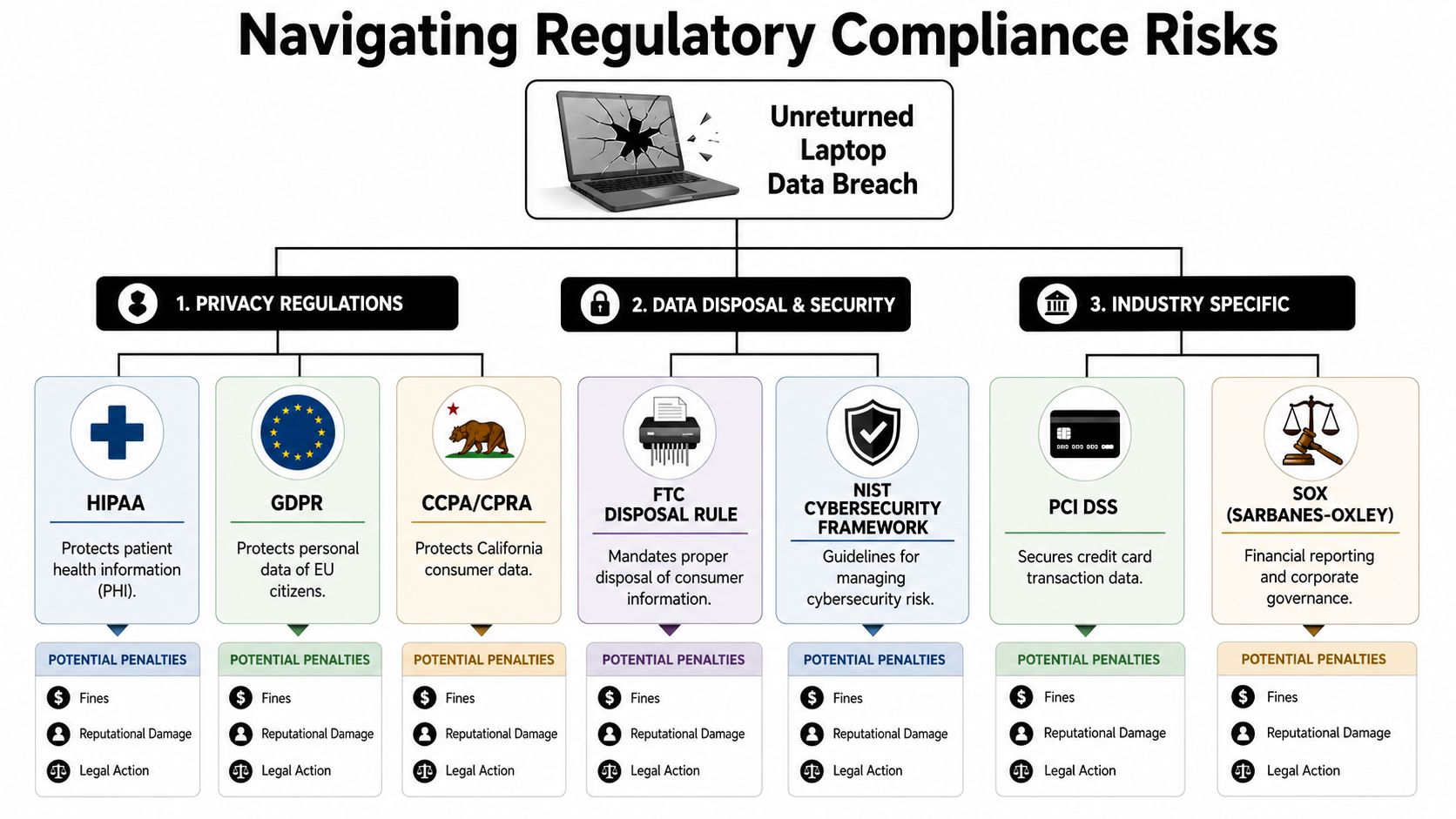
Even a well-managed corporate endpoint can retain sensitive material after termination. Common examples include:
- Identity residue such as email tokens, remembered sessions, MFA prompts, and browser cookies
- Local business data including downloads, desktop files, synced folders, and temporary exports
- Administrative traces like remote support tools, certificates, and device management remnants
- Personal overlap where users mixed personal storage, messaging, or removable media with company work
This is why the phrase "data at rest" matters. The laptop may be inactive from your perspective while still containing recoverable information.
Why remote action isn't the same as closure
Security teams should still revoke access, issue remote lock commands, and attempt a remote wipe where tooling supports it. Those are good incident-response moves. They aren't the same thing as completed disposition.
The problem is proof. If the device never reconnects, never ships back, or comes back outside documented controls, your organization can't easily show what data remained, what command executed, whether sanitization occurred, or who handled the asset along the way. That's why many teams align endpoint recovery and retirement practices with NIST SP 800-88 guidance for media sanitization. The standard gives structure to defensible sanitization, but it depends on possession and records.
If police treat the hardware dispute as civil, the data problem still belongs to the company on day one.
Navigating the Minefield of Regulatory Violations
Compliance breaks long before a breach becomes public. It breaks when your process can no longer produce auditable evidence.
Many articles on missing laptops focus on exposure of sensitive data. That's only half the problem. The harder issue is the documentation gap created when the asset leaves your controlled lifecycle. Once chain of custody is broken, you often can't prove secure handling, secure storage, or secure destruction. That failure is difficult to repair later because records created after the fact don't recreate possession history.
Where the violation actually happens
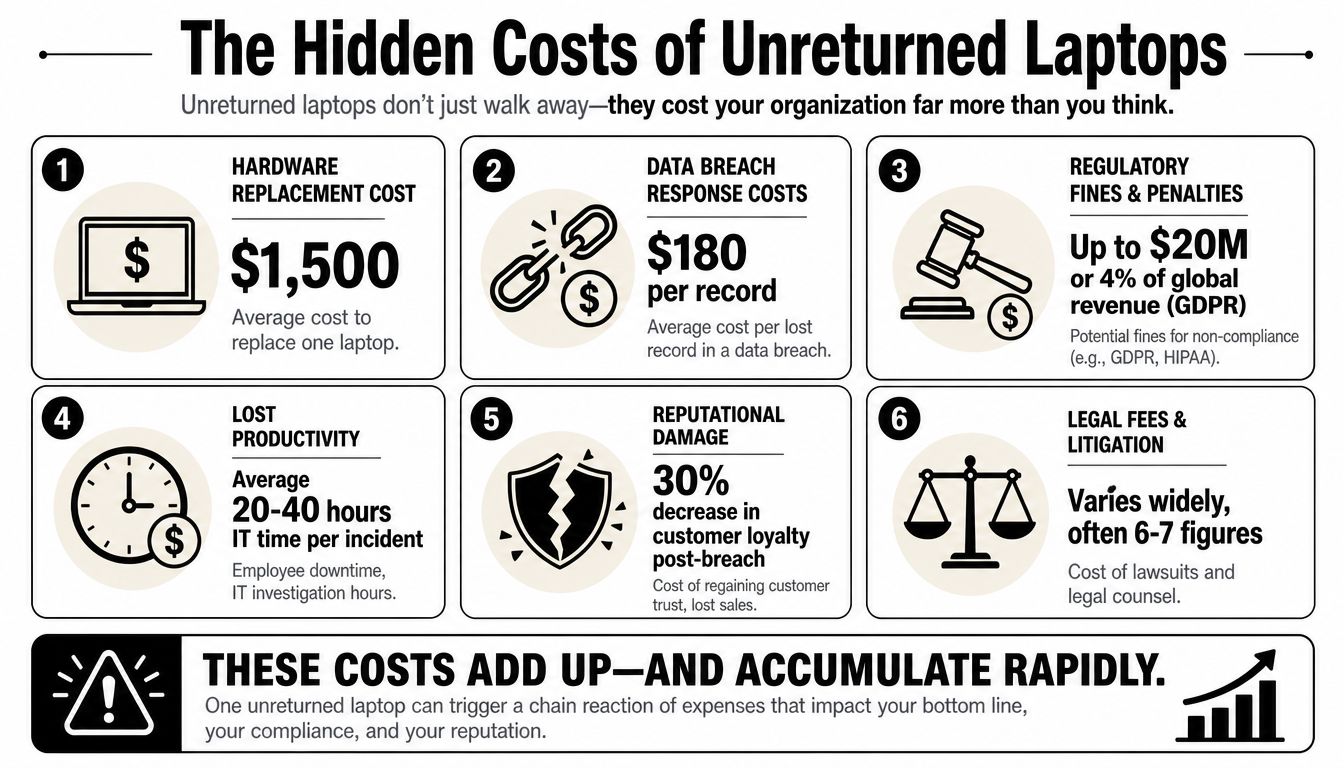
An unreturned laptop can trigger a compliance problem in several distinct ways:
No verified possession trail
You know the device was issued. You may know when employment ended. You may not know where the device went after that.No documented sanitization event
If the asset wasn't returned through controlled channels, there may be no verifiable record that data destruction happened at all.No defensible end-of-life record
Auditors and legal reviewers often look for tickets, handoff logs, destruction records, and final disposition documentation.No way to prove policy execution
A written policy is helpful. A completed, timestamped workflow is what stands up under review.
The sharpest version of this problem is the chain-of-custody blind spot. Beyond Surplus notes that the lack of a documented sanitization record for an unreturned, untracked asset can trigger fines under state e-waste laws and the FTC Disposal Rule that are 65% higher than for properly managed assets, because the company can't generate the required verified sanitization records (Beyond Surplus).
Why auditors care about controls, not intentions
Regulations differ, but they tend to ask the same operational questions:
| Compliance concern | What the reviewer looks for | What fails with an unreturned laptop |
|---|---|---|
| Disposal controls | Proof data was destroyed properly | No verified sanitization record |
| Security governance | Documented handling procedures | Offboarding broke outside process |
| Privacy safeguards | Evidence personal data remained protected | Device location and status unknown |
| Internal control maturity | Repeatable, monitored workflow | Ad hoc retrieval and exceptions |
This same logic appears in internal control frameworks. A COSO-based control environment isn't about writing stronger policy language. It's about showing that custody, approvals, exceptions, and evidence all hold together.
Operational rule: if your team can't produce a possession trail and a sanitization record, the compliance issue isn't hypothetical. It's already present.
The regulations aren't isolated from each other
A single missing device can cross several obligations at once. Privacy rules govern personal data. Industry rules govern sector-specific information. Disposal rules govern end-of-life handling. Internal control obligations govern whether your process was documented and repeatable.
That's why unreturned laptops create outsized risk. The same broken handoff can become a privacy issue, a records issue, a disposal issue, and a board-level control issue in one incident.
Quantifying the True Financial Fallout of Unreturned Devices
Forrester estimated that each lost laptop can cost organizations thousands of dollars once replacement, labor, and disruption are counted, and the total often reaches far beyond the value of the hardware itself (Intel vPro summary of Forrester research).
That gap matters, but it still misses the cost category that creates the hardest conversations with auditors, privacy counsel, and finance. An unreturned laptop leaves two separate exposures behind. The company has lost an asset, and it has also lost the documentation trail that proves who had custody, what data remained on the device, and whether sanitization ever occurred. If that evidence was never created, no one can rebuild it accurately after the fact.
Where the money actually goes
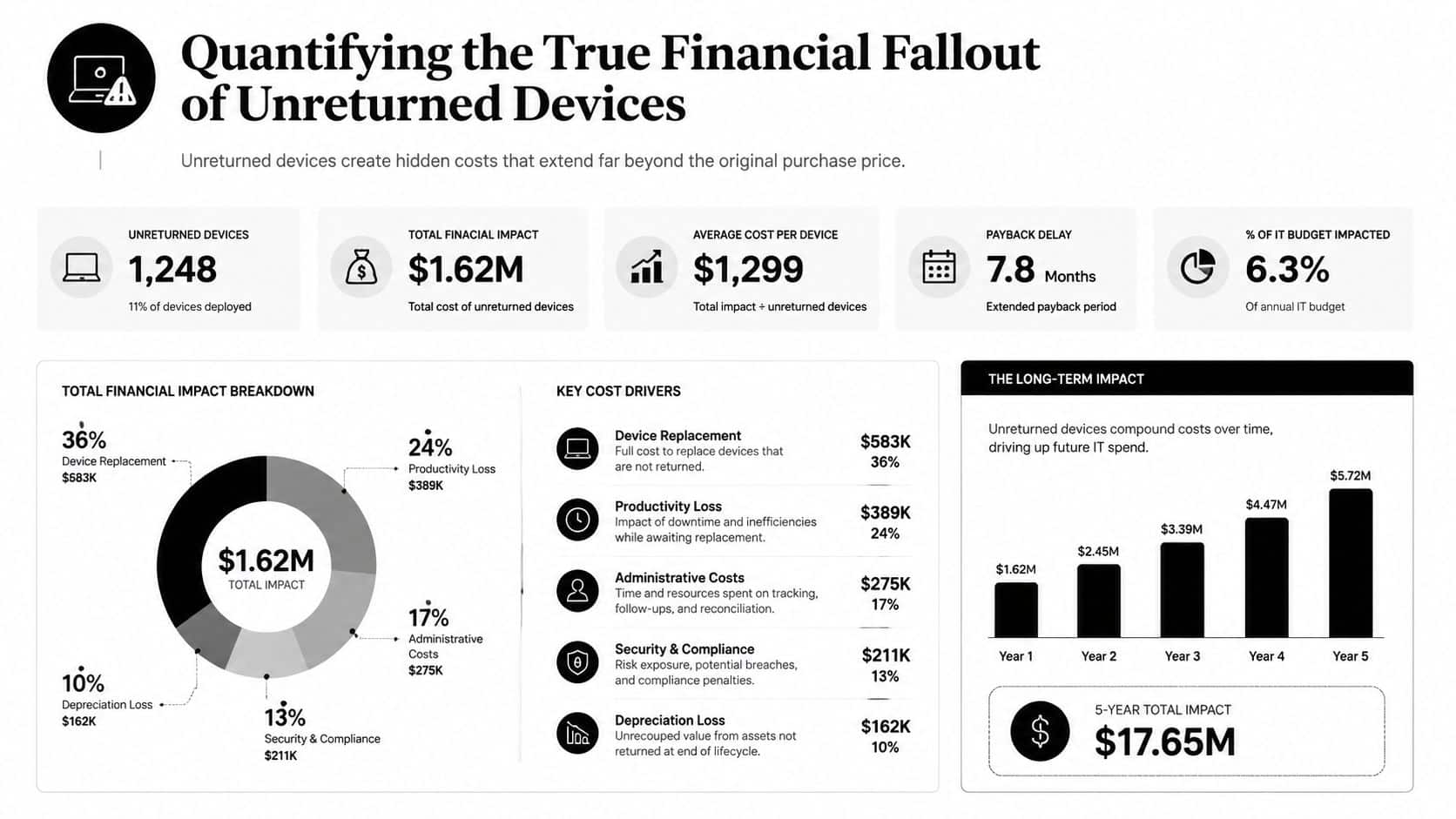
The first costs are obvious. Teams replace the laptop, issue a new one, reassign software, and spend staff time trying to figure out what happened.
The larger costs show up later, usually after someone asks for proof:
- Replacement and redeployment costs for the missing device and the new asset issued in its place
- License and service waste when tools remain assigned to a device that never came back through intake
- Internal labor across IT, HR, security, legal, procurement, and finance
- Forensic and incident response spend if the device may contain regulated, confidential, or customer data
- Outside counsel, notification, and remediation costs if the event triggers privacy review
- Audit exceptions and control remediation work when the organization cannot produce custody logs, return records, or destruction evidence
- Higher downstream disposal costs because recovered assets without clear history often require extra handling, segregation, and review before release to an ITAD partner
That last group is where many teams underbudget. The expense is not limited to a potential breach. It includes the operational cleanup created by a broken chain of custody. A laptop that disappears during offboarding can force the company to test assumptions, document exceptions, brief leadership, and defend incomplete records months later.
IBM reports that the global average cost of a data breach reached $4.88 million in 2024 (IBM Cost of a Data Breach Report 2024). Not every unreturned laptop becomes a reportable breach, but every unreturned laptop with unknown data status creates the same first problem. The company cannot prove exposure did not occur.
Documentation failures drive the most expensive outcomes
In practice, fines and settlements often increase when regulators or auditors see a control failure plus missing evidence. The organization is no longer answering, "Was data protected?" It is answering, "Why was there no verified return, no documented custody transfer, and no destruction record tied to this asset?"
Those are different questions, with different consequences.
A late laptop return can sometimes be solved operationally. A missing possession trail usually cannot. If the asset stayed outside controlled custody for weeks and no one logged where it went, who handled it, or whether it was wiped, the record is broken permanently. Teams can document the exception. They cannot recreate the original proof.
That is why finance should model unreturned devices as a controls problem, not just shrinkage. Hardware loss is a line item. Missing compliance evidence can trigger legal review, audit findings, policy remediation, and higher scrutiny in future assessments. A documented employee equipment return policy reduces that exposure because it gives IT and HR a process that produces evidence before a device goes missing, not after.
Establishing Ironclad Asset Recovery and Offboarding Policies
Good recovery starts before the employee leaves. If your policy only activates after access is shut off, you've already made retrieval harder.
The most reliable programs treat laptop return as a controlled workflow shared by HR, IT, security, and legal. Ownership can't be vague. Someone has to trigger the process, someone has to verify access changes, someone has to track logistics, and someone has to confirm the asset is physically back inside controlled custody.
Build the process around checkpoints

A practical recovery policy usually includes these checkpoints:
- Written return terms in offer documents, handbooks, and equipment agreements
- A named process owner so retrieval doesn't fall between HR and IT
- Pre-termination preparation including box kits, labels, and courier coordination where needed
- Access control steps that revoke accounts, tokens, VPN, and MDM privileges in the correct order
- Escalation paths for late, disputed, or failed returns
- Receipt confirmation documenting date, condition, serial number, and handler
A clear employee equipment return policy framework helps because it forces teams to define what counts as returned, what counts as overdue, and what evidence must be retained.
What works and what doesn't
What works is boring. Standard boxes. Standard labels. Standard deadlines. Standard ownership. Standard exception handling.
What fails is also predictable:
- Spreadsheet-only tracking that depends on memory and manual follow-up
- Last-day surprises where the employee learns about return logistics too late
- Loose custody where returned devices sit at reception, on a loading dock, or with no logged handoff
- Overconfidence in remote wipe as a substitute for physical recovery and certified disposition
One practical option for organizations that need stronger records is to use an ITAD partner that documents possession history, sanitization, and final disposition. Beyond Surplus, for example, provides chain-of-custody documentation and certificates tied to secure data destruction workflows. That's useful when internal teams need records that survive turnover and support audit review.
Recovery policy should reduce ambiguity
The policy should answer basic operational questions without interpretation:
| Policy point | Good answer |
|---|---|
| When does retrieval start | Before separation is complete |
| Who owns the ticket | Named role, not shared assumption |
| What proves return | Logged receipt with asset details |
| What if the asset isn't returned | Escalation, legal review, and documented risk handling |
| What happens after return | Secure storage, testing, sanitization, and disposition decision |
Strong offboarding policies don't just improve return rates. They preserve evidence.
The Final Line of Defense Secure ITAD and Certified Destruction
Even disciplined recovery programs won't solve every case. Some devices won't come back. Others will return with uncertain handling history, damaged drives, or incomplete records. That's where end-of-life controls stop being administrative and become legal protection.
Deleting files isn't enough. Running a standard wipe isn't enough. E-Waste One explains that even hardware described as wiped can still contain recoverable sensitive data, and that compliant handling requires certified data destruction methods such as cryptographic erasure or physical shredding (E-Waste One).
What secure closure looks like
For returned devices, the final line of defense should include:
- Controlled intake with serial verification and logged handoff
- Segregated storage until disposition decisions are complete
- Documented sanitization using a recognized method appropriate to the media
- Certificates and audit records that connect the asset to the destruction outcome
- Recycling or resale records that show the device exited your environment properly
For high-risk fleets, teams often pair internal controls with a documented certified data destruction checklist so the final step isn't left to assumption.
Why this is the only defensible finish
Remote lock helps. MDM helps. Encryption helps. None of them replaces a verified destruction record when the asset reaches end of life.
That's the part many organizations miss when they ask why unreturned company laptops create compliance risks. The answer isn't only exposure. It's irreversibility. Once the device leaves your chain of custody and no verified sanitization record exists, you can't recreate that evidence later. You can investigate, estimate, and mitigate. You can't retroactively prove compliant destruction happened.
If your organization needs audit-ready handling for returned IT assets and a defensible process for data destruction, contact Beyond Surplus for certified electronics recycling and secure IT asset disposal.


