

Remote workforce IT asset management fails at the point many teams treat as routine: getting devices back. 71% of employees fail to return company equipment, and remote employees are nearly 17% more likely to withhold equipment than on-site staff. That isn't an admin headache. It's a compound risk across security, accounting, compliance, and recovery value.
When a laptop never comes back, the loss isn't limited to hardware. IT loses physical control of the endpoint. Finance keeps stale records. Security inherits an unmanaged device that may still hold company data. Operations ends up with ghost assets that distort inventory and delay redeployment.
A strong return program treats retrieval as a full lifecycle control, not a shipping task. That means policy, tracking, communications, wipe controls, chain of custody, and final disposition all work as one system.
The High Stakes of Unreturned Remote Equipment
The biggest mistake I see is companies treating device returns as a courtesy request. It has to be handled like a controlled business process.
Why remote returns break down
Distributed teams remove the old safety net. There's no office drop-off, no manager collecting a laptop on the last day, and no easy visual audit of what's missing. The result is a wider recovery gap and more unresolved assets sitting in homes, cars, or unknown storage.
That gap is expensive in ways many teams underestimate:
- Asset loss: Hardware that never returns can't be reused, remarketed, or recycled through an approved path.
- Data exposure: Devices outside company control may still contain credentials, files, cached data, or regulated information.
- Reporting errors: Missing equipment often remains active in inventory even when the business has effectively lost it.
- Offboarding friction: HR, IT, legal, and finance all end up chasing the same unresolved item.
Practical rule: If your offboarding process doesn't assign one owner for device recovery, no one really owns it.
A weak retrieval program also undermines the rest of ITAD. If the return step fails, sanitization, documentation, remarketing, and recycling can't happen on schedule.
Why this is bigger than logistics
Remote Workforce IT Asset Management: Ensuring Equipment Returns is really about maintaining control from deployment through disposition. The shipping label is only one piece. The harder part is creating a process that employees understand, managers trigger on time, and IT can verify.
The financial and operational drag of missing laptops is covered well in Beyond Surplus's breakdown of the hidden costs of unreturned company laptops. That's the right lens. Retrieval isn't clerical work. It's risk mitigation with recoverable value attached.
Building a Bulletproof Equipment Return Policy
Policy has to do two jobs. It has to make expectations clear before equipment leaves your control, and it has to give HR and IT a script to follow when employment ends.
What the policy must state
Since remote work expanded, over 80% of unused corporate devices have not followed a compliant IT asset disposition path. That's why vague language like “return company property promptly” doesn't work.
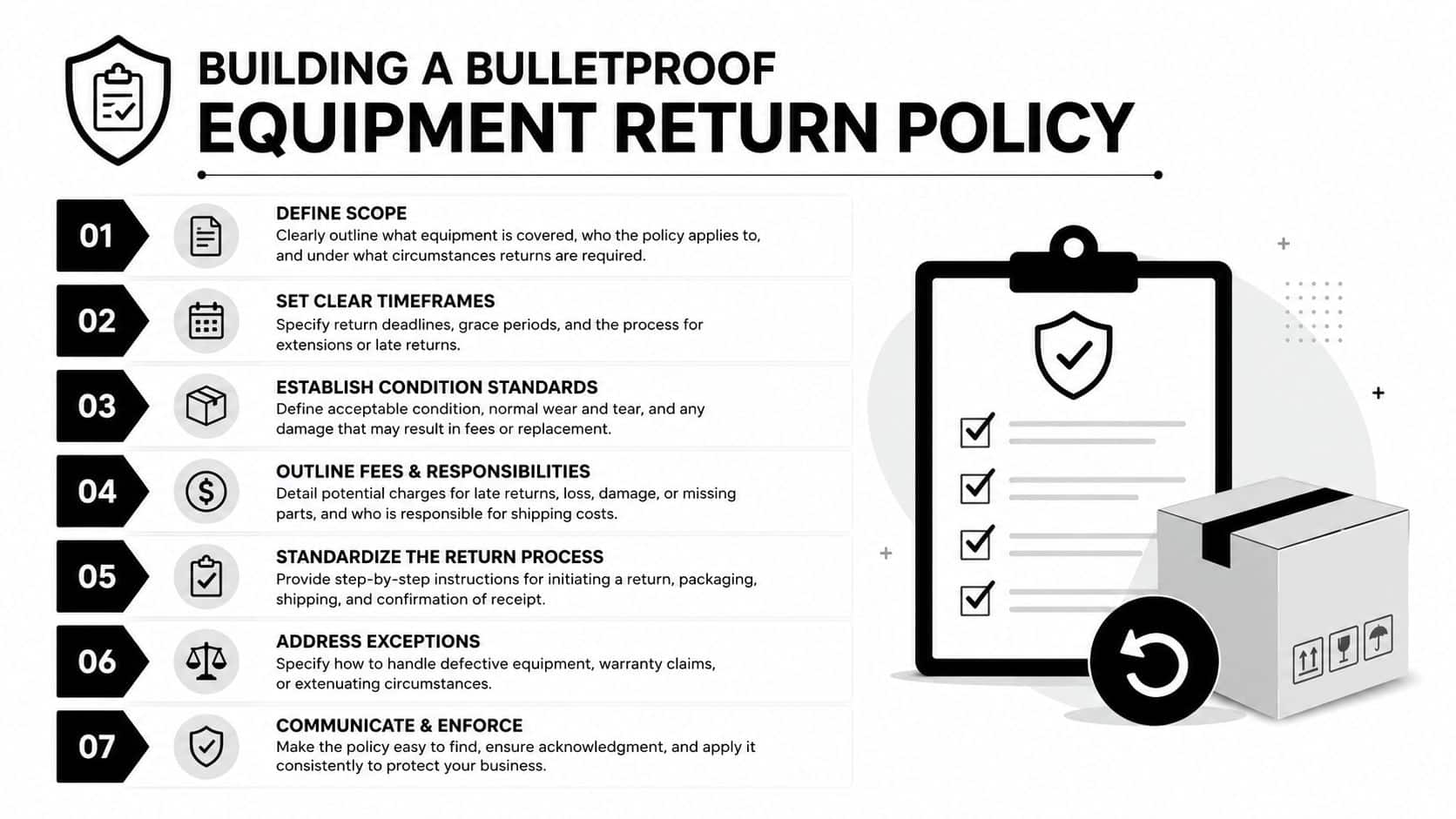
A workable return policy should cover:
- Covered assets: Laptops, phones, tablets, monitors, docks, access cards, removable media, and issued peripherals.
- Employee acknowledgment: Signed confirmation during onboarding that all issued property remains company-owned.
- Return trigger: Resignation notice, termination approval, role change, refresh event, or leave of absence.
- Return window: The required deadline after separation or notice.
- Approved return method: Prepaid shipment, scheduled pickup, or direct delivery to a designated location.
- Condition requirements: Basic packing and item checklist requirements so returns arrive intact.
- Non-return escalation: The company's formal process for follow-up and legal review.
Where policy usually fails
Most documents fail in the handoff between departments. HR has the termination checklist. IT has the asset list. Legal has the signed agreements. If they don't connect, the policy stays theoretical.
Use one offboarding trigger that opens a return case immediately. That case should attach the employee's assigned assets, shipping instructions, due date, and communications log.
A practical reference point is Beyond Surplus's guide to employee laptop return policies every business needs to know. The useful takeaway is simple: write the policy so operations can execute it without interpretation.
A return policy works only when HR can trigger it, IT can verify it, and legal can enforce it.
Implementing Smart Inventory Tagging and Tracking
Spreadsheets can list assets. They can't manage custody well. For remote retrieval, you need a live system of record that shows who has the device, when it was issued, what state it's in, and what happens after separation starts.
Build one source of truth
The label on the device matters less than the discipline behind it. QR codes, barcodes, and RFID can all work if they map into an ITAM platform with clean ownership records. What matters is consistency.
Track each asset against these fields:
| Control point | What to record |
|---|---|
| Assignment | Employee name, department, location, manager |
| Device identity | Serial number, asset tag, model, configuration |
| Lifecycle state | In stock, deployed, pending return, received, wiped, redeployed, disposed |
| Return event | Notice date, termination date, due date, shipment status |
| Evidence | Photos, receipts, shipping scans, intake notes |
Tagging without process discipline doesn't help
I've seen teams invest in strong tooling and still lose visibility because they skip intake hygiene. If the serial number is wrong at deployment, or accessories aren't assigned individually, return disputes start later.
Use a standard issue-and-return checklist every time. On deployment, record the exact device and issued peripherals. On return, check the same list. If the employee sends back a laptop but keeps the dock, headset, or power supply, the record should show it clearly.
- At deployment: Link asset tag, serial number, and employee acknowledgment.
- During active use: Update manager changes, address changes, and swap-outs.
- At offboarding: Freeze the assigned asset list before retrieval starts.
- At intake: Reconcile returned items against the original record.
For teams trying to tighten auditability, Beyond Surplus has a useful page on inventory optimization. The operational point is right. Better inventory control starts long before a return request goes out.
Streamlining Remote Return Logistics and Communication
Good return programs reduce excuses. The employee shouldn't have to guess what to send, how to pack it, or where it goes.
What a clean remote return looks like
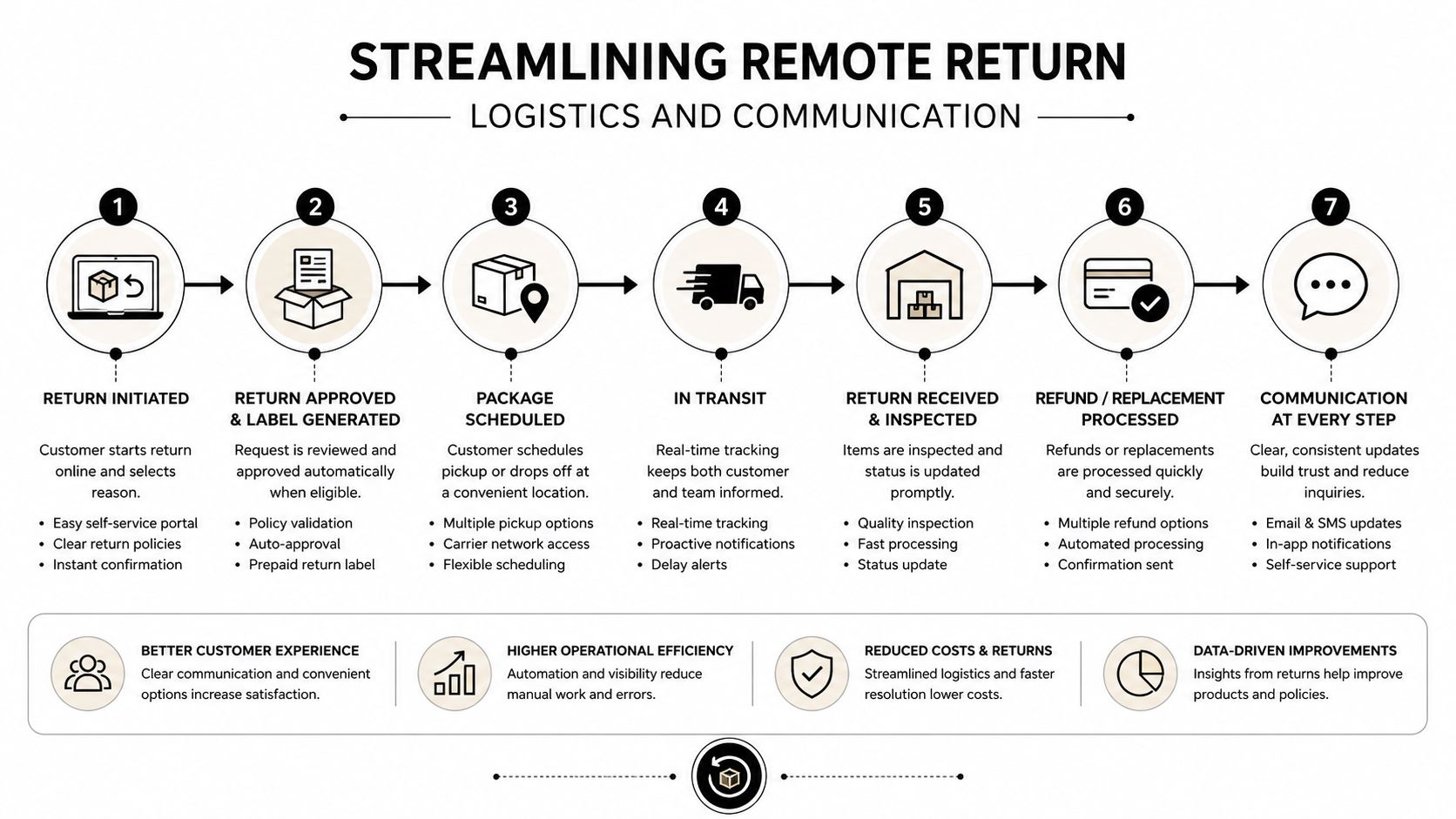
A resignation is entered on Monday. HR triggers offboarding that same day. IT confirms the assigned laptop, dock, charger, and phone. A prepaid return kit goes out with simple instructions and a return checklist. The employee gets an email and text message with the deadline, tracking details, and support contact. Nothing about the process is ambiguous.
That's what removes delay. Not more reminders alone, but fewer decisions for the departing employee to make.
Automation is what closes the gap
Organizations using asset lifecycle platforms with auto-reminders by email and text achieve higher compliance, and the workflow should escalate to legal demand letters if returns are not confirmed within 7 to 14 days. Manual chasing usually collapses because the reminders are inconsistent and no one knows when to escalate.
What works in practice:
- Immediate instructions: Send them as soon as notice is received or termination is approved.
- Prepaid packaging: Don't ask ex-employees to source boxes or labels.
- Multi-channel reminders: Use both email and text, not one or the other.
- Shared tracking: Let the employee and internal team see the same shipment status.
- Escalation path: Move from reminder to manager outreach to formal notice without improvising.
If the process depends on someone remembering to send the next email, the process will fail.
For shipping execution, Beyond Surplus outlines useful handling steps in its guide to shipping laptops back from remote employees. That kind of standard packaging workflow reduces both delays and damage claims.
Ensuring Secure Data Sanitization and Destruction
Once the device leaves the employee's hands, the next question is whether the data is still exposed. Retrieval alone doesn't answer that.
Remote wipe is an early control, not the final answer
A managed laptop should be locked or wiped through MDM as soon as policy allows. That limits exposure if shipping is delayed, the employee goes silent, or the package is lost.
But remote wipe isn't the same as final sanitization. Devices still need controlled processing after intake, with methods aligned to internal policy and recognized destruction standards.
A useful operating model looks like this:
- Before return shipment: Lock or wipe through MDM where appropriate.
- At intake: Verify device identity and quarantine if needed.
- Before reuse or disposal: Perform approved sanitization workflow.
- For failed or non-reusable media: Move to physical destruction when policy requires it.
Why this gets top priority
The market reflects what buyers care about. In North America, data destruction and sanitization represented the largest service-type share of the ITAD market at 38.20% in 2025. That aligns with what experienced IT teams already know. The device itself is often replaceable. The data risk isn't.
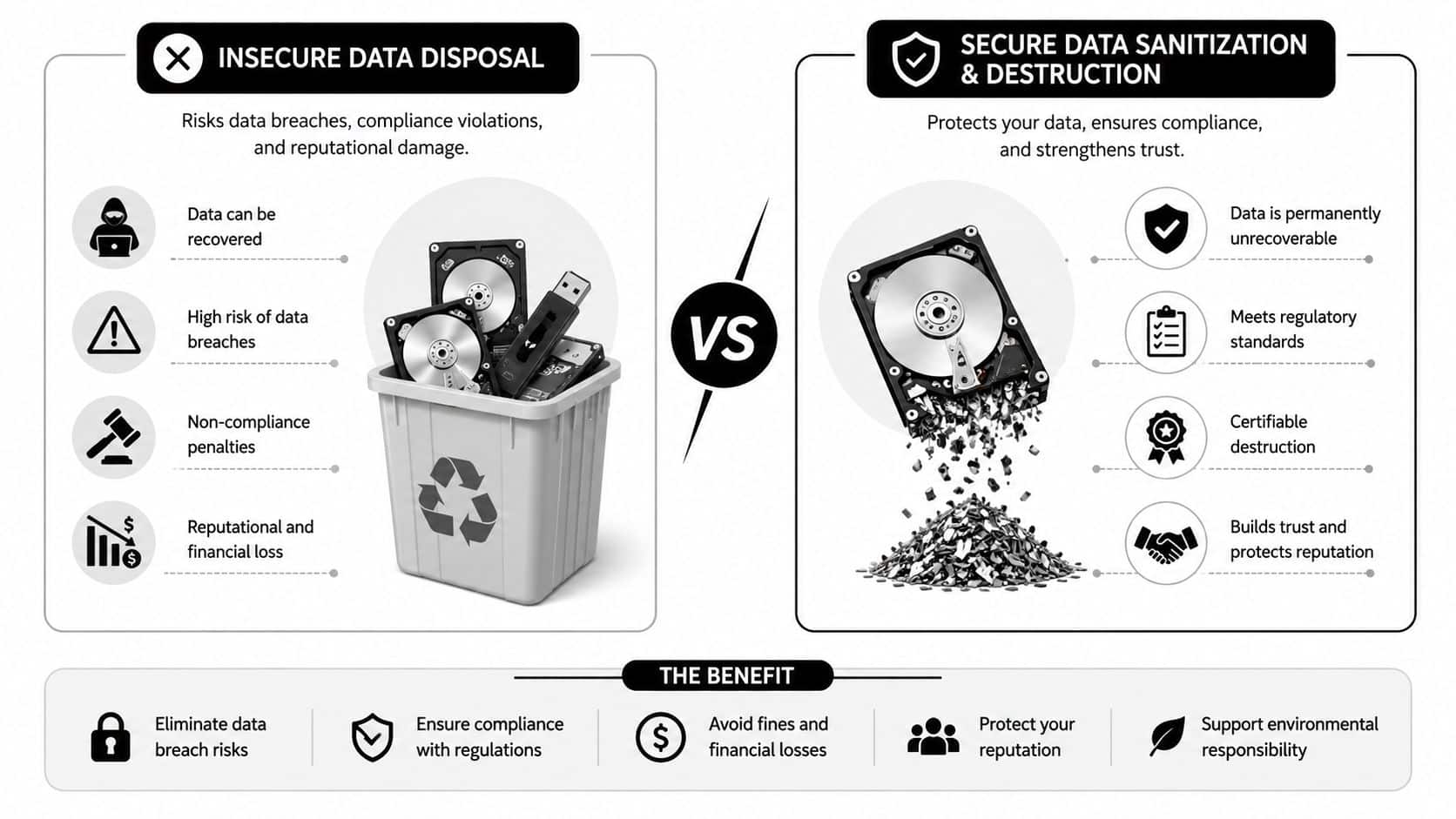
Deleted files, reformatted drives, and factory resets don't provide the proof most regulated organizations need. NIST-aligned processes and formal downstream documentation do. For teams refining that control, NIST SP 800-88 guidance is the right benchmark to operationalize.
Managing the Chain of Custody and Final Disposition
Security teams often focus on whether the laptop came back. Auditors care whether you can prove what happened next.
Documentation is what transfers liability
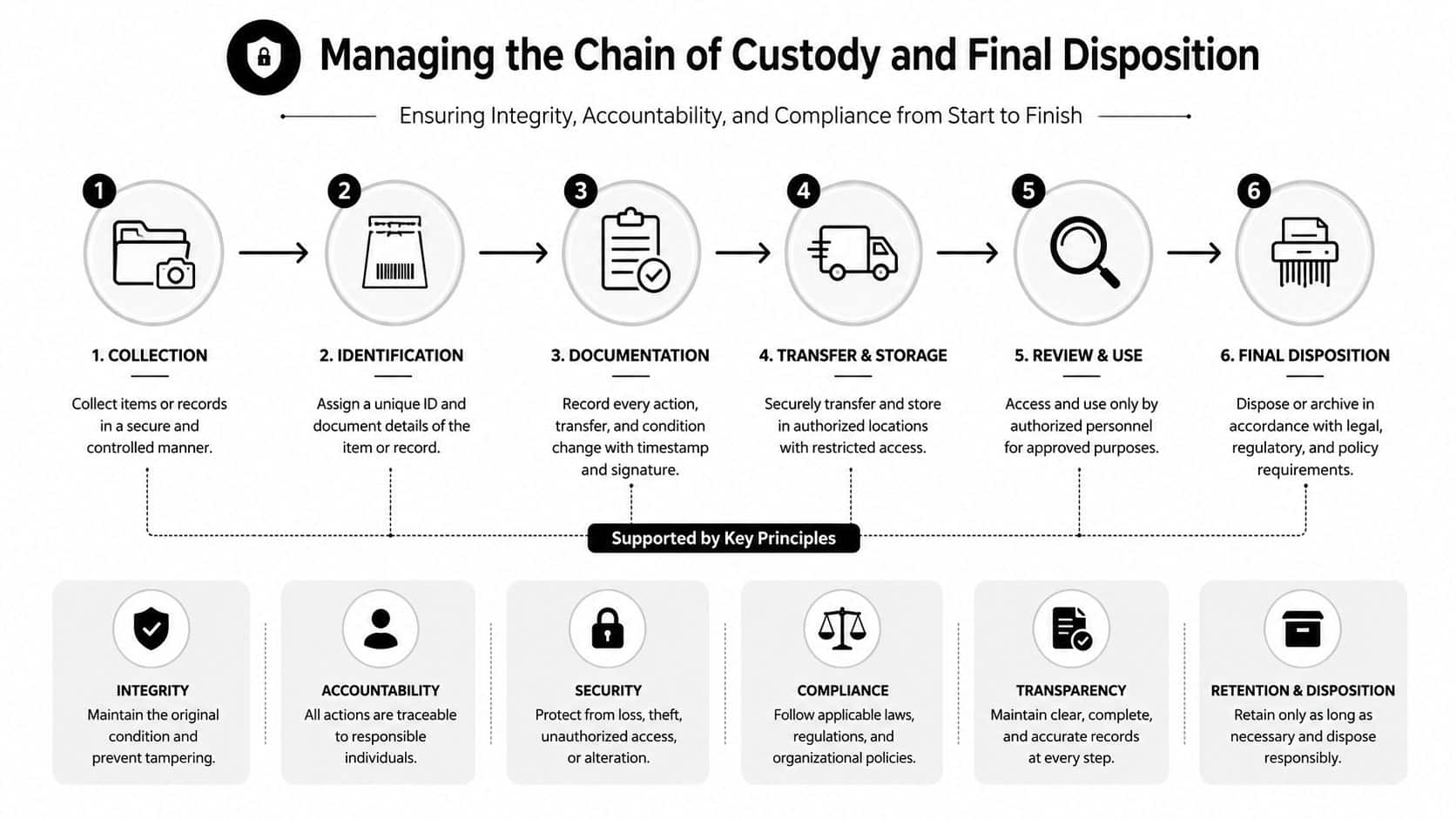
A complete ITAD workflow isn't finished when a device arrives at the dock. It requires a six-step process that includes inventory identification, chain-of-custody establishment from decommissioning, data sanitization per NIST standards, and a Certificate of Destruction or Final Disposition to transfer liability and ensure compliance.
That chain should be unbroken from the moment the return is initiated. Every custody handoff needs a record. Employee to carrier. Carrier to receiving team. Receiving team to processing area. Processing area to sanitization or destruction stream.
What the record should prove
A strong record answers practical questions fast:
- Was this the same asset originally assigned?
- Who handled it during transit and intake?
- What sanitization method was applied?
- Was the device reused, remarketed, recycled, or destroyed?
- What final document closes the file?
The certificate matters because it closes the argument later. If a regulator, customer, or internal auditor asks what happened to a returned device, you need evidence, not memory.
Many organizations discover that retrieval and ITAD cannot be managed as separate programs. If they are, assets return physically but remain unresolved administratively.
Maximizing Value Recovery and Sustainability
The most mature programs don't stop at risk reduction. They turn returned hardware into a controlled value stream.
Returned assets still have business value
Computers and laptops remain the primary category in ITAD demand, which is why disciplined recovery matters so much operationally and financially. A returned device can be redeployed internally, remarketed through an approved channel, harvested for parts, or processed through certified recycling if it has reached end of life.
That only works if the earlier controls were handled correctly. A laptop with a broken custody record, uncertain data status, or poor intake notes loses recovery options quickly.
Security and sustainability work better together
Organizations often split security and sustainability into separate conversations. In practice, they're tied together. Devices that return on time can be sanitized, assessed, and moved into reuse or recycling channels instead of sitting unaccounted for. That improves environmental handling and avoids the waste that follows bad inventory discipline.
The broader ITAD market shows where this is headed. It was estimated at USD $25.31 billion in 2024 and is projected to reach USD $54.54 billion by 2030, growing at approximately 14% CAGR. The demand signal is clear. Companies are building formal end-of-life programs because distributed assets need tighter control, not looser oversight.
For businesses that want one operating path from retrieval through disposition, Beyond Surplus is one option that coordinates secure data destruction, logistics, certificates, and IT asset recovery for organizations across the United States.
Contact Beyond Surplus for certified electronics recycling and secure IT asset disposal.


