

A Fayetteville business usually notices IT asset disposal when the new equipment arrives. Laptops are unboxed, old desktops come off desks, network gear gets stacked in a back room, and someone asks the question that creates real exposure: “Can we just recycle this?”
That's the wrong frame. Old hardware is rarely the main problem. Residual data, missing documentation, and unclear liability transfer are the problem. If customer records, patient files, employee information, financial data, or internal credentials remain on retired devices, disposal becomes a legal and balance-sheet issue, not a housekeeping task.
Why Secure ITAD Matters for Fayetteville Businesses
A technology refresh looks routine until you inventory what's leaving the building. Staff laptops, failed SSDs, backup tapes, retired servers, copiers with hard drives, and storage arrays all carry different levels of risk. A Fayetteville manager who treats that pile as “scrap” can create a breach scenario without meaning to.
Professional IT asset disposition, or ITAD, exists to control that risk. It creates a documented process for handling equipment from pickup through final disposition, with data destruction, audit support, and environmental processing built in. That's why this category has grown into a major market. The global IT asset disposition market was valued at USD 17.5 billion in 2025 and is projected to grow at a CAGR of 8.9% from 2026 to 2035, while the data destruction segment led at about USD 5 billion in 2025, according to Global Market Insights on the ITAD market.
What Fayetteville managers are really buying
The value of secure ITAD isn't “someone hauled away old computers.” The value is a defensible record that shows your company handled end-of-life equipment responsibly.
That matters when your organization has to answer questions from:
- Internal audit teams looking for documented controls
- Customers and vendors reviewing your data handling practices
- Insurance carriers and counsel evaluating post-incident exposure
- Regulated departments that can't accept vague destruction claims
Practical rule: If a disposal process can't show who handled each device, what happened to it, and when that happened, it hasn't reduced much risk.
For Fayetteville companies planning a refresh, relocation, merger, or cleanup of stored electronics, the operational question is simple. You're not just removing clutter. You're deciding whether retired assets leave behind avoidable liability.
A broader view of that business case appears in this guide to why ITAD services matter for Georgia companies in 2026.
Defining IT Asset Disposition
ITAD is often confused with electronics recycling. They overlap, but they aren't the same thing.
Basic e-waste recycling focuses on material handling. A recycler may dismantle equipment, sort commodities, and process components responsibly. That's useful, but it doesn't automatically mean your data-bearing devices were sanitized in a way that can stand up to audit or liability review.
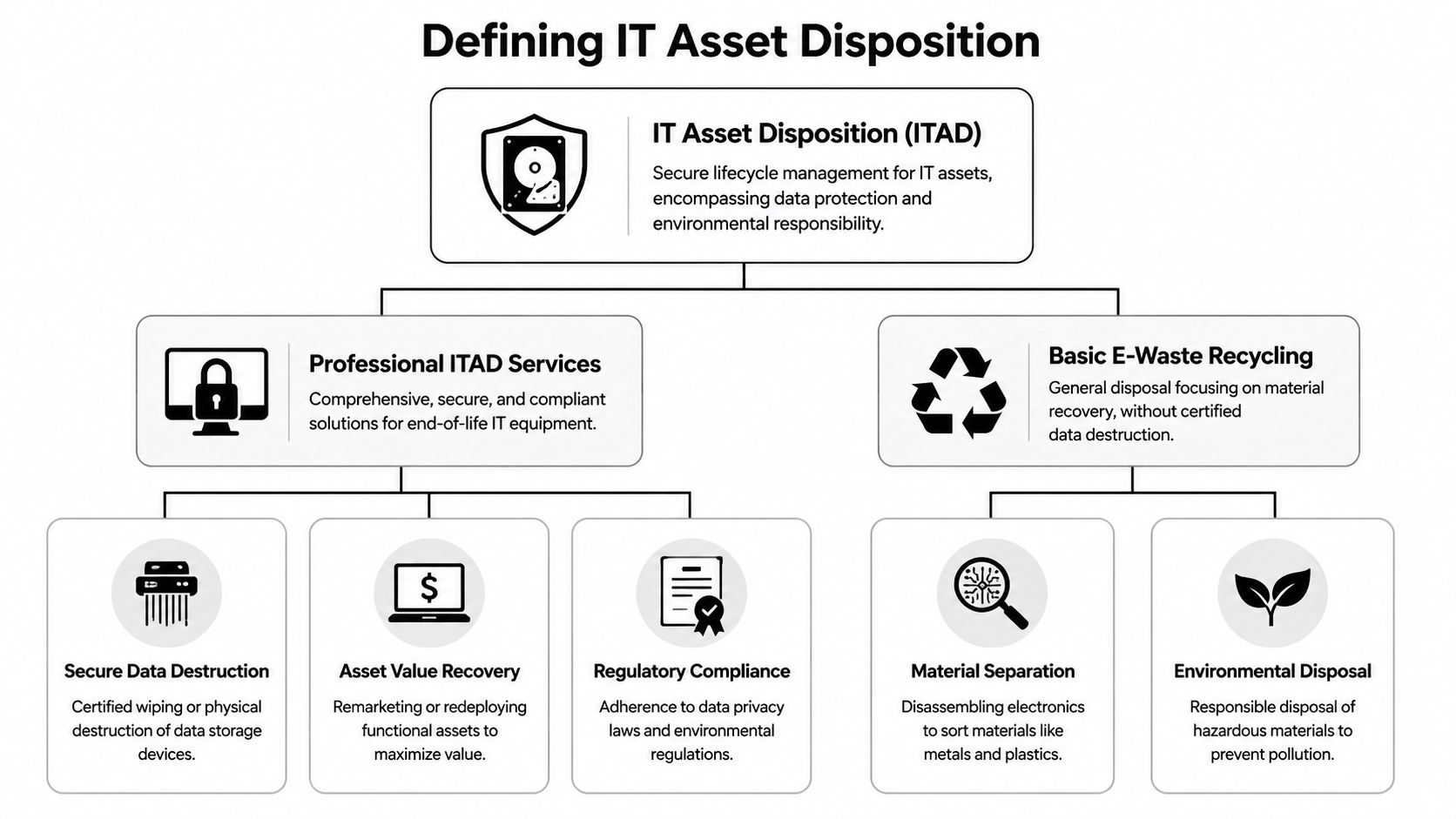
The four working parts of ITAD
A professional ITAD program works more like a controlled supply chain for retired technology.
Secure logistics
Assets are identified, packed, moved, and received under documented controls.Data sanitization
Drives and other media are wiped, degaussed, shredded, or otherwise destroyed using the method that fits the media type and risk level.Value recovery
Reusable equipment may be refurbished, redeployed, or remarketed instead of being destroyed unnecessarily.Final disposition
Non-reusable assets are recycled or otherwise processed through compliant downstream channels.
Why the distinction matters
A Fayetteville office manager may only see pallets leaving the dock. A compliance officer sees a chain of events that needs evidence. That's the difference.
ITAD is less about disposal volume and more about control quality.
When companies use the term loosely, they miss the business purpose. Proper ITAD reduces uncertainty at the end of the asset lifecycle. It creates cleaner inventory records, better handoff procedures, and stronger support if a customer, regulator, or auditor later asks for proof.
If you want the plain-language version of that distinction, this overview of what IT asset disposition is is a useful starting point.
Secure Data Destruction Methods Explained
The right destruction method depends on the device, the condition of the media, and whether the asset still has reuse value. Treating every drive the same is where weak programs fail.
Certified wiping
Wiping works best when a storage device is healthy and the business wants reuse or resale value. The process overwrites data according to an approved sanitization workflow and creates a record of what was done. For working laptops, desktops, and some server drives, this preserves value while still supporting security.
The limitation is practical. If a drive is damaged, inaccessible, encrypted with unknown keys, or too high-risk for redeployment, wiping may not be the right answer.
Degaussing
Degaussing is designed for magnetic media. It disrupts magnetic domains, which can neutralize hard drives and tape. That makes it useful in specific environments, especially where magnetic storage still appears in backup or legacy systems.
But it's not a universal answer. As explained in this guide to secure ITAD data destruction methods, degaussing doesn't address SSDs or NVMe flash. That same source notes that high-assurance programs pair media-specific selection with physical shredding for solid-state devices and verifiable inspection of destruction status, and some providers cite practical particle-size benchmarks such as 40 mm for HDDs and 6 mm for SSDs.
Physical shredding
Shredding is the most direct option when reuse isn't needed or the security requirement is high. It destroys the media itself, not just the logical data structure. That's why many organizations choose it for failed drives, highly sensitive devices, and solid-state media that shouldn't stay in circulation.
A strong destruction program doesn't just say “we shred drives.” It matches the shred process to the media type and verifies the result.
Here's the practical comparison:
- Choose wiping when the device is functional and value recovery matters.
- Choose degaussing for applicable magnetic media, not as a blanket method.
- Choose shredding for SSDs, failed media, or higher-assurance destruction needs.
For teams reviewing internal procedures, this hard drive erasure guide helps clarify where software sanitization fits and where it doesn't.
On-Site Versus Off-Site Destruction in Fayetteville
Fayetteville companies usually don't struggle with whether to destroy data. They struggle with where that destruction should happen.
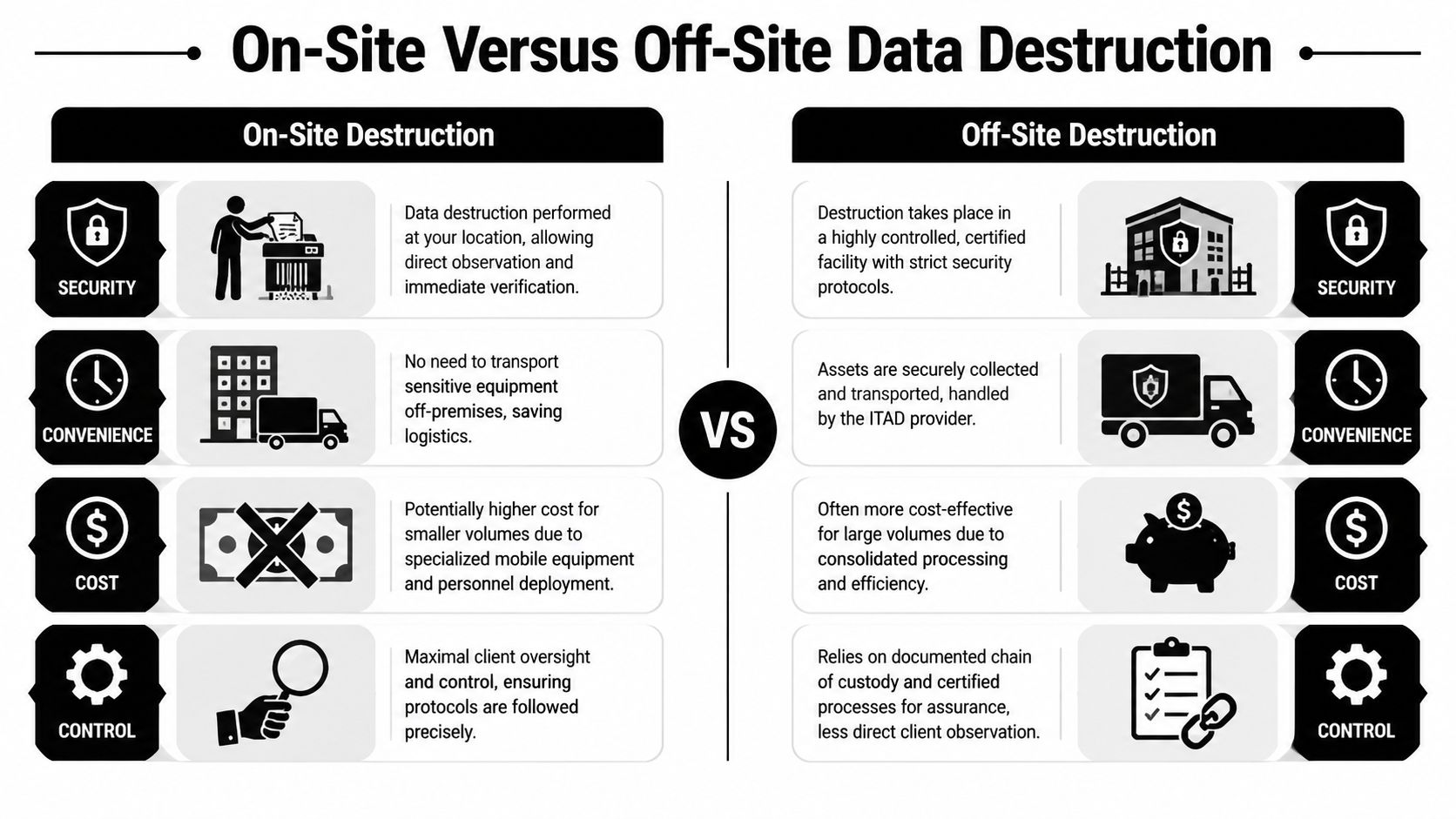
When on-site destruction makes sense
On-site destruction keeps media at your location until it is destroyed. That gives security teams, compliance staff, or management direct visibility into the process.
That's often the better fit when:
- Observation is required because leadership or policy demands witnessed destruction
- The assets are highly sensitive and the organization wants the shortest possible custody window
- Internal stakeholders need immediate confirmation before equipment can leave the property
The trade-off is cost and operational coordination. Mobile shredding or on-site destruction resources can be less efficient for smaller loads, and the service window may need more planning.
When off-site destruction is the better choice
Off-site destruction can be the cleaner operational model for many Fayetteville organizations. Assets are packed, documented, transported under chain-of-custody procedures, and processed in a secure facility built for volume and consistency.
That often works well when:
- You have larger quantities of retired equipment
- Facility access is limited and on-site processing would disrupt operations
- You need standardized reporting across many asset types
A secure facility with strong intake controls and documented custody can be fully appropriate. The question isn't whether you can watch the shredder. The question is whether the process produces defensible evidence.
A useful decision lens
| Decision factor | On-site | Off-site |
|---|---|---|
| Client visibility | Highest | Lower direct visibility |
| Logistics burden | Lower transport exposure | Provider-managed transport |
| Cost efficiency | Can be less efficient for small jobs | Often better for consolidated loads |
| Audit support | Depends on records produced | Depends on records produced |
Notice what matters in both columns. Documentation still decides whether the service transfers risk.
If your team is weighing direct observation against facility-based processing, this page on on-site data destruction in Georgia gives a helpful operational reference point.
Navigating Data Privacy and Disposal Compliance
Compliance pressure usually shows up after the fact. Someone asks whether the retired device contained protected data, whether it was sanitized properly, and whether the company can prove it. At that moment, disposal shortcuts become expensive.
Why standards matter
The ITAD industry commonly references NIST 800-88 for media sanitization, and certified providers often combine wiping, degaussing, shredding, and disintegration to make data unrecoverable. Some programs also align with the FACTA Disposal Rule, HIPAA, and GLBA, as outlined in this discussion of secure data destruction for data center environments.
That matters because these frameworks give organizations a defensible basis for their end-of-life decisions. They don't just say “destroy data.” They support a methodical approach to selecting the right sanitization path for the media and risk involved.
What this looks like in real Fayetteville operations
A healthcare clinic doesn't need a generic recycling receipt. It needs a process that supports its handling of devices that may store patient information.
A financial office has a similar issue. If workstations, backup media, or multifunction devices leave service, the firm needs a repeatable process that aligns with privacy obligations and internal retention practices.
A school, nonprofit, or public-sector office may have different acronyms to consider, but the operational need is the same:
- Identify which assets store data
- Apply the correct sanitization method
- Document the outcome
- Retain records in case someone asks later
Compliance isn't created by the shredder alone. It comes from choosing the right method and keeping proof that the method was applied.
For managers who want the technical baseline behind these practices, this NIST SP 800-88 resource is the right reference point.
The Importance of Chain of Custody and Certification
Data destruction without proof is only half a control. The part that protects your organization in an audit, dispute, or investigation is the paper trail.
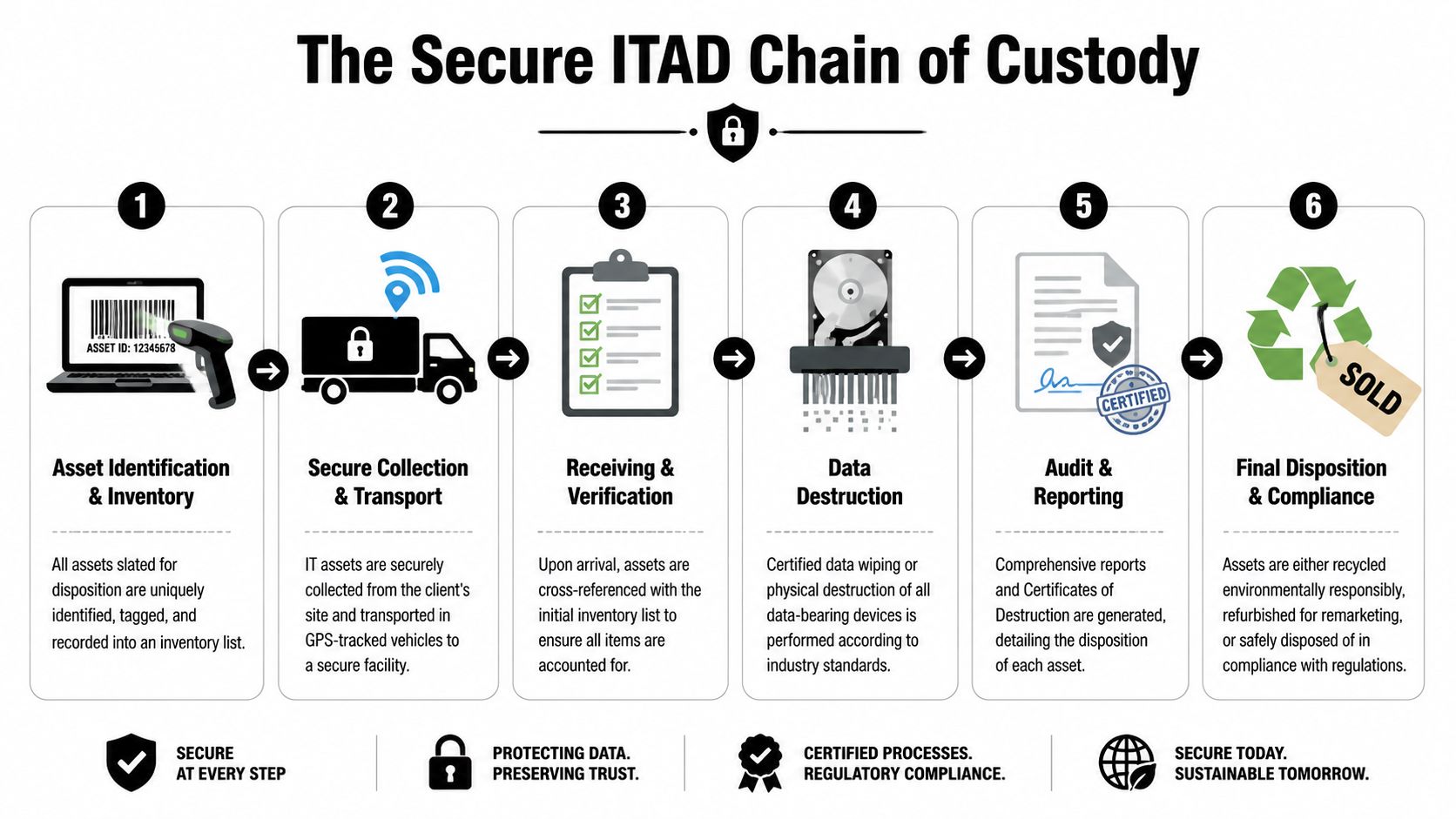
What chain of custody actually means
Chain of custody is the documented history of each asset from the time your organization releases it until its final disposition is complete. That history should show custody changes, receiving events, processing steps, and the final result.
Weak programs treat devices as a batch. Strong programs track each relevant asset individually.
According to this analysis of secure data destruction in enterprise ITAD, the strongest technical control is asset-level sanitization, not batch processing. It also notes that the NIST 800-88 model separates Clear, Purge, and Destroy workflows, and that a defensible certificate of destruction should be serial-numbered per device and record the sanitization method, timestamp, and technician verification.
What to ask for before approving a vendor
A Fayetteville business manager doesn't need to become a forensic specialist. But you should insist on records that answer basic liability questions.
Look for:
- Device-level identification tied to serial numbers or other unique asset records
- Method-specific reporting that shows whether the media was wiped, degaussed, or physically destroyed
- Time and handling records that show when custody changed and when destruction occurred
- Technician verification rather than a generic statement with no accountable operator
If a certificate only says a load was destroyed, it may satisfy a filing habit. It may not satisfy a serious audit.
The practical test is simple. If counsel asked you to prove what happened to one specific laptop or failed SSD, could your records answer that question quickly?
Partnering with Beyond Surplus for Fayetteville ITAD
For Fayetteville organizations, the right ITAD partner should make risk reduction easier, not more complicated. That means clear scoping, secure logistics, media-specific destruction options, and reporting that stands up when someone reviews the file months or years later.
A good engagement process is straightforward:
- Review the asset types, data sensitivity, and pickup requirements.
- Decide whether on-site or off-site destruction fits your risk model.
- Confirm inventory expectations and documentation needs before anything leaves the site.
- Schedule pickup, processing, and final reporting.
Beyond Surplus supports commercial and enterprise clients with secure IT asset disposition, electronics recycling, data destruction, and logistics coordination. If your Fayetteville business is planning a refresh, office move, storage cleanup, or data center decommissioning, the goal should be the same: retire equipment in a way that reduces exposure and leaves a defensible record behind.
Fayetteville ITAD Services FAQ
What affects the cost of ITAD services in Fayetteville
The biggest cost drivers are usually asset volume, media type, service model, and logistics complexity. On-site destruction may involve different equipment and scheduling demands than off-site processing. Projects with mixed assets, failed drives, or strict documentation requirements also need more handling than a simple pickup.
What kinds of equipment should go through ITAD
Any business device that may store data belongs in scope. That includes laptops, desktops, servers, hard drives, SSDs, backup media, network appliances, and many copiers or multifunction devices. If a device ever authenticated users, stored files, cached jobs, or held configuration data, treat it as potentially sensitive until proven otherwise.
What makes documentation audit-proof
The difference is specificity. Stronger guidance says organizations should expect serial-specific certificates, chain-of-custody logs, and documented verification steps, with some providers retaining records for years to support audits and investigations. That level of documentation is especially important for HIPAA, GLBA, FISMA, or internal audit teams, as noted in this explanation of on-site shredding and destruction records.
A generic receipt may show that equipment left your office. It doesn't necessarily prove what happened to each data-bearing device. Audit-proof records connect the asset, the method, the handling trail, and the final outcome.
Protect your organization before retired equipment turns into a breach response problem. Contact Beyond Surplus for certified electronics recycling and secure IT asset disposal for Fayetteville businesses.


