

Most advice on fiber optic installation near me is too simple for a business buyer in Atlanta. Provider pages talk about speed, promotional pricing, and fast appointments. They usually skip the hard part, which is whether your specific address can be connected cleanly, legally, and without turning a straightforward order into a construction project.
That gap matters in dense commercial areas. A site can show as serviceable on a map, yet still face blocked conduit, riser restrictions, landlord approvals, patchwork inside cabling, or a street-to-building route that makes the job slow and expensive. If you’re planning service for an office, warehouse, clinic, campus, or mixed-use property, the actual work starts before the cable ever reaches your suite.
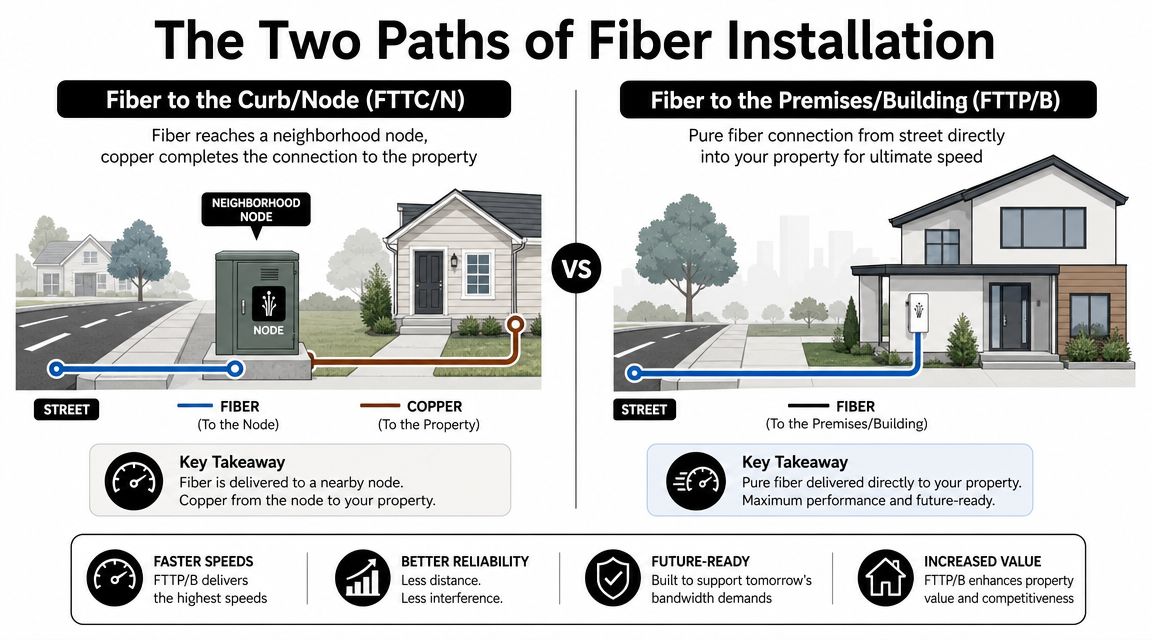
The Two Paths of Fiber Installation Curb vs Building
When owners search for local fiber service, they often assume availability means a direct fiber handoff into their space. It doesn’t always. The first thing to clarify is whether the provider reaches the curb or node, or whether it reaches the building itself.
A useful comparison is to plumbing. One setup brings the main water line to the street and relies on older piping for the final stretch. The other runs a clean line all the way into the building. Both can be marketed as available service, but they create very different expectations for performance, build scope, and installation effort.
What curb access actually means
With fiber to the curb or node, fiber gets close, then another medium finishes the trip to the property. For a business, that usually means the provider’s network build is nearby, but your final connection may still depend on existing pathways, legacy building infrastructure, or new work to bridge the gap.
That explains why one nearby tenant may already have service while your address still needs review. The challenge isn’t always network capacity. It’s often the physical route, access rights, and whether the last segment can be installed without major construction.
Practical rule: Never treat a coverage map as a final answer. Treat it as permission to start a site survey.
Independent coverage data illustrates how misleading “near me” can be. In McAllen, one view reports fiber coverage at 28.24% while another shows 57.33% of the city covered by fiber providers, which highlights how broad market availability can differ from address-level reality, according to independent McAllen fiber coverage comparisons.
What building delivery means
With fiber to the premises or building, the fiber path enters your property. That’s what most businesses want when they need stable, scalable bandwidth and a cleaner handoff for managed networking, VoIP, cameras, access control, or multi-suite distribution.
In practice, this is the version that forces the important questions:
- Who controls entry rights: Landlord, property manager, or tenant.
- Where the demarc goes: MPOE, telecom room, IDF, or a suite wall.
- How inside pathways work: Existing conduit, risers, ceiling space, or new raceway.
- What happens after handoff: Structured cabling, patching, and documentation.
For Atlanta sites, especially older office buildings and converted industrial properties, that final segment is where schedules slip. A provider may be ready. Your building may not be.
How to verify what you actually have
Ask direct questions before signing anything.
- Is fiber already entering this building, or only available nearby?
- Will the order require new construction outside the property line?
- Who is responsible for inside pathway work after building entry?
- Has the installer surveyed the riser, conduit, and telecom room?
If you need broader support beyond a carrier drop, it’s worth reviewing how telecom network installation in Atlanta typically extends from provider service into structured business infrastructure.
Decoding Physical Installation Methods
Once serviceability is real, the next decision is physical delivery. Fiber doesn’t magically appear in the building. Crews have to move it from the street, pole line, handhole, or conduit system into your demarc location without damaging the cable or creating maintenance problems later.
Standards guidance is clear on the basic route options. Outdoor fiber may be direct-buried, pulled or blown into conduit or innerduct, or installed aerially, while indoor fiber is commonly routed through raceways, cable trays, ceilings, floors, conduit, or innerduct, as outlined by the FOA installation reference. That route choice affects bend stress, pull tension, and long-term protection, so the path should be verified before any pull starts.

Aerial installation
Aerial is usually the fastest path when pole infrastructure already exists and local utility coordination is straightforward. The cable runs overhead from pole to pole, then drops to the building at an approved attachment point.
This method works well where alleys, rear utility easements, or existing communications space on poles are available. In Atlanta, it can also be the least disruptive option for sites that can’t tolerate pavement cuts or outdoor damage.
Aerial isn’t ideal everywhere.
- Visual impact: Some property owners don’t want additional overhead lines.
- Clearance constraints: Trees, parking lot lighting, signs, and loading areas can complicate the route.
- Attachment approvals: Pole owners and local utility processes can slow what looks simple on paper.
Underground trenching
Trenching is the classic method for burying cable where a shallow open path can be cut, laid, and restored. It’s common on campuses, new developments, and properties with enough access for equipment and restoration work.
The advantage is straightforward routing. You can often create a direct path from the public right-of-way to the building entry point. The downside is surface disruption. Asphalt, concrete, landscaping, irrigation, and traffic flow all turn into project variables.
A trench route that looks short on a sketch can become the expensive option if crews have to cross drive lanes, preserve decorative hardscape, or coordinate around active business operations.
The shortest route isn’t always the best route. The best route is the one that can be installed, protected, and serviced without creating repeat work later.
Directional boring
Directional boring is often the cleanest answer for built-up commercial property. Instead of opening a continuous trench, crews bore underground and pull the conduit or cable through with much less surface disruption.
That makes it attractive for office parks, retail frontage, medians, and properties with expensive pavement or landscaping. It also helps where city or owner requirements limit open trenching.
The trade-off is complexity. Bore planning depends on subsurface conditions, utility locates, entry pits, and enough room to stage equipment. On crowded sites, boring can solve one problem while introducing another, especially if there isn’t a clean receiving point at the building.
What usually drives the final choice
A good installer doesn’t pick a method by habit. They match the route to site conditions.
| Method | Usually best when | Main drawback |
|---|---|---|
| Aerial | Existing poles and easy overhead access | Visibility and clearance issues |
| Trenching | Open ground and direct surface route | Disruption and restoration |
| Directional boring | Need to minimize surface disturbance | More planning and utility coordination |
For a business owner, the practical takeaway is simple. Ask the installer to explain why they chose the method, what they ruled out, and what that means for maintenance after the build.
Budgeting Your Fiber Project What to Expect
Most owners focus on cable pricing first. That’s understandable, but it’s rarely the main cost driver. In commercial fiber work, construction method usually matters more than the fiber itself.
A 2025 pricing guide reports standard single-mode fiber cable at $0.09 to $1.49 per foot, multimode fiber at $1.50 to $6.00 per foot, and armored fiber at $6.00 to $13.50 per foot. For installation, aerial builds are listed at $8 to $12 per linear foot, underground trenching at $15 to $35 per foot, and directional boring at $20 to $30 per foot, according to this fiber installation cost guide. The same guide notes aerial work at about $40,000 to $60,000 per mile, commercial underground projects often around $5,000 to $20,000 per mile, and individual business connections at $15,000 to $30,000 for 100 to 200 network drops.

Where the money actually goes
Cable cost matters, especially if you’re specifying armored runs or special indoor-outdoor transitions. But labor, equipment, access constraints, and restoration usually decide whether a quote stays manageable or climbs fast.
A realistic budget often includes these buckets:
- Cable and pathway materials: Fiber type, conduit, innerduct, pull boxes, supports, and protective hardware.
- Field labor: Crews for pulling, boring, trenching, splicing, terminations, and testing.
- Permitting and coordination: Municipal approvals, utility locates, traffic planning, and property management requirements.
- Restoration: Sidewalk patching, asphalt repair, paint, ceiling tile replacement, and grounds cleanup.
- Inside-building work: Telecom room prep, riser extensions, sleeve work, patch panels, and handoff cleanup.
What makes one quote very different from another
Two contractors can bid the same address and land in very different places because they aren’t pricing the same risk. One may assume existing conduit is usable. Another may assume it needs rodding, clearing, or replacement. One may stop at the building entrance. Another may include full extension to the IDF.
That difference is why generic shopping for fiber optic installation near me often leads to bad comparisons.
Budget check: If a quote looks unusually low, see what’s excluded. Restoration, permits, testing, and inside-building distribution are common omissions.
If you’re comparing providers and support vendors in parallel, this overview of business telecom services near you can help frame where carrier work ends and broader business telecom work begins.
How to read a quote like an operator
Look for scope language, not just totals. A solid quote spells out route assumptions, installation method, entry point, termination scope, testing deliverables, and exclusions.
If those details are missing, you’re not looking at a finished plan. You’re looking at a placeholder number.
The Pre-Installation Checklist Preparing Your Property
The smoothest fiber projects are organized before the install crew arrives. Most delays come from access issues, missing approvals, bad route assumptions, or cutover timing that wasn’t thought through early enough.
Provider marketing often highlights speed. In reality, fast scheduling doesn’t remove business risk. Market reporting notes that providers may advertise professional installation “as soon as tomorrow,” but organizations with uptime requirements still need proper cutover planning and continuity management, as discussed in this review of provider installation timing and service continuity.
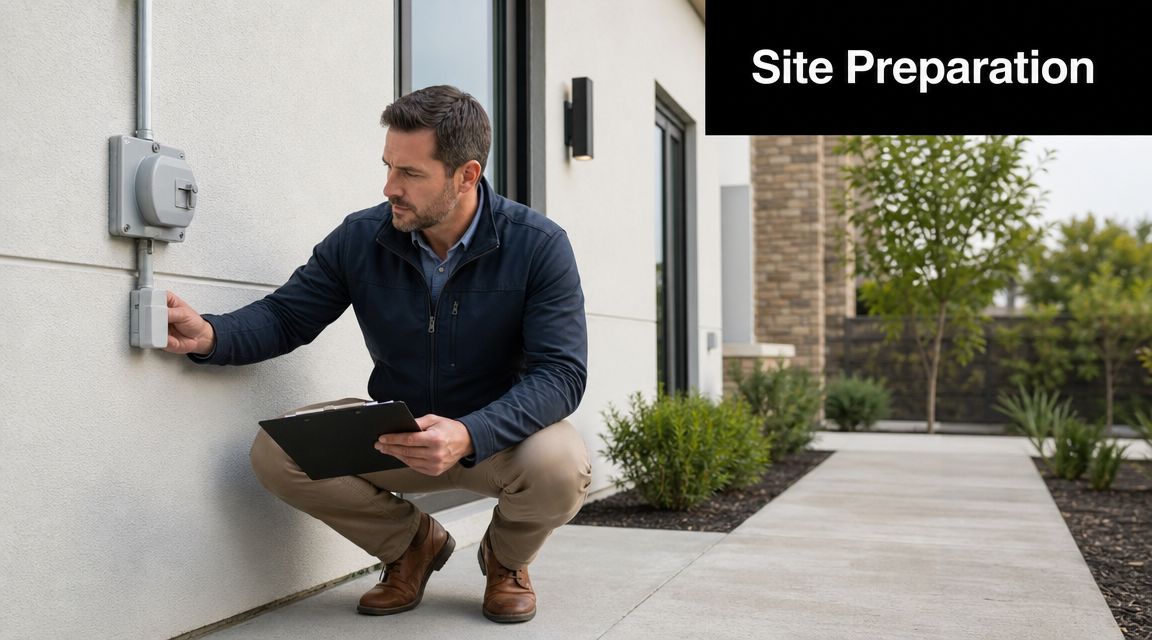
Site readiness items that save time
Before installation day, confirm the physical basics.
- Clear access: Ensure access to telecom rooms, roof hatches, gated service areas, and any room with building pathway access.
- Route visibility: Mark preferred entry points, riser closets, suite pathways, and any areas the crew shouldn’t disturb.
- Power readiness: Make sure the intended equipment location has power where needed for provider equipment and related network gear.
- Point person on site: Assign someone who can authorize small field decisions without chasing signatures all day.
Administrative items that usually get missed
Commercial jobs fail on paperwork as often as fieldwork. If you’re a tenant, landlord approval may determine where the provider can enter, what penetrations are allowed, and whether new pathway hardware is acceptable.
Use a short preflight list:
- Confirm landlord or property manager approval.
- Verify certificate of insurance requirements for the installer.
- Check building work-hour restrictions.
- Confirm who signs off on wall penetrations and roof access.
- Document the agreed demarc location before work begins.
Planning the cutover
A fiber install isn’t finished when light reaches the building. The business question is when traffic moves, who supports the transition, and what stays active during the overlap.
For offices, clinics, and operational facilities, I strongly prefer a staged cutover. Keep the legacy connection live until the new link is installed, tested, and validated with the equipment that will be using it. That reduces pressure on the field team and gives your IT staff room to catch handoff issues before users do.
If you’re coordinating with broader local telecom support, this guide to local telecom companies is useful for understanding who may handle carrier coordination, inside wiring, and post-install support.
Evaluating Local Atlanta Installers and Providers
The best installer isn’t always the one who can show up fastest. Speed matters, but poor workmanship creates the kind of intermittent trouble that burns time for months. A flaky handoff, hidden bend damage, or sloppy termination can look like random outages, unstable performance, or mysterious support tickets.
What separates good work from rushed work is process discipline. Industry guidance emphasizes that sound installs depend on termination quality and verification testing, including use of an optical time-domain reflectometer (OTDR) to validate signal integrity, with installers minimizing unnecessary splices, respecting minimum bend radius, and certifying the link after installation, as described in this fiber installation testing overview.
Questions worth asking before you hire
Ask technical questions in plain language. A qualified provider should answer them without turning vague.
- How will you terminate the fiber? You want a clear answer on splicing and termination practice.
- Will you certify the link after installation? If they don’t test, you inherit the risk.
- Do you provide OTDR results or other closeout documentation? That documentation matters later.
- How do you protect bend radius during pulls and turns? This is a basic workmanship issue.
- How many splice points are planned, and why? Extra splice points create extra places for failure.
What weak answers sound like
Be cautious if you hear things like “we’ll test it with the equipment once it’s live” or “the carrier handles that.” Those responses can mean nobody owns the final physical quality of the link.
Another warning sign is a provider who treats inside-building routing as an afterthought. The outside plant may be excellent, but the last indoor segment often causes the service trouble that users blame on the carrier.
Reliability usually comes from boring discipline. Clean pathway work, protected turns, careful terminations, and documented test results beat a fast but sloppy install every time.
What strong providers do differently
The strongest teams survey first, define the route, coordinate access, pull within cable limits, terminate cleanly, and hand over documentation that another technician can understand later. They also explain what they won’t do, which is a sign of competence, not hesitation.
If you’re vetting support partners in the city, this overview of telecom services in Atlanta can help you separate basic provider installation from broader commercial telecom execution.
Frequently Asked Questions About Fiber Installation
Business buyers usually ask the same practical questions after the sales call ends. These are the questions that affect scheduling, support responsibility, and future changes.
How long does the appointment take
For simple installs, appointment windows can be short. Industry guidance summarized by one installer notes residential installs commonly take 2 to 6 hours when an ONT already exists, or 4 to 6 hours when one must be installed, as described in that earlier installation guidance. Commercial jobs vary more because access, pathway complexity, and building coordination usually matter more than the final device hookup.
For an office or multi-room business space, don’t assume the provider’s calendar slot equals project completion. The carrier install may finish before your internal patching, firewall turnover, or voice cutover is ready.
What happens inside the building
Expect three things. First, the crew brings the service to a demarc or equipment location. Second, they terminate and test the connection. Third, your IT or cabling team connects that handoff to the rest of your network.
If your office has weak pathway planning, the indoor portion may become quite a project. That’s why facilities teams often avoid costly mistakes with pros in other trades by checking route access, permissions, and scope boundaries before work starts. The same mindset applies here.
Can I choose where the ONT or handoff goes
Usually you can request a preferred location, but the final answer depends on power, pathway access, wall construction, provider policy, and how far the route can be extended without creating service issues or extra unsupported work.
A good request is specific. Name the room, show the pathway, and explain who will use the handoff after installation.
What if we need to move equipment later
Plan for that now. Moving an ONT, changing the demarc, or rerouting the inside handoff later can trigger new labor, a return visit, and possibly new pathway work. It’s cheaper to choose the right location the first time than to treat the initial install as temporary.
Do we own the installed equipment
Sometimes yes, sometimes no. Carrier-owned gear, customer-premise equipment, structured cabling, and patch hardware may have different ownership rules. Get that in writing before the install closes, especially if your IT team expects to modify anything later.
What’s the best final check before signoff
Use a simple closeout standard:
- Confirm live service: Verify the circuit is active where expected.
- Review test results: Ask for certification or documented validation.
- Check labeling: Make sure demarc and patch points are clearly identified.
- Capture photos: Save images of entry points, equipment, and pathway transitions.
- Store support contacts: Know who handles carrier trouble versus internal cabling work.
If you’re still comparing local options for carrier availability and support structure, this roundup of telecom providers near you is a practical place to continue your review.
If your Atlanta organization is upgrading networks, decommissioning old telecom gear, or clearing retired IT hardware after infrastructure changes, contact Beyond Surplus for secure, business-focused IT asset disposal, electronics recycling, and data destruction support.


