

By Friday, an IT director may need to retire hundreds of servers while keeping production stable, protecting sensitive data, and satisfying an auditor who wants proof, not assurances. How to dispose of old servers securely starts before a truck arrives. It requires an inventory, a data-based sanitization decision, controlled custody, verified processing, and records that connect every drive to its final outcome.
The risk is larger than lost equipment. About 422.61 million data records were leaked worldwide in the third quarter of 2024 alone, according to the industry report cited by CoroData's analysis of improper IT asset disposal. The same source cites an average 2022 data breach cost of $9.44 million. Those figures make server retirement a security control with measurable evidence, not a facilities cleanup task.
Table of Contents
- The Moment a Server Fleet Becomes a Security Event
- Inventory and Data Classification Before Any Disk Is Touched
- Matching NIST Sanitization Outcomes to Each Drive Type
- Wiping, Degaussing, and Physical Destruction Done Right
- On-Site Versus Off-Site Disposal Trade-offs
- Compliance, Chain-of-Custody, and Certificates of Destruction
- Final Checklist for IT Directors and Value-Recovery Options
The Moment a Server Fleet Becomes a Security Event
At 6:42 p.m. on a Thursday, the last workload moves off a rack. A hyperconverged refresh is underway, the CIO is watching the shutdown, and an audit binder contains a failed SOC 2 finding for inadequate media sanitization procedures. The servers look inactive, but the risk has just changed location.
The moment a server leaves production, it stops being infrastructure and becomes a liability that can walk out the loading dock. If nobody owns the next handoff, drives containing personal information can reach a generic recycler, the audit trail can disappear at the rack boundary, and residual data can surface months later during a breach investigation.
Practical rule: Treat every retired server as controlled media until its storage devices have a documented final disposition.
The first 72 hours need an owner
A secure retirement program assigns responsibility before de-racking begins. The infrastructure lead confirms workloads are gone. The asset manager records each device. The security team approves the sanitization outcome. Facilities controls access and loading. A qualified ITAD provider handles transport, processing, and downstream documentation where applicable.
NIST's media-sanitization framework established Clear, Purge, and Destroy as distinct outcomes for media disposal and reuse. NIST SP 800-88 Revision 1 was published on December 17, 2014. NIST published Revision 2 in September 2025, then marked Revision 1 withdrawn and superseded. That change matters because secure server disposal follows an evolving federal standard, not a one-time best practice.
Proof turns disposal into a control
A defensible process has a named asset, an approved method, a recorded operator, a custody trail, and a final certificate. It also has exception handling for failed drives, missing serial numbers, inaccessible storage, and assets that change disposition after inspection.
NIST says sanitization should make target data infeasible to access. That standard gives the IT director a practical test: can the organization demonstrate what happened to every storage device, or can it only say that a vendor picked up a pallet?
Inventory and Data Classification Before Any Disk Is Touched
Don't approve wiping, shredding, or degaussing until the asset record is complete. A server inventory should identify the equipment leaving the building and the information it may contain. This record becomes the control document for method selection, custody, reconciliation, and audit review.
Capture the hostname, manufacturer, model, service tag, rack location, drive count, drive type, RAID configuration, hypervisor, ownership status, and last production date. Include warm spares, failed units, backup appliances, storage arrays, and drives removed during earlier maintenance. A retired spare can still contain a database copy even when the active server has been decommissioned correctly.
Build the record before choosing the method
Use a barcode or serial-number scan where possible, then reconcile the scan against the configuration database and rack list. Record whether each drive is SATA, SAS, SSD, or NVMe. Note self-encrypting drive status and whether the device is accessible to an approved sanitization tool.
| Field | Why It Matters | Example Value |
|---|---|---|
| Hostname | Links hardware to the retired workload | DB-CLUSTER-02 |
| Service tag | Provides unit-level identity | Recorded manufacturer tag |
| Rack location | Establishes removal point and custody start | Row B, rack 14 |
| Drive type | Determines viable sanitization methods | SAS HDD |
| Drive count | Supports final reconciliation | Recorded per chassis |
| RAID configuration | Identifies logical and physical storage relationships | RAID 10 |
| Last production date | Helps confirm workload retirement | Recorded in asset record |
| Data classification | Sets the required outcome | Confidential |
An asset management review supported by Beyond Surplus's inventory optimization service can help expose mismatches between physical equipment and existing records. The service choice matters less than the discipline of reconciling every physical unit before release.
Classification drives the outcome
Classify data as public, internal, confidential, or regulated. Regulated workloads may include PHI, PCI data, GDPR personal data, or ITAR-controlled information. The classification determines whether reuse is acceptable and whether Clear, Purge, or Destroy is appropriate.
Don't assume the hypervisor erased anything. Don't rely on SSD wear-leveling to hide old blocks. Don't overlook retired warm spares. Once classification and inventory are signed off, choose the venue, sanitization method, certificate detail, and exception path for each asset group.
Matching NIST Sanitization Outcomes to Each Drive Type
NIST's three outcomes are not interchangeable labels. Clear uses logical techniques and is generally intended for reuse. Purge uses physical or logical techniques designed to make recovery infeasible with state-of-the-art laboratory techniques. Destroy makes recovery infeasible and prevents the media from being reused for storage, as described in NIST's sanitization category summary.
Select the outcome by media and sensitivity
For magnetic hard disk drives, Clear or Purge may be appropriate when the device remains reusable and the selected method is supported by the drive technology. Highly sensitive data may justify Destroy, particularly when the drive has failed or cannot be verified.
SSDs and NVMe devices require more care. Wear-leveling means software overwrites may not reach every physical flash location. Use a supported Purge method, such as cryptographic erasure or an approved device command, or select Destroy when verification is impossible or the workload requires non-reuse.
Self-encrypting drives create a different decision path. Re-keying or destroying the encryption key can provide a Purge outcome when the implementation and procedure are validated. It can also preserve the hardware for reuse, unlike physical destruction.
| Drive Type | Clear (Re-use) | Purge (Re-use or Recycle) | Destroy (End-of-Life) |
|---|---|---|---|
| Magnetic HDD | Approved logical sanitization with verification | Validated purge or suitable physical method | Use for failed or highly sensitive media |
| Enterprise SSD | Use only where the technology supports reliable clearing | Cryptographic erase or approved device purge | Use when purge cannot be validated |
| NVMe SSD | Don't assume overwrite reaches all flash locations | Validate namespace and device-level purge | Use for failed or exceptionally sensitive media |
| Self-encrypting drive | Possible only under a validated logical process | Re-key or destroy the encryption key | Use when key control or verification fails |
The practical guidance in Beyond Surplus's NIST 800-88 data destruction standards explanation is useful when mapping a mixed fleet to documented outcomes. Don't shred working drives by habit. Destroy media because the sensitivity, condition, or verification limits require it, not because it is the easiest default.
Wiping, Degaussing, and Physical Destruction Done Right
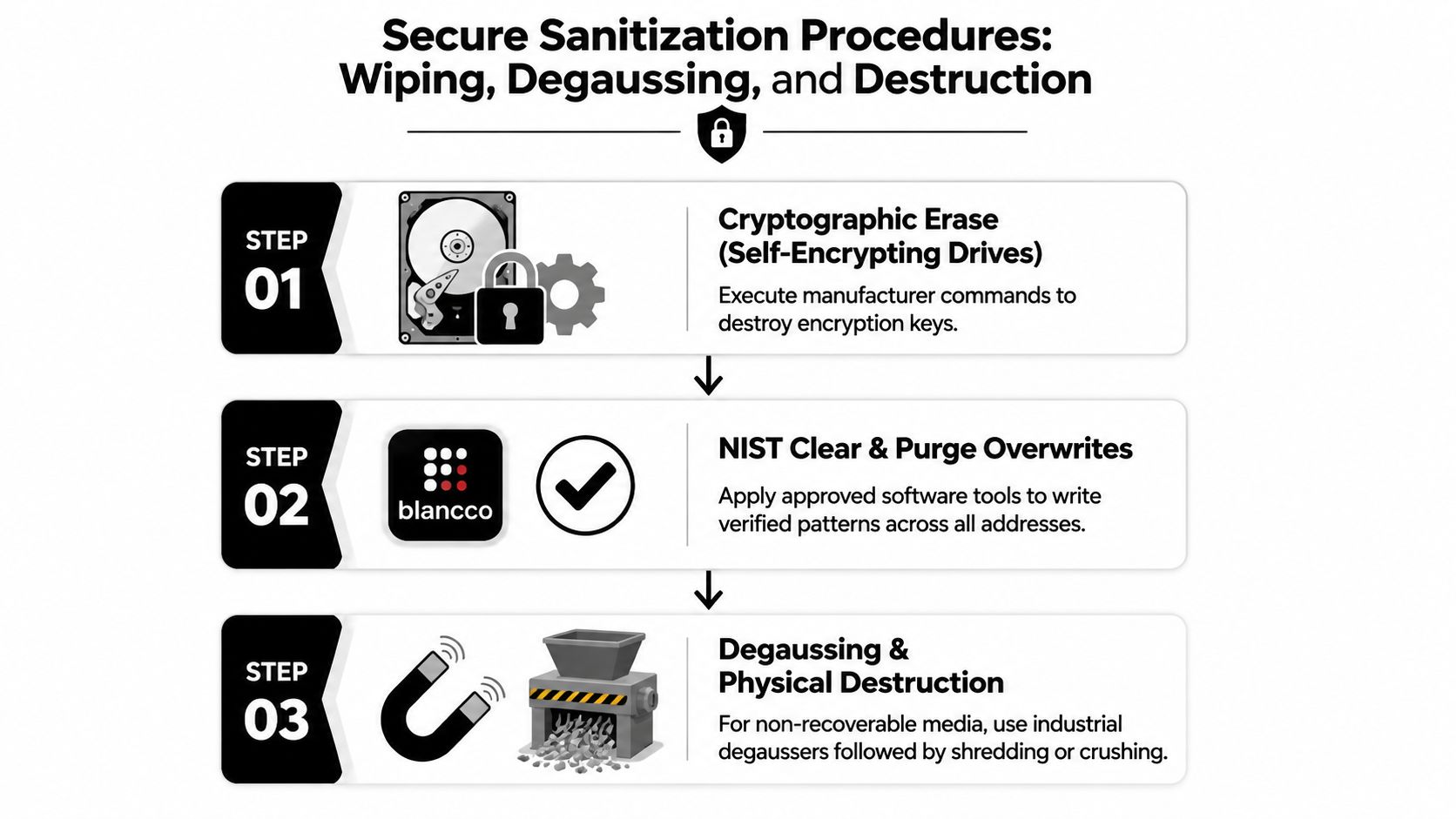
Execution quality determines whether the approved outcome is real. Start with the drive identity, confirm the target device, apply the approved method, verify the result, and record the evidence. A factory reset is not a sanitization program, and a completed software screen is not enough if the tool never addressed the relevant storage areas.
Use an ordered procedure
Cryptographic erase: For a self-encrypting drive, use the manufacturer-supported command or management workflow to destroy or re-key the encryption key. Record the drive identifier, command result, operator, and verification result.
Software Clear or Purge: Apply an approved tool to the correct physical devices, not only the operating-system volume. Confirm remapped sectors, RAID members, hidden areas, and all NVMe namespaces are addressed separately from SATA volumes.
Degaussing: Use a degausser rated for the media class and confirm that the device is magnetic media. Degaussing doesn't sanitize SSD or NVMe flash, and it may make a hard drive unusable, so it belongs in a deliberate Purge or Destroy workflow.
Physical destruction: Send end-of-life media through industrial shredding, crushing, pulverization, or another approved process. A target particle size should be defined by the organization's risk policy and vendor process. Don't treat a damaged casing as proof that platters or flash packages are unrecoverable.
Verification is the audit evidence
NIST SP 800-88 recommends verification whenever sanitization is applied, where feasible. For LBA-addressed hard drives, representative sampling across the full media surface should use at least 1,000 subsections, with two non-overlapping pseudo-random samples per subsection, including the first and last addressable locations. That method reaches at least 10% of the media, and NIST advises secondary verification on a random subset covering at least 20% of sanitized media with a different validation tool, as detailed in the NIST verification workflow.
For SSD Clear operations, require full verification where the tool and media support it. For failed drives, record the failure and route the device to physical destruction. Total destruction counts, witness attestation, and serial matching close the gap that a simple “shredded” status leaves open. Teams evaluating magnetic media can use a practical explanation of degausser operation before selecting equipment or a service.
On-Site Versus Off-Site Disposal Trade-offs
Venue selection is a risk decision. On-site processing keeps servers inside the organization's controlled space and can shorten the custody chain. Off-site processing may offer greater throughput, specialized machinery, secure storage, and stronger value recovery, but transport becomes another point that requires documented control.
| Factor | On-Site Service | Off-Site ITAD Facility |
|---|---|---|
| Security exposure | Assets remain within the site | Requires controlled transport and receiving |
| Downtime | Can support rapid local processing | May require staging and scheduled collection |
| Throughput | Limited by mobile equipment and site conditions | Higher capacity and specialized processing |
| Residual value | Inspection may be more limited | Broader testing, repair, and remarketing capability |
| Audit evidence | Witnessing is straightforward | Requires detailed pickup, transport, and receipt records |
| Logistics | Less movement of sensitive media | More coordination, packaging, and route control |
On-site service fits highly sensitive workloads, restricted facilities, and projects where witness verification carries significant value. It also works when a data center can accommodate mobile shredding or degaussing equipment without disrupting operations. The trade-off is capacity and cost per asset, particularly when the project includes extensive testing or parts recovery.
Off-site service fits large fleets, mixed hardware, and organizations that want a controlled ITAD facility to separate reusable equipment from scrap. Select a provider with documented receiving controls, secure processing areas, downstream accountability, and serialized certificates. For large projects, procurement teams may also review this bulk procurement specification guide when defining packaging and transport requirements for technology shipments.
Consider data sensitivity, fleet size, available cage space, required turnaround, and transport exposure. Beyond Surplus's comparison of on-site and off-site ITAD services provides a useful framework for weighing those variables without treating one venue as universally correct.
Compliance, Chain-of-Custody, and Certificates of Destruction
A certificate is only useful when it identifies what was processed and how. The custody record should begin at rack-out, continue through secure staging and transport, document facility receipt, and end with sanitization, recycling, resale, or destruction. Every handoff needs a person, date, asset count, and location.
The FTC Disposal Rule applies to businesses that hold consumer-report information. It requires disposal in a way that prevents information from being read or reconstructed, and it lists reasonable measures such as shredding, burning, pulping, erasure, or destruction of electronic media. The FTC's Disposal Rule guidance also expects due diligence when hiring a contractor and ongoing monitoring of contractor compliance.
Build a certificate that can survive review
A Certificate of Destruction should include the asset list, serial numbers, sanitization or destruction method code, completion date, technician identity, witness signature where applicable, and the downstream processor or recycler identity. A Certificate of Recycling should connect the same serialized inventory to the final recycling or recovery route.
The document should reconcile with the pickup manifest. If ten drives entered processing and nine appear on the certificate, the project isn't complete. Failed devices, missing labels, substituted equipment, and split shipments need explicit exception records, not silent corrections.
Liability follows the evidence
Vendor pickup doesn't automatically transfer responsibility. The data owner must choose a qualified contractor, define the required controls, review the output, and retain the records. Healthcare, finance, education, and government organizations should map the process to their own contractual and regulatory obligations, including media controls under applicable HIPAA Security Rule policies and environmental handling expectations.
Organizations reviewing risk transfer can use this resource on cyber insurance for small and mid-sized businesses as part of a broader risk discussion. For the disposal project itself, Beyond Surplus's chain-of-custody documentation service illustrates the type of serialized evidence an auditor or insurer may request.
Final Checklist for IT Directors and Value-Recovery Options
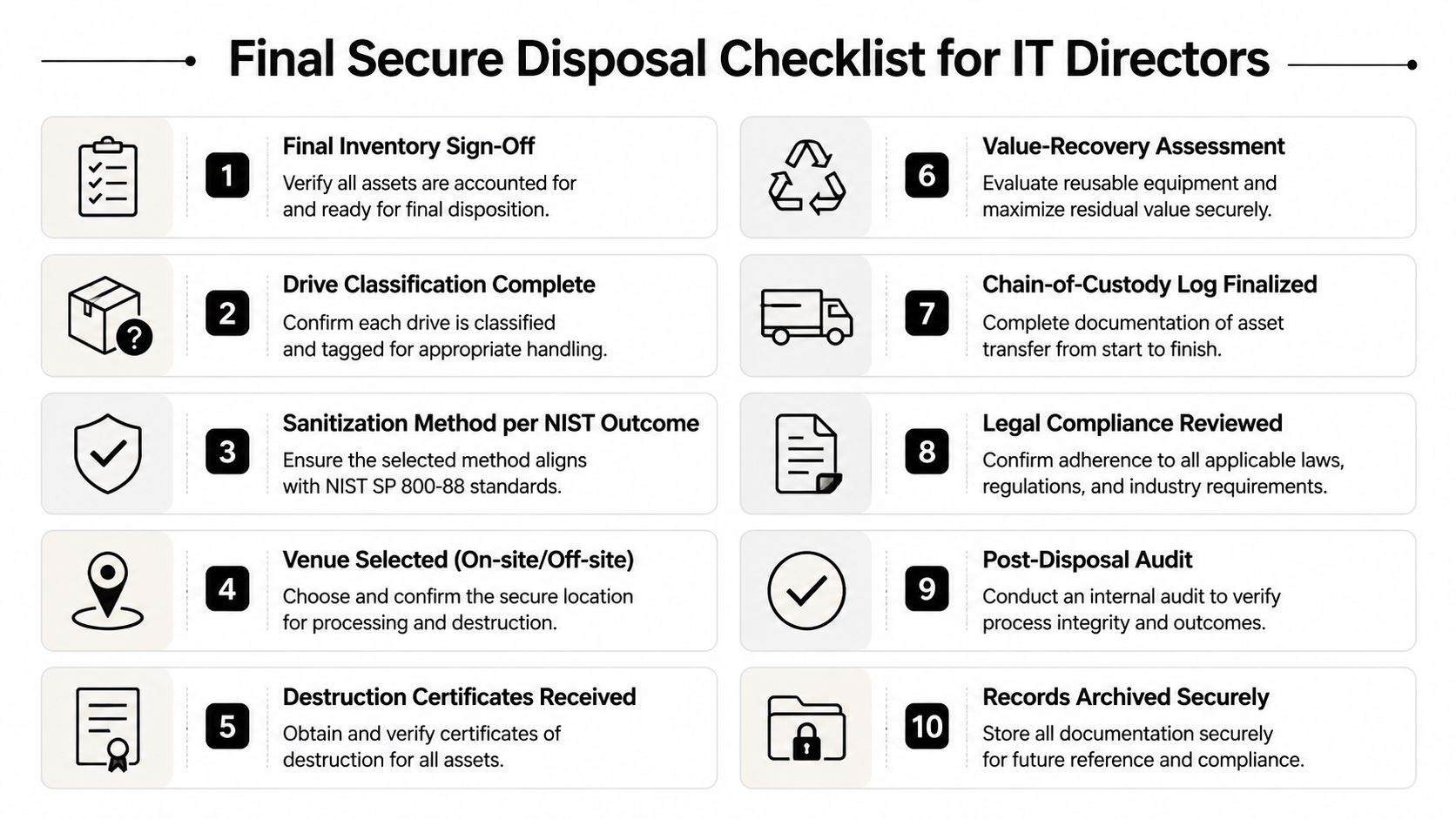
The Monday-morning checklist should assign an owner and produce an artifact at every stage. Don't let a project plan say “IT” or “vendor” without naming the accountable role.
- Inventory sign-off: The asset manager reconciles serials, locations, drive counts, and configurations. Artifact: approved inventory.
- Drive classification: The security lead assigns data sensitivity and media type. Artifact: classification register.
- NIST outcome selection: The security and infrastructure leads approve Clear, Purge, or Destroy per drive. Artifact: method matrix.
- Venue decision: The project manager selects on-site or off-site processing. Artifact: venue and logistics plan.
- Custody handoff: Facilities and the carrier record each transfer. Artifact: signed chain-of-custody log.
- Sanitization evidence: The processing technician records commands, tools, failures, and verification. Artifact: sanitization report.
- Certificates: The ITAD account lead issues serialized destruction and recycling records. Artifact: certificates matched to assets.
- Regulatory mapping: Legal, privacy, or compliance staff map the workflow to applicable obligations. Artifact: compliance review.
- Audit packet: The security analyst compiles manifests, verification results, exceptions, and certificates. Artifact: retained audit packet.
- Reconciliation: The asset manager compares the final disposition against the original inventory. Artifact: closed project report.
Recover value without weakening control
Redeploy servers internally only after the approved sanitization outcome and a technical inspection. Send eligible equipment to an ITAD buyback program when the configuration has resale value, but require serial-number matching and per-unit documentation. Route obsolete, damaged, or uneconomic equipment to certified recycling and materials recovery.
Resale can produce recovery value but requires careful data control and testing. Donation may support an organization's social objectives, but it still requires the same sanitization evidence. Trade-in programs can simplify procurement, while certified recycling provides a clear environmental disposition for equipment that no longer makes economic sense.
The EPA reports that recycling one million laptops saves the energy equivalent of the electricity used by more than 3,500 U.S. homes for a year in its electronics donation and recycling guidance. The agency also estimates that 2.7 million tons of consumer electronics were generated in the United States in 2018, while 1.04 million tons were collected for recycling, a 38.5 percent recovery rate, according to EPA facts and frequently asked questions. For business IT, recovery should follow sanitization, not compete with it.
Never let a reseller pick drives before sanitization. Never accept a buyback without a per-unit certificate. Beyond Surplus provides business IT asset disposal, secure data wiping and hard-drive shredding, data center decommissioning, electronics recycling, and IT asset recovery with documented processing options.
Contact Beyond Surplus to plan a secure server retirement project with serialized inventory, controlled transport, verified data destruction, certificates, and responsible recycling or value recovery. Share your server count, locations, drive types, and deadline so the team can recommend an on-site or off-site workflow that fits your security requirements.


